

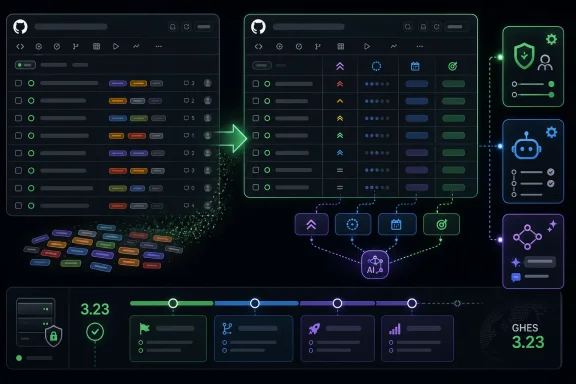
On July 2, 2026, GitHub made issue fields generally available for organizations on Free, Team, Enterprise, and GitHub Enterprise Cloud with data residency plans, with GitHub Enterprise Server support scheduled for version 3.23 later in the release train. The feature sounds modest: typed metadata attached to issues. In practice, it is GitHub admitting that labels, milestones, and project-board workarounds were no longer enough for modern software planning. The larger story is not a new sidebar widget, but GitHub’s slow conversion of Issues from a developer discussion space into an organization-wide planning database.
GitHub Issues began life as a lightweight tracker, and its charm was precisely that it did not behave like heavyweight project-management software. An issue could be a bug report, a feature request, a support thread, or a half-formed idea. Labels did the rest, provided everyone agreed what “P1,” “urgent,” “needs-triage,” and “good first issue” meant this quarter.
Issue fields change that bargain. Instead of encoding planning data in labels or free text, organizations can define fields such as priority, effort, start date, target date, or any custom value that matters to their workflow. These are typed fields, not decorative tags, which means they can be searched, displayed, sorted, reported on, and handed to automation without forcing every team to rediscover the same naming convention.
That is a bigger philosophical shift than GitHub’s changelog language suggests. Labels are local culture. Fields are governance. Once metadata is defined at the organization level and applied across repositories, GitHub becomes less of a loose collaboration layer and more of a source of operational truth.
For WindowsForum’s audience, that matters even if your primary work is not building public open-source software. Many IT teams, DevOps groups, internal platform teams, and security engineers now live inside GitHub for scripts, infrastructure-as-code, documentation, deployment workflows, and vulnerability response. When GitHub changes the shape of an issue, it changes the shape of how those teams describe work.
The result is often searchable but not structured. A label can mean a category, a status, a risk, a team, a workflow state, or a managerial shrug. The same issue might have
Issue fields make that distinction explicit. A single-select field for priority is not the same kind of thing as a date field for target delivery. A number field for effort is not the same kind of thing as a text field for an external tracking ID. This is the difference between painting values onto an issue and modeling them as data.
That does not mean labels are going away. They remain useful for loose categorization, community discovery, and quick visual scanning. But their role becomes narrower and healthier. Labels can return to being human-readable descriptors, while fields carry the data that automation, dashboards, and managers need to consume reliably.
The timing is also telling. GitHub says more than 40,000 organizations adopted issue fields during the public preview that began in May. That is fast uptake for a planning feature, and it signals pent-up demand from teams that had outgrown improvisation but did not want to move planning conversations out of GitHub.
Priority and effort are the vocabulary of triage. Start date and target date are the vocabulary of delivery. Put together, they cover the minimum planning loop: what matters, how hard it is, when it begins, and when it is supposed to land. That is not a replacement for Jira in every enterprise, but it is enough to reduce the number of teams that need Jira merely because GitHub Issues lacked typed fields.
The important detail is that organization admins can customize fields, add new ones, and configure which fields appear on each issue type. That makes the feature less like a hard-coded planning template and more like a governance layer. A security team might define “Exploitability” and “Disclosure deadline.” A platform team might track “Cloud region,” “Service tier,” or “Migration wave.” A desktop engineering group might care about “Windows version,” “Device class,” or “Driver dependency.”
This is where the feature becomes relevant beyond software product teams. Internal IT organizations often use GitHub issues to track scripts, endpoints, packaging bugs, deployment problems, documentation work, and automation requests. A field-driven issue tracker makes it easier to separate urgency from severity, scheduling from ownership, and customer impact from engineering complexity.
It also makes messy cross-repository work more legible. Labels often diverge repo by repo; fields defined at the organization level can impose a common planning grammar across those repositories. That is exactly the kind of dull standardization that makes reporting possible.
This matters because issue lists are where many teams live during standups, incident reviews, sprint planning, release readiness checks, and backlog grooming. The old model encouraged opening issue after issue to inspect the sidebar, read comments, decode labels, and infer status from context. The new model makes structured metadata visible where decisions are made.
It also increases pressure on teams to keep fields accurate. Once priority and target dates appear in the issue list, stale values become public friction. A field that says “Urgent” for a task nobody has touched in six weeks is no longer hidden in the sidebar; it is visible evidence of planning decay.
That is both the strength and danger of structured metadata. It turns vague disagreement into sortable columns. It also creates another surface for performative cleanliness, where teams spend more time satisfying the tracker than doing the work. The value of issue fields will depend less on GitHub’s UI than on whether organizations resist the urge to model every managerial anxiety as a required field.
That changes the social meaning of project metadata. In an open-source project, a visible target date or priority field is not just an internal planning aid; it becomes a signal to contributors, downstream users, package maintainers, and sometimes journalists. It tells outsiders what the maintainers think matters.
This can improve transparency. A contributor can see that a bug is high priority but high effort, or that a feature has a target date but low priority. A user affected by a regression can understand whether an issue is triaged, deferred, or planned. For large public projects, structured fields can reduce the endless comment churn asking whether something is important or when it might be fixed.
But visibility controls are essential because not all planning metadata belongs in public. A field that tracks customer escalation, contractual deadline, security sensitivity, or internal staffing constraint may be appropriate for maintainers but not for the world. GitHub’s decision to include visibility controls acknowledges that public collaboration and internal planning overlap, but they are not identical.
The interesting governance problem is cultural rather than technical. Once public fields exist, communities may begin to expect them. Projects that expose little may look opaque; projects that expose too much may overcommit. Maintainers will need to decide whether structured transparency is a tool for trust or another invitation for outsiders to litigate priorities.
If AI agents are going to create issues, summarize incidents, file bugs from logs, generate remediation tasks, or update project status, they need structured targets. A free-text issue body is useful for humans, but brittle for automation. A typed priority field or target date gives an agent somewhere specific to put a decision.
This is where issue fields become more than an organizer’s convenience. They provide a schema for AI-assisted work. Without fields, an agent might write “Priority: high” into a Markdown template, add a label, or mention urgency in a comment. With fields, it can update the same value humans see in the issue list and projects use for grouping, filtering, and charts.
That raises the bar for controls. If AI tools can set field values, organizations need to think about who is allowed to automate those updates, which fields are safe for AI assistance, and how to audit changes. A bot misclassifying a dozen issues as low priority is annoying. A bot assigning the wrong disclosure deadline or target date can become operationally serious.
For sysadmins and platform engineers, the lesson is familiar: structured automation is powerful when the permissions model is boring. The risk is not that Copilot can touch fields. The risk is that organizations may enable AI-driven updates before they decide which fields represent opinion, which represent policy, and which represent commitments.
For GitHub Enterprise Cloud customers, especially those using data residency plans, general availability means issue fields can become part of near-term process design. For GitHub Enterprise Server customers, the feature remains a future upgrade consideration. That gap is normal for GitHub’s cloud-first development model, but it shapes adoption.
Enterprises running GHES rarely adopt a feature merely because it ships. They test it against existing workflows, integrations, reporting pipelines, permission models, and backup strategies. Issue fields will need to coexist with imported Jira conventions, internal dashboards, security workflows, and GitHub Actions automations that already rely on labels or project fields.
The question for those teams is not whether issue fields are useful. It is where they become authoritative. If “Priority” lives as a GitHub issue field, a Jira field, a label, and a spreadsheet column, the organization has not solved the metadata problem. It has multiplied it.
That makes migration strategy important. The smart path is not a dramatic label purge. It is identifying a small set of fields whose meaning must be consistent across repositories, then letting labels continue to handle looser categorization. GitHub is offering a schema; organizations still have to decide what deserves to be structured.
GitHub frames the limit as alignment with actual usage, saying more than 97 percent of API consumers never paginate beyond the first page of edit history. That is a reasonable product argument. Most users do not need the 137th edit of a comment from two years ago, and unbounded edit history has storage, performance, and privacy implications.
Still, retention limits matter. Edit histories can be useful during incident reviews, moderation disputes, compliance checks, and forensic investigations. Preserving the original content and the most recent 99 edits is a sensible compromise for ordinary collaboration, but it is not the same as preserving every intermediate state forever.
The practical advice for administrators is simple: do not treat GitHub’s edit history as an immutable audit archive. If your organization has compliance requirements around issue or pull request content, export and archive the data you need through appropriate systems. GitHub’s product history is useful operational context, not a substitute for a records-retention policy.
This change also pairs philosophically with issue fields. GitHub is tightening the shape of collaboration data in both directions: more structure for current work, bounded retention for historical edits. That is what mature platforms do when they move from developer convenience toward enterprise infrastructure.
That distinction matters. Jira is a system many organizations use because they need configurable workflow machinery. GitHub is a system developers use because it is where code, review, CI, security alerts, and collaboration already live. The closer GitHub gets to “good enough” planning, the harder it becomes to justify bouncing every work item into a separate planning universe.
The strongest case for issue fields is context preservation. A bug can live near the pull request that fixes it, the action run that tests it, the security alert that motivated it, and the discussion that explains it. Adding structured metadata to that same object reduces the need to synchronize meaning across tools.
The strongest case against overreliance is that planning tools exist for reasons GitHub may not want to fully absorb. Complex workflows, multi-team dependencies, capacity planning, approvals, financial reporting, and enterprise portfolio management can turn a simple issue tracker into a bureaucratic machine. If GitHub chases all of that, it risks making Issues less pleasant for the developers who made it useful in the first place.
The current implementation looks like a careful middle path. GitHub is adding typed metadata, defaults, visibility controls, project integration, and AI access. It is not, at least yet, turning every issue into a mandatory workflow object with a dozen required fields and a committee-defined lifecycle.
Metadata sprawl is not merely ugly. It changes behavior. Users stop filing issues when the form feels like a tax return. Engineers stop trusting fields when half of them are stale. Managers stop getting useful reports when every team interprets the same field differently.
The best organizations will treat issue fields as a limited vocabulary, not a dumping ground. A field should exist because it drives a decision, a view, a report, or an automation. If a value is interesting but not actionable, it probably belongs in the issue body or a label, not in the organization schema.
GitHub’s 25-field organizational limit, as described in documentation, may help here. Limits force prioritization. They also create political fights, but better a fight over what metadata matters than a slow slide into unreadable forms.
This is especially relevant for Windows and infrastructure teams, where issues may span code, devices, policies, tenants, images, drivers, deployment rings, and support incidents. The temptation to model the entire environment in issue fields will be strong. The better approach is to model only the metadata that needs to survive across repositories and workflows.
For Microsoft, which owns GitHub, this trajectory is strategically tidy. GitHub becomes the collaboration surface where developers, IT operators, security teams, and AI agents can coordinate around code-adjacent work. Azure DevOps still exists, Jira still exists, ServiceNow still exists, but GitHub gets stronger where the boundary between code and operations keeps dissolving.
That boundary is already blurry for many Windows environments. Endpoint management scripts live in repositories. PowerShell modules are reviewed through pull requests. Intune remediation work, Azure infrastructure changes, deployment automation, and documentation fixes all produce issue-shaped work. A GitHub issue with typed metadata is a more natural object for that world than a ticket copied into a separate tracker after the fact.
The long-term implication is that GitHub Issues may become the default planning layer for teams that do not think of themselves as traditional software teams. If your work is versioned, reviewed, automated, and deployed, GitHub wants the work item to live there too.
A good rollout begins with the four defaults and one or two organization-specific fields that solve real pain. If priority labels are inconsistent, move priority into a field. If target dates live in comments, use a date field. If triage depends on severity but severity means something different from priority, define it carefully and pin it only where needed.
The most important work is not clicking through Settings. It is writing down what each field means. “High priority” should mean the same thing in three repositories. “Target date” should distinguish between aspiration, commitment, and external deadline. “Effort” should not become a proxy for seniority, blame, or political leverage.
The tooling will not solve those governance questions. It will merely make the answers visible.
 GitHub Turns the Issue Tracker Into a System of Record
GitHub Issues began life as a lightweight tracker, and its charm was precisely that it did not behave like heavyweight project-management software. An issue could be a bug report, a feature request, a support thread, or a half-formed idea. Labels did the rest, provided everyone agreed what “P1,” “urgent,” “needs-triage,” and “good first issue” meant this quarter.Issue fields change that bargain. Instead of encoding planning data in labels or free text, organizations can define fields such as priority, effort, start date, target date, or any custom value that matters to their workflow. These are typed fields, not decorative tags, which means they can be searched, displayed, sorted, reported on, and handed to automation without forcing every team to rediscover the same naming convention.
That is a bigger philosophical shift than GitHub’s changelog language suggests. Labels are local culture. Fields are governance. Once metadata is defined at the organization level and applied across repositories, GitHub becomes less of a loose collaboration layer and more of a source of operational truth.
For WindowsForum’s audience, that matters even if your primary work is not building public open-source software. Many IT teams, DevOps groups, internal platform teams, and security engineers now live inside GitHub for scripts, infrastructure-as-code, documentation, deployment workflows, and vulnerability response. When GitHub changes the shape of an issue, it changes the shape of how those teams describe work.
The Label Pile Finally Meets Its Replacement
Anyone who has administered a busy repository knows the label pile. It starts clean:bug, enhancement, documentation, help wanted. Then reality arrives. You add priority labels, severity labels, team labels, product labels, customer labels, escalation labels, release labels, and a few emergency labels created during an outage that nobody dares delete.The result is often searchable but not structured. A label can mean a category, a status, a risk, a team, a workflow state, or a managerial shrug. The same issue might have
priority-high, severity-medium, area-auth, customer-impact, and needs-design, but GitHub has no native reason to understand which of those labels represent ranking, scheduling, scope, or ownership.Issue fields make that distinction explicit. A single-select field for priority is not the same kind of thing as a date field for target delivery. A number field for effort is not the same kind of thing as a text field for an external tracking ID. This is the difference between painting values onto an issue and modeling them as data.
That does not mean labels are going away. They remain useful for loose categorization, community discovery, and quick visual scanning. But their role becomes narrower and healthier. Labels can return to being human-readable descriptors, while fields carry the data that automation, dashboards, and managers need to consume reliably.
The timing is also telling. GitHub says more than 40,000 organizations adopted issue fields during the public preview that began in May. That is fast uptake for a planning feature, and it signals pent-up demand from teams that had outgrown improvisation but did not want to move planning conversations out of GitHub.
The Default Fields Reveal GitHub’s Target User
Every organization automatically receives four default fields: Priority, Effort, Start date, and Target date. Those defaults are not neutral. They tell us GitHub is aiming squarely at teams that need lightweight portfolio planning without importing the full ceremony of enterprise project-management suites.Priority and effort are the vocabulary of triage. Start date and target date are the vocabulary of delivery. Put together, they cover the minimum planning loop: what matters, how hard it is, when it begins, and when it is supposed to land. That is not a replacement for Jira in every enterprise, but it is enough to reduce the number of teams that need Jira merely because GitHub Issues lacked typed fields.
The important detail is that organization admins can customize fields, add new ones, and configure which fields appear on each issue type. That makes the feature less like a hard-coded planning template and more like a governance layer. A security team might define “Exploitability” and “Disclosure deadline.” A platform team might track “Cloud region,” “Service tier,” or “Migration wave.” A desktop engineering group might care about “Windows version,” “Device class,” or “Driver dependency.”
This is where the feature becomes relevant beyond software product teams. Internal IT organizations often use GitHub issues to track scripts, endpoints, packaging bugs, deployment problems, documentation work, and automation requests. A field-driven issue tracker makes it easier to separate urgency from severity, scheduling from ownership, and customer impact from engineering complexity.
It also makes messy cross-repository work more legible. Labels often diverge repo by repo; fields defined at the organization level can impose a common planning grammar across those repositories. That is exactly the kind of dull standardization that makes reporting possible.
Visibility on the Issues List Is the Quiet Productivity Win
One of the most practical additions since preview is that field values now appear directly on the repository issues list. That sounds like table-stakes UI, but it may be the change users feel first. If priority, effort, and dates are visible without opening every issue, triage becomes scanning rather than spelunking.This matters because issue lists are where many teams live during standups, incident reviews, sprint planning, release readiness checks, and backlog grooming. The old model encouraged opening issue after issue to inspect the sidebar, read comments, decode labels, and infer status from context. The new model makes structured metadata visible where decisions are made.
It also increases pressure on teams to keep fields accurate. Once priority and target dates appear in the issue list, stale values become public friction. A field that says “Urgent” for a task nobody has touched in six weeks is no longer hidden in the sidebar; it is visible evidence of planning decay.
That is both the strength and danger of structured metadata. It turns vague disagreement into sortable columns. It also creates another surface for performative cleanliness, where teams spend more time satisfying the tracker than doing the work. The value of issue fields will depend less on GitHub’s UI than on whether organizations resist the urge to model every managerial anxiety as a required field.
Public Projects Make Metadata a Community Contract
Public project support is more consequential than it looks. GitHub says issue fields now work in public projects, with controls that let organizations decide which fields are visible to nonmembers. Logged-out users can see public fields when those fields are exposed.That changes the social meaning of project metadata. In an open-source project, a visible target date or priority field is not just an internal planning aid; it becomes a signal to contributors, downstream users, package maintainers, and sometimes journalists. It tells outsiders what the maintainers think matters.
This can improve transparency. A contributor can see that a bug is high priority but high effort, or that a feature has a target date but low priority. A user affected by a regression can understand whether an issue is triaged, deferred, or planned. For large public projects, structured fields can reduce the endless comment churn asking whether something is important or when it might be fixed.
But visibility controls are essential because not all planning metadata belongs in public. A field that tracks customer escalation, contractual deadline, security sensitivity, or internal staffing constraint may be appropriate for maintainers but not for the world. GitHub’s decision to include visibility controls acknowledges that public collaboration and internal planning overlap, but they are not identical.
The interesting governance problem is cultural rather than technical. Once public fields exist, communities may begin to expect them. Projects that expose little may look opaque; projects that expose too much may overcommit. Maintainers will need to decide whether structured transparency is a tool for trust or another invitation for outsiders to litigate priorities.
MCP Integration Makes Fields Part of the AI Workflow
The most future-facing piece of the announcement is Model Context Protocol integration. GitHub says issue fields are accessible through its MCP server, allowing AI tools such as Copilot to read and set field values when creating or updating issues. That is not just automation glue; it is a preview of how GitHub expects planning data to be manipulated in the AI era.If AI agents are going to create issues, summarize incidents, file bugs from logs, generate remediation tasks, or update project status, they need structured targets. A free-text issue body is useful for humans, but brittle for automation. A typed priority field or target date gives an agent somewhere specific to put a decision.
This is where issue fields become more than an organizer’s convenience. They provide a schema for AI-assisted work. Without fields, an agent might write “Priority: high” into a Markdown template, add a label, or mention urgency in a comment. With fields, it can update the same value humans see in the issue list and projects use for grouping, filtering, and charts.
That raises the bar for controls. If AI tools can set field values, organizations need to think about who is allowed to automate those updates, which fields are safe for AI assistance, and how to audit changes. A bot misclassifying a dozen issues as low priority is annoying. A bot assigning the wrong disclosure deadline or target date can become operationally serious.
For sysadmins and platform engineers, the lesson is familiar: structured automation is powerful when the permissions model is boring. The risk is not that Copilot can touch fields. The risk is that organizations may enable AI-driven updates before they decide which fields represent opinion, which represent policy, and which represent commitments.
Enterprise Server 3.23 Keeps the On-Prem Crowd in the Story
GitHub Enterprise Server support is slated for version 3.23, which keeps self-hosted and regulated environments in the roadmap. That matters because the organizations most likely to care about structured planning metadata are often the same organizations that care about residency, compliance, auditability, and upgrade timing.For GitHub Enterprise Cloud customers, especially those using data residency plans, general availability means issue fields can become part of near-term process design. For GitHub Enterprise Server customers, the feature remains a future upgrade consideration. That gap is normal for GitHub’s cloud-first development model, but it shapes adoption.
Enterprises running GHES rarely adopt a feature merely because it ships. They test it against existing workflows, integrations, reporting pipelines, permission models, and backup strategies. Issue fields will need to coexist with imported Jira conventions, internal dashboards, security workflows, and GitHub Actions automations that already rely on labels or project fields.
The question for those teams is not whether issue fields are useful. It is where they become authoritative. If “Priority” lives as a GitHub issue field, a Jira field, a label, and a spreadsheet column, the organization has not solved the metadata problem. It has multiplied it.
That makes migration strategy important. The smart path is not a dramatic label purge. It is identifying a small set of fields whose meaning must be consistent across repositories, then letting labels continue to handle looser categorization. GitHub is offering a schema; organizations still have to decide what deserves to be structured.
The 100-Edit Limit Is a Data-Retention Footnote With Real Edges
Bundled into the same changelog entry is a second change: GitHub now limits stored edits per content item to 100 for issues, issue comments, pull requests, and pull request review comments. When a new edit exceeds that count, GitHub removes the oldest intermediate edits while preserving the original content and the most recent 99 changes.GitHub frames the limit as alignment with actual usage, saying more than 97 percent of API consumers never paginate beyond the first page of edit history. That is a reasonable product argument. Most users do not need the 137th edit of a comment from two years ago, and unbounded edit history has storage, performance, and privacy implications.
Still, retention limits matter. Edit histories can be useful during incident reviews, moderation disputes, compliance checks, and forensic investigations. Preserving the original content and the most recent 99 edits is a sensible compromise for ordinary collaboration, but it is not the same as preserving every intermediate state forever.
The practical advice for administrators is simple: do not treat GitHub’s edit history as an immutable audit archive. If your organization has compliance requirements around issue or pull request content, export and archive the data you need through appropriate systems. GitHub’s product history is useful operational context, not a substitute for a records-retention policy.
This change also pairs philosophically with issue fields. GitHub is tightening the shape of collaboration data in both directions: more structure for current work, bounded retention for historical edits. That is what mature platforms do when they move from developer convenience toward enterprise infrastructure.
GitHub Is Closing the Gap With Jira Without Becoming Jira
The obvious comparison is Jira, and GitHub knows it. Structured fields, issue types, projects, charts, filters, and automation all move GitHub closer to the territory Atlassian has long occupied. But GitHub’s bet is not to clone Jira feature for feature. It is to make enough of Jira unnecessary for teams whose work already happens next to code.That distinction matters. Jira is a system many organizations use because they need configurable workflow machinery. GitHub is a system developers use because it is where code, review, CI, security alerts, and collaboration already live. The closer GitHub gets to “good enough” planning, the harder it becomes to justify bouncing every work item into a separate planning universe.
The strongest case for issue fields is context preservation. A bug can live near the pull request that fixes it, the action run that tests it, the security alert that motivated it, and the discussion that explains it. Adding structured metadata to that same object reduces the need to synchronize meaning across tools.
The strongest case against overreliance is that planning tools exist for reasons GitHub may not want to fully absorb. Complex workflows, multi-team dependencies, capacity planning, approvals, financial reporting, and enterprise portfolio management can turn a simple issue tracker into a bureaucratic machine. If GitHub chases all of that, it risks making Issues less pleasant for the developers who made it useful in the first place.
The current implementation looks like a careful middle path. GitHub is adding typed metadata, defaults, visibility controls, project integration, and AI access. It is not, at least yet, turning every issue into a mandatory workflow object with a dozen required fields and a committee-defined lifecycle.
The Real Test Is Whether Teams Can Resist Metadata Sprawl
The danger of issue fields is that they make structure easy enough to overuse. Once admins can add fields, every stakeholder will have a reason to request one. Customer impact, revenue impact, executive sponsor, region, platform, environment, due date, review state, escalation tier, confidence score, risk rating—the list writes itself.Metadata sprawl is not merely ugly. It changes behavior. Users stop filing issues when the form feels like a tax return. Engineers stop trusting fields when half of them are stale. Managers stop getting useful reports when every team interprets the same field differently.
The best organizations will treat issue fields as a limited vocabulary, not a dumping ground. A field should exist because it drives a decision, a view, a report, or an automation. If a value is interesting but not actionable, it probably belongs in the issue body or a label, not in the organization schema.
GitHub’s 25-field organizational limit, as described in documentation, may help here. Limits force prioritization. They also create political fights, but better a fight over what metadata matters than a slow slide into unreadable forms.
This is especially relevant for Windows and infrastructure teams, where issues may span code, devices, policies, tenants, images, drivers, deployment rings, and support incidents. The temptation to model the entire environment in issue fields will be strong. The better approach is to model only the metadata that needs to survive across repositories and workflows.
The Changelog Is Small Because the Platform Shift Is Already Underway
GitHub’s announcement is brief, but it lands in the middle of a much larger product arc. Issues have been gaining richer search, project integrations, issue types, default values, Copilot-assisted workflows, and now structured fields. Each individual feature can look incremental; together they describe a platform turning work tracking into a native data layer.For Microsoft, which owns GitHub, this trajectory is strategically tidy. GitHub becomes the collaboration surface where developers, IT operators, security teams, and AI agents can coordinate around code-adjacent work. Azure DevOps still exists, Jira still exists, ServiceNow still exists, but GitHub gets stronger where the boundary between code and operations keeps dissolving.
That boundary is already blurry for many Windows environments. Endpoint management scripts live in repositories. PowerShell modules are reviewed through pull requests. Intune remediation work, Azure infrastructure changes, deployment automation, and documentation fixes all produce issue-shaped work. A GitHub issue with typed metadata is a more natural object for that world than a ticket copied into a separate tracker after the fact.
The long-term implication is that GitHub Issues may become the default planning layer for teams that do not think of themselves as traditional software teams. If your work is versioned, reviewed, automated, and deployed, GitHub wants the work item to live there too.
The Fields That Matter Are the Ones Nobody Has to Decode
For teams deciding whether to adopt issue fields immediately, the answer is yes, but cautiously. The feature is generally available, broadly accessible across GitHub plans, and useful enough that ignoring it will leave many organizations stuck with label conventions they already dislike. But the first configuration pass should be conservative.A good rollout begins with the four defaults and one or two organization-specific fields that solve real pain. If priority labels are inconsistent, move priority into a field. If target dates live in comments, use a date field. If triage depends on severity but severity means something different from priority, define it carefully and pin it only where needed.
The most important work is not clicking through Settings. It is writing down what each field means. “High priority” should mean the same thing in three repositories. “Target date” should distinguish between aspiration, commitment, and external deadline. “Effort” should not become a proxy for seniority, blame, or political leverage.
The tooling will not solve those governance questions. It will merely make the answers visible.
A Small Schema Now Shapes the Next GitHub Workflow
GitHub’s general availability announcement gives organizations a useful new planning primitive, but the real value will come from disciplined adoption. The feature is simple enough to start using quickly and structural enough to create long-term consequences.- Issue fields are now broadly available across GitHub organization plans, with GitHub Enterprise Server support planned for version 3.23.
- Organizations receive default fields for priority, effort, start date, and target date, but admins can customize the model to fit their workflows.
- Field values now appearing on repository issue lists should make triage faster and expose stale planning data more visibly.
- Public project support turns selected metadata into a transparency mechanism for open-source communities and external stakeholders.
- MCP integration makes issue fields part of AI-assisted issue creation and updating, which increases both automation potential and governance risk.
- The new 100-edit history limit is a reminder that GitHub collaboration data should not be mistaken for a permanent compliance archive.
References
- Primary source: The GitHub Blog
Published: 2026-07-02T09:00:39.330048
Issue fields are now generally available - GitHub Changelog
Issue fields are now generally available for all GitHub organizations on Free, Team, Enterprise, and GitHub Enterprise Cloud with data residency plans and will ship in GitHub Enterprise Server 3.23.…github.blog
- Official source: docs.github.com
Managing issue fields in your organization - GitHub Docs
You can create and manage custom issue fields to collect structured metadata across all issues in your organization. docs.github.com
