

Glance is a free, open-source, self-hosted dashboard written in Go that turns a home server’s scattered services, feeds, and status pages into a single browser homepage, giving homelab users one morning view of Docker, Pi-hole, RSS, weather, markets, and service health. That sounds modest, but it solves one of self-hosting’s least glamorous problems: the server may be powerful, but the daily experience is often a mess of ports, bookmarks, and half-remembered URLs. Glance matters because it treats the homelab not as a rack of services, but as a place a human actually visits. The best infrastructure sometimes wins not by doing more, but by becoming easier to look at.
The modern home server has quietly become a domestic appliance. It blocks ads, runs backups, manages smart-home automations, stores media, syncs files, and occasionally pretends to be a serious enterprise system despite living on an old laptop or Raspberry Pi. What it rarely has is a front door.
That absence is more irritating than it first appears. A Pi-hole dashboard on one port, Home Assistant on another, a file server somewhere else, Docker stats in a terminal, and a handful of RSS feeds in yet another app do not add up to a coherent daily workflow. They add up to a private cloud with the ergonomics of a junk drawer.
Glance is not the first attempt to fix this. Homepage, Heimdall, Dashy, Homarr, and other startpage-style dashboards have long offered self-hosters a way to collect links and service cards. But Glance leans into a slightly different idea: the dashboard should not merely point you to the things you run; it should show you the things you check.
That distinction is why the MakeUseOf piece lands. The author is not celebrating another admin panel for its own sake. They are describing a small but meaningful shift from “I maintain services” to “I have a daily homepage that makes those services feel usable.”
Glance largely resists that gravity. Its name is not accidental. It is designed for seeing, not operating.
That limitation will frustrate some users, and it should. If your ideal dashboard is a single pane where you can restart containers, approve updates, silence alerts, and reconfigure services, Glance will feel deliberately incomplete. It is closer to a newspaper front page than a cockpit.
But that restraint is also its strongest design choice. Control planes demand trust, authentication, permission models, auditability, and failure handling. A page that can merely render feeds, stats, and links has a much smaller blast radius. In a homelab, where security boundaries are often more aspirational than engineered, that matters.
The self-hosting community has a habit of confusing convenience with maturity. A dashboard that can do everything from everywhere is convenient right up until it becomes the softest target on the network. Glance’s read-mostly posture is not a complete security model, but it avoids pretending that a pretty homepage should automatically become the root console for the house.
That makes sense. A home server is not a corporate data center. It exists in the same rhythm as coffee, calendar checks, package tracking, YouTube subscriptions, Reddit threads, GitHub releases, and weather forecasts. If the system is already on, already trusted, and already running 24/7, why shouldn’t it be the place where the day begins?
This is where Glance separates itself from dashboards that are mostly bookmark grids. A grid of service icons is useful, but static. You still need to click through to learn anything. Glance’s widget model makes the homepage itself informative: RSS summaries, Hacker News posts, YouTube uploads, market prices, weather, Docker container status, server stats, and DNS-blocking metrics can all sit together.
The result is subtle but important. The dashboard becomes something you open because it is useful, not because something is broken. That is a healthier relationship with home infrastructure.
A lot of self-hosted web apps bring the gravitational field of modern web development with them. Node dependencies, frontend frameworks, build pipelines, database containers, background workers, and elaborate configuration layers can be justified for complex products. For a homepage, they are often a tax.
Glance’s pitch is that the dashboard should be light enough to disappear into the background. The project’s own positioning emphasizes low memory use, few dependencies, minimal vanilla JavaScript, and a single small binary. That is not just engineering thrift; it is an implicit critique of dashboards that feel heavier than the services they are supposed to summarize.
The YAML configuration model reinforces the same philosophy. There is no database to migrate, no web editor to secure, and no opaque state hidden behind a settings page. You define pages, columns, widgets, feeds, and options in text. Save the file, reload the dashboard, and move on.
That will not be everyone’s idea of painless. YAML remains perfectly capable of ruining an afternoon with indentation errors and invisible assumptions. But for the audience running Docker Compose, Ansible, Home Assistant, and reverse proxies, a declarative config file is not a barrier. It is a comfort blanket.
Every homelab eventually becomes weird. Someone is running Jellyfin with custom scripts, monitoring a UPS through a half-supported exporter, checking Unraid status, scraping a local JSON endpoint, or tracking a niche service that no general-purpose dashboard will ever support out of the box. If a dashboard cannot adapt to that mess, it eventually becomes ornamental.
Glance’s custom-api widget gives users a way to fetch JSON from a URL and render it through a template. That sounds dry, but it is the difference between “this dashboard supports my stack” and “this dashboard supports the idea of my stack.” The latter has a much longer shelf life.
The community-widgets repository extends that advantage. Shared widgets are not just convenience snippets; they are a social layer around the product. They let users copy patterns, adapt ideas, and avoid solving the same small problems in isolation. For a self-hosted tool, that can be more valuable than a formal plugin marketplace.
There is also a philosophical benefit. Glance does not need to become bloated with every conceivable integration if users can create and share their own. The core can stay small while the edges remain porous.
That is not a fatal flaw. It is a reminder that self-hosting is still systems work, even when the interface is polished. A dashboard is not magic; it is an orchestrated pile of HTTP requests, DNS lookups, API calls, cached responses, and layout decisions.
Glance mitigates some of this with widget-level cache settings. That is the right lever. Weather, RSS feeds, market prices, and release trackers do not all need the same freshness. A dashboard that lets each widget define its own cache lifetime gives users the ability to tune the page instead of accepting a single global behavior.
Still, the MakeUseOf account is appropriately clear that Glance is not a control mechanism. If a container is down, Glance may show you. It will not necessarily fix it. If an API is broken, a widget may fail. If your YAML is wrong, the dashboard will not intuit your intent. The tool makes the homelab more legible, not self-healing.
Self-hosters are unusually well positioned to revive the homepage because they have something most users do not: a personal server that can generate a genuinely personal front page. Not a corporate portal. Not a vendor-curated news feed. Not a search engine box surrounded by sponsored modules. A page that reflects the user’s own devices, feeds, projects, and priorities.
That is why Glance feels more compelling than its feature list might suggest. A widget for Docker status is useful. A widget for RSS is useful. A widget for weather is useful. But the larger product is the act of reclaiming the first page of the day from platforms that would rather make it a recommendation surface.
There is a privacy angle here, too, though it should not be oversold. Glance does not make external sources private merely by aggregating them. If you pull data from Reddit, YouTube, weather providers, or market APIs, those requests still exist somewhere. But the dashboard itself is self-hosted, configurable, and not dependent on a third-party dashboard vendor learning what you check every morning.
For WindowsForum readers, that matters even if the server underneath is Linux. Many Windows enthusiasts run Linux in the closet, Windows on the desktop, and a browser as the bridge between them. A self-hosted homepage is one of the few cross-platform experiences that feels equally at home on a Windows workstation, a Linux laptop, an iPad, or a phone.
Home infrastructure has become quietly serious. Network-level ad blocking changes the browsing experience for an entire household. Home Assistant automations can affect lights, locks, sensors, heating, and energy monitoring. File backup is the difference between a dead drive and a recoverable weekend. These are real responsibilities, even when the hardware is repurposed consumer gear.
The problem is that the user interface for this stack often remains fragmented. Each service does its job well enough, but the whole thing lacks an operating surface. The server is functionally important and experientially invisible.
Glance fills that gap without pretending to be an operating system. It is not Proxmox. It is not Windows Admin Center. It is not Grafana. It is not a monitoring suite. It is the laminated card on the fridge that tells you what is happening in the house.
That role is easy to underestimate. In practice, legibility is what keeps small systems maintained. If a user sees that a container is unhealthy, a feed has stopped updating, or DNS blocking has spiked, they are more likely to notice early. If checking those signals requires remembering five URLs, they probably will not.
Grafana is excellent when you need time-series dashboards, alerting integrations, and operational analysis. It is overkill when you want the weather, RSS feeds, YouTube uploads, Docker container status, and a few service links on a browser startpage. A homelab can use both, but only one of them should probably be the first tab you open with breakfast.
The danger in the self-hosting world is tool inflation. A small need attracts a large platform because the large platform is more impressive to deploy. Before long, checking whether the home server is healthy requires maintaining the monitoring system that checks whether the home server is healthy.
Glance avoids that spiral by being intentionally shallow. It favors summary over analysis, presentation over alerting, and configuration over orchestration. That makes it less powerful in the strict technical sense, but more suitable for the daily ritual described in the source article.
There is a lesson there for software makers beyond homelabs. The right product boundary is not always “add the adjacent feature.” Sometimes the right boundary is “stop before the user starts needing documentation to understand the homepage.”
Glance’s design does not eliminate that concern. A dashboard can leak plenty even if it cannot control anything. Service names, internal hostnames, Docker container lists, feed preferences, calendars, and status indicators can all reveal more about a network than the owner may realize.
But a read-oriented dashboard is easier to reason about than a full control interface. If compromised access only reveals information, that is still bad; if it also allows service manipulation, credentialed API actions, or container operations, the stakes rise sharply. The distinction matters.
Users should also be careful with API tokens. A widget that talks to a local service may require credentials, and those credentials need to be scoped with the same suspicion one would apply anywhere else. The convenience of rendering everything in one place should not become an excuse to spray long-lived secrets around a config file without thinking.
The healthier way to view Glance is as a LAN-native dashboard that can be hardened as needed, not as a cloud portal waiting to be published. The best self-hosted tools respect that most home networks are not professionally administered. Glance’s relative simplicity helps, but it does not absolve the operator.
That bet is credible in a homelab. A
The column-based layout system also appears to hit a pragmatic middle ground. Users define pages, set column sizes, and stack widgets into those columns. That is less freeform than a canvas UI, but it prevents the endless pixel-pushing that can turn dashboard-building into interior decorating for servers.
Tabbed widget groups are another useful concession. Dense dashboards can quickly become vertical scroll farms, especially when feeds and service cards accumulate. Grouping related widgets into tabs lets the homepage stay compact without forcing users to create too many separate pages.
There is an irony here: YAML is often criticized as hostile to beginners, yet many of the most popular self-hosted systems have trained users to accept it. Docker Compose, Home Assistant, and automation tooling have made declarative config a common language for the enthusiast class. Glance benefits from that ecosystem literacy.
Software that merely exists in a bookmark bar is optional. Software that becomes part of a daily loop has crossed a threshold. It has become useful enough to compete with the default habits imposed by browsers, search engines, social feeds, and operating systems.
That is why the “front page” framing works. The home server is no longer an invisible utility box that occasionally demands SSH. It becomes a place. The dashboard gives the server a visual identity, and that identity makes maintenance feel less like spelunking.
This may sound sentimental, but it has practical consequences. People maintain systems they can see. They improve systems they visit. They notice breakage sooner when status is ambient rather than hidden behind deliberate inspection.
For homelab users, that can be the difference between a stack that slowly decays and one that keeps getting better. A dashboard does not replace discipline, but it can make discipline easier.
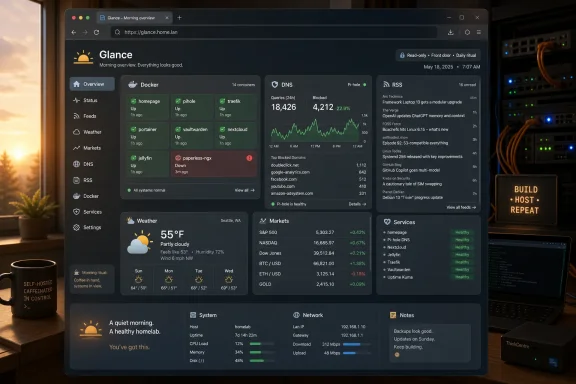 The Homelab Finally Gets a Front Door
The modern home server has quietly become a domestic appliance. It blocks ads, runs backups, manages smart-home automations, stores media, syncs files, and occasionally pretends to be a serious enterprise system despite living on an old laptop or Raspberry Pi. What it rarely has is a front door.That absence is more irritating than it first appears. A Pi-hole dashboard on one port, Home Assistant on another, a file server somewhere else, Docker stats in a terminal, and a handful of RSS feeds in yet another app do not add up to a coherent daily workflow. They add up to a private cloud with the ergonomics of a junk drawer.
Glance is not the first attempt to fix this. Homepage, Heimdall, Dashy, Homarr, and other startpage-style dashboards have long offered self-hosters a way to collect links and service cards. But Glance leans into a slightly different idea: the dashboard should not merely point you to the things you run; it should show you the things you check.
That distinction is why the MakeUseOf piece lands. The author is not celebrating another admin panel for its own sake. They are describing a small but meaningful shift from “I maintain services” to “I have a daily homepage that makes those services feel usable.”
Glance Wins by Refusing to Become a Control Plane
The temptation with any homelab dashboard is to turn it into mission control. Once users can see Docker containers, why not let them restart them? Once they can see Home Assistant entities, why not make the dashboard a smart-home remote? Once they can see Pi-hole stats, why not add configuration toggles?Glance largely resists that gravity. Its name is not accidental. It is designed for seeing, not operating.
That limitation will frustrate some users, and it should. If your ideal dashboard is a single pane where you can restart containers, approve updates, silence alerts, and reconfigure services, Glance will feel deliberately incomplete. It is closer to a newspaper front page than a cockpit.
But that restraint is also its strongest design choice. Control planes demand trust, authentication, permission models, auditability, and failure handling. A page that can merely render feeds, stats, and links has a much smaller blast radius. In a homelab, where security boundaries are often more aspirational than engineered, that matters.
The self-hosting community has a habit of confusing convenience with maturity. A dashboard that can do everything from everywhere is convenient right up until it becomes the softest target on the network. Glance’s read-mostly posture is not a complete security model, but it avoids pretending that a pretty homepage should automatically become the root console for the house.
The Feed-First Dashboard Feels Less Like Admin Work
The most interesting thing about Glance is that it collapses two categories that usually live apart: infrastructure monitoring and everyday information consumption. A traditional service dashboard shows whether your stack is alive. A browser startpage shows the weather, news, videos, links, and feeds you want to read. Glance argues that, for a home server, those are not separate rituals.That makes sense. A home server is not a corporate data center. It exists in the same rhythm as coffee, calendar checks, package tracking, YouTube subscriptions, Reddit threads, GitHub releases, and weather forecasts. If the system is already on, already trusted, and already running 24/7, why shouldn’t it be the place where the day begins?
This is where Glance separates itself from dashboards that are mostly bookmark grids. A grid of service icons is useful, but static. You still need to click through to learn anything. Glance’s widget model makes the homepage itself informative: RSS summaries, Hacker News posts, YouTube uploads, market prices, weather, Docker container status, server stats, and DNS-blocking metrics can all sit together.
The result is subtle but important. The dashboard becomes something you open because it is useful, not because something is broken. That is a healthier relationship with home infrastructure.
Go, YAML, and Vanilla JavaScript Are a Product Strategy
Glance’s technical choices are not exotic: a Go backend, a small binary, minimal frontend dependencies, YAML configuration, and Docker-friendly deployment. In 2026, that combination almost feels conservative. It is also exactly why the project fits the homelab audience.A lot of self-hosted web apps bring the gravitational field of modern web development with them. Node dependencies, frontend frameworks, build pipelines, database containers, background workers, and elaborate configuration layers can be justified for complex products. For a homepage, they are often a tax.
Glance’s pitch is that the dashboard should be light enough to disappear into the background. The project’s own positioning emphasizes low memory use, few dependencies, minimal vanilla JavaScript, and a single small binary. That is not just engineering thrift; it is an implicit critique of dashboards that feel heavier than the services they are supposed to summarize.
The YAML configuration model reinforces the same philosophy. There is no database to migrate, no web editor to secure, and no opaque state hidden behind a settings page. You define pages, columns, widgets, feeds, and options in text. Save the file, reload the dashboard, and move on.
That will not be everyone’s idea of painless. YAML remains perfectly capable of ruining an afternoon with indentation errors and invisible assumptions. But for the audience running Docker Compose, Ansible, Home Assistant, and reverse proxies, a declarative config file is not a barrier. It is a comfort blanket.
The Custom API Widget Is the Escape Hatch That Matters
Built-in widgets are what make Glance approachable. The custom API widget is what makes it durable.Every homelab eventually becomes weird. Someone is running Jellyfin with custom scripts, monitoring a UPS through a half-supported exporter, checking Unraid status, scraping a local JSON endpoint, or tracking a niche service that no general-purpose dashboard will ever support out of the box. If a dashboard cannot adapt to that mess, it eventually becomes ornamental.
Glance’s custom-api widget gives users a way to fetch JSON from a URL and render it through a template. That sounds dry, but it is the difference between “this dashboard supports my stack” and “this dashboard supports the idea of my stack.” The latter has a much longer shelf life.
The community-widgets repository extends that advantage. Shared widgets are not just convenience snippets; they are a social layer around the product. They let users copy patterns, adapt ideas, and avoid solving the same small problems in isolation. For a self-hosted tool, that can be more valuable than a formal plugin marketplace.
There is also a philosophical benefit. Glance does not need to become bloated with every conceivable integration if users can create and share their own. The core can stay small while the edges remain porous.
The Trade-Off Is That Glance Will Not Save You From Yourself
A dashboard that aggregates everything can also become a dashboard that pounds everything. Glance’s model of loading fresh data on page load is sensible, but a page packed with widgets can still create bursts of requests. The project’s documentation has specifically noted that Pi-hole, AdGuard Home, and similar DNS blockers may hit rate-limit issues when a busy dashboard suddenly resolves a crowd of endpoints.That is not a fatal flaw. It is a reminder that self-hosting is still systems work, even when the interface is polished. A dashboard is not magic; it is an orchestrated pile of HTTP requests, DNS lookups, API calls, cached responses, and layout decisions.
Glance mitigates some of this with widget-level cache settings. That is the right lever. Weather, RSS feeds, market prices, and release trackers do not all need the same freshness. A dashboard that lets each widget define its own cache lifetime gives users the ability to tune the page instead of accepting a single global behavior.
Still, the MakeUseOf account is appropriately clear that Glance is not a control mechanism. If a container is down, Glance may show you. It will not necessarily fix it. If an API is broken, a widget may fail. If your YAML is wrong, the dashboard will not intuit your intent. The tool makes the homelab more legible, not self-healing.
The Browser Homepage Is Due for a Comeback
There is a funny cultural point hiding in this story: the browser homepage used to matter. Then search bars, session restore, pinned tabs, mobile habits, and algorithmic feeds hollowed it out. For many people, the browser no longer opens onto a chosen place. It opens onto whatever the last tab happened to be.Self-hosters are unusually well positioned to revive the homepage because they have something most users do not: a personal server that can generate a genuinely personal front page. Not a corporate portal. Not a vendor-curated news feed. Not a search engine box surrounded by sponsored modules. A page that reflects the user’s own devices, feeds, projects, and priorities.
That is why Glance feels more compelling than its feature list might suggest. A widget for Docker status is useful. A widget for RSS is useful. A widget for weather is useful. But the larger product is the act of reclaiming the first page of the day from platforms that would rather make it a recommendation surface.
There is a privacy angle here, too, though it should not be oversold. Glance does not make external sources private merely by aggregating them. If you pull data from Reddit, YouTube, weather providers, or market APIs, those requests still exist somewhere. But the dashboard itself is self-hosted, configurable, and not dependent on a third-party dashboard vendor learning what you check every morning.
For WindowsForum readers, that matters even if the server underneath is Linux. Many Windows enthusiasts run Linux in the closet, Windows on the desktop, and a browser as the bridge between them. A self-hosted homepage is one of the few cross-platform experiences that feels equally at home on a Windows workstation, a Linux laptop, an iPad, or a phone.
The Old Laptop Server Is the New Small Business Stack
The MakeUseOf setup is familiar: Linux Mint on laptop hardware, Pi-hole for ad and tracker blocking, Home Assistant for smart devices, Copyparty for file backup, and Glance as the visual layer. That is not an enterprise architecture diagram. It is also not a toy.Home infrastructure has become quietly serious. Network-level ad blocking changes the browsing experience for an entire household. Home Assistant automations can affect lights, locks, sensors, heating, and energy monitoring. File backup is the difference between a dead drive and a recoverable weekend. These are real responsibilities, even when the hardware is repurposed consumer gear.
The problem is that the user interface for this stack often remains fragmented. Each service does its job well enough, but the whole thing lacks an operating surface. The server is functionally important and experientially invisible.
Glance fills that gap without pretending to be an operating system. It is not Proxmox. It is not Windows Admin Center. It is not Grafana. It is not a monitoring suite. It is the laminated card on the fridge that tells you what is happening in the house.
That role is easy to underestimate. In practice, legibility is what keeps small systems maintained. If a user sees that a container is unhealthy, a feed has stopped updating, or DNS blocking has spiked, they are more likely to notice early. If checking those signals requires remembering five URLs, they probably will not.
Glance Is Not Grafana, and That Is the Point
Some sysadmins will look at Glance and immediately reach for heavier tools. Why not Prometheus and Grafana? Why not Netdata? Why not a proper logging stack? The answer is that those tools solve different problems.Grafana is excellent when you need time-series dashboards, alerting integrations, and operational analysis. It is overkill when you want the weather, RSS feeds, YouTube uploads, Docker container status, and a few service links on a browser startpage. A homelab can use both, but only one of them should probably be the first tab you open with breakfast.
The danger in the self-hosting world is tool inflation. A small need attracts a large platform because the large platform is more impressive to deploy. Before long, checking whether the home server is healthy requires maintaining the monitoring system that checks whether the home server is healthy.
Glance avoids that spiral by being intentionally shallow. It favors summary over analysis, presentation over alerting, and configuration over orchestration. That makes it less powerful in the strict technical sense, but more suitable for the daily ritual described in the source article.
There is a lesson there for software makers beyond homelabs. The right product boundary is not always “add the adjacent feature.” Sometimes the right boundary is “stop before the user starts needing documentation to understand the homepage.”
The Security Story Is Better When the Dashboard Stays Boring
Any self-hosted dashboard raises the obvious question: should this be exposed to the internet? For most users, the safest default answer remains no. Put it behind a VPN, keep it on the LAN, or protect it with a properly configured reverse proxy and authentication layer if remote access is genuinely needed.Glance’s design does not eliminate that concern. A dashboard can leak plenty even if it cannot control anything. Service names, internal hostnames, Docker container lists, feed preferences, calendars, and status indicators can all reveal more about a network than the owner may realize.
But a read-oriented dashboard is easier to reason about than a full control interface. If compromised access only reveals information, that is still bad; if it also allows service manipulation, credentialed API actions, or container operations, the stakes rise sharply. The distinction matters.
Users should also be careful with API tokens. A widget that talks to a local service may require credentials, and those credentials need to be scoped with the same suspicion one would apply anywhere else. The convenience of rendering everything in one place should not become an excuse to spray long-lived secrets around a config file without thinking.
The healthier way to view Glance is as a LAN-native dashboard that can be hardened as needed, not as a cloud portal waiting to be published. The best self-hosted tools respect that most home networks are not professionally administered. Glance’s relative simplicity helps, but it does not absolve the operator.
The YAML Wall Is Real, but It Is Lower Than It Looks
The lack of a web UI editor will be a deal-breaker for some users. Drag-and-drop dashboards have an obvious appeal, especially for people who want to tinker visually rather than edit configuration files. Glance makes a different bet: text configuration is less friendly at minute one, but more portable at month six.That bet is credible in a homelab. A
glance.yml file can be backed up, versioned, copied, templated, diffed, and restored. If you rebuild the server, the dashboard does not live inside a database whose export format you forgot to test. It is just a file.The column-based layout system also appears to hit a pragmatic middle ground. Users define pages, set column sizes, and stack widgets into those columns. That is less freeform than a canvas UI, but it prevents the endless pixel-pushing that can turn dashboard-building into interior decorating for servers.
Tabbed widget groups are another useful concession. Dense dashboards can quickly become vertical scroll farms, especially when feeds and service cards accumulate. Grouping related widgets into tabs lets the homepage stay compact without forcing users to create too many separate pages.
There is an irony here: YAML is often criticized as hostile to beginners, yet many of the most popular self-hosted systems have trained users to accept it. Docker Compose, Home Assistant, and automation tooling have made declarative config a common language for the enthusiast class. Glance benefits from that ecosystem literacy.
A Good Dashboard Changes Behavior, Not Just Layout
The strongest claim in the MakeUseOf article is not that Glance has many widgets or runs quickly. It is that the author now opens the page every morning. That is the behavioral signal that matters.Software that merely exists in a bookmark bar is optional. Software that becomes part of a daily loop has crossed a threshold. It has become useful enough to compete with the default habits imposed by browsers, search engines, social feeds, and operating systems.
That is why the “front page” framing works. The home server is no longer an invisible utility box that occasionally demands SSH. It becomes a place. The dashboard gives the server a visual identity, and that identity makes maintenance feel less like spelunking.
This may sound sentimental, but it has practical consequences. People maintain systems they can see. They improve systems they visit. They notice breakage sooner when status is ambient rather than hidden behind deliberate inspection.
For homelab users, that can be the difference between a stack that slowly decays and one that keeps getting better. A dashboard does not replace discipline, but it can make discipline easier.
The Morning Page Has a Few Non-Negotiables
Glance’s appeal is strongest when understood as a practical daily surface rather than a generic dashboard category. It is not trying to win every comparison chart, and that is partly why it works. The useful test is whether it reduces friction without becoming another service that needs constant care.- Glance is best suited for users who want a fast, self-hosted startpage that mixes personal feeds with homelab status.
- Its read-oriented design is a feature, not a flaw, for anyone who does not want a homepage doubling as a risky remote-control panel.
- The custom API widget is the project’s most important extensibility point because it lets unusual homelab services appear without waiting for official support.
- YAML configuration makes Glance less beginner-friendly than drag-and-drop dashboards, but easier to back up, version, and rebuild.
- Busy dashboards can create bursts of DNS and API traffic, so cache settings and DNS rate limits deserve attention.
- Glance complements heavier monitoring tools rather than replacing them, especially in setups that need alerting, historical metrics, or incident analysis.
References
- Primary source: MakeUseOf
Published: 2026-06-14T14:10:07.604499
My home server finally got a front page worth opening every morning
Homelabs deserve better dashboards. www.makeuseof.com
- Related coverage: kwlug.org

