

Technobezz has published a July 13 guide to creating a Gmail account in 2026, but its most useful reminder is that Gmail signup is really part of Google’s broader account-creation flow. For Windows users, the simplest route remains a web browser: open Google’s sign-in page, select Create account, choose the intended account type, then complete the username, password, and verification prompts.
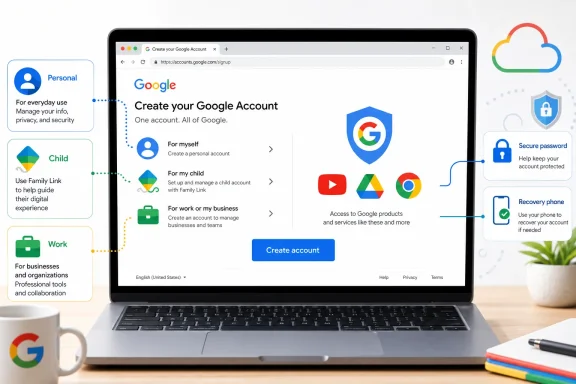
Google’s current help documentation supports that flow and lists three account categories: personal use, child, and work or business. Users can accept a suggested Gmail address, pick an available address themselves, or—in some cases—create a Google Account using an existing non-Gmail email address instead.
A Gmail address is not strictly required for a Google Account. That matters for people who need access to Chrome sync, Drive, YouTube, Android devices, or other Google services without moving their mail to Gmail.
Conversely, users who already have a Google Account without Gmail can add a Gmail address through Gmail’s setup page. Google says doing so permanently makes the new Gmail address the account’s primary username, while the previous email address becomes an alternate or recovery address.
That is a potentially disruptive change for anyone using the original address with Sign in with Google, shared files, or remote-access tools. Admins and support staff should treat it as an account-identity change rather than merely adding a mailbox.
For children under the applicable age of consent, Google directs parents to Family Link or supported Android and Chromebook setup flows. These accounts require parental consent and can be supervised through Family Link. Google notes that some child accounts may initially lack a functioning Gmail address and password; a parent can later upgrade the account when prompted to enable services that require them.
The guide also correctly warns iPhone and iPad users that Apple’s Mail settings add an existing Google account to Apple Mail—they do not create a new Gmail address. The Gmail app or a browser is the appropriate starting point.
For workplace use, a consumer Gmail account should not be mistaken for a managed Google Workspace identity; organizations should use their approved provisioning process instead.
The practical next step is to create personal Gmail accounts in a browser and use Family Link or managed-account procedures where supervision or organizational control is required.
Google’s current help documentation supports that flow and lists three account categories: personal use, child, and work or business. Users can accept a suggested Gmail address, pick an available address themselves, or—in some cases—create a Google Account using an existing non-Gmail email address instead.
 The important distinction
A Gmail address is not strictly required for a Google Account. That matters for people who need access to Chrome sync, Drive, YouTube, Android devices, or other Google services without moving their mail to Gmail.Conversely, users who already have a Google Account without Gmail can add a Gmail address through Gmail’s setup page. Google says doing so permanently makes the new Gmail address the account’s primary username, while the previous email address becomes an alternate or recovery address.
That is a potentially disruptive change for anyone using the original address with Sign in with Google, shared files, or remote-access tools. Admins and support staff should treat it as an account-identity change rather than merely adding a mailbox.
Device and child-account paths
The same account-creation flow is available from the Gmail app, Android’s account settings, and Chromebook setup. On a Chromebook, users can sign out, choose Add person, select personal, child, or work/school use, and create an account if necessary.For children under the applicable age of consent, Google directs parents to Family Link or supported Android and Chromebook setup flows. These accounts require parental consent and can be supervised through Family Link. Google notes that some child accounts may initially lack a functioning Gmail address and password; a parent can later upgrade the account when prompted to enable services that require them.
The guide also correctly warns iPhone and iPad users that Apple’s Mail settings add an existing Google account to Apple Mail—they do not create a new Gmail address. The Gmail app or a browser is the appropriate starting point.
Practical account hygiene
Google may request phone verification during signup, and its exact prompts can vary by country, device, risk checks, and account history. A strong unique password and recovery email or phone number are more important than the path used to start registration.For workplace use, a consumer Gmail account should not be mistaken for a managed Google Workspace identity; organizations should use their approved provisioning process instead.
The practical next step is to create personal Gmail accounts in a browser and use Family Link or managed-account procedures where supervision or organizational control is required.
References
- Primary source: Technobezz
Published: 2026-07-13T16:22:11.566000+00:00
How to Create a New Gmail Account in 2026 | Technobezz
How to create a new Gmail account on the web, in the Gmail app, through Android settings, on Chromebook, or for a child.www.technobezz.com
