

One of the best compact desktops for creators — GMKtec’s Nucbox K8 Plus — has just dropped to roughly $630 (from $739) on Amazon, and the price cut makes an already compelling compact workstation a very tempting buy for content creators, prosumers, and small studios looking for a high-performance, upgradeable mini PC without the bulk of a tower.
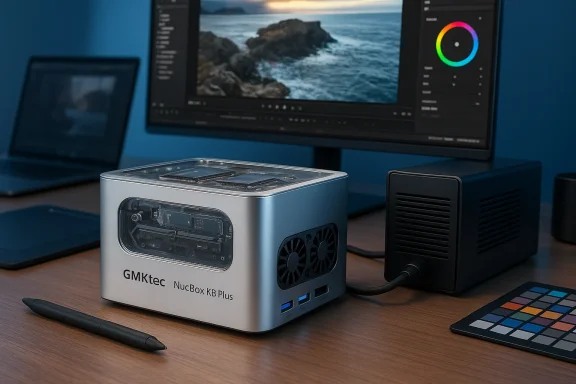
GMKtec’s Nucbox line has quietly matured into a family of compact systems that pile desktop-class components into a tiny chassis. The K8 Plus is the company’s most overtly performance-focused model in that lineup, shipping with an AMD Ryzen 7 8845HS APU, integrated AMD Radeon 780M graphics, 32 GB of DDR5 memory, and a 1 TB PCIe 4.0 M.2 SSD in a roughly 130 × 127 × 48 mm enclosure. That combination aims to deliver near-desktop speeds for editing, retouching, and multitasking while keeping a small footprint and extensive port options.
This is not a stripped-down “box PC” — GMKtec equips the K8 Plus with modern connectivity (dual USB4, HDMI 2.1, DisplayPort 2.1, dual 2.5 Gbps Ethernet), a two-slot M.2 storage layout, and OCuLink for PCIe expansion. Those pieces are what let this mini PC function as a legitimate desktop replacement for many creative workflows.
Independent benchmark aggregators and GPU comparison resources corroborate the Radeon 780M’s position as a high-end integrated GPU in the mobile/APU space — it outperforms many previous integrated designs and narrows the gap to entry-level discrete GPUs for rasterized workloads and compositing previews. For many creators who rely on GPU-accelerated effects rather than heavy real-time 3D or large-scale render farms, that is a meaningful capability.
Where the K8 Plus shows its limits is in very long, thermal-heavy rendering sessions or extremely GPU-bound 3D work. TechRadar noted that during sustained 4K renders the system began to show more fan noise and a mild dip in throughput — predictable behaviour for a small chassis trying to keep a 45 W‑class APU cool. Users who perform frequent, prolonged full-resolution exports may still prefer a tower with a full-size discrete GPU for the absolute fastest throughput.
In short: if you’ve been waiting for a moment to pick up a compact workstation that punches above its size, this price makes the GMKtec Nucbox K8 Plus a standout value. Just make sure to confirm the specific SKU’s configuration (NPU-enabled APU, RAM and storage capacities), read the return/warranty fine print for your region, and set expectations for thermal behavior under sustained renders — and you’ll have a remarkably capable mini PC for modern creative work.
Source: TechRadar This 'exceptionally well-balanced' Windows 11 mini PC is perfect for creators — GMKtec’s compact workstation gets a $109 price cut
 Background / Overview
GMKtec’s Nucbox line has quietly matured into a family of compact systems that pile desktop-class components into a tiny chassis. The K8 Plus is the company’s most overtly performance-focused model in that lineup, shipping with an AMD Ryzen 7 8845HS APU, integrated AMD Radeon 780M graphics, 32 GB of DDR5 memory, and a 1 TB PCIe 4.0 M.2 SSD in a roughly 130 × 127 × 48 mm enclosure. That combination aims to deliver near-desktop speeds for editing, retouching, and multitasking while keeping a small footprint and extensive port options.This is not a stripped-down “box PC” — GMKtec equips the K8 Plus with modern connectivity (dual USB4, HDMI 2.1, DisplayPort 2.1, dual 2.5 Gbps Ethernet), a two-slot M.2 storage layout, and OCuLink for PCIe expansion. Those pieces are what let this mini PC function as a legitimate desktop replacement for many creative workflows.
What’s inside: key specifications verified
CPU — AMD Ryzen 7 8845HS
- 8 cores / 16 threads, base around 3.8 GHz and boost up to 5.1 GHz.
- Configured for ~45 W class performance in typical OEM builds.
- Includes AMD’s Ryzen AI (XDNA) neural engine — an on-die NPU intended to accelerate supported AI workloads.
GPU — AMD Radeon 780M (RDNA 3)
- Integrated RDNA 3 architecture, typically implemented as 12 Compute Units (768 shaders), with boost clocks commonly reported near 2.7 GHz on mobile/APU designs.
- Strong for an integrated solution: capable of smooth high-resolution desktop rendering, accelerated media encode/decode, and respectable results in GPU-accelerated creative tasks.
Memory & Storage
- Ships with 32 GB DDR5 (2×16 GB) at 5600 MHz dual-channel. GMKtec advertises expansion up to 128 GB depending on configuration.
- Storage is a 1 TB PCIe 4.0 NVMe M.2 SSD with a second M.2 slot for expansion — the chassis supports up to multiple terabytes (manufacturer notes configurations supporting up to 4 TB per slot or up to 8 TB total in some listings).
I/O, displays, and networking
- Display outputs: HDMI 2.1, DisplayPort 2.1, and two USB4 (40 Gbps) Type-C ports capable of DisplayPort Alt Mode — GMKtec advertises support for up to four displays, including high-resolution 4K/8K options.
- Wired networking: dual Intel 2.5 Gbps Ethernet ports (reported as Intel i226-V on multiple teardown/spec lists). Wireless: Wi‑Fi 6 and Bluetooth 5.2.
- Expansion: OCuLink (PCIe Gen4 ×4) port allows connecting an external GPU enclosure or high-performance NVMe arrays for users who need discrete GPU power or external PCIe storage.
Cooling & modes
GMKtec uses a dual-fan Hyper Ice Chamber with heat-pipe vapor chamber cooling and offers three performance/noise modes users can toggle to favor quiet or peak performance. In real-world heavy loads the fans will ramp, and thermal headroom/behavior will depend on mode and ambient temperature.Performance in creative workflows — what tests and reviewers say
TechRadar’s hands-on testing found the Nucbox K8 Plus to be unusually capable for its class: timeline scrubbing, preview rendering, and medium-complexity color grading in DaVinci Resolve, plus layered retouching in Photoshop, all ran comfortably without the system feeling underpowered — though the fans do become audible in sustained heavy workloads. TechRadar’s benchmark suite showed strong Cinebench and 3DMark numbers for a compact system of this size.Independent benchmark aggregators and GPU comparison resources corroborate the Radeon 780M’s position as a high-end integrated GPU in the mobile/APU space — it outperforms many previous integrated designs and narrows the gap to entry-level discrete GPUs for rasterized workloads and compositing previews. For many creators who rely on GPU-accelerated effects rather than heavy real-time 3D or large-scale render farms, that is a meaningful capability.
Where the K8 Plus shows its limits is in very long, thermal-heavy rendering sessions or extremely GPU-bound 3D work. TechRadar noted that during sustained 4K renders the system began to show more fan noise and a mild dip in throughput — predictable behaviour for a small chassis trying to keep a 45 W‑class APU cool. Users who perform frequent, prolonged full-resolution exports may still prefer a tower with a full-size discrete GPU for the absolute fastest throughput.
Why this discount matters (price, context, and alternatives)
- The current deal (reported on 18 February 2026) brings the K8 Plus down to around $630 at Amazon, a roughly $109 reduction from its prior list. That places a mini PC with 32 GB DDR5, a 1 TB PCIe 4.0 SSD, and an 8845HS APU at a price point that competes with many entry-level desktops and ultrathin laptops once you add the benefits of full-size ports and expandability.
- Price-tracking snapshots and European price comparators show the K8 Plus often wanders across the mid‑$600 to $800 range depending on region, marketplace promotions, and stock levels; this discount is toward the lower end of that band. If your budget is around this level and you need creative muscle in a small package, the deal is a sweet spot.
- Competitors and alternatives: Several other mini-PCs and small-form-factor vendors (Geekom, MinisForum, and boutique OEMs) offer machines with the same APU or similar Intel equivalents. The differentiators for the K8 Plus are the combination of the 8845HS with a 12‑CU RDNA3 iGPU, two M.2 slots, USB4/OCuLink, and dual 2.5 Gbps NICs — features often omitted in cheaper boxes. When comparing, pay attention to whether competing machines include the same number of M.2 slots, the NPU-equipped APU variant, and the same networking/port set.
Strengths: where the K8 Plus excels
- Exceptional CPU-to-size ratio. The Ryzen 7 8845HS provides multi-core performance that outpaces many older desktop CPUs in a tiny chassis — useful for encoding, photo editing, code builds, and multitasking.
- Strong integrated GPU for creators. The RDNA 3-based Radeon 780M delivers GPU acceleration that makes tasks like timeline previews and GPU-accelerated filters materially faster than older integrated solutions.
- Modern connectivity and expansion. USB4, HDMI 2.1, DisplayPort 2.1, OCuLink, and dual M.2 slots give the Nucbox K8 Plus headroom for future-proofing and workstation use. Dual 2.5 Gbps Ethernet is a boon for studio networks or NAS workflows.
- On-die NPU (Ryzen AI). The APU includes AMD’s Ryzen AI silicon, enabling accelerated local AI features where supported by software, which can matter for AI-assisted denoising, deblur, and other model-based creative functions.
- Upgradeability. Dual SO‑DIMM slots and dual M.2 bays mean buyers can meaningfully increase RAM and storage over time without replacing the whole system. GMKtec advertises configurations up to much higher capacities for both memory and storage.
Risks, limitations, and points to verify before buying
- Thermals and sustained loads. Small chassis physics: under long export or render loads the fans will spin up and thermal throttling can reduce peak throughput compared with a tower cooled by large fans or water cooling. TechRadar observed this behavior during prolonged 4K renders. If your work involves constant high-power rendering, a larger chassis with a discrete GPU will likely finish jobs faster.
- Driver and software support for AI features. Having an NPU on the die is only meaningful if the software you use supports AMD Ryzen AI or on‑device acceleration via AMD’s XDNA toolchain. Adoption varies by vendor and plugin, and not every AI feature in apps will auto-accelerate on the APU today — always check vendor compatibility.
- Warranty & support variability. Reviews and forum threads for small OEMs sometimes highlight mixed experiences with support response or RMA timelines. Region of purchase (Amazon/third‑party seller vs. official GMKtec store) affects warranty terms and logistics, so confirm the seller and warranty details before purchasing.
- Specification inconsistencies across listings. We found some discrepancies in third-party spec pages about maximum memory and exact component labeling (some sources list maximum memory as 96 GB, others 128 GB or even higher). GMKtec’s official product page lists expandable to 128 GB but independent databases sometimes differ. Treat third-party spec aggregators with caution and default to the manufacturer’s published figures when in doubt.
- Noise under load. The three performance modes let users tune noise vs. performance, but even in balanced modes the dual fans are audible under sustained load. For quiet studio environments you’ll want to test the unit in person (or purchase from a seller with a reasonable return window).
Practical buying and setup guidance (for creators)
- Confirm which APU revision you’re getting. Manufacturers sometimes ship SKU variants (e.g., with or without the NPU enabled). Ask the seller or verify product codes if Ryzen AI capability is important to you.
- Opt for balanced RAM configuration: buy the shipped 2×16 GB kit to ensure dual-channel operation. If you plan to upgrade, check whether GMKtec’s warranty requires you to use identical modules and whether BIOS updates are required for higher-density kits.
- Use the second M.2 slot for a dedicated scratch disk/working drive if you edit many RAW or ProRes files — keeping OS/app on one drive and media cache on another improves responsiveness.
- Test the three performance modes and monitor temperatures and fan noise for your typical projects. If you frequently need maximum sustained throughput, consider pairing the K8 Plus with an external GPU via OCuLink or look at tower alternatives.
- Verify local warranty terms and RMA procedures with the seller before purchase. If you’re in a region where GMKtec’s official support is limited, buying through a reliable marketplace seller with clear returns may be worth the slightly higher short-term price.
How the K8 Plus stacks up for specific creative scenarios
Photo editing and retouching
For heavy Photoshop use with large layered documents and AI-assisted filters, the combination of an 8-core CPU, 32 GB of fast DDR5, and the Radeon 780M provides a very responsive experience for most users. Tasks that map well to CPU threads (batch exports, RAW conversions) and those that benefit from GPU acceleration (some filters, canvas redraw) are both served well by this configuration. TechRadar’s hands-on review supports this: everyday creative tasks felt notably snappy in test workflows.Video editing (DaVinci Resolve and Premiere)
For timeline work, proxy workflows, and short-to-medium-length 4K projects, the K8 Plus is more than usable: previews are smooth, GPU-accelerated color operations are quicker than older integrated designs, and the fast storage keeps scrubbing responsive. For very long multi-track RAW/4K/8K exports or heavy noise-reduction passes, expect longer render times than a discrete-GPU tower but a pleasant desktop-like experience for most professional editing tasks.Motion graphics & 3D
Light to moderate motion graphics and compositor work (After Effects, Fusion) will run fine for many projects, but the Radeon 780M is still an integrated GPU and will not match a midrange discrete GPU for large 3D renders or GPU raytracing. If your pipeline includes heavy GPU rendering, consider an external GPU via OCuLink (bearing in mind added cost and power) or a desktop workstation with a dedicated GPU.Final assessment: who should buy the Nucbox K8 Plus at this price?
Buy the GMKtec Nucbox K8 Plus if:- You need a compact, desk-friendly system that delivers near-desktop multi-core performance.
- You want modern ports (USB4, HDMI 2.1, DisplayPort 2.1) and the flexibility to add storage and an eGPU later.
- Your workflow involves medium-complexity creative tasks (photo editing, 4K timeline work, GPU-accelerated plugins) and you value footprint and quiet desktop presence over maximum sustained workstation throughput.
- Your daily work is dominated by long, GPU-bound renders or massive 3D scenes that require a full discrete GPU for acceptable turnaround times.
- You require absolute silence during heavy loads — the fans will spin up, and thermal throttling is possible under long, sustained peak loads.
In short: if you’ve been waiting for a moment to pick up a compact workstation that punches above its size, this price makes the GMKtec Nucbox K8 Plus a standout value. Just make sure to confirm the specific SKU’s configuration (NPU-enabled APU, RAM and storage capacities), read the return/warranty fine print for your region, and set expectations for thermal behavior under sustained renders — and you’ll have a remarkably capable mini PC for modern creative work.
Source: TechRadar This 'exceptionally well-balanced' Windows 11 mini PC is perfect for creators — GMKtec’s compact workstation gets a $109 price cut
