

Google on June 25, 2026 began rolling out new Gemini education features that connect Google Classroom data, Gemini study notebooks, Read Along literacy tools, NotebookLM workflows, and Chromebook classroom controls across Google Workspace for Education and personal Google accounts. The move is not just another “AI tutor” announcement. It is Google’s clearest attempt yet to turn its school software stack into a controlled learning operating system, where prompts, coursework, student progress, and device behavior all orbit the same platform. For schools, that promises less friction; for administrators, it also concentrates more pedagogical, privacy, and procurement risk in one vendor’s hands.
The most important part of Google’s education announcement is not the shiniest one. Study notebooks sound more marketable, Read Along is easier to explain to parents, and Chromebook focus controls are the sort of feature teachers can immediately picture using on Monday morning. But the strategic hinge is the new Classroom app inside Gemini.
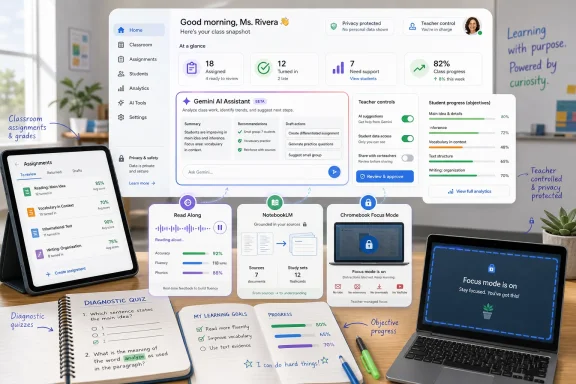
That app lets educators use assignments, grades, and course materials already stored in Google Classroom when asking Gemini to analyze class progress or draft new learning activities. In plain terms, teachers no longer need to copy context into a blank chatbot prompt. The AI can now reason against the same coursework and evidence of learning that already sits inside the district’s Google environment.
That changes the role of Gemini from general-purpose assistant to classroom-aware colleague. A teacher asking where students struggled on the last three assignments is making a very different request from “write me a worksheet on fractions.” The former depends on class-specific evidence, and Google is now positioning Gemini as the layer that can interpret it.
The upside is obvious. Teachers spend a grim amount of time translating messy classroom reality into formats that software understands. If Gemini can use existing Classroom materials without manual uploads, it reduces one of the most tedious barriers to useful AI: feeding the machine the right context.
The risk is just as obvious. Once AI becomes useful because it can see the real classroom, the governance problem moves from “should students use chatbots?” to “which systems are allowed to interpret educational records, and under whose control?” Google says Workspace for Education data accessed through this route remains inside its education environment and is not used to train its AI models. That reassurance matters, but it does not eliminate the operational burden on school IT teams that must decide who gets access, what logs are retained, and how errors are reviewed.
That is a meaningful shift. Generic chatbot help has always had a structural weakness in education: it is too easy for the student to ask for an answer rather than work through a concept. A notebook that begins with a diagnostic quiz, tracks objectives, and recommends follow-up lessons is a tighter design. It makes the AI feel less like a vending machine for completed homework and more like adaptive courseware.
Google says each notebook can break a learning goal into more than 100 objectives and categorize them as strengths, focus areas, or not started. That kind of progress dashboard will appeal to students who want structure and to parents who want visible evidence that “AI help” is not just a prettier search engine. It will also appeal to schools that have spent years buying adaptive learning products that promised similar personalization but often lived outside the daily classroom workflow.
The crucial difference is that Google already owns the surrounding workflow. A standalone tutoring app has to convince students to upload their materials, remember another login, and shuttle between systems. Gemini study notebooks can sit near Classroom, NotebookLM, and a student’s Google account. That is the flywheel.
For now, the rollout is more limited than the marketing arc suggests. Study notebooks are starting on the Gemini web app through personal Google Accounts, with mobile access and support for school-issued accounts, including accounts used by students under 18, planned for later this summer. That gap matters. A feature that students can use personally is not the same as one a district can govern, audit, deploy, and support.
This is Google’s answer to a problem every AI vendor faces in education: trust improves when the AI is grounded in material that teachers or students choose. A general model can hallucinate. A source-grounded notebook can still make mistakes, but it at least gives the product a defined perimeter.
The education value is not merely that students can create flashcards or infographics. It is that Google is building continuity between a student’s learning goal, uploaded sources, previous Gemini conversations, and NotebookLM-generated study artifacts. In a mature version of this system, a semester’s worth of study work could become navigable, reusable, and increasingly personalized.
That is also where the lock-in starts to look less theoretical. A student who uses Google Docs, submits in Classroom, studies in Gemini, turns sources into NotebookLM outputs, and takes reading assignments in Read Along is not just using a bundle of apps. They are producing an educational activity trail inside one ecosystem.
For WindowsForum readers, this should sound familiar. Microsoft has spent decades proving that productivity software becomes infrastructure once files, identity, administration, and habits converge. Google is now applying the same logic to AI in schools: do not just provide the assistant; provide the place where the assistant has the most context.
That is the kind of feature districts can justify without needing to sell “AI transformation” to skeptical staff. Foundational literacy is a persistent, measurable problem. Teachers already collect reading evidence, already differentiate materials, and already need better ways to understand which students require help with decoding, fluency, or comprehension.
Google is also broadening Read Along’s content base, with hundreds of books and texts across eight languages: English, Spanish, Portuguese, Urdu, Arabic, Thai, Indonesian, and Malay. Native-language support for English learners is available in several of those languages, and Gemini can help teachers generate differentiated reading activities based on level, topic, or phonics needs.
The product strategy is clear. Give away a literacy workflow that produces useful classroom data, then reserve some advanced analytics for paid tiers such as Education Plus and the Teaching and Learning add-on. That is not sinister; it is enterprise software economics. But schools should recognize the pattern.
Free access lowers the adoption barrier, particularly for districts already standardized on Google Workspace for Education Fundamentals. Once teachers depend on the workflow and administrators begin using the data, paid reporting features become easier to justify. The procurement conversation moves from “do we need this?” to “do we need the deeper analytics?”
That matters because reading data is sensitive in a different way from a homework prompt. Fluency, pronunciation, comprehension, and phonics progress can shape intervention decisions and parent conversations. Schools will need to be especially clear about data retention, access roles, export policies, and whether AI-generated reading activities are reviewed before reaching students.
This is the missing piece in many education AI debates. Schools often argue about which AI tools to allow while ignoring the device environment in which those tools are used. If a student has an unmanaged browser, an AI policy is just a PDF with aspirations.
Focus Mode and planned Guided Learning controls suggest Google understands that teacher trust requires containment. A classroom AI product is not useful merely because it can generate content. It becomes useful when teachers can decide what students can access, when they can access it, and what context the system is allowed to use.
That plays directly to Chromebook’s institutional strength. ChromeOS won in many schools not because it was more powerful than Windows, but because it was cheaper to administer, easier to reset, and built around web-based identity and policy. AI gives Google a chance to renew that device-management advantage for the next decade.
The competitive implication is uncomfortable for Microsoft. Windows remains dominant in many districts, especially where legacy applications, career and technical education software, or staff computing needs are more complex. But if the AI classroom of the future is tightly coupled to browser identity, Classroom data, Gemini prompts, and Chromebook policy controls, Google has a cleaner story for K-12 administrators who prioritize simplicity.
That could solve a real fragmentation problem. Teachers already juggle learning management systems, reading tools, assessment platforms, content libraries, gradebooks, and district apps. If third-party EdTech products can securely use authorized Classroom context, lesson planning and assignment workflows could become less repetitive.
It could also create a new integration surface that school IT teams must police. Any mechanism that lets AI systems reference class context becomes part of the district’s data perimeter. Administrators will need to understand not just which apps connect, but what data they request, how consent is managed, how access is revoked, and whether vendors can pass context downstream.
Google has not named the first external platforms for the MCP server, nor has it detailed exactly which Classroom information those providers will be permitted to access. That uncertainty is normal for a feature still described as coming over the next few months. It is also precisely why districts should not treat the announcement as a finished governance model.
The hard lesson from decades of school software adoption is that integrations multiply faster than oversight. A district may approve one product for a limited purpose, only to find that new AI features later expand what the product can infer, generate, or store. MCP-style connectivity could become valuable plumbing, but plumbing leaks are still leaks.
That framing is smart because it responds to the central anxiety around generative AI in schools: the fear that students will outsource thinking to machines while teachers lose visibility. Google’s answer is not to ban the machine, but to put it inside teacher-managed workflows.
The question is whether teacher control scales in real life. Teachers are already overloaded with grading, planning, communication, accommodations, behavior management, and compliance documentation. If AI adds dashboards, generated activities, review queues, and intervention recommendations, it may reduce some work while adding new obligations.
There is also a subtle risk in the phrase “teacher-led.” In practice, many schools will configure defaults at the domain or organizational-unit level. Administrators may enable features broadly; vendors may ship defaults that favor adoption; time-pressed teachers may accept generated materials with less review than policy assumes. The human-in-the-loop model is only as strong as the time and training allocated to the human.
Google is trying to address that training gap with the Google AI Educator Series, developed with ISTE and ASCD, and by funding aiEDU work around AI readiness planning in Title I school districts. That investment is politically and practically important. But training programs cannot substitute for local governance, curriculum review, and clear escalation paths when AI-generated materials are wrong, biased, inappropriate, or simply misaligned with a lesson’s intent.
It will be won by the platform that best connects identity, content, assignments, analytics, device management, safety controls, and teacher workflow. Google’s advantage is that Classroom and Chromebooks are already deeply embedded in many K-12 environments. Microsoft’s advantage is that Windows and Microsoft 365 remain deeply embedded in staff, enterprise, higher education, and hybrid environments where richer desktop capabilities still matter.
The pressure point is coherence. Google’s announcement is persuasive because it tells a simple story: Classroom provides context, Gemini provides assistance, NotebookLM structures sources, Read Along collects literacy evidence, and Chromebooks enforce focus. Microsoft can match many individual pieces, but it must make the whole education story feel equally integrated.
For Windows administrators, the lesson is not that Chromebooks suddenly beat Windows everywhere. It is that AI-era device strategy cannot be separated from learning-platform strategy. If your district’s teachers live in Google Classroom and students use Gemini-grounded assignments, Windows devices may increasingly look like endpoints into someone else’s ecosystem.
That does not make them irrelevant. It does mean Microsoft, OEMs, and district IT leaders need to argue for Windows on more than compatibility and habit. They need to show how Windows devices participate in governed AI learning workflows without becoming harder to manage than the Chromebook alternative.
Student data protection also involves access control, auditability, minimization, retention, parent rights, vendor contracts, state laws, and the everyday discipline of configuring systems correctly. A feature can be privacy-preserving in architecture and still risky in implementation if too many people can see too much data, if exports are poorly governed, or if administrators cannot explain what happened after a complaint.
AI adds another layer because it generates interpretations. A grade is a record. A reading-fluency score is a record. But an AI-generated statement that a student appears to misunderstand a concept, needs intervention, or is ready for enrichment can become influential even if it is probabilistic. Schools will need policies for how such insights are used and how they are challenged.
The danger is not that Gemini will secretly become a teacher. The danger is that AI-generated hints become institutional shorthand. A dashboard that labels focus areas can be helpful, but if teachers, parents, or administrators treat those labels as authoritative, the system’s errors acquire bureaucratic weight.
That is why the governance conversation should happen before full deployment, not after a controversy. Districts should decide which AI insights are advisory, which require teacher confirmation, and which may be included in formal records. They should also decide how long AI-generated activity data is retained and whether students can see, contest, or contextualize it.
But equity is not solved by access alone. Students with stable internet, supportive adults, quiet study spaces, and strong digital habits will often extract more value from AI tools than students without those advantages. A study notebook can personalize lessons, but it cannot fix attendance, hunger, device sharing, or the absence of adult support at home.
There is also a language and curriculum issue. Read Along’s multilingual support is meaningful, and native-language assistance for English learners could be a genuine classroom benefit. But AI-generated differentiation must be scrutinized carefully in multilingual and special education contexts, where errors can reinforce misunderstanding or create inappropriate simplifications.
The best version of Google’s rollout gives teachers better evidence, students more structured practice, and schools more affordable tools. The worst version lets under-resourced districts substitute software dashboards for staffing, intervention time, and professional judgment. The difference will not be determined by Gemini alone. It will be determined by implementation.
That is good news for schools tired of AI chaos. It is easier to govern tools that live inside identity-managed platforms, respect organizational controls, and connect to approved materials. It is easier to train teachers on workflows than on open-ended prompting. It is easier to reassure parents when the AI is bounded by Classroom content rather than the whole internet.
It is also a consolidation story. The more AI depends on class data, device controls, and analytics, the harder it becomes for smaller vendors to compete unless they integrate with the dominant platforms. Google’s planned MCP server may offer third parties a route into that ecosystem, but it also reinforces Google Classroom as the hub around which those integrations revolve.
This is how platform power works in education technology. First, the platform solves a practical problem. Then it becomes the default place where new problems are solved. Eventually, choosing a different tool feels like swimming upstream.
 Google Is Turning Classroom Into Gemini’s Memory
The most important part of Google’s education announcement is not the shiniest one. Study notebooks sound more marketable, Read Along is easier to explain to parents, and Chromebook focus controls are the sort of feature teachers can immediately picture using on Monday morning. But the strategic hinge is the new Classroom app inside Gemini.That app lets educators use assignments, grades, and course materials already stored in Google Classroom when asking Gemini to analyze class progress or draft new learning activities. In plain terms, teachers no longer need to copy context into a blank chatbot prompt. The AI can now reason against the same coursework and evidence of learning that already sits inside the district’s Google environment.
That changes the role of Gemini from general-purpose assistant to classroom-aware colleague. A teacher asking where students struggled on the last three assignments is making a very different request from “write me a worksheet on fractions.” The former depends on class-specific evidence, and Google is now positioning Gemini as the layer that can interpret it.
The upside is obvious. Teachers spend a grim amount of time translating messy classroom reality into formats that software understands. If Gemini can use existing Classroom materials without manual uploads, it reduces one of the most tedious barriers to useful AI: feeding the machine the right context.
The risk is just as obvious. Once AI becomes useful because it can see the real classroom, the governance problem moves from “should students use chatbots?” to “which systems are allowed to interpret educational records, and under whose control?” Google says Workspace for Education data accessed through this route remains inside its education environment and is not used to train its AI models. That reassurance matters, but it does not eliminate the operational burden on school IT teams that must decide who gets access, what logs are retained, and how errors are reviewed.
The New AI Tutor Is Really a Workflow Strategy
Google’s study notebooks in Gemini are pitched as personalized learning spaces. Students can create a notebook, upload course materials such as notes, syllabuses, readings, and documents, and have Gemini generate a diagnostic quiz before building shorter lessons and follow-up checks. The experience is designed to feel less like chatting with a bot and more like moving through a guided study plan.That is a meaningful shift. Generic chatbot help has always had a structural weakness in education: it is too easy for the student to ask for an answer rather than work through a concept. A notebook that begins with a diagnostic quiz, tracks objectives, and recommends follow-up lessons is a tighter design. It makes the AI feel less like a vending machine for completed homework and more like adaptive courseware.
Google says each notebook can break a learning goal into more than 100 objectives and categorize them as strengths, focus areas, or not started. That kind of progress dashboard will appeal to students who want structure and to parents who want visible evidence that “AI help” is not just a prettier search engine. It will also appeal to schools that have spent years buying adaptive learning products that promised similar personalization but often lived outside the daily classroom workflow.
The crucial difference is that Google already owns the surrounding workflow. A standalone tutoring app has to convince students to upload their materials, remember another login, and shuttle between systems. Gemini study notebooks can sit near Classroom, NotebookLM, and a student’s Google account. That is the flywheel.
For now, the rollout is more limited than the marketing arc suggests. Study notebooks are starting on the Gemini web app through personal Google Accounts, with mobile access and support for school-issued accounts, including accounts used by students under 18, planned for later this summer. That gap matters. A feature that students can use personally is not the same as one a district can govern, audit, deploy, and support.
NotebookLM Becomes the Study Room Next Door
The connection between Gemini study notebooks and NotebookLM is one of the more revealing pieces of the announcement. NotebookLM has become Google’s source-grounded research and study environment, known for turning uploaded materials into summaries, study aids, audio-style explanations, flashcards, and other outputs. Study notebooks now give Gemini a bridge into that world.This is Google’s answer to a problem every AI vendor faces in education: trust improves when the AI is grounded in material that teachers or students choose. A general model can hallucinate. A source-grounded notebook can still make mistakes, but it at least gives the product a defined perimeter.
The education value is not merely that students can create flashcards or infographics. It is that Google is building continuity between a student’s learning goal, uploaded sources, previous Gemini conversations, and NotebookLM-generated study artifacts. In a mature version of this system, a semester’s worth of study work could become navigable, reusable, and increasingly personalized.
That is also where the lock-in starts to look less theoretical. A student who uses Google Docs, submits in Classroom, studies in Gemini, turns sources into NotebookLM outputs, and takes reading assignments in Read Along is not just using a bundle of apps. They are producing an educational activity trail inside one ecosystem.
For WindowsForum readers, this should sound familiar. Microsoft has spent decades proving that productivity software becomes infrastructure once files, identity, administration, and habits converge. Google is now applying the same logic to AI in schools: do not just provide the assistant; provide the place where the assistant has the most context.
Read Along Shows Why Free Can Still Be Strategic
Read Along’s expansion to all Google Workspace for Education users at no cost is the announcement’s most straightforward classroom win. The tool listens as students read aloud, offers support, and gives educators data on reading accuracy, speed, comprehension, phonics skills, and progress. Google says the rollout is expected to finish by July 3, 2026.That is the kind of feature districts can justify without needing to sell “AI transformation” to skeptical staff. Foundational literacy is a persistent, measurable problem. Teachers already collect reading evidence, already differentiate materials, and already need better ways to understand which students require help with decoding, fluency, or comprehension.
Google is also broadening Read Along’s content base, with hundreds of books and texts across eight languages: English, Spanish, Portuguese, Urdu, Arabic, Thai, Indonesian, and Malay. Native-language support for English learners is available in several of those languages, and Gemini can help teachers generate differentiated reading activities based on level, topic, or phonics needs.
The product strategy is clear. Give away a literacy workflow that produces useful classroom data, then reserve some advanced analytics for paid tiers such as Education Plus and the Teaching and Learning add-on. That is not sinister; it is enterprise software economics. But schools should recognize the pattern.
Free access lowers the adoption barrier, particularly for districts already standardized on Google Workspace for Education Fundamentals. Once teachers depend on the workflow and administrators begin using the data, paid reporting features become easier to justify. The procurement conversation moves from “do we need this?” to “do we need the deeper analytics?”
That matters because reading data is sensitive in a different way from a homework prompt. Fluency, pronunciation, comprehension, and phonics progress can shape intervention decisions and parent conversations. Schools will need to be especially clear about data retention, access roles, export policies, and whether AI-generated reading activities are reviewed before reaching students.
Chromebook Controls Turn AI Into a Managed Environment
The Chromebook side of the announcement may seem less glamorous, but it is arguably the most important for real classrooms. Google is expanding Class tools with Focus Mode, which can restrict a student device to an approved application or resource during a lesson. A teacher could keep students inside NotebookLM while they work with selected research materials, rather than letting “AI study time” become a tab-hopping expedition.This is the missing piece in many education AI debates. Schools often argue about which AI tools to allow while ignoring the device environment in which those tools are used. If a student has an unmanaged browser, an AI policy is just a PDF with aspirations.
Focus Mode and planned Guided Learning controls suggest Google understands that teacher trust requires containment. A classroom AI product is not useful merely because it can generate content. It becomes useful when teachers can decide what students can access, when they can access it, and what context the system is allowed to use.
That plays directly to Chromebook’s institutional strength. ChromeOS won in many schools not because it was more powerful than Windows, but because it was cheaper to administer, easier to reset, and built around web-based identity and policy. AI gives Google a chance to renew that device-management advantage for the next decade.
The competitive implication is uncomfortable for Microsoft. Windows remains dominant in many districts, especially where legacy applications, career and technical education software, or staff computing needs are more complex. But if the AI classroom of the future is tightly coupled to browser identity, Classroom data, Gemini prompts, and Chromebook policy controls, Google has a cleaner story for K-12 administrators who prioritize simplicity.
The Model Context Protocol Door Opens a Bigger Risk
Google’s planned Classroom Model Context Protocol server is the most technical phrase in the announcement, but it deserves attention. Model Context Protocol is an emerging standard for connecting AI systems to external tools and data sources. Google says its Classroom MCP server will allow selected external EdTech platforms to reference authorized class information.That could solve a real fragmentation problem. Teachers already juggle learning management systems, reading tools, assessment platforms, content libraries, gradebooks, and district apps. If third-party EdTech products can securely use authorized Classroom context, lesson planning and assignment workflows could become less repetitive.
It could also create a new integration surface that school IT teams must police. Any mechanism that lets AI systems reference class context becomes part of the district’s data perimeter. Administrators will need to understand not just which apps connect, but what data they request, how consent is managed, how access is revoked, and whether vendors can pass context downstream.
Google has not named the first external platforms for the MCP server, nor has it detailed exactly which Classroom information those providers will be permitted to access. That uncertainty is normal for a feature still described as coming over the next few months. It is also precisely why districts should not treat the announcement as a finished governance model.
The hard lesson from decades of school software adoption is that integrations multiply faster than oversight. A district may approve one product for a limited purpose, only to find that new AI features later expand what the product can infer, generate, or store. MCP-style connectivity could become valuable plumbing, but plumbing leaks are still leaks.
Teacher Control Is the Sales Pitch, Not the Whole Answer
Google repeatedly frames these updates around teacher-led AI. Educators select the materials that ground activities. Teachers assign study notebooks through Classroom. Teachers receive individual and class-level information about how students interact with content. Chromebook controls keep students in approved learning environments.That framing is smart because it responds to the central anxiety around generative AI in schools: the fear that students will outsource thinking to machines while teachers lose visibility. Google’s answer is not to ban the machine, but to put it inside teacher-managed workflows.
The question is whether teacher control scales in real life. Teachers are already overloaded with grading, planning, communication, accommodations, behavior management, and compliance documentation. If AI adds dashboards, generated activities, review queues, and intervention recommendations, it may reduce some work while adding new obligations.
There is also a subtle risk in the phrase “teacher-led.” In practice, many schools will configure defaults at the domain or organizational-unit level. Administrators may enable features broadly; vendors may ship defaults that favor adoption; time-pressed teachers may accept generated materials with less review than policy assumes. The human-in-the-loop model is only as strong as the time and training allocated to the human.
Google is trying to address that training gap with the Google AI Educator Series, developed with ISTE and ASCD, and by funding aiEDU work around AI readiness planning in Title I school districts. That investment is politically and practically important. But training programs cannot substitute for local governance, curriculum review, and clear escalation paths when AI-generated materials are wrong, biased, inappropriate, or simply misaligned with a lesson’s intent.
Microsoft Should Hear the Chromebook Alarm Bell
This story may be about Google, but it lands squarely in Microsoft’s yard. Microsoft has been adding AI tools across Microsoft 365 Education, Copilot experiences, Teams, OneNote, Reading Coach, and related services. The company understands the same strategic truth Google does: education AI will not be won by the best chatbot alone.It will be won by the platform that best connects identity, content, assignments, analytics, device management, safety controls, and teacher workflow. Google’s advantage is that Classroom and Chromebooks are already deeply embedded in many K-12 environments. Microsoft’s advantage is that Windows and Microsoft 365 remain deeply embedded in staff, enterprise, higher education, and hybrid environments where richer desktop capabilities still matter.
The pressure point is coherence. Google’s announcement is persuasive because it tells a simple story: Classroom provides context, Gemini provides assistance, NotebookLM structures sources, Read Along collects literacy evidence, and Chromebooks enforce focus. Microsoft can match many individual pieces, but it must make the whole education story feel equally integrated.
For Windows administrators, the lesson is not that Chromebooks suddenly beat Windows everywhere. It is that AI-era device strategy cannot be separated from learning-platform strategy. If your district’s teachers live in Google Classroom and students use Gemini-grounded assignments, Windows devices may increasingly look like endpoints into someone else’s ecosystem.
That does not make them irrelevant. It does mean Microsoft, OEMs, and district IT leaders need to argue for Windows on more than compatibility and habit. They need to show how Windows devices participate in governed AI learning workflows without becoming harder to manage than the Chromebook alternative.
Privacy Promises Meet the Reality of Student Data
Google’s statement that Classroom data used in Gemini remains within Google Workspace for Education and is not used to train its AI models is essential. Without that promise, the product would be a nonstarter for many districts. But privacy in schools is not just about model training.Student data protection also involves access control, auditability, minimization, retention, parent rights, vendor contracts, state laws, and the everyday discipline of configuring systems correctly. A feature can be privacy-preserving in architecture and still risky in implementation if too many people can see too much data, if exports are poorly governed, or if administrators cannot explain what happened after a complaint.
AI adds another layer because it generates interpretations. A grade is a record. A reading-fluency score is a record. But an AI-generated statement that a student appears to misunderstand a concept, needs intervention, or is ready for enrichment can become influential even if it is probabilistic. Schools will need policies for how such insights are used and how they are challenged.
The danger is not that Gemini will secretly become a teacher. The danger is that AI-generated hints become institutional shorthand. A dashboard that labels focus areas can be helpful, but if teachers, parents, or administrators treat those labels as authoritative, the system’s errors acquire bureaucratic weight.
That is why the governance conversation should happen before full deployment, not after a controversy. Districts should decide which AI insights are advisory, which require teacher confirmation, and which may be included in formal records. They should also decide how long AI-generated activity data is retained and whether students can see, contest, or contextualize it.
The Equity Argument Cuts Both Ways
Google’s no-cost framing is powerful in education because budgets are uneven and attention is scarce. Free study notebooks, free Read Along access, and broad Workspace availability can put AI-supported learning tools in front of students who might otherwise be priced out of commercial tutoring platforms. For Title I districts, the promise of AI readiness funding and educator training will sound especially welcome.But equity is not solved by access alone. Students with stable internet, supportive adults, quiet study spaces, and strong digital habits will often extract more value from AI tools than students without those advantages. A study notebook can personalize lessons, but it cannot fix attendance, hunger, device sharing, or the absence of adult support at home.
There is also a language and curriculum issue. Read Along’s multilingual support is meaningful, and native-language assistance for English learners could be a genuine classroom benefit. But AI-generated differentiation must be scrutinized carefully in multilingual and special education contexts, where errors can reinforce misunderstanding or create inappropriate simplifications.
The best version of Google’s rollout gives teachers better evidence, students more structured practice, and schools more affordable tools. The worst version lets under-resourced districts substitute software dashboards for staffing, intervention time, and professional judgment. The difference will not be determined by Gemini alone. It will be determined by implementation.
The Coming Classroom Stack Has a Shape Now
Google’s announcement clarifies where education AI is heading. The market is moving away from isolated chatbots and toward managed, context-rich systems that sit inside existing learning workflows. The chatbot is becoming a feature of the classroom stack, not a separate destination.That is good news for schools tired of AI chaos. It is easier to govern tools that live inside identity-managed platforms, respect organizational controls, and connect to approved materials. It is easier to train teachers on workflows than on open-ended prompting. It is easier to reassure parents when the AI is bounded by Classroom content rather than the whole internet.
It is also a consolidation story. The more AI depends on class data, device controls, and analytics, the harder it becomes for smaller vendors to compete unless they integrate with the dominant platforms. Google’s planned MCP server may offer third parties a route into that ecosystem, but it also reinforces Google Classroom as the hub around which those integrations revolve.
This is how platform power works in education technology. First, the platform solves a practical problem. Then it becomes the default place where new problems are solved. Eventually, choosing a different tool feels like swimming upstream.
The Lesson Plan Google Is Really Selling
Google’s June 2026 education push should be read less as a collection of features and more as a platform argument. The company is saying that AI in schools will be safer, more useful, and easier to manage when it is grounded in Classroom materials, shaped by teacher controls, measured through learning dashboards, and constrained by managed devices.- Google Classroom data can now inform Gemini prompts for educators, reducing manual context entry while raising the stakes for access control and auditability.
- Gemini study notebooks are rolling out first on the web for personal Google Accounts, with mobile and school-issued account support planned later this summer.
- Read Along in Google Classroom is expanding at no cost across Google Workspace for Education, with deployment expected to finish by July 3, 2026.
- NotebookLM integration turns uploaded materials and prior Gemini work into a more persistent study environment rather than a one-off chatbot exchange.
- Chromebook Focus Mode and planned Guided Learning controls show that classroom AI governance will increasingly depend on device management.
- The planned Classroom MCP server could make third-party EdTech integrations more useful, but it will also expand the data-governance surface districts must monitor.
References
- Primary source: EdTech Innovation Hub
Published: Sun, 28 Jun 2026 23:30:02 GMT
Google brings Classroom data into Gemini | ETIH EdTech News — EdTech Innovation Hub
AI in education moves deeper into classroom workflows as Google connects assignments, grades, and course materials with Gemini. ETIH edtech news covers teacher controls, Chromebook Focus Mode, secure edtech integrations, and new tools designed to help educators personalize learning.www.edtechinnovationhub.com
- Related coverage: blog.google
ISTE 2026: Supporting teaching and learning with connected AI tools
The latest announcements from Google for Education at ISTE 2026.blog.google - Official source: support.google.com

Learn about Gemini in Google Classroom - Classroom Help
Gemini in Google Classroom is a suite of generative AI tools designed for educators and eligible students. Generative AI is an emerging type of artificial intelligence that can generate new and unique
support.google.com
- Related coverage: icharles.com
Google Gemini Launches Free Study Notebooks · iCharles
Google launched Study Notebooks in Gemini on June 25, 2026. The free feature runs diagnostic quizzes, builds personalized lesson plans, and reshapes itself…icharles.com - Related coverage: eweek.com
Gemini Study Notebooks Are Coming to Google Classroom | eWeek
Google will let teachers assign Gemini study notebooks through Classroom as the AI study tool expands to school-issued accounts, including users under 18. www.eweek.com
- Related coverage: workspaceupdates.googleblog.com
- Related coverage: forbes.com
Google's Ambitious New AI Tools For Classrooms Explained
Google just launched a wave of new Gemini and Classroom AI tools. Here's what's new, what the trial evidence shows, and what it means for educators and students.www.forbes.com - Related coverage: jetstream.blog
Gemini Introduces “Study Notebooks” for Students – Jetstream
Google has announced "Study Notebooks," a new feature for the Gemini app primarily designed for students. An interactive learning space that provides lessons personalized to a student's specific goals. By uploading syllabi, notes, reading materials, and other coursework to...jetstream.blog - Related coverage: techradar.com
Google just made Gemini far more useful for real life with its new notebooks feature that's borrowed straight from NotebookLM | TechRadar
The latest AI feature focuses on continuity instead of one-off answerswww.techradar.com - Related coverage: androidcentral.com
Gemini could support NotebookLM notebook imports in a future update | Android Central
Gemini might soon support importing NotebookLM notebooks.www.androidcentral.com - Related coverage: tomsguide.com
I replaced my notes app with Gemini’s new Notebooks — and I’m not going back | Tom's Guide
Google just added notebooks to Gemini — I used it to replace my notes app and organize my entire workflow. Here’s what actually happened.www.tomsguide.com - Related coverage: techlearning.com
6 New Features Added To Google NotebookLM | Tech & Learning
Google has added six new features and upgrades to its NotebookLM platform that will be of interest to educators.www.techlearning.com - Related coverage: govconnection.com
