

Google Workspace officially supports Chrome, Firefox, Safari, and Microsoft Edge in 2026, but Google’s own guidance makes Chrome the only browser that receives the full Workspace feature set, including offline access across core apps, complete Meet client-side encryption support, and one-to-one Chrome support for eligible enterprise customers. That is not a footnote in a help document; it is a product strategy hiding in plain sight. Browser choice has become part of the Workspace operating model, not merely a matter of user preference. For WindowsForum readers, the interesting story is not that Chrome works best with Google’s cloud suite, but that Edge now sits in an unusually strong middle position while Firefox and Safari carry the visible trade-offs.
Google’s browser support page reads, at first glance, like a reassurance. The big four browsers are present: Chrome, Firefox, Safari, and Microsoft Edge. For administrators who have spent years fighting legacy browser lock-in, that looks like healthy modern web compatibility.
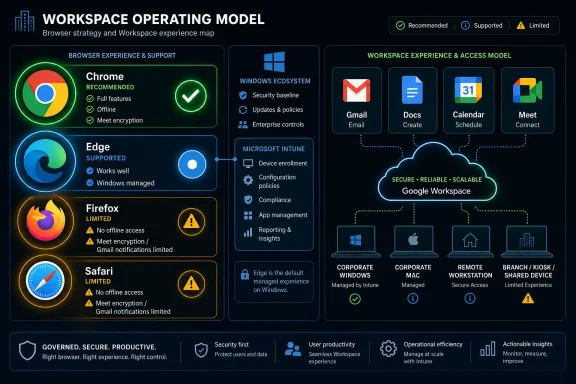
But the details turn a compatibility list into a hierarchy. Chrome is described as supporting all Google Workspace features and functionality. Firefox and Safari “work well,” but each has named exclusions. Edge is also described as working well, without the same specific feature carve-outs in the current browser support table.
That phrasing matters because enterprise software rarely breaks all at once. It erodes at the edge cases: the executive on a flight who expected offline access to a deck, the legal team that needs encryption behavior to match policy, the remote worker who misses a time-sensitive Gmail notification. Google’s list is not saying Firefox and Safari are unusable. It is saying they are not equivalent operational platforms for Workspace.
The distinction is sharper because Google Workspace is no longer just Gmail plus Docs. It is mail, storage, calendaring, meetings, collaboration, workflow glue, compliance tooling, identity-adjacent controls, and increasingly AI-assisted work. A browser that can open the app but cannot support key modes of work is supported in the narrow sense, not in the strategic one.
The practical result is that Chrome remains the only browser in Google’s own table with full Workspace support. It gets offline access to Gmail, Calendar, Docs, Sheets, and Slides. It gets the expected Meet client-side encryption path. It gets the complete notification and app behavior Google wants Workspace customers to experience.
For eligible Workspace customers, Google also ties support language directly to Chrome core functionality under the Workspace agreement. That is a quiet but meaningful enterprise differentiator. When something breaks in Chrome, customers can expect Google to own more of the troubleshooting surface than it will for a competing browser.
That does not mean Chrome is always the best browser for every organization. Some companies standardize on Edge because it is integrated with Windows, Microsoft 365, Intune, Defender, and Entra-centric management. Some users prefer Firefox for privacy reasons. Mac-heavy organizations often default to Safari for battery life, platform integration, and user familiarity.
But Google’s guidance makes the trade-off explicit. If Workspace is the productivity center of gravity, Chrome is the browser with the fewest caveats. Everything else is a negotiation.
The offline limitation is the easier one to understand in day-to-day terms. If a worker relies on Docs during flights, hotel Wi-Fi outages, field visits, classroom dead zones, or train commutes, Firefox is not the browser Google recommends for that job. The browser may handle the web apps perfectly when connected, but the fallback mode disappears.
The Meet encryption limitation is narrower but more consequential for certain organizations. Client-side encryption is not a casual consumer feature. It is aimed at customers with regulatory, confidentiality, sovereignty, or internal security requirements that go beyond standard transport and storage encryption. If a policy depends on that feature, Firefox is not just less convenient; it may be disqualified from that workflow.
This is where the compatibility discussion becomes uncomfortable. Firefox is one of the last major non-Chromium browser engines with meaningful desktop usage. Supporting it well is important for web diversity, privacy-minded users, and the health of the open web. Yet the Workspace reality is that Google’s richest experience is aligned with Chrome, and in some cases with Chromium-based browsers more broadly.
That is not the same as saying Google is intentionally sabotaging Firefox. Browser APIs, storage models, notification behavior, enterprise controls, and security architecture differ for real technical reasons. But users experience outcomes, not intent. If the app suite they use all day gives them more capability in Chrome, the market pressure is obvious.
Offline access is the headline limitation, but the Gmail notification gap may be the one that irritates users more often. A Mac user can live inside Safari all day and still be surprised that Workspace does not behave like a fully integrated work surface. Missed or delayed awareness of mail is not a glamorous compatibility issue, but it is exactly the kind that generates help-desk tickets and user workarounds.
Safari is also the browser most likely to be defended on platform grounds. Apple users often choose it because it is power efficient, deeply integrated into macOS and iOS, and aligned with Apple’s privacy posture. For personal browsing, those are strong reasons. For a Workspace-heavy enterprise, they become part of a managed exception list.
The result is a strange split-brain environment on Macs. Users may prefer Safari for general browsing, but IT may recommend Chrome for Workspace. That means two browsers, two sets of stored sessions, two notification models, and another place where users must remember which tool is “right” for which job.
This is especially awkward in education, media, design, and executive environments where Mac adoption is high but Google Workspace is also common. The browser that feels native to the device is not the browser that unlocks the full productivity suite. In 2026, that is less a technical surprise than an administrative nuisance that never quite goes away.
For Windows administrators, that matters. Edge is already built into Windows 10 and Windows 11, is Chromium-based, and is deeply manageable through Microsoft’s enterprise tooling. In organizations that standardize on Microsoft security, identity, and endpoint management but still use Google Workspace, Edge can be the pragmatic compromise.
This is a reversal from the old browser-war logic. Years ago, Google apps working best in Chrome and Microsoft apps working best in Microsoft browsers would have looked like another front in platform rivalry. Today, Edge’s Chromium foundation means Microsoft’s browser can often sit closer to Chrome compatibility while retaining Microsoft’s management and Windows integration advantages.
That does not make Edge identical to Chrome in every Google support scenario. Google’s own wording still reserves the clearest “all features and functionality” promise for Chrome, along with the Chrome-specific enterprise support statement. But Edge’s absence from the named Firefox and Safari exclusions gives Windows shops room to treat it as more than a second-class fallback.
The strategic lesson is that Chromium has become an enterprise compatibility layer. Chrome is Google’s preferred client, but Edge benefits from the same engine family while serving a different administrative ecosystem. For many WindowsForum readers, that may be the actual policy sweet spot: Chrome where Google support certainty matters, Edge where Windows manageability matters more.
The people most likely to need offline Workspace are often the least tolerant of failure: executives traveling between meetings, field staff working in unreliable networks, teachers in buildings with uneven connectivity, consultants on client sites, and employees in regions where broadband quality remains inconsistent. For them, offline Docs, Sheets, Slides, Gmail, and Calendar are not convenience features. They are continuity features.
That is why Google’s browser distinctions matter beyond the enthusiast debate over rendering engines. If a company tells users that Workspace is its productivity platform, it also has to tell them which browser preserves productivity when the network disappears. “Use whatever you like” is no longer a complete answer.
Offline support also affects disaster planning. During outages, VPN failures, campus network incidents, or travel disruptions, the browser can determine whether users keep working or wait. Administrators who treat browser support as a cosmetic standard may discover that their real business continuity plan depends on an unspoken Chrome assumption.
The more organizations move core work into cloud suites, the more offline behavior becomes a first-class operational requirement. The paradox is that the cloud productivity suite still needs a strong local client. In Google’s world, that client is effectively Chrome.
Google’s client-side encryption model is designed to give organizations more control over who can access sensitive content. In broad terms, the idea is that content is encrypted before it is stored or processed in Google’s cloud, with customer-controlled key access sitting outside Google’s default access path. That is a major selling point for regulated industries and security-conscious enterprises.
When browser support differs for that kind of feature, the browser becomes part of the compliance boundary. An administrator cannot simply say, “Workspace supports Firefox,” if a specific encrypted Meet workflow does not. The relevant question is not whether the homepage loads. It is whether the approved security control works in the approved user environment.
This is the broader direction of enterprise SaaS. Modern web apps are not just pages; they are distributed clients that use local storage, hardware acceleration, cryptographic APIs, notification systems, identity flows, device posture checks, and administrative policy hooks. The browser is the runtime. Treating it like a neutral window onto the internet is increasingly obsolete.
That creates a management burden. IT teams need browser policy, version control, extension governance, update enforcement, and user education. A supported browser that is two versions behind, blocking cookies, disabling JavaScript, or running inside a constrained virtual session may still create failures that look like Workspace problems but are really client environment problems.
That caveat lands directly in the middle of modern security architecture. Many organizations are trying to reduce endpoint risk by pushing apps into controlled sessions, isolating browsing, or centralizing access. Cloud productivity suites, meanwhile, increasingly assume a capable local browser with access to storage, notifications, media devices, identity state, and encryption functions.
The collision is predictable. A security team may prefer virtualized browsing. A collaboration team may need Meet, offline files, notifications, and smooth editing. A user just wants Gmail to work. When something fails, each vendor can plausibly point to another layer.
This is why administrators should not read Google’s browser support matrix as a simple procurement note. It is a test plan. If Workspace is accessed through remote sessions, app virtualization, browser isolation, locked-down kiosk environments, or nonstandard endpoint builds, the organization needs to validate the actual workflows users perform.
The risk is not merely that an app will refuse to open. Google notes that older or unsupported browsers may produce partial failures: calendars might be viewable but not editable, drawings or presentations may not display correctly, and some applications may not open at all. Partial failure is worse than clean failure because it invites users to improvise.
That sounds obvious until it meets privacy tooling, hardened browser baselines, aggressive extension policies, third-party cookie restrictions, content blockers, conditional access products, and well-meaning users following outdated security advice. The modern web app stack assumes active client-side execution and state. Workspace is no exception.
For administrators, this means browser hardening cannot be separated from SaaS testing. A policy that looks defensible in isolation may break Drive previews, Docs editing, Calendar behavior, embedded Meet flows, sign-in persistence, or encryption workflows. The right question is not whether cookies and JavaScript are good or bad in the abstract. It is which controls can be tightened without breaking approved work.
This is especially important in mixed-browser environments. Chrome, Edge, Firefox, and Safari may expose different cookie controls, tracking protections, notification prompts, storage behaviors, and enterprise policy mechanisms. A Workspace configuration that works in one browser can fail in another even when both are technically supported.
The help-desk symptom is usually vague: “Google is broken.” The root cause may be a blocked script, a disabled cookie setting, a privacy extension, an outdated browser, or a managed profile misconfiguration. Browser choice determines how easy that problem is to diagnose and how much of the stack a vendor will help you own.
The native apps can integrate more cleanly with notifications, file handling, account switching, mobile operating system permissions, camera and microphone access, and offline behavior. They also give Google a more controlled environment than a mobile browser tab, especially on iOS where all browsers are constrained by Apple’s platform rules.
For users, that means the desktop browser debate does not transfer neatly to phones and tablets. A person may use Safari as the default browser on an iPhone, Chrome on a Windows desktop, and the Gmail or Docs app on mobile. From a management perspective, that is not inconsistency; it is the realistic client map.
The administrative challenge is to document that map clearly. If users are told only that Workspace supports Safari, some will assume browser access on every Apple device is the preferred path. Google’s guidance points the other way. On mobile, the app is the product experience Google wants users to have.
This also matters for support boundaries. Mobile browser quirks can be difficult to reproduce and harder to manage consistently across devices. Native apps give IT a cleaner baseline, especially when paired with mobile device management, managed app configuration, and account controls.
But the practical question for administrators is not whether browser favoritism feels fair. It is what they can rely on. Google’s documentation says Chrome has full support, Firefox and Safari have specific limitations, and Edge works well. That is the operational fact set IT must build around.
There is a difference between supported and preferred, and the Workspace matrix makes that difference visible. Google can truthfully say it supports multiple browsers while still making Chrome the browser where all roads are paved. That is not unique to Google. Microsoft’s cloud services have their own gravitational pull toward Edge, Windows, and Microsoft identity. Apple services are strongest inside Apple’s ecosystem.
The lesson is that the browser wars did not end. They became cloud-suite wars. Instead of arguing over which browser renders a static page correctly, vendors now compete over which browser best supports their productivity, identity, AI, security, and management features.
That shift is harder for users to see because the web looks universal until a feature is missing. The app opens. The inbox loads. The meeting starts. Then one day the offline document is not available, the notification never appears, or the encrypted meeting option does not behave as expected. That is when “works well” becomes a phrase administrators learn to parse carefully.
A sensible Workspace browser policy in 2026 should not necessarily ban every non-Chrome browser. That would be heavy-handed for many organizations and politically difficult in mixed-platform workplaces. But it should define a primary supported browser for Workspace workflows and explain the known limitations of alternatives.
For Google-centric organizations, Chrome remains the simplest default. For Windows-first organizations that use Workspace, Edge deserves serious consideration as a managed standard, especially where Microsoft endpoint tooling is already in place. Firefox and Safari can remain available, but users should know that “available” does not mean feature-complete.
The policy should also distinguish between casual access and approved workflows. Reading mail in Safari may be fine. Running regulated client-side encrypted Meet sessions in Firefox is not, according to Google’s stated limitations. Editing a Doc online in Safari may work. Depending on offline access before travel is a Chrome-first expectation.
The worst policy is silence. If IT does not define the supported path, users will create their own browser workflows and blame the service when the edge cases fail. A two-paragraph browser standard in the internal knowledge base can prevent weeks of recurring confusion.
What Google’s guidance makes impossible is the old fiction that browser choice is just taste. In 2026, the browser is part of the productivity stack, the security model, and the support contract. Google has not made Firefox, Safari, or Edge irrelevant to Workspace, but it has made Chrome the reference implementation for the full experience. For administrators, the next step is not outrage or resignation; it is policy, testing, and plain-language user guidance before the missing feature becomes tomorrow’s ticket queue.
 Google’s Compatibility Matrix Is Really a Hierarchy
Google’s browser support page reads, at first glance, like a reassurance. The big four browsers are present: Chrome, Firefox, Safari, and Microsoft Edge. For administrators who have spent years fighting legacy browser lock-in, that looks like healthy modern web compatibility.But the details turn a compatibility list into a hierarchy. Chrome is described as supporting all Google Workspace features and functionality. Firefox and Safari “work well,” but each has named exclusions. Edge is also described as working well, without the same specific feature carve-outs in the current browser support table.
That phrasing matters because enterprise software rarely breaks all at once. It erodes at the edge cases: the executive on a flight who expected offline access to a deck, the legal team that needs encryption behavior to match policy, the remote worker who misses a time-sensitive Gmail notification. Google’s list is not saying Firefox and Safari are unusable. It is saying they are not equivalent operational platforms for Workspace.
The distinction is sharper because Google Workspace is no longer just Gmail plus Docs. It is mail, storage, calendaring, meetings, collaboration, workflow glue, compliance tooling, identity-adjacent controls, and increasingly AI-assisted work. A browser that can open the app but cannot support key modes of work is supported in the narrow sense, not in the strategic one.
Chrome Is the Default Because Google Can Optimize the Whole Stack
Chrome’s advantage is not mysterious. Google controls the browser, the productivity suite, much of the web performance machinery around it, and the enterprise management story that surrounds Chrome in business environments. That gives Google a clean path to ship features that depend on browser APIs, storage behavior, encryption flows, notifications, and managed policy.The practical result is that Chrome remains the only browser in Google’s own table with full Workspace support. It gets offline access to Gmail, Calendar, Docs, Sheets, and Slides. It gets the expected Meet client-side encryption path. It gets the complete notification and app behavior Google wants Workspace customers to experience.
For eligible Workspace customers, Google also ties support language directly to Chrome core functionality under the Workspace agreement. That is a quiet but meaningful enterprise differentiator. When something breaks in Chrome, customers can expect Google to own more of the troubleshooting surface than it will for a competing browser.
That does not mean Chrome is always the best browser for every organization. Some companies standardize on Edge because it is integrated with Windows, Microsoft 365, Intune, Defender, and Entra-centric management. Some users prefer Firefox for privacy reasons. Mac-heavy organizations often default to Safari for battery life, platform integration, and user familiarity.
But Google’s guidance makes the trade-off explicit. If Workspace is the productivity center of gravity, Chrome is the browser with the fewest caveats. Everything else is a negotiation.
Firefox Pays the Price for Not Being Chromium
Firefox’s Workspace limitations are the most revealing because they show where “modern browser support” still has boundaries. According to Google’s current guidance, Firefox users lose offline access to Gmail, Google Calendar, Google Docs, Sheets, and Slides. They also lose client-side encryption in Google Meet.The offline limitation is the easier one to understand in day-to-day terms. If a worker relies on Docs during flights, hotel Wi-Fi outages, field visits, classroom dead zones, or train commutes, Firefox is not the browser Google recommends for that job. The browser may handle the web apps perfectly when connected, but the fallback mode disappears.
The Meet encryption limitation is narrower but more consequential for certain organizations. Client-side encryption is not a casual consumer feature. It is aimed at customers with regulatory, confidentiality, sovereignty, or internal security requirements that go beyond standard transport and storage encryption. If a policy depends on that feature, Firefox is not just less convenient; it may be disqualified from that workflow.
This is where the compatibility discussion becomes uncomfortable. Firefox is one of the last major non-Chromium browser engines with meaningful desktop usage. Supporting it well is important for web diversity, privacy-minded users, and the health of the open web. Yet the Workspace reality is that Google’s richest experience is aligned with Chrome, and in some cases with Chromium-based browsers more broadly.
That is not the same as saying Google is intentionally sabotaging Firefox. Browser APIs, storage models, notification behavior, enterprise controls, and security architecture differ for real technical reasons. But users experience outcomes, not intent. If the app suite they use all day gives them more capability in Chrome, the market pressure is obvious.
Safari’s Problem Is Not Access, It Is Workflow Friction
Safari’s exclusions are different and very Apple-specific in their impact. Google says Safari users do not get offline access to Gmail, Calendar, Docs, Sheets, or Slides. They also do not get desktop notifications in Gmail.Offline access is the headline limitation, but the Gmail notification gap may be the one that irritates users more often. A Mac user can live inside Safari all day and still be surprised that Workspace does not behave like a fully integrated work surface. Missed or delayed awareness of mail is not a glamorous compatibility issue, but it is exactly the kind that generates help-desk tickets and user workarounds.
Safari is also the browser most likely to be defended on platform grounds. Apple users often choose it because it is power efficient, deeply integrated into macOS and iOS, and aligned with Apple’s privacy posture. For personal browsing, those are strong reasons. For a Workspace-heavy enterprise, they become part of a managed exception list.
The result is a strange split-brain environment on Macs. Users may prefer Safari for general browsing, but IT may recommend Chrome for Workspace. That means two browsers, two sets of stored sessions, two notification models, and another place where users must remember which tool is “right” for which job.
This is especially awkward in education, media, design, and executive environments where Mac adoption is high but Google Workspace is also common. The browser that feels native to the device is not the browser that unlocks the full productivity suite. In 2026, that is less a technical surprise than an administrative nuisance that never quite goes away.
Edge Has Become the Quiet Winner for Windows Shops
The most interesting line in Google’s current guidance may be the least dramatic one: Microsoft Edge works well with Google Workspace. Unlike Firefox and Safari, the support table does not attach the same named exclusions to Edge.For Windows administrators, that matters. Edge is already built into Windows 10 and Windows 11, is Chromium-based, and is deeply manageable through Microsoft’s enterprise tooling. In organizations that standardize on Microsoft security, identity, and endpoint management but still use Google Workspace, Edge can be the pragmatic compromise.
This is a reversal from the old browser-war logic. Years ago, Google apps working best in Chrome and Microsoft apps working best in Microsoft browsers would have looked like another front in platform rivalry. Today, Edge’s Chromium foundation means Microsoft’s browser can often sit closer to Chrome compatibility while retaining Microsoft’s management and Windows integration advantages.
That does not make Edge identical to Chrome in every Google support scenario. Google’s own wording still reserves the clearest “all features and functionality” promise for Chrome, along with the Chrome-specific enterprise support statement. But Edge’s absence from the named Firefox and Safari exclusions gives Windows shops room to treat it as more than a second-class fallback.
The strategic lesson is that Chromium has become an enterprise compatibility layer. Chrome is Google’s preferred client, but Edge benefits from the same engine family while serving a different administrative ecosystem. For many WindowsForum readers, that may be the actual policy sweet spot: Chrome where Google support certainty matters, Edge where Windows manageability matters more.
Offline Access Is the Feature That Turns Preference Into Policy
Offline access sounds like a relic until the moment someone needs it. In a world of fiber, 5G, home broadband, and office Wi-Fi, it is easy to assume cloud apps are always reachable. Hybrid work has proved the opposite.The people most likely to need offline Workspace are often the least tolerant of failure: executives traveling between meetings, field staff working in unreliable networks, teachers in buildings with uneven connectivity, consultants on client sites, and employees in regions where broadband quality remains inconsistent. For them, offline Docs, Sheets, Slides, Gmail, and Calendar are not convenience features. They are continuity features.
That is why Google’s browser distinctions matter beyond the enthusiast debate over rendering engines. If a company tells users that Workspace is its productivity platform, it also has to tell them which browser preserves productivity when the network disappears. “Use whatever you like” is no longer a complete answer.
Offline support also affects disaster planning. During outages, VPN failures, campus network incidents, or travel disruptions, the browser can determine whether users keep working or wait. Administrators who treat browser support as a cosmetic standard may discover that their real business continuity plan depends on an unspoken Chrome assumption.
The more organizations move core work into cloud suites, the more offline behavior becomes a first-class operational requirement. The paradox is that the cloud productivity suite still needs a strong local client. In Google’s world, that client is effectively Chrome.
Security Features Are Where Browser Neutrality Gets Expensive
Client-side encryption is not a mass-market productivity feature, but it is a critical signal. It shows that advanced Workspace capabilities increasingly depend on specific browser behavior. Encryption that happens in the client is only as dependable as the client environment allows it to be.Google’s client-side encryption model is designed to give organizations more control over who can access sensitive content. In broad terms, the idea is that content is encrypted before it is stored or processed in Google’s cloud, with customer-controlled key access sitting outside Google’s default access path. That is a major selling point for regulated industries and security-conscious enterprises.
When browser support differs for that kind of feature, the browser becomes part of the compliance boundary. An administrator cannot simply say, “Workspace supports Firefox,” if a specific encrypted Meet workflow does not. The relevant question is not whether the homepage loads. It is whether the approved security control works in the approved user environment.
This is the broader direction of enterprise SaaS. Modern web apps are not just pages; they are distributed clients that use local storage, hardware acceleration, cryptographic APIs, notification systems, identity flows, device posture checks, and administrative policy hooks. The browser is the runtime. Treating it like a neutral window onto the internet is increasingly obsolete.
That creates a management burden. IT teams need browser policy, version control, extension governance, update enforcement, and user education. A supported browser that is two versions behind, blocking cookies, disabling JavaScript, or running inside a constrained virtual session may still create failures that look like Workspace problems but are really client environment problems.
Virtual Browsers Remain the Compatibility Trap Nobody Wants to Own
Google’s warning about virtual browser environments is easy to skim past, but it matters for enterprises that use Citrix, VMware, remote desktops, secure browser isolation, or other virtualized access models. Google recommends using a supported browser on a local machine for the best Workspace experience because virtualized environments may not expose the full range of browser capabilities.That caveat lands directly in the middle of modern security architecture. Many organizations are trying to reduce endpoint risk by pushing apps into controlled sessions, isolating browsing, or centralizing access. Cloud productivity suites, meanwhile, increasingly assume a capable local browser with access to storage, notifications, media devices, identity state, and encryption functions.
The collision is predictable. A security team may prefer virtualized browsing. A collaboration team may need Meet, offline files, notifications, and smooth editing. A user just wants Gmail to work. When something fails, each vendor can plausibly point to another layer.
This is why administrators should not read Google’s browser support matrix as a simple procurement note. It is a test plan. If Workspace is accessed through remote sessions, app virtualization, browser isolation, locked-down kiosk environments, or nonstandard endpoint builds, the organization needs to validate the actual workflows users perform.
The risk is not merely that an app will refuse to open. Google notes that older or unsupported browsers may produce partial failures: calendars might be viewable but not editable, drawings or presentations may not display correctly, and some applications may not open at all. Partial failure is worse than clean failure because it invites users to improvise.
Cookies and JavaScript Are Still the Boring Controls That Break Everything
The modern enterprise browser is heavily managed, and that is where the simplest requirements become operationally significant. Google Workspace requires cookies and JavaScript to be enabled. Disable either, and core applications will not function correctly.That sounds obvious until it meets privacy tooling, hardened browser baselines, aggressive extension policies, third-party cookie restrictions, content blockers, conditional access products, and well-meaning users following outdated security advice. The modern web app stack assumes active client-side execution and state. Workspace is no exception.
For administrators, this means browser hardening cannot be separated from SaaS testing. A policy that looks defensible in isolation may break Drive previews, Docs editing, Calendar behavior, embedded Meet flows, sign-in persistence, or encryption workflows. The right question is not whether cookies and JavaScript are good or bad in the abstract. It is which controls can be tightened without breaking approved work.
This is especially important in mixed-browser environments. Chrome, Edge, Firefox, and Safari may expose different cookie controls, tracking protections, notification prompts, storage behaviors, and enterprise policy mechanisms. A Workspace configuration that works in one browser can fail in another even when both are technically supported.
The help-desk symptom is usually vague: “Google is broken.” The root cause may be a blocked script, a disabled cookie setting, a privacy extension, an outdated browser, or a managed profile misconfiguration. Browser choice determines how easy that problem is to diagnose and how much of the stack a vendor will help you own.
Mobile Workspace Is an App Story, Not a Browser Story
On mobile, Google’s advice is refreshingly direct: use the dedicated Workspace apps for Android, iPhone, and iPad rather than relying on a mobile browser. That recommendation reflects the reality that mobile browsers are not the primary productivity clients for serious Workspace use.The native apps can integrate more cleanly with notifications, file handling, account switching, mobile operating system permissions, camera and microphone access, and offline behavior. They also give Google a more controlled environment than a mobile browser tab, especially on iOS where all browsers are constrained by Apple’s platform rules.
For users, that means the desktop browser debate does not transfer neatly to phones and tablets. A person may use Safari as the default browser on an iPhone, Chrome on a Windows desktop, and the Gmail or Docs app on mobile. From a management perspective, that is not inconsistency; it is the realistic client map.
The administrative challenge is to document that map clearly. If users are told only that Workspace supports Safari, some will assume browser access on every Apple device is the preferred path. Google’s guidance points the other way. On mobile, the app is the product experience Google wants users to have.
This also matters for support boundaries. Mobile browser quirks can be difficult to reproduce and harder to manage consistently across devices. Native apps give IT a cleaner baseline, especially when paired with mobile device management, managed app configuration, and account controls.
The Antitrust Shadow Does Not Change the Product Reality
It is impossible to discuss Google recommending Chrome for Workspace without acknowledging the platform politics. Google owns the suite and the browser. Chrome has enormous market share. Workspace competes with Microsoft 365, while Chrome competes with Edge, Firefox, and Safari. Every compatibility distinction is therefore read through a competitive lens.But the practical question for administrators is not whether browser favoritism feels fair. It is what they can rely on. Google’s documentation says Chrome has full support, Firefox and Safari have specific limitations, and Edge works well. That is the operational fact set IT must build around.
There is a difference between supported and preferred, and the Workspace matrix makes that difference visible. Google can truthfully say it supports multiple browsers while still making Chrome the browser where all roads are paved. That is not unique to Google. Microsoft’s cloud services have their own gravitational pull toward Edge, Windows, and Microsoft identity. Apple services are strongest inside Apple’s ecosystem.
The lesson is that the browser wars did not end. They became cloud-suite wars. Instead of arguing over which browser renders a static page correctly, vendors now compete over which browser best supports their productivity, identity, AI, security, and management features.
That shift is harder for users to see because the web looks universal until a feature is missing. The app opens. The inbox loads. The meeting starts. Then one day the offline document is not available, the notification never appears, or the encrypted meeting option does not behave as expected. That is when “works well” becomes a phrase administrators learn to parse carefully.
IT Should Stop Pretending Browser Choice Is Personal
The user-choice model still has value. People have legitimate browser preferences, and power users often know exactly why they prefer Firefox, Safari, Chrome, or Edge. But in managed environments, browser choice intersects with compliance, supportability, training, incident response, and continuity.A sensible Workspace browser policy in 2026 should not necessarily ban every non-Chrome browser. That would be heavy-handed for many organizations and politically difficult in mixed-platform workplaces. But it should define a primary supported browser for Workspace workflows and explain the known limitations of alternatives.
For Google-centric organizations, Chrome remains the simplest default. For Windows-first organizations that use Workspace, Edge deserves serious consideration as a managed standard, especially where Microsoft endpoint tooling is already in place. Firefox and Safari can remain available, but users should know that “available” does not mean feature-complete.
The policy should also distinguish between casual access and approved workflows. Reading mail in Safari may be fine. Running regulated client-side encrypted Meet sessions in Firefox is not, according to Google’s stated limitations. Editing a Doc online in Safari may work. Depending on offline access before travel is a Chrome-first expectation.
The worst policy is silence. If IT does not define the supported path, users will create their own browser workflows and blame the service when the edge cases fail. A two-paragraph browser standard in the internal knowledge base can prevent weeks of recurring confusion.
The Workspace Browser Decision Now Belongs in the Admin Playbook
The concrete lesson from Google’s 2026 guidance is not that every user must immediately switch to Chrome. It is that Workspace administrators need to treat browsers as managed clients with different capabilities, not interchangeable shells around the same web apps.- Chrome is the only browser Google identifies as supporting all Google Workspace features and functionality.
- Firefox works for many Workspace tasks, but Google lists no offline access for core apps and no client-side encryption in Meet.
- Safari works for many Workspace tasks, but Google lists no offline access for core apps and no Gmail desktop notifications.
- Microsoft Edge is listed as working well with Workspace and currently avoids the named Firefox and Safari exclusions in Google’s browser support table.
- Cookies and JavaScript must remain enabled, so privacy and hardening policies need real Workspace testing before deployment.
- Mobile users should generally use Google’s native Workspace apps rather than treating a phone or tablet browser as the primary client.
What Google’s guidance makes impossible is the old fiction that browser choice is just taste. In 2026, the browser is part of the productivity stack, the security model, and the support contract. Google has not made Firefox, Safari, or Edge irrelevant to Workspace, but it has made Chrome the reference implementation for the full experience. For administrators, the next step is not outrage or resignation; it is policy, testing, and plain-language user guidance before the missing feature becomes tomorrow’s ticket queue.
References
- Primary source: Techgenyz
Published: 2026-06-22T12:52:08.117469
Google Workspace Supported Browsers: What Works, What Doesn't, and Why It Matters in 2026
Google Workspace supports Chrome, Firefox, Safari, and Edge, but only Chrome delivers full offline access, Meet encryption, and complete features.techgenyz.com - Official source: support.google.com
- Official source: knowledge.workspace.google.com
Google Workspace 支持的浏览器 | Support & troubleshooting | Google Workspace Help
 knowledge.workspace.google.com
- Official source: developers.google.com
Supported platforms | Gmail | Google for Developers
 developers.google.com
- Official source: services.google.com
- Related coverage: insight.com
- Related coverage: groupmgmt.com
