

Enterprise collaboration platforms and routine IT updates are no longer just operational chores — they now shape the way organizations govern data, manage risk, and enforce compliance across a distributed workforce.
The rise of unified communications and collaboration tools such as Microsoft Teams has remade workplace communication: chat, channels, meetings, screen sharing and file collaboration have replaced many private emails and in‑person conversations. This shift delivers clear productivity gains — faster decision cycles, easier co‑authoring, and seamless hybrid teamwork — but it also spreads information far beyond traditional guarded silos. The result: governance, legal discovery, regulatory compliance, and security controls must adapt to new information flows without injecting bureaucratic friction into collaboration.
This is not theoretical. Enterprises now use administrative telemetry and policy enforcement to track messaging volumes, meeting participation, call patterns and device posture — turning routine IT updates and endpoint management controls into first‑order governance levers. These monitoring and enforcement mechanisms are increasingly embedded in the Microsoft stack (Teams, Microsoft Purview, Intune, Microsoft Entra/Entra ID), and organizations must decide how to use them responsibly. The tradeoff is clear: governance that preserves collaboration versus surveillance that destroys trust. The following sections explain how modern controls work, the benefits and risks they bring, and practical guidance for IT, legal, and security teams. updates now equal governance changes
Practical note: such protections are a helpful layer, but they are not absolute — sophisticated adversaries could still exfiltrate information (photographing screens with external devices, for example). Feature rollout planning should therefore be accompanied by policy, user training, and layered technical controls (DLP, Rights Management, conditional access).
But two truths remain:
<!-- Article ends here -->
Source: TechTarget Routine IT updates now shape enterprise governance | TechTarget
 Background / Overview
The rise of unified communications and collaboration tools such as Microsoft Teams has remade workplace communication: chat, channels, meetings, screen sharing and file collaboration have replaced many private emails and in‑person conversations. This shift delivers clear productivity gains — faster decision cycles, easier co‑authoring, and seamless hybrid teamwork — but it also spreads information far beyond traditional guarded silos. The result: governance, legal discovery, regulatory compliance, and security controls must adapt to new information flows without injecting bureaucratic friction into collaboration.This is not theoretical. Enterprises now use administrative telemetry and policy enforcement to track messaging volumes, meeting participation, call patterns and device posture — turning routine IT updates and endpoint management controls into first‑order governance levers. These monitoring and enforcement mechanisms are increasingly embedded in the Microsoft stack (Teams, Microsoft Purview, Intune, Microsoft Entra/Entra ID), and organizations must decide how to use them responsibly. The tradeoff is clear: governance that preserves collaboration versus surveillance that destroys trust. The following sections explain how modern controls work, the benefits and risks they bring, and practical guidance for IT, legal, and security teams. updates now equal governance changes
From patching to policy
Historically, routine updates — OS patches, software releases, and configuration changes — were primarily a security and reliability function. Today, update cycles and device policies also determine what data can be accessed, who can join sensitive meetings, and which clients can screenshot protected windows. When a collaboration platform changes behavior (for example, introducing a prevent screen capture control), that update becomes a governance mechanism, not just a feature release. Administrators must therefore treat update planning as a governance exercise: test controls, validate compliance impacts, and communicate changes to stakeholders. Evidence of this shift appears repeatedly in enterprise admin reporting and community conversations about Teams and Intune feature rollouts.Information flat and persistent channels turn ephemeral conversations into searchable, auditable records.
- Meetings now include screen sharing, file co‑editing, transcripts and recordings — all of which may be relevant in legal discovery.
- Endpoint telemetry (device type, OS version, biometric status) produces signals that feed conditional access decisions.
The technical building blocks: identity, device pol access
Identity is the primary key
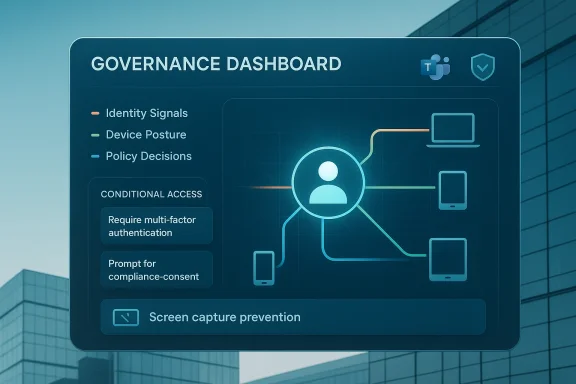
Modern access models place identity at the center. Organizations authenticate users via identity providers such as Microsoft Entra ID (formerly Azure AD) and map entitlements to roles and groups. These identity systems are the primary record of who did what and when, and they feed logging, investigation and legal processes. Microsoft’s conditional access engine evaluates identity signals as the first input when enforcing access decisions.Device posture and Intune compliance
Device posture — the health of the endpoint — is the second critical signal. Common posture checks include:- OS and patch level
- Disk encryption status
- Jailbreak/root detection
- Secure Boot and firmware trust status
- Endpoint security agent presence
Conditional access: layered enforcement in practice
Conditional access takes identity and device posture together and applies policy rules. Typical behaviors include:- Compliant device + trusted location = full access
- Non‑compliant device = limited access or block
- Unknown device = require MFA or step‑up authentication
Monitoring collaboration platforms responsibly
What administrators can monitor
Modern collaboration platforms expose a variety of administrative signals:- Number and timing of messages sent
- Meeting participation and join/leave times
- Screensharing and control transfer events
- File upload and sharing activity
- Device types and client versions used to connect
Governance vs. surveillance: practical controls
To avoid the perception of surveillance while still enabling governance, enterprises should:- Use role‑based administrative access (RBAC) to limit who can view sensitive logs.
- Anonymize or pseudonymize data where possible for trend analysis (e.g., message volume by team, without user identifiers).
- Configure alerts to flag policy violations rather than inspect all messages in real time.
- Document retention and monitoring policies transparently in employee handbooks and privacy notices.
Recent platform-level features that matter for governance
Prevent Screen Capture in Teams
In July 2025 Microsoft added a Prevent Screen Capture control to Teams meetings for supported clients, primarily to block unauthorized screenshots of sensitive meeting content. When enforced, the meeting window blanks (or otherwise stops the screen capture mechanism) on supported operating systems and clients, providing an evidence‑free way to reduce accidental exl content during live collaboration. This feature must be supported both on the client and the device’s OS/firmware level for reliable enforcement. Multiple independent reports and product roadmap notes confirm the feature and its audit/logging integrations.Practical note: such protections are a helpful layer, but they are not absolute — sophisticated adversaries could still exfiltrate information (photographing screens with external devices, for example). Feature rollout planning should therefore be accompanied by policy, user training, and layered technical controls (DLP, Rights Management, conditional access).
Enhanced audit logging for meeting activity
Teams’ expanded audit logs capture meeting participant details and specific activities such as when someone starts screensharing, who gave remote control, and timestamps of those events. These logs flow into Microsoft Purview’s search tools, enabling compliance teams to run focused investigations without broad user surveillance. This fills a long‑standing gap for legal and security teams that previously lacked meeting‑level detail for investigations.Intune: Secure Boot, hotpatching and reporting
Intune and Windows Autopatch have grown beyond simple policy distribution. Recent admin features surface firmware‑level signals such as Secure Boot status and certificate readiness, enabling IT to tie hardware trust into compliance decisions. Intune also now defaults certain hotpatching behaviors for Windows update policies, changing how quickly security fixes arrive on managed devices. These platform changes mean patch planning is now an operational and governance conversation with implications for compliance reporting and incident response.Strengths: what modern governance gets right
- Signal richness: Identity + device + behavior = better, context‑aware access decisions. Conditional access powered by device posture reduces over‑reliance on passwords and blanket network trust.
- Auditability: Enhanced logs for meetings, screen sharing and control transfers close investigative blind spots and provide defensible records for legal holds.
- Automation of enforcement: MDM and endpoint compliance sysremediation (e.g., block access for non‑compliant devices) which scales far better than manual processes.
- Reduced friction when designed well: When policies are precise and transparent, they can protect data without creating repeated user friction (e.g., requiring MFA only when risk signals are elevated).
Risks, blind spots and governance traps
1) Overreach and erosion of trust
Heavy‑handed monitoring or opaque policy enforcement damages morale and can create chilling effects on communication. If employees believe they’re under constant surveillance, collaboration will suffer. Governance programs must therefore be accompanied by transparent policies and minimal necessary access to logs. This is as much a cultural risk as a technical one.2) False positives and policy brittleness
Device posture checks can misfire: partial updates, flaky telemetry, or co‑management states (Intune + Configuration Manager) sometimes report noncompliance that is not actionable. False positives can block legitimate work and generate helpdesk overload. Admins must design user journeys for remediation and roll out policies in staged ways to avoid operational disruption. Industry forums and admin communities have long discussed these edge cases with Intune deployments.3) Partial enforcement and platform gaps
Client‑side features such as screen capture prevention are effective only on supported clients and OS versions. Unsupported endpoints, BYOD scenarios, and external participants can remain weak links. Enterprise controls must account for heterogeneous environments and prioritize protections where they matter most (sensitive projects, regulated data).4) Legal complexity and cross‑border data flows
Recording and auditing collaborative content intersects with privacy law, employment law and sectoral regulations. Where data crosses jurisdictions, retention and disclosure obligations can conflict. Governance teams must involve legal early and map where collaboration data lives, how long it’s retained, and who can access it. External guidance from national agencies and insider‑threat frameworks adds additional constraints.5) Insider risk vs. legitimate investigation
Monitoring tools can help detect insider threat behaviors, but they must be scoped to avoid discriminatory or invasive practices. Use case definition (investigation, eDiscovery, compliance reporting) must drive data collection and retention policies — and oversight bodies (privacy officer, legal counsel) should be involved in access approvals.Operational playbook: how to implement governance without killing collaboration
1. Map data and use cases first
- Inventory collaboration workloads (teams, channels, recordings, meeting types).
- Classify sensitive data and define which meeting contexts require elevated protections.
- Identify regulatory obligations that affect retention, disclosure and auditability.
2. Create layered policies (identity → device → application)
- Enforce strong identity hygiene (passwordless where possible, MFA for high‑privilege roles).
- Define Intune compliance policies with staged enforcement (notify → remediate → restrict).
- Apply conditional access policies that only step up authentication or block access when necessary.
3. Use RBAC and process gates for logs and alerts
- Limit audit log access via RBAC.
- Require documented justification and approval for deep investigations.
- Automate risk scoring and only escalate exceptions for human review when thresholds are crossed.
4. Test updates in real‑world pilots
Run feature and update pilots that include end users, legal and HR. This reduces the chance that a patch or feature inadvertently impairs workflows or creates legal exposure.5. Train users and communicate transparently
Explain why monitoring exists, what is logged, and how to remediate noncompliance. Clear communication turns governance from a punitive control into a shared protection strategy.6. Monitor policy health and tune for false positives
Use compliance reporting (Intune data warehouse, Windows Autopatch CVE reporting) to track trends and adjust policies to reduce helpdesk overhead. Community signals and admin forums are valuable early warning systems for platform quirks.Realistic expectations: what these tools will and won’t do
- They will significantly reduce accidental data leaks during meetings and improve auditability for investigations.
- They will not eliminate every insider risk or stop determined exfiltration methods.
- They can disrupt work if deployed without adequate staging, remediation pathways, and user education.
- They will shift compliance tasks earlier into the update lifecycle; update planning must now include legal and compliance review.
Measuring success: KPIs that align governance with business outcomes
- Mean time to remediate non‑compliant device (MTTR for compliance).
- False positive rate for compliance‑driven access denials.
- Number and severity of data leakage incidents attributable to collaboration tools.
- Time to produce meeting/activity logs for legal holds or investigations.
- Employee sentiment scores related to privacy/trust post‑deployment.
Final analysis and recommendations
The modern enterprise must treat routine IT updates and collaboration platform features as governance instruments, not mere operational minutiae. Microsoft’s evolving toolset — richer Teams audit logs, screen capture prevention, Intune’s hardware trust visibility, and Entra/conditional access policy logic — gives organizations the technical means to manage risk across identity, devices, and collaborative content. These features convert platform updates into governance levers that can reduce insider risk and help satisfy regulatory demands when deployed thoughtfully.But two truths remain:
- Technology alone will not fix governance. Policies, legal review, user transparency, and measured rollouts matter as much as product capabilities.
- Overreach and brittle enforcement will backfire. Design monitoring to be targeted, role‑based, and privacy‑conscious.
- Add legal and privacy to update and feature review cycles for collaboration tools.
- Pilot Teams’ meeting protection and audit features with high‑risk teams first.
- Harden identity (MFA/passwordless) and deploy conditional access policies that are measured and reversible.
- Use Intune’s compliance reporting to create auditable, defensible compliance baselines and remediation playbooks.
- Maintain communication plans that explain monitoring and remediation to the workforce.
<!-- Article ends here -->
Source: TechTarget Routine IT updates now shape enterprise governance | TechTarget
