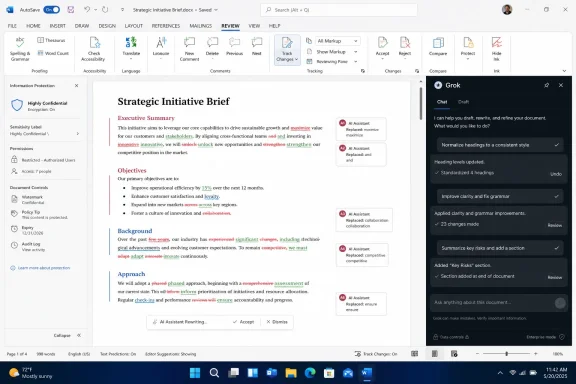
On June 18, 2026, xAI launched Grok for Microsoft Word as an official Microsoft 365 add-in that lets users draft and edit documents from a side panel while drawing on Grok’s web-connected research tools and its X-aware summarization pitch inside Word. The feature matters less because another chatbot can now rewrite a paragraph, and more because xAI is trying to move Grok from the browser tab into the document supply chain. If it works, Word becomes not just a place where knowledge workers write, but a place where live outside information is continuously pulled, compressed, visualized, and negotiated. That is useful, risky, and very much the next battlefield for workplace AI.
The Grok Word plugin is a familiar product move with unusually sharp implications. AI vendors have spent the past three years teaching users to leave their work, open a chatbot, paste in context, copy the answer, and then return to the file where the real work happens. xAI’s plugin attacks that friction directly by placing Grok beside the document instead of asking the document to orbit Grok.
That sounds like a small interface change. It is not. In productivity software, the winning assistant is often the one closest to the cursor, because the cursor is where intent becomes work. If Grok can sit inside Word while a consultant drafts a client memo, a lawyer trims a brief, or a marketer assembles a campaign plan, it has a chance to become part of the writing habit rather than another AI destination.
The official xAI positioning emphasizes drafting, restructuring, tightening, and keeping edits in the document. The user-submitted launch material goes further, describing research summaries from the web and X, plus diagram generation inside Word. That distinction is important: the public product page clearly frames Grok for Word as an add-in panel for writing and editing, while the broader launch narrative pitches a more ambitious research-and-visualization workflow.
This is the hinge of the story. A writing assistant inside Word is convenient; a live research assistant inside Word is strategic. The former competes with grammar tools and Copilot’s document features. The latter competes with the way analysts, journalists, policy teams, and executives gather evidence before a document ever becomes a document.
That matters for admins because this is not the same thing as Microsoft blessing Grok as a native Word feature. It is an add-in, and add-ins live in the messy middle between user choice, tenant policy, marketplace approval, and enterprise deployment controls. In well-managed environments, that means IT gets a say. In looser environments, it means another AI tool can appear where sensitive drafts are born.
For xAI, the add-in route is fast and pragmatic. It does not need to displace Copilot from the ribbon or persuade Microsoft to re-architect Word around Grok. It only needs enough users to decide that Grok’s voice, web awareness, or connection to X is better suited to their work than Microsoft’s built-in assistant.
For Microsoft, this is both validation and irritation. The Office add-in ecosystem proves the durability of Word as the default container for professional writing. But every high-profile third-party AI assistant inside Word also reminds users that Copilot is not the only possible intelligence layer for Microsoft 365.
That is exactly the kind of workflow that consumes hours in professional writing. A policy analyst collects recent statements, a financial researcher tracks market chatter, a communications team watches public reaction, and a product manager wants the latest competitive framing before sending a planning memo. If Grok can compress that research without forcing constant context-switching, the productivity case is obvious.
But this is also where the plugin moves from helpful tool to trust problem. Live information is messy. X is fast, noisy, and frequently useful precisely because it contains early signals before they are verified. The web is broader but not automatically cleaner. A summary engine that blends those sources into polished Word-ready prose can make uncertain material feel settled.
The danger is not merely hallucination in the classic chatbot sense. The danger is premature authority. A paragraph that arrives formatted, confident, and grammatically clean inside a business document can outrun the evidence behind it. That is especially true when source attribution is “handled internally,” as the launch summary puts it. Internal attribution may help the interface stay tidy, but professionals still need inspectable evidence trails when a claim will influence a client, regulator, investor, or court.
The better version of this product would make verification easier, not just writing faster. It would show where claims came from, separate social chatter from primary sources, and make uncertainty visible before a user pastes a summary into a final document. Otherwise, Grok risks becoming a machine for laundering volatile inputs into boardroom prose.
This is not only about saving clicks. Diagrams are often where business writing becomes decision-making. A process map can expose who owns a workflow. A timeline can make a delay politically visible. A simple chart can turn a vague trend into something a manager can approve or challenge. If Grok can help users generate editable visuals at the point of writing, it moves deeper into the logic of the document.
There is a reason this feature belongs in Word rather than only in PowerPoint. Many professional documents are not slide decks: contracts, reports, research notes, internal policies, grant proposals, audit summaries, incident postmortems, and technical plans all live in Word. They still need visuals, but the visuals are often trapped in another application until someone manually imports them.
The practical question is how editable the results really are. A generated image of a flowchart is less useful than a diagram made of Word-native shapes or objects that can be revised, styled, and governed by document templates. If the plugin produces visuals that look good but behave like pasted screenshots, the feature will impress in demos and frustrate in production.
The competition is not just technical. Copilot’s pitch is organizational integration. It is close to Microsoft Graph, tenant identity, compliance posture, and the apps many companies already license. Grok’s pitch is different: speed, personality, web-connectedness, and the unique information stream of X. Those are not trivial differentiators, particularly for users who care about public discourse, breaking news, market sentiment, or fast-moving technical communities.
This creates a split that IT departments will recognize immediately. Microsoft will argue from governance. xAI will argue from capability and immediacy. Users will argue from whatever gets the document done by 5 p.m. The winning tool may depend less on benchmark scores than on whether the assistant understands the user’s context without creating a compliance headache.
There is also a branding problem hiding in plain sight. Grok is not a neutral enterprise name in the way “Copilot” tries to be. It carries Elon Musk, X, and xAI’s public reputation into the productivity suite. For some organizations, that will be an asset: edgy, current, plugged into the public internet. For others, it will be an avoidable procurement fight.
That is where the add-in story becomes more than packaging. A Word document is often where confidential material is first assembled before it is sanitized for public release. Draft strategy decks, legal analysis, HR investigations, acquisition memos, source-code documentation, and unreleased product plans all pass through Word. An AI panel that can “read what you point it at” needs strict boundaries.
Organizations should not assume that because an AI tool appears inside a Microsoft app, it inherits Microsoft’s full compliance envelope. Microsoft itself has drawn distinctions around third-party models and external processing in other AI contexts. Admins will want to know whether Grok processes prompts and document excerpts inside Microsoft-managed environments or xAI-managed systems, how data is retained, and whether enterprise opt-outs exist for training or service improvement.
The launch material gestures at enterprise controls, but the real test will be documentation, not marketing. Security teams will look for data processing terms, auditability, tenant-level deployment settings, sensitivity-label behavior, and whether the plugin respects restrictions on protected documents. Legal teams will ask what happens when Grok summarizes public X posts that later prove defamatory, misleading, copyrighted, or manipulated.
That sounds cautious because it is. AI add-ins are not just features; they are new egress paths. The more useful they become, the more sensitive the data they are invited to touch.
But the burden shifts. If Grok gives writers faster first drafts, editors and reviewers must become better at asking where claims came from. In many organizations, that job already falls through the cracks. AI-generated summaries can make the crack wider because they remove the visible messiness of research: the tabs, notes, conflicting articles, and half-formed caveats that normally remind humans what they do not yet know.
This is especially important for X-derived summaries. X can be a powerful discovery layer, particularly for real-time commentary and expert communities. It can also be a rumor amplifier. A professional document that uses X as an input needs to preserve the difference between “people are saying this,” “a credible expert argues this,” and “this has been verified by primary evidence.”
The best users will treat Grok as an accelerator, not an authority. They will ask it to produce outlines, alternatives, and candidate summaries, then verify the claims that matter. The worst users will paste fluent output into final documents because the prose sounds done. That divide will determine whether this plugin becomes a productivity gain or a quality-control tax.
The reality is more complicated. The tools are converging on similar visible features while diverging on trust models. One assistant may be better integrated with enterprise identity. Another may be better at long-form reasoning. Another may be more current because it leans on live web and social data. Another may be safer for regulated industries because its governance story is clearer.
Grok’s advantage, if it has one, is freshness. Its connection to X and xAI’s broader identity as a fast-moving model company gives it a plausible claim in workflows where the latest public conversation matters. Its disadvantage is the same thing viewed from the other side: freshness can be volatility, and volatility is not what every enterprise wants inside Word.
Microsoft’s advantage is incumbency. Copilot does not need to win every individual feature comparison if it remains the most administratively comfortable choice for organizations already paying for Microsoft 365. But incumbency is not invulnerability. If third-party assistants become meaningfully better at particular tasks, users will route around the default.
That is why Grok for Word should be read as part of a broader platform fight. AI companies do not want to be destinations. They want to be embedded in the work surfaces where decisions are made. Word remains one of the most valuable of those surfaces because it is where messy thinking becomes institutional memory.
That does not mean companies should ban them reflexively. In many environments, banning useful AI tools simply drives employees toward unmanaged browser workflows, personal accounts, and copy-paste habits that are harder to monitor. A governed Word add-in may be safer than a dozen unofficial web sessions.
But governance has to be explicit. Admins should decide which users can install AI add-ins, which documents can be processed, and what types of sources are acceptable for business use. They should also require training that explains the difference between AI-assisted drafting and verified research.
This is also a moment for procurement discipline. If xAI wants Grok to be taken seriously in enterprise productivity, it will need to compete not only on model quality but on boring documentation: retention, deletion, auditing, incident response, data residency, and contractual commitments. In enterprise software, boring is often the feature that closes the deal.
For decades, Word has been the final assembly tool. Users gathered evidence elsewhere, then brought the results into the document. AI reverses that flow. Now the document can summon the evidence, or at least a machine-generated interpretation of it, while the writer is still forming the argument.
That is powerful because writing and thinking are not separate tasks. A summary that appears mid-draft can change the structure of the document. A generated diagram can reveal a missing step in a process. A rewrite suggestion can make an argument clearer, or flatten it into corporate fog. The assistant is not just speeding up writing; it is shaping the thinking that writing exposes.
This is why the plugin’s value cannot be measured only in minutes saved. The deeper question is whether it improves judgment. A tool that saves an hour but introduces an unverified claim into an executive memo has not improved productivity. It has merely moved the cost downstream.
 xAI Is No Longer Content to Live in the Chat Window
The Grok Word plugin is a familiar product move with unusually sharp implications. AI vendors have spent the past three years teaching users to leave their work, open a chatbot, paste in context, copy the answer, and then return to the file where the real work happens. xAI’s plugin attacks that friction directly by placing Grok beside the document instead of asking the document to orbit Grok.That sounds like a small interface change. It is not. In productivity software, the winning assistant is often the one closest to the cursor, because the cursor is where intent becomes work. If Grok can sit inside Word while a consultant drafts a client memo, a lawyer trims a brief, or a marketer assembles a campaign plan, it has a chance to become part of the writing habit rather than another AI destination.
The official xAI positioning emphasizes drafting, restructuring, tightening, and keeping edits in the document. The user-submitted launch material goes further, describing research summaries from the web and X, plus diagram generation inside Word. That distinction is important: the public product page clearly frames Grok for Word as an add-in panel for writing and editing, while the broader launch narrative pitches a more ambitious research-and-visualization workflow.
This is the hinge of the story. A writing assistant inside Word is convenient; a live research assistant inside Word is strategic. The former competes with grammar tools and Copilot’s document features. The latter competes with the way analysts, journalists, policy teams, and executives gather evidence before a document ever becomes a document.
The Add-In Model Lets Grok Enter Microsoft’s House Without Owning the House
Microsoft has spent years turning Office into Microsoft 365, and Microsoft 365 into a substrate for Copilot. But Office has also long supported add-ins, which means third parties can ride into Word through Microsoft’s own extensibility model. Grok for Word appears to use that opening: a Microsoft 365 add-in docked alongside the active document.That matters for admins because this is not the same thing as Microsoft blessing Grok as a native Word feature. It is an add-in, and add-ins live in the messy middle between user choice, tenant policy, marketplace approval, and enterprise deployment controls. In well-managed environments, that means IT gets a say. In looser environments, it means another AI tool can appear where sensitive drafts are born.
For xAI, the add-in route is fast and pragmatic. It does not need to displace Copilot from the ribbon or persuade Microsoft to re-architect Word around Grok. It only needs enough users to decide that Grok’s voice, web awareness, or connection to X is better suited to their work than Microsoft’s built-in assistant.
For Microsoft, this is both validation and irritation. The Office add-in ecosystem proves the durability of Word as the default container for professional writing. But every high-profile third-party AI assistant inside Word also reminds users that Copilot is not the only possible intelligence layer for Microsoft 365.
The Real-Time Research Pitch Is the Feature That Changes the Risk Model
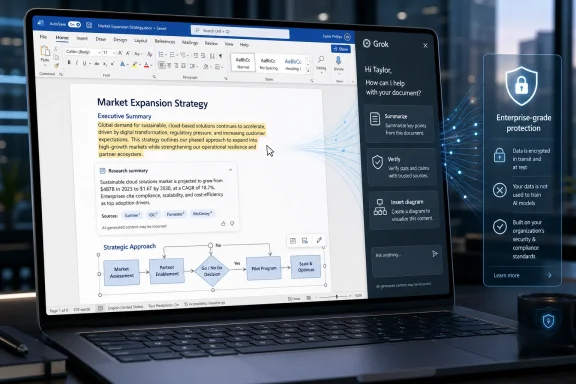
The most interesting promise in the launch material is not that Grok can draft prose. Every serious AI assistant can draft prose. The more consequential claim is that Grok can summarize research pulled from the web and X and turn those findings into structured text that can be inserted into a Word document.That is exactly the kind of workflow that consumes hours in professional writing. A policy analyst collects recent statements, a financial researcher tracks market chatter, a communications team watches public reaction, and a product manager wants the latest competitive framing before sending a planning memo. If Grok can compress that research without forcing constant context-switching, the productivity case is obvious.
But this is also where the plugin moves from helpful tool to trust problem. Live information is messy. X is fast, noisy, and frequently useful precisely because it contains early signals before they are verified. The web is broader but not automatically cleaner. A summary engine that blends those sources into polished Word-ready prose can make uncertain material feel settled.
The danger is not merely hallucination in the classic chatbot sense. The danger is premature authority. A paragraph that arrives formatted, confident, and grammatically clean inside a business document can outrun the evidence behind it. That is especially true when source attribution is “handled internally,” as the launch summary puts it. Internal attribution may help the interface stay tidy, but professionals still need inspectable evidence trails when a claim will influence a client, regulator, investor, or court.
The better version of this product would make verification easier, not just writing faster. It would show where claims came from, separate social chatter from primary sources, and make uncertainty visible before a user pastes a summary into a final document. Otherwise, Grok risks becoming a machine for laundering volatile inputs into boardroom prose.
Diagram Generation Turns Word Into a Lightweight Communication Studio
The second ambitious feature in the launch material is diagram generation. The pitch is straightforward: type a prompt, get a flowchart, timeline, or chart embedded in the document, then refine it without leaving Word. For anyone who has built a proposal by bouncing between Word, PowerPoint, Visio, Excel, and a browser, the appeal is immediate.This is not only about saving clicks. Diagrams are often where business writing becomes decision-making. A process map can expose who owns a workflow. A timeline can make a delay politically visible. A simple chart can turn a vague trend into something a manager can approve or challenge. If Grok can help users generate editable visuals at the point of writing, it moves deeper into the logic of the document.
There is a reason this feature belongs in Word rather than only in PowerPoint. Many professional documents are not slide decks: contracts, reports, research notes, internal policies, grant proposals, audit summaries, incident postmortems, and technical plans all live in Word. They still need visuals, but the visuals are often trapped in another application until someone manually imports them.
The practical question is how editable the results really are. A generated image of a flowchart is less useful than a diagram made of Word-native shapes or objects that can be revised, styled, and governed by document templates. If the plugin produces visuals that look good but behave like pasted screenshots, the feature will impress in demos and frustrate in production.
Copilot Now Has a More Ideological Competitor Inside Its Own Terrain
Microsoft 365 Copilot already drafts, rewrites, summarizes, and helps users interact with Word documents. That means Grok for Word is not entering a vacuum. It is entering one of the most hotly contested surfaces in enterprise software: the Office document.The competition is not just technical. Copilot’s pitch is organizational integration. It is close to Microsoft Graph, tenant identity, compliance posture, and the apps many companies already license. Grok’s pitch is different: speed, personality, web-connectedness, and the unique information stream of X. Those are not trivial differentiators, particularly for users who care about public discourse, breaking news, market sentiment, or fast-moving technical communities.
This creates a split that IT departments will recognize immediately. Microsoft will argue from governance. xAI will argue from capability and immediacy. Users will argue from whatever gets the document done by 5 p.m. The winning tool may depend less on benchmark scores than on whether the assistant understands the user’s context without creating a compliance headache.
There is also a branding problem hiding in plain sight. Grok is not a neutral enterprise name in the way “Copilot” tries to be. It carries Elon Musk, X, and xAI’s public reputation into the productivity suite. For some organizations, that will be an asset: edgy, current, plugged into the public internet. For others, it will be an avoidable procurement fight.
Enterprise IT Will Treat This as a Data Boundary Event
For home users and freelancers, the plugin’s core question is simple: is it useful enough to install? For enterprise IT, the question is harder: what leaves the tenant, what gets logged, what gets retained, and which contractual protections apply?That is where the add-in story becomes more than packaging. A Word document is often where confidential material is first assembled before it is sanitized for public release. Draft strategy decks, legal analysis, HR investigations, acquisition memos, source-code documentation, and unreleased product plans all pass through Word. An AI panel that can “read what you point it at” needs strict boundaries.
Organizations should not assume that because an AI tool appears inside a Microsoft app, it inherits Microsoft’s full compliance envelope. Microsoft itself has drawn distinctions around third-party models and external processing in other AI contexts. Admins will want to know whether Grok processes prompts and document excerpts inside Microsoft-managed environments or xAI-managed systems, how data is retained, and whether enterprise opt-outs exist for training or service improvement.
The launch material gestures at enterprise controls, but the real test will be documentation, not marketing. Security teams will look for data processing terms, auditability, tenant-level deployment settings, sensitivity-label behavior, and whether the plugin respects restrictions on protected documents. Legal teams will ask what happens when Grok summarizes public X posts that later prove defamatory, misleading, copyrighted, or manipulated.
That sounds cautious because it is. AI add-ins are not just features; they are new egress paths. The more useful they become, the more sensitive the data they are invited to touch.
Writers Get Speed, But Editors Inherit the Verification Burden
For writers, the immediate benefit is obvious. A tool that can restructure rough notes, tighten language, summarize background material, and generate a diagram without leaving Word is tailor-made for deadline pressure. It reduces the empty-page problem and shortens the distance between research and draft.But the burden shifts. If Grok gives writers faster first drafts, editors and reviewers must become better at asking where claims came from. In many organizations, that job already falls through the cracks. AI-generated summaries can make the crack wider because they remove the visible messiness of research: the tabs, notes, conflicting articles, and half-formed caveats that normally remind humans what they do not yet know.
This is especially important for X-derived summaries. X can be a powerful discovery layer, particularly for real-time commentary and expert communities. It can also be a rumor amplifier. A professional document that uses X as an input needs to preserve the difference between “people are saying this,” “a credible expert argues this,” and “this has been verified by primary evidence.”
The best users will treat Grok as an accelerator, not an authority. They will ask it to produce outlines, alternatives, and candidate summaries, then verify the claims that matter. The worst users will paste fluent output into final documents because the prose sounds done. That divide will determine whether this plugin becomes a productivity gain or a quality-control tax.
The Office AI Market Is Fragmenting Around Trust, Not Features
It is tempting to compare Grok for Word, Copilot in Word, Claude’s Word add-in, and other AI writing tools as feature matrices. Drafting, summarization, tone adjustment, document Q&A, diagram generation, source lookup: check the boxes and pick the most complete tool. That is how software buyers like to pretend decisions are made.The reality is more complicated. The tools are converging on similar visible features while diverging on trust models. One assistant may be better integrated with enterprise identity. Another may be better at long-form reasoning. Another may be more current because it leans on live web and social data. Another may be safer for regulated industries because its governance story is clearer.
Grok’s advantage, if it has one, is freshness. Its connection to X and xAI’s broader identity as a fast-moving model company gives it a plausible claim in workflows where the latest public conversation matters. Its disadvantage is the same thing viewed from the other side: freshness can be volatility, and volatility is not what every enterprise wants inside Word.
Microsoft’s advantage is incumbency. Copilot does not need to win every individual feature comparison if it remains the most administratively comfortable choice for organizations already paying for Microsoft 365. But incumbency is not invulnerability. If third-party assistants become meaningfully better at particular tasks, users will route around the default.
That is why Grok for Word should be read as part of a broader platform fight. AI companies do not want to be destinations. They want to be embedded in the work surfaces where decisions are made. Word remains one of the most valuable of those surfaces because it is where messy thinking becomes institutional memory.
The June 18 Launch Gives Admins a New Reason to Revisit Word Add-In Policy
The practical consequence of Grok’s launch is that organizations should dust off a policy area many have treated as background plumbing. Office add-ins used to be useful but relatively narrow extensions: citation managers, signing tools, template helpers, CRM connectors. AI add-ins are different because they can read, transform, and export meaning.That does not mean companies should ban them reflexively. In many environments, banning useful AI tools simply drives employees toward unmanaged browser workflows, personal accounts, and copy-paste habits that are harder to monitor. A governed Word add-in may be safer than a dozen unofficial web sessions.
But governance has to be explicit. Admins should decide which users can install AI add-ins, which documents can be processed, and what types of sources are acceptable for business use. They should also require training that explains the difference between AI-assisted drafting and verified research.
This is also a moment for procurement discipline. If xAI wants Grok to be taken seriously in enterprise productivity, it will need to compete not only on model quality but on boring documentation: retention, deletion, auditing, incident response, data residency, and contractual commitments. In enterprise software, boring is often the feature that closes the deal.
The Word Processor Is Becoming the Research Interface
The most provocative implication of Grok for Word is that the word processor is no longer merely the place where research is written up. It is becoming the place where research is requested, summarized, argued with, visualized, and inserted. That changes the mental model of office work.For decades, Word has been the final assembly tool. Users gathered evidence elsewhere, then brought the results into the document. AI reverses that flow. Now the document can summon the evidence, or at least a machine-generated interpretation of it, while the writer is still forming the argument.
That is powerful because writing and thinking are not separate tasks. A summary that appears mid-draft can change the structure of the document. A generated diagram can reveal a missing step in a process. A rewrite suggestion can make an argument clearer, or flatten it into corporate fog. The assistant is not just speeding up writing; it is shaping the thinking that writing exposes.
This is why the plugin’s value cannot be measured only in minutes saved. The deeper question is whether it improves judgment. A tool that saves an hour but introduces an unverified claim into an executive memo has not improved productivity. It has merely moved the cost downstream.
The Document Desk Now Has Three New Rules
Grok for Word is best understood as a serious productivity move with serious caveats. It will appeal first to users who live in drafts and deadlines, but its long-term success depends on whether xAI can turn speed into trust rather than asking customers to choose between them.- Grok for Word brings xAI directly into Microsoft’s document workflow through a Microsoft 365 add-in rather than a separate chatbot tab.
- The most consequential promise is live research summarization from the web and X, because that changes how evidence enters business documents.
- Diagram generation could make Word a more complete reporting environment if the visuals remain editable and compatible with professional document workflows.
- Microsoft Copilot remains the default enterprise benchmark, but Grok competes on freshness, style, and proximity to public conversation.
- IT departments should treat AI Word add-ins as data-boundary decisions, not ordinary productivity conveniences.
- Writers will gain speed only if organizations preserve verification habits and make source inspection part of the workflow.
References
- Primary source: blockchain.news
Published: 2026-06-18T22:50:30.334462
Grok Word Plugin Launches, Boosts Writing | AI News Detail
According to @grok, the Grok plugin for Word now drafts documents, summarizes web and X research, and generates diagrams.blockchain.news - Related coverage: x.ai
Grok for Word | xAI
Grok in Microsoft Word: structure rough notes, make reversible edits in place, and keep long documents consistent.x.ai - Related coverage: krasa.ai
xAI Launches Grok Skills: Persistent Expertise Across Every Chat | Krasa.ai
Grok Skills lets users teach Grok once and have it remembered across every chat, while shipping native document, deck, and spreadsheet generation. www.krasa.ai
- Related coverage: eweek.com
Elon Musk’s xAI Launches ‘Grok Build,’ a Coding Agent for Developers | eWeek
Elon Musk’s xAI launches Grok Build, a $300-per-month beta coding agent that brings Grok into developer terminals as AI coding tools heat up fast in 2026. www.eweek.com
- Related coverage: theplanettools.ai
Grok Skills: Teach Grok Once, It Remembers | ThePlanetTools.ai
xAI launched Grok Skills May 18, 2026: persistent cross-conversation memory + Word/PPT/Excel/PDF generation. Why it targets Claude Skills.theplanettools.ai - Related coverage: awesomeagents.ai
Grok Build Plugin Marketplace Launches With Six Tools | Awesome Agents
xAI ships an open plugin marketplace for Grok Build with six launch partners including MongoDB, Vercel, and Sentry, backed by SHA-pinned supply chain security and an open GitHub catalog.awesomeagents.ai
- Related coverage: dsebastien.net
Grok
Grok is xAI's Large Language Model (LLM)). Grok is multi-modal. It can generate text, images, etc. It's deeply integrated in the X platform. Users can ask… www.dsebastien.net
- Related coverage: venturebeat.com
xAI launches Grok 4.3 at an aggressively low price and a new, fast, powerful voice cloning suite | VentureBeat
The launch of Grok 4.3 represents a calculated bet by xAI that the market wants specialized brilliance and extreme cost efficiency over a perfectly balanced generalist.venturebeat.com - Related coverage: gentic.news
xAI Launches Grok Plugin Marketplace to… | gentic.news
xAI launched Grok Build Plugin Marketplace June 11, 2026 with 6 plugins, directly competing with Claude Code's 224,691-star open-source ecosystem.gentic.news - Related coverage: ixbt.com
Илон Маск анонсировал плагины для Microsoft Excel, Word и PowerPoint: xAI готовит плагины Grok для офисных приложений
После демонстрации Grok 4.3 Маск анонсировал интеграцию ИИ в ключевые инструменты Microsoft www.ixbt.com
- Related coverage: techxplore.com
- Related coverage: 50plusjobseekers.org
- Related coverage: allthings-elon.com
Grok 4.3 Generates Word, PowerPoint, and Excel Files — Microsoft Office Rival | All Things Elon
xAI's Grok 4.3 now generates production-ready Word documents, PowerPoint presentations, and Excel spreadsheets natively, directly competing with Microsoft 365 Copilot in enterprise AI productivity.www.allthings-elon.com - Official source: support.microsoft.com
View, manage, and install add-ins for Excel, PowerPoint, and Word | Microsoft Support
Explore your options and settings when you install add-ins.support.microsoft.com - Official source: word.cloud.microsoft
AI summarizer: generate text summaries with Copilot in Word | Microsoft Word
Try Copilot AI summarizer tools in Word to gather the most important information from any text and summarize multiple documents at once.word.cloud.microsoft - Related coverage: techradar.com
Anthropic is bringing Claude's AI power to Microsoft Word | TechRadar
Claude is getting another plug-in, this time for Wordwww.techradar.com