

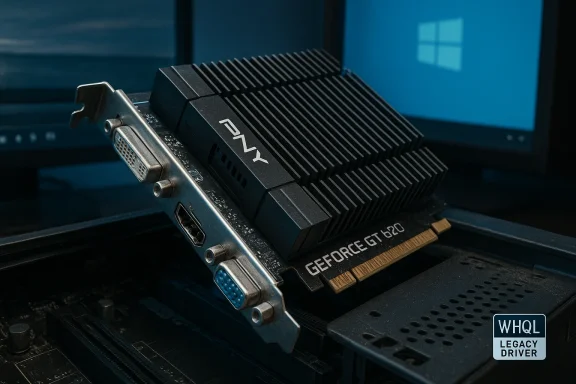
If you’re still running a PC with a PNY GeForce GT 620 (VCGGT620XPB) and you need the best route to a stable Windows 10 experience, this deep-dive guide walks you through the facts, the realistic performance you can expect, the safest driver choices, installation steps, and the risks to watch for when buying or updating an eight- to twelve-year-old GPU. The GT 620 is an entry-level card by modern standards—1 GB DDR3, PCI Express 2.0, single-slot, DVI / VGA / HDMI outputs—but with the right driver and setup it remains a low-power, useful solution for video playback, multi-monitor desktop use, and very light gaming on Windows 10.
The GeForce GT 620 launched in the early 2010s as part of NVIDIA’s GeForce 600 family. PNY sold a popular board-level SKU under the part number VCGGT620XPB, typically configured with 1024 MB DDR3 memory and a 64-bit memory bus. At the time it was marketed toward budget builders and OEMs for basic graphics tasks, HTPCs, and multi-display desktops. In 2026 terms it’s firmly a legacy-class product: low power draw (no external PCIe power required), modest clocks, and basic DirectX/OpenGL support useful for day-to-day Windows use but not for modern AAA gaming.
Why this matters today: Windows 10 remains widely used and NVIDIA’s driver policies have evolved, but older GPUs can still work well if matched with the correct driver. The main task for owners is to identify a driver that balances compatibility, security updates, and stability—without chasing the latest Game Ready driver that may no longer support the GF108-based GT 620.
Conclusion: if you need a stable, low-power GPU for Windows 10 and already own a PNY VCGGT620XPB, pick a tested WHQL driver (PNY or the last NVIDIA release that lists GT 620), perform a clean install, and you’ll extend the life of that system safely. If you’re buying now, compare outlet prices against inexpensive modern alternatives—often a newer entry-level card is a better long-term investment.
Source: Born2Invest https://born2invest.com/?b=style-230004912/
 Background / Overview
The GeForce GT 620 launched in the early 2010s as part of NVIDIA’s GeForce 600 family. PNY sold a popular board-level SKU under the part number VCGGT620XPB, typically configured with 1024 MB DDR3 memory and a 64-bit memory bus. At the time it was marketed toward budget builders and OEMs for basic graphics tasks, HTPCs, and multi-display desktops. In 2026 terms it’s firmly a legacy-class product: low power draw (no external PCIe power required), modest clocks, and basic DirectX/OpenGL support useful for day-to-day Windows use but not for modern AAA gaming.Why this matters today: Windows 10 remains widely used and NVIDIA’s driver policies have evolved, but older GPUs can still work well if matched with the correct driver. The main task for owners is to identify a driver that balances compatibility, security updates, and stability—without chasing the latest Game Ready driver that may no longer support the GF108-based GT 620.
What the PNY VCGGT620XPB actually is
- Model: PNY GeForce GT 620 (VCGGT620XPB)
- Memory: 1,024 MB DDR3
- Bus: PCI Express 2.0 x16 (backwards-compatible with PCIe 3.0/4.0 slots)
- Memory bus width: 64-bit
- Outputs: DVI-I (dual-link on many boards), HDMI, VGA
- Power: No 6-pin or 8-pin required; typical board TDP in the 30–50 W range
- Physical dimensions: compact, single-slot designs typically 140–160 mm length (verify with the specific card in-hand)
The driver question: which NVIDIA GeForce GT 620 Windows 10 driver is “top”?
Short answer: the “top” driver for a GT 620 on Windows 10 is the most recent driver that explicitly lists the GT 620 (or GeForce 600/GT 600 series GF108 device) as a supported product and that is stable on your machine. For many GT 620 owners, that will be a GeForce driver branch released in the mid-to-late 2010s that still includes legacy Fermi and GF108 support. Options to consider:- Official NVIDIA Game Ready / GeForce drivers that include the GT 620 in their supported-products list (many driver releases in the 3xx series and later historically listed the GT 620).
- Manufacturer-provided drivers from PNY for the VCGGT620XPB—these may be customized for the board and are often the safest bet when available.
- Windows Update in-box driver—if you want the most plug-and-play route and don’t need advanced features, Windows Update often delivers a functional signed driver that is stable and safe.
- Third-party archives (TechPowerUp, DriverPack) as a last resort—only use these when the GPU vendor and NVIDIA archive options fail and verify checksums if available.
Why driver choice matters for Windows 10
- Compatibility: The wrong driver can cause black screens, repeated crashes, or disabled Aero/desktop composition. Older GPUs sometimes require older driver branches that are still compatible with Windows 10’s driver model.
- Performance: While the GT 620 won’t benefit from modern gaming optimizations, correct drivers ensure hardware-accelerated video decoding, proper multi-monitor handling, and stable frame pacing for light gaming.
- Security: Staying on a driver branch that still receives security maintenance (or at least has no known critical issues) reduces attack surface from GPU driver vulnerabilities.
- Feature trade-offs: Newer Game Ready drivers may add features like driver telemetry, GeForce Experience integration, and optimizations for new titles—but they might not support legacy GPUs. Conversely, legacy drivers lack new features but can be simpler and leaner.
Recommended approach: a step-by-step driver strategy
Follow these sequential steps to pick and install a GT 620 Windows 10 driver with the highest chance of success.- Check PNY first. Look for a VCGGT620XPB driver package or support page on the PNY support site or the documentation that shipped with the card. If PNY provides a Windows 10 driver for that part number, start there—board-specific drivers sometimes include tweaks for outputs and audio over HDMI.
- Find the latest NVIDIA driver that lists GT 620. If PNY doesn’t have a Windows 10 package, use NVIDIA’s driver download tool or product-supported lists and find the latest Game Ready / legacy driver that explicitly includes “GT 620” in the supported products section.
- Prefer WHQL-signed packages. Signed installers reduce installation errors and security prompts on Windows 10.
- Back up and create a restore point. Before major driver changes, create a Windows restore point or full image backup.
- Remove old drivers cleanly. Use Display Driver Uninstaller (DDU) in safe mode to remove existing NVIDIA drivers if you’re switching between major driver branches.
- Install the selected driver with a “Custom / Clean Install” option. When the NVIDIA installer runs, pick Custom and choose Clean Install to remove leftover settings.
- Skip GeForce Experience if you want minimal telemetry. During install, opt out of GeForce Experience to reduce background processes and telemetry if you don’t need automatic game profiles or overlay features.
- Test and validate. Check device manager, run a video playback test, and use basic benchmarks or real-world apps you care about.
Installation checklist and troubleshooting tips
- Before installing: confirm if your Windows 10 is 32-bit or 64-bit; download the matching driver.
- If the installer fails: reboot to Safe Mode and run DDU to purge previous NVIDIA driver remnants.
- If you get “code 43” or black screens: roll back to a prior driver via Device Manager or install an older WHQL driver version that you’ve confirmed supports GT 620.
- Audio over HDMI not working: make sure the NVIDIA HD Audio device is installed (often a separate checkbox during the driver installation), and set the HDMI device as the default playback device in Windows Sound settings.
- Low resolution or missing outputs: check for dual-link DVI vs single-link, confirm adapter wiring (some DVI-to-VGA/DVI-to-HDMI adapters are passive and incompatible with digital-only outputs), and confirm the physical ports match your cables.
Performance and expectations: what the GT 620 will and won’t do on Windows 10
- The GT 620 is fine for:
- Desktop acceleration: smooth window composition, multiple monitors, and HD video playback.
- Office productivity and older/indie games at low settings (e.g., eSports titles in low resolution).
- Home theater use for up to 1080p video decoding (depending on the exact sub-variant and drivers).
- The GT 620 is NOT suitable for:
- Modern AAA gaming at playable framerates.
- Hardware-accelerated ray tracing or AI features (these are exclusive to newer architectures).
- GPU compute workloads where CUDA cores and modern driver/toolchain support are required.
- Realistic user expectation: treat the GT 620 as an energy-efficient legacy card that extends the life of older hardware rather than as a performance upgrade.
Buying or sourcing a PNY GT 620 online or from an outlet: buyer’s checklist
- Check model and part number: confirm you’re buying VCGGT620XPB (or the exact PNY SKU you need) and not a different GT 600-series part.
- Inspect outputs: if you need dual-link DVI or HDMI audio, confirm the seller’s photos and descriptions match.
- Ask about condition: prefer “new old stock” or seller-tested cards; avoid cards with unclear provenance.
- Watch for counterfeit/adapter-modified boards: some listings rebrand or modify outputs—don’t assume every card has HDMI audio unless the seller confirms it.
- Power requirements: GT 620 requires no external power; still confirm your system PSU and motherboard slot are compatible.
- Return policy and seller history: older cards can fail; a seller with a clear return window protects your purchase.
- Price perspective: entry-level cards often trade cheaply—balance price against shipping and return risk.
Security and privacy: telemetry, GeForce Experience, and Windows 10
NVIDIA’s installer and GeForce Experience historically enabled optional telemetry and background services. If you’re privacy-conscious:- Choose the Custom / Clean Install path and opt out of GeForce Experience.
- Disable background NVIDIA services you don’t need (driver components vs. telemetry).
- Keep in mind Windows Update may push drivers automatically; use Group Policy or the “Show or hide updates” troubleshooter to block driver updates if needed.
- Older driver branches may not receive feature updates but can still get security patches depending on vendor policy—verify NVIDIA’s current stance for legacy GPUs if security is a concern.
When you should stop using a GT 620 on Windows 10
- If you require modern GPU features like DirectX 12 feature-level 12_1/12_2, ray tracing, or accelerated AI features.
- If security policy in your environment requires vendor support for driver updates and the GT 620 is explicitly outside that support window.
- If driver incompatibilities after Windows updates become chronic and no viable signed driver exists that supports your hardware.
Advanced tips for enthusiasts and IT pros
- For multi-boot systems, keep driver packages for each OS ready—legacy drivers for Windows 7 / older Windows 10 builds, and newer drivers for newer OS installs.
- If you need HDMI audio and the board’s HDMI output is nonfunctional, test with a fresh driver install and ensure the NVIDIA HD Audio device appears in Device Manager.
- If you manage multiple legacy systems, create a small driver repository with checksummed installers and a simple deployment script to avoid repeated downloads.
- For virtualization passthrough or CUDA compute: don’t expect viable performance; GT 620 is not recommended for GPU-accelerated virtualization.
Risks and caveats
- Driver mismatch risks: installing a modern driver that drops legacy GF108 support can render a system unstable. Always confirm supported product lists before installing.
- Unsigned/third-party drivers: avoid unverified drivers from unknown sites; unsigned drivers can break driver signing enforcement and reduce system security.
- Hardware wear and failure: used cards can fail; check for warranty (rare for old stock) and verify seller returns.
- Windows Update driver overwrites: automatic updates may replace your tested driver with a different version. Consider blocking problematic updates if needed.
Final verdict and practical recommendations
For most users who want stable Windows 10 operation on a PNY GeForce GT 620 (VCGGT620XPB), the safest approach is:- Check PNY for a board-specific driver first.
- If unavailable, download the most recent NVIDIA driver that explicitly lists GT 620 in its supported products, favoring WHQL-signed releases from NVIDIA’s archived driver pages.
- Use Display Driver Uninstaller and a clean install to avoid conflicts, and opt out of GeForce Experience if you want minimal background services.
- For buying or replacing a card, weigh the low cost of modern entry-level GPUs (which offer newer features and longer support) against the risk of running long-term legacy drivers on Windows 10.
Conclusion: if you need a stable, low-power GPU for Windows 10 and already own a PNY VCGGT620XPB, pick a tested WHQL driver (PNY or the last NVIDIA release that lists GT 620), perform a clean install, and you’ll extend the life of that system safely. If you’re buying now, compare outlet prices against inexpensive modern alternatives—often a newer entry-level card is a better long-term investment.
Source: Born2Invest https://born2invest.com/?b=style-230004912/
