

Microsoft’s latest update to its enterprise security stack introduces a reworked, guided onboarding experience for Defender deployments—an attempt to move the historically fiddly, error‑prone first-mile of endpoint and security operations into a predictable, auditable, and largely automated workflow for large organizations. The new experience centers on a dedicated deployment tool, clearer connectivity and compliance checks for complex cloud environments, and tighter integration across Microsoft’s management plane—Intune, Azure AD, Microsoft Sentinel, and the unified Defender portal—so security teams can go from zero to telemetry in far fewer manual steps.
Enterprises have long treated onboarding to endpoint protection and XDR platforms as a discrete project: inventory devices, ensure connectivity, configure policies, deploy agents, validate telemetry, and tune false positives. For large, hybrid organizations those steps can span weeks and require careful coordination across security, desktop engineering, network, and compliance teams. Microsoft’s push to streamline that journey is a response to a few clear drivers: (1) the growing appetite for unified XDR telemetry and automated investigations, (2) the operational cost of point‑by‑point deployments, and (3) regulatory and connectivity complexities in government and restricted cloud environments.
This latest update folds lessons learned from the Defender product family’s steady expansion—Endpoint, Cloud, Office 365 protections, and Sentinel—into a single, opinionated onboarding path that promises decreased friction for large rollouts and better alignment between modern device management (MDM) and security posture tooling.
For enterprises already invested in Microsoft’s management and security stack, the reworked onboarding is a meaningful productivity gain. For organizations with heterogeneous tooling, the benefits are real but will require more integration work. The net result, if adopted thoughtfully, is a faster path from deployment to actionable threat detection and response—with fewer configuration surprises and clearer operational expectations.
The update is a strong step forward: it can save weeks of engineering time, improve consistency, and make it simpler for security teams to benefit from Defender’s XDR capabilities. But success depends on disciplined rollout: proper scoping, licensing checks, pilot validation, SOC tuning, and governance controls remain essential. Organizations that pair this improved tooling with robust testing and governance will unlock the most value—faster detections, cleaner alerts, and a more predictable security posture across their device estate.
Source: Windows Report https://windowsreport.com/microsoft...oyment-onboarding-experience-for-enterprises/
 Background
Enterprises have long treated onboarding to endpoint protection and XDR platforms as a discrete project: inventory devices, ensure connectivity, configure policies, deploy agents, validate telemetry, and tune false positives. For large, hybrid organizations those steps can span weeks and require careful coordination across security, desktop engineering, network, and compliance teams. Microsoft’s push to streamline that journey is a response to a few clear drivers: (1) the growing appetite for unified XDR telemetry and automated investigations, (2) the operational cost of point‑by‑point deployments, and (3) regulatory and connectivity complexities in government and restricted cloud environments.This latest update folds lessons learned from the Defender product family’s steady expansion—Endpoint, Cloud, Office 365 protections, and Sentinel—into a single, opinionated onboarding path that promises decreased friction for large rollouts and better alignment between modern device management (MDM) and security posture tooling.
What’s in the new Defender deployment onboarding experience
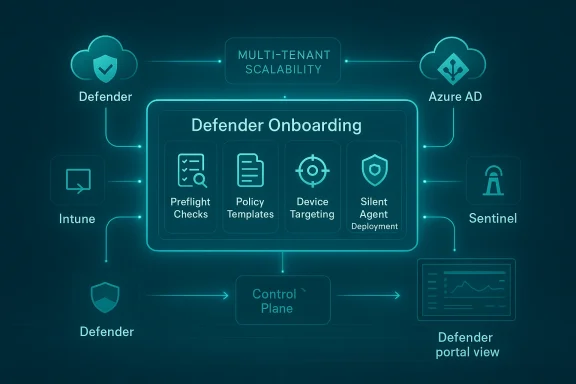
The deployment tool: a guided, zero‑touch path
- Guided workflows that walk administrators through required steps, checks, and preconditions in a single console.
- Zero‑touch agent installation options for managed devices, enabling silent agent installs for endpoints already managed by Microsoft Endpoint Manager (Intune) or other supported MDM solutions.
- Preflight checks that surface missing connectivity endpoints, required permissions, and common misconfigurations before changes are applied.
- Templates and recommended policy sets to reduce the expertise required to pick sensible defaults for attack surface reduction, EDR collection levels, telemetry, and data retention.
Tighter integration with Intune and Azure AD
- Devices enrolled and managed through Intune can be automatically targeted for Defender onboarding, avoiding the need for separate packaging or manual installs.
- Azure AD‑joined devices can be preconfigured to appear in the Defender portal with the correct identity mapping and device grouping.
Streamlined connectivity for restricted clouds and government environments
- The onboarding tool includes checks and optimized connectivity profiles for restricted cloud environments (for example, government clouds) where endpoint telemetry endpoints and service URLs differ from commercial tenants.
- This reduces the number of manual service endpoints administrators must configure and helps avoid common connectivity gaps that block telemetry ingestion.
Sentinel/Defender portal alignment
- New customers and newly onboarded workspaces can be auto‑redirected to the unified Defender portal to provide a single control plane for alerts, incidents, and hunting.
- Multi‑workspace management capabilities are improved so SecOps teams can onboard secondary workspaces while preserving correlation with Defender XDR signals.
Enterprise readiness: automation, multi‑tenant, and multicloud considerations
- Multi‑tenant management features and content distribution capabilities allow Managed Security Service Providers (MSSPs) and large enterprises to push analytic rules, automation playbooks, and workbooks at scale across tenants.
- Deployment automation supports scripted orchestration and policy-as-code approaches so large estates can be onboarded programmatically and repeatably.
Why this matters: benefits for enterprise security operations
- Faster time to visibility. By collapsing agent install, connectivity verification, and policy application into a guided flow, organizations can begin receiving actionable telemetry and alerts in hours rather than days or weeks.
- Consistency and repeatability. Templates, preflight checks, and automation hooks reduce “configuration drift” and enable security teams to enforce consistent baselines across geographies and business units.
- Reduced friction between teams. Because the tool integrates with Intune and Azure AD, device and security teams can coordinate less manually—identity, management, and protection are aligned out of the gate.
- Lower operational risk. Preflight checks and recommended settings aim to prevent common misconfigurations that produce noisy alerts, telemetry gaps, or broken devices.
- Improved compliance posture. Built‑in options for restricted clouds and government environments help ensure data residency, connectivity, and logging requirements are satisfied earlier in the process.
Technical highlights and verified capabilities
- The deployment flow exposes a Defender deployment tool that orchestrates the sequence of onboarding steps: identify target devices, confirm management state (Intune/AAD), validate connectivity, apply baseline policies, and verify telemetry arrival.
- Automatic onboarding paths exist for devices already enrolled in Microsoft Endpoint Manager—these permit silent agent deployment and immediate registration in the Defender portal.
- Connectivity validation is visible during setup; the tool flags missing or blocked endpoints required for telemetry, threat intelligence, and cloud policy orchestration. This is important for segmented networks and air‑gapped environments.
- Templates for policy and telemetry are supplied to help organizations choose appropriate EDR levels, data retention windows, and Attack Surface Reduction (ASR) rules without bespoke policymaking.
- The Defender portal is increasingly the single pane of glass for both Microsoft Sentinel and Defender XDR experiences; onboarding now includes options to redirect and consolidate management in the Defender portal to consume cross‑product correlation, cases, and automation.
Deep dive: what to expect during a deployment
Pre-deployment planning
- Inventory: enumerate devices (AAD‑joined, hybrid joined, Intune enrolled, legacy domain‑joined).
- Owner mapping: assign owners and identify device groups that will receive different protection baselines.
- Network readiness: identify proxy or network devices that may block telemetry endpoints and plan exceptions.
- Licensing: confirm Defender, Sentinel, and Microsoft 365 licensing entitlements; certain features and advanced automation require E5 or equivalent licenses.
Onboarding steps in the new flow
- Select target tenant and authenticate with the required administrative permissions.
- Run the preflight connectivity and permissions checks.
- Choose or customize a protection baseline template (EDR level, ASR rules, isolation policies).
- Target devices (Intune groups, dynamic groups, or manually selected lists).
- Deploy the agent (silent, push via management tool, or user‑initiated prompts for unmanaged devices).
- Verify telemetry arrival—confirm endpoint registration, heartbeat, and baseline signal.
- Tune and iterate—disable overly aggressive rule(s), adjust telemetry levels for high‑volume devices, and finalize ROEs for incident response.
Post-deployment validation and hardening
- Run discovery hunts against newly onboarded devices to confirm coverage.
- Test playbooks and automation rules with simulated alerts to validate incident handling.
- Confirm data retention policies and export/ingest pipelines for SIEM and forensic evidence.
Critical analysis: strengths and practical limitations
Strengths
- Operational acceleration. The consolidation of steps into a single guided flow materially reduces the “manual glue” that previously slowed large rollouts.
- Reduced human error. Preflight checks and templates lower the chance of configuration mistakes that cause telemetry loss or create security gaps.
- Enterprise scale features. Content distribution and multi‑tenant management features are practical wins for MSSPs and global SecOps teams managing many subsidiaries or tenants.
- Government cloud-aware. Recognizing and simplifying connectivity to restricted clouds is a critical operational improvement for public sector customers.
Potential limitations and risks
- Complex estates still require bespoke work. Organizations with legacy management tooling, deep on‑prem dependencies, or third‑party security agents may still face manual integration steps. The guided flow helps, but it cannot magically reconcile incompatible enterprise architectures.
- False sense of completeness. A simplified onboarding experience can lull teams into thinking coverage is complete when subtle telemetry gaps or configuration exceptions still exist; teams must validate real‑world telemetry and end‑to‑end incident flows.
- Permissions and governance traps. Auto‑onboarding features are powerful; if not gated properly they can lead to unintended onboarding of sensitive or special‑purpose devices. Role‑based access control and approval gates are still essential.
- Licensing complexity. Some advanced Defender XDR features and large‑scale automation capabilities are gated behind higher license tiers. Enterprises must map feature availability to their license entitlements before relying on specific automation.
- Privacy and data residency. While the tool includes options for restricted clouds, organizations must still ensure telemetry handling and retention meet contractual and regulatory data residency and access requirements—especially across borders.
- Change management and alert fatigue. Rapid onboarding of many endpoints may flood SOC queues with new, untriaged alerts. Teams must budget time for tuning ASR rules, EDR collection thresholds, and exclusion lists.
Deployment playbook: an operational checklist for success
- Establish a cross‑functional deployment team (Security, Endpoint Engineering, Networking, Compliance).
- Confirm licensing entitlements and exactly which Defender features will be enabled by the onboarding templates you choose.
- Run the deployment tool’s preflight checks in a scoped pilot tenant before attempting production mass onboarding.
- Use a phased rollout:
- Pilot: 50–200 devices (representative mix of OS versions, hardware, and locales).
- Ramp: 5–10% of enterprise device population to validate scale.
- Full rollout: staged by geographic region or business unit.
- Validate incident playbooks with simulated alerts and ensure integrations (SIEM, ticketing, SOAR) work end‑to‑end.
- Document rollback procedures: how to unenroll agents, reverse policy changes, and quarantine devices in case of regressions.
- Ensure communications to employees—especially on BYOD or user‑facing devices—so users expect possible changes and notifications.
Governance, privacy, and compliance considerations
- Least privilege for onboarding permissions. Limit who can initiate tenant‑level onboarding. Use multi‑person approval for large tenants or partner providers.
- Data minimization. Choose telemetry levels consistent with the organization’s risk tolerance and compliance obligations; high‑fidelity EDR data can include sensitive application and process metadata.
- Audit trails. Ensure onboarding actions are logged and retained to meet internal audit and regulator requirements. The deployment tool should provide logs of who initiated onboarding, which templates were applied, and what devices were targeted.
- Third‑party data sharing. If outsourcing management to an MSSP, ensure data access agreements explicitly define scope, retention, and permitted uses of telemetry data.
- Regulatory alignment. For sectors with strict data locality laws, use the cloud‑specific onboarding profiles and validate that telemetry and storage occur in compliant regions.
Testing and validation: how to know onboarding worked
- Verify endpoint registration in the Defender portal and confirm the heartbeat metric for each device.
- Ensure that EDR logs and alerts flow into your incident pipeline and are visible within both Defender and any external SIEM.
- Run simulated incident scenarios to validate automated containment and response playbooks.
- Test key integrations: ticketing connectors, case management, alert enrichment, and threat intelligence feeds.
- Monitor for unexpected user impact: performance hits, application compatibility issues, or false positives that disrupt workflows.
Rollback strategy and incident remediation
- If telemetry is missing or devices are unstable, utilize the deployment tool’s logs to identify the failing step (agent install, connectivity, policy apply).
- Revoke or disable newly applied policies for the impacted group to restore baseline behavior while preserving forensic artifacts.
- Use MDM rollback capabilities to remove the agent from a small set of test devices before a full unenroll action.
- Keep a clean golden image or recovery state for critical devices to enable rapid redeployment if agent deployment causes boot or application issues.
Cost, licensing, and operational impact
- The onboarding tool itself aims to reduce operational cost by reducing manual labor, but the realized value depends on:
- The organization’s existing management maturity (Intune‑managed estates see the most benefit).
- License entitlements (higher tiers unlock advanced automation and integration).
- SOC readiness (a team must be prepared to handle increased signal volume).
- Plan for potential short‑term SOC overhead: initial onboarding often drives an uptick in benign alerts that must be triaged and suppressed through tuning.
Recommendations for IT leaders
- Treat onboarding as a program, not a checkbox. Use the deployment tool to accelerate work, but pair it with disciplined testing, role controls, and validation.
- Start small and iterate: pilot the onboarding tool with a representative device set and SOC playbook tests before broad rollout.
- Maintain a clear communications plan for device owners and helpdesk teams to reduce user‑side confusion.
- Invest time in tuning ASR, EDR collection levels, and exclusions to reduce noise and prioritize high‑fidelity detections.
- Lock down who can initiate tenant onboarding and maintain an audit trail for compliance and post‑incident investigation.
- Coordinate with network teams early to ensure telemetry and cloud connectivity exceptions are applied where needed, especially in segmented or government environments.
The strategic view: where this fits in a modern security architecture
This onboarding update is a practical, operational step toward Microsoft’s broader vision: a unified security operations continuum spanning devices, identities, cloud workloads, and SaaS apps. By reducing the time and expertise required to achieve reliable telemetry, the new experience makes it easier for organizations to adopt automation, threat intelligence, and AI‑powered investigation tools—yet it does not eliminate the need for careful governance, tuning, and human oversight.For enterprises already invested in Microsoft’s management and security stack, the reworked onboarding is a meaningful productivity gain. For organizations with heterogeneous tooling, the benefits are real but will require more integration work. The net result, if adopted thoughtfully, is a faster path from deployment to actionable threat detection and response—with fewer configuration surprises and clearer operational expectations.
Conclusion
Microsoft’s revamped Defender deployment onboarding experience tackles a long‑standing operational bottleneck for enterprises: the complexity and fragility of first‑time onboarding. By introducing a guided deployment tool, preflight checks, templates, and deeper integration with Intune, Azure AD, and the Defender portal, Microsoft aims to shorten time‑to‑visibility, reduce misconfigurations, and support large‑scale, multi‑tenant operations.The update is a strong step forward: it can save weeks of engineering time, improve consistency, and make it simpler for security teams to benefit from Defender’s XDR capabilities. But success depends on disciplined rollout: proper scoping, licensing checks, pilot validation, SOC tuning, and governance controls remain essential. Organizations that pair this improved tooling with robust testing and governance will unlock the most value—faster detections, cleaner alerts, and a more predictable security posture across their device estate.
Source: Windows Report https://windowsreport.com/microsoft...oyment-onboarding-experience-for-enterprises/
