

When a technical team sits down to write a spec, produce API docs, or capture runbooks, the choice between a Markdown-first editor and a traditional word processor is not a matter of taste — it changes how the team writes, reviews, and ships work.
The competition between modern, developer-oriented editors and the legacy word processor is now a practical decision for engineering organizations and documentation teams. On one side sits HackMD, a lightweight, online, Markdown-first editor built around code blocks, diagrams, and Git-style workflows. On the other is Microsoft Word, the ubiquitous WYSIWYG powerhouse that still sets the standard for page-accurate, print-ready documents and formal review cycles. Both are engineered for collaboration, but they serve different audiences and solve different problems. The following assessment verifies product claims, cross-checks pricing and capabilities, and lays out practical guidance for choosing the right tool for technical collaboration.
Source: TechBullion HackMD vs. MS Word: The Best Tool for Technical Team Collaboration
 Background
The competition between modern, developer-oriented editors and the legacy word processor is now a practical decision for engineering organizations and documentation teams. On one side sits HackMD, a lightweight, online, Markdown-first editor built around code blocks, diagrams, and Git-style workflows. On the other is Microsoft Word, the ubiquitous WYSIWYG powerhouse that still sets the standard for page-accurate, print-ready documents and formal review cycles. Both are engineered for collaboration, but they serve different audiences and solve different problems. The following assessment verifies product claims, cross-checks pricing and capabilities, and lays out practical guidance for choosing the right tool for technical collaboration. Overview: what each tool is optimized for
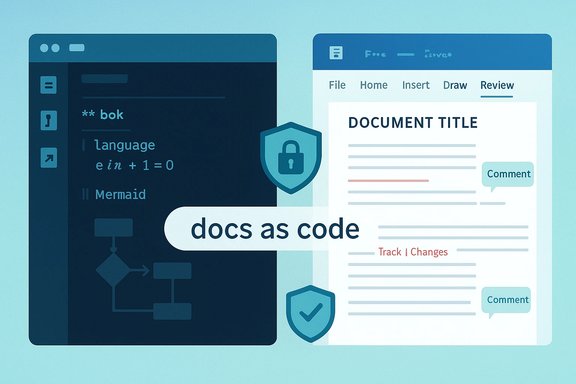
- HackMD — optimized for speed, developer workflows, and documentation-as-code. It expects Markdown fluency, offers live preview, built-in math and diagram rendering (LaTeX/MathJax, Mermaid), and direct integration with GitHub for pushing notes to a repository. The product design emphasizes versioned text, readable diffs, and fast editing with keyboard-first commands.
- Microsoft Word — optimized for precise page layout, complex tables of contents, print-ready output, and formal review processes with industry-standard track changes and comment workflows. Word is available as a rich desktop app with full offline capabilities and deep integrations across the Microsoft 365 ecosystem, including AI assistance (Copilot) on subscription plans.
Feature-by-feature comparison
Ease of use and learning curve
- HackMD’s interface is intentionally minimal: a Markdown editor on the left with a live preview on the right. For people comfortable with Markdown, the speed benefits are immediate; for those unfamiliar, the syntax is small and learnable in minutes. Its keyboard-focused editing reduces friction for engineers and technical writers who prefer to stay on the keyboard.
- Microsoft Word surfaces a broad set of features via the Ribbon. Non-technical users welcome the familiarity and discoverability of formatting controls, templates, and layout tools. But the UI density can overwhelm users who only need to create plain documents or short technical notes. Word’s track changes and commenting remain the industry standard for formal reviews.
Handling code, math, and diagrams
- HackMD includes native support for code blocks with syntax highlighting, inline and block LaTeX via MathJax, Mermaid and similar diagram formats, and other developer-friendly features such as slide mode for presentations and book-mode collections. Those features make it a natural fit for API docs, README-style content, and engineering runbooks.
- Word can display code snippets as formatted text blocks or via add-ins, and it supports math equations through an equation editor. However, adding and maintaining code blocks, multi-language syntax highlighting, or versioned diagrams in Word is cumbersome compared with Markdown-first tools. Word lacks the native, text-first diagram syntaxes that make diagrams trivial to maintain in source control.
Collaboration, versioning, and edit review
- HackMD offers real-time collaboration and — on paid tiers — unlimited version history and suggestion modes tailored to team editing patterns. The system maps well to Git-style revision models and can be integrated with GitHub to push and pull notes as repository documents, which preserves diffs and enables CI/collaboration flows.
- Word supports real-time co-authoring when files are stored on OneDrive or SharePoint, and its Track Changes plus Compare/Merge workflows are deeply familiar to publishers, legal teams, and regulated teams. Version history is available via Microsoft 365 cloud storage, and desktop Word preserves a robust offline editing story that survives poor connectivity.
Performance, reliability, and offline access
- HackMD is a web-first app: it’s lightweight, fast in the browser, and excellent for synchronous editing. It does not provide a full, native desktop offline editor (though browser caching and 3rd-party sync tools may mitigate this). Teams that need to work reliably offline or where connectivity is intermittent should plan accordingly.
- Word provides full-featured desktop applications with full offline editing and the ability to sync changes when a connection returns. For long, complex documents that may be worked on offline (legal filings, book-length manuals), Word’s desktop-first capabilities are decisive.
Integrations and developer workflows
- HackMD integrates directly with GitHub and allows configured pushes to repositories (with limits on the free tier for push counts). This makes it possible to store canonical docs next to code, use pull requests for documentation changes, and include documentation in CI pipelines. The Markdown format keeps diffs readable and tooling interoperable.
- Word integrates broadly across Microsoft 365: SharePoint, OneDrive, Teams, and enterprise governance tools. However, Word documents (binary .docx) are less friendly to line-by-line diffing, and while tools exist to convert .docx to plain text or Markdown, fidelity issues often arise. For engineering teams that prefer docs-in-repo, Word poses friction unless a robust conversion and governance plan is in place.
Security, governance, and enterprise features
- HackMD’s paid plans add organization-level SSO (SAML), private workspaces, role-based controls, custom domains, and enterprise support. Those features are tailored to teams that need collaboration with strong access controls and repository integrations. Pricing tiers reflect the addition of these enterprise controls.
- Microsoft Word, as part of Microsoft 365, benefits from mature enterprise governance (Entra, Purview), device controls, advanced DLP, and tenant-level admin controls. Microsoft’s platform has deep enterprise features for compliance, retention, and legal holds. Copilot integration is governed by Microsoft’s enterprise admin surfaces for model routing and data governance. Those governance capabilities are central to regulated industries.
Pricing and value: what you should verify
Pricing is one of the most concrete decision levers, but it changes frequently as vendors add AI or new enterprise features.- HackMD currently publishes a freemium model: Free tier with unlimited notes and up to 3 teammates, a Prime tier at roughly $5 per seat/month (billed annually) which adds full-text search, unlimited history and pushes, and a Team+ tier at roughly $16.67 per seat/month (billed annually) which introduces organization-level controls like SAML single sign-on and private workspaces. Enterprise options add RBAC, custom SSO/LDAP, and dedicated support. Those prices are published on HackMD’s pricing page and match the typical freemium-to-enterprise progression for documentation tools. Cross-check HackMD’s published pages for the most recent seat prices before budgeting.
- Microsoft bundles Word inside Microsoft 365. Microsoft announced the inclusion of Copilot features into consumer Microsoft 365 Personal and Family plans and adjusted pricing accordingly in 2025. Microsoft also offers a Microsoft 365 Premium bundle for individuals that includes broader Copilot functionality and advanced security. Business and Enterprise plans differ by included services and security posture; business plans also vary from $6 to $22 per user per month depending on features and desktop app inclusion. The changes to consumer and premium pricing over 2024–2025 mean you must confirm current SKU definitions and whether Copilot or AI credits are included in your target plan.
- If documentation is your only purchase and your teams are technical, HackMD’s Prime or Team+ often represents better value than paying for a full Microsoft 365 seat.
- If users already require desktop Word, Excel, or enterprise security controls, Microsoft 365 is often justified even when documentation needs are limited. Confirm whether Copilot features are required and whether additional Copilot usage limits or AI credits are relevant to your forecast.
Migration, interoperability, and practical tradeoffs
Switching between Word and Markdown is rarely friction-free. Converting .docx to Markdown (and back) is possible with third-party tools but generally requires manual cleanup when documents contain complex tables, macros, or precise layout.- Migration checklist for mixed environments:
- Inventory mission-critical documents, templates, and macros.
- Pilot conversions of representative docs and validate formatting, macros, and automations.
- Decide canonical storage (repo for docs-as-code vs. SharePoint/OneDrive for Word).
- Train teams on workflows and enforce governance for sensitive content (DLP, retention).
Recommended workflows by team type
- For engineering teams and open-source documentation:
- Use HackMD (or another Markdown-first editor) for authoring.
- Store canonical docs in a Git repository, use pull requests for review, and connect CI to run link checks and static doc generation.
- Use the GitHub integration to push HackMD notes to repositories if you want a lightweight authoring overlay.
- For product, legal, and executive documents that require print fidelity:
- Author in Word (desktop) for precise layout.
- Use SharePoint/OneDrive to enable co-authoring and use Track Changes for review cycles.
- Archive final deliverables as PDF to preserve layout.
- For hybrid teams (mixed technical/non-technical contributors):
- Keep technical docs in Markdown, but provide a Word template and an export process for stakeholder-facing versions.
- Automate conversions where possible and accept manual polishing for final artifacts.
- Define a canonical source of truth: either repo-based Markdown or a SharePoint document library, and enforce it.
Security, governance and AI: a special word about Copilot and AI features
AI features are reshaping documentation workflows, but they add governance complexity.- Microsoft bundles Copilot into many Microsoft 365 consumer and business plans; the company publishes guidance on privacy and AI credits for consumer plans. Administrators must test Copilot workflows and control model routing for regulated data.
- For lightweight editors like HackMD, enterprise plans include SSO and role-based controls; however, if you use third-party plugins or external model integrations, verify where data is routed and stored. Confirm enterprise SSO, RBAC, and SAML configurations before adopting HackMD as a compliance-critical platform.
- Map data types that must not be sent to external models.
- Pilot AI-assisted workflows on a small dataset and instrument all prompts and outputs for audit.
- Apply DLP and retention rules consistently across repositories and cloud storage.
Strengths, risks, and trade-offs (a candid assessment)
Strengths of HackMD:- Developer-first: Markdown, code blocks, diagrams, and Git integration are built-in.
- Fast collaboration: Browser-first, low friction, suggestion modes for teams.
- Good freemium value: A capable free tier and clear seat pricing for growing teams.
- Offline limitations: No full-featured desktop offline app — plan for connectivity.
- Formatting edge cases: Complex visual layouts (print headers/footers, mail-merge) are not HackMD’s strength.
- Organizational buy-in: Non-technical stakeholders may resist Markdown tooling.
- Production-grade formatting: Unrivaled control for print, legal, and publishing artifacts.
- Enterprise governance: Deep admin and security tooling across Microsoft 365.
- Offline-first desktop apps: Robust offline editing that survives network interruptions.
- Docs-as-code friction: Binary formats and poor diffability make it harder for engineering-centred documentation.
- Overhead for small teams: Paying for full Microsoft 365 seats just for docs can be inefficient.
- Collaboration complexity: Co-authoring works best when files are stored correctly; uncoordinated local-edit workflows can create merge headaches.
Practical checklist to choose between HackMD and Word
- Define the document types you produce (specs, APIs, runbooks vs. legal contracts, reports).
- Identify your primary audience (engineers vs. executives/clients).
- Audit your integration needs (GitHub, CI, versioning, DLP).
- Run two-week pilots with representative users: one using HackMD+repo and one using Word+SharePoint.
- Measure friction points: conversion time, review cycles, merge conflicts, and offline editing needs.
Implementation example: a hybrid workflow that scales
- Author technical content in HackMD; store the canonical Markdown in a git repository.
- Use pull requests and code review for documentation changes; run automated link and lint checks in CI.
- When a stakeholder needs a printable artifact, export Markdown to a styled template, convert to Word/PDF, and use Word for final signoff.
- Keep an archival copy of the final PDF in SharePoint for records and legal traceability.
Final verdict
For technical teams that “live in the terminal,” require code-first docs, and want documentation to be versioned and reviewed like code, HackMD is the better tool: it is faster to edit, easier to maintain in source control, and its native support for code blocks, LaTeX math, and diagrams dramatically reduces friction. Its free tier and clear seat-level pricing make it attractive for teams that only need documentation tooling. For teams producing formal, print-ready artifacts, working under strict enterprise governance, or needing powerful desktop editing and review workflows, Microsoft Word — as part of Microsoft 365 — remains the safer standard. Word’s unmatched layout control, Track Changes review model, and deep enterprise governance make it the default for legal, executive, and high-fidelity deliverables. Recent shifts to include Copilot and consumer AI in Microsoft 365 subscriptions have expanded Word’s capabilities, but they also require careful governance planning. The pragmatic answer for most organizations is not an absolute choice: use the right tool for the right job and automate conversions when necessary. Adopt documentation-as-code for developer-facing material and reserve Word for final sign-off artifacts and legal deliverables. The small cost and management overhead of a hybrid approach are often rewarded by much lower friction, clearer ownership, and better outputs overall.Closing recommendation — a 30‑day plan to evaluate and adopt
- Week 1: Inventory documentation types and stakeholders; list top 10 documents by importance.
- Week 2: Run parallel pilots — HackMD for engineering docs, Word templates for legal and executive outputs.
- Week 3: Automate conversion tests and CI linting for Markdown; test Word export fidelity for the top 5 legal/exec docs.
- Week 4: Decide canonical storage locations, train teams on the chosen workflows, and roll out SSO and DLP settings as needed.
Source: TechBullion HackMD vs. MS Word: The Best Tool for Technical Team Collaboration
