Hi
ejdgr8,
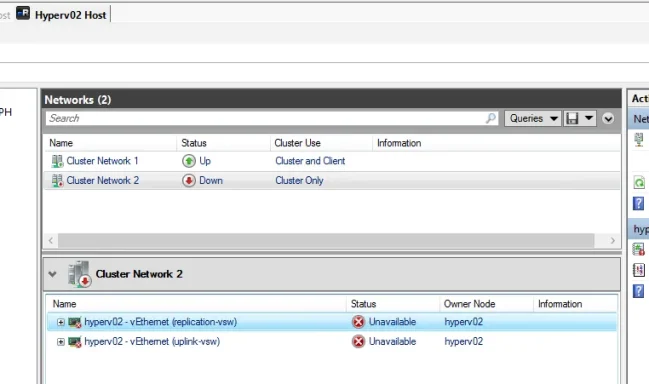
From your screenshots, this does
not look like a simple “GUI glitch.” It looks like
hyperv02 lost cluster network communication, so the cluster marked that node
Down. Your screenshots show:
- hyperv02 = Down
- Cluster Network 2 = Down
- both vEthernet adapters on hyperv02 = Unavailable / Unidentified
- the affected network is marked Cluster Only
That points first to a
network path issue on hyperv02: physical NIC, team/SET, vSwitch binding, VLAN, cable/switch port, or host vNIC config.
Also, an
“Unidentified network” label by itself is
not always the actual problem on Hyper‑V host vNICs. The real problem is that Failover Clustering sees those interfaces as
Unavailable/Down and removes the node when heartbeat traffic is lost. Microsoft’s cluster guidance says node removal commonly happens when cluster communication is lost, and recommends validating network configuration, checking latency, drivers/firmware, firewall/ports, and switch/NIC issues. Microsoft also recommends that cluster traffic networks be isolated properly, and that each dedicated physical or virtual adapter use a
unique subnet per traffic type.
Most likely causes
Check these first on
hyperv02:
- Physical NIC or uplink failure
- cable/SFP
- switch port down/err-disabled
- FC is unrelated here; this is Ethernet cluster traffic
- NIC team / SET / vSwitch issue
- one team member failed
- uplink adapter removed from vSwitch
- wrong load balancing / broken team state
- Wrong VLAN or IP settings on host vNICs
- replication-vsw / uplink-vsw may be on the wrong VLAN
- duplicate IP
- subnet mask mismatch
- gateway on non-management NIC
- Cluster heartbeat network broken
- cluster uses UDP/TCP 3343
- if the network is reachable at L2/L3 but blocked by firewall/filtering, the node can still be evicted. Microsoft specifically calls out port 3343 plus related cluster ports and recommends cluster validation/network checks.
- Outdated NIC drivers / firmware / vendor utilities
- Microsoft explicitly notes old NIC drivers/firmware or adapter issues as common causes of lost heartbeats / Event ID 1135.
What to do now
1) Check whether hyperv02 is actually alive
On
hyperv02 console / iLO / iDRAC:
Code:
Get-Service ClusSvc
Get-NetAdapter
Get-VMNetworkAdapter -ManagementOS
Get-VMSwitch
ipconfig /all
What you want to see:
- physical NICs = Up
- team/SET = Up
- vEthernet adapters = Up
- correct IPs on the cluster/replication/uplink networks
If the physical NIC is down, fix that first.
2) Verify the cluster network from hyperv01
From
hyperv01:
Code:
Get-ClusterNode
Get-ClusterNetwork | ft Name, State, Role, Address, Metric, AutoMetric
Get-ClusterNetworkInterface | ft Node, Network, IPAddress, State
If
hyperv02 interfaces on
Cluster Network 2 show
Unavailable, that confirms the cluster cannot talk to that node on that network.
3) Test basic connectivity between nodes on each cluster-related subnet
From
hyperv01, ping the IPs of
hyperv02 on:
- management
- cluster
- replication/live migration if used
Example:
Code:
ping <hyperv02-management-ip>
ping <hyperv02-cluster-ip>
ping <hyperv02-replication-ip>
Test-NetConnection <hyperv02-cluster-ip> -Port 3343
If management works but cluster-only network fails, the problem is isolated to that specific vNIC/VLAN/switch path.
4) Check the Hyper-V vSwitch and management OS vNIC config on hyperv02
If you are using a converged design, verify the virtual NICs attached to the vSwitch:
Code:
Get-VMSwitch
Get-VMNetworkAdapter -ManagementOS | ft Name, SwitchName, Status, MacAddress
Get-VMNetworkAdapterVlan -ManagementOS
If a VLAN tag is wrong or missing on
replication-vsw or
uplink-vsw, Failover Cluster will see the network as down.
Microsoft’s Hyper‑V cluster network guidance says cluster, live migration, management, and replica traffic should be isolated correctly, and dedicated adapters should be on unique subnets. It also notes that if VMM is managing the cluster, networking changes should be done consistently through VMM.
5) Check NIC Teaming / SET
If using
LBFO:
Code:
Get-NetLbfoTeam
Get-NetLbfoTeamMember
Get-NetAdapter
If using
SET:
Code:
Get-VMSwitchTeam
Get-NetAdapter
Microsoft recommends for clustered Hyper‑V:
- Switch Independent
- Hyper-V Port load balancing
for NIC Teaming/LBFO scenarios.
If one uplink is failed or detached, recreate/fix the team before touching cluster settings.
6) Check Event Viewer on both nodes
Look for:
- FailoverClustering
- Hyper-V-VmSwitch
- NIC vendor driver logs
- System
Especially:
- Event ID 1135
- link up/down
- miniport reset
- team member failure
- VLAN mismatch / adapter disconnect
Microsoft’s Event 1135 troubleshooting guidance is directly relevant here: when a node is removed from cluster membership, review cluster networks, run validation, check firewall/ports, latency, packet loss, NIC drivers, and switch issues.
7) Run Cluster Validation — especially Network tests
From Failover Cluster Manager:
- Validate Configuration
- run at least Network tests
Or:
Test-Cluster -Include "Network","System Configuration"
This is one of Microsoft’s first recommended steps for node communication issues.
Important design note
Based on your screenshots, you have:
- Cluster Network 1 = Cluster and Client
- Cluster Network 2 = Cluster Only
That is valid. Microsoft’s recommended roles are:
- Management = cluster + client
- Cluster = cluster only
- Live migration = cluster only
- Storage = no cluster communication
- Replica = usually cluster + client, depending on design.
So the role itself is probably
not the issue. The issue is more likely that
Cluster Network 2 on hyperv02 is no longer reachable.
I would troubleshoot in this order
- hyperv02 physical NIC/link state
- Switch port / VLAN config
- Team/SET health
- vSwitch bindings
- vNIC VLAN/IP config
- Event 1135 / NIC reset logs
- Cluster validation
Likely fix
In real-world cases like this, the fix is often one of these:
- reconnect/fix failed NIC or switch port
- correct VLAN tagging on host vNIC
- repair/recreate NIC team or SET
- update NIC drivers/firmware
- remove bad stale vNIC and recreate it
- re-run cluster validation and bring node back
Quick commands to paste on hyperv02
Code:
Get-NetAdapter
Get-VMSwitch
Get-VMNetworkAdapter -ManagementOS
Get-VMNetworkAdapterVlan -ManagementOS
ipconfig /all
Get-Service ClusSvc
Quick commands on hyperv01
Code:
Get-ClusterNode
Get-ClusterNetwork | ft Name, State, Role, Address
Get-ClusterNetworkInterface | ft Node, Network, IPAddress, State
Test-NetConnection <hyperv02-cluster-ip> -Port 3343
If you want, send me the output of those commands and I’ll tell you
exactly which adapter/network is broken and whether it’s
VLAN, team, vSwitch, or cluster heartbeat.