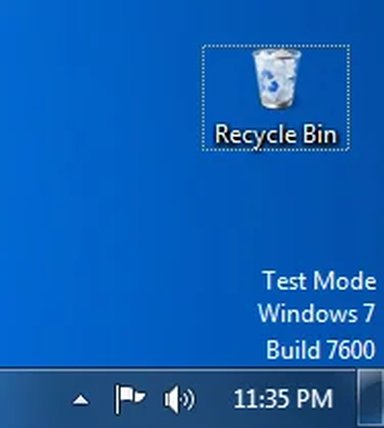
B blosh New Member Joined Aug 10, 2010 Messages 2 Aug 10, 2010 Thread Author #1 For some reason my computer is running in a test mode. Screenshot:
Solution cybercore Aug 11, 2010 If you have disabled signature driver checking, then re-enable it and this watermark should be gone. command prompt bcdedit.exe -set loadoptions ENABLE_INTEGRITY_CHECKS bcdedit.exe -set TESTSIGNING OFF
If you have disabled signature driver checking, then re-enable it and this watermark should be gone. command prompt bcdedit.exe -set loadoptions ENABLE_INTEGRITY_CHECKS bcdedit.exe -set TESTSIGNING OFF
cybercore New Member Joined Jul 7, 2009 Messages 15,641 Aug 11, 2010 #2 If you have disabled signature driver checking, then re-enable it and this watermark should be gone. command prompt bcdedit.exe -set loadoptions ENABLE_INTEGRITY_CHECKS bcdedit.exe -set TESTSIGNING OFF Upvote 0 Downvote Solution
If you have disabled signature driver checking, then re-enable it and this watermark should be gone. command prompt bcdedit.exe -set loadoptions ENABLE_INTEGRITY_CHECKS bcdedit.exe -set TESTSIGNING OFF