

Microsoft Edge can be removed from some Windows 10 and Windows 11 systems by using its installer’s uninstall command, while Windows 11 users in the European Economic Area may see a normal Settings uninstall option because of Digital Markets Act compliance changes. The practical answer is less elegant than the political one: Edge is removable in some places, resistant in others, and likely to reappear if Windows servicing decides it should. That makes “how to uninstall Edge” a Windows architecture story, not just a browser preference story. For most users and nearly all managed fleets, the safest decision is still to disable Edge’s reach before trying to delete its binaries.
The annoyance starts with a mismatch between what users see and what Windows sees. To a user, Microsoft Edge is the blue-green browser icon that opens when a link, search result, widget, help pane, or Microsoft nag prompt gets its way. To Windows, Edge is also part of the machinery for web-backed experiences, progressive web apps, account flows, help content, and system surfaces that assume a Microsoft-controlled web runtime is present.
That does not mean the Edge browser interface is technically impossible to remove. It means Microsoft has designed Windows so that removal is not always a first-class consumer action. On many non-European Windows 10 and Windows 11 installations, the Settings app may show Edge as installed while withholding the ordinary Uninstall button. The operating system is not confused; it is expressing a policy decision.
Microsoft’s public stance has long been that Edge is the default browser and a core component of Windows. That language matters because it turns a consumer preference into a servicing assumption. If a feature update, repair operation, or system reset sees Edge as part of the expected Windows image, it may restore it just as it would restore other inbox components.
The result is a strange bargain. You can install Chrome, Firefox, Brave, Vivaldi, Opera, or any other browser in minutes, and Windows will mostly let you make it the default. But if you want Edge gone rather than merely ignored, you are suddenly negotiating with the operating system itself.
That is why some Windows 11 users in Europe can remove Edge through Settings in a way that looks entirely ordinary. They open the installed apps list, select Microsoft Edge, and choose Uninstall. For those users, the browser behaves more like a bundled application and less like an untouchable system fixture.
Outside that compliance perimeter, the same action may be missing. The button may be greyed out, absent, or replaced by repair-style options. Two users running broadly similar Windows builds can therefore see different levels of control because Microsoft is not simply shipping one global policy.
This is the core frustration in the Blockchain Council guide’s premise: there is no single universal “remove Edge” button because Microsoft’s browser has become a test case for modularity by jurisdiction. Windows is not merely adapting to user demand. It is adapting to law.
The typical path sits under
This method is best understood as a supported mechanism used in an unsupported context. The setup executable knows how to uninstall Edge because enterprise deployment, repair, rollback, and servicing workflows require that logic. But Microsoft does not necessarily present that capability as a consumer-facing removal promise on every Windows edition and region.
A reboot is not optional theater here. Edge processes, update services, scheduled tasks, and shell integrations can linger until the next session. Restarting gives Windows a chance to release file locks and settle whatever registry and servicing state the uninstaller changed.
Even then, success should be measured modestly. The browser binaries may disappear, but Windows may still contain Edge-related references, WebView components, protocol handlers, Start menu stubs, update artifacts, or default-app prompts. Removing Edge is not the same as removing every Microsoft web dependency from Windows.
Edge, however, is not consistently exposed as a simple AppX package in the way users expect. Modern Chromium-based Edge has traveled through several packaging and servicing approaches since replacing the old EdgeHTML browser. Depending on build, edition, deployment history, and policy state, PowerShell may remove a shell-facing package, fail outright, or appear to work until Windows puts the browser back.
That is why commands such as
For IT professionals, this distinction matters. A command that works on one test laptop but fails on half a fleet is not a deployment strategy. It is a troubleshooting note.
Windows servicing expects certain components to exist, certain registry entries to match files, and certain package states to be internally consistent. Manual deletion bypasses the mechanisms that maintain that consistency. The immediate result may feel satisfying, but the longer-term result can be failed repairs, repeated reinstallations, broken help flows, or inscrutable event log noise.
Third-party uninstallers occupy a similar gray zone. They can be useful for removing leftover files after a legitimate uninstall path has run. They are riskier when they become the primary tool for ripping out protected components that Windows still believes are present.
The correct hierarchy is simple. Use Settings where Microsoft exposes uninstall. Use Edge’s own installer command where that remains viable. Treat PowerShell as a narrow compatibility tool. Save ownership changes, policy-file edits, and forced folder deletion for lab images, disposable test machines, or users who are prepared to repair Windows if the operation goes sideways.
Group Policy and Microsoft Intune can set default browsers, manage Edge behavior, control first-run experiences, suppress prompts, configure update behavior, and define enterprise browser boundaries. In a managed estate, that is vastly preferable to maintaining a brittle uninstall script that may need revision after each cumulative update or feature release.
There is also the WebView problem. Microsoft Edge WebView2 is not the same thing as the Edge browser UI, but the distinction is easy to miss. Many modern Windows applications use WebView2 to render embedded web content. Removing or damaging web runtime components can break line-of-business apps, sign-in windows, dashboards, launchers, and admin tools that have no visible relationship to Edge as a browser.
That is why enterprises should separate browser preference from runtime dependency. Block Edge from being the default browser if that is the requirement. Prevent it from launching at startup. Remove taskbar pins and Start menu promotion. But do not assume that every Edge-adjacent component is expendable.
The same logic applies to kiosk and VDI images, though with more room for aggressive tuning. If Edge removal is part of a locked-down image, it should be scripted, documented, tested after Windows updates, and validated against app dependencies. The standard should be repeatability, not cleverness.
But the deeper strategy is about platform leverage. A default browser is an entry point for search, advertising, identity, AI assistants, shopping features, PDF handling, password management, enterprise security controls, and web app installation. Losing the default browser means losing a lot of downstream surface area.
That is why the EU changes are so revealing. When forced to unbundle more clearly, Microsoft can do it. Edge can be made more removable in at least some Windows configurations. The question is not whether modularity is technically imaginable; it is where Microsoft is compelled or incentivized to expose it.
For Windows users outside Europe, that creates an uncomfortable two-tier reality. The operating system you bought may be technically capable of giving you more control, but the policy switch is not necessarily offered in your market. That is not a Windows limitation in the classic engineering sense. It is a business decision mediated by regulation.
Start by installing the replacement browser before touching Edge. Then set it as the default for web browsing, relevant file types, and common protocols in Windows Settings. Windows 11 has improved this process compared with its earliest releases, but edge cases remain, especially around Microsoft-specific protocols and shell experiences.
Next, remove Edge from everyday sight. Unpin it from the taskbar, remove Start menu shortcuts, disable startup behavior in Task Manager where present, and turn off Edge background startup features from within the browser if you still have access to its settings. Those steps do not remove the binary, but they reduce the browser’s ability to intrude.
For users determined to redirect Microsoft-specific links, tools such as MSEdgeRedirect exist to route
In plain terms, disabling is less satisfying but more durable. It leaves Windows in a state Microsoft’s servicing stack understands, while still making another browser the daily driver.
That is the correct framing. Edge removal is not a moral victory if the next Windows feature update reinstalls it. It is not a clean deployment if a WebView-dependent application fails three months later. It is not user empowerment if the process requires weakening system protections just to delete a browser folder.
Where users should be careful is with any guide that compresses uncertainty into certainty. “Works on Windows 11” is not enough. Which build? Which region? Which edition? Managed or unmanaged? Fresh install or upgraded machine? Consumer account or enterprise policy? Those details decide whether the removal path is clean, blocked, reversible, or likely to be undone.
The guide also correctly points toward the future: the browser interface and the web rendering runtime are diverging. That is probably where Windows is headed. Microsoft can let users remove the visible browser while preserving shared components that applications need.
That future would make everyone’s life easier. Users could uninstall the browser they do not want. Developers could rely on a stable runtime. Admins could manage defaults without fighting consumer growth tactics. Microsoft could still ship WebView securely without pretending the Edge icon itself is load-bearing.
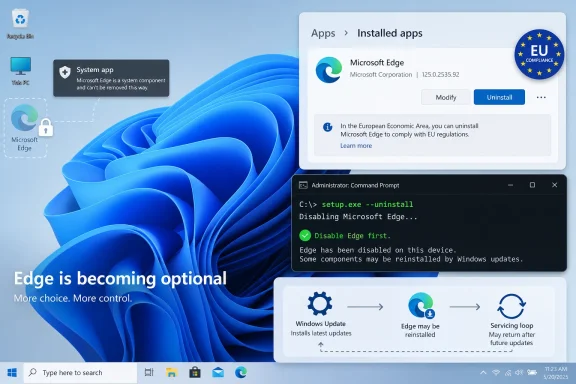 Edge Is a Browser, but Windows Treats It Like Plumbing
The annoyance starts with a mismatch between what users see and what Windows sees. To a user, Microsoft Edge is the blue-green browser icon that opens when a link, search result, widget, help pane, or Microsoft nag prompt gets its way. To Windows, Edge is also part of the machinery for web-backed experiences, progressive web apps, account flows, help content, and system surfaces that assume a Microsoft-controlled web runtime is present.That does not mean the Edge browser interface is technically impossible to remove. It means Microsoft has designed Windows so that removal is not always a first-class consumer action. On many non-European Windows 10 and Windows 11 installations, the Settings app may show Edge as installed while withholding the ordinary Uninstall button. The operating system is not confused; it is expressing a policy decision.
Microsoft’s public stance has long been that Edge is the default browser and a core component of Windows. That language matters because it turns a consumer preference into a servicing assumption. If a feature update, repair operation, or system reset sees Edge as part of the expected Windows image, it may restore it just as it would restore other inbox components.
The result is a strange bargain. You can install Chrome, Firefox, Brave, Vivaldi, Opera, or any other browser in minutes, and Windows will mostly let you make it the default. But if you want Edge gone rather than merely ignored, you are suddenly negotiating with the operating system itself.
The EU Turned an Uninstall Button Into a Regulatory Artifact
The cleanest Edge removal path now depends less on technical skill than geography. In the European Economic Area, Windows 11 has been altered to satisfy parts of the EU Digital Markets Act, which pressures large platform operators to give users more meaningful control over defaults, bundled apps, and self-preferencing behavior. In practical terms, that has meant additional options for removing or demoting some Microsoft components that remain harder to touch elsewhere.That is why some Windows 11 users in Europe can remove Edge through Settings in a way that looks entirely ordinary. They open the installed apps list, select Microsoft Edge, and choose Uninstall. For those users, the browser behaves more like a bundled application and less like an untouchable system fixture.
Outside that compliance perimeter, the same action may be missing. The button may be greyed out, absent, or replaced by repair-style options. Two users running broadly similar Windows builds can therefore see different levels of control because Microsoft is not simply shipping one global policy.
This is the core frustration in the Blockchain Council guide’s premise: there is no single universal “remove Edge” button because Microsoft’s browser has become a test case for modularity by jurisdiction. Windows is not merely adapting to user demand. It is adapting to law.
The Installer Command Remains the Workhorse Hack
For users without the EU Settings path, the most widely circulated removal method is to invoke Edge’s own installer from its versioned Installer directory. The command generally takes the form of runningsetup.exe with uninstall, system-level, verbose logging, and force-uninstall flags. It is inelegant, but it has persisted because it uses Microsoft’s own servicing mechanism rather than simply deleting folders by hand.The typical path sits under
C:\Program Files (x86)\Microsoft\Edge\Application\, followed by a version-numbered directory and then Installer. Because Edge updates frequently, guides often use a wildcard in the command prompt path rather than asking the user to type the current version number. Once there, an elevated terminal can run the uninstall command and trigger a silent or semi-silent removal.This method is best understood as a supported mechanism used in an unsupported context. The setup executable knows how to uninstall Edge because enterprise deployment, repair, rollback, and servicing workflows require that logic. But Microsoft does not necessarily present that capability as a consumer-facing removal promise on every Windows edition and region.
A reboot is not optional theater here. Edge processes, update services, scheduled tasks, and shell integrations can linger until the next session. Restarting gives Windows a chance to release file locks and settle whatever registry and servicing state the uninstaller changed.
Even then, success should be measured modestly. The browser binaries may disappear, but Windows may still contain Edge-related references, WebView components, protocol handlers, Start menu stubs, update artifacts, or default-app prompts. Removing Edge is not the same as removing every Microsoft web dependency from Windows.
PowerShell Is Tempting Because It Looks Cleaner Than It Is
PowerShell removal commands appeal to a certain kind of Windows user because they look declarative. Find the package, pipe it to removal, restart, done. On older Windows app models, that logic can work well enough.Edge, however, is not consistently exposed as a simple AppX package in the way users expect. Modern Chromium-based Edge has traveled through several packaging and servicing approaches since replacing the old EdgeHTML browser. Depending on build, edition, deployment history, and policy state, PowerShell may remove a shell-facing package, fail outright, or appear to work until Windows puts the browser back.
That is why commands such as
Get-AppxPackage *Microsoft.MicrosoftEdge* | Remove-AppxPackage should be treated as limited and build-dependent. They are not magic, and they are not the most reliable route on current Windows 11 systems. If the command fails, that failure is not necessarily user error; it may simply reflect how Edge is registered on that machine.For IT professionals, this distinction matters. A command that works on one test laptop but fails on half a fleet is not a deployment strategy. It is a troubleshooting note.
Deleting the Folder Is the Fastest Way to Create a Servicing Mystery
There is an obvious brute-force approach that keeps appearing in forums: take ownership of Edge directories, stop update tasks, delete the files, and clean up the leftovers with a third-party uninstaller. It can work in the narrow sense that the icon stops launching the browser. It can also create exactly the sort of half-broken state that makes future Windows updates and app repairs harder to diagnose.Windows servicing expects certain components to exist, certain registry entries to match files, and certain package states to be internally consistent. Manual deletion bypasses the mechanisms that maintain that consistency. The immediate result may feel satisfying, but the longer-term result can be failed repairs, repeated reinstallations, broken help flows, or inscrutable event log noise.
Third-party uninstallers occupy a similar gray zone. They can be useful for removing leftover files after a legitimate uninstall path has run. They are riskier when they become the primary tool for ripping out protected components that Windows still believes are present.
The correct hierarchy is simple. Use Settings where Microsoft exposes uninstall. Use Edge’s own installer command where that remains viable. Treat PowerShell as a narrow compatibility tool. Save ownership changes, policy-file edits, and forced folder deletion for lab images, disposable test machines, or users who are prepared to repair Windows if the operation goes sideways.
The Better Enterprise Answer Is Usually Boring Policy
In business environments, removing Edge is often the wrong hill to die on. The operational objective is usually not “no Edge files may exist on disk.” It is “users should use the approved browser, links should open where policy says, startup should be quiet, and Microsoft should not hijack workflows.” Those goals are better served with policy than surgery.Group Policy and Microsoft Intune can set default browsers, manage Edge behavior, control first-run experiences, suppress prompts, configure update behavior, and define enterprise browser boundaries. In a managed estate, that is vastly preferable to maintaining a brittle uninstall script that may need revision after each cumulative update or feature release.
There is also the WebView problem. Microsoft Edge WebView2 is not the same thing as the Edge browser UI, but the distinction is easy to miss. Many modern Windows applications use WebView2 to render embedded web content. Removing or damaging web runtime components can break line-of-business apps, sign-in windows, dashboards, launchers, and admin tools that have no visible relationship to Edge as a browser.
That is why enterprises should separate browser preference from runtime dependency. Block Edge from being the default browser if that is the requirement. Prevent it from launching at startup. Remove taskbar pins and Start menu promotion. But do not assume that every Edge-adjacent component is expendable.
The same logic applies to kiosk and VDI images, though with more room for aggressive tuning. If Edge removal is part of a locked-down image, it should be scripted, documented, tested after Windows updates, and validated against app dependencies. The standard should be repeatability, not cleverness.
Microsoft’s Real Strategy Is Persistence, Not Just Preference
Edge’s stubbornness is often framed as a browser war annoyance, and that is partly fair. Microsoft has spent years nudging, pleading, and sometimes irritating users into trying Edge. Default browser prompts, Bing integration, Windows Search behavior, Widgets links, and Microsoft account surfaces all contribute to the perception that Edge is less a choice than an ambient presence.But the deeper strategy is about platform leverage. A default browser is an entry point for search, advertising, identity, AI assistants, shopping features, PDF handling, password management, enterprise security controls, and web app installation. Losing the default browser means losing a lot of downstream surface area.
That is why the EU changes are so revealing. When forced to unbundle more clearly, Microsoft can do it. Edge can be made more removable in at least some Windows configurations. The question is not whether modularity is technically imaginable; it is where Microsoft is compelled or incentivized to expose it.
For Windows users outside Europe, that creates an uncomfortable two-tier reality. The operating system you bought may be technically capable of giving you more control, but the policy switch is not necessarily offered in your market. That is not a Windows limitation in the classic engineering sense. It is a business decision mediated by regulation.
Disabling Edge Solves More Real Problems Than Uninstalling It
For many users, the practical goal is not philosophical purity. They simply do not want Edge opening, prompting, preloading, or reclaiming defaults. That goal is achievable without full removal.Start by installing the replacement browser before touching Edge. Then set it as the default for web browsing, relevant file types, and common protocols in Windows Settings. Windows 11 has improved this process compared with its earliest releases, but edge cases remain, especially around Microsoft-specific protocols and shell experiences.
Next, remove Edge from everyday sight. Unpin it from the taskbar, remove Start menu shortcuts, disable startup behavior in Task Manager where present, and turn off Edge background startup features from within the browser if you still have access to its settings. Those steps do not remove the binary, but they reduce the browser’s ability to intrude.
For users determined to redirect Microsoft-specific links, tools such as MSEdgeRedirect exist to route
microsoft-edge: protocol calls to a chosen default browser. That can be useful, especially on systems where Windows Search, Widgets, or other surfaces insist on Edge. It is also an additional background tool intercepting system behavior, so it deserves the same caution as any utility that inserts itself into protocol handling.In plain terms, disabling is less satisfying but more durable. It leaves Windows in a state Microsoft’s servicing stack understands, while still making another browser the daily driver.
The Blockchain Council Guide Gets the Hierarchy Mostly Right
The submitted guide’s strongest point is its ordering of risk. It does not pretend that one command solves every Windows 10 and Windows 11 configuration. It places the EU Settings route where it belongs, treats the installer command as the broadest non-Settings method, describes PowerShell as inconsistent, and presents disabling as the safer operational choice.That is the correct framing. Edge removal is not a moral victory if the next Windows feature update reinstalls it. It is not a clean deployment if a WebView-dependent application fails three months later. It is not user empowerment if the process requires weakening system protections just to delete a browser folder.
Where users should be careful is with any guide that compresses uncertainty into certainty. “Works on Windows 11” is not enough. Which build? Which region? Which edition? Managed or unmanaged? Fresh install or upgraded machine? Consumer account or enterprise policy? Those details decide whether the removal path is clean, blocked, reversible, or likely to be undone.
The guide also correctly points toward the future: the browser interface and the web rendering runtime are diverging. That is probably where Windows is headed. Microsoft can let users remove the visible browser while preserving shared components that applications need.
That future would make everyone’s life easier. Users could uninstall the browser they do not want. Developers could rely on a stable runtime. Admins could manage defaults without fighting consumer growth tactics. Microsoft could still ship WebView securely without pretending the Edge icon itself is load-bearing.
The Practical Edge Exit Plan for 2026 Windows PCs
The cleanest approach is to decide what problem you are actually solving before running commands. A home user who dislikes Edge prompts has a different risk profile from a sysadmin maintaining thousands of endpoints, and both are different from a hobbyist building a stripped-down Windows image.- If Windows offers a normal Settings uninstall option for Edge, use that before trying command-line or third-party removal methods.
- If Settings does not expose removal, the Edge installer command is usually the most coherent next step because it uses Edge’s own setup infrastructure.
- If PowerShell package removal fails or Edge returns after reboot, treat that as a sign of build-level integration rather than a reason to force-delete system folders.
- If the real goal is to stop Edge from opening, set another default browser, disable Edge startup behavior, remove shortcuts, and consider protocol redirection only after weighing the trade-offs.
- If the machine is managed by an organization, prefer Group Policy, Intune, and documented deployment controls over one-off uninstall tricks.
- If WebView2 or embedded web content matters to your apps, do not confuse removing the Edge browser UI with removing every Edge-related runtime component.
References
- Primary source: Blockchain Council
Published: Tue, 26 May 2026 11:16:37 GMT
How to Remove Microsoft Edge (Windows 10 and 11)
How to remove Microsoft Edge on Windows 10/11: EU DMA Settings uninstall, installer command method, PowerShell option, risks, and safer ways to disable it.www.blockchain-council.org - Official source: support.microsoft.com
Why can't I uninstall Microsoft Edge? | Microsoft Support
Learn more about why you can't uninstall Microsoft Edge on your Windows computer.support.microsoft.com - Official source: microsoft.com

Uninstall Microsoft Edge | Microsoft Edge
Trying to uninstall Microsoft Edge from Windows 10, Windows 11, or other systems? Discover the features and functionalities you’ll miss without it.
www.microsoft.com
- Related coverage: windowscentral.com
Microsoft will let users uninstall Edge, Bing, and disable ads on Windows 11 as it complies with the Digital Markets Act | Windows Central
Microsoft ensures Windows 11 is compliant with the Digital Markets Act in the European Economic Area.www.windowscentral.com - Official source: learn.microsoft.com
I am trying to uninstall Microsoft Edge and cannot, grrrr. - Microsoft Q&A
I go through the steps as instructed - settings, apps & features, select app and click on uninstall, but it is gray. Also, I tried to terminate has instructed once I reached that page and when I click on it (shows color background and black letters)…learn.microsoft.com - Official source: techcommunity.microsoft.com
How do I completely uninstall microsoft edge in windows 11? | Microsoft Community Hub
Hi,The Microsoft Edge browser has been consuming a lot of CPU and RAM on my Windows 11 computer lately, even when only a few tabs are open. It's starting to... techcommunity.microsoft.com
- Related coverage: howtogeek.com
MSEdgeRedirect Stops Windows From Opening Edge (But We Don't Recommend It)
Microsoft is doing all it can to get you to use Edge and users are doing all they can to avoid it. www.howtogeek.com
- Related coverage: techspot.com
Microsoft will allow Windows 11 users in the EU to uninstall Edge and disable Bing | TechSpot
Microsoft is one of the six "gatekeepers" named in the EU's DMA alongside Apple, Amazon, ByteDance, Google, and Meta. A gatekeeper is defined as any tech company...www.techspot.com - Official source: answers.microsoft.com
How to Uninstall/Reinstall Edge - Microsoft Q&A
Edge keeps crashing in Windows 11. I have already tried quite a few troubleshooting steps suggested here and it's still not fixed. The last suggestion I received before reinstalling Windows is to reinstall Edge. (Not repair/reinstall from the…answers.microsoft.com - Related coverage: wintips.org
How to Uninstall and Reinstall Microsoft Edge.
Microsoft Edge is the new and lightweight default Web browser in Windows 10 Operating Systems and it is designed to replace the Internet Explorer in the future.www.wintips.org - Official source: intowindows.com
How To Uninstall Edge From Windows 11 Via Settings (EU Only)
Microsoft Edge browser is installed by default in Windows 11. It's automatically installed when you install/reinstall and set up Windows 11 on yourwww.intowindows.com - Related coverage: ema.europa.eu
- Related coverage: support.waspbarcode.com
Microsoft .NET Framework Repair and Uninstall/Reinstall Procedures - Knowledgebase / FAQs - Wasp Helpdesk
PDF documentsupport.waspbarcode.com
