

HP’s move to put Microsoft 365 Copilot on office printers turns a familiar endpoint into an active participant in the document lifecycle — enabling on‑panel summarization, smart filing and translation that promise to shave steps off everyday scanning workflows while keeping scanned content inside the Microsoft 365 estate.
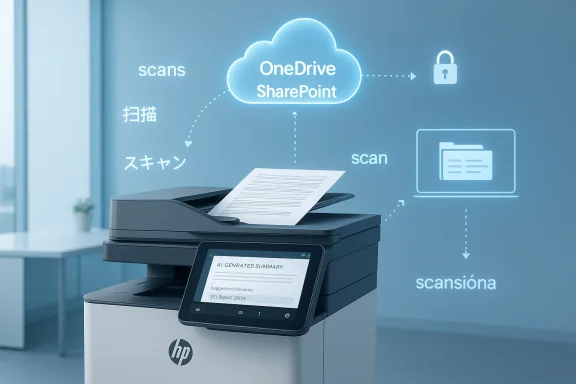
HP recently announced "HP for Microsoft 365 Copilot," a new HP Workpath app that integrates Microsoft 365 Copilot capabilities directly into supported HP multifunction printers (MFPs). The offering is positioned as the first direct Copilot integration at the office‑printer touchpoint and is slated for general availability in Spring 2026. The vendor frames the capability as a way to move AI to “the place where paper meets digital”: a scan is captured at the MFP, Copilot produces a short summary, suggests a consistent file name and destination in OneDrive or SharePoint, and can provide translated text at the device before the asset is stored.
This announcement arrives amid broad enterprise AI adoption. Large independent surveys and vendor research show most enterprises are now using AI in at least one business function; one major industry survey puts that figure in the high‑70s percent range, and analyst forecasts anticipate continued growth over the next two years. Separately, Microsoft’s own usage research shows many Copilot users report measurable daily time savings — with averages in the low‑tens of minutes per day and substantially larger gains in select deployments. Those external datapoints help explain HP’s timing: organizations that already standardize on Microsoft 365 want capture and compliance to live inside their tenant controls, and printers are a natural extension of that workflow.
That said, market numbers and customer outcomes vary by study and by deployment profile. Some firms report modest average gains while a minority of highly engaged users and pilots report multi‑hour monthly savings. Claims about adoption percentages and time saved should therefore be treated as directional — useful for planning, but not as a guaranteed outcome for every organization.
However, realize the benefits are not automatic. Key dependencies include:
In short: HP’s Copilot integration at the printer is a credible, well‑timed extension of enterprise AI into the physical capture point. It resolves a persistent operational friction — turning paper into actionable, searchable digital content — but it also raises the familiar tradeoffs of any enterprise AI project: licensing complexity, accuracy risk, and governance requirements. Measure, pilot, and govern first; scale second.
Source: TECHNOLOGY RESELLER Unlocking Smarter Print Productivity with HP for Microsoft 365 Copilot AI-powered workflows at the printer – saving time, reducing steps, and keeping your data secure By Aurelio Maruggi, Division President of HP Office Print Solutions – TECHNOLOGY RESELLER
 Background / Overview
HP recently announced "HP for Microsoft 365 Copilot," a new HP Workpath app that integrates Microsoft 365 Copilot capabilities directly into supported HP multifunction printers (MFPs). The offering is positioned as the first direct Copilot integration at the office‑printer touchpoint and is slated for general availability in Spring 2026. The vendor frames the capability as a way to move AI to “the place where paper meets digital”: a scan is captured at the MFP, Copilot produces a short summary, suggests a consistent file name and destination in OneDrive or SharePoint, and can provide translated text at the device before the asset is stored.This announcement arrives amid broad enterprise AI adoption. Large independent surveys and vendor research show most enterprises are now using AI in at least one business function; one major industry survey puts that figure in the high‑70s percent range, and analyst forecasts anticipate continued growth over the next two years. Separately, Microsoft’s own usage research shows many Copilot users report measurable daily time savings — with averages in the low‑tens of minutes per day and substantially larger gains in select deployments. Those external datapoints help explain HP’s timing: organizations that already standardize on Microsoft 365 want capture and compliance to live inside their tenant controls, and printers are a natural extension of that workflow.
That said, market numbers and customer outcomes vary by study and by deployment profile. Some firms report modest average gains while a minority of highly engaged users and pilots report multi‑hour monthly savings. Claims about adoption percentages and time saved should therefore be treated as directional — useful for planning, but not as a guaranteed outcome for every organization.
What HP announced and why it matters
HP’s announced feature set for HP for Microsoft 365 Copilot centers on three headline capabilities accessible from the MFP touchscreen:- AI‑generated summaries of scanned documents and of files in OneDrive/SharePoint so users can triage content without opening long PDFs.
- Smart file naming and storage suggestions that propose consistent filenames, metadata, and tenant destinations to improve searchability and records management.
- On‑device translation powered by Copilot, enabling immediate translated text or bilingual files at the point of capture.
- An HP Workpath‑enabled printer (modern enterprise MFP models with the Workpath framework),
- Customer Microsoft 365 tenant with Copilot entitlements (appropriate licensing), and
- OneDrive/SharePoint storage configured for the tenant workflow.
Technical architecture — how it likely works
HP’s Workpath is a cloud‑centric app framework for enterprise HP printers. Workpath apps run on supported MFPs and mediate secure interactions with cloud services using device‑side agents and HP’s management stack. The Copilot Workpath app will rely on existing authentication and cloud‑to‑device channels:- Authentication will integrate with Microsoft Entra ID (Azure AD) so printer console users authenticate into the tenant, with support for enterprise single sign‑on and MFA modalities.
- The device captures a scan (image/PDF), the Workpath app orchestrates OCR and metadata extraction, and the content is sent to the Copilot service for summarization/translation unless an explicit on‑device inference mode is available.
- The Copilot response (summary, name suggestion, translated text) is returned to the device and the final file is stored into OneDrive/SharePoint using tenant‑scoped credentials and policies.
Verified claims and where they line up (and where they diverge)
- HP’s product claim that the feature will summarize scanned documents and suggest storage destinations is confirmed in HP’s official product announcement and blog messaging. HP frames availability as Spring 2026 and positions the app inside Workpath Premium bundles.
- Market adoption numbers: HP cites enterprise AI adoption and Copilot penetration figures as context for the product. Independent industry surveys show a large majority of enterprises reporting AI use in at least one function (commonly reported in the high‑70s to 80s percent), and Microsoft’s own material reports strong Copilot traction among enterprise customers — although the exact percentage among Fortune 500 reported by different parties varies. Vendor and Microsoft messaging on Copilot adoption have both been cited publicly.
- Productivity claims: HP cites time‑savings ranges that align with vendor studies and high‑value pilot outcomes in which some organizations measure multi‑hour monthly gains. Independent Microsoft surveys indicate the average Copilot user saves minutes per day (the company’s own research reports averages consistent with about 4–14 hours per month depending on the cohort), while select customer case studies show much larger results (in some cases 8–19 hours per month for top users). In short, time‑savings are real but highly variable by role, use case, and adoption intensity.
Strengths: where this integration genuinely adds value
- Fewer manual steps at capture. Automating name, summary, and destination reduces friction and human error, and can shave several minutes per transaction across high‑volume scanning environments.
- Improved metadata and discoverability. Standardized filenames and suggested metadata at ingestion improves search, records retention, and auditability — important in legal and compliance workflows.
- Faster triage for document‑intensive teams. Legal intake, HR onboarding, facilities forms, invoices and claims processing benefit immediately from a quick summary and destination suggestion that speeds routing.
- Better multilingual access. Translation at capture unlocks faster cross‑border processing and reduces downstream translation cycles for global teams.
- Consolidation inside the Microsoft ecosystem. For organizations standardized on Microsoft 365, routing scans directly into OneDrive/SharePoint under tenant controls keeps guardrails aligned with existing DLP, retention and eDiscovery tools.
- Channel and managed‑service opportunities. Resellers and MSPs can package device procurement, Workpath bundles, Copilot entitlements and tenant configuration as managed capture services — a natural upsell.
Risks, limitations and governance considerations
- Inference locality and data residency. Vendors’ marketing sometimes uses the phrase “on‑device,” but many Copilot features run in Microsoft’s cloud. Organizations need explicit diagrams showing whether OCR text or images leave the MFP and where inference occurs to map compliance obligations (GDPR, HIPAA, sectoral rules).
- Retention, logging and audit trails. Who logs Copilot prompts, intermediate text, and responses? For regulated workloads, IT needs to confirm retention settings, Purview/Purview‑equivalent integration, and eDiscovery visibility for any content processed by Copilot.
- Accuracy and hallucinations. Generative summarization can err, omit context, or invent details. Automated filenames or routing based on an incorrect summary may misplace sensitive documents; treat AI outputs as assistive and keep a human‑in‑the‑loop for critical classes of documents.
- Endpoint security (the printer as an attack surface). Modern MFPs are networked endpoints. A compromised MFP could be used to intercept scans pre‑transmission or modify stored content. Mitigations: keep firmware current, segment printers, enforce Entra ID authentication with MFA, and ingest printer telemetry into SIEM.
- Licensing complexity and TCO. The Workpath Copilot app requires both the HP Workpath Premium bundle and Microsoft 365 Copilot entitlements. Model total cost of ownership, including device upgrades, licensing, configuration and partner services, before assuming net savings.
- Firmware/remote recovery governance. HP’s expanded Workforce Experience Platform includes firmware‑level recovery tools; while operationally useful, BIOS‑level remote access requires strict RBAC, audit controls and clarity around encrypted‑drive interactions (e.g., BitLocker, TPM).
- Network and firewall changes. Workpath apps interact with HP and Microsoft cloud endpoints; enterprise firewall and proxy rules will likely need adjustments. Plan for endpoint whitelisting without opening undue exposure.
Practical deployment checklist for IT leaders
Run a controlled pilot and validate assumptions before broad roll‑out. A short, focused checklist:- Inventory and readiness
- Identify Workpath‑capable MFPs and confirm firmware baselines.
- Map which models will need replacement or upgrades.
- Licensing and procurement
- Confirm Microsoft 365 Copilot entitlements required (per‑user or tenant) and Workpath Premium bundle costs.
- Budget for integration and partner services.
- Identity and access
- Integrate MFPs with Microsoft Entra ID for SSO and enforce MFA or passwordless authentication.
- Consider HP Authentication Manager for QR code/push login and supervised release workflows.
- Network and security
- Whitelist required HP and Microsoft endpoints; verify TLS inspection does not break secure channels.
- Place printers in segmented VLANs and apply endpoint monitoring and NAC policies.
- Compliance and data flows
- Get a flow diagram for ingestion, inference, logging and retention.
- Map to internal DLP, Purview/audit and eDiscovery policies; decide which document classes require manual review.
- Pilot execution
- Run a 30–90 day pilot measuring: accuracy of summaries, time saved per task, misrouting/error rates, user satisfaction, and SIEM logs.
- Use representative document types (invoices, HR forms, legal intake).
- Human‑in‑the‑loop controls
- Configure AI outputs as suggestions by default; require sign‑off for critical document classes.
- Enable redaction or supervised release for sensitive content.
- Training and change management
- Train staff on when to trust AI suggestions and how to audit Copilot outputs.
- Create user guides for the printer panel workflows.
- Monitoring and incident response
- Forward printer and Workpath telemetry to SIEM and define incident playbooks for compromised devices.
- Establish firmware update SLAs with partners.
- Scale and iterate
- Use pilot data to tune metadata templates, naming rules, and folder routing before wide rollout.
- Revalidate costs against measured time savings.
Cost, ROI and realistic expectations
Vendor headlines often highlight broad productivity gains — and some deployments deliver them. In practice:- Expect variable results. Average time savings reported in vendor research is often less than the top‑user numbers. Microsoft’s usage research shows average Copilot users saving minutes a day (which compounds into hours per month), while customer case studies show a wide range (from 4–19 hours per month depending on role and intensity).
- Model TCO carefully. Include Copilot entitlements, Workpath Premium app costs, device upgrades, partner integration, and the operational cost of governance and monitoring.
- Run a focused pilot with pre‑defined KPIs (time per scan workflow, error rates, percentage of scans auto‑routed correctly), and use that real data for procurement decisions.
Recommendations and best practices for channel partners and MSPs
- Use a bundled offering: device + Workpath Premium + Copilot entitlements + tenant configuration + managed monitoring; package as a measurable outcome service.
- Offer pilot packages that include baseline measurements, a 30–90 day trial, and a post‑pilot ROI report.
- Provide security hardening as a service: identity integration, firewall configuration, firmware management, and SIEM onboarding.
- Train customers on conservative rollouts for regulated document classes; build standard operating procedures for human‑in‑the‑loop verification.
Final analysis: meaningful step or incremental marketing?
HP for Microsoft 365 Copilot is strategically sensible and practically useful where the preconditions exist: modern Workpath‑enabled fleets, Microsoft 365 tenant control, and a willingness to invest in governance. Turning MFPs into active capture endpoints that produce searchable, correctly routed assets can reduce clerical overhead and shorten document lifecycles — tangible benefits for document‑heavy teams.However, realize the benefits are not automatic. Key dependencies include:
- The accuracy and reliability of AI summaries for your document types,
- Clear documentation about where inference runs (on‑device vs cloud) and how logs/retention are handled,
- A total cost model that includes licensing, device readiness and operational monitoring,
- Strong security and compliance controls to keep the expanded attack surface manageable.
In short: HP’s Copilot integration at the printer is a credible, well‑timed extension of enterprise AI into the physical capture point. It resolves a persistent operational friction — turning paper into actionable, searchable digital content — but it also raises the familiar tradeoffs of any enterprise AI project: licensing complexity, accuracy risk, and governance requirements. Measure, pilot, and govern first; scale second.
Source: TECHNOLOGY RESELLER Unlocking Smarter Print Productivity with HP for Microsoft 365 Copilot AI-powered workflows at the printer – saving time, reducing steps, and keeping your data secure By Aurelio Maruggi, Division President of HP Office Print Solutions – TECHNOLOGY RESELLER
