

HP’s new "HP for Microsoft 365 Copilot" integration brings generative AI from the cloud to the printer panel, promising to shorten scanning workflows, automate file naming and storage, and deliver on-device translation — all tied into OneDrive and SharePoint for a seamless, Microsoft‑centric document lifecycle.
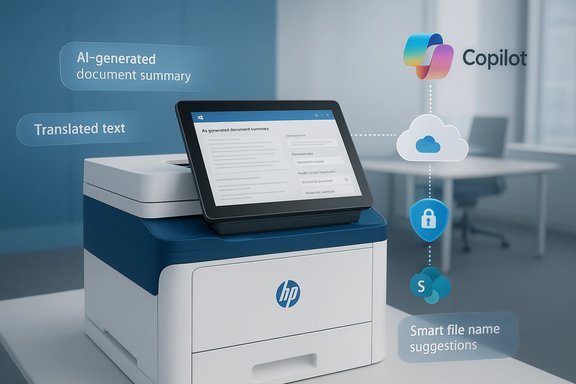
HP announced HP for Microsoft 365 Copilot as a Workpath app slated for availability in Spring 2026. The offering embeds Microsoft 365 Copilot capabilities directly into HP Workpath‑enabled multifunction printers (MFPs) so Copilot can summarize scanned documents, suggest intelligent file names and storage locations, and translate text at the device before a file is saved to OneDrive or SharePoint. HP positions this as an extension of the Microsoft 365 Copilot experience — the same AI that users interact with on PCs and in Teams, but pushed to the point where paper becomes digital.
This move follows a broader enterprise trend: organizations are rapidly adopting generative AI in knowledge work and seeking to fold those capabilities into day‑to‑day workflows. Industry reporting from vendors and analyst houses shows enterprise AI adoption rates in the high‑70s to 80s percentile range and widespread Copilot deployment among large enterprises; Microsoft itself has highlighted widespread Copilot adoption across enterprise customers. HP’s announcement ties directly to those market dynamics, offering printers as new endpoints for AI workflows.
Key technical elements that administrators will need to plan for:
Administrators should therefore assume a cloud‑assisted workflow: the MFP captures the image, the HP Workpath app sends it to Microsoft Copilot services (authenticated via the organization’s tenant), and the returned summary/translation is attached or embedded into the stored file.
For Microsoft, the integration extends Copilot’s reach into physical workflows, supporting the strategy of embedding AI across device surfaces. For customers, the partnership can reduce vendor sprawl by centralizing capture and initial processing within the Microsoft ecosystem.
Market claims around broad Copilot adoption and enterprise AI productivity gains are supported by multiple public industry statements from Microsoft and third‑party analyst summaries, which indicate high rates of Copilot adoption within large enterprises and tangible time savings in knowledge‑work scenarios. Organizations should however recognize that reported productivity gains vary significantly by use case, implementation quality, and user behavior. Where HP’s release quotes time‑savings ranges or adoption percentages drawn from external reports, those numbers reflect aggregated surveys and vendor reporting rather than guaranteed outcomes for every deployment.
When a vendor or partner claims a specific time savings (for example, "10–15 hours per employee per month"), treat those as benchmarks rather than guaranteed outcomes. Conduct a focused pilot to measure real savings in your environment, capturing baseline task times and measuring the AI‑assisted workflow over a representative period.
However, the practical value will be realized only when a few conditions are met:
But the benefits are not automatic. They depend on careful planning: fleet readiness, tenant licensing, security hardening, compliance mapping, and human‑in‑the‑loop safeguards. For organizations ready to pilot the capability, HP’s announcement represents an actionable evolution: bringing AI to the traditionally static capture step, and offering a practical way to start applying generative AI where many enterprise processes begin.
Source: HP Unlocking Smarter Print Productivity with HP for M365 Copilot
 Background
HP announced HP for Microsoft 365 Copilot as a Workpath app slated for availability in Spring 2026. The offering embeds Microsoft 365 Copilot capabilities directly into HP Workpath‑enabled multifunction printers (MFPs) so Copilot can summarize scanned documents, suggest intelligent file names and storage locations, and translate text at the device before a file is saved to OneDrive or SharePoint. HP positions this as an extension of the Microsoft 365 Copilot experience — the same AI that users interact with on PCs and in Teams, but pushed to the point where paper becomes digital.This move follows a broader enterprise trend: organizations are rapidly adopting generative AI in knowledge work and seeking to fold those capabilities into day‑to‑day workflows. Industry reporting from vendors and analyst houses shows enterprise AI adoption rates in the high‑70s to 80s percentile range and widespread Copilot deployment among large enterprises; Microsoft itself has highlighted widespread Copilot adoption across enterprise customers. HP’s announcement ties directly to those market dynamics, offering printers as new endpoints for AI workflows.
Overview: What HP for Microsoft 365 Copilot actually does
HP’s description lists three headline capabilities for the Workpath app:- AI‑generated summaries of scanned documents or files stored in OneDrive and SharePoint, reducing the need to open and read long scans before routing.
- Smart file naming and storage suggestions, so scans can be categorized and saved with consistent metadata and destination suggestions.
- On‑device translation powered by Copilot, enabling multilingual scanning and immediate translation at the printer console.
Why HP is pushing Copilot to printers
The operational problem being solved
Many organizations still face friction when turning paper into usable digital content. Common pain points include:- Time-consuming manual file naming and classification after a scan.
- Multiple steps to get a scan into a shared repository (scan → PC → rename → upload).
- Language barriers when scanning documents in multinational or multilingual environments.
- Security and governance gaps introduced by ad hoc scanning and local file handling.
The business pitch
HP frames the integration as a productivity multiplier: fewer manual steps, faster document lifecycle completion, and reduced delay between capture and actionable content. HP also leans on enterprise security messaging — asserting that the combination of HP printer protections and Microsoft cloud standards delivers enterprise‑grade security for these AI workflows.Technical context: how it is likely architected
HP Workpath and cloud mediation
HP Workpath is HP’s cloud‑centric application framework for modern HP enterprise printers. Workpath apps run on supported printers and can interact with cloud services using secure channels provisioned through HP’s management stack and device firmware. HP Workpath already supports authentication flows to Microsoft Entra ID (Azure AD), Universal Print and other Microsoft cloud services via Workpath apps and the HP Authentication Manager, so the Copilot Workpath app is an extension of an existing cloud‑to‑device model.Key technical elements that administrators will need to plan for:
- The MFP must be Workpath‑capable and have the correct firmware version to run the Copilot app.
- The environment must allow the printer to reach HP cloud services and Microsoft endpoints (HTTPS/TLS, certain UDP ports for signaling in some deployments); firewall rules and proxies may require whitelisting HP and Microsoft endpoints.
- The deployment will likely rely on Microsoft authentication (Microsoft Entra ID) and may use the HP Authentication suite for passwordless or MFA‑backed access to the printer console.
- A Microsoft 365 Copilot subscription is required for users to leverage Copilot features tied to the tenant.
On‑device vs cloud processing
HP’s announcement mentions “on‑device translation powered by Copilot,” which requires clarification. In practice, current Copilot and Microsoft cloud AI models run in the cloud (Microsoft’s AI stack in Azure). What HP calls “on‑device translation” is most likely a hybrid experience where the device collects and securely transmits the scan or text to Microsoft’s Copilot service, receives the translated text back, and displays or embeds it in the file at the device. If HP were to run full generative models locally on the printer, that would imply local inference capabilities and significantly different hardware and update vectors — and there is no public indication that HP is shipping such models inside printers today.Administrators should therefore assume a cloud‑assisted workflow: the MFP captures the image, the HP Workpath app sends it to Microsoft Copilot services (authenticated via the organization’s tenant), and the returned summary/translation is attached or embedded into the stored file.
Strengths: where this integration genuinely moves the needle
1. Reduced human steps and faster capture-to-action
By automating summarization, naming, and storage suggestions at the point of capture, organizations eliminate repetitive, error‑prone manual steps. This reduces friction for employees who frequently scan documents and need the results quickly accessible in shared repositories.- Benefit: Time recovered from clerical tasks; faster turnaround for workflows that depend on scanned inputs (contracts, invoices, HR forms).
- Real impact: Case studies for generative AI deployments consistently show meaningful time savings for document‑centric tasks; embedding AI at the capture point compounds those savings by eliminating a roundtrip to a PC.
2. Better metadata and discoverability
Smart file naming and storage suggestions increase the probability that scanned assets are searchable, properly categorized, and governed from the start.- Benefit: Improved records management and faster retrieval of critical documents.
- Business value: Reduces duplicate files, less rework during audits, and fewer lost documents.
3. Localized usability with translation
Multilingual offices and global partners often struggle with language barriers in paper workflows. Offering immediate translation at the printer lowers the barrier for global collaboration.- Benefit: Faster cross‑border processing of paper documents, better access to information across offices.
- Note: Translation quality will vary by language pair and content complexity — see risks below.
4. A consistent Microsoft 365 experience
For organizations invested in Microsoft 365 and cloud identity, the integration promises a uniform Copilot experience across PC and printer endpoints, reducing training friction.- Benefit: Familiar UX and governance model, consistent data residency and compliance handling through Microsoft services.
5. Monetization and managed services opportunity for partners
HP plans to distribute the app through Workpath Premium Bundles and Microsoft Partner channels, creating upsell opportunities for managed service providers and resellers.- Benefit: Partners can offer bundled solutions (Copilot licenses + Workpath apps + managed installation) to provide turnkey outcomes.
Risks, limitations and open questions
1. Data privacy, governance, and the shared responsibility model
Moving sensitive scanned material through device‑to‑cloud AI workflows raises several governance questions:- Who controls the retention and logging of prompts and document text when Copilot processes a scan?
- How will organizations prove data locality and compliance if Copilot processing occurs in Microsoft’s cloud? (This is especially important for regulated industries.
- What audit trails exist for content processed by Copilot? Administrators must confirm logging, retention, and eDiscovery policies for Copilot interactions.
2. Accuracy and hallucination risk
Generative AI summarization and translation can and do make mistakes — from inaccurate summaries to invented facts in a "summary." If the Copilot Workpath app creates metadata or routing decisions based on an incorrect summary, downstream processes could suffer.- Mitigation: Use the AI outputs as suggestions, not authoritative entries; include human review steps for critical content.
- Caveat: For noncritical or high‑volume administrative scans, suggested automation may be acceptable. For legal, financial, or patient‑record materials, more conservative controls are needed.
3. Security posture of the printer endpoint
While HP has invested in printer security (firmware protections, boot integrity checks, authentication suites), the printer remains a networked endpoint. Attackers able to compromise a printer could intercept scanned material pre‑transmission or modify device behavior.- Mitigation: Keep printer firmware updated, use Entra ID authentication with MFA, segment printers in VLANs where appropriate, and apply endpoint monitoring for anomalous activity.
- Note: Zero‑trust principles should be extended to IoT/print devices.
4. Licensing and cost complexity
Copilot licensing remains separate from HP Workpath app provisioning. Organizations will need both Copilot entitlements and HP Workpath premium app bundles — adding to procurement and per‑user costs.- Operational impact: Budgets must account for per‑user or per‑tenant Copilot costs, app bundle fees, and potential partner integration services.
- Recommendation: Model TCO carefully against the expected time savings and efficiency gains.
5. Compatibility and deployment friction
Not all HP devices are Workpath‑capable; some older printers may need hardware upgrades or replacements. Workpath app availability may be limited to managed, enterprise models.- Action item: Inventory fleet printer models and FW levels to determine readiness and upgrade needs.
6. Network and firewall configuration
Workpath apps interact with HP and Microsoft cloud endpoints. In tightly controlled enterprise networks, firewall rules, proxies, and private endpoint configurations may need adjustment.- Operational requirement: IT teams must plan for port and endpoint whitelisting while keeping security controls intact.
Deployment checklist and recommended best practices
Below is a pragmatic deployment checklist for organizations evaluating HP for Microsoft 365 Copilot.- Inventory printers and firmware:
- Confirm which MFPs are HP Workpath‑capable and list firmware versions.
- Confirm licensing:
- Ensure the tenant has Microsoft 365 Copilot entitlements and appropriate OneDrive/SharePoint subscriptions.
- Budget for HP Workpath Premium Bundle apps and partner integration costs.
- Plan identity and access:
- Integrate printers with Microsoft Entra ID for single sign‑on and enforce MFA for high‑risk users.
- Evaluate HP Authentication Manager for QR/BLE/passwordless workflows.
- Security & network configuration:
- Whitelist required HP and Microsoft endpoints in the firewall/proxy.
- Segment printers in a monitored VLAN; restrict lateral movement.
- Ensure TLS inspection/termination policies do not break secure channels used by Workpath apps.
- Compliance mapping:
- Map document processing flows to retention, eDiscovery, and data residency rules.
- Decide which document classes require human review before Copilot suggestions are applied.
- Pilot program:
- Run a small pilot that measures time saved, accuracy of summaries/translations, and end‑user satisfaction.
- Monitor logs to verify that prompts and content flows align with policy.
- Training and change management:
- Train staff on when to trust AI suggestions and when to escalate.
- Communicate the secure handling of scanned documents and any changes in storage practices.
- Monitoring and incident response:
- Extend monitoring and SIEM ingest for printer and Workpath app events.
- Define an incident playbook for compromised devices or anomalous Copilot behavior.
- Partner enablement:
- If working with an MSP, ensure SLAs cover firmware updates, connectivity, and security patching.
- Scale and refine:
- Use pilot findings to adjust Copilot prompt constraints, metadata templates, and folder routing rules before broad rollout.
Practical scenarios: where the solution offers immediate value
Administrative offices and HR
HR teams frequently process documents (onboarding forms, contracts, certifications). Summaries and metadata suggestions reduce manual indexing and accelerate HR workflows.Legal intake and contract triage
Frontline legal teams can use summaries to triage incoming documents, assign priority, and route to the right reviewer faster. However, legal teams should enforce human verification before relying on AI summaries in formal processes.Healthcare administration (nonclinical documents)
Administrative documents such as referrals, claims forms, and insurance paperwork can benefit from faster routing and translation. Clinical records require stricter governance and, in many jurisdictions, additional safeguards.Global branch operations
Multilingual branches can scan documents in local languages and get a translated version saved to shared repositories for centralized processing.Business and partner implications
HP’s move exposes a fresh monetization path: printing hardware as an endpoint for enterprise AI experiences. Channel partners and MSPs that manage printer fleets are positioned to offer bundled services — device procurement, Workpath app licensing, Copilot license brokering, tenant configuration, security hardening, and ongoing monitoring.For Microsoft, the integration extends Copilot’s reach into physical workflows, supporting the strategy of embedding AI across device surfaces. For customers, the partnership can reduce vendor sprawl by centralizing capture and initial processing within the Microsoft ecosystem.
Verification and caveats
HP’s announcement contains specific claims — availability in Spring 2026, a Workpath app offering three primary capabilities, and the requirement of Copilot subscriptions and Workpath‑enabled printers. These are HP’s stated product plans and should be treated as vendor commitments until the app is released and independently tested.Market claims around broad Copilot adoption and enterprise AI productivity gains are supported by multiple public industry statements from Microsoft and third‑party analyst summaries, which indicate high rates of Copilot adoption within large enterprises and tangible time savings in knowledge‑work scenarios. Organizations should however recognize that reported productivity gains vary significantly by use case, implementation quality, and user behavior. Where HP’s release quotes time‑savings ranges or adoption percentages drawn from external reports, those numbers reflect aggregated surveys and vendor reporting rather than guaranteed outcomes for every deployment.
When a vendor or partner claims a specific time savings (for example, "10–15 hours per employee per month"), treat those as benchmarks rather than guaranteed outcomes. Conduct a focused pilot to measure real savings in your environment, capturing baseline task times and measuring the AI‑assisted workflow over a representative period.
Final analysis: is this a meaningful step or incremental marketing?
HP for Microsoft 365 Copilot is both strategically smart and practically useful. It brings AI-assisted document triage to where many workflows begin: the paper or physical document. For organizations that already standardize on Microsoft 365 and deploy HP enterprise printers, the integration reduces friction and consolidates capture and compliance into a single vendor model.However, the practical value will be realized only when a few conditions are met:
- The app delivers reliable, accurate summaries and metadata suggestions with a low rate of error.
- Security, audit logging, and compliance controls for Copilot processing align with enterprise policy.
- Total cost of ownership (license and management costs) is justified by measurable time savings and process improvements.
- IT teams and partners can operationalize the solution without adding undue complexity to firewall, identity, and device management.
Conclusion
Embedding Microsoft 365 Copilot into HP Workpath printers turns the humble MFP into an active participant in the enterprise information lifecycle. When properly governed and accurately implemented, the integration can reduce manual steps, improve document discoverability, and accelerate cross‑border collaboration through translation — all while keeping captured content inside Microsoft 365 repositories.But the benefits are not automatic. They depend on careful planning: fleet readiness, tenant licensing, security hardening, compliance mapping, and human‑in‑the‑loop safeguards. For organizations ready to pilot the capability, HP’s announcement represents an actionable evolution: bringing AI to the traditionally static capture step, and offering a practical way to start applying generative AI where many enterprise processes begin.
Source: HP Unlocking Smarter Print Productivity with HP for M365 Copilot
