

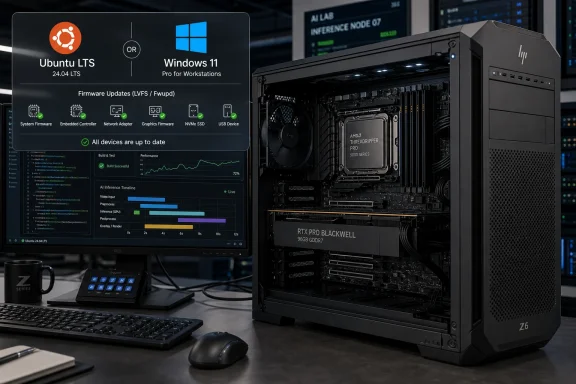
HP’s refreshed Z6 G5 A workstation, reviewed by Phoronix in May 2026, pairs AMD’s Ryzen Threadripper PRO 9000-series CPUs with NVIDIA RTX PRO Blackwell graphics in a Linux-friendly tower that can ship with Windows 11, Ubuntu LTS, or no operating system at all. That matters because this is not a boutique Linux box dressed up as enterprise hardware. It is a mainstream OEM workstation quietly treating Linux as a first-class deployment path. The result is a machine that says more about the state of professional desktops in 2026 than another benchmark chart ever could.
The most interesting thing about the updated HP Z6 G5 A is not that it is fast. At roughly $25,000 in the reviewed configuration, with a 32-core Threadripper PRO 9975WX, 128GB of DDR5 memory, a 1TB NVMe SSD, and an NVIDIA RTX PRO 6000 Blackwell card, speed is table stakes. A workstation in this class is purchased because someone expects it to chew through code builds, rendering jobs, AI inference, simulation, or media workloads without making a drama of it.
The more revealing detail is that HP still offers this tower with Ubuntu LTS preloaded, or as a “Linux-ready” configuration with no OS installed, and that those options reportedly reduce the price compared with Windows 11 Pro. That is a small line item in a huge bill of materials, but it is also a blunt admission: for a meaningful slice of the workstation market, Windows is not the assumed destination.
This is where the Z6 G5 A becomes more than another high-end desktop refresh. The review describes a system that boots modern Linux distributions cleanly, supports firmware updates through LVFS and Fwupd, and works with current AMD and NVIDIA stacks without the ritual pain that used to define high-end Linux workstations. For IT buyers, that is the difference between “Linux can be made to work” and “Linux is part of the procurement plan.”
The timing is not accidental. AMD’s Zen 5 Threadripper PRO 9000 WX-series arrived as the workstation market was already being reshaped by local AI workloads, larger software builds, heavier content pipelines, and a growing distrust of cloud-only economics. The Z6 G5 A sits directly in that tension: it is expensive, yes, but it is also a local compute appliance for organizations that want workstation-class horsepower without handing every heavy job to a remote GPU cluster.
That distinction matters because the modern workstation buyer is less likely to be buying a “fast PC” in the old sense. They may be buying a local build server, a video finishing box, an Unreal Engine workstation, a small AI inference node, or a machine that will run several of those roles in rotation. Threadripper PRO’s value proposition is not simply that it posts large numbers in multi-threaded tests; it is that it gives desktop users access to a platform that behaves more like infrastructure.
Phoronix’s review configuration is especially telling because it does not use the flagship 96-core Threadripper PRO 9995WX. Instead, the tested unit uses the 32-core 9975WX, which is far more plausible for many professional buyers. A 96-core workstation is a prestige object unless the workload can really keep that many threads busy; a 32-core Zen 5 workstation is still extravagant, but it lives closer to the region where software development, media production, scientific work, and AI-adjacent tasks overlap.
The comparison to the earlier 2023 Z6 G5 A is therefore less about direct benchmark continuity and more about platform maturity. Phoronix reviewed the prior machine with Threadripper PRO 7000 and RTX Ada-generation graphics. The new machine keeps the same broad chassis identity but swaps in a newer CPU generation and Blackwell-era NVIDIA hardware. That continuity is valuable: HP did not reinvent the workstation, it updated the compute stack inside a design that already had a track record.
The uncomfortable part is price. The article notes that the base configuration has climbed sharply since the 2023 review, from roughly the low-$3,000 range then to well above $5,000 now. Some of that reflects component inflation, some reflects the premium workstation market, and some reflects the reality that professional desktop hardware has become a niche where vendors price for businesses, not hobbyists. The Z6 G5 A may be Linux-friendly, but it is not economically friendly in the way Linux enthusiasts often mean the phrase.
That is the right question for 2026. AI inference is no longer confined to cloud APIs and datacenter accelerators, especially for organizations concerned about data locality, latency, cost predictability, or experimentation speed. A machine with a large professional GPU can become a private test bench for models, a visualization engine, a GPU development target, or a production workstation for creators who do not want their pipeline gated by shared infrastructure.
But Blackwell also reintroduces the old NVIDIA-on-Linux tension in a new form. Phoronix reports that the RTX PRO 6000 Blackwell works out of the box with the Nouveau open-source driver using GSP firmware, while the best performance still comes from NVIDIA’s packaged proprietary Linux driver stack. That sentence captures nearly the entire state of NVIDIA Linux support in 2026: the open path exists and is improving, but the performance and professional software reality still push serious users toward NVIDIA’s own drivers.
That is not necessarily a scandal. Workstation buyers tend to care less about ideological purity than about predictable behavior in Blender, CUDA, Omniverse, DaVinci Resolve, simulation tools, and internal code. Still, it matters that Nouveau and NVK are viable enough to be discussed in the same review as a top-end professional GPU. For years, open NVIDIA graphics support was more a promise than a professional option. Now it is at least part of the deployment conversation.
The more sober reading is that Linux graphics has matured, but it has not become simple. Blackwell-era NVIDIA hardware needs current kernels, current firmware, current user-space stacks, and often the right branch of NVIDIA’s driver. That is manageable for a workstation team, but it is not the same as saying every random long-term-support image from two years ago will be frictionless. HP’s value is partly that it narrows those variables by validating the system as a workstation rather than leaving users to assemble the matrix themselves.
LVFS and Fwupd allow vendors to deliver firmware updates through a Linux-native update mechanism. That matters in a professional environment because firmware is no longer optional plumbing. Security fixes, platform stability improvements, device compatibility changes, and microcode-related updates all pass through firmware. If a Linux workstation requires a Windows install, a bootable ISO dance, or a vendor utility that only works under one blessed configuration, it is not truly enterprise-manageable.
HP’s inclusion here is not new, but it is still important. The Z6 G5 A reviewed in 2023 already had a good Linux story, and the refreshed version appears to preserve it. That continuity is precisely what administrators want. A one-off Linux-friendly model is nice; a workstation line that keeps that support across CPU and GPU generations becomes a procurement pattern.
This also changes the calculus for dual-platform shops. Many organizations standardize on Windows for office productivity but use Linux for development, rendering, research, or infrastructure-adjacent workloads. A workstation like the Z6 G5 A allows the same hardware family to serve both constituencies. The machine can ship with Windows 11 Pro, Ubuntu LTS, or no OS, which means IT can choose the software image without changing the physical workstation class.
That flexibility is quietly strategic for HP. Dell and Lenovo have long competed in the professional Linux workstation market, and smaller vendors such as System76, Tuxedo, and others have built reputations around Linux-first hardware. HP does not need to become a Linux boutique to matter here. It only needs to make Linux boring on expensive machines, because boring is exactly what enterprise buyers want.
Yet the Phoronix framing pushes against the assumption that Windows is the natural performance baseline. The same workstation has appeared in related tests where Ubuntu 26.04 LTS reportedly led Windows 11 Pro in a variety of creator workstation benchmarks. Another comparison found CachyOS outperforming Ubuntu and Fedora in performance-focused Linux testing on the same machine. Those results are not universal laws, but they reinforce a familiar pattern: on CPU-heavy and developer-oriented workloads, Linux can be the faster platform when the software stack is tuned.
This is where Microsoft’s workstation position looks more complicated than its market share suggests. Windows is still the default commercial desktop environment, but the workloads that justify a $25,000 workstation are often the very workloads where Linux is strongest. Large compiles, containerized development, HPC-style tools, AI frameworks, scripting-heavy pipelines, and open-source creative stacks are all comfortable on Linux. WSL narrowed the gap for developers on Windows, but it did not erase the appeal of running Linux directly on the metal.
The choice is no longer just “Windows for professionals, Linux for enthusiasts.” It is increasingly “Windows for certain application ecosystems, Linux for certain performance and infrastructure workflows.” The Z6 G5 A’s value is that it does not force the buyer to settle that argument at the hardware level. HP will sell the same class of machine into either camp.
For WindowsForum readers, that is the part worth taking seriously. A Linux-friendly workstation is not anti-Windows hardware. It is a sign that the desktop workstation market is becoming more pluralistic. Microsoft’s operating system remains powerful and pervasive, but high-end local compute is now a territory where Linux is not the alternative; it is often the expected tool.
That increase lands in a market already frustrated by component prices, GPU scarcity in some professional channels, and the gravitational pull of AI hardware demand. Workstation buyers have always paid a premium for validation, support, thermals, acoustics, serviceability, and vendor accountability. But when a tower starts above $5,000 before meaningful RAM, storage, or GPU upgrades, the phrase “professional workstation” does a lot of work.
The reviewed configuration, at roughly $24,935, is not competing with a self-built gaming PC. It is competing with cloud GPU spend, shared lab hardware, rackmount servers, and certified workstations from other tier-one vendors. For a business, the question is not whether the number is large. It is whether the machine pays back its cost through local availability, employee productivity, shorter build times, faster iteration, reduced cloud bills, or workflows that cannot leave the premises.
That is the rational case. The emotional case is more strained. Enthusiasts will look at the specs and see a dream Linux tower. Most will also see a machine so expensive that it lives behind an enterprise purchasing process. The old Linux workstation fantasy was about liberation from vendor lock-in and consumer OS assumptions. The 2026 version is more complicated: the best-supported Linux workstations may come from the same corporate supply chains, premium margins, and procurement portals that define the Windows workstation world.
Still, that does not make the Z6 G5 A irrelevant to individuals. High-end OEM workstations often become tomorrow’s used-market bargains. Today’s $25,000 tower may eventually become a secondhand homelab monster, a local AI box, or a developer workstation for someone who would never buy it new. Linux support ages well when firmware updates, kernel compatibility, and standard components are part of the design.
The desk-side form factor imposes discipline. It requires airflow that can support a 350W-class CPU and a high-end professional GPU without turning the workday into a thermal negotiation. It requires a chassis that can be serviced without treating every component as a bespoke puzzle. It requires predictable behavior under sustained loads, not just a few minutes of heroic boost clocks.
This is where large OEM workstations often justify part of their premium. Enthusiast builds can outperform them in isolated metrics, and boutique vendors can offer more personality, but HP’s workstation engineering is aimed at repeatability. If a company buys dozens of machines for a studio, lab, or engineering team, it does not want every unit to be a thermal experiment.
The review’s continuity with the 2023 design suggests HP is comfortable with the platform envelope. The company has not chased novelty for its own sake. It has kept the chassis and updated the silicon, which is often the right move in workstation design. Professionals are not asking for a case redesign every generation; they are asking for a machine that will work at 2 p.m. on a deadline.
There is a broader industry point here. As more AI and rendering workloads move back onto local machines, acoustics and thermals will become competitive features again. A loud GPU server in a closet is one thing. A Blackwell workstation beside an editor, developer, or researcher for eight hours a day is another.
But the workstation world is not won by booting to a desktop. It is won by predictable acceleration, software certification, application stability, and performance under load. NVIDIA’s proprietary driver stack remains the practical route for serious CUDA work and most professional GPU workloads. Anyone buying an RTX PRO 6000 Blackwell to leave most of its performance on the table is misallocating budget.
That creates a two-tier Linux reality. The open driver path is good enough to make installation and fallback scenarios less painful. The proprietary path remains the route to the workstation’s actual value. For administrators, that means driver lifecycle management remains part of the job. Kernel updates, NVIDIA driver branches, CUDA versions, application requirements, and distribution support windows must still be planned together.
The good news is that this planning is increasingly ordinary rather than exotic. Ten years ago, getting a high-end NVIDIA workstation running properly on Linux could feel like a rite of passage. In 2026, the conversation is more about which driver branch, which distro, and which workload profile. That is progress, even if it falls short of the clean open-stack ideal.
HP’s role is to reduce the number of unknowns. When a major OEM validates the platform and supports firmware delivery under Linux, it gives IT teams a firmer base from which to manage the NVIDIA layer. That does not absolve NVIDIA of complexity, but it does make the system as a whole more deployable.
On ordinary office desktops, those differences may be subtle. On a 32-core Zen 5 Threadripper PRO workstation with a Blackwell GPU, they can become measurable. Kernel versions, compiler defaults, scheduler behavior, Mesa components, NVIDIA packaging, filesystem choices, and power-management defaults all influence the final experience. The more expensive the workstation, the more absurd it becomes to ignore software-stack tuning.
That does not mean every business should run a performance-focused Arch derivative on production workstations. Stability, supportability, security policy, and staff familiarity still matter. But it does mean that “Linux” is not a single performance category. The distribution decision is part of the workstation configuration, just as surely as memory capacity or GPU selection.
This is an uncomfortable truth for OEMs. Selling Ubuntu LTS is straightforward because it maps to certification, support windows, and enterprise expectations. Enthusiast and performance-oriented distributions may extract more speed from the hardware, but they are harder to standardize around in corporate environments. The result is a familiar split: official support favors conservative platforms, while benchmark leadership often goes to faster-moving ones.
For buyers, the right lesson is not that one distribution is universally best. It is that workstation evaluation should include the actual OS image and software stack intended for production. A $25,000 workstation tested under the wrong assumptions can mislead a purchasing team just as badly as a synthetic benchmark can.
That quietness is exactly why it matters. Linux has already won large parts of the server, cloud, embedded, and developer-tooling worlds. On the desktop, the story has always been more fragmented. But the workstation niche is different from the consumer desktop. It is smaller, more technical, more workload-driven, and more tolerant of specialized software environments. If Linux is going to claim more of the traditional desktop PC market, high-end workstations are one of the most plausible beachheads.
The Z6 G5 A also pressures Microsoft in a subtle way. Windows does not lose the workstation market because one HP tower runs Ubuntu well. But Microsoft’s desktop dominance looks less absolute when expensive professional machines are explicitly sold with Linux paths, when Linux beats Windows in some workstation benchmarks, and when developers increasingly view Linux-native environments as the most direct route to their work.
At the same time, this is not a simple victory lap for Linux. Many of the applications that justify professional workstations remain Windows-first or Windows-friendly. Adobe workflows, CAD ecosystems, certain engineering suites, and enterprise management assumptions still keep Windows deeply relevant. The workstation market is not flipping overnight.
The more realistic conclusion is that the default is weakening. Windows remains a strong default, but it is no longer the unquestioned one for high-end local compute. HP’s machine embodies that shift by offering choice without making choice feel like a compromise.
A workstation like this gives users control over hardware availability. There is no queue for a shared GPU node, no surprise cloud bill after a weekend experiment, no dependency on a remote region’s capacity, and no need to ship sensitive data outside the organization for every workload. Those advantages are not universal, but when they matter, they matter a lot.
The counterargument is that local workstations are capital-intensive and less flexible. A $25,000 tower is a commitment. If workloads change, if a team grows, or if the GPU becomes outdated faster than expected, the buyer owns that depreciation. Cloud infrastructure can be wasteful, but it can also be turned off. A workstation sits there whether it is fully utilized or not.
That is why the Z6 G5 A is best understood as a control purchase, not merely a performance purchase. The buyer is paying for local capability, validated hardware, OS flexibility, and a supportable platform. The benchmarks prove the machine is fast. The more important question is whether the organization values having that speed under its own desk, in its own lab, and on its own terms.
Source: Phoronix HP Z6 G5 A Continues Working Out Well For Linux-Friendly, High-End Workstation Review - Phoronix
 HP’s Workstation Bet Is No Longer Just About Windows
The most interesting thing about the updated HP Z6 G5 A is not that it is fast. At roughly $25,000 in the reviewed configuration, with a 32-core Threadripper PRO 9975WX, 128GB of DDR5 memory, a 1TB NVMe SSD, and an NVIDIA RTX PRO 6000 Blackwell card, speed is table stakes. A workstation in this class is purchased because someone expects it to chew through code builds, rendering jobs, AI inference, simulation, or media workloads without making a drama of it.The more revealing detail is that HP still offers this tower with Ubuntu LTS preloaded, or as a “Linux-ready” configuration with no OS installed, and that those options reportedly reduce the price compared with Windows 11 Pro. That is a small line item in a huge bill of materials, but it is also a blunt admission: for a meaningful slice of the workstation market, Windows is not the assumed destination.
This is where the Z6 G5 A becomes more than another high-end desktop refresh. The review describes a system that boots modern Linux distributions cleanly, supports firmware updates through LVFS and Fwupd, and works with current AMD and NVIDIA stacks without the ritual pain that used to define high-end Linux workstations. For IT buyers, that is the difference between “Linux can be made to work” and “Linux is part of the procurement plan.”
The timing is not accidental. AMD’s Zen 5 Threadripper PRO 9000 WX-series arrived as the workstation market was already being reshaped by local AI workloads, larger software builds, heavier content pipelines, and a growing distrust of cloud-only economics. The Z6 G5 A sits directly in that tension: it is expensive, yes, but it is also a local compute appliance for organizations that want workstation-class horsepower without handing every heavy job to a remote GPU cluster.
Threadripper PRO Turns the Tower Into a Local Compute Node
AMD’s Threadripper PRO line has always blurred the border between workstation and server, and the 9000-series pushes that identity even harder. The 9975WX used in the reviewed HP configuration is a 32-core, 64-thread Zen 5 part with workstation-class platform features, not a gaming CPU repackaged for creators. In practical terms, that means lots of cores, lots of memory bandwidth, high platform I/O, and a power envelope designed for sustained work rather than short benchmark bursts.That distinction matters because the modern workstation buyer is less likely to be buying a “fast PC” in the old sense. They may be buying a local build server, a video finishing box, an Unreal Engine workstation, a small AI inference node, or a machine that will run several of those roles in rotation. Threadripper PRO’s value proposition is not simply that it posts large numbers in multi-threaded tests; it is that it gives desktop users access to a platform that behaves more like infrastructure.
Phoronix’s review configuration is especially telling because it does not use the flagship 96-core Threadripper PRO 9995WX. Instead, the tested unit uses the 32-core 9975WX, which is far more plausible for many professional buyers. A 96-core workstation is a prestige object unless the workload can really keep that many threads busy; a 32-core Zen 5 workstation is still extravagant, but it lives closer to the region where software development, media production, scientific work, and AI-adjacent tasks overlap.
The comparison to the earlier 2023 Z6 G5 A is therefore less about direct benchmark continuity and more about platform maturity. Phoronix reviewed the prior machine with Threadripper PRO 7000 and RTX Ada-generation graphics. The new machine keeps the same broad chassis identity but swaps in a newer CPU generation and Blackwell-era NVIDIA hardware. That continuity is valuable: HP did not reinvent the workstation, it updated the compute stack inside a design that already had a track record.
The uncomfortable part is price. The article notes that the base configuration has climbed sharply since the 2023 review, from roughly the low-$3,000 range then to well above $5,000 now. Some of that reflects component inflation, some reflects the premium workstation market, and some reflects the reality that professional desktop hardware has become a niche where vendors price for businesses, not hobbyists. The Z6 G5 A may be Linux-friendly, but it is not economically friendly in the way Linux enthusiasts often mean the phrase.
Blackwell Makes the GPU the Main Character Again
If Threadripper PRO gives the Z6 G5 A its workstation spine, NVIDIA’s RTX PRO 6000 Blackwell gives it the headline-grabbing muscle. A professional Blackwell GPU in a tower workstation changes the conversation from “can this box render quickly?” to “how much local accelerated work can this desk-side machine absorb before it starts behaving like a server?”That is the right question for 2026. AI inference is no longer confined to cloud APIs and datacenter accelerators, especially for organizations concerned about data locality, latency, cost predictability, or experimentation speed. A machine with a large professional GPU can become a private test bench for models, a visualization engine, a GPU development target, or a production workstation for creators who do not want their pipeline gated by shared infrastructure.
But Blackwell also reintroduces the old NVIDIA-on-Linux tension in a new form. Phoronix reports that the RTX PRO 6000 Blackwell works out of the box with the Nouveau open-source driver using GSP firmware, while the best performance still comes from NVIDIA’s packaged proprietary Linux driver stack. That sentence captures nearly the entire state of NVIDIA Linux support in 2026: the open path exists and is improving, but the performance and professional software reality still push serious users toward NVIDIA’s own drivers.
That is not necessarily a scandal. Workstation buyers tend to care less about ideological purity than about predictable behavior in Blender, CUDA, Omniverse, DaVinci Resolve, simulation tools, and internal code. Still, it matters that Nouveau and NVK are viable enough to be discussed in the same review as a top-end professional GPU. For years, open NVIDIA graphics support was more a promise than a professional option. Now it is at least part of the deployment conversation.
The more sober reading is that Linux graphics has matured, but it has not become simple. Blackwell-era NVIDIA hardware needs current kernels, current firmware, current user-space stacks, and often the right branch of NVIDIA’s driver. That is manageable for a workstation team, but it is not the same as saying every random long-term-support image from two years ago will be frictionless. HP’s value is partly that it narrows those variables by validating the system as a workstation rather than leaving users to assemble the matrix themselves.
Linux Friendliness Is Becoming an OEM Feature, Not a Hobbyist Hack
The most consequential phrase in the review may be “LVFS/Fwupd support.” Firmware updates are not glamorous, and nobody buys a workstation because the BIOS update path sounds elegant. But for Linux administrators, firmware management is one of the clearest dividing lines between hardware that merely tolerates Linux and hardware that is actually supportable under Linux.LVFS and Fwupd allow vendors to deliver firmware updates through a Linux-native update mechanism. That matters in a professional environment because firmware is no longer optional plumbing. Security fixes, platform stability improvements, device compatibility changes, and microcode-related updates all pass through firmware. If a Linux workstation requires a Windows install, a bootable ISO dance, or a vendor utility that only works under one blessed configuration, it is not truly enterprise-manageable.
HP’s inclusion here is not new, but it is still important. The Z6 G5 A reviewed in 2023 already had a good Linux story, and the refreshed version appears to preserve it. That continuity is precisely what administrators want. A one-off Linux-friendly model is nice; a workstation line that keeps that support across CPU and GPU generations becomes a procurement pattern.
This also changes the calculus for dual-platform shops. Many organizations standardize on Windows for office productivity but use Linux for development, rendering, research, or infrastructure-adjacent workloads. A workstation like the Z6 G5 A allows the same hardware family to serve both constituencies. The machine can ship with Windows 11 Pro, Ubuntu LTS, or no OS, which means IT can choose the software image without changing the physical workstation class.
That flexibility is quietly strategic for HP. Dell and Lenovo have long competed in the professional Linux workstation market, and smaller vendors such as System76, Tuxedo, and others have built reputations around Linux-first hardware. HP does not need to become a Linux boutique to matter here. It only needs to make Linux boring on expensive machines, because boring is exactly what enterprise buyers want.
Windows 11 Is Present, But Not Dominant
The review unit shipped with Windows 11 Pro, which is unsurprising for a major OEM workstation. Windows remains deeply embedded in creative software, engineering tools, enterprise management systems, authentication workflows, and procurement defaults. Many buyers will still order this machine with Windows because it fits their licensing, imaging, and support models.Yet the Phoronix framing pushes against the assumption that Windows is the natural performance baseline. The same workstation has appeared in related tests where Ubuntu 26.04 LTS reportedly led Windows 11 Pro in a variety of creator workstation benchmarks. Another comparison found CachyOS outperforming Ubuntu and Fedora in performance-focused Linux testing on the same machine. Those results are not universal laws, but they reinforce a familiar pattern: on CPU-heavy and developer-oriented workloads, Linux can be the faster platform when the software stack is tuned.
This is where Microsoft’s workstation position looks more complicated than its market share suggests. Windows is still the default commercial desktop environment, but the workloads that justify a $25,000 workstation are often the very workloads where Linux is strongest. Large compiles, containerized development, HPC-style tools, AI frameworks, scripting-heavy pipelines, and open-source creative stacks are all comfortable on Linux. WSL narrowed the gap for developers on Windows, but it did not erase the appeal of running Linux directly on the metal.
The choice is no longer just “Windows for professionals, Linux for enthusiasts.” It is increasingly “Windows for certain application ecosystems, Linux for certain performance and infrastructure workflows.” The Z6 G5 A’s value is that it does not force the buyer to settle that argument at the hardware level. HP will sell the same class of machine into either camp.
For WindowsForum readers, that is the part worth taking seriously. A Linux-friendly workstation is not anti-Windows hardware. It is a sign that the desktop workstation market is becoming more pluralistic. Microsoft’s operating system remains powerful and pervasive, but high-end local compute is now a territory where Linux is not the alternative; it is often the expected tool.
The Price Tag Reveals the Workstation Market’s Real Divide
The Z6 G5 A’s price escalation is hard to ignore. Phoronix notes that the 2023 base configuration was around $3,240 with a Threadripper PRO 7945WX, 16GB of memory, a 512GB SSD, and Windows 11. The updated base price described in the review is about $5,537 for a similar entry-level class, with only a small premium to move to the Zen 5-based Threadripper PRO 9945WX.That increase lands in a market already frustrated by component prices, GPU scarcity in some professional channels, and the gravitational pull of AI hardware demand. Workstation buyers have always paid a premium for validation, support, thermals, acoustics, serviceability, and vendor accountability. But when a tower starts above $5,000 before meaningful RAM, storage, or GPU upgrades, the phrase “professional workstation” does a lot of work.
The reviewed configuration, at roughly $24,935, is not competing with a self-built gaming PC. It is competing with cloud GPU spend, shared lab hardware, rackmount servers, and certified workstations from other tier-one vendors. For a business, the question is not whether the number is large. It is whether the machine pays back its cost through local availability, employee productivity, shorter build times, faster iteration, reduced cloud bills, or workflows that cannot leave the premises.
That is the rational case. The emotional case is more strained. Enthusiasts will look at the specs and see a dream Linux tower. Most will also see a machine so expensive that it lives behind an enterprise purchasing process. The old Linux workstation fantasy was about liberation from vendor lock-in and consumer OS assumptions. The 2026 version is more complicated: the best-supported Linux workstations may come from the same corporate supply chains, premium margins, and procurement portals that define the Windows workstation world.
Still, that does not make the Z6 G5 A irrelevant to individuals. High-end OEM workstations often become tomorrow’s used-market bargains. Today’s $25,000 tower may eventually become a secondhand homelab monster, a local AI box, or a developer workstation for someone who would never buy it new. Linux support ages well when firmware updates, kernel compatibility, and standard components are part of the design.
Air Cooling and Desk-Side Acoustics Still Matter
One of the more grounded details in the review is that the Z6 G5 A remains an air-cooled tower designed to run at a noise level suitable for being under or on a desk. That sounds mundane until you remember how much workstation-class hardware has drifted toward server-like power density. A machine can have extraordinary specifications and still fail as a workstation if it sounds like a rack node trying to escape.The desk-side form factor imposes discipline. It requires airflow that can support a 350W-class CPU and a high-end professional GPU without turning the workday into a thermal negotiation. It requires a chassis that can be serviced without treating every component as a bespoke puzzle. It requires predictable behavior under sustained loads, not just a few minutes of heroic boost clocks.
This is where large OEM workstations often justify part of their premium. Enthusiast builds can outperform them in isolated metrics, and boutique vendors can offer more personality, but HP’s workstation engineering is aimed at repeatability. If a company buys dozens of machines for a studio, lab, or engineering team, it does not want every unit to be a thermal experiment.
The review’s continuity with the 2023 design suggests HP is comfortable with the platform envelope. The company has not chased novelty for its own sake. It has kept the chassis and updated the silicon, which is often the right move in workstation design. Professionals are not asking for a case redesign every generation; they are asking for a machine that will work at 2 p.m. on a deadline.
There is a broader industry point here. As more AI and rendering workloads move back onto local machines, acoustics and thermals will become competitive features again. A loud GPU server in a closet is one thing. A Blackwell workstation beside an editor, developer, or researcher for eight hours a day is another.
The Open-Source Graphics Story Is Better, But Not Finished
Phoronix’s related Nouveau-versus-NVIDIA testing is a reminder that open-source graphics support is no longer a side note for NVIDIA hardware, even if it is not yet the performance default. The existence of a functioning open path for RTX PRO Blackwell hardware is significant. It gives distributions more flexibility, improves basic out-of-box behavior, and reduces the dead-on-arrival feeling that once accompanied unsupported GPUs.But the workstation world is not won by booting to a desktop. It is won by predictable acceleration, software certification, application stability, and performance under load. NVIDIA’s proprietary driver stack remains the practical route for serious CUDA work and most professional GPU workloads. Anyone buying an RTX PRO 6000 Blackwell to leave most of its performance on the table is misallocating budget.
That creates a two-tier Linux reality. The open driver path is good enough to make installation and fallback scenarios less painful. The proprietary path remains the route to the workstation’s actual value. For administrators, that means driver lifecycle management remains part of the job. Kernel updates, NVIDIA driver branches, CUDA versions, application requirements, and distribution support windows must still be planned together.
The good news is that this planning is increasingly ordinary rather than exotic. Ten years ago, getting a high-end NVIDIA workstation running properly on Linux could feel like a rite of passage. In 2026, the conversation is more about which driver branch, which distro, and which workload profile. That is progress, even if it falls short of the clean open-stack ideal.
HP’s role is to reduce the number of unknowns. When a major OEM validates the platform and supports firmware delivery under Linux, it gives IT teams a firmer base from which to manage the NVIDIA layer. That does not absolve NVIDIA of complexity, but it does make the system as a whole more deployable.
The Distribution Choice Is Becoming a Performance Decision
One of the more interesting subplots around the Z6 G5 A is that Phoronix used it as a testbed for multiple Linux distribution comparisons. Ubuntu 26.04 LTS, Fedora Workstation 44, and CachyOS each represent a different philosophy. Ubuntu prioritizes long-term support and enterprise familiarity. Fedora tracks newer Linux technologies aggressively while retaining a strong mainstream identity. CachyOS leans into performance tuning and newer packages from an Arch-derived base.On ordinary office desktops, those differences may be subtle. On a 32-core Zen 5 Threadripper PRO workstation with a Blackwell GPU, they can become measurable. Kernel versions, compiler defaults, scheduler behavior, Mesa components, NVIDIA packaging, filesystem choices, and power-management defaults all influence the final experience. The more expensive the workstation, the more absurd it becomes to ignore software-stack tuning.
That does not mean every business should run a performance-focused Arch derivative on production workstations. Stability, supportability, security policy, and staff familiarity still matter. But it does mean that “Linux” is not a single performance category. The distribution decision is part of the workstation configuration, just as surely as memory capacity or GPU selection.
This is an uncomfortable truth for OEMs. Selling Ubuntu LTS is straightforward because it maps to certification, support windows, and enterprise expectations. Enthusiast and performance-oriented distributions may extract more speed from the hardware, but they are harder to standardize around in corporate environments. The result is a familiar split: official support favors conservative platforms, while benchmark leadership often goes to faster-moving ones.
For buyers, the right lesson is not that one distribution is universally best. It is that workstation evaluation should include the actual OS image and software stack intended for production. A $25,000 workstation tested under the wrong assumptions can mislead a purchasing team just as badly as a synthetic benchmark can.
HP’s Quiet Linux Competence Raises the Bar for Everyone Else
The Z6 G5 A does not appear to be trying to win over Linux users with branding. It is not wrapped in penguin iconography or sold as a rebellion against Windows. It is simply a workstation from a major OEM that can be bought, configured, updated, and run with Linux in a way that professional users can take seriously.That quietness is exactly why it matters. Linux has already won large parts of the server, cloud, embedded, and developer-tooling worlds. On the desktop, the story has always been more fragmented. But the workstation niche is different from the consumer desktop. It is smaller, more technical, more workload-driven, and more tolerant of specialized software environments. If Linux is going to claim more of the traditional desktop PC market, high-end workstations are one of the most plausible beachheads.
The Z6 G5 A also pressures Microsoft in a subtle way. Windows does not lose the workstation market because one HP tower runs Ubuntu well. But Microsoft’s desktop dominance looks less absolute when expensive professional machines are explicitly sold with Linux paths, when Linux beats Windows in some workstation benchmarks, and when developers increasingly view Linux-native environments as the most direct route to their work.
At the same time, this is not a simple victory lap for Linux. Many of the applications that justify professional workstations remain Windows-first or Windows-friendly. Adobe workflows, CAD ecosystems, certain engineering suites, and enterprise management assumptions still keep Windows deeply relevant. The workstation market is not flipping overnight.
The more realistic conclusion is that the default is weakening. Windows remains a strong default, but it is no longer the unquestioned one for high-end local compute. HP’s machine embodies that shift by offering choice without making choice feel like a compromise.
The Real Purchase Decision Is About Control
The Z6 G5 A lands at a moment when local compute is being revalued. For years, the industry narrative pushed heavy workloads toward the cloud: elastic capacity, managed services, shared accelerators, centralized governance. That model is still powerful, but it is not always cheaper, faster, or easier. AI inference, media production, software compilation, sensitive research data, and iterative development can all benefit from powerful local machines.A workstation like this gives users control over hardware availability. There is no queue for a shared GPU node, no surprise cloud bill after a weekend experiment, no dependency on a remote region’s capacity, and no need to ship sensitive data outside the organization for every workload. Those advantages are not universal, but when they matter, they matter a lot.
The counterargument is that local workstations are capital-intensive and less flexible. A $25,000 tower is a commitment. If workloads change, if a team grows, or if the GPU becomes outdated faster than expected, the buyer owns that depreciation. Cloud infrastructure can be wasteful, but it can also be turned off. A workstation sits there whether it is fully utilized or not.
That is why the Z6 G5 A is best understood as a control purchase, not merely a performance purchase. The buyer is paying for local capability, validated hardware, OS flexibility, and a supportable platform. The benchmarks prove the machine is fast. The more important question is whether the organization values having that speed under its own desk, in its own lab, and on its own terms.
The Z6 G5 A Shows Where the Workstation Is Going
The useful lesson from Phoronix’s review is not that everyone should buy HP’s latest tower. Most people should not. The useful lesson is that the premium workstation is being rebuilt around heterogeneous local compute, Linux-capable management, and software-stack choice.- The refreshed Z6 G5 A shows that Linux support is now a competitive workstation feature, not merely an accommodation for enthusiasts.
- The Threadripper PRO 9000 platform makes a desk-side tower behave more like a compact compute node than a traditional desktop PC.
- The RTX PRO 6000 Blackwell gives local AI, visualization, and GPU development workloads a reason to stay on-premises, even as driver management remains important.
- The price increase since the 2023 configuration makes clear that validated professional workstations are becoming more specialized and more expensive.
- The choice between Windows 11, Ubuntu LTS, and other Linux distributions is increasingly a workload decision rather than a cultural one.
- Firmware support through LVFS and Fwupd is one of the strongest signs that a Linux workstation is genuinely manageable over its service life.
Source: Phoronix HP Z6 G5 A Continues Working Out Well For Linux-Friendly, High-End Workstation Review - Phoronix
