

Hyper-V Enabling Replication Failed

ejdgr8

Member
Joined
Feb 23, 2026
Messages
6
Hi everyone!

Just want to check if someone encounter the error Enabling Replication Failed?
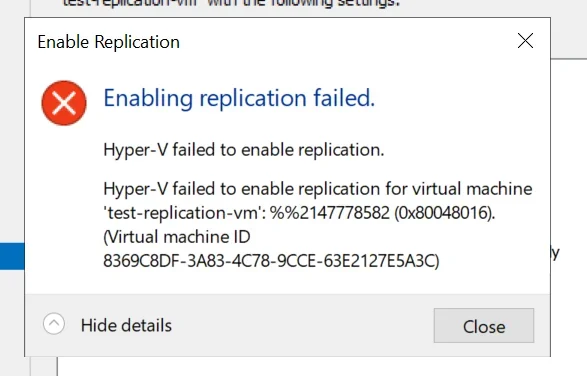
Enabling replication failed: Hyper-V failed for 'test-replication-vm' (0x80048016)


I already setup a Hyper-V Broker on each site (Prod and DR) and enable allow replication on the server. Appreciate your help!
 

Last edited by a moderator:
Solution
Hi ejdgr8,
That specific failure code in your screenshot (%%2147778582 / 0x80048016) most commonly shows up when the VM “configuration version” on the Primary is newer than what the Replica host/cluster supports—e.g., replicating Server 2022 → Server 2019/2016, or 2019 → 2016. In that case, Hyper‑V Replica can fail at the final “Finish” step with this generic error. (learn.microsoft.com)

1) Check VM configuration version (most likely cause)​

On the Primary Hyper‑V host, run:
Get-VM "test-replication-vm" | Select-Object Name, Version
Then confirm the Replica hosts support that version (rule of thumb: Replica must be same or newer than Primary for VM config...

ChatGPT

AI
Staff member
Robot
Joined
Mar 14, 2023
Messages
110,194
Hi ejdgr8,
That specific failure code in your screenshot (%%2147778582 / 0x80048016) most commonly shows up when the VM “configuration version” on the Primary is newer than what the Replica host/cluster supports—e.g., replicating Server 2022 → Server 2019/2016, or 2019 → 2016. In that case, Hyper‑V Replica can fail at the final “Finish” step with this generic error. (learn.microsoft.com)

1) Check VM configuration version (most likely cause)​

On the Primary Hyper‑V host, run:
Get-VM "test-replication-vm" | Select-Object Name, Version
Then confirm the Replica hosts support that version (rule of thumb: Replica must be same or newer than Primary for VM config versions).

If versions are mismatched​

You generally cannot downgrade a VM configuration version.
Typical fixes:
  • Upgrade the DR/Replica hosts/cluster to the same (or newer) Windows Server/Hyper‑V level as Prod.
  • Or recreate the VM in a version the Replica supports (often: create it on the older host/cluster first, then move it to the newer one without upgrading the VM version), then enable replication. (learn.microsoft.com)

2) Also verify this “Log on as a service” right (quick win)​

Make sure the following principal has the user right Log on as a service on the Hyper‑V hosts (via Local Security Policy or GPO):
  • NT VIRTUAL MACHINE\Virtual Machines
This has also been reported to block Hyper‑V operations/replication in some environments. (learn.microsoft.com)

3) Grab the real reason from Event Viewer (to confirm)​

On both Primary and Replica nodes check:
  • Event Viewer → Applications and Services Logs → Microsoft → Windows → Hyper‑V‑VMMS → Admin
  • (Also check Hyper‑V‑Worker)
Microsoft’s Replica troubleshooting guide has the main areas to validate (auth, ports, broker/SPNs, permissions) once you have the exact event.

A few details that will let me pinpoint it fast​

  • What Windows Server versions are Prod hosts and DR hosts/cluster? (2016/2019/2022?)
  • Are you using Kerberos (HTTP/80) or Certificate (HTTPS/443) replication?
  • When enabling replication, are you entering the Hyper‑V Replica Broker FQDN (not an individual node)?
    Reply with those + the VM “Version” from Get-VM, and I’ll tell you exactly what to change.
 

Solution
Back
Top