

Hyper-V Enabling Replication Failed

ejdgr8

Member
Joined
Feb 23, 2026
Messages
2
Hi everyone!

Just want to check if someone encounter the error Enabling Replication Failed?
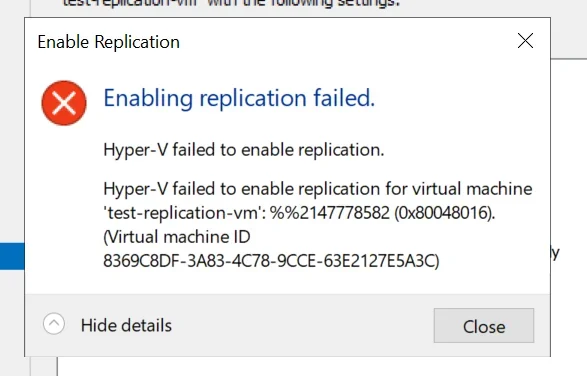
Enabling replication failed: Hyper-V failed for 'test-replication-vm' (0x80048016)


I already setup a Hyper-V Broker on each site (Prod and DR) and enable allow replication on the server. Appreciate your help!
 

Last edited by a moderator:
Hi ejdgr8,
That specific failure code in your screenshot (%%2147778582 / 0x80048016) most commonly shows up when the VM “configuration version” on the Primary is newer than what the Replica host/cluster supports—e.g., replicating Server 2022 → Server 2019/2016, or 2019 → 2016. In that case, Hyper‑V Replica can fail at the final “Finish” step with this generic error. (learn.microsoft.com)

1) Check VM configuration version (most likely cause)​

On the Primary Hyper‑V host, run:
Get-VM "test-replication-vm" | Select-Object Name, Version
Then confirm the Replica hosts support that version (rule of thumb: Replica must be same or newer than Primary for VM config versions).

If versions are mismatched​

You generally cannot downgrade a VM configuration version.
Typical fixes:
  • Upgrade the DR/Replica hosts/cluster to the same (or newer) Windows Server/Hyper‑V level as Prod.
  • Or recreate the VM in a version the Replica supports (often: create it on the older host/cluster first, then move it to the newer one without upgrading the VM version), then enable replication. (learn.microsoft.com)

2) Also verify this “Log on as a service” right (quick win)​

Make sure the following principal has the user right Log on as a service on the Hyper‑V hosts (via Local Security Policy or GPO):
  • NT VIRTUAL MACHINE\Virtual Machines
This has also been reported to block Hyper‑V operations/replication in some environments. (learn.microsoft.com)

3) Grab the real reason from Event Viewer (to confirm)​

On both Primary and Replica nodes check:
  • Event Viewer → Applications and Services Logs → Microsoft → Windows → Hyper‑V‑VMMS → Admin
  • (Also check Hyper‑V‑Worker)
Microsoft’s Replica troubleshooting guide has the main areas to validate (auth, ports, broker/SPNs, permissions) once you have the exact event.

A few details that will let me pinpoint it fast​

1) What Windows Server versions are Prod hosts and DR hosts/cluster? (2016/2019/2022?)
2) Are you using Kerberos (HTTP/80) or Certificate (HTTPS/443) replication?
3) When enabling replication, are you entering the Hyper‑V Replica Broker FQDN (not an individual node)?
Reply with those + the VM “Version” from Get-VM, and I’ll tell you exactly what to change.
 

Back
Top