

On June 8, 2026, ZDNET highlighted HyperDroid, a free Android launcher that makes phones and tablets resemble Windows 11 by replacing the default home screen with a desktop-style interface. The app does not run Windows software, does not turn Android into a PC, and does not change the underlying operating system. But its timing is revealing: as Microsoft’s own Android-on-Windows ambitions have receded, Android developers are now borrowing the Windows desktop metaphor in the opposite direction. The result is less a novelty skin than a small reminder that the PC interface still has gravitational pull.
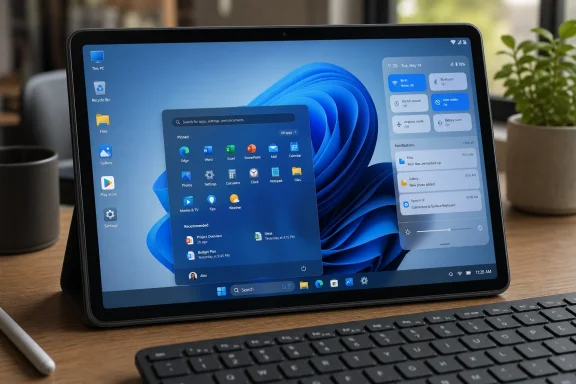
HyperDroid’s pitch is simple enough to sound like a gimmick: install a launcher, and your Android device starts behaving visually like Windows 11. ZDNET’s Jack Wallen found the familiar pieces in place — a taskbar, desktop launchers, a system tray, search, a desktop-like app menu, widgets, theming, and the kind of glassy blur that Microsoft has spent years polishing in Windows. On a Pixel 9 Pro, the illusion was striking; on a Nubia Pad Pro tablet, it apparently became much more convincing.
That distinction matters. A phone pretending to be a desktop is always fighting the geometry of the hand. A tablet, especially a larger Android tablet with a keyboard nearby, already lives in the awkward middle ground between consumption slab and lightweight productivity machine. HyperDroid succeeds not because it magically makes Android more powerful, but because it maps Android’s app world onto a mental model many users already understand.
The app’s greatest trick is not visual mimicry. It is orientation. Android’s default launcher grammar assumes a mobile-first world of swipes, grids, notification shades, and one-app-at-a-time focus. HyperDroid assumes the user wants landmarks: a lower panel, a menu, icons on a desktop, settings in predictable corners, and a sense that apps are being launched from a workspace rather than summoned from a drawer.
That is why the story is interesting for WindowsForum readers. HyperDroid is not a Windows product, but it is a Windows-adjacent cultural artifact. It says something about where Microsoft’s design language has traveled, and something more pointed about what Android tablets still lack.
That changes the emotional register. Windows Phone launchers are acts of remembrance. A Windows 11 launcher is an act of translation. HyperDroid is not asking users to relive 2012; it is asking whether the modern Windows desktop remains a better abstraction for larger mobile screens than Android’s native tablet interface.
ZDNET’s hands-on account suggests that the answer is “sometimes, yes.” The launcher reportedly performs well, animates smoothly, and feels intuitive if the user already understands desktop conventions. That is not a small achievement. Many launcher experiments collapse under their own cleverness, especially when they attempt to mimic another platform too literally.
HyperDroid appears to understand which parts of Windows 11 matter visually. The centered taskbar is not just decoration; it is the anchor. The system tray is not merely a cluster of icons; it is the promise that status and quick settings live in one dependable region. Desktop icons are not modern design orthodoxy, but they remain useful because they let users spatially arrange importance.
The irony, of course, is that Microsoft itself has spent years trying to modernize, constrain, and sometimes de-emphasize those exact desktop affordances. Windows 11 softened the old Windows shell, centered the taskbar by default, simplified right-click menus, and pushed users toward a cleaner, less chaotic desktop. HyperDroid takes the polished part of that story and ports it to Android, where a little desktop chaos may actually feel liberating.
Android tablets have improved dramatically in hardware, but the software story remains inconsistent. Samsung has DeX, Lenovo and Xiaomi have their own productivity overlays, Google has spent recent Android releases improving large-screen behavior, and many apps are now less hostile to wide displays than they once were. Still, the default Android tablet experience often feels like a phone interface that has been stretched and negotiated with, rather than a coherent desktop-class environment.
That is the gap HyperDroid exploits. It does not need to beat Samsung DeX at window management or ChromeOS at laptop replacement. It only needs to give users a more legible home base. A taskbar and desktop metaphor may be old, but old is not the same as obsolete. In enterprise and power-user contexts, old often means teachable, documented by muscle memory, and forgiving.
The launcher’s appeal is therefore strongest for people who use Android tablets as auxiliary machines: reading dashboards, handling email, launching remote desktop sessions, managing files, checking chat, streaming media, or doing light administrative work from the couch. Those tasks do not require Windows binaries. They require quick access, familiar navigation, and a low-friction way to move between apps.
That is also why the phrase “looks like Windows 11” undersells the point. The real product is not a wallpaper-and-icons theme. The product is a desktop metaphor grafted onto Android at a moment when large-screen Android still has too many competing answers to the question of what a tablet should be.
That distinction will seem obvious to technical readers, but it is precisely where consumer confusion tends to creep in. A Windows-like launcher can make an Android tablet feel like a PC at the moment of navigation. The illusion ends the moment a user expects a Windows executable, a driver stack, a domain-joined management model, or the exact file-system behaviors of a Windows workstation.
For Windows enthusiasts, this is familiar territory. The shell is powerful because it is the user’s daily interface with the machine, but the shell is not the platform. Explorer is not NT. Start is not Win32. A launcher is not an application compatibility layer.
HyperDroid’s value should therefore be judged on the right scale. It is a home-screen replacement that gives Android a PC-like control surface. It may make app launching, multitasking habits, and tablet use feel more natural to Windows users. But it does not erase the boundary between ecosystems.
That boundary has become more important since Microsoft formally ended the Windows Subsystem for Android and the Amazon Appstore’s Windows availability in March 2025. For a brief period, Windows 11 promised a future in which Android apps could run on the PC as part of the platform’s mainstream story. That future did not survive. HyperDroid points in the other direction: instead of bringing Android apps to Windows, it brings Windows-like navigation to Android apps.
That strategy is more realistic than Windows Phone ever was, and arguably more useful than Windows Subsystem for Android was for most users. Phone Link can surface messages, notifications, photos, calls, and in some cases app streaming. File integration between Android devices and Windows has continued to improve. Microsoft’s mobile work now feels less like a bid to own the phone and more like an attempt to make Windows the best desk-side companion to whatever phone the user already owns.
HyperDroid lives outside that strategy, but it benefits from the same underlying truth: users do not necessarily want one operating system everywhere. They want continuity of habits. They want the phone, tablet, and PC to stop feeling like unrelated rooms in the same house.
A launcher cannot deliver the hard parts of that continuity. It cannot synchronize identity, manage corporate policy, unify file providers, or secure cross-device workflows. But it can do something Microsoft has always understood: it can make a device feel familiar before the user has learned anything new.
That is the part of Windows’ legacy that remains portable. The software stack may not move, but the metaphor does. A taskbar is a tiny piece of cultural infrastructure. So is the Start-menu idea. So is the assumption that “settings” and “status” should have visible homes.
But familiarity has economic and cognitive value. Workers do not abandon decades of spatial memory because a product team has discovered a cleaner gesture model. Administrators do not train users on elegance; they train them on repeatability. A Windows-like launcher on Android is appealing precisely because it reduces the sense that a tablet is an alien device.
This is especially relevant for older users, Windows-first households, and organizations that issue Android tablets for narrow workflows. A home screen with a taskbar and obvious app icons may be easier to support than a heavily customized Android launcher or a vendor-specific productivity mode. It may also be less intimidating for users who still think in terms of “desktop,” “menu,” and “settings.”
That does not mean HyperDroid is enterprise-ready. A free launcher with reported widget quirks is not the same as a managed kiosk shell or a supported OEM desktop mode. But it demonstrates demand for a middle layer between full mobile freedom and locked-down corporate launchers. There is room for Android interfaces that acknowledge PC habits without pretending to be PCs.
The strongest argument for HyperDroid, then, is not that Windows 11 is the perfect interface. It is that Windows remains the interface many people can operate without thinking. On a tablet, that is not trivial. The less the shell demands attention, the more the device can become useful.
Launchers operate in a privileged-feeling but constrained space. They can reshape the home screen, organize apps, draw panels, and simulate desktop affordances. They cannot always dictate how widgets behave, how background restrictions are applied, how OEM skins handle permissions, or how aggressively the device kills processes. Android’s openness is real, but it is mediated by Google’s APIs, manufacturer customizations, battery policies, and security boundaries.
That is why performance praise should be balanced against maintainability. Smooth animations on two test devices are encouraging, but launcher reliability is a long game. The app has to survive Android updates, Play policy changes, OEM quirks, foldables, tablets, different densities, accessibility settings, and users who do strange things because real users always do strange things.
The widget problem also matters because widgets are one of the places where a desktop-like launcher can become genuinely useful. A Windows-style panel with glanceable weather, news, calendar, or system information makes sense on a tablet. If that layer is unreliable, the illusion remains attractive but thinner.
Still, the reported workaround — restarting the launcher — suggests a bug rather than a conceptual failure. For enthusiasts, that may be tolerable. For anyone deploying devices at scale, it is a warning label.
But Android’s path to desktop productivity has never been singular. Samsung DeX is the most mature consumer-facing example, but it is Samsung-specific. ChromeOS can run Android apps, but it is not Android in the ordinary tablet sense. Google’s own large-screen improvements have been incremental and sometimes dependent on developer adoption. OEM overlays vary widely.
That fragmentation creates an opening for launchers like HyperDroid. They can move faster than platform owners because they do less. They can copy what works visually, ignore what is hard architecturally, and appeal to users who want the feel of productivity without waiting for Google or a device maker to settle the matter.
The downside is that launchers can only paper over so much. True desktop-class Android would need consistent windowing, robust external display behavior, mature keyboard and pointer conventions, better file management, stronger multi-user and management tools, and app layouts that do not collapse when stretched. HyperDroid can make the front door look like Windows. It cannot remodel the building.
Even so, front doors matter. The home screen is where expectations are set. If HyperDroid makes a tablet feel less like a giant phone and more like a small workstation, it has already solved a real user-experience problem, even if the deeper platform work remains unfinished.
It is also a little funny, because Windows 11 itself remains divisive among Windows power users. The same interface decisions that annoy some desktop veterans can look clean and modern when transplanted to Android. A centered taskbar on a 32-inch monitor can feel like Microsoft chasing macOS. A centered taskbar on an Android tablet can feel like order imposed on chaos.
Context changes the verdict. Windows 11 is judged against Windows 10, Windows 7, and decades of desktop expectations. HyperDroid is judged against Android launchers, OEM skins, and the awkwardness of tablet home screens. The same design language can feel restrictive in one environment and clarifying in another.
That may be the most interesting lesson for Microsoft. Design ideas do not have fixed meanings. They succeed or fail relative to the problem in front of the user. Windows 11’s shell may not satisfy every PC traditionalist, but its simplified desktop vocabulary is apparently strong enough to sell a PC-like Android experience.
For users, that is good news. It means the Windows metaphor is no longer trapped inside Windows. It can be borrowed, remixed, and used where it helps — as long as everyone remembers where the metaphor stops.
That is not an accusation against HyperDroid. It is a general rule for launchers. Users should review permissions, developer reputation, update history, privacy disclosures, and whether the app’s business model makes sense. A launcher that changes the whole feel of a device is fun; a launcher that quietly over-collects data would be a problem.
The Play Store reduces some risk but does not eliminate it. Google’s review and Play Protect systems are useful, yet the Android ecosystem has repeatedly shown that bad or sloppy apps can pass through mainstream channels. Enthusiasts installing interface-level tools should bring the same skepticism they would bring to browser extensions or Windows shell utilities.
There is also the issue of long-term trust. A launcher can be excellent today and degraded tomorrow by ads, tracking, abandoned maintenance, or an acquisition. Free utilities often live or die by the incentives of their developers. If HyperDroid becomes a daily driver, users should watch not just how it looks, but how it evolves.
For IT admins, the recommendation is simpler: do not confuse a consumer launcher with a managed shell. If the goal is kiosk control, device compliance, or standardized work tablets, use proper mobile device management and supported Android Enterprise tooling. HyperDroid may be a useful experiment; it is not a policy framework.
That means HyperDroid is not trying to replace Windows in any serious sense. It is trying to make ordinary Android hardware feel less ordinary. For devices without a strong built-in desktop mode, that could be enough. For users with Samsung tablets or ChromeOS devices, the calculus is different.
The app’s strongest niche may be inexpensive Android tablets. These devices often have decent screens, acceptable performance, and weak software ambition. A launcher that gives them a cleaner PC-like interface could extend their usefulness, especially as secondary machines. It will not make a budget tablet into a Surface Pro, but it might make it feel less like a content vending machine.
This is where Windows enthusiasts should resist platform tribalism. The interesting question is not whether HyperDroid is “better than Windows.” It plainly is not Windows. The question is whether the Windows-style shell remains the most efficient way to organize general-purpose computing tasks on a medium-to-large screen. HyperDroid’s existence suggests that many users still think it is.
That conclusion should not flatter Microsoft too much. It also reveals a failure by Android tablet software to settle on something equally obvious. If third-party developers keep reaching for Windows metaphors, it is because the native alternatives are not yet winning by default.
That theatrical quality is not a weakness unless users mistake it for engineering reality. Much of modern computing already works this way. Web apps pretend to be desktop apps. Progressive web apps pretend to be native apps. Cloud desktops pretend remote infrastructure is local. The interface story often matters because it determines whether users feel capable before they encounter the technical boundary.
HyperDroid’s boundary is clear. It can launch Android apps; it cannot run Windows programs. It can mimic a taskbar; it cannot provide the Windows shell. It can make a tablet feel like a PC; it cannot inherit the management, compatibility, or peripheral model of a PC.
Yet within that boundary, the idea has merit. A launcher that makes Android more legible to Windows users is a small but useful bridge. It will not change Microsoft’s platform strategy, but it might change how some people use the tablet already sitting on their coffee table.
 Android Gets the Windows Costume Microsoft No Longer Sells
HyperDroid’s pitch is simple enough to sound like a gimmick: install a launcher, and your Android device starts behaving visually like Windows 11. ZDNET’s Jack Wallen found the familiar pieces in place — a taskbar, desktop launchers, a system tray, search, a desktop-like app menu, widgets, theming, and the kind of glassy blur that Microsoft has spent years polishing in Windows. On a Pixel 9 Pro, the illusion was striking; on a Nubia Pad Pro tablet, it apparently became much more convincing.That distinction matters. A phone pretending to be a desktop is always fighting the geometry of the hand. A tablet, especially a larger Android tablet with a keyboard nearby, already lives in the awkward middle ground between consumption slab and lightweight productivity machine. HyperDroid succeeds not because it magically makes Android more powerful, but because it maps Android’s app world onto a mental model many users already understand.
The app’s greatest trick is not visual mimicry. It is orientation. Android’s default launcher grammar assumes a mobile-first world of swipes, grids, notification shades, and one-app-at-a-time focus. HyperDroid assumes the user wants landmarks: a lower panel, a menu, icons on a desktop, settings in predictable corners, and a sense that apps are being launched from a workspace rather than summoned from a drawer.
That is why the story is interesting for WindowsForum readers. HyperDroid is not a Windows product, but it is a Windows-adjacent cultural artifact. It says something about where Microsoft’s design language has traveled, and something more pointed about what Android tablets still lack.
The Launcher Is the Message
Android launchers have always been a kind of operating-system cosplay. Nova Launcher made Android feel faster and more configurable. Niagara rethought the home screen around one-handed minimalism. Square Home and Launcher 10 kept the Windows Phone tile aesthetic alive long after Microsoft walked away from mobile hardware. HyperDroid joins that lineage, but it aims at a different nostalgia: not the lost phone OS, but the still-dominant desktop OS.That changes the emotional register. Windows Phone launchers are acts of remembrance. A Windows 11 launcher is an act of translation. HyperDroid is not asking users to relive 2012; it is asking whether the modern Windows desktop remains a better abstraction for larger mobile screens than Android’s native tablet interface.
ZDNET’s hands-on account suggests that the answer is “sometimes, yes.” The launcher reportedly performs well, animates smoothly, and feels intuitive if the user already understands desktop conventions. That is not a small achievement. Many launcher experiments collapse under their own cleverness, especially when they attempt to mimic another platform too literally.
HyperDroid appears to understand which parts of Windows 11 matter visually. The centered taskbar is not just decoration; it is the anchor. The system tray is not merely a cluster of icons; it is the promise that status and quick settings live in one dependable region. Desktop icons are not modern design orthodoxy, but they remain useful because they let users spatially arrange importance.
The irony, of course, is that Microsoft itself has spent years trying to modernize, constrain, and sometimes de-emphasize those exact desktop affordances. Windows 11 softened the old Windows shell, centered the taskbar by default, simplified right-click menus, and pushed users toward a cleaner, less chaotic desktop. HyperDroid takes the polished part of that story and ports it to Android, where a little desktop chaos may actually feel liberating.
Tablets Make the Illusion Useful
ZDNET’s most practical observation is that HyperDroid is better suited to tablets than phones. That should surprise no one, but it is the difference between a novelty and a plausible daily driver. On a phone, the Windows 11 metaphor is cramped, and the launcher’s landscape-only limitation makes it feel like the device is being forced into someone else’s posture. On a tablet, the metaphor breathes.Android tablets have improved dramatically in hardware, but the software story remains inconsistent. Samsung has DeX, Lenovo and Xiaomi have their own productivity overlays, Google has spent recent Android releases improving large-screen behavior, and many apps are now less hostile to wide displays than they once were. Still, the default Android tablet experience often feels like a phone interface that has been stretched and negotiated with, rather than a coherent desktop-class environment.
That is the gap HyperDroid exploits. It does not need to beat Samsung DeX at window management or ChromeOS at laptop replacement. It only needs to give users a more legible home base. A taskbar and desktop metaphor may be old, but old is not the same as obsolete. In enterprise and power-user contexts, old often means teachable, documented by muscle memory, and forgiving.
The launcher’s appeal is therefore strongest for people who use Android tablets as auxiliary machines: reading dashboards, handling email, launching remote desktop sessions, managing files, checking chat, streaming media, or doing light administrative work from the couch. Those tasks do not require Windows binaries. They require quick access, familiar navigation, and a low-friction way to move between apps.
That is also why the phrase “looks like Windows 11” undersells the point. The real product is not a wallpaper-and-icons theme. The product is a desktop metaphor grafted onto Android at a moment when large-screen Android still has too many competing answers to the question of what a tablet should be.
The Windows Skin Does Not Bring the Windows Contract
The most important caveat is also the easiest to bury: HyperDroid does not make an Android device run Windows apps. It does not provide Win32 compatibility, it does not install Microsoft Store desktop software, and it does not turn a tablet into a Surface. It changes the shell, not the system.That distinction will seem obvious to technical readers, but it is precisely where consumer confusion tends to creep in. A Windows-like launcher can make an Android tablet feel like a PC at the moment of navigation. The illusion ends the moment a user expects a Windows executable, a driver stack, a domain-joined management model, or the exact file-system behaviors of a Windows workstation.
For Windows enthusiasts, this is familiar territory. The shell is powerful because it is the user’s daily interface with the machine, but the shell is not the platform. Explorer is not NT. Start is not Win32. A launcher is not an application compatibility layer.
HyperDroid’s value should therefore be judged on the right scale. It is a home-screen replacement that gives Android a PC-like control surface. It may make app launching, multitasking habits, and tablet use feel more natural to Windows users. But it does not erase the boundary between ecosystems.
That boundary has become more important since Microsoft formally ended the Windows Subsystem for Android and the Amazon Appstore’s Windows availability in March 2025. For a brief period, Windows 11 promised a future in which Android apps could run on the PC as part of the platform’s mainstream story. That future did not survive. HyperDroid points in the other direction: instead of bringing Android apps to Windows, it brings Windows-like navigation to Android apps.
Microsoft’s Android Retreat Made Room for the Mirror Image
The rise of Windows-like launchers on Android is partly a design story, but it is also a platform story. Microsoft once had a mobile operating system, then it had a cross-device strategy, then it had an Android subsystem for Windows 11. Today, the company’s practical mobile strategy is mostly connective tissue: Phone Link, Link to Windows, OneDrive, Edge, Microsoft 365, and cloud services that make the phone and PC aware of each other without pretending they are the same machine.That strategy is more realistic than Windows Phone ever was, and arguably more useful than Windows Subsystem for Android was for most users. Phone Link can surface messages, notifications, photos, calls, and in some cases app streaming. File integration between Android devices and Windows has continued to improve. Microsoft’s mobile work now feels less like a bid to own the phone and more like an attempt to make Windows the best desk-side companion to whatever phone the user already owns.
HyperDroid lives outside that strategy, but it benefits from the same underlying truth: users do not necessarily want one operating system everywhere. They want continuity of habits. They want the phone, tablet, and PC to stop feeling like unrelated rooms in the same house.
A launcher cannot deliver the hard parts of that continuity. It cannot synchronize identity, manage corporate policy, unify file providers, or secure cross-device workflows. But it can do something Microsoft has always understood: it can make a device feel familiar before the user has learned anything new.
That is the part of Windows’ legacy that remains portable. The software stack may not move, but the metaphor does. A taskbar is a tiny piece of cultural infrastructure. So is the Start-menu idea. So is the assumption that “settings” and “status” should have visible homes.
Familiarity Is a Feature, Not a Failure of Imagination
There is a tendency in interface design discourse to treat desktop metaphors as nostalgic baggage. That critique is not baseless. The desktop was invented for a world of mice, overlapping windows, folders, and local storage. Mobile interfaces grew because fingers, sensors, and app sandboxes demanded a different approach. Shoving a PC interface onto a phone can be as misguided as bolting a steering wheel onto a bicycle.But familiarity has economic and cognitive value. Workers do not abandon decades of spatial memory because a product team has discovered a cleaner gesture model. Administrators do not train users on elegance; they train them on repeatability. A Windows-like launcher on Android is appealing precisely because it reduces the sense that a tablet is an alien device.
This is especially relevant for older users, Windows-first households, and organizations that issue Android tablets for narrow workflows. A home screen with a taskbar and obvious app icons may be easier to support than a heavily customized Android launcher or a vendor-specific productivity mode. It may also be less intimidating for users who still think in terms of “desktop,” “menu,” and “settings.”
That does not mean HyperDroid is enterprise-ready. A free launcher with reported widget quirks is not the same as a managed kiosk shell or a supported OEM desktop mode. But it demonstrates demand for a middle layer between full mobile freedom and locked-down corporate launchers. There is room for Android interfaces that acknowledge PC habits without pretending to be PCs.
The strongest argument for HyperDroid, then, is not that Windows 11 is the perfect interface. It is that Windows remains the interface many people can operate without thinking. On a tablet, that is not trivial. The less the shell demands attention, the more the device can become useful.
The Widget Glitch Is a Reminder of the Launcher’s Limits
ZDNET’s hands-on report included one significant rough edge: widgets did not behave reliably. Wallen described widgets claiming they had no internet access and eventually seeming to confuse different news sources, with a restart of HyperDroid needed after adding widgets to the pane. That kind of bug does not ruin the concept, but it does expose the fragility of third-party launchers that attempt to build a full environment on top of Android.Launchers operate in a privileged-feeling but constrained space. They can reshape the home screen, organize apps, draw panels, and simulate desktop affordances. They cannot always dictate how widgets behave, how background restrictions are applied, how OEM skins handle permissions, or how aggressively the device kills processes. Android’s openness is real, but it is mediated by Google’s APIs, manufacturer customizations, battery policies, and security boundaries.
That is why performance praise should be balanced against maintainability. Smooth animations on two test devices are encouraging, but launcher reliability is a long game. The app has to survive Android updates, Play policy changes, OEM quirks, foldables, tablets, different densities, accessibility settings, and users who do strange things because real users always do strange things.
The widget problem also matters because widgets are one of the places where a desktop-like launcher can become genuinely useful. A Windows-style panel with glanceable weather, news, calendar, or system information makes sense on a tablet. If that layer is unreliable, the illusion remains attractive but thinner.
Still, the reported workaround — restarting the launcher — suggests a bug rather than a conceptual failure. For enthusiasts, that may be tolerable. For anyone deploying devices at scale, it is a warning label.
Android’s Desktop Future Is Still Being Invented in Public
HyperDroid’s arrival fits a broader trend: Android is being pulled toward desktop-like behavior from several directions at once. Foldables need adaptable layouts. Tablets need better multitasking. External displays make phones look underpowered if the software cannot scale. Qualcomm, MediaTek, Samsung, Lenovo, Google, and the wider app ecosystem all have incentives to make Android more credible on bigger screens.But Android’s path to desktop productivity has never been singular. Samsung DeX is the most mature consumer-facing example, but it is Samsung-specific. ChromeOS can run Android apps, but it is not Android in the ordinary tablet sense. Google’s own large-screen improvements have been incremental and sometimes dependent on developer adoption. OEM overlays vary widely.
That fragmentation creates an opening for launchers like HyperDroid. They can move faster than platform owners because they do less. They can copy what works visually, ignore what is hard architecturally, and appeal to users who want the feel of productivity without waiting for Google or a device maker to settle the matter.
The downside is that launchers can only paper over so much. True desktop-class Android would need consistent windowing, robust external display behavior, mature keyboard and pointer conventions, better file management, stronger multi-user and management tools, and app layouts that do not collapse when stretched. HyperDroid can make the front door look like Windows. It cannot remodel the building.
Even so, front doors matter. The home screen is where expectations are set. If HyperDroid makes a tablet feel less like a giant phone and more like a small workstation, it has already solved a real user-experience problem, even if the deeper platform work remains unfinished.
The Windows 11 Look Has Escaped Windows 11
There is also a branding story here that Microsoft may not mind. Windows 11’s visual language — centered icons, translucent surfaces, rounded panels, simplified system areas — has become recognizable enough that a third-party Android launcher can borrow it and be instantly legible. That is a kind of success.It is also a little funny, because Windows 11 itself remains divisive among Windows power users. The same interface decisions that annoy some desktop veterans can look clean and modern when transplanted to Android. A centered taskbar on a 32-inch monitor can feel like Microsoft chasing macOS. A centered taskbar on an Android tablet can feel like order imposed on chaos.
Context changes the verdict. Windows 11 is judged against Windows 10, Windows 7, and decades of desktop expectations. HyperDroid is judged against Android launchers, OEM skins, and the awkwardness of tablet home screens. The same design language can feel restrictive in one environment and clarifying in another.
That may be the most interesting lesson for Microsoft. Design ideas do not have fixed meanings. They succeed or fail relative to the problem in front of the user. Windows 11’s shell may not satisfy every PC traditionalist, but its simplified desktop vocabulary is apparently strong enough to sell a PC-like Android experience.
For users, that is good news. It means the Windows metaphor is no longer trapped inside Windows. It can be borrowed, remixed, and used where it helps — as long as everyone remembers where the metaphor stops.
The Free Price Tag Should Not End the Security Conversation
Because HyperDroid is free and distributed through Google Play, the barrier to trying it is low. That does not mean the decision is consequence-free. Launchers sit at a sensitive layer of the Android experience: they see app lists, manage the home screen, often request notification or accessibility-adjacent permissions, and become the user’s default way of reaching everything else.That is not an accusation against HyperDroid. It is a general rule for launchers. Users should review permissions, developer reputation, update history, privacy disclosures, and whether the app’s business model makes sense. A launcher that changes the whole feel of a device is fun; a launcher that quietly over-collects data would be a problem.
The Play Store reduces some risk but does not eliminate it. Google’s review and Play Protect systems are useful, yet the Android ecosystem has repeatedly shown that bad or sloppy apps can pass through mainstream channels. Enthusiasts installing interface-level tools should bring the same skepticism they would bring to browser extensions or Windows shell utilities.
There is also the issue of long-term trust. A launcher can be excellent today and degraded tomorrow by ads, tracking, abandoned maintenance, or an acquisition. Free utilities often live or die by the incentives of their developers. If HyperDroid becomes a daily driver, users should watch not just how it looks, but how it evolves.
For IT admins, the recommendation is simpler: do not confuse a consumer launcher with a managed shell. If the goal is kiosk control, device compliance, or standardized work tablets, use proper mobile device management and supported Android Enterprise tooling. HyperDroid may be a useful experiment; it is not a policy framework.
The Real Competition Is Not Windows, It Is DeX and ChromeOS
HyperDroid’s obvious comparison is Windows 11, but its practical competition is elsewhere. On Samsung hardware, DeX already offers a more ambitious desktop mode with windowed apps, external display support, keyboard and mouse friendliness, and years of refinement. On Chromebooks, Android apps coexist with a desktop browser and a more traditional productivity environment. On some tablets, OEM productivity modes provide their own taskbars and app-floating behaviors.That means HyperDroid is not trying to replace Windows in any serious sense. It is trying to make ordinary Android hardware feel less ordinary. For devices without a strong built-in desktop mode, that could be enough. For users with Samsung tablets or ChromeOS devices, the calculus is different.
The app’s strongest niche may be inexpensive Android tablets. These devices often have decent screens, acceptable performance, and weak software ambition. A launcher that gives them a cleaner PC-like interface could extend their usefulness, especially as secondary machines. It will not make a budget tablet into a Surface Pro, but it might make it feel less like a content vending machine.
This is where Windows enthusiasts should resist platform tribalism. The interesting question is not whether HyperDroid is “better than Windows.” It plainly is not Windows. The question is whether the Windows-style shell remains the most efficient way to organize general-purpose computing tasks on a medium-to-large screen. HyperDroid’s existence suggests that many users still think it is.
That conclusion should not flatter Microsoft too much. It also reveals a failure by Android tablet software to settle on something equally obvious. If third-party developers keep reaching for Windows metaphors, it is because the native alternatives are not yet winning by default.
A Windows Desktop on Android Is Most Useful When Everyone Admits It Is Theater
The healthiest way to understand HyperDroid is as productive theater. It stages Android as Windows 11, and the staging helps some users behave more productively. The props are familiar enough to change expectations, but the underlying machinery remains Android.That theatrical quality is not a weakness unless users mistake it for engineering reality. Much of modern computing already works this way. Web apps pretend to be desktop apps. Progressive web apps pretend to be native apps. Cloud desktops pretend remote infrastructure is local. The interface story often matters because it determines whether users feel capable before they encounter the technical boundary.
HyperDroid’s boundary is clear. It can launch Android apps; it cannot run Windows programs. It can mimic a taskbar; it cannot provide the Windows shell. It can make a tablet feel like a PC; it cannot inherit the management, compatibility, or peripheral model of a PC.
Yet within that boundary, the idea has merit. A launcher that makes Android more legible to Windows users is a small but useful bridge. It will not change Microsoft’s platform strategy, but it might change how some people use the tablet already sitting on their coffee table.
The HyperDroid Lesson for WindowsForum Readers
HyperDroid is worth treating as more than a visual gag because it sits at the intersection of Windows muscle memory, Android tablet ambition, and the unresolved question of what “desktop-like” should mean on mobile hardware. The practical advice is straightforward, but the broader lesson is about interface gravity.- HyperDroid is a free Android launcher that gives phones and tablets a Windows 11-style home screen, taskbar, system tray, search, desktop icons, widgets, and theming.
- The launcher is reportedly much more convincing on tablets than phones, partly because the desktop metaphor needs screen space and partly because HyperDroid does not work well as a portrait-phone experience.
- HyperDroid does not run Windows applications, provide Win32 compatibility, or convert Android into Windows; it changes the launcher layer only.
- Reported widget issues suggest the app is promising but not flawless, and users should expect the usual third-party launcher trade-offs around reliability and device-specific behavior.
- Windows users who already think in terms of taskbars, desktops, and system trays may find HyperDroid more natural than a conventional Android tablet launcher.
- Administrators should view HyperDroid as a consumer customization tool, not a substitute for managed Android Enterprise launchers, kiosk modes, or mobile device management.
References
- Primary source: ZDNET
Published: Mon, 08 Jun 2026 14:32:00 GMT
I used HyperDroid to make my Android devices look and feel like Windows 11 - and don't regret it
I've never been the biggest fan of Windows UI, but I made my Pixel 9 Pro and Nubia Pad Pro look like it anyway, and didn't mind it.www.zdnet.com - Official source: play.google.com
HyperDroid - PC Launcher - Apps on Google Play
Get ready for the desktop experience.play.google.com
- Related coverage: makeuseof.com
This free launcher makes your Android look just like Windows XP, and it is brilliant
With a Start menu, Minesweeper, Notepad, and Internet Explorer, this free launcher brings the classic Windows XP experience to any Android phone. www.makeuseof.com
- Related coverage: windowscentral.com
Samsung Galaxy Z Fold 4 turned into 'Windows Phone' — here's how | Windows Central
Why have a Galaxy Z Fold 4 that looks like an Android device when it can look like Windows Phone?www.windowscentral.com - Related coverage: trishtech.com
Make Android Look Like Windows 11 with Win 11 Launcher
"Win 11 Launcher" is a launcher appusing which we can make any Android phone have the Windows 11 desktop look-alike interface.www.trishtech.com - Related coverage: apkpure.net
HyperDroid APK Download for Android - Latest Version
Download HyperDroid APK (2.7) for Android for free. HyperDroid is a Windows 11 style launcher that brings a desktop feel to Android.apkpure.net
- Related coverage: logicity.in
HyperDroid Turns Your Android Into a Windows 11 Desktop | Logicity
HyperDroid launcher gives Android phones a Windows 11 interface with taskbars and Start menus. Here's how it works and whether it's worth trying.logicity.in - Related coverage: windowsforum.com
Win 11 Launcher on Android: Windows Aesthetic, Not Windows Functionality | Windows Forum
MakeUseOf’s cheeky experiment—installing a Windows 11-style launcher on an Android phone—is more than a novelty: it’s a useful case study in how far...windowsforum.com - Related coverage: androidcentral.com
Launcher 10 lets you turn an Android phone into a Windows Phone | Android Central
Let's take it back a decade to simpler times.www.androidcentral.com - Related coverage: sourceforge.net
HyperDroid - PC Launcher for Android
Download HyperDroid - PC Launcher for Android for free. HyperDroid – PC Launcher, created by Binary Inc., offers a desktop-inspired visual theme and a desktop-style arrangement for organizing and launching apps. It provides straightforward personalization like renaming shortcuts and swapping...sourceforge.net - Official source: support.microsoft.com
Manage settings for mobile apps on Windows | Microsoft Support
Learn about the settings for mobile apps in Windows, and how to adjust them with the Windows Subsystem for Android™ Settings app.support.microsoft.com - Related coverage: drwindows.de
Windows 11: Microsoft stellt das Windows Subsystem for Android im März 2025 ein - Dr. Windows
Kleiner Rundumschlag aus Redmond: Microsoft hat in einem neuen Eintrag auf der entsprechenden Supportseite bei Microsoft Learn die Einstellung vom Windows Subsystem for Android angekündigt. Bis das Feature aus Windows 11 verschwunden ist, wird es aber noch ein bisschen dauern, erst im 5. März...www.drwindows.de
- Related coverage: tomsguide.com
Windows 11 will stop supporting Android apps in 2025 - here's why | Tom's Guide
Microsoft's Windows 11 can support Android apps. But soon enough, that'll be going away.www.tomsguide.com - Related coverage: windowslatest.com
Microsoft is killing off Windows 11 Subsystem for Android after a messy rollout
Microsoft has recently updated its support document to confirm that the Windows Subsystem for Android is being discontinued. This means that the feature that allowed users to run Android applications and games on their PC, which was one of the main features of Windows 11. www.windowslatest.com
- Official source: microsoft.com
Use Phone Link to Sync Your Android or iPhone to Your Windows Computer | Microsoft
Sync your smartphone and Windows computer wirelessly using Microsoft Phone Link. Text, call, back up photos, and more no matter if you have an Android or an iPhone.www.microsoft.com - Official source: learn.microsoft.com
Will Windows Subsystem for Android (WSA) stay executable after 05 March 2025 if already installed at that time? - Microsoft Q&A
Quite recently I bought a PC running Windows 11 and was very glad about the option to also run Android apps in the Windows Subsystem for Android (WSA). In fact I have 3 Android apps that I'd like to run, which are not avaible in the Amazon Appstore but…learn.microsoft.com - Related coverage: techspot.com
Windows 11 Android support ends next March | TechSpot
Windows 11 users have one more year to install and use Android apps. Microsoft recently announced that it will deprecate Windows Subsystem for Android (WSA) on March...www.techspot.com - Related coverage: notebookcheck.net
Microsoft's Windows Subsystem for Android is being terminated - Amazon's App Store also affected - Notebookcheck News
The Windows ubsystem for Android will disappear in just over a year. This will also affect the Amazon App Store for Windows. Microsoft is already issuing a warning when reinstalling the subsystem in its Microsoft Store. www.notebookcheck.net
- Related coverage: techradar.com
Microsoft stops breaking Windows 11 – instead it just made Phone Link even better with Android apps | TechRadar
Fed up of Android apps running in tiny windows? A solution is now inboundwww.techradar.com
