

HyperX NGENUITY in 2026 is HP-owned HyperX’s free Windows 10 and Windows 11 control software for compatible mice, keyboards, headsets, microphones, and controllers, but owners must choose between the current application for newer hardware and NGENUITY Legacy for many peripherals sold from 2018 through 2022. That split is the most important fact about the software because installing the wrong edition can make a perfectly functional device appear unsupported. NGENUITY offers substantial control over lighting, inputs, sensor performance, audio, profiles, and firmware, yet the value of those features depends entirely on whether HyperX has placed a particular peripheral on the correct side of its software transition. In other words, compatibility is the product.
Peripheral software is usually presented as an optional enhancement: install the application, change a few colors, and then forget it exists. NGENUITY is more consequential because it is the interface through which compatible HyperX hardware exposes functions that may not be available through physical controls or standard Windows settings.
The application can configure RGB lighting, programmable buttons, macros, keyboard bindings, mouse sensitivity, polling behavior, headset equalization, microphone gain, sidetone, and device profiles. It also checks for peripheral firmware updates, making it part configuration utility, part update client, and part hardware management layer.
That makes choosing the right NGENUITY application more than a cosmetic concern. If the software does not recognize a device, owners may lose access to the very capabilities that distinguished that model from a cheaper, less configurable alternative.
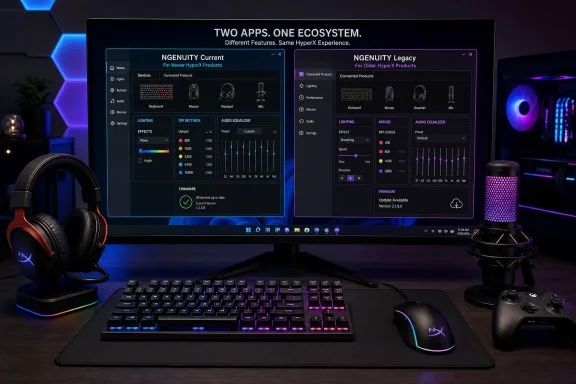
HyperX’s complication is that NGENUITY now exists in two forms. The current application is intended primarily for newer peripherals, while NGENUITY Legacy remains available for older products that have not migrated to the rebuilt platform.
HP’s software guide describes the current generation as having launched in 2024 and receiving significant updates during 2025 and 2026. HyperX’s present product page uses slightly different public-facing language, calling the newer application “NGENUITY (2025)” and the older branch “NGENUITY Legacy (2020–2025).”
Those descriptions are not impossible to reconcile. A software platform can begin development or rollout in one year, enter a broader beta or product phase later, and receive a different marketing label when it becomes the primary edition. But the discrepancy illustrates the larger problem: HyperX’s transition is easier to understand as an evolving migration than as one clean launch.
The trade-off is that HyperX has transferred part of the migration burden to customers and support staff. Before installation, the user must identify the peripheral precisely, consult the compatibility information, and select the appropriate application.
The table is necessarily a starting point rather than an absolute compatibility guarantee. The supplied HP guidance uses product age as the practical dividing line, recommending the current application for 2023-and-newer hardware and Legacy for devices from 2018 through 2022.
HyperX’s own compatibility information is more granular. Some product families and individual models can appear in both lists, while other devices with similar names may support only one application. A model year therefore helps narrow the choice, but it cannot replace checking the exact product name.
This distinction matters with families such as Pulsefire Haste 2, where wired, wireless, miniature, core, and higher-performance variants may not follow identical software paths. “Haste 2 compatible” is not necessarily specific enough; administrators and users need the full variant name.
The same principle applies to headsets. Windows may recognize a headset as an ordinary audio device even when the installed NGENUITY edition cannot expose its advanced controls. Basic playback is not proof that EQ, microphone processing, spatial features, lighting, or firmware management are correctly available.
2025 — NGENUITY receives significant updates, while HyperX’s public software language increasingly distinguishes the newer platform from the Legacy branch.
2026 — Further significant updates expand the current application’s audio, performance-tuning, and control ambitions around newer devices such as the Clutch Talon controller and Cloud Stinger 3.
The transition remains active rather than complete. HyperX’s own product page acknowledges that the current application is still under development and that not every feature has been fully implemented.
For supported RGB products, users can choose colors, apply built-in effects such as wave, breathing, or reactive lighting, and construct layered patterns. Lighting can also be synchronized across multiple compatible HyperX devices, turning separate peripherals into a coordinated desktop setup.
Lighting is subjective, but input configuration has direct functional value. NGENUITY can record input sequences as macros and assign them to programmable keyboard keys or mouse buttons, along with media controls, application shortcuts, and game commands.
Mouse owners can configure as many as five DPI stages on supported models. That allows one sensitivity level for ordinary desktop work, another for fast movement, and a lower setting for more deliberate aiming without rebuilding the configuration each time.
Eligible mice can also run at polling rates of up to 1000 Hz. The practical benefit depends on the device, game, display, and player, but the software is where HyperX exposes those sensor and reporting options.
NGENUITY’s profile system ties these settings together. A profile can contain lighting, button assignments, macros, DPI choices, and audio preferences, reducing the need to manually reconfigure a device whenever the workload changes.
Automatic profile switching makes that system more useful. NGENUITY can associate a profile with a game or application, load it when the program starts, and revert when the user exits.
That is not merely convenience for competitive gaming. A programmable mouse can have one layout for a game, another for video editing, and a third for general Windows use. A keyboard can swap between application shortcuts and game-specific macros without requiring the user to remember which buttons were reassigned.
The important limitation is that profile behavior may depend on whether the software is running or whether the peripheral supports onboard memory. A configuration stored only in the application may not follow the device to another PC unless it is synchronized or recreated.
The supplied HP guide describes multi-band equalization, microphone gain, sidetone monitoring, and preset profiles for uses such as first-person games, music, and bass-heavy playback. HyperX’s recent product messaging goes further, positioning the rebuilt audio engine around more advanced equalization, microphone processing, monitoring, noise reduction, and spatial tools.
This expansion raises the stakes of the two-version split. If one application offers a newer audio engine but does not yet support an older headset’s full feature set, upgrading the software is no longer an obvious decision.
The problem is familiar across the peripheral industry. A vendor wants to replace an aging codebase, but its old application contains years of device-specific behavior and exceptions. Rebuilding the interface can be relatively straightforward; reproducing every firmware interaction, profile format, audio endpoint, lighting effect, and onboard-memory function is not.
HyperX has chosen parallel operation rather than pretending the migration is finished. That is more honest than silently dropping old products, but it can produce a fragmented experience in mixed-device environments.
A user with a newer headset and an older keyboard may discover that one NGENUITY edition does not manage the entire desk. Even where both applications can be installed, running two hardware utilities introduces obvious support questions involving background services, update behavior, profile ownership, RGB control, and device detection.
HyperX also says NGENUITY can coexist with OMEN Gaming Hub, but advises using only one of the applications for RGB control to avoid conflicts. That advice reveals how quickly a “simple” peripheral utility becomes part of a larger Windows management stack.
For IT departments, streaming studios, esports venues, and shared gaming spaces, the implication is clear: NGENUITY should be treated as managed hardware software, not as a harmless color picker.
HyperX’s official guidance also identifies no Linux edition. Some devices may retain limited functionality outside Windows through physical controls or onboard profiles, but configuration and profile-writing still require access to a Windows PC.
That creates a distinction between peripheral compatibility and software compatibility. A headset may play audio from a Mac, console, or mobile device, while NGENUITY remains unavailable on that platform.
Consumers can easily miss this difference because product pages frequently list the platforms on which a device can perform its basic role. A cross-platform headset does not necessarily have cross-platform configuration software.
This limitation is especially relevant for peripherals whose best features are software-defined. If EQ, microphone processing, button remapping, or lighting requires NGENUITY, the device’s full functionality effectively belongs to the Windows ecosystem even if the underlying hardware can connect elsewhere.
The Windows requirement can also complicate support in organizations using locked-down machines. Microsoft Store access may be restricted, executable downloads may require approval, and peripheral firmware tools may be prohibited from running without administrative review.
HyperX provides two official download routes: its NGENUITY page and the Microsoft Store. Users should prefer those official channels rather than third-party download portals, particularly because the application can deliver firmware to connected hardware.
The installation requires approximately 480 MB of storage. An internet connection is needed for downloading the application, obtaining updates, and using cloud synchronization.
Those requirements are modest for a gaming PC, but the internet dependency matters for managed or isolated systems. The application may run locally after installation, yet its update and cloud functions cannot be considered fully offline.
On first launch, the application scans for supported devices. Recognized products appear in the interface, where selecting one exposes its available configuration pages.
Changes generally apply in real time, allowing users to see lighting changes or hear audio adjustments as they are made. A first-run tutorial introduces the interface, reducing the learning curve once the device has been successfully detected.
Detection is the crucial dividing line. If a product does not appear, users should not immediately conclude that the hardware is defective.
The first question is whether the installed NGENUITY edition supports the exact peripheral. This is more important than repeatedly reinstalling the same incompatible application.
HyperX’s own troubleshooting advice then moves through firmware availability, alternate USB ports, and application reinstallation. Those steps reflect the layers involved: model compatibility, device firmware, Windows USB enumeration, and the NGENUITY installation itself.
Direct USB connections are preferable during initial setup and firmware work. Hubs, docks, monitor USB ports, and switching equipment can add another variable when the application is attempting to identify or update a peripheral.
Firmware installation deserves particular caution. A device should remain connected throughout the update, and a laptop should have reliable power. Interrupting a firmware write is categorically different from interrupting an RGB change.
Cloud sync also changes the support model. A profile problem may originate in the local application, the account, the synchronized copy, or the specific device’s interpretation of the settings.
Organizations should therefore distinguish between personal convenience and managed reproducibility. A gamer may prefer automatic synchronization, while an esports venue may want a known local configuration that does not change when a user signs in.
Macros deserve similar scrutiny. They can improve productivity and accessibility, but some competitive games and managed environments restrict automated input sequences. The fact that NGENUITY can create a macro does not mean every application or tournament permits its use.
Automatic game-profile switching can also create confusion during troubleshooting. A user may verify one set of settings on the Windows desktop, launch a game, and then encounter a different DPI, button map, EQ curve, or lighting pattern because NGENUITY loaded an associated profile.
The software is behaving as configured, but the change can resemble a device fault. Support teams should check profile associations before resetting hardware or reinstalling drivers.
These are not arguments against profiles. They are evidence that peripheral configuration has become stateful, account-linked software rather than a collection of simple hardware switches.
HyperX currently describes the older edition as “soon-to-be legacy” software and warns that newer devices may not support it. Its compatibility guidance also makes clear that many older peripherals have not been added to the current application.
That creates a two-sided boundary. Moving too early can strand old hardware in the new application, while refusing to move can strand newly purchased hardware in Legacy.
For owners of devices such as the Cloud Flight S, Alloy Elite RGB, and Pulsefire Surge, the rational choice is to continue using Legacy if it provides the required functionality. There is no benefit in adopting newer software solely because its interface is more modern.
For current-generation products such as the Clutch Talon controller or Cloud Stinger 3, the reverse applies. The rebuilt application is where HyperX is concentrating its newer control, performance, and audio features.
The Pulsefire Haste 2 series illustrates why product names must be checked carefully. The broader family is associated with current-generation NGENUITY, but HyperX’s live compatibility lists distinguish among individual versions, and support can overlap or differ between the two applications.
The danger is treating “current” and “Legacy” as equivalent to “good” and “bad.” Legacy may be the correct, fully functional choice for an older device, while the current application may be the only meaningful choice for a newer one.
What matters is not the age of the executable. It is the completeness of the hardware-to-software relationship.
That is an important strength. Peripheral suites from major gaming brands have a reputation for consuming excessive resources, presenting promotional content, and attempting to manage unrelated system functions. A focused utility can be an advantage even if its feature list is less sprawling.
At the same time, community reports around the transition describe missing devices, inconsistent firmware behavior, audio complications, unavailable options, and confusion over which download represents the new application. Such reports do not establish that every user will encounter a defect, but they do show that HyperX’s public explanation has not always made the migration obvious.
Some reports also suggest that a function available in Legacy may not yet behave identically in the rebuilt application. That aligns with HyperX’s own acknowledgment that NGENUITY remains in active development and that not every feature is fully implemented.
The distinction between a compatibility problem and a software bug is essential. If a device is absent from the current support list, reinstalling Windows, changing drivers, or repeatedly resetting the peripheral is unlikely to add support.
If the device is explicitly supported but fails to appear, ordinary troubleshooting becomes appropriate. The USB connection, firmware state, application installation, Windows device enumeration, and competing hardware utilities should then be investigated.
HyperX’s challenge is that both situations look the same to the customer: the device does not appear. Better in-application messaging could separate “recognized but malfunctioning” from “not supported by this edition.”
A mouse’s sensor, switches, shape, and weight remain fundamental, but the usable product also includes DPI configuration, button mapping, firmware maintenance, profile storage, and the continued availability of the application that controls them.
The same applies to headsets. Comfort and driver quality matter, but software-defined EQ, microphone processing, game/chat balance, monitoring, and spatial controls can meaningfully affect the experience.
HyperX’s two-application model means prospective buyers should check software support before purchase, not after opening the box. That is particularly important when buying discontinued, refurbished, or secondhand equipment.
An older device may be attractively priced and fully serviceable, but its reliance on Legacy should be understood. A user unwilling or unable to install the older application may not receive the functionality implied by the hardware’s original marketing.
Conversely, a brand-new peripheral may require the current NGENUITY application even if an existing HyperX setup is still managed through Legacy. Adding one device can therefore create a second software dependency.
Mixed fleets are where this becomes an administrative issue. An organization that standardizes on HyperX should record the required NGENUITY branch alongside each model, just as it would record a driver package or firmware baseline.
Software support should also be considered when devices move between employees or PCs. A configuration that works on one machine may depend on a particular edition, local profile, account, firmware revision, or onboard-memory state.
The ideal NGENUITY installer would detect attached hardware before completing setup and state plainly which application is required. If a user opened the wrong edition, it should name the detected device and direct the user to the correct branch rather than presenting an empty interface.
HyperX also needs a durable migration policy. Owners should be able to determine whether an older product is scheduled to receive current-app support, will remain on Legacy permanently, or has reached the end of configurable software support.
Profile portability would reduce the cost of transition. Where hardware capabilities overlap, users should not have to rebuild every lighting scheme, macro, DPI level, and audio preset simply because the control application was replaced.
The company should also clarify which functions require the application to remain running, which can be written to onboard memory, which depend on cloud sync, and which are unavailable outside Windows. Those boundaries are as important as the feature list.
Finally, the live compatibility matrix must remain authoritative. Broad advice based on a device’s release year is useful for orientation, but exact model support should govern installation and purchasing decisions.
HyperX is attempting something reasonable: retire an aging peripheral suite without immediately abandoning years of hardware. The success of that effort will depend less on how polished the new dashboard looks than on whether customers can move through the transition without losing functions they already paid for.
 HyperX Has Turned Peripheral Setup Into a Compatibility Decision
Peripheral software is usually presented as an optional enhancement: install the application, change a few colors, and then forget it exists. NGENUITY is more consequential because it is the interface through which compatible HyperX hardware exposes functions that may not be available through physical controls or standard Windows settings.The application can configure RGB lighting, programmable buttons, macros, keyboard bindings, mouse sensitivity, polling behavior, headset equalization, microphone gain, sidetone, and device profiles. It also checks for peripheral firmware updates, making it part configuration utility, part update client, and part hardware management layer.
That makes choosing the right NGENUITY application more than a cosmetic concern. If the software does not recognize a device, owners may lose access to the very capabilities that distinguished that model from a cheaper, less configurable alternative.
HyperX’s complication is that NGENUITY now exists in two forms. The current application is intended primarily for newer peripherals, while NGENUITY Legacy remains available for older products that have not migrated to the rebuilt platform.
HP’s software guide describes the current generation as having launched in 2024 and receiving significant updates during 2025 and 2026. HyperX’s present product page uses slightly different public-facing language, calling the newer application “NGENUITY (2025)” and the older branch “NGENUITY Legacy (2020–2025).”
Those descriptions are not impossible to reconcile. A software platform can begin development or rollout in one year, enter a broader beta or product phase later, and receive a different marketing label when it becomes the primary edition. But the discrepancy illustrates the larger problem: HyperX’s transition is easier to understand as an evolving migration than as one clean launch.
Two Applications Preserve Hardware Support by Moving Complexity to the User
Keeping NGENUITY Legacy available is preferable to immediately abandoning older hardware. A Cloud Flight S headset, Alloy Elite RGB keyboard, or Pulsefire Surge mouse may still work perfectly well years after purchase, and replacing it merely because the configuration utility changed would be indefensible.The trade-off is that HyperX has transferred part of the migration burden to customers and support staff. Before installation, the user must identify the peripheral precisely, consult the compatibility information, and select the appropriate application.
| Consideration | NGENUITY current | NGENUITY Legacy |
|---|---|---|
| Intended hardware | Primarily newer peripherals from 2023 onward | Primarily peripherals from 2018 to 2022 |
| Representative devices | Pulsefire Haste 2 series, Clutch Talon controller, Cloud Stinger 3 | Cloud Flight S, Alloy Elite RGB, Pulsefire Surge |
| Interface direction | Modernized, actively developed platform | Older application retained for device compatibility |
| Main advantage | Latest features, audio engine, and current-generation support | Continued configuration support for older hardware |
| Main risk | Some older devices remain unsupported | Newer devices may never be supported |
| Price | Free | Free |
HyperX’s own compatibility information is more granular. Some product families and individual models can appear in both lists, while other devices with similar names may support only one application. A model year therefore helps narrow the choice, but it cannot replace checking the exact product name.
This distinction matters with families such as Pulsefire Haste 2, where wired, wireless, miniature, core, and higher-performance variants may not follow identical software paths. “Haste 2 compatible” is not necessarily specific enough; administrators and users need the full variant name.
The same principle applies to headsets. Windows may recognize a headset as an ordinary audio device even when the installed NGENUITY edition cannot expose its advanced controls. Basic playback is not proof that EQ, microphone processing, spatial features, lighting, or firmware management are correctly available.
Timeline
2024 — According to HP’s software guide, the rebuilt current NGENUITY platform launches with a modernized foundation.2025 — NGENUITY receives significant updates, while HyperX’s public software language increasingly distinguishes the newer platform from the Legacy branch.
2026 — Further significant updates expand the current application’s audio, performance-tuning, and control ambitions around newer devices such as the Clutch Talon controller and Cloud Stinger 3.
The transition remains active rather than complete. HyperX’s own product page acknowledges that the current application is still under development and that not every feature has been fully implemented.
NGENUITY’s Real Job Is Unlocking Hardware Already on the Desk
The superficial interpretation of gaming-peripheral software is that it exists to make devices glow. RGB is certainly prominent, but NGENUITY’s more important functions affect how the hardware behaves.For supported RGB products, users can choose colors, apply built-in effects such as wave, breathing, or reactive lighting, and construct layered patterns. Lighting can also be synchronized across multiple compatible HyperX devices, turning separate peripherals into a coordinated desktop setup.
Lighting is subjective, but input configuration has direct functional value. NGENUITY can record input sequences as macros and assign them to programmable keyboard keys or mouse buttons, along with media controls, application shortcuts, and game commands.
Mouse owners can configure as many as five DPI stages on supported models. That allows one sensitivity level for ordinary desktop work, another for fast movement, and a lower setting for more deliberate aiming without rebuilding the configuration each time.
Eligible mice can also run at polling rates of up to 1000 Hz. The practical benefit depends on the device, game, display, and player, but the software is where HyperX exposes those sensor and reporting options.
NGENUITY’s profile system ties these settings together. A profile can contain lighting, button assignments, macros, DPI choices, and audio preferences, reducing the need to manually reconfigure a device whenever the workload changes.
Automatic profile switching makes that system more useful. NGENUITY can associate a profile with a game or application, load it when the program starts, and revert when the user exits.
That is not merely convenience for competitive gaming. A programmable mouse can have one layout for a game, another for video editing, and a third for general Windows use. A keyboard can swap between application shortcuts and game-specific macros without requiring the user to remember which buttons were reassigned.
The important limitation is that profile behavior may depend on whether the software is running or whether the peripheral supports onboard memory. A configuration stored only in the application may not follow the device to another PC unless it is synchronized or recreated.
Audio Has Turned the Utility Into a Broader Software Platform
The current NGENUITY application matters most where HyperX is pushing beyond conventional peripheral settings. Audio processing is central to that strategy, particularly for newer headsets and microphones.The supplied HP guide describes multi-band equalization, microphone gain, sidetone monitoring, and preset profiles for uses such as first-person games, music, and bass-heavy playback. HyperX’s recent product messaging goes further, positioning the rebuilt audio engine around more advanced equalization, microphone processing, monitoring, noise reduction, and spatial tools.
This expansion raises the stakes of the two-version split. If one application offers a newer audio engine but does not yet support an older headset’s full feature set, upgrading the software is no longer an obvious decision.
The problem is familiar across the peripheral industry. A vendor wants to replace an aging codebase, but its old application contains years of device-specific behavior and exceptions. Rebuilding the interface can be relatively straightforward; reproducing every firmware interaction, profile format, audio endpoint, lighting effect, and onboard-memory function is not.
HyperX has chosen parallel operation rather than pretending the migration is finished. That is more honest than silently dropping old products, but it can produce a fragmented experience in mixed-device environments.
A user with a newer headset and an older keyboard may discover that one NGENUITY edition does not manage the entire desk. Even where both applications can be installed, running two hardware utilities introduces obvious support questions involving background services, update behavior, profile ownership, RGB control, and device detection.
HyperX also says NGENUITY can coexist with OMEN Gaming Hub, but advises using only one of the applications for RGB control to avoid conflicts. That advice reveals how quickly a “simple” peripheral utility becomes part of a larger Windows management stack.
For IT departments, streaming studios, esports venues, and shared gaming spaces, the implication is clear: NGENUITY should be treated as managed hardware software, not as a harmless color picker.
Windows Is Not Merely Preferred but Required
NGENUITY supports Windows 10 and Windows 11, with Windows 10 requiring a 64-bit installation. Windows is the only supported desktop platform; there is no NGENUITY application for macOS.HyperX’s official guidance also identifies no Linux edition. Some devices may retain limited functionality outside Windows through physical controls or onboard profiles, but configuration and profile-writing still require access to a Windows PC.
That creates a distinction between peripheral compatibility and software compatibility. A headset may play audio from a Mac, console, or mobile device, while NGENUITY remains unavailable on that platform.
Consumers can easily miss this difference because product pages frequently list the platforms on which a device can perform its basic role. A cross-platform headset does not necessarily have cross-platform configuration software.
This limitation is especially relevant for peripherals whose best features are software-defined. If EQ, microphone processing, button remapping, or lighting requires NGENUITY, the device’s full functionality effectively belongs to the Windows ecosystem even if the underlying hardware can connect elsewhere.
The Windows requirement can also complicate support in organizations using locked-down machines. Microsoft Store access may be restricted, executable downloads may require approval, and peripheral firmware tools may be prohibited from running without administrative review.
HyperX provides two official download routes: its NGENUITY page and the Microsoft Store. Users should prefer those official channels rather than third-party download portals, particularly because the application can deliver firmware to connected hardware.
The installation requires approximately 480 MB of storage. An internet connection is needed for downloading the application, obtaining updates, and using cloud synchronization.
Those requirements are modest for a gaming PC, but the internet dependency matters for managed or isolated systems. The application may run locally after installation, yet its update and cloud functions cannot be considered fully offline.
Installation Is Easy; Correct Detection Is the Real Test
The normal installation flow is simple. The user downloads the correct edition, runs the installer or installs through the Microsoft Store, connects a compatible HyperX peripheral, and opens NGENUITY.On first launch, the application scans for supported devices. Recognized products appear in the interface, where selecting one exposes its available configuration pages.
Changes generally apply in real time, allowing users to see lighting changes or hear audio adjustments as they are made. A first-run tutorial introduces the interface, reducing the learning curve once the device has been successfully detected.
Detection is the crucial dividing line. If a product does not appear, users should not immediately conclude that the hardware is defective.
The first question is whether the installed NGENUITY edition supports the exact peripheral. This is more important than repeatedly reinstalling the same incompatible application.
HyperX’s own troubleshooting advice then moves through firmware availability, alternate USB ports, and application reinstallation. Those steps reflect the layers involved: model compatibility, device firmware, Windows USB enumeration, and the NGENUITY installation itself.
Direct USB connections are preferable during initial setup and firmware work. Hubs, docks, monitor USB ports, and switching equipment can add another variable when the application is attempting to identify or update a peripheral.
Firmware installation deserves particular caution. A device should remain connected throughout the update, and a laptop should have reliable power. Interrupting a firmware write is categorically different from interrupting an RGB change.
Action checklist for admins
- Inventory each HyperX device by its complete model and variant name, not merely its product family.
- Check whether that exact device requires current NGENUITY or NGENUITY Legacy before deployment.
- Obtain both applications only from HyperX or the Microsoft Store.
- Confirm the endpoint runs Windows 10 64-bit or Windows 11 and has roughly 480 MB available.
- Test device discovery, profiles, audio endpoints, and firmware updates on a pilot PC before wider installation.
- Avoid allowing multiple utilities to control the same RGB hardware simultaneously.
- Export, synchronize, or document critical profiles before replacing or upgrading an NGENUITY installation.
- Keep Legacy installed where required until the current application demonstrably supports every needed device and feature.
Cloud Profiles Add Convenience and Another Operational Dependency
NGENUITY can synchronize profiles through an account, allowing settings to follow a user between computers. That is useful for someone moving between a gaming desktop and a laptop, or for replacing a Windows installation without rebuilding every configuration manually.Cloud sync also changes the support model. A profile problem may originate in the local application, the account, the synchronized copy, or the specific device’s interpretation of the settings.
Organizations should therefore distinguish between personal convenience and managed reproducibility. A gamer may prefer automatic synchronization, while an esports venue may want a known local configuration that does not change when a user signs in.
Macros deserve similar scrutiny. They can improve productivity and accessibility, but some competitive games and managed environments restrict automated input sequences. The fact that NGENUITY can create a macro does not mean every application or tournament permits its use.
Automatic game-profile switching can also create confusion during troubleshooting. A user may verify one set of settings on the Windows desktop, launch a game, and then encounter a different DPI, button map, EQ curve, or lighting pattern because NGENUITY loaded an associated profile.
The software is behaving as configured, but the change can resemble a device fault. Support teams should check profile associations before resetting hardware or reinstalling drivers.
These are not arguments against profiles. They are evidence that peripheral configuration has become stateful, account-linked software rather than a collection of simple hardware switches.
Legacy Is a Compatibility Bridge, Not the Destination
The word Legacy carries an unavoidable implication. HyperX is maintaining the older application because the current platform has not absorbed every supported device, not because the company intends to develop two equal branches indefinitely.HyperX currently describes the older edition as “soon-to-be legacy” software and warns that newer devices may not support it. Its compatibility guidance also makes clear that many older peripherals have not been added to the current application.
That creates a two-sided boundary. Moving too early can strand old hardware in the new application, while refusing to move can strand newly purchased hardware in Legacy.
For owners of devices such as the Cloud Flight S, Alloy Elite RGB, and Pulsefire Surge, the rational choice is to continue using Legacy if it provides the required functionality. There is no benefit in adopting newer software solely because its interface is more modern.
For current-generation products such as the Clutch Talon controller or Cloud Stinger 3, the reverse applies. The rebuilt application is where HyperX is concentrating its newer control, performance, and audio features.
The Pulsefire Haste 2 series illustrates why product names must be checked carefully. The broader family is associated with current-generation NGENUITY, but HyperX’s live compatibility lists distinguish among individual versions, and support can overlap or differ between the two applications.
The danger is treating “current” and “Legacy” as equivalent to “good” and “bad.” Legacy may be the correct, fully functional choice for an older device, while the current application may be the only meaningful choice for a newer one.
What matters is not the age of the executable. It is the completeness of the hardware-to-software relationship.
Independent Coverage Shows Both the Promise and the Rough Edges
Independent product reviews suggest that NGENUITY can be comparatively straightforward when hardware support is aligned. Tom’s Hardware, reviewing a newer HyperX keyboard, described the software as simple to use and less bloated than some competing mechanical-keyboard utilities.That is an important strength. Peripheral suites from major gaming brands have a reputation for consuming excessive resources, presenting promotional content, and attempting to manage unrelated system functions. A focused utility can be an advantage even if its feature list is less sprawling.
At the same time, community reports around the transition describe missing devices, inconsistent firmware behavior, audio complications, unavailable options, and confusion over which download represents the new application. Such reports do not establish that every user will encounter a defect, but they do show that HyperX’s public explanation has not always made the migration obvious.
Some reports also suggest that a function available in Legacy may not yet behave identically in the rebuilt application. That aligns with HyperX’s own acknowledgment that NGENUITY remains in active development and that not every feature is fully implemented.
The distinction between a compatibility problem and a software bug is essential. If a device is absent from the current support list, reinstalling Windows, changing drivers, or repeatedly resetting the peripheral is unlikely to add support.
If the device is explicitly supported but fails to appear, ordinary troubleshooting becomes appropriate. The USB connection, firmware state, application installation, Windows device enumeration, and competing hardware utilities should then be investigated.
HyperX’s challenge is that both situations look the same to the customer: the device does not appear. Better in-application messaging could separate “recognized but malfunctioning” from “not supported by this edition.”
The Software Generation Is Now Part of the Purchase Decision
Gaming hardware is increasingly sold as a combination of physical device, firmware, desktop application, and online service. Buyers should evaluate all four.A mouse’s sensor, switches, shape, and weight remain fundamental, but the usable product also includes DPI configuration, button mapping, firmware maintenance, profile storage, and the continued availability of the application that controls them.
The same applies to headsets. Comfort and driver quality matter, but software-defined EQ, microphone processing, game/chat balance, monitoring, and spatial controls can meaningfully affect the experience.
HyperX’s two-application model means prospective buyers should check software support before purchase, not after opening the box. That is particularly important when buying discontinued, refurbished, or secondhand equipment.
An older device may be attractively priced and fully serviceable, but its reliance on Legacy should be understood. A user unwilling or unable to install the older application may not receive the functionality implied by the hardware’s original marketing.
Conversely, a brand-new peripheral may require the current NGENUITY application even if an existing HyperX setup is still managed through Legacy. Adding one device can therefore create a second software dependency.
Mixed fleets are where this becomes an administrative issue. An organization that standardizes on HyperX should record the required NGENUITY branch alongside each model, just as it would record a driver package or firmware baseline.
Software support should also be considered when devices move between employees or PCs. A configuration that works on one machine may depend on a particular edition, local profile, account, firmware revision, or onboard-memory state.
HyperX Needs One Compatibility Story, Even If It Still Needs Two Apps
Maintaining Legacy is the defensible decision. The weakness lies in making users decode the migration through product dates, overlapping lists, download labels, and evolving launch terminology.The ideal NGENUITY installer would detect attached hardware before completing setup and state plainly which application is required. If a user opened the wrong edition, it should name the detected device and direct the user to the correct branch rather than presenting an empty interface.
HyperX also needs a durable migration policy. Owners should be able to determine whether an older product is scheduled to receive current-app support, will remain on Legacy permanently, or has reached the end of configurable software support.
Profile portability would reduce the cost of transition. Where hardware capabilities overlap, users should not have to rebuild every lighting scheme, macro, DPI level, and audio preset simply because the control application was replaced.
The company should also clarify which functions require the application to remain running, which can be written to onboard memory, which depend on cloud sync, and which are unavailable outside Windows. Those boundaries are as important as the feature list.
Finally, the live compatibility matrix must remain authoritative. Broad advice based on a device’s release year is useful for orientation, but exact model support should govern installation and purchasing decisions.
HyperX is attempting something reasonable: retire an aging peripheral suite without immediately abandoning years of hardware. The success of that effort will depend less on how polished the new dashboard looks than on whether customers can move through the transition without losing functions they already paid for.
The Practical Rules for Living With Two NGENUITY Generations
The current application represents HyperX’s future, but Legacy remains operationally necessary for part of its installed base. Users should resist both the assumption that newer software is automatically better for every device and the opposite assumption that Legacy will support future purchases.- NGENUITY is free official HyperX software for compatible peripherals on Windows 10 and Windows 11.
- The current application is generally recommended for products from 2023 onward; Legacy is generally intended for models from 2018 through 2022.
- The exact model and variant matter more than the broad product family or purchase date.
- There is no supported macOS desktop application, even when the peripheral itself can perform basic functions on a Mac.
- Current NGENUITY delivers newer interface, audio, performance, and control work, while Legacy preserves support for hardware not yet migrated.
- Official HyperX compatibility information should be checked before installation, firmware work, software removal, or a new peripheral purchase.
References
- Primary source: HP
Published: 2026-07-11T02:20:08.612453
HyperX NGENUITY Software Guide: Setup, Features & Customisation < Tech Takes - HP.com New Zealand
Learn how HyperX NGENUITY software works, how to set it up, and how to customise your HyperX gaming peripherals for maximum performance.www.hp.com - Related coverage: hyperx.com
NGENUITY Software Download | Customize HyperX Headsets, Mouse & Keyboards – HyperX US
Download HyperX Ngenuity software to personalize your compatible HyperX products. Set button bindings, program and store macros, and customize lighting; HyperX NGENUITY gives you as much control as you want. hyperx.com
- Related coverage: ngenuity.app
HyperX NGENUITY - Free Download for Windows PC
Download HyperX NGENUITY free for Windows. Customize RGB lighting, macros, DPI, and audio profiles for your HyperX gaming peripherals.ngenuity.app - Related coverage: row.hyperx.com
HyperX NGENUITY Software – HyperX ROW
Personalize your compatible HyperX products with HyperX NGENUITY software. Set button bindings, program and store macros, and customize lighting; HyperX NGENUITY gives you as much control as you want. row.hyperx.com
- Related coverage: softpedia.com
HyperX NGENUITY - Download - Softpedia
Download HyperX NGENUITY 2.1.2 / 2.38.0.0 Legacy / 5.38.0.0 Store App - This software allows owners of HyperX products to customize them according to their preferences: depending on the part, you can adjust the RGB, macros, and morewww.softpedia.com - Related coverage: de.hyperx.com
HyperX NGENUITY-Software – HyperX DE
Personalisieren Sie Ihre kompatiblen HyperX-Produkte mit der HyperX NGENUITY-Software. Legen Sie Tastenbelegungen fest, programmieren und speichern Sie Makros, und passen Sie die Beleuchtung an; HyperX NGENUITY gibt Ihnen so viel Kontrolle, wie Sie möchten. de.hyperx.com
- Related coverage: apkpure.net
Download HyperX NGENUITY Old Versions for Android on APKPure Lite
Download older versions of HyperX NGENUITY APK on Android. Get all of the older versions of HyperX NGENUITY for free and safely on APKPure Lite.apkpure.net - Related coverage: uk.hyperx.com
HyperX NGENUITY Software – HyperX UK
Personalize your compatible HyperX products with HyperX NGENUITY software. Set button bindings, program and store macros, and customize lighting; HyperX NGENUITY gives you as much control as you want. uk.hyperx.com
- Related coverage: tomshardware.com
HyperX Origins 2 65 Review: 8,000Hz and Customizable | Tom's Hardware
A fair attempt at bridging customization and gamingwww.tomshardware.com - Related coverage: tomsguide.com
HyperX Cloud Alpha 2 review: Perfect for audiophile gamers | Tom's Guide
The HyperX Cloud Alpha 2 is a premium gaming headset that sounds fantastic and boasts a massive 250-hour battery life. However, it has some flaws.www.tomsguide.com - Related coverage: techradar.com
HyperX Origins 2 1800 review: a satisfying mechanical board with versatile hardware but limited software | TechRadar
The HyperX Origins 2 1800 promises pure mechanical excellence — but how does it fare in the modern gaming keyboard landscape?www.techradar.com - Related coverage: gamesradar.com
HyperX Cloud Alpha 2 Wireless review | GamesRadar+
The HyperX Cloud Alpha 2 Wireless headset is a fantastic-sounding headset with a ridiculously impressive battery life, but its microphone and price, driven up by the RGB Base Station, make it awkward to wholeheartedly recommend.www.gamesradar.com - Related coverage: windowscentral.com
HyperX Alloy Rise 75 Wireless keyboard review: Is it enough? | Windows Central
The HyperX Alloy Rise 75 Wireless is impressive in a number of ways, but it's also finnicky and expensive (on paper).www.windowscentral.com
