

Hytale’s published PC requirements give a clear picture of what to expect at launch: modest minimum targets for 1080p/30, comfortable 1080p/60 recommended hardware, and a separate “creator/streamer” tier that pushes players toward modern CPUs, 32 GB RAM, and NVMe storage for stable 1440p captures — all with a small install footprint but potentially large world-generated saved files.
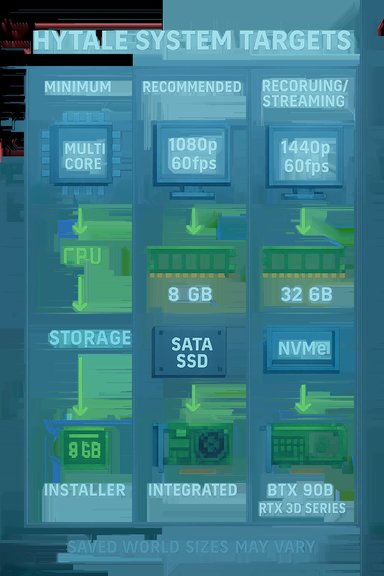
Hytale has returned to the spotlight ahead of its early access window, and the developer-published performance targets and system requirements are now circulating in the press. The studio aims to support everything from low-end integrated GPUs to high-end recording rigs, with tiered guidance that targets different play styles: Minimum (30 FPS, 1080p), Recommended (60 FPS, 1080p), and Recording/Streaming (1440p, 60 FPS) for creators. These specifications are derived from the developer’s internal testing and have been reported across multiple outlets. This article breaks down those system requirements, verifies the most critical numbers against independent reporting, analyzes practical implications for Windows players, and offers upgrade and configuration advice to get the best real-world experience without overspending.
For Windows users, the best short-term strategy is pragmatic: ensure an SSD-based install, bring system RAM to at least 16 GB if you want recommended-level play, and follow the developer and vendor driver guidance at launch. Content creators should plan earlier — 32 GB RAM and a separate NVMe capture drive pay immediate dividends. Keep an eye on driver updates and final launch notes, because pre-release targets are useful baselines but not immutable guarantees.
Source: Shacknews Hytale minimum and recommended specs - PC system requirements
 Background / Overview
Hytale has returned to the spotlight ahead of its early access window, and the developer-published performance targets and system requirements are now circulating in the press. The studio aims to support everything from low-end integrated GPUs to high-end recording rigs, with tiered guidance that targets different play styles: Minimum (30 FPS, 1080p), Recommended (60 FPS, 1080p), and Recording/Streaming (1440p, 60 FPS) for creators. These specifications are derived from the developer’s internal testing and have been reported across multiple outlets. This article breaks down those system requirements, verifies the most critical numbers against independent reporting, analyzes practical implications for Windows players, and offers upgrade and configuration advice to get the best real-world experience without overspending.Official system requirements — the numbers you need
Below is a condensed presentation of the developer-targeted tiers as reported by multiple outlets that received the specification sheet from the Hytale team.Minimum (Playable — 1080p @ 30 FPS)
- OS: 64-bit Windows 10 (version 1809) or Windows 11.
- CPU: Intel Core i5-7500 or AMD Ryzen 3 1200 (or equivalent).
- RAM:
- Singleplayer with dedicated GPU: 8 GB
- Singleplayer with integrated GPU: 12 GB
- Multiplayer-only: 8 GB.
- GPU:
- Integrated: Intel UHD Graphics 620, AMD Radeon Vega 3.
- Dedicated: NVIDIA GTX 900 Series, AMD Radeon 400 Series, Intel Arc A-Series.
- Storage: SATA SSD with 20 GB free space.
- Network: 2 Mbit/s for multiplayer (UDP/QUIC compatible).
- Notes: The developer warns that support for Vulkan 1.3 will be required in the future — flagged as a deprecation notice.
Recommended (Comfortable — 1080p @ 60 FPS)
- OS: 64-bit Windows 10 (version 1809) or Windows 11.
- CPU: Intel Core i5-10400 or AMD Ryzen 5 3600 (or equivalent).
- RAM: 16 GB.
- GPU:
- Integrated: Intel Iris Xe, AMD Radeon 660M.
- Dedicated: NVIDIA GTX 900 Series, AMD Radeon 400 Series, Intel Arc A-Series.
- Storage: SSD with 20 GB free space.
- Network: 8 Mbit/s for multiplayer (UDP/QUIC compatible).
Recording / Streaming (Target: stable 60 FPS at 1440p)
- OS: 64-bit Windows 10 (version 1809) or Windows 11.
- CPU: Intel Core i7-10700K or AMD Ryzen 9 3800X (or equivalent).
- RAM: 32 GB.
- GPU: NVIDIA RTX 30-Series, AMD Radeon RX 7000-Series, or Intel Arc A-Series.
- Storage: NVMe SSD with at least 10% (or 50 GB) free; developers recommend a separate drive for captured video.
- Recording advice: If supported, developers strongly recommend AV1 or HEVC for high-quality recording.
Install size and saved-game footprint
- Installer size: ~8 GB at launch; developers warn that world exploration will increase on-disk data.
- Saved game sizes (reported): ~661 MB for a 5000×5000 block cube; ~27 KB for a 32×32 chunk. These numbers illustrate how saved data scales with exploration.
How the specs map to real-world play
Minimum: “You can play” — realistic expectations
The Minimum tier targets a playable, low‑demand experience — roughly 1080p at ~30 FPS on low presets with an emphasized view-distance cap in internal tests. Players on integrated GPUs or older GPUs should expect to reduce view distance and other settings to stay smooth. Singleplayer with server simulation running locally is CPU- and RAM-sensitive: Hytale’s architecture combines client and server simulation in singleplayer, which drives higher CPU and memory use than a pure client.Recommended: the practical sweet spot
The Recommended tier is aimed at mainstream players who want steady 60 FPS at 1080p. The guidance is conservative: a modern midrange CPU (6 cores) and 16 GB RAM are the baseline. Vendor upscalers and driver-level features (e.g., DLSS/FSR/XeSS) will help preserve quality while boosting framerates, but they are not a substitute for a well-balanced system when view distances and simulation load increase.Creator/Streamer tier: CPU, RAM, and storage matter most
Recording or streaming at high quality forces different bottlenecks. Hytale’s creator tier recommends 32 GB RAM, NVMe storage, and recent multi-core CPUs because recording/encoding and the simultaneous simulation load magnify IO and memory pressure. Using a dedicated capture drive and hardware encoders (NVENC/AMD VCN or AV1/HEVC if supported) reduces contention and avoids frame drops during long capture sessions.Notable strengths in the dev guidance
- Accessible low-end baseline: The minimum requirement explicitly supports integrated GPUs and older dedicated GPUs, which preserves accessibility for players on laptops and lower-cost systems. Requiring only 8–12 GB RAM for many singleplayer use cases lowers the bar for newcomers.
- Tiered, realistic targets: Separating Minimum, Recommended, and Creator tiers helps players make pragmatic upgrade decisions — casual players don’t need the hardware creators need, and creators get specific guidance on NVMe and dedicated capture drives.
- Small base install size: An 8 GB installer is modest compared with many modern titles; it reduces initial download friction for players with limited bandwidth or storage. The developer’s clear saved-game size estimates also help creators plan storage.
- Forward-looking API guidance: The mention that Vulkan 1.3 support will be required in the future signals an intent to leverage modern driver/APIs for performance and cross-vendor parity. This is good for long-term performance scaling across GPU vendors.
Risks, caveats, and things you should watch
- “Will change” disclaimer: Developer-targeted specs are often a moving target. Optimization, engine changes, or feature expansion can raise performance demands between this pre-release sheet and later builds. Treat the numbers as targets, not immutable guarantees.
- Vulkan 1.3 deprecation notice: Requiring Vulkan 1.3 in the future may create platform friction for older drivers, some OEM laptops, or certain integrated GPU stacks lacking up-to-date Vulkan implementations. Players should confirm driver support for Vulkan 1.3 before major upgrades or troubleshooting.
- Singleplayer CPU/Memory pressure: Because the client runs a server in singleplayer, CPU and RAM are stressed more than in games that split server and client responsibilities. Users who only compare GPU specs to other titles may underestimate the CPU/RAM impact.
- Saved-world growth: While the installer is small, saved-world sizes scale rapidly with exploration and building. Large worlds or heavy use of custom content/mods will drive up disk and memory use; the dev-provided chunks-to-size figures show this clearly. Plan storage headroom.
- Driver and platform fragmentation: The guidance lists a wide array of supported GPU families, including older GTX 900 series and Radeon 400 series cards. While this improves coverage, real-world performance on older drivers and architectures can vary; driver updates and vendor-specific optimizations will matter on day one.
- Network expectations: Multiplayer bandwidth guidance (2 Mbit/s minimum / 8 Mbit/s recommended) is modest, but actual play experience at high view distances, frequent world-syncing, or high-population servers can exceed these numbers. Users with metered or high-latency connections should test before committing to heavy multiplayer sessions.
Upgrade and tuning guidance for Windows players
If you’re comparing your PC to Hytale’s published targets, use this prioritized checklist to get the most performance for your money.- SSD first — for everyone:
- Move the game to an SSD if you haven’t already. The Minimum tier asks for a SATA SSD, while creators are advised to use NVMe. SSDs reduce texture streaming stutters and load-time hitching far more than modest CPU or GPU gains in many cases.
- RAM next — especially for creators:
- If you’re under 16 GB, upgrade to 16 GB for recommended-level play. If you record or stream, move to 32 GB to avoid swapping and to keep encoders and the simulation happy.
- CPU considerations:
- For singleplayer with higher view distances, choose a modern multi-core CPU (6+ cores) to handle simulation and background processes. Recording demands favor higher core counts and strong single-thread bursts.
- GPU and VRAM:
- The published dedicated‑GPU minimum includes older GTX 900 and Radeon 400 series cards; these will run but expect compromises. For comfortable 1080p/60, target midrange GPUs with 8+ GB VRAM — especially if you plan higher texture pools or 1440p capture.
- Storage headroom:
- Reserve extra free space beyond the stated 20 GB — patches, world saves, and capture files can expand usage quickly. For creators, follow the developer recommendation of separate NVMe for game and HDD/NVMe for captures.
- Driver and API readiness:
- Keep GPU drivers updated and confirm Vulkan 1.3 support if you use non-DX stacks. For NVIDIA/AMD/Intel, install vendor-supplied driver packages and enable hardware-accelerated encoders if recording.
- Network checks:
- Test latency and throughput to your likely servers. If you have a slow or high-latency connection, lower the view distance and avoid frequent large multiplayer events unless you have higher bandwidth.
Practical configuration checklist (short, actionable)
- Update Windows (1809+ for compatibility) and GPU drivers.
- Install on an SSD; prefer NVMe for creators.
- 8–12 GB RAM is usable for singleplayer; aim for 16 GB for recommended, 32 GB for creators.
- Confirm Vulkan 1.3 capability on your GPU/driver roadmap.
- Use hardware encoders and AV1/HEVC where available for best-quality capture with lower CPU overhead.
What isn’t fully verifiable yet — flagged claims
- Long-term Vulkan mandate: The developer sheet states Vulkan 1.3 will be required in the future. That statement is a roadmap note rather than a present launch requirement; how soon that requirement will be enforced and which platforms/drivers will be impacted remains unconfirmed. Treat this as a cautionary signal and verify driver support before upgrading or assuming compatibility.
- Performance at extreme view distances: Internal benchmarks cited by outlets show very high framerates on extreme hardware, but these are lab results; real-world multiplayer scenarios with many players and heavy mods may produce different outcomes. Expect variance and test with your typical server/mod set.
- Exact day‑one driver recommendations: Developers often publish final vendor driver recommendations at or near launch to avoid regressions. Those exact driver numbers were not part of the public spec sheet, so check the developer support pages and vendor sites when preloads and launch drivers appear.
Final analysis — who needs to upgrade, and what to buy
- Casual singleplayer players on modern laptops with integrated GPUs or lower-end dedicated cards will likely be able to play Hytale at lowered settings without immediate upgrades. The Minimum tier was explicitly written with integrated-systems in mind.
- Players who want a stable 1080p/60 experience should plan for at least 16 GB RAM and a midrange CPU (i5-10400 / Ryzen 5 3600 class) with a GPU roughly equivalent to a late‑gen midrange card. Upgrading to an NVMe SSD is helpful but not strictly required for the recommended tier.
- Creators and streamers should prioritize CPU cores, 32 GB RAM, NVMe storage, and GPU encoder capabilities (and use AV1/HEVC if available) — this avoids dropped frames during long capture sessions and gives headroom for high-bitrate footage.
- If you plan to play with lots of mods, very large custom maps, or run servers, add significant storage headroom and consider faster CPUs with additional cores; saved-world sizes can grow quickly.
Conclusion
Hytale’s published system guidance balances accessibility with the practical realities of a modern, simulation-heavy voxel world: a modest installer, explicit minimums that include integrated GPUs, and a clear creator tier that pushes for modern CPUs, abundant RAM, and NVMe storage. The developer’s note about Vulkan 1.3 and the emphasis on NVMe for creators are forward-looking signals that performance and compatibility will evolve.For Windows users, the best short-term strategy is pragmatic: ensure an SSD-based install, bring system RAM to at least 16 GB if you want recommended-level play, and follow the developer and vendor driver guidance at launch. Content creators should plan earlier — 32 GB RAM and a separate NVMe capture drive pay immediate dividends. Keep an eye on driver updates and final launch notes, because pre-release targets are useful baselines but not immutable guarantees.
Source: Shacknews Hytale minimum and recommended specs - PC system requirements
