

Hytale’s hardware targets are refreshingly pragmatic: a small base install, support for older GPUs and integrated graphics at minimum settings, a clear 1080p/60 recommended tier for mainstream players, and a distinct “creator/streamer” spec that pushes toward modern CPUs, abundant RAM and NVMe storage for stable high-resolution capture.
Hytale has re-entered public view with a detailed hardware guidance sheet intended to help players and creators plan ahead for Early Access. The developer’s approach is explicitly tiered — Minimum, Recommended, and Recording/Streaming — and the published numbers describe both the playable baseline and the hardware profile Hypixel Studios used when internally testing the game. That breakdown is useful because Hytale is a hybrid: a voxel sandbox with a non-trivial simulation layer that runs server-like logic in singleplayer, which increases CPU and memory pressure compared with purely client-side titles.
This article breaks down the Hytale system requirements and file size, verifies the most important figures from the developer briefing, and offers practical analysis and upgrade guidance for Windows players and content creators. It highlights where the specs are conservative and where they suggest potential friction, and flags items that may change between Early Access and later builds.
Players should plan storage headroom and prioritize an SSD upgrade before considering CPU or GPU upgrades. Creators and streamers should heed the NVMe and 32 GB recommendations and prepare for AV1/HEVC workflows where supported. Finally, treat the published numbers as valid guidance but expect some movement as Hypixel continues development through Early Access; driver maturity, post-launch patches, and community content will shape the long-term performance story.
Source: Eurogamer Hytale system requirements and file size
 Background
Hytale has re-entered public view with a detailed hardware guidance sheet intended to help players and creators plan ahead for Early Access. The developer’s approach is explicitly tiered — Minimum, Recommended, and Recording/Streaming — and the published numbers describe both the playable baseline and the hardware profile Hypixel Studios used when internally testing the game. That breakdown is useful because Hytale is a hybrid: a voxel sandbox with a non-trivial simulation layer that runs server-like logic in singleplayer, which increases CPU and memory pressure compared with purely client-side titles.This article breaks down the Hytale system requirements and file size, verifies the most important figures from the developer briefing, and offers practical analysis and upgrade guidance for Windows players and content creators. It highlights where the specs are conservative and where they suggest potential friction, and flags items that may change between Early Access and later builds.
Overview: the numbers you need right now
Below are the key figures Hypixel Studios published for Hytale’s Early Access window. These are presented as the developers shared them; treat them as the studio’s current targets rather than immutable final values.Hytale storage requirements — installer and saved-game footprint
- Installation (installer) size at launch: roughly 8 GB.
- Recommended free storage to play comfortably over time: 20 GB on an SSD (NVMe preferred for creators).
- Minimum free storage to run the game: 10 GB may allow play at lower performance levels, but 20 GB is recommended.
- Saved game size (example figures copied from the studio): ~661 MB for a 5000×5000 blocks exploration area; ~27 KB per 32×32 chunk. These illustrate how saved-world data scales with exploration and building.
Note: The small base installer belies how quickly disk usage can grow as you explore, build, download workshop content, or record gameplay. The developer explicitly recommends using an SSD and, for creators, a separate NVMe drive for captured video.
Hytale recommended system requirements (1080p @ 60 FPS)
- Operating System: 64‑bit Windows 10 (version 1809) or Windows 11.
- CPU: Intel Core i5‑10400 or AMD Ryzen 5 3600 (or equivalent).
- RAM: 16 GB.
- GPU: Integrated — Intel Iris Xe or AMD Radeon 660M; Dedicated — GTX 900 Series / Radeon 400 Series / Intel Arc A‑Series or better. Drivers supporting at least OpenGL 4.1 required; future versions may require Vulkan 1.3 and DirectX 12 support.
- Storage: SSD (NVMe recommended) with ~20 GB free.
- Network: 8 Mbit/s recommended for multiplayer (UDP/QUIC compatible).
Hytale minimum system requirements (1080p @ 30 FPS)
- Operating System: 64‑bit Windows 10 (version 1809) or Windows 11.
- CPU: Intel Core i5‑7500 or AMD Ryzen 3 1200 (or equivalent).
- RAM: 8 GB (singleplayer with dedicated GPU), 12 GB (singleplayer with integrated graphics), 8 GB (multiplayer-only).
- GPU: Integrated — Intel UHD Graphics 620 / AMD Radeon Vega 6; Dedicated — GTX 900 Series / Radeon 400 Series / Intel Arc A‑Series. Drivers supporting OpenGL 4.1 minimum.
- Storage: SATA SSD with ~20 GB free.
- Network: 2 Mbit/s minimum for multiplayer (UDP/QUIC compatible).
Hytale streaming / recording requirements (1440p @ 60 FPS capture target)
- Operating System: 64‑bit Windows 10 (version 1809) or Windows 11.
- CPU: Intel Core i7‑10700K or AMD Ryzen 7 3800X (or equivalent).
- RAM: 32 GB.
- GPU: NVIDIA RTX 30 Series, AMD Radeon RX 7000 Series, or Intel Arc A‑Series preferred for stable high-resolution capture.
- Recommended encoding: AV1 / HEVC if supported — developers strongly recommend these for recording quality and bitrate efficiency.
- Storage: NVMe SSD with at least 10% (or ~50 GB) free for captured video; the team recommends a separate drive for video recording.
What the specs tell us — practical interpretation
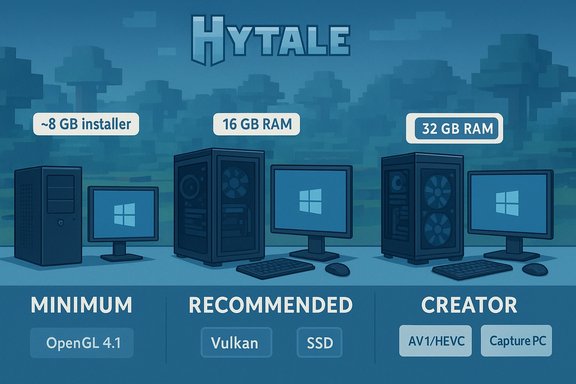
Hytale’s hardware guidance is deliberately pragmatic and tiered. Instead of a single intimidating “recommended” column, Hypixel supplies three distinct targets so players can choose the appropriate trade-offs.- The Minimum tier is built to preserve accessibility: it explicitly mentions integrated GPU families and older dedicated cards, keeping the entry bar low for laptops and budget systems. This makes Hytale approachable for a broad audience.
- The Recommended tier aims squarely at mainstream 1080p/60 players using midrange CPUs and 16 GB of RAM — a sensible baseline in 2026. The requirement for an SSD with roughly 20 GB free keeps day‑to‑day performance smooth without asking for an excessive storage investment.
- The Creator/Streamer tier recognizes that recording and capturing gameplay magnifies IO, CPU and memory bottlenecks. The studio’s guidance — 32 GB RAM, NVMe drives, and modern multi-core CPUs — is practical for anyone who wants stable 60+ FPS captures at 1440p while recording in high-efficiency codecs like AV1/HEVC.
- Singleplayer carries extra CPU and RAM weight because the client also runs simulation logic akin to a server; this raises the importance of CPU core count and memory headroom relative to many single-client-only games.
- Saved-world data scales with exploration and build density — the example numbers (661 MB for a 5000×5000 area) show that disk usage can grow quickly if you’re a world-builder or run public servers. Plan extra storage accordingly.
Hytale file size and storage planning: detailed advice
The installer is small by modern standards, but the long-term storage story is where players often get surprised.- Installer: ~8 GB at launch is light and quick to download for most broadband connections.
- Recommended free space: 20 GB for comfortable play; 10 GB minimum may suffice for constrained systems but expect degraded performance or lack of headroom.
- Saves: Because Hytale’s worlds are chunked, saved data grows with exploration. Example figures provided by the studio show ~27 KB per 32×32 chunk and ~661 MB for a very large 5000×5000 block area; these are useful for approximating how quickly you’ll allocate disk to your worlds.
- Use an SSD as the primary installation target. A SATA SSD meets the minimum, but an NVMe SSD reduces streaming latency and hitching, especially when loading new terrain or assets.
- Reserve additional headroom. During installation and frequent updates, temporary working space is needed — reserve 20–50% of the game drive free when preloading or patching to avoid failures.
- Creators: keep recorded video on a separate drive. High-bitrate AV1 or HEVC footage can easily consume tens to hundreds of gigabytes per session; Hypixel recommends using a separate NVMe drive for captures to avoid I/O contention.
- Back up saves if you run large worlds or servers. Early Access changes can occasionally invalidate save formats; a simple external copy strategy insulates you from accidental data loss.
Performance analysis: where upgrades matter most
If you’re matching Hytale’s targets to real hardware, prioritize upgrades in this order:- SSD (NVMe preferred) — reduces texture and world streaming stutters and lowers load times. This is the single best upgrade for improving perceived smoothness in many cases.
- RAM — move to 16 GB for comfortable recommended-tier play, 32 GB if you record/stream or maintain large worlds. RAM reduces paging and stabilizes frame times under load.
- CPU — Hytale benefits from multiple cores because of in-process simulation; a modern 6‑core CPU is the baseline for recommended settings. For creators, higher core counts and faster single-thread bursts reduce encoding and simulation contention.
- GPU and VRAM — for 1080p recommended play a midrange dedicated GPU (8+ GB VRAM class) is sensible. For native 1440p or heavy texture settings, step up to modern RTX 30-series or AMD RX 7000-series equivalents.
- Players on HDD or very old SATA drives: install Hytale on an SSD. Immediate improvement in stutter and load times.
- Players with 8 GB RAM: upgrade to 16 GB to reach recommended tier if you run background apps (Discord, browser, music).
- Creators and streamers: 32 GB RAM, NVMe drive for recordings, and a modern multi-core CPU will prevent dropped frames and maintain smooth captures.
Streaming and capture considerations
Hypixel Studios tested a creator rig with the view distance set to 768 blocks and recorded in AV1 to ensure stable frame times at 1440p 60 FPS. The team’s guidance has important implications for streamers:- Use hardware encoders where possible (NVENC or AMD VCN) or modern codecs (AV1/HEVC) to reduce CPU load while keeping high visual quality. AV1 is preferred if your hardware supports it.
- Keep capture on a separate NVMe drive to avoid I/O contention. Hypixel explicitly recommends this for big captures to maintain consistent framerates.
- Expect high RAM needs for extended captures: 32 GB is the studio’s recommendation for stable 1440p recording/streaming sessions.
- Test upload bandwidth: while Hypixel’s recommended multiplayer bandwidth is modest, livestreaming at high bitrates alongside playing and recording requires more upstream capacity; plan accordingly.
Strengths and notable positives
- Accessible minimum: Hypixel’s Minimum tier explicitly supports integrated graphics and older dedicated cards, which keeps the door open for laptop and budget users. This is a conscious inclusion decision that helps broaden the player base.
- Small base installer: An ~8 GB installer reduces initial download friction for players on limited bandwidth or storage, speeding preloads and installs.
- Clear creator guidance: The separated Recorder/Streamer tier is practical and honest: capturing gameplay is a different workload and Hypixel’s 32 GB + NVMe recommendation helps creators plan purchases intentionally.
- Developer transparency on how resources are used: The studio explains that singleplayer runs server simulation, and that view distance scales CPU, RAM and VRAM usage nonlinearly — useful guidance that helps players prioritize upgrades correctly.
Risks, caveats, and items to watch
- Developer-specs can change. The published requirements are a snapshot based on in-house testing; day‑one patches, added features, or engine updates may alter the final performance profile. Treat the numbers as guidance, not guarantees.
- Saved-world growth: small installer + large saved-world footprint is a risk. If you build large worlds or run servers, disk usage will grow; plan extra storage. The chunked saved-data figures show this clearly.
- Driver and API volatility: the studio notes a future requirement for Vulkan 1.3 and may require DirectX 12 support in later versions. This can create compatibility issues for older laptops or OEM driver stacks that lack modern API support. Verify drivers before upgrading.
- Recording and encoding support maturity: AV1 and HEVC are recommended for quality recording, but hardware support and driver maturity vary across GPUs and vendor drivers. Early adopters may need to update drivers or use software encoders at the cost of CPU load.
- Network variance: while the multiplayer bandwidth guidance (2 Mbit/s min, 8 Mbit/s recommended) is modest, high view distances and populated servers will increase network demands and synchronization load. Players on metered or high-latency connections should lower view distances.
- Unverifiable peak benchmark claims: studio-provided internal benchmarks showing extreme framerates on experimental, very high-end rigs are illustrative and not representative of typical player hardware. Treat those figures cautiously and rely on independent reviews post-launch for practical metrics.
Practical, step-by-step pre-launch checklist (for Windows players)
- Confirm Windows version: ensure you have 64‑bit Windows 10 (1809+) or Windows 11 updated and driver-ready.
- Free up space: reserve at least 20–50 GB free on your intended game drive; for creators plan for hundreds of GB for recorded footage.
- Move the game to an SSD: if you’re on an HDD, plan an SSD (NVMe preferred) to avoid streaming hitching.
- Upgrade RAM if needed: 16 GB for recommended play; 32 GB if you record/stream or run large worlds.
- Test your CPU/GPU against similar modern games: if similar titles run poorly on your machine, expect to lower view distances and texture pools.
- For streamers: set aside a dedicated NVMe capture drive and confirm AV1/HEVC encoder support on your hardware (or plan for NVENC/VCN).
Conclusion
Hytale’s system requirements and file size guidance strike a sensible balance between accessibility and creator-focused performance. The small installer size and inclusion of older GPU classes at minimum make the game reachable for many players, while the explicit 16 GB recommended and 32 GB creator target reflect the simulation-driven memory demands and the realities of high-quality capture.Players should plan storage headroom and prioritize an SSD upgrade before considering CPU or GPU upgrades. Creators and streamers should heed the NVMe and 32 GB recommendations and prepare for AV1/HEVC workflows where supported. Finally, treat the published numbers as valid guidance but expect some movement as Hypixel continues development through Early Access; driver maturity, post-launch patches, and community content will shape the long-term performance story.
Source: Eurogamer Hytale system requirements and file size
