

A Reddit user known as MatiHalek has shown Windows releases spanning from Windows NT 4.0 through Windows 10 22H2 running directly on a 2005 IBM ThinkPad T43, using bare-metal installs rather than virtual machines and documenting the results through screenshots posted to r/Windows. The stunt is easy to enjoy as retro-computing theater, but it is more interesting as an accidental audit of Windows’ long hardware memory. A laptop built for the late Windows XP era became a bridge between the workstation NT world, the Vista driver-model rupture, and the long twilight of Windows 10. In that sense, the ThinkPad did not just run old software; it exposed how much of the PC platform’s continuity was engineered, inherited, and eventually abandoned.
The IBM ThinkPad T43 is the kind of machine that makes retro PC people unusually sentimental. It sits at a hinge point: old enough to carry legacy ports, classic ThinkPad design language, and generous support for pre-modern Windows, but new enough to have PCI Express graphics, DDR2 memory, Wi-Fi, and a driver story that reaches into the Vista generation.
That combination matters more than nostalgia. A much older Pentium II laptop might be a more atmospheric Windows 98 machine, and a Core 2 Duo notebook would be a more practical Windows 10 experiment. The T43 is compelling because it lands in the narrow middle, where Microsoft’s OS history is still technically contiguous.
MatiHalek’s reported path makes that clear. The machine already had Windows XP installed, then gained Vista as a dual-boot option. From there, the user followed the official-feeling ladder from Vista to Windows 7, Windows 8, Windows 8.1, and Windows 10 RTM before pushing onward to Windows 10 22H2 through a more convoluted clean-install process.
That is not the same thing as proving one disk image can glide smoothly across 26 years of Windows. It proves something more useful: with enough patience, compatible firmware assumptions, and a lucky driver stack, one physical PC can still touch nearly the entire modern Windows lineage.
Running these systems on bare metal forces the old contract between Windows and the PC to reappear. The operating system has to see a real chipset, a real graphics adapter, real storage, real BIOS behavior, and real limitations. Every successful boot is a negotiation with hardware assumptions that were never meant to remain valid forever.
That is why the ThinkPad T43 is such a good protagonist. It is not impossibly ancient, but it is also not secretly modern. A single-core Pentium M, a 32-bit instruction set, limited memory, and era-specific graphics drivers put hard edges around the experiment.
The absence of a virtual machine changes the emotional register, too. This is not merely “Windows NT still launches.” It is “Windows NT still knows what to do when handed a keyboard, display adapter, disk controller, and BIOS from a machine built almost a decade later.” Likewise, Windows 10 22H2 is not simply running in a window on contemporary silicon; it is being asked to tolerate the physical remains of the IBM PC compatible ecosystem.
Windows 10 22H2 was harder. According to the report, it required a clean install through a Windows 10 1709 PE environment and additional workarounds. That detail is important because it marks the point where historical compatibility stops feeling like a corporate promise and starts feeling like hobbyist recovery work.
The final preferred configuration reportedly went in the other direction: the drive was wiped and set up as a multi-boot installation of Windows 98 SE, Windows NT 4.0, and Windows 2000. That choice is revealing. After proving the T43 could climb toward the end of Windows 10, the owner apparently returned it to the era where the hardware’s odd breadth is most useful.
This is often how retro computing works in practice. The most impressive technical achievement is not always the most pleasant daily configuration. Windows 10 on a Pentium M ThinkPad is a trophy; Windows 2000 or XP on the same box is a working time capsule.
That is the kind of boring technical continuity that makes absurd projects possible. A graphics driver that survives the Vista transition can become a passport into Windows 7 and beyond. A storage controller that does not require exotic installation media can spare hours of failure. A network adapter with period-correct drivers determines whether a machine feels alive or marooned.
The T43 also benefited from its place in the corporate laptop market. ThinkPads were not bargain-bin mystery machines; they were business systems with disciplined driver packages, field-service documentation, docking hardware, and long support expectations. That corporate dullness is precisely what makes them wonderful retro platforms two decades later.
There is a lesson here for modern hardware, though it is not necessarily flattering. Today’s tightly integrated laptops, soldered components, firmware locks, and cloud-mediated setup flows may produce better security and battery life. They are also less likely to become weirdly flexible museum pieces in 2046.
The T43’s journey from Vista to Windows 7, 8, 8.1, and 10 is a miniature version of Microsoft’s broader strategy. Vista broke the glass; Windows 7 cleaned up the shards; Windows 10 inherited the structure. Users remember the performance complaints and permission prompts, but the platform story is bigger than the launch backlash.
That is why the Vista driver matters so much in this experiment. It is not just a compatibility footnote. It is the hinge between classic Windows and the composited, driver-isolated, security-hardened client OS that followed.
For years, Microsoft tried to maintain the idea that Windows could modernize without fully abandoning the past. Vista proved how ugly that bargain could become. The T43 proves how durable it could also be.
That does not mean Windows 10 is a good operating system for this machine. A single-core Pentium M and 2GB memory ceiling were never the intended experience for the late Windows 10 era. Even if the system boots, the modern web, background services, update mechanisms, and security tooling are punishing in ways that a screenshot cannot show.
But as a compatibility milestone, it is hard to dismiss. Windows 10 22H2 represents a Microsoft client OS still willing to accommodate a huge amount of old PC DNA. It is the last mainstream Windows release where a machine like this can be discussed as impractical rather than impossible.
Windows 11 changes the character of the conversation. Its official requirements, TPM expectations, CPU support lists, memory baseline, and 64-bit-only direction sever the line that makes the T43 experiment charming. Windows 11 is not merely too heavy for the T43; it belongs to a different definition of what a supported PC is.
That matters because Windows 11 is often discussed as though its hardware rules are only an annoyance for users with still-capable machines. Sometimes they are. But on a laptop like the T43, the cutoff looks less arbitrary and more like a recognition that the old compatibility contract cannot last forever.
Security is part of that. Modern Windows assumes hardware-backed protections, newer driver models, and a baseline of CPU capabilities that cannot be retrofitted into a 2005 notebook. Performance is part of it, too. A machine can technically execute instructions and still fail the lived experience of a modern desktop.
Still, the emotional response is understandable. The Windows ecosystem trained users for decades to believe that old PCs might always have one more life left in them. Windows 11 is Microsoft saying, more forcefully than before, that this instinct has limits.
That latitude is why a 2005 laptop can plausibly host Windows NT 4.0 from 1996 and Windows 10 22H2 from 2022. It is not magic. It is the accumulated residue of decisions made for corporate customers, hardware vendors, peripheral makers, and software developers who demanded that yesterday’s investments still matter tomorrow.
Microsoft has spent much of its history trying to escape the cost of that bargain without losing the market power it created. Every big Windows transition carries this tension: keep the past alive, but not so alive that it prevents the future from working. Sometimes that balance looks elegant. Sometimes it looks like Vista.
The T43 experiment is therefore less a miracle than a stress test. It reminds us that Windows’ most impressive feature was never the Start menu or the taskbar. It was the sheer stubbornness with which it continued to recognize old machines as PCs.
Windows NT 4.0 on a T43 tells one story: the workstation-class NT line before the consumer and business branches converged. Windows 98 SE tells another: the last great DOS-based consumer Windows before the NT kernel took over the desktop. Windows 2000 and XP show the consolidation point, while Vista and 7 show the painful modernization of the display and security stack.
Windows 8 and 8.1 add the platform identity crisis. Windows 10 adds the service model and the long goodbye to the old client release cadence. Put them all on the same laptop, and the history stops being a timeline and becomes a set of trade-offs you can boot into.
That is why the no-VM detail matters so much to enthusiasts. A virtual machine can preserve software behavior. Bare metal preserves friction, and friction is where the history lives.
Those ports are not just collector trivia. They are compatibility surfaces. A parallel port can matter to old peripherals. VGA can matter to old displays and projectors. PC Card can matter when a missing capability needs to be added in a way old Windows understands.
Modern laptops are vastly better for modern work, but they are narrower by design. USB-C docks, sealed firmware ecosystems, soldered wireless modules, and driver packages distributed through vendor portals make sense now. They also reduce the number of historical paths a future enthusiast can take.
The T43 belongs to the last period when a mainstream business laptop could still feel like a general-purpose hardware conversation. That is why it can mediate between so many versions of Windows. It was built before the industry finished deciding which old doors to close.
This is not a criticism of the project. Retro computing has always had tiers of success: POST, install, boot, driver completion, application usability, and daily-driver sanity. Getting Windows 10 22H2 onto a single-core ThinkPad from 2005 clears a surprisingly high bar, even if no one should confuse it with a recommended setup.
The same caution applies to the older installs. Windows NT 4.0, Windows 98 SE, and Windows 2000 may run beautifully in some respects and awkwardly in others. Driver availability can be uneven, storage partitioning can get fussy, and multi-boot arrangements across DOS-based and NT-based systems can become an art form.
The best way to read the project is not as a consumer buying guide, but as a compatibility exhibit. Its value is in showing what is possible when a historically flexible machine meets a historically flexible operating-system family.
Microsoft’s customer base has always included organizations that cannot simply throw away old line-of-business applications or specialized hardware. That pressure shaped Windows into an operating system that prizes continuity, sometimes to a fault. The upside is that old software and old habits survive. The downside is that modernization becomes expensive, politically difficult, and technically compromised.
The T43 story is a charming version of that bargain. In enterprise reality, the same bargain can keep unsupported systems alive long after they should have been retired. Compatibility is wonderful when it lets a hobbyist explore history. It is dangerous when it becomes the reason a production environment avoids necessary change.
That distinction matters for WindowsForum readers because many of them live in both worlds. The same person who admires Windows 2000 on period hardware may spend Monday morning trying to eliminate an unsupported Windows 10 fleet from a small business network. Nostalgia and risk often share the same boot menu.
Windows 10 22H2 complicates the picture because it still feels familiar to many users, but its mainstream support status has changed. For ordinary machines not covered by extended security updates or special servicing arrangements, the operating system has crossed from current platform to managed legacy. That should change how people think about exposure.
A ThinkPad T43 running Windows 10 for fun is one thing. A business depending on Windows 10-era hardware because “it still works” is another. The difference is not whether the machine boots; it is whether the environment can absorb unpatched vulnerabilities, unsupported drivers, and increasingly incompatible software.
The project’s most practical lesson may be that bootability is a poor proxy for viability. Windows has always been good at starting on surprising hardware. Security, maintainability, and trust are harder tests.
There is a reason ThinkPads remain disproportionately visible in retro and Linux communities. Their keyboards, chassis, repair manuals, docking ecosystems, and parts availability make them unusually durable platforms for experimentation. Even when they are not the fastest machines of their era, they are knowable machines.
The T43 is especially evocative because it arrived near the end of IBM’s direct ThinkPad identity. Lenovo would continue and evolve the brand, but the IBM-badged T43 still carries the aura of the old enterprise laptop ideal: matte black, practical, slightly severe, and built for a world where a laptop was a tool rather than a lifestyle accessory.
That identity helps explain why the story travels. “Old laptop runs old and new Windows” is mildly interesting. “IBM-era ThinkPad becomes a 26-year Windows archive” has cultural weight because the hardware already means something to the audience.
NT 4.0 brought the serious workstation lineage. Windows 2000 refined it for business desktops. XP made the NT kernel the default consumer experience. Vista attempted to modernize the platform and paid the political price. Windows 7 made that modernization palatable.
Windows 8 tried to drag the desktop into a touch-first future that desktop users did not ask for. Windows 8.1 retreated partway. Windows 10 stabilized the brand by promising familiarity, then stretched into a long service-era platform whose final version became the refuge for PCs that Windows 11 would not officially welcome.
On the T43, that history becomes less like a release chart and more like tree rings. Each OS carries assumptions about memory, graphics, networking, storage, security, and user behavior. The hardware stays fixed; the definition of “enough PC” changes around it.
That is not an argument against the experiment. It is an argument for understanding the boundary between exploration and operations. The same techniques that make a retro install possible can make a production environment fragile if they are used to avoid lifecycle planning.
For sysadmins, the T43 is a reminder that “possible” and “supportable” are separate categories. A machine can run an OS without being a responsible endpoint. A driver can load without being a good idea. An upgrade path can complete without creating a maintainable future.
For enthusiasts, that separation is liberating. Once a machine is outside production duty, it can become a laboratory. The T43 is no longer obligated to be efficient, secure, or modern. It can instead be interesting.
That is fine. The achievement is not diminished because it is not a museum-grade completeness claim. The point is that a single physical laptop has apparently hosted the core desktop lineage from the NT 4.0 era through the last Windows 10 feature release, plus older consumer Windows in a final multi-boot setup.
The distinction matters because retro projects often become vulnerable to pedantry. Someone will ask about Windows ME, obscure editions, Tablet PC variants, Media Center editions, or server releases. Those are valid curiosities, but they do not change the larger meaning.
The story is not that every SKU in Microsoft history has found eternal life on one ThinkPad. The story is that the mainstream Windows desktop arc remained physically bridgeable for far longer than anyone designing the T43 in 2005 likely had in mind.
That does not make Microsoft uniquely villainous. Operating systems cannot support everything forever, and old compatibility surfaces can become security liabilities. The industry’s move toward stronger baselines has real benefits.
But the T43 reminds us what is lost when the ladder gets pulled up. The PC was once defined by its tolerance for odd combinations, inherited standards, and long afterlives. A user could learn by installing the wrong thing and making it work anyway.
Modern computing is cleaner, safer, and more managed. It is also less forgiving of curiosity that crosses product boundaries. The T43’s improbable Windows tour is charming because it comes from an era when the machine still let the user argue.
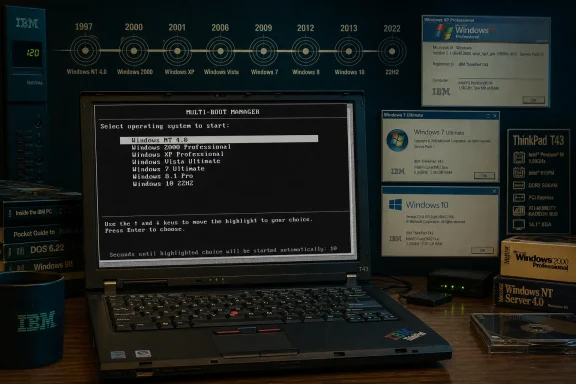 The ThinkPad T43 Turns Into a Windows Time Machine
The IBM ThinkPad T43 is the kind of machine that makes retro PC people unusually sentimental. It sits at a hinge point: old enough to carry legacy ports, classic ThinkPad design language, and generous support for pre-modern Windows, but new enough to have PCI Express graphics, DDR2 memory, Wi-Fi, and a driver story that reaches into the Vista generation.That combination matters more than nostalgia. A much older Pentium II laptop might be a more atmospheric Windows 98 machine, and a Core 2 Duo notebook would be a more practical Windows 10 experiment. The T43 is compelling because it lands in the narrow middle, where Microsoft’s OS history is still technically contiguous.
MatiHalek’s reported path makes that clear. The machine already had Windows XP installed, then gained Vista as a dual-boot option. From there, the user followed the official-feeling ladder from Vista to Windows 7, Windows 8, Windows 8.1, and Windows 10 RTM before pushing onward to Windows 10 22H2 through a more convoluted clean-install process.
That is not the same thing as proving one disk image can glide smoothly across 26 years of Windows. It proves something more useful: with enough patience, compatible firmware assumptions, and a lucky driver stack, one physical PC can still touch nearly the entire modern Windows lineage.
Bare Metal Is the Point, Not a Technicality
Virtual machines have made operating-system archaeology almost too convenient. They flatten hardware into a friendly abstraction, turn driver problems into configuration menus, and let Windows NT 4.0 and Windows 10 share the same host without either knowing what century it is. That is useful, but it is not the same achievement.Running these systems on bare metal forces the old contract between Windows and the PC to reappear. The operating system has to see a real chipset, a real graphics adapter, real storage, real BIOS behavior, and real limitations. Every successful boot is a negotiation with hardware assumptions that were never meant to remain valid forever.
That is why the ThinkPad T43 is such a good protagonist. It is not impossibly ancient, but it is also not secretly modern. A single-core Pentium M, a 32-bit instruction set, limited memory, and era-specific graphics drivers put hard edges around the experiment.
The absence of a virtual machine changes the emotional register, too. This is not merely “Windows NT still launches.” It is “Windows NT still knows what to do when handed a keyboard, display adapter, disk controller, and BIOS from a machine built almost a decade later.” Likewise, Windows 10 22H2 is not simply running in a window on contemporary silicon; it is being asked to tolerate the physical remains of the IBM PC compatible ecosystem.
The Upgrade Path Tells a Better Story Than the Screenshot Gallery
The screenshots are the fun part, but the installation path is the story. MatiHalek reportedly began with XP already present, added Vista, then upgraded from Vista through the major consumer Windows line into Windows 10 RTM. That route follows Microsoft’s own generational seams: XP to Vista was the great driver-model and security-model disruption, while Vista to 7 was the rehabilitation phase, and 8 to 8.1 to 10 was the platform’s lurch toward the service era.Windows 10 22H2 was harder. According to the report, it required a clean install through a Windows 10 1709 PE environment and additional workarounds. That detail is important because it marks the point where historical compatibility stops feeling like a corporate promise and starts feeling like hobbyist recovery work.
The final preferred configuration reportedly went in the other direction: the drive was wiped and set up as a multi-boot installation of Windows 98 SE, Windows NT 4.0, and Windows 2000. That choice is revealing. After proving the T43 could climb toward the end of Windows 10, the owner apparently returned it to the era where the hardware’s odd breadth is most useful.
This is often how retro computing works in practice. The most impressive technical achievement is not always the most pleasant daily configuration. Windows 10 on a Pentium M ThinkPad is a trophy; Windows 2000 or XP on the same box is a working time capsule.
The Driver Stack Was the Real Hero
Windows compatibility stories are usually told as operating-system stories, but this one is mostly a driver story. The T43’s ATI Mobility Radeon X300 or X300SE graphics support appears to have been crucial, especially because the GPU reportedly had drivers across NT 4.0, Windows 2000, XP, and Vista. The Vista-era WDDM driver then remained useful across later upgrades.That is the kind of boring technical continuity that makes absurd projects possible. A graphics driver that survives the Vista transition can become a passport into Windows 7 and beyond. A storage controller that does not require exotic installation media can spare hours of failure. A network adapter with period-correct drivers determines whether a machine feels alive or marooned.
The T43 also benefited from its place in the corporate laptop market. ThinkPads were not bargain-bin mystery machines; they were business systems with disciplined driver packages, field-service documentation, docking hardware, and long support expectations. That corporate dullness is precisely what makes them wonderful retro platforms two decades later.
There is a lesson here for modern hardware, though it is not necessarily flattering. Today’s tightly integrated laptops, soldered components, firmware locks, and cloud-mediated setup flows may produce better security and battery life. They are also less likely to become weirdly flexible museum pieces in 2046.
Vista’s Unloved Architecture Quietly Carries the Future
Vista remains one of the most unpopular Windows releases in the public imagination, but projects like this show why its reputation is incomplete. Vista was painful partly because it forced a new driver model, a stricter security posture, and higher hardware expectations onto a PC ecosystem that was not uniformly ready. But once that painful transition happened, it became the foundation for a decade and a half of Windows client evolution.The T43’s journey from Vista to Windows 7, 8, 8.1, and 10 is a miniature version of Microsoft’s broader strategy. Vista broke the glass; Windows 7 cleaned up the shards; Windows 10 inherited the structure. Users remember the performance complaints and permission prompts, but the platform story is bigger than the launch backlash.
That is why the Vista driver matters so much in this experiment. It is not just a compatibility footnote. It is the hinge between classic Windows and the composited, driver-isolated, security-hardened client OS that followed.
For years, Microsoft tried to maintain the idea that Windows could modernize without fully abandoning the past. Vista proved how ugly that bargain could become. The T43 proves how durable it could also be.
Windows 10 22H2 Becomes the End of the Old Road
Windows 10 22H2 is a symbolic endpoint for this experiment because it is both late enough to feel modern and old enough to remain reachable by legacy 32-bit hardware. Microsoft made 22H2 the last Windows 10 version, and mainstream support for Windows 10 has now ended for ordinary users unless they are covered by extended security arrangements. In other words, the T43 reached the last stop on the Windows branch that still had a plausible path back to the early 2000s PC.That does not mean Windows 10 is a good operating system for this machine. A single-core Pentium M and 2GB memory ceiling were never the intended experience for the late Windows 10 era. Even if the system boots, the modern web, background services, update mechanisms, and security tooling are punishing in ways that a screenshot cannot show.
But as a compatibility milestone, it is hard to dismiss. Windows 10 22H2 represents a Microsoft client OS still willing to accommodate a huge amount of old PC DNA. It is the last mainstream Windows release where a machine like this can be discussed as impractical rather than impossible.
Windows 11 changes the character of the conversation. Its official requirements, TPM expectations, CPU support lists, memory baseline, and 64-bit-only direction sever the line that makes the T43 experiment charming. Windows 11 is not merely too heavy for the T43; it belongs to a different definition of what a supported PC is.
The Missing Windows 11 Install Is the Most Honest Part
It would be tempting to frame the lack of Windows 11 as a failure, but it is actually the cleanest boundary in the story. The ThinkPad T43’s 32-bit Pentium M processor and limited memory put it outside the modern Windows 11 world in a way that workarounds cannot meaningfully solve. Even where unofficial installation tricks exist for newer unsupported PCs, this hardware is beyond the practical edge.That matters because Windows 11 is often discussed as though its hardware rules are only an annoyance for users with still-capable machines. Sometimes they are. But on a laptop like the T43, the cutoff looks less arbitrary and more like a recognition that the old compatibility contract cannot last forever.
Security is part of that. Modern Windows assumes hardware-backed protections, newer driver models, and a baseline of CPU capabilities that cannot be retrofitted into a 2005 notebook. Performance is part of it, too. A machine can technically execute instructions and still fail the lived experience of a modern desktop.
Still, the emotional response is understandable. The Windows ecosystem trained users for decades to believe that old PCs might always have one more life left in them. Windows 11 is Microsoft saying, more forcefully than before, that this instinct has limits.
The PC’s Long Memory Was Never an Accident
The reason this experiment resonates is that the PC platform was built on continuity. BIOS conventions, x86 compatibility, expansion standards, Windows driver layers, and enterprise procurement cycles all rewarded software and hardware that did not break too abruptly. The result was messy, but it gave users extraordinary latitude.That latitude is why a 2005 laptop can plausibly host Windows NT 4.0 from 1996 and Windows 10 22H2 from 2022. It is not magic. It is the accumulated residue of decisions made for corporate customers, hardware vendors, peripheral makers, and software developers who demanded that yesterday’s investments still matter tomorrow.
Microsoft has spent much of its history trying to escape the cost of that bargain without losing the market power it created. Every big Windows transition carries this tension: keep the past alive, but not so alive that it prevents the future from working. Sometimes that balance looks elegant. Sometimes it looks like Vista.
The T43 experiment is therefore less a miracle than a stress test. It reminds us that Windows’ most impressive feature was never the Start menu or the taskbar. It was the sheer stubbornness with which it continued to recognize old machines as PCs.
Retro Computing Is Becoming a Form of Systems Journalism
There is a reason these projects attract attention beyond the usual collector circles. They let people see technology history in a way that spec sheets and anniversary blog posts cannot. A multi-boot ThinkPad makes abstract platform transitions physical.Windows NT 4.0 on a T43 tells one story: the workstation-class NT line before the consumer and business branches converged. Windows 98 SE tells another: the last great DOS-based consumer Windows before the NT kernel took over the desktop. Windows 2000 and XP show the consolidation point, while Vista and 7 show the painful modernization of the display and security stack.
Windows 8 and 8.1 add the platform identity crisis. Windows 10 adds the service model and the long goodbye to the old client release cadence. Put them all on the same laptop, and the history stops being a timeline and becomes a set of trade-offs you can boot into.
That is why the no-VM detail matters so much to enthusiasts. A virtual machine can preserve software behavior. Bare metal preserves friction, and friction is where the history lives.
The T43 Was Built for an Era When Ports Still Meant Possibility
Part of the ThinkPad T43’s usefulness comes from its physical generosity. Depending on configuration, the machine could include Ethernet, modem, VGA, S-Video, USB 2.0, PC Card expansion, docking support, Bluetooth, Wi-Fi, and the kinds of display options that made sense before widescreen panels took over business laptops. It was a transitional object with one foot in the 1990s and another in the mid-2000s.Those ports are not just collector trivia. They are compatibility surfaces. A parallel port can matter to old peripherals. VGA can matter to old displays and projectors. PC Card can matter when a missing capability needs to be added in a way old Windows understands.
Modern laptops are vastly better for modern work, but they are narrower by design. USB-C docks, sealed firmware ecosystems, soldered wireless modules, and driver packages distributed through vendor portals make sense now. They also reduce the number of historical paths a future enthusiast can take.
The T43 belongs to the last period when a mainstream business laptop could still feel like a general-purpose hardware conversation. That is why it can mediate between so many versions of Windows. It was built before the industry finished deciding which old doors to close.
A Screenshot Can Prove a Boot, Not a Daily Driver
It is worth keeping the achievement in perspective. A screenshot of System Properties or About Windows proves that an OS installed and ran long enough to identify itself. It does not prove stable sleep and resume, full acceleration, working audio, safe networking, smooth browsing, or reliable updates.This is not a criticism of the project. Retro computing has always had tiers of success: POST, install, boot, driver completion, application usability, and daily-driver sanity. Getting Windows 10 22H2 onto a single-core ThinkPad from 2005 clears a surprisingly high bar, even if no one should confuse it with a recommended setup.
The same caution applies to the older installs. Windows NT 4.0, Windows 98 SE, and Windows 2000 may run beautifully in some respects and awkwardly in others. Driver availability can be uneven, storage partitioning can get fussy, and multi-boot arrangements across DOS-based and NT-based systems can become an art form.
The best way to read the project is not as a consumer buying guide, but as a compatibility exhibit. Its value is in showing what is possible when a historically flexible machine meets a historically flexible operating-system family.
Microsoft’s Compatibility Reputation Was Earned the Hard Way
Windows is often criticized for carrying too much baggage, and often fairly. Old APIs, legacy subsystems, compatibility shims, ancient control panels, and enterprise-driven caution can make the platform feel less coherent than cleaner rivals. But the same baggage is why stunts like this work at all.Microsoft’s customer base has always included organizations that cannot simply throw away old line-of-business applications or specialized hardware. That pressure shaped Windows into an operating system that prizes continuity, sometimes to a fault. The upside is that old software and old habits survive. The downside is that modernization becomes expensive, politically difficult, and technically compromised.
The T43 story is a charming version of that bargain. In enterprise reality, the same bargain can keep unsupported systems alive long after they should have been retired. Compatibility is wonderful when it lets a hobbyist explore history. It is dangerous when it becomes the reason a production environment avoids necessary change.
That distinction matters for WindowsForum readers because many of them live in both worlds. The same person who admires Windows 2000 on period hardware may spend Monday morning trying to eliminate an unsupported Windows 10 fleet from a small business network. Nostalgia and risk often share the same boot menu.
The Security Lesson Is Less Romantic Than the Hardware
The retro community often understands this better than outsiders assume, but it bears repeating: installing old Windows on real hardware is not the same as safely putting it on today’s internet. Windows 98 SE, NT 4.0, Windows 2000, and even unpatched XP are historical systems. They are not defensible modern endpoints.Windows 10 22H2 complicates the picture because it still feels familiar to many users, but its mainstream support status has changed. For ordinary machines not covered by extended security updates or special servicing arrangements, the operating system has crossed from current platform to managed legacy. That should change how people think about exposure.
A ThinkPad T43 running Windows 10 for fun is one thing. A business depending on Windows 10-era hardware because “it still works” is another. The difference is not whether the machine boots; it is whether the environment can absorb unpatched vulnerabilities, unsupported drivers, and increasingly incompatible software.
The project’s most practical lesson may be that bootability is a poor proxy for viability. Windows has always been good at starting on surprising hardware. Security, maintainability, and trust are harder tests.
The Experiment Flatters IBM as Much as Microsoft
Microsoft’s compatibility deserves credit, but so does IBM’s hardware discipline. The T43 came from a ThinkPad lineage built for corporate buyers who valued serviceability, documentation, predictable configurations, and long-lived accessories. Those traits age well.There is a reason ThinkPads remain disproportionately visible in retro and Linux communities. Their keyboards, chassis, repair manuals, docking ecosystems, and parts availability make them unusually durable platforms for experimentation. Even when they are not the fastest machines of their era, they are knowable machines.
The T43 is especially evocative because it arrived near the end of IBM’s direct ThinkPad identity. Lenovo would continue and evolve the brand, but the IBM-badged T43 still carries the aura of the old enterprise laptop ideal: matte black, practical, slightly severe, and built for a world where a laptop was a tool rather than a lifestyle accessory.
That identity helps explain why the story travels. “Old laptop runs old and new Windows” is mildly interesting. “IBM-era ThinkPad becomes a 26-year Windows archive” has cultural weight because the hardware already means something to the audience.
The Windows Timeline Looks Different When One Machine Hosts It
Seeing Windows versions as a sequence of releases makes them feel discrete. Seeing them on one machine emphasizes inheritance. NT 4.0, Windows 2000, XP, Vista, 7, 8, 8.1, and 10 are not isolated monuments; they are revisions in a long argument over what a PC should be.NT 4.0 brought the serious workstation lineage. Windows 2000 refined it for business desktops. XP made the NT kernel the default consumer experience. Vista attempted to modernize the platform and paid the political price. Windows 7 made that modernization palatable.
Windows 8 tried to drag the desktop into a touch-first future that desktop users did not ask for. Windows 8.1 retreated partway. Windows 10 stabilized the brand by promising familiarity, then stretched into a long service-era platform whose final version became the refuge for PCs that Windows 11 would not officially welcome.
On the T43, that history becomes less like a release chart and more like tree rings. Each OS carries assumptions about memory, graphics, networking, storage, security, and user behavior. The hardware stays fixed; the definition of “enough PC” changes around it.
This Is the Kind of Hack That Makes Support Engineers Winch
There is a joyful absurdity to the project, but also a faint echo of every unsupported configuration that has ever haunted an IT department. Workarounds, legacy drivers, clean installs from intermediate environments, and multi-boot setups are delightful in a hobby context. They are nightmares when they become undocumented dependencies.That is not an argument against the experiment. It is an argument for understanding the boundary between exploration and operations. The same techniques that make a retro install possible can make a production environment fragile if they are used to avoid lifecycle planning.
For sysadmins, the T43 is a reminder that “possible” and “supportable” are separate categories. A machine can run an OS without being a responsible endpoint. A driver can load without being a good idea. An upgrade path can complete without creating a maintainable future.
For enthusiasts, that separation is liberating. Once a machine is outside production duty, it can become a laboratory. The T43 is no longer obligated to be efficient, secure, or modern. It can instead be interesting.
The Small Print Behind the Big Nostalgia
The reported Windows spread also shows why “all versions” is a phrase that needs care. Windows history is messy. There are consumer and business branches, service packs, feature updates, editions, architectures, embedded variants, server cousins, and release channels. A gallery can capture the spirit of breadth without exhausting the taxonomy.That is fine. The achievement is not diminished because it is not a museum-grade completeness claim. The point is that a single physical laptop has apparently hosted the core desktop lineage from the NT 4.0 era through the last Windows 10 feature release, plus older consumer Windows in a final multi-boot setup.
The distinction matters because retro projects often become vulnerable to pedantry. Someone will ask about Windows ME, obscure editions, Tablet PC variants, Media Center editions, or server releases. Those are valid curiosities, but they do not change the larger meaning.
The story is not that every SKU in Microsoft history has found eternal life on one ThinkPad. The story is that the mainstream Windows desktop arc remained physically bridgeable for far longer than anyone designing the T43 in 2005 likely had in mind.
The ThinkPad’s Boot Menu Has a Message for 2026
This episode arrives at a moment when many Windows users are thinking about endings. Windows 10 has moved out of ordinary mainstream support, Windows 11 has tightened the hardware baseline, and the PC market is increasingly organized around security processors, AI-branded silicon, and integrated platform features. The old idea that any reasonably standard PC can keep climbing the Windows ladder is fading.That does not make Microsoft uniquely villainous. Operating systems cannot support everything forever, and old compatibility surfaces can become security liabilities. The industry’s move toward stronger baselines has real benefits.
But the T43 reminds us what is lost when the ladder gets pulled up. The PC was once defined by its tolerance for odd combinations, inherited standards, and long afterlives. A user could learn by installing the wrong thing and making it work anyway.
Modern computing is cleaner, safer, and more managed. It is also less forgiving of curiosity that crosses product boundaries. The T43’s improbable Windows tour is charming because it comes from an era when the machine still let the user argue.
The Real Spoils From One Very Stubborn Laptop
The useful lessons from this project are concrete, not mystical. The ThinkPad T43 did not defeat time; it occupied a rare compatibility zone and benefited from unusually durable drivers, generous legacy hardware, and a Windows lineage built around continuity.- The experiment’s most important claim is that the installations were done on bare metal, which makes hardware compatibility the achievement rather than mere software preservation.
- The ThinkPad T43 was unusually well suited to the task because it combined late legacy PC features with enough mid-2000s hardware support to reach Vista and beyond.
- The Vista-era driver model appears to have been the bridge that allowed later Windows versions to remain usable after the initial upgrade path.
- Windows 10 22H2 is the practical endpoint for this kind of hardware experiment because Windows 11’s CPU, memory, security, and 64-bit assumptions move beyond the T43’s capabilities.
- The project is best understood as a retro-computing exhibit, not as evidence that unsupported operating systems or ancient hardware belong on modern networks.
- The broader lesson is that Windows’ messy backward compatibility was both a technical burden and one of the PC ecosystem’s greatest strengths.
References
- Primary source: TechSpot
Published: Sat, 30 May 2026 13:17:00 GMT
Someone got 26 years of Windows running on a classic IBM ThinkPad T43 without a virtual machine | TechSpot
Redditor MatiHalek posted the results of the experiment to r/Windows, showing 26 years of Microsoft's operating systems running on the same bare-metal laptop. The gallery includes screenshots...www.techspot.com - Related coverage: tomshardware.com
IBM ThinkPad T43 enthusiast installs 'almost' every version of Windows on the single-core laptop without using virtual machine — 26 years of Windows running bare metal, from 1996 Windows NT 4.0 to Windows 10 22H2 working on legendary hardware |
This IBM-made 2005 vintage Pentium M-toting laptop is prized among retro tech enthusiasts.www.tomshardware.com - Official source: learn.microsoft.com
Windows 10 - release information | Microsoft Learn
Learn release information for Windows 10 releaseslearn.microsoft.com - Related coverage: pcnews.ru
Энтузиаст установил на ноутбук IBM ThinkPad T43 с одноядерным процессором почти все версии Windows без использования виртуальных машин — от Windows 98 до Windows 10 - PCNEWS.RU
Все компьютерные новости на PCNews.ru. Вся новая информация, о компьютерах и информационных технологиях. Синдикация новостей, статей, пресс-релизов со всех сайтов компьютерной (ИТ или IT) тематики.pcnews.ru
- Related coverage: windowscentral.com
Windows 10 is finished — Microsoft confirms 'version 22H2' is the last | Windows Central
Microsoft has today announced that it has no plans to release any more new versions of Windows 10, with the current 'version 22H2' release being the last before the OS reaches end of support in October 2025www.windowscentral.com - Related coverage: goodtech.com.ua
26 років історії Windows на одному пристрої: власник IBM ThinkPad T43 встановив майже всі версії ОС - Goodtech
Користувач з Reddit MatiHalek заявив, що встановив майже всі версії Windows на свій стареньки goodtech.com.ua
- Official source: support.microsoft.com
- Related coverage: portaltela.com
ThinkPad T43 roda Windows de 1996 até Windows 10 no mesmo hardware
MatiHalek instalou quase todas as versões do Windows em um ThinkPad T43 de 2005, do NT 4.0 de 1996 até o Windows 10 na build 22H2, tudo no hardware original....www.portaltela.com - Related coverage: macdat.net
IBM ThinkPad T43 & T43p - MacDat
Specifications, drivers and other info about the IBM ThinkPad T43 and T43p.
www.macdat.net
- Related coverage: everything.explained.today
ThinkPad T43 explained
The ThinkPad T43 is a laptop computer manufactured by IBM and later by Lenovo.everything.explained.today - Related coverage: techradar.com
Still on Windows 11 23H2? Microsoft will soon force you to upgrade to 25H2 – for your own good | TechRadar
Support has ended for version 23H2 as of earlier this weekwww.techradar.com - Related coverage: scscc.club
- Related coverage: images10.newegg.com

