

Microsoft’s Ignite 2025 keynote didn’t just promise incremental Windows 11 improvements — it delivered a coordinated resiliency playbook that rethinks how broken PCs get fixed, how recovery environments connect to the cloud, and how IT teams can treat large-scale failures as manageable incidents rather than days-long emergencies.
The resiliency push is a direct response to high-impact update incidents that exposed systemic fragility in modern endpoint fleets. The most cited catalyst is the July 19, 2024 CrowdStrike Falcon configuration update that triggered kernel faults and left millions of Windows machines unbootable; Microsoft’s internal estimate placed the number of affected devices at roughly 8.5 million during that incident. That event turned a vendor bug into a global operational crisis and reframed recoverability as a platform-level requirement rather than an add-on. Microsoft’s answer is being packaged as a multi-year Windows Resiliency Initiative that combines prevention, rapid diagnosis and repair, surgical rollback primitives, and cloud-assisted rebuild flows. The goal: reduce Mean Time To Repair (MTTR) across both consumer and enterprise environments so a single misbehaving update can’t cascade into widespread downtime.
Source: ENTREVUE.FR SCIENCE/TECH: Windows 11, Microsoft wants to put an end to crashes…
 Background
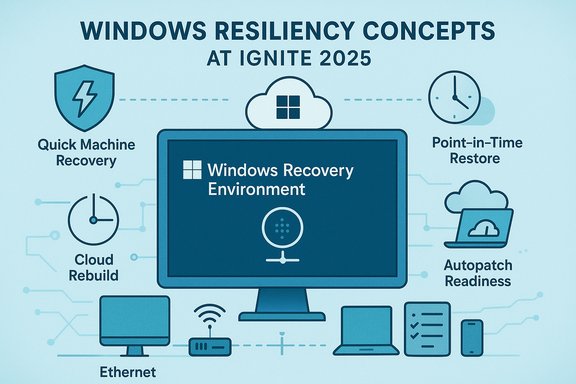
The resiliency push is a direct response to high-impact update incidents that exposed systemic fragility in modern endpoint fleets. The most cited catalyst is the July 19, 2024 CrowdStrike Falcon configuration update that triggered kernel faults and left millions of Windows machines unbootable; Microsoft’s internal estimate placed the number of affected devices at roughly 8.5 million during that incident. That event turned a vendor bug into a global operational crisis and reframed recoverability as a platform-level requirement rather than an add-on. Microsoft’s answer is being packaged as a multi-year Windows Resiliency Initiative that combines prevention, rapid diagnosis and repair, surgical rollback primitives, and cloud-assisted rebuild flows. The goal: reduce Mean Time To Repair (MTTR) across both consumer and enterprise environments so a single misbehaving update can’t cascade into widespread downtime. What Microsoft announced at Ignite 2025 — the short list
- Quick Machine Recovery (QMR) enhancements — a connected WinRE that can network, fetch targeted remediations, and be managed via Autopatch/Intune.
- WinRE networking improvements — out‑of‑the‑box Ethernet, expanded Wi‑Fi handling and staged enterprise Wi‑Fi/certificate support so recovery flows can access the internet.
- Intune remote recovery and WinRE plugin model — visibility and remote actions while a device sits in WinRE, plus plugins for third‑party MDMs and Azure VM integration.
- Point‑in‑Time Restore (PITR) — automated, frequent restore points that can roll a PC back to a previous complete system state (OS, apps, settings and some local files). Preview rolling for Insiders this week.
- Cloud Rebuild / Cloud reinstallation — a remote, zero‑touch reinstall that pulls Windows 11 media from Microsoft, reprovisions using Autopilot/Intune, and rehydrates apps and data via Windows Backup for Organizations and OneDrive. Targeted for business customers in phased previews with GA expectations to follow.
- Autopatch update preparation (readiness) — pre‑deployment checks surfaced in Autopatch to identify devices that aren’t ready for a given patch, surfacing blockers before rollout.
- Business continuity expansions — Windows 365 Reserve and companion services that provide Cloud PC access during major physical device outages.
Deep dive: Quick Machine Recovery (QMR) — the new first line of defense
What QMR now does
QMR transforms WinRE (Windows Recovery Environment) from a minimal offline toolkit into a cloud-aware remediation surface. When a device repeatedly fails to boot, QMR can automatically:- Boot into WinRE and establish network connectivity (Ethernet immediately, staged Wi‑Fi capabilities),
- Upload scoped diagnostic telemetry to Microsoft,
- Query a cloud remediation catalog (Windows Update / Microsoft remediation services),
- Download and apply a targeted remediation package from pre‑boot,
- Reboot and reattempt normal startup.
Management and controls
QMR is governed by enterprise controls. Administrators can tune behavior via Intune, Group Policy, and command-line controls (reagentc.exe), and Autopatch can be used to deploy updates to the QMR repair tool itself from a single console. Defaults differ by SKU: consumer devices typically ship with cloud remediation enabled by default, while Pro/Edu/Enterprise devices remain under admin control until configured.Why this matters operationally
For distributed fleets — retail point‑of‑sale, frontline devices, branch offices, kiosks, or hospitals — the cost and logistics of physical site visits are huge. QMR reduces that overhead by enabling centralized, policy‑driven remediation. The net effect is fewer onsite visits, faster incident response, and smaller blast radii from buggy vendor updates. However, QMR’s reliance on network access introduces its own dependencies and test requirements.Caveats and risks
- Network dependence: QMR needs an authenticated network path. Air‑gapped environments and complex enterprise 802.1X networks will require planning for certificate distribution and potential WinRE driver injection.
- Telemetry and compliance: Diagnostics uploaded during WinRE may include detailed device state; organizations must assess regulatory and privacy considerations before enabling cloud remediation.
- Not a universal cure: QMR is “best‑effort” — a targeted remediation catalog cannot cover every firmware-level or hardware fault. Failover plans (crew dispatch, local imaging tools) remain necessary.
WinRE networking: Ethernet today, enterprise Wi‑Fi next
A perennial problem for pre‑boot repair flows has been connectivity: WinRE historically lacked the drivers and credentials necessary to join protected networks. Microsoft’s approach is pragmatic: WinRE will reuse the host OS’s network configuration where possible, support Ethernet out of the box, and progressively add enterprise Wi‑Fi (including certificate and 802.1X workflows) in staged updates. Administrators must validate driver availability in WinRE for specific Wi‑Fi chipsets and design certificate/802.1X provisioning strategies for recovery scenarios.- Benefits:
- Allows QMR to fetch fixes and upload telemetry even when the OS won’t boot.
- Reduces dependence on manual USB/image-based repairs.
- Implementation notes:
- Test WinRE network connectivity across hardware vendors.
- Ensure BitLocker recovery keys are escrowed and accessible (WinRE restores often require these).
- For dot1x/cert-based Wi‑Fi, pre-provision device certificates in a manner WinRE can access.
Intune and remote management of non‑booting devices
Ignite introduced remote visibility and actionability for devices in WinRE through Intune. From the Intune console admins can:- See device recovery state and connectivity,
- Push custom recovery scripts into the WinRE session,
- Trigger recovery actions (PITR or Cloud Rebuild where supported),
- Integrate third‑party management solutions via a WinRE plugin model,
- Extend the same recovery model to Azure-hosted Windows Server VMs in the Azure Portal.
Point‑in‑Time Restore (PITR): System snapshots with limits
What PITR is
Point‑in‑Time Restore is an evolution of the classic System Restore concept. It automatically captures complete restore points at configurable cadences (4, 6, 12, 16, 24 hours) with a preview retention window commonly set to 72 hours by default during early testing. The intention is to let a device roll back to a known good state — OS, applications, settings, and (in many cases) local files — without performing a full reinstall. PITR is surfaced from WinRE so it can be used on non‑booting devices.Configuration and constraints
- Default preview cadence and retention settings are tuned to minimize storage usage (e.g., a default 2% disk cap with minimums), and administrators can tune these values.
- PITR is deliberately a short‑term safety net — not a substitute for off‑device backups. Retention is short and restoring to an older point can cause credential mismatches, certificate invalidation, or other side effects.
Practical recovery flow
- Boot into WinRE → Troubleshoot → Point‑in‑Time Restore.
- Provide BitLocker recovery key (if disk encrypted).
- Select the desired timestamp and confirm understanding of data-loss implications.
- Restore and reboot.
Limitations and risk profile
- Restores can delete local changes made after the restore point; cloud‑synced data (OneDrive) is preserved but local-only edits can be lost.
- Hardware faults, firmware corruption, or irreversible kernel damage may not be recoverable via PITR.
- The short retention window (72 hours in preview) means PITR helps fast regressions but not long‑tail data recovery.
Cloud Rebuild: remote reinstallation and rehydration
For the most severe failure cases, Microsoft announced Cloud Rebuild — a remote full reinstall flow where the device downloads a clean Windows 11 image from Microsoft, reinstalls the OS, reprovisions with Autopilot/Intune, and rehydrates user data and apps using Windows Backup for Organizations, OneDrive, and configuration policies. The service is explicitly targeted at managed fleets and integrates with Intune and Autopilot to minimize manual imaging efforts.Operational benefits
- Removes the need to ship USB drives or send technicians to remote locations for corrupted devices.
- Automates driver selection and reprovisioning, speeding return to service.
- Keeps identity, provisioning, and policy enforcement consistent via Autopilot and Intune.
Timelines and verification
Microsoft positioned Cloud Rebuild and related enterprise recovery tooling as preview features during Ignite, with general availability windows that may stretch into 2026 for broader enterprise rollout. Organizations should treat GA timing as tentative and plan pilots accordingly. Where possible, validate the rehydration plan — particularly for applications that require manual licensing or local activation.Autopatch update preparation: anticipate problems before they happen
Autopatch’s new update readiness functionality provides a pre‑deployment checklist and readiness dashboard to surface devices that may fail during an update. The dashboard can flag missing telemetry, BitLocker or recovery key issues, compliance blockers, and feature/driver conflicts — letting IT remediate issues upstream of a full rollout. This shift from reactive incident handling to proactive remediation is one of the more understated but operationally important announcements.- Key outcomes:
- Reduced risk of surprise mass failures,
- More predictable Autopatch rollouts,
- Faster rollback decisions thanks to clearer pre‑deployment signals.
Business continuity: Windows 365 Reserve and cloud fallbacks
Windows 365 Reserve is a complementary capability that provides temporary Cloud PC access when physical endpoints are unavailable. Microsoft positions Reserve as an affordable way to maintain worker productivity during device outages, ransomware incidents, supply delays, or hardware failures — typically offering up to a fixed number of Cloud PC access days per user per year and managed through Intune. This is a pragmatic acknowledgement that some outages will require cloud-based continuity rather than local recovery alone.Critical analysis — strengths, blind spots, and risks
Strengths: a pragmatic, platform‑level pivot
- Platform-first resiliency: Treating recovery as a built‑in capability (WinRE + cloud) closes the loop between update delivery and remediation. Microsoft is moving from ad‑hoc incident responses to baked‑in operational tooling.
- Reduced operational load: For large fleets, fewer site visits and fewer full reimages translate directly to cost savings and faster MTTR.
- Multiple options by severity: Surgical rollback (PITR), pre‑boot remediation (QMR), and full reinstall/reprovision (Cloud Rebuild) give admins a graded toolkit rather than a single blunt instrument.
Risks and open questions
- Trust and privacy of WinRE telemetry: Diagnostic uploads from pre‑boot environments raise compliance questions in regulated industries. IT teams need clear telemetry policies and controls.
- Networking as a single point of failure: QMR’s power is also a weakness — if WinRE cannot reach the network due to certificate/802.1X misconfiguration, the remediation surface is limited. Organizations with segmented networks, air‑gapped facilities, or complex NAC (Network Access Control) setups must invest in validation and fallbacks.
- Restore semantics and data loss: PITR’s short retention window and overwriting of local changes make it unsuitable as a primary backup strategy. Administrators must continue to educate users and rely on cloud backup strategies for durable recovery.
- Vendor ecosystem adjustments: Security vendors will need to adapt to new Microsoft requirements and off‑kernel architectures. This transition risks compatibility gaps and will require coordinated testing to ensure critical protections aren’t weakened in the interim.
Unverifiable or caveated claims
- Some reporting summarizes timelines (for example, GA in “first half of 2026”) which Microsoft frames as tentative and subject to change. Treat schedule statements as targets rather than assured delivery dates, and verify against official Microsoft product pages when planning production deployments.
Practical recommendations for IT teams
- Pilot deliberately.
- Select a cross-section of hardware vendors, network segments, and user scenarios. Validate WinRE networking and BitLocker key escrow flows.
- Validate network and driver coverage.
- Test Ethernet and Wi‑Fi connectivity from WinRE across your major Wi‑Fi chipsets. Inject drivers where necessary and test client certificate authentication flows.
- Harden telemetry and compliance practices.
- Define what diagnostic data is acceptable to upload during WinRE operations, and ensure legal/compliance teams sign off on recovery telemetry retention and access.
- Keep backups outside the local device.
- Treat PITR as a short‑term mitigation, not a backup strategy. Enforce cloud backup (OneDrive, Windows Backup for Organizations) and offline archival for long‑term retention.
- Use Autopatch readiness checks before mass rollouts.
- Run readiness reports and remediate flagged blockers; this dramatically lowers the risk of having to execute broad QMR or Cloud Rebuild campaigns.
- Coordinate with security vendors.
- Engage endpoint protection partners early to test off‑kernel or new integration models and ensure protection features remain effective after architectural changes.
The big picture: resiliency as a platform responsibility
Microsoft’s Ignite 2025 announcements mark a meaningful transition: recoverability is ceasing to be an afterthought. By hardening the driver and kernel surfaces, making WinRE cloud-aware, offering localized surgical rollback (PITR), and enabling zero‑touch cloud reinstallation and reprovisioning, Microsoft is building an ecosystem where large‑scale update regressions are survivable incidents rather than existential outages. For IT operations, the shift means investing in validation and governance now to reap lower operational costs and shorter outage windows later.Conclusion
Ignite 2025’s resiliency suite is the most comprehensive attempt yet to close the loop between software delivery, incident detection, and automated repair for Windows 11. The combination of Quick Machine Recovery, WinRE networking, Intune remote recovery, Point‑in‑Time Restore, and Cloud Rebuild offers a pragmatic way to reduce downtime, limit the blast radius of buggy updates, and shift IT practices from firefighting to orchestration. The tools are powerful, but they are not automatic panaceas — successful adoption will require planning, testing, and clear governance around telemetry, network configuration, and backup strategy. If those fundamentals are addressed, organizations can expect materially lower MTTR and a much stronger insurance policy against the next large‑scale update mishap.Source: ENTREVUE.FR SCIENCE/TECH: Windows 11, Microsoft wants to put an end to crashes…
