

Microsoft’s recommended escape route from the obsolete IIS 6.0 SMTP virtual server is to deploy a supported Exchange Edge Transport server, but that answer becomes materially more complicated once licensing enters the room in 2026. The short version is that Edge Transport may be “standalone” architecturally, but it is not magically free. If it is an Exchange server role running on Windows Server, Microsoft’s licensing model still expects you to license the server, the underlying OS, and any relevant users or devices that access Exchange functionality.
That matters because the whole attraction of this pattern is minimalism. The customer is not trying to resurrect on-premises Exchange as a mailbox platform. They are trying to replace a creaky SMTP relay that has survived through inertia, printer firmware, undocumented business applications, and the eternal terror of touching something that “just works.” Edge Transport is a sensible answer technically, but licensing is the part that decides whether it is a clean modernization project or an unexpectedly expensive detour.
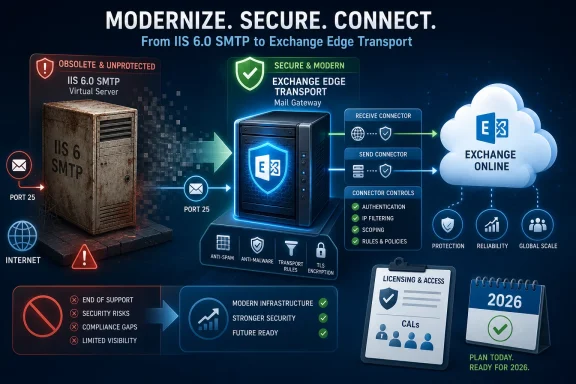
The IIS SMTP virtual server survived because it was boring. It sat on a Windows box, listened on port 25, accepted messages from approved internal systems, and shoved mail toward a smart host or the internet. For many organizations, it became the unofficial neutral zone between legacy applications and whatever mail system happened to be fashionable that decade.
But “free” infrastructure has a way of becoming expensive at the end. IIS 6.0 SMTP is not a modern, supported mail relay platform. It lacks the management surface, transport controls, logging depth, and security posture administrators now expect from anything that moves mail across trust boundaries. Its continued use is less a product decision than a fossil record of every application owner who retired without documenting their SMTP settings.
That is why Microsoft’s proposed replacement is not another IIS role. It is Exchange Edge Transport: an Exchange server role designed specifically for SMTP transport, perimeter placement, mail hygiene integration, routing control, and connector-driven policy. In the narrow case described by Microsoft’s guidance, the Edge server is not subscribed to an Active Directory site. It is “standalone” in the Exchange topology sense, not necessarily in the licensing sense.
That distinction is easy to miss. A standalone Edge Transport server can avoid EdgeSync, Direct Trust certificates, schema preparation, and an Active Directory-aware Exchange organization. It can be domain-joined or workgroup-joined depending on operational requirements. But it remains Exchange Server software running on Windows Server, and that is where the licensing conversation starts.
It does not mean the Edge Transport role becomes a free SMTP appliance. Exchange Edge Transport is still part of Exchange Server. If you deploy it, patch it, run it, and use it to process mail, you should treat it as an Exchange Server instance for licensing purposes.
For organizations moving from IIS SMTP, that can feel counterintuitive. The old relay may have been enabled as a Windows feature on a server they already owned. The new relay is a dedicated Exchange role, installed from Exchange media, administered with Exchange Management Shell, and bound by Exchange’s product lifecycle and licensing model. The operational footprint may be small, but the product identity is not.
In practice, that means you need to account for at least three layers. First, the Windows Server operating system must be licensed for the physical or virtual environment where Edge runs. Second, the Exchange Server software itself must be licensed under the applicable Exchange Server model. Third, depending on how users and devices interact with the service and what Microsoft licensing terms apply to your agreement, Client Access License or subscription-license considerations may enter the picture.
This is where administrators should resist the temptation to answer licensing questions with folklore. Exchange licensing has changed over time, and Exchange Server Subscription Edition has made the “what version are we installing?” question more important than it used to be.
That does not mean every existing Exchange 2019 Edge Transport server vanished overnight. It means a new deployment plan in 2026 should not be designed around installing an out-of-support Exchange version as the replacement for an out-of-support IIS component. Swapping one lifecycle problem for another is not modernization; it is merely changing the logo on the risk register.
Exchange SE also changes the licensing conversation because it is not simply “Exchange 2025” in the old perpetual-license sense. Microsoft positioned Subscription Edition as the ongoing supported Exchange Server product, with subscription-style licensing and continued update obligations. For Edge Transport, the consequence is straightforward: if your replacement relay is Exchange SE Edge Transport, your licensing plan needs to match Exchange SE, not a half-remembered Exchange 2013 or Exchange 2016 hybrid-era exception.
This is especially relevant for organizations that decommissioned their final on-premises Exchange server years ago and now want a supported SMTP relay. They may no longer have Exchange Server licenses, Software Assurance, or an active hybrid license story. The fact that the box will not host mailboxes does not automatically exempt it from Exchange Server licensing.
The product role is narrower, but the license question remains.
That shorthand is dangerous when applied to a standalone Edge relay. First, Microsoft’s free hybrid-license mechanisms were tied to specific hybrid deployment scenarios and Exchange versions. They were not a blanket grant to run any Exchange role for any transport purpose. Second, Microsoft’s own documentation has been explicit that the free hybrid license is not available for Exchange 2019 or later hybrid servers in the same way it was for earlier generations.
More importantly, the IIS SMTP replacement scenario is not necessarily a hybrid management server scenario at all. A standalone Edge Transport server that accepts mail from printers, applications, fax systems, scanners, monitoring platforms, or line-of-business systems and relays that mail onward is functioning as an SMTP transport server. It may use Exchange Online as a smart host, but that does not automatically make it a hybrid server licensed by the Hybrid Configuration Wizard.
The difference is not academic. A hybrid management server exists primarily to manage recipients and configuration in a synchronized Exchange environment. An Edge Transport relay exists to process SMTP traffic. Those are different use cases, and Microsoft’s licensing carve-outs have never been a general-purpose amnesty program for all on-premises Exchange binaries.
For WindowsForum readers, the practical advice is simple: do not build a licensing model for standalone Edge Transport around the phrase “hybrid license” unless your Microsoft licensing partner or Microsoft account team confirms that your exact deployment qualifies. In many real-world IIS SMTP replacement projects, it probably will not.
In classic Exchange Server licensing, users or devices that access Exchange Server require Exchange CALs, unless they are covered by qualifying subscription licenses or another licensing right. That model was designed around human users accessing mailboxes, calendars, Outlook, mobile clients, and collaboration features. SMTP relay from headless devices is a less elegant fit.
But that does not mean it can be ignored. If a multifunction printer, application server, monitoring platform, ERP system, or custom service submits messages to Exchange Edge Transport, it is using Exchange Server functionality. Depending on the licensing program, environment, and whether access is by user or device, you may need to count those users or devices, or rely on Microsoft 365 plans that provide equivalent rights.
The cleanest answer usually comes from your licensing channel, not from an admin console. Microsoft licensing is contractual, and the precise answer can depend on whether you are using Exchange Server 2019, Exchange SE, Enterprise Agreement terms, Software Assurance, Microsoft 365 E3 or E5, or another plan. A forum answer can describe the pattern, but it cannot safely replace a licensing review.
Still, the strategic point is clear. If the entire purpose of deploying Edge Transport is to support hundreds of anonymous devices and applications, you should not assume the only license required is one Exchange server license. The access side of the equation needs to be reviewed before procurement signs off.
That review may produce a tolerable answer. Many organizations already have Microsoft 365 licenses that cover most human users, and the number of actual service devices may be manageable. But it may also reveal that a “simple SMTP relay” has become a compliance and licensing cleanup project. That is not a reason to stay on IIS SMTP. It is a reason to plan the migration honestly.
But Microsoft’s own migration logic acknowledges why this often fails. Some legacy applications cannot perform outbound internet connectivity. Some cannot handle TLS or STARTTLS correctly. Some cannot authenticate with modern methods. Some devices are scattered across branch offices where certificate management is a punishment disguised as architecture. And some applications are effectively orphans, with no current owner willing to change their SMTP configuration.
Exchange Online’s SMTP relay options also have boundaries. Certificate-based connectors are stronger but require certificate deployment and accepted-domain alignment. IP-based connectors are less desirable and depend on stable public IP addresses and sender-domain matching. SMTP AUTH has its own deprecation and security story, and NTLM is not a viable path for Exchange Online SMTP submission.
This is why Edge Transport remains attractive. It centralizes the ugly part. Instead of teaching every copier, alarm system, manufacturing app, and decade-old ERP module to speak modern cloud mail, you teach them to speak to one internal relay. Then the relay speaks properly to Exchange Online or external domains.
That operational value can justify the licensing cost. The mistake is pretending there is no cost.
The IIS SMTP retirement project is the opportunity to stop doing that. The assessment phase should identify source IPs, sender addresses, recipient domains, daily volume, authentication methods, and routing behavior. If the old IIS logs are messy, that is not an argument for skipping analysis; it is evidence that the environment has been flying blind.
On Edge Transport, the Receive Connector design becomes the new control plane. Internal anonymous relay to accepted domains can be tightly scoped. Authenticated relay can be separated onto a connector with specific authentication mechanisms and remote IP ranges. Any open relay behavior should be treated as a dangerous exception, not a migration convenience.
The Send Connector design is equally important. Some organizations will point Edge at Exchange Online Protection as a smart host. Others may route certain domains directly. Some will need certificate-based TLS validation. Others will need to preserve an existing public IP reputation because Microsoft 365 throttling and external recipient reputation systems care about sending history.
A licensed, supported server deserves a supported design. Otherwise the organization has merely recreated IIS SMTP’s worst habits on newer software.
If applications require Integrated Windows Authentication or domain service accounts, a domain-joined Edge server may be the practical route. If local accounts are sufficient, a workgroup server may keep the blast radius smaller. If the organization relies on Group Policy Objects, security baselines, certificate auto-enrollment, endpoint management, or centralized auditing, domain joining may make the server easier to govern.
None of those choices eliminates Exchange licensing. A workgroup Edge server is not a loophole. A domain-joined Edge server is not automatically a full Exchange organization. The licensing status follows the software and its use, not the computer account’s location.
That distinction is also helpful for Active Directory planning. A standalone Edge deployment that is not Edge-subscribed does not require the same Active Directory schema preparation as a full Exchange organization. That is one of the reasons the model is appealing for cloud-only or post-migration customers. But again, reduced directory impact is not reduced product licensing.
The architecture can be light. The compliance obligation is still real.
Azure virtual machines still require Windows Server licensing, although that may be included in the VM pricing depending on how the workload is deployed and whether Azure Hybrid Benefit is used. Exchange Server licensing still applies to the Exchange software. Network connectivity must be engineered so internal applications and devices can reach the relay reliably, which often means VPN, ExpressRoute, routing work, firewall policy, and name resolution.
Outbound SMTP from Azure is also not a generic free-for-all. Microsoft has long restricted outbound SMTP on Azure VMs in many subscription types to reduce abuse. Organizations with Enterprise Agreement or Microsoft Customer Agreement for enterprise subscriptions may have supported paths, but smaller or consumer-style subscription arrangements can run into platform-level limitations.
That makes Azure Edge Transport an option for some enterprises, not a universal answer. It can be attractive when branch devices already route through Azure, when the company has strong cloud networking, or when datacenter exit is a priority. It is much less attractive if the deployment requires hairpinning every printer and application through a new network path just to avoid buying a small on-premises server.
The larger lesson is familiar: cloud placement does not erase licensing. It changes where the bill appears and which network team gets dragged into the project.
Security teams increasingly care about mail relay because it is a perfect abuse point. A permissive internal relay can become a phishing cannon. A poorly scoped connector can let compromised devices send mail as trusted internal domains. A stale SPF record can make legitimate outbound traffic look suspicious while attackers enjoy better alignment than the business does. The relay is not glamorous infrastructure, but it sits directly on the line between internal trust and external reputation.
Edge Transport gives administrators more tools to manage that line. Message tracking logs, pipeline tracing, receive and send connector controls, transport agents, TLS settings, accepted domains, and Exchange-aware routing all create a better platform than IIS SMTP. If Exchange Online is the smart host, certificate binding, inbound connectors, SPF alignment, DKIM, and DMARC become part of the design rather than afterthoughts.
But procurement will not approve “better vibes.” The business case should separate one-time and recurring costs: Windows Server licensing, Exchange Server licensing or subscription rights, potential CAL or user subscription coverage, certificates, load balancing if high availability is required, monitoring, backup policy, and operational labor. Compared with a breach, spoofing incident, or unsupported-server audit finding, those costs may be modest. Compared with “we thought this was free,” they can be a surprise.
The way to win the argument is to frame Edge Transport as a controlled mail gateway replacement, not a free IIS checkbox with a nicer name.
A company with an existing supported Exchange Server estate and licensed users may find Edge Transport relatively straightforward. It still needs to license the additional Edge server instance, but the organization may already have CALs or qualifying Microsoft 365 subscriptions covering most users. The migration is mainly technical and operational.
A cloud-only Exchange Online customer with no remaining Exchange licensing may face a cleaner but more expensive decision. If it deploys standalone Edge Transport, it is reintroducing Exchange Server software on-premises solely for relay. That likely means obtaining the appropriate Exchange Server licensing or Exchange SE subscription rights, plus Windows Server licensing and any required access rights.
A hybrid customer that still has older assumptions about a free management server needs to be careful. The fact that a server participates in mail flow to Exchange Online does not automatically qualify it for a free hybrid license, especially in modern Exchange versions. If the Edge server exists primarily as an SMTP relay for applications and devices, it should be evaluated as an Exchange transport server.
A customer using only Exchange Online direct send or SMTP relay without on-premises Exchange may avoid Exchange Server licensing altogether. But that depends on whether all devices and applications can meet Exchange Online’s connectivity, TLS, authentication, sender, and connector requirements. In many legacy-heavy environments, that is precisely the blocker that created the Edge recommendation.
A customer considering a third-party SMTP relay appliance or service should compare licensing and support on equal terms. Edge Transport may be the most Microsoft-native solution, but it is not the only possible supported relay pattern. The right answer may depend on compliance requirements, authentication needs, message volume, routing complexity, and whether the organization wants mail relay governed inside the Microsoft ecosystem.
Source IPs reveal the systems submitting mail. Sender addresses reveal whether applications are masquerading as users, shared mailboxes, service accounts, or generic no-reply identities. Recipient patterns reveal whether the relay is used only for internal notification mail or as a route to the wider internet. Authentication logs reveal whether domain accounts, local accounts, anonymous relay, or legacy Basic Authentication are in play.
That information should be captured before anyone buys licenses. If 20 systems submit alerts to internal recipients only, the answer may be relatively simple. If 2,000 devices across 80 locations relay external customer mail through a central server, the answer may be more involved. If applications send as real users, the organization may also need to revisit identity, consent, mailbox permissions, and auditability.
The licensing review should not be treated as a bureaucratic pause after the design is done. It should shape the design. IP-scoped anonymous relay, authenticated submission, service-account consolidation, Exchange Online connectors, and device replacement may produce different licensing and security outcomes.
This is also the moment to decide whether every current relay use deserves to survive. Many IIS SMTP estates contain abandoned systems that still send monthly reports nobody reads. Migrating them without scrutiny is how technical debt becomes immortal.
That may disappoint administrators who hoped the Edge role would function like a supported successor to the Windows SMTP service. Microsoft no longer really offers that kind of lightweight, built-in Windows SMTP relay. The company’s supported answers now push customers either upward into Exchange Online connectors or sideways into Exchange Server transport infrastructure.
For some environments, that is reasonable. Email relay is security-sensitive, and the old Windows feature had fallen badly behind modern expectations. For others, especially small organizations with a few legacy devices and no on-premises Exchange footprint, the Exchange Edge answer may feel like using a loading dock to replace a mail slot.
That is where third-party relay services, SMTP gateway appliances, or application modernization may compete. The Microsoft-native route has the advantage of Exchange semantics and Exchange Online integration. It also carries Exchange licensing baggage. The non-Microsoft route may be cheaper or simpler, but it introduces another vendor, another trust boundary, and another support model.
There is no universal winner. There is only an honest mapping of requirements to costs.
The end of IIS SMTP is not just another server migration; it is Microsoft forcing a long-deferred decision about how seriously organizations want to treat mail relay. Exchange Edge Transport is a credible and supportable replacement when legacy devices and applications cannot speak directly to Exchange Online, but it brings Exchange’s licensing model with it. The smart move is to use the migration as leverage: inventory the relay estate, kill what no longer matters, license what remains, and build a mail gateway that can survive the next audit, the next security review, and the next decade of forgotten applications.
That matters because the whole attraction of this pattern is minimalism. The customer is not trying to resurrect on-premises Exchange as a mailbox platform. They are trying to replace a creaky SMTP relay that has survived through inertia, printer firmware, undocumented business applications, and the eternal terror of touching something that “just works.” Edge Transport is a sensible answer technically, but licensing is the part that decides whether it is a clean modernization project or an unexpectedly expensive detour.
 The Cheapest-Looking SMTP Server Was Always Carrying Hidden Risk
The IIS SMTP virtual server survived because it was boring. It sat on a Windows box, listened on port 25, accepted messages from approved internal systems, and shoved mail toward a smart host or the internet. For many organizations, it became the unofficial neutral zone between legacy applications and whatever mail system happened to be fashionable that decade.But “free” infrastructure has a way of becoming expensive at the end. IIS 6.0 SMTP is not a modern, supported mail relay platform. It lacks the management surface, transport controls, logging depth, and security posture administrators now expect from anything that moves mail across trust boundaries. Its continued use is less a product decision than a fossil record of every application owner who retired without documenting their SMTP settings.
That is why Microsoft’s proposed replacement is not another IIS role. It is Exchange Edge Transport: an Exchange server role designed specifically for SMTP transport, perimeter placement, mail hygiene integration, routing control, and connector-driven policy. In the narrow case described by Microsoft’s guidance, the Edge server is not subscribed to an Active Directory site. It is “standalone” in the Exchange topology sense, not necessarily in the licensing sense.
That distinction is easy to miss. A standalone Edge Transport server can avoid EdgeSync, Direct Trust certificates, schema preparation, and an Active Directory-aware Exchange organization. It can be domain-joined or workgroup-joined depending on operational requirements. But it remains Exchange Server software running on Windows Server, and that is where the licensing conversation starts.
“Standalone” Means Less Exchange Plumbing, Not No Exchange License
The phrase “standalone Edge Transport” does a lot of work in Microsoft’s migration story. It means the Edge server is not subscribed to an Active Directory site, does not synchronize Exchange configuration from Mailbox servers, and does not require the organization to keep a full on-premises Exchange deployment merely to relay mail. That is a meaningful simplification.It does not mean the Edge Transport role becomes a free SMTP appliance. Exchange Edge Transport is still part of Exchange Server. If you deploy it, patch it, run it, and use it to process mail, you should treat it as an Exchange Server instance for licensing purposes.
For organizations moving from IIS SMTP, that can feel counterintuitive. The old relay may have been enabled as a Windows feature on a server they already owned. The new relay is a dedicated Exchange role, installed from Exchange media, administered with Exchange Management Shell, and bound by Exchange’s product lifecycle and licensing model. The operational footprint may be small, but the product identity is not.
In practice, that means you need to account for at least three layers. First, the Windows Server operating system must be licensed for the physical or virtual environment where Edge runs. Second, the Exchange Server software itself must be licensed under the applicable Exchange Server model. Third, depending on how users and devices interact with the service and what Microsoft licensing terms apply to your agreement, Client Access License or subscription-license considerations may enter the picture.
This is where administrators should resist the temptation to answer licensing questions with folklore. Exchange licensing has changed over time, and Exchange Server Subscription Edition has made the “what version are we installing?” question more important than it used to be.
Exchange Server 2019 and Exchange SE Change the Calendar Math
For years, many organizations thinking about SMTP relay would have reached for Exchange Server 2019 Edge Transport and moved on. But the calendar has tightened. Exchange Server 2016 and Exchange Server 2019 reached the end of support on October 14, 2025, and Exchange Server Subscription Edition is now the supported on-premises Exchange line.That does not mean every existing Exchange 2019 Edge Transport server vanished overnight. It means a new deployment plan in 2026 should not be designed around installing an out-of-support Exchange version as the replacement for an out-of-support IIS component. Swapping one lifecycle problem for another is not modernization; it is merely changing the logo on the risk register.
Exchange SE also changes the licensing conversation because it is not simply “Exchange 2025” in the old perpetual-license sense. Microsoft positioned Subscription Edition as the ongoing supported Exchange Server product, with subscription-style licensing and continued update obligations. For Edge Transport, the consequence is straightforward: if your replacement relay is Exchange SE Edge Transport, your licensing plan needs to match Exchange SE, not a half-remembered Exchange 2013 or Exchange 2016 hybrid-era exception.
This is especially relevant for organizations that decommissioned their final on-premises Exchange server years ago and now want a supported SMTP relay. They may no longer have Exchange Server licenses, Software Assurance, or an active hybrid license story. The fact that the box will not host mailboxes does not automatically exempt it from Exchange Server licensing.
The product role is narrower, but the license question remains.
The Hybrid Free-License Myth Does Not Save Every Relay
A lot of confusion comes from Microsoft’s historical hybrid licensing concessions. In earlier Exchange hybrid scenarios, the Hybrid Configuration Wizard could license certain on-premises Exchange servers used for hybrid management when no mailboxes were hosted on-premises. That became shorthand in many IT shops for “the last Exchange server is free if it is just there for hybrid.”That shorthand is dangerous when applied to a standalone Edge relay. First, Microsoft’s free hybrid-license mechanisms were tied to specific hybrid deployment scenarios and Exchange versions. They were not a blanket grant to run any Exchange role for any transport purpose. Second, Microsoft’s own documentation has been explicit that the free hybrid license is not available for Exchange 2019 or later hybrid servers in the same way it was for earlier generations.
More importantly, the IIS SMTP replacement scenario is not necessarily a hybrid management server scenario at all. A standalone Edge Transport server that accepts mail from printers, applications, fax systems, scanners, monitoring platforms, or line-of-business systems and relays that mail onward is functioning as an SMTP transport server. It may use Exchange Online as a smart host, but that does not automatically make it a hybrid server licensed by the Hybrid Configuration Wizard.
The difference is not academic. A hybrid management server exists primarily to manage recipients and configuration in a synchronized Exchange environment. An Edge Transport relay exists to process SMTP traffic. Those are different use cases, and Microsoft’s licensing carve-outs have never been a general-purpose amnesty program for all on-premises Exchange binaries.
For WindowsForum readers, the practical advice is simple: do not build a licensing model for standalone Edge Transport around the phrase “hybrid license” unless your Microsoft licensing partner or Microsoft account team confirms that your exact deployment qualifies. In many real-world IIS SMTP replacement projects, it probably will not.
CALs Are Where Simple SMTP Relay Becomes a Lawyerly Problem
Server licensing is only the first half of the conversation. The more awkward question is whether the devices and applications using Edge Transport require Exchange access licensing.In classic Exchange Server licensing, users or devices that access Exchange Server require Exchange CALs, unless they are covered by qualifying subscription licenses or another licensing right. That model was designed around human users accessing mailboxes, calendars, Outlook, mobile clients, and collaboration features. SMTP relay from headless devices is a less elegant fit.
But that does not mean it can be ignored. If a multifunction printer, application server, monitoring platform, ERP system, or custom service submits messages to Exchange Edge Transport, it is using Exchange Server functionality. Depending on the licensing program, environment, and whether access is by user or device, you may need to count those users or devices, or rely on Microsoft 365 plans that provide equivalent rights.
The cleanest answer usually comes from your licensing channel, not from an admin console. Microsoft licensing is contractual, and the precise answer can depend on whether you are using Exchange Server 2019, Exchange SE, Enterprise Agreement terms, Software Assurance, Microsoft 365 E3 or E5, or another plan. A forum answer can describe the pattern, but it cannot safely replace a licensing review.
Still, the strategic point is clear. If the entire purpose of deploying Edge Transport is to support hundreds of anonymous devices and applications, you should not assume the only license required is one Exchange server license. The access side of the equation needs to be reviewed before procurement signs off.
That review may produce a tolerable answer. Many organizations already have Microsoft 365 licenses that cover most human users, and the number of actual service devices may be manageable. But it may also reveal that a “simple SMTP relay” has become a compliance and licensing cleanup project. That is not a reason to stay on IIS SMTP. It is a reason to plan the migration honestly.
Exchange Online Direct Send Is Cheaper Until It Isn’t Possible
The most obvious licensing workaround is not to deploy Edge at all. If applications and devices can send directly to Exchange Online using supported methods, the organization may avoid running any Exchange Server on-premises for relay. That can be simpler, cheaper, and more cloud-native.But Microsoft’s own migration logic acknowledges why this often fails. Some legacy applications cannot perform outbound internet connectivity. Some cannot handle TLS or STARTTLS correctly. Some cannot authenticate with modern methods. Some devices are scattered across branch offices where certificate management is a punishment disguised as architecture. And some applications are effectively orphans, with no current owner willing to change their SMTP configuration.
Exchange Online’s SMTP relay options also have boundaries. Certificate-based connectors are stronger but require certificate deployment and accepted-domain alignment. IP-based connectors are less desirable and depend on stable public IP addresses and sender-domain matching. SMTP AUTH has its own deprecation and security story, and NTLM is not a viable path for Exchange Online SMTP submission.
This is why Edge Transport remains attractive. It centralizes the ugly part. Instead of teaching every copier, alarm system, manufacturing app, and decade-old ERP module to speak modern cloud mail, you teach them to speak to one internal relay. Then the relay speaks properly to Exchange Online or external domains.
That operational value can justify the licensing cost. The mistake is pretending there is no cost.
The Edge Server Should Be Designed Like a Mail Gateway, Not a Junk Drawer
Once an organization accepts that Edge Transport is a licensed Exchange role, the architecture should reflect that seriousness. Too many SMTP relays become junk drawers: anonymous relay here, a permissive connector there, a forgotten IP range from a subnet that no longer exists, and a smart host nobody remembers approving.The IIS SMTP retirement project is the opportunity to stop doing that. The assessment phase should identify source IPs, sender addresses, recipient domains, daily volume, authentication methods, and routing behavior. If the old IIS logs are messy, that is not an argument for skipping analysis; it is evidence that the environment has been flying blind.
On Edge Transport, the Receive Connector design becomes the new control plane. Internal anonymous relay to accepted domains can be tightly scoped. Authenticated relay can be separated onto a connector with specific authentication mechanisms and remote IP ranges. Any open relay behavior should be treated as a dangerous exception, not a migration convenience.
The Send Connector design is equally important. Some organizations will point Edge at Exchange Online Protection as a smart host. Others may route certain domains directly. Some will need certificate-based TLS validation. Others will need to preserve an existing public IP reputation because Microsoft 365 throttling and external recipient reputation systems care about sending history.
A licensed, supported server deserves a supported design. Otherwise the organization has merely recreated IIS SMTP’s worst habits on newer software.
Domain Joining Is an Operational Choice, Not the Licensing Escape Hatch
Microsoft generally recommends Edge Transport in a perimeter-style deployment, often not domain-joined, especially in traditional Exchange architectures. In the standalone relay scenario, the domain-join decision is more nuanced. It depends less on Exchange topology and more on authentication, management, and security requirements.If applications require Integrated Windows Authentication or domain service accounts, a domain-joined Edge server may be the practical route. If local accounts are sufficient, a workgroup server may keep the blast radius smaller. If the organization relies on Group Policy Objects, security baselines, certificate auto-enrollment, endpoint management, or centralized auditing, domain joining may make the server easier to govern.
None of those choices eliminates Exchange licensing. A workgroup Edge server is not a loophole. A domain-joined Edge server is not automatically a full Exchange organization. The licensing status follows the software and its use, not the computer account’s location.
That distinction is also helpful for Active Directory planning. A standalone Edge deployment that is not Edge-subscribed does not require the same Active Directory schema preparation as a full Exchange organization. That is one of the reasons the model is appealing for cloud-only or post-migration customers. But again, reduced directory impact is not reduced product licensing.
The architecture can be light. The compliance obligation is still real.
Azure Makes the Licensing Story Cloudier, Not Simpler
Some organizations will ask whether the Edge Transport relay can live in Azure instead of a server room or branch datacenter. Technically, the answer may be yes, but this is not the magic simplification it first appears to be.Azure virtual machines still require Windows Server licensing, although that may be included in the VM pricing depending on how the workload is deployed and whether Azure Hybrid Benefit is used. Exchange Server licensing still applies to the Exchange software. Network connectivity must be engineered so internal applications and devices can reach the relay reliably, which often means VPN, ExpressRoute, routing work, firewall policy, and name resolution.
Outbound SMTP from Azure is also not a generic free-for-all. Microsoft has long restricted outbound SMTP on Azure VMs in many subscription types to reduce abuse. Organizations with Enterprise Agreement or Microsoft Customer Agreement for enterprise subscriptions may have supported paths, but smaller or consumer-style subscription arrangements can run into platform-level limitations.
That makes Azure Edge Transport an option for some enterprises, not a universal answer. It can be attractive when branch devices already route through Azure, when the company has strong cloud networking, or when datacenter exit is a priority. It is much less attractive if the deployment requires hairpinning every printer and application through a new network path just to avoid buying a small on-premises server.
The larger lesson is familiar: cloud placement does not erase licensing. It changes where the bill appears and which network team gets dragged into the project.
Security Is the Real ROI, but Procurement Will Ask for the Spreadsheet
The strongest argument for replacing IIS SMTP with Exchange Edge Transport is not feature parity. It is risk reduction. A supported mail transport stack with maintained updates, better logging, connector policy, transport controls, and integration with Exchange Online is defensible in a way IIS SMTP no longer is.Security teams increasingly care about mail relay because it is a perfect abuse point. A permissive internal relay can become a phishing cannon. A poorly scoped connector can let compromised devices send mail as trusted internal domains. A stale SPF record can make legitimate outbound traffic look suspicious while attackers enjoy better alignment than the business does. The relay is not glamorous infrastructure, but it sits directly on the line between internal trust and external reputation.
Edge Transport gives administrators more tools to manage that line. Message tracking logs, pipeline tracing, receive and send connector controls, transport agents, TLS settings, accepted domains, and Exchange-aware routing all create a better platform than IIS SMTP. If Exchange Online is the smart host, certificate binding, inbound connectors, SPF alignment, DKIM, and DMARC become part of the design rather than afterthoughts.
But procurement will not approve “better vibes.” The business case should separate one-time and recurring costs: Windows Server licensing, Exchange Server licensing or subscription rights, potential CAL or user subscription coverage, certificates, load balancing if high availability is required, monitoring, backup policy, and operational labor. Compared with a breach, spoofing incident, or unsupported-server audit finding, those costs may be modest. Compared with “we thought this was free,” they can be a surprise.
The way to win the argument is to frame Edge Transport as a controlled mail gateway replacement, not a free IIS checkbox with a nicer name.
The Licensing Answer Depends on the Scenario
There are several common patterns, and each has a different licensing temperature.A company with an existing supported Exchange Server estate and licensed users may find Edge Transport relatively straightforward. It still needs to license the additional Edge server instance, but the organization may already have CALs or qualifying Microsoft 365 subscriptions covering most users. The migration is mainly technical and operational.
A cloud-only Exchange Online customer with no remaining Exchange licensing may face a cleaner but more expensive decision. If it deploys standalone Edge Transport, it is reintroducing Exchange Server software on-premises solely for relay. That likely means obtaining the appropriate Exchange Server licensing or Exchange SE subscription rights, plus Windows Server licensing and any required access rights.
A hybrid customer that still has older assumptions about a free management server needs to be careful. The fact that a server participates in mail flow to Exchange Online does not automatically qualify it for a free hybrid license, especially in modern Exchange versions. If the Edge server exists primarily as an SMTP relay for applications and devices, it should be evaluated as an Exchange transport server.
A customer using only Exchange Online direct send or SMTP relay without on-premises Exchange may avoid Exchange Server licensing altogether. But that depends on whether all devices and applications can meet Exchange Online’s connectivity, TLS, authentication, sender, and connector requirements. In many legacy-heavy environments, that is precisely the blocker that created the Edge recommendation.
A customer considering a third-party SMTP relay appliance or service should compare licensing and support on equal terms. Edge Transport may be the most Microsoft-native solution, but it is not the only possible supported relay pattern. The right answer may depend on compliance requirements, authentication needs, message volume, routing complexity, and whether the organization wants mail relay governed inside the Microsoft ecosystem.
The Cutover Plan Is Also a Licensing Discovery Tool
The technical migration from IIS SMTP to Edge Transport begins with logs, but the licensing migration begins with inventory. The same data that tells administrators how to build connectors also tells licensing teams who and what is using the service.Source IPs reveal the systems submitting mail. Sender addresses reveal whether applications are masquerading as users, shared mailboxes, service accounts, or generic no-reply identities. Recipient patterns reveal whether the relay is used only for internal notification mail or as a route to the wider internet. Authentication logs reveal whether domain accounts, local accounts, anonymous relay, or legacy Basic Authentication are in play.
That information should be captured before anyone buys licenses. If 20 systems submit alerts to internal recipients only, the answer may be relatively simple. If 2,000 devices across 80 locations relay external customer mail through a central server, the answer may be more involved. If applications send as real users, the organization may also need to revisit identity, consent, mailbox permissions, and auditability.
The licensing review should not be treated as a bureaucratic pause after the design is done. It should shape the design. IP-scoped anonymous relay, authenticated submission, service-account consolidation, Exchange Online connectors, and device replacement may produce different licensing and security outcomes.
This is also the moment to decide whether every current relay use deserves to survive. Many IIS SMTP estates contain abandoned systems that still send monthly reports nobody reads. Migrating them without scrutiny is how technical debt becomes immortal.
The Practical Answer Microsoft Did Not Put in the Flowchart
The article that sparked the licensing question is right about the technical direction: standalone Edge Transport is often the cleanest Microsoft-supported replacement for IIS SMTP when direct Exchange Online relay is not feasible. But the licensing answer is not “install Edge and move on.” It is “license it like Exchange, validate access rights, and do not assume hybrid exceptions apply.”That may disappoint administrators who hoped the Edge role would function like a supported successor to the Windows SMTP service. Microsoft no longer really offers that kind of lightweight, built-in Windows SMTP relay. The company’s supported answers now push customers either upward into Exchange Online connectors or sideways into Exchange Server transport infrastructure.
For some environments, that is reasonable. Email relay is security-sensitive, and the old Windows feature had fallen badly behind modern expectations. For others, especially small organizations with a few legacy devices and no on-premises Exchange footprint, the Exchange Edge answer may feel like using a loading dock to replace a mail slot.
That is where third-party relay services, SMTP gateway appliances, or application modernization may compete. The Microsoft-native route has the advantage of Exchange semantics and Exchange Online integration. It also carries Exchange licensing baggage. The non-Microsoft route may be cheaper or simpler, but it introduces another vendor, another trust boundary, and another support model.
There is no universal winner. There is only an honest mapping of requirements to costs.
The Relay Bill Comes Due Before the Old Server Goes Dark
Before an organization retires IIS SMTP in favor of Edge Transport, the decision makers should agree on a few concrete points. These are not abstract licensing theories; they are the items most likely to derail a late-stage migration.- The Edge Transport server itself should be treated as a licensed Exchange Server instance, even when it is standalone and not subscribed to Active Directory.
- The Windows Server operating system underneath Edge Transport must also be licensed for the deployment model, whether physical, virtualized, or hosted in Azure.
- The organization should review whether users, devices, applications, or service accounts submitting mail require Exchange CALs, qualifying Microsoft 365 licenses, or other access rights under its agreement.
- The free hybrid-license assumptions from older Exchange deployments should not be applied to a standalone SMTP relay without explicit confirmation.
- Exchange Server Subscription Edition should be the planning baseline for new supported deployments in 2026, not Exchange 2016 or Exchange 2019.
- If Exchange Online direct relay can satisfy the application and device requirements, it may avoid on-premises Exchange licensing entirely, but many legacy environments cannot meet those requirements cleanly.
The end of IIS SMTP is not just another server migration; it is Microsoft forcing a long-deferred decision about how seriously organizations want to treat mail relay. Exchange Edge Transport is a credible and supportable replacement when legacy devices and applications cannot speak directly to Exchange Online, but it brings Exchange’s licensing model with it. The smart move is to use the migration as leverage: inventory the relay estate, kill what no longer matters, license what remains, and build a mail gateway that can survive the next audit, the next security review, and the next decade of forgotten applications.
References
- Primary source: Microsoft Exchange Team Blog
Published: Tue, 19 May 2026 14:14:31 GMT
Replacing IIS SMTP virtual server with Exchange Edge Transport | Microsoft Community Hub
How to go about replacing IIS SMTP virtual server with Exchange Edge Transport.   techcommunity.microsoft.com
- Official source: learn.microsoft.com
Edge Subscriptions | Microsoft Learn
Summary: Learn about subscribing an Edge Transport server to your internal Exchange Server 2016 or Exchange Server 2019 organization, which provides end-to-end mail flow, recipient look-up, and safelist aggregation.learn.microsoft.com - Official source: microsoft.com
Your request has been blocked. This could be due to several reasons.
www.microsoft.com
- Related coverage: petri.com
Exchange Server Subscription Edition: An IT Pro Guide to Exchange Server in 2025 - Petri IT Knowledgebase
Exchange Server Subscription Edition (ESSE) is the new version of Microsoft's on-premises email and calendaring solution, due to be released early Q3 of 2025. petri.com
- Related coverage: practical365.com
Exchange 2019 Edge Transport Server | Practical365
In this blog, Jaap Wesselius goes over how to set up an Exchange 2019 Edge Transport Server in an on-premises environment.practical365.com - Official source: support.microsoft.com

- Related coverage: exchangemvp.org
Exchange Server Subscription Edition Pricing Breakdown
New Exchange Server Subscription Edition pricing structure explained. Server Licenses jump 10%, CAL suites climb 15%–20% & upgrade costs rise.www.exchangemvp.org
- Related coverage: software-express.de
Exchange Lizenzierung | Preise und Lizenzen | Software-Express
Die Lizenzierung des Exchange Servers unterscheidet sich je nach gewählter Bereitstellungsoption (Exchange Server Subscription (SE) oder Exchange Online Plan). Auch die verschiedenen Lizenzprogramme unterscheiden sich bei den enthalten Rechten. Hier finden Sie eine Übersicht zur Orientierung für...www.software-express.de - Official source: download.microsoft.com
