

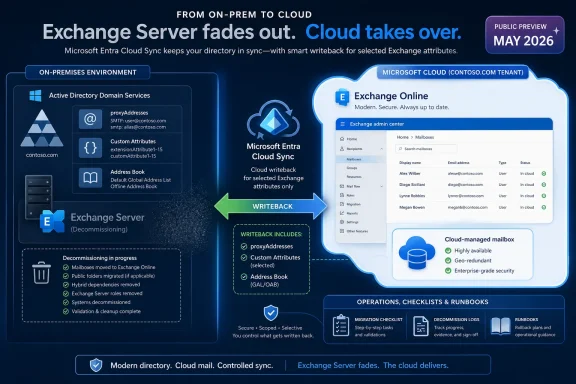
Microsoft has put writeback for cloud-managed remote mailboxes into public preview in May 2026, letting Exchange Online push selected Exchange attributes back into on-premises Active Directory through Microsoft Entra Cloud Sync. That sounds like a plumbing change, and in a sense it is. But for hybrid Exchange shops, plumbing has always been the problem. This preview is Microsoft’s most concrete move yet toward ending the awkward era of keeping one Exchange Server alive simply because Active Directory still has a vote.
For years, the “last Exchange Server” problem has been one of those enterprise IT irritants that survives not because anyone loves it, but because removing it created too many unsupported edge cases. Organizations moved mailboxes to Exchange Online, redirected mail flow, retired most of their Exchange infrastructure, and still found themselves nursing one server for recipient management. The box was often underused, unloved, and overprotected, because it sat at the intersection of mail identity, Active Directory, and Microsoft’s support boundaries.
The issue was never that Exchange Online could not host the mailbox. It was that many hybrid environments still treated on-premises Active Directory as the authoritative source for synchronized identities. Exchange-specific attributes such as proxy addresses, custom attributes, hide-from-address-book settings, and related recipient metadata lived in AD and flowed upward into Microsoft 365. If administrators wanted to stay in a supported configuration, they often needed Exchange tooling on-premises to manage those attributes cleanly.
Cloud-managed remote mailboxes changed part of that equation by allowing the source of authority for Exchange attributes to move to Exchange Online while leaving identity attributes on-premises. That was a significant shift, because it separated “who the user is” from “how Exchange should treat the user.” Microsoft’s new writeback preview now addresses the obvious follow-up problem: what happens when on-premises systems still read those Exchange attributes from AD?
That gap mattered. In a pure cloud architecture, an attribute edited in Exchange Online is simply the truth. In a hybrid enterprise, the same attribute may be consumed by provisioning scripts, HR-driven workflows, intranet address-book tools, legacy applications, compliance exports, or line-of-business systems that have been querying LDAP since before “Microsoft 365” was a brand. Without writeback, the cloud and AD copies could diverge. With writeback, Microsoft is trying to make the cloud authoritative without making AD blind.
That split is more important than it first appears. Microsoft is not saying that hybrid identity disappears. It is not saying Active Directory suddenly becomes irrelevant. It is saying that the Exchange-shaped part of a synchronized object can be governed by Exchange Online while the identity-shaped part remains on-premises.
That distinction reflects the real state of enterprise Microsoft environments in 2026. Many organizations are not ready, willing, or able to abandon Active Directory. Their domain controllers still anchor device sign-in, Kerberos-dependent applications, Group Policy, privileged access patterns, and years of operational muscle memory. Yet those same organizations increasingly expect Exchange to behave like a cloud service rather than a server workload they must patch, monitor, and defend.
Writeback is the compromise. Exchange Online gets to become the management plane for Exchange attributes, but Microsoft Entra Cloud Sync pushes supported changes back into AD so local consumers do not immediately lose visibility. The enterprise gets to move the operational center of gravity to the cloud without breaking every application that still assumes AD is the directory of record.
The preview therefore signals something larger than a feature flag. It is Microsoft acknowledging that the last-mile problem in cloud migration is not mailbox movement. It is the accumulation of dependencies that orbit the mailbox.
Consider
The same is true for custom attributes. Many organizations use Exchange custom attributes as convenient tagging fields for routing, segmentation, licensing logic, address-list behavior, or downstream automation. Whether that is architecturally elegant is beside the point. It is common, it works, and it has accumulated over years of hybrid operations.
Writeback attempts to make this less brittle. Changes made in Exchange Online to designated Exchange attributes can be pushed back to on-premises AD through Microsoft Entra Cloud Sync. That means the organization can use Exchange Online as the management surface while keeping AD sufficiently current for systems that still depend on it.
This is not a full reversal of directory synchronization. It is a targeted backchannel for a specific class of attributes. That matters because broad bidirectional sync is where identity systems go to become haunted houses. Microsoft is instead carving out a constrained path: Exchange Online controls supported Exchange attributes, Cloud Sync writes them back, and existing directory synchronization continues doing its ordinary job.
The architectural message is cautious but clear. Microsoft is not trying to make AD and the cloud co-equal masters of everything. It is trying to move authority attribute by attribute, workload by workload, until the final on-premises dependency becomes optional rather than structural.
Connect Sync is deeply embedded in mature hybrid environments. It is often wrapped in change-control processes, monitored by identity teams, and treated as a critical path for user provisioning. Asking customers to uninstall or replace it simply to evaluate Exchange attribute writeback would have been a nonstarter for many organizations.
Microsoft’s approach is more pragmatic. Cloud Sync runs alongside Connect Sync. Connect Sync keeps handling the existing directory synchronization configuration. Cloud Sync handles the Exchange attribute writeback job. In theory, that separation lowers the blast radius: organizations can test the writeback path without redesigning their entire identity synchronization architecture.
That said, “runs alongside” should not be mistaken for “requires no thought.” IT teams will still need to understand scheduling, scoping, filtering, agent placement, permissions, monitoring, and failure modes. They will need to prove that attributes move in the expected direction, that unsupported attributes do not create false assumptions, and that administrative workflows are updated so staff stop editing the wrong side of the system.
The transport choice also shows Microsoft’s broader preference. Entra Cloud Sync has been positioned as a lighter, cloud-managed provisioning model compared with the older Connect Sync architecture. Using it here gives Microsoft a way to add new hybrid behaviors without dragging every customer through the historical weight of Azure AD Connect-era design.
For administrators, the practical lesson is that the new writeback path is additive, not a forklift migration. But additive does not mean trivial. In identity systems, every additional flow is another thing to document, monitor, and explain during an outage.
The limit tells us two things. First, Microsoft believes the feature is mature enough for broad testing in real hybrid environments, not just small labs. A 200,000-mailbox ceiling is not a small-business-only preview. It includes universities, government agencies, large regional enterprises, and plenty of multinational subsidiaries.
Second, Microsoft is still watching scale. Attribute writeback is not glamorous, but at large tenant sizes it becomes a distributed systems problem. Every change must be detected, transported, authorized, written, audited, retried if necessary, and reconciled against directory state. When the object count rises, edge cases stop being edge cases and become Tuesday.
The GA target at the end of June 2026 is aggressive but not shocking. Microsoft has been building toward this moment through cloud-managed remote mailbox previews and related documentation. The company is no longer asking whether customers want to retire the last Exchange Server. It is asking which dependency blocks them from doing so.
The scale ceiling also gives enterprise customers a useful bargaining chip. Microsoft explicitly wants to hear from organizations blocked by the limit. That is not merely community outreach; it is telemetry by another name. If the next wave of blocked customers clusters at 300,000, 500,000, or more than a million mailboxes, Microsoft can prioritize engineering and validation accordingly.
For everyone under the limit, the preview is an invitation to test the assumptions that have kept that last server alive. For everyone over it, the preview is still a signal that the architecture is moving, even if the runway is not yet long enough.
The new guide matters because decommissioning Exchange is not the same as turning off a virtual machine. Hybrid environments accumulate objects: connectors, organization relationships, federation trusts, certificates, OAuth service principal credentials, Hybrid Agent components, and cloud-side remnants. Some live on-premises. Some live in Exchange Online. Some are created by the Hybrid Configuration Wizard and then forgotten until removal day.
Microsoft’s older guidance around the last server has also had an important distinction: in some management-tools scenarios, administrators were told not to uninstall the final Exchange Server because uninstalling could remove AD information required by the tools. The newer cloud-managed source-of-authority path changes the conversation. If Exchange attributes are now cloud-managed, and if writeback covers the on-premises consumers that still matter, the final server can move from “management dependency” to “decommissioning candidate.”
That does not mean every organization should uninstall immediately. It means Microsoft is finally describing the path for those that meet the prerequisites. The guide’s emphasis on pre-removal verification is especially important, because hybrid environments drift. DNS may have been repointed and then partially rolled back. SMTP relay may have been forgotten on a scanner fleet. A public folder migration may be assumed complete until someone checks. A connector may still be handling an obscure application path.
The phrase last Exchange Server has always made the problem sound smaller than it is. In reality, the server is the visible artifact of a broader configuration. Microsoft’s new documentation is useful because it treats the removal as a sequence of dependency closures rather than a dramatic power-off moment.
But the risk does not vanish. It changes shape.
Once Exchange attributes are cloud-managed, operational discipline moves into Exchange Online roles, Entra configuration, Cloud Sync agents, and change processes. Administrators must know where a change should be made, how long it should take to appear on-premises, what logs prove the flow worked, and which attributes are outside the writeback contract. Help desks need updated runbooks. Identity teams need ownership clarity. Security teams need audit paths.
This is where public preview deserves caution. Preview features can be production-adjacent, but they are still preview features. Organizations should test with representative objects, real downstream consumers, and failure scenarios. The dangerous test is not “can I change an alias and see it in AD?” The useful test is “what happens when the agent is offline, the attribute is malformed, the object is out of scope, or two teams try to manage the same mailbox through different assumptions?”
There is also the matter of reversibility. Moving source of authority is a governance change, not just a technical one. If an organization has years of scripts that assume
The best candidates for early adoption are not necessarily the smallest organizations. They are the ones with the cleanest inventory of Exchange dependencies, the strongest identity change control, and the least romantic attachment to “we’ve always done it this way.”
That was always an uncomfortable end state. A server product designed to host mailboxes, transport messages, and expose administrative surfaces became a kind of ceremonial authority figure for recipient metadata. Many administrators resented it. Many security teams distrusted it. Many finance teams wondered why a supposedly completed cloud migration still had Exchange on the infrastructure list.
Cloud-managed remote mailboxes and writeback point toward a different model. Hybrid becomes a relationship between identity sources, attribute authorities, and synchronization flows. The server itself becomes optional when its remaining job has been replaced by cloud management, documented cleanup, and controlled writeback.
This is also consistent with Microsoft’s broader cloud posture. The company rarely removes hybrid complexity all at once. It drains it. A workload moves first, then management surfaces follow, then dependencies are narrowed, then the old infrastructure becomes a special case. Exchange is simply reaching that late-stage cloud migration moment.
For WindowsForum readers, the Windows angle is not incidental. Retiring Exchange Server does not just simplify messaging. It reduces the number of domain-joined servers with privileged roles, lowers patching urgency around a historically sensitive application stack, and lets administrators revisit firewall rules, certificate renewals, backup scopes, and monitoring noise. A cleaner hybrid identity model is also a cleaner Windows Server estate.
The irony is that Active Directory remains central even as Exchange Server recedes. Microsoft is not pretending every customer has become cloud-native. It is instead building a bridge for customers who remain AD-rooted but no longer want Exchange Server as the toll booth.
Many organizations will not like the answers. The mailbox migration project may have been declared complete years ago, while a surprising number of systems continued to treat AD as the canonical address book. Some of those systems may be business-critical. Others may be zombie dependencies that nobody has dared to remove.
Writeback can keep those systems alive, but it should not become an excuse to avoid inventory. The feature is best understood as a compatibility layer for a transition, not a permanent license to let every application scrape directory attributes forever. If a line-of-business system needs
The supported attribute list therefore becomes a planning document. It tells administrators not only what Microsoft can write back, but also what assumptions may need to change. Unsupported attributes are not merely missing checkboxes. They are prompts for remediation, redesign, or acceptance of continued on-premises dependency.
Testing should include the boring cases. Create a mailbox. Add an alias. Hide it from address lists. Change custom attributes. Confirm writeback timing. Check AD. Check applications. Disable the Cloud Sync path and observe failure behavior. Restore it and confirm reconciliation. Boring tests are how administrators avoid exciting outages.
The organizations that treat this as a weekend checkbox will learn less than the ones that treat it as a dependency audit. The feature’s real payoff is not just retiring a server. It is discovering whether the server was the last dependency or merely the most visible one.
Still, vendor framing naturally emphasizes the path, not the potholes. Administrators should read “no impact on your existing mailboxes, users, or sync configuration” in its intended scope. The feature may not require replacing Connect Sync or changing mailbox hosting, but it absolutely changes the operational model for Exchange attribute management. That is impact of a different kind.
There is also a training problem. Hybrid Exchange knowledge is already fragmented across Exchange admins, identity admins, endpoint teams, security teams, and sometimes outsourced providers. Moving attribute authority to the cloud while writing selected values back to AD requires everyone to understand the new chain of custody. If only one senior engineer understands it, the organization has traded a server dependency for a human one.
Change windows should be chosen accordingly. This is not the sort of preview to enable casually before a holiday freeze or during a broader identity migration. It belongs in a staged rollout, with pilot users, known application dependencies, rollback planning, and explicit ownership of monitoring.
The upside remains substantial. A properly executed transition reduces server maintenance, removes a common source of hybrid confusion, and aligns Exchange management with where the mailboxes actually live. But the preview does not absolve customers from doing architecture. It simply gives them a better architecture to move toward.
That order matters because Exchange hybrid is full of shared state. Remove the wrong thing too early and you can create confusion that is harder to unwind than the original dependency. Leave the wrong thing behind and you may think you are decommissioned while stale connectors, trusts, or service principal credentials continue to exist.
The new documentation’s inclusion of post-uninstall cloud cleanup is particularly welcome. Too many decommissioning stories stop at the server boundary, as though removing a Windows role magically cleans the tenant. Hybrid configuration lives in both worlds. A serious guide must clean both worlds.
The public preview’s writeback requirement is equally situational. If no on-premises applications need Exchange attributes in AD, an organization may not need writeback as a blocker. If those applications do exist, writeback becomes the difference between a clean authority transfer and a slow divergence problem. The correct answer depends on dependency mapping, not ideology.
This is why “retire the last Exchange Server” should not be reduced to a slogan. The right goal is to remove unsupported, unnecessary, and risky infrastructure while preserving the directory behavior the business still requires. Writeback is a tool for reaching that goal, not proof that every environment is ready today.
The most concrete implications are now straightforward:
Source: Microsoft Exchange Team Blog Writeback for Cloud-Managed Remote Mailboxes: Now in Public Preview | Microsoft Community Hub
 Microsoft Finally Attacks the Last-Server Problem at Its Weakest Point
For years, the “last Exchange Server” problem has been one of those enterprise IT irritants that survives not because anyone loves it, but because removing it created too many unsupported edge cases. Organizations moved mailboxes to Exchange Online, redirected mail flow, retired most of their Exchange infrastructure, and still found themselves nursing one server for recipient management. The box was often underused, unloved, and overprotected, because it sat at the intersection of mail identity, Active Directory, and Microsoft’s support boundaries.The issue was never that Exchange Online could not host the mailbox. It was that many hybrid environments still treated on-premises Active Directory as the authoritative source for synchronized identities. Exchange-specific attributes such as proxy addresses, custom attributes, hide-from-address-book settings, and related recipient metadata lived in AD and flowed upward into Microsoft 365. If administrators wanted to stay in a supported configuration, they often needed Exchange tooling on-premises to manage those attributes cleanly.
Cloud-managed remote mailboxes changed part of that equation by allowing the source of authority for Exchange attributes to move to Exchange Online while leaving identity attributes on-premises. That was a significant shift, because it separated “who the user is” from “how Exchange should treat the user.” Microsoft’s new writeback preview now addresses the obvious follow-up problem: what happens when on-premises systems still read those Exchange attributes from AD?
That gap mattered. In a pure cloud architecture, an attribute edited in Exchange Online is simply the truth. In a hybrid enterprise, the same attribute may be consumed by provisioning scripts, HR-driven workflows, intranet address-book tools, legacy applications, compliance exports, or line-of-business systems that have been querying LDAP since before “Microsoft 365” was a brand. Without writeback, the cloud and AD copies could diverge. With writeback, Microsoft is trying to make the cloud authoritative without making AD blind.
The Cloud Becomes the Editor, Not Just the Destination
The central idea is simple enough: setIsExchangeCloudManaged to true on a directory-synchronized mailbox, and Exchange Online becomes the authority for Exchange-related attributes. Identity information such as names, departments, and other core directory properties remains governed by on-premises AD. Exchange attributes, however, become editable in the cloud.That split is more important than it first appears. Microsoft is not saying that hybrid identity disappears. It is not saying Active Directory suddenly becomes irrelevant. It is saying that the Exchange-shaped part of a synchronized object can be governed by Exchange Online while the identity-shaped part remains on-premises.
That distinction reflects the real state of enterprise Microsoft environments in 2026. Many organizations are not ready, willing, or able to abandon Active Directory. Their domain controllers still anchor device sign-in, Kerberos-dependent applications, Group Policy, privileged access patterns, and years of operational muscle memory. Yet those same organizations increasingly expect Exchange to behave like a cloud service rather than a server workload they must patch, monitor, and defend.
Writeback is the compromise. Exchange Online gets to become the management plane for Exchange attributes, but Microsoft Entra Cloud Sync pushes supported changes back into AD so local consumers do not immediately lose visibility. The enterprise gets to move the operational center of gravity to the cloud without breaking every application that still assumes AD is the directory of record.
The preview therefore signals something larger than a feature flag. It is Microsoft acknowledging that the last-mile problem in cloud migration is not mailbox movement. It is the accumulation of dependencies that orbit the mailbox.
Writeback Turns Drift From a Design Flaw Into a Managed Flow
Before this preview, cloud-managed remote mailboxes had a practical limitation that many administrators spotted immediately. If Exchange attributes were edited only in the cloud after the source of authority moved, the corresponding attributes in on-premises AD could become stale. That was not merely untidy; it could be operationally dangerous.Consider
proxyAddresses, one of the most widely consumed attributes in Microsoft environments. It is not just an Exchange detail. It often informs application access, address resolution, identity matching, scripts, and user lifecycle automation. If the cloud says a user has one set of aliases while AD says something else, administrators are left with a silent mismatch until something breaks.The same is true for custom attributes. Many organizations use Exchange custom attributes as convenient tagging fields for routing, segmentation, licensing logic, address-list behavior, or downstream automation. Whether that is architecturally elegant is beside the point. It is common, it works, and it has accumulated over years of hybrid operations.
Writeback attempts to make this less brittle. Changes made in Exchange Online to designated Exchange attributes can be pushed back to on-premises AD through Microsoft Entra Cloud Sync. That means the organization can use Exchange Online as the management surface while keeping AD sufficiently current for systems that still depend on it.
This is not a full reversal of directory synchronization. It is a targeted backchannel for a specific class of attributes. That matters because broad bidirectional sync is where identity systems go to become haunted houses. Microsoft is instead carving out a constrained path: Exchange Online controls supported Exchange attributes, Cloud Sync writes them back, and existing directory synchronization continues doing its ordinary job.
The architectural message is cautious but clear. Microsoft is not trying to make AD and the cloud co-equal masters of everything. It is trying to move authority attribute by attribute, workload by workload, until the final on-premises dependency becomes optional rather than structural.
Cloud Sync Gets the Job Nobody Wanted Connect Sync to Own
One of the most important details in the announcement is that writeback uses Microsoft Entra Cloud Sync, not a wholesale replacement of existing Microsoft Entra Connect Sync deployments. For many enterprises, this is the difference between a preview they can test and a preview they would immediately reject.Connect Sync is deeply embedded in mature hybrid environments. It is often wrapped in change-control processes, monitored by identity teams, and treated as a critical path for user provisioning. Asking customers to uninstall or replace it simply to evaluate Exchange attribute writeback would have been a nonstarter for many organizations.
Microsoft’s approach is more pragmatic. Cloud Sync runs alongside Connect Sync. Connect Sync keeps handling the existing directory synchronization configuration. Cloud Sync handles the Exchange attribute writeback job. In theory, that separation lowers the blast radius: organizations can test the writeback path without redesigning their entire identity synchronization architecture.
That said, “runs alongside” should not be mistaken for “requires no thought.” IT teams will still need to understand scheduling, scoping, filtering, agent placement, permissions, monitoring, and failure modes. They will need to prove that attributes move in the expected direction, that unsupported attributes do not create false assumptions, and that administrative workflows are updated so staff stop editing the wrong side of the system.
The transport choice also shows Microsoft’s broader preference. Entra Cloud Sync has been positioned as a lighter, cloud-managed provisioning model compared with the older Connect Sync architecture. Using it here gives Microsoft a way to add new hybrid behaviors without dragging every customer through the historical weight of Azure AD Connect-era design.
For administrators, the practical lesson is that the new writeback path is additive, not a forklift migration. But additive does not mean trivial. In identity systems, every additional flow is another thing to document, monitor, and explain during an outage.
The 200,000-Mailbox Ceiling Reveals the Preview’s Real Audience
Public preview comes with a limit: tenants with fewer than 200,000 cloud-managed mailboxes are supported. Microsoft says it plans to raise that limit at general availability, currently targeted for the end of June 2026. That boundary is generous for many organizations and still meaningful for the largest enterprises.The limit tells us two things. First, Microsoft believes the feature is mature enough for broad testing in real hybrid environments, not just small labs. A 200,000-mailbox ceiling is not a small-business-only preview. It includes universities, government agencies, large regional enterprises, and plenty of multinational subsidiaries.
Second, Microsoft is still watching scale. Attribute writeback is not glamorous, but at large tenant sizes it becomes a distributed systems problem. Every change must be detected, transported, authorized, written, audited, retried if necessary, and reconciled against directory state. When the object count rises, edge cases stop being edge cases and become Tuesday.
The GA target at the end of June 2026 is aggressive but not shocking. Microsoft has been building toward this moment through cloud-managed remote mailbox previews and related documentation. The company is no longer asking whether customers want to retire the last Exchange Server. It is asking which dependency blocks them from doing so.
The scale ceiling also gives enterprise customers a useful bargaining chip. Microsoft explicitly wants to hear from organizations blocked by the limit. That is not merely community outreach; it is telemetry by another name. If the next wave of blocked customers clusters at 300,000, 500,000, or more than a million mailboxes, Microsoft can prioritize engineering and validation accordingly.
For everyone under the limit, the preview is an invitation to test the assumptions that have kept that last server alive. For everyone over it, the preview is still a signal that the architecture is moving, even if the runway is not yet long enough.
Decommissioning Documentation Is the Other Half of the Feature
The new writeback preview would be less compelling without Microsoft’s companion guide for decommissioning the last Exchange Server after transferring source of authority to the cloud. Administrators have not lacked desire. They have lacked a clean, current, end-to-end procedure that acknowledges the actual hybrid debris left behind.The new guide matters because decommissioning Exchange is not the same as turning off a virtual machine. Hybrid environments accumulate objects: connectors, organization relationships, federation trusts, certificates, OAuth service principal credentials, Hybrid Agent components, and cloud-side remnants. Some live on-premises. Some live in Exchange Online. Some are created by the Hybrid Configuration Wizard and then forgotten until removal day.
Microsoft’s older guidance around the last server has also had an important distinction: in some management-tools scenarios, administrators were told not to uninstall the final Exchange Server because uninstalling could remove AD information required by the tools. The newer cloud-managed source-of-authority path changes the conversation. If Exchange attributes are now cloud-managed, and if writeback covers the on-premises consumers that still matter, the final server can move from “management dependency” to “decommissioning candidate.”
That does not mean every organization should uninstall immediately. It means Microsoft is finally describing the path for those that meet the prerequisites. The guide’s emphasis on pre-removal verification is especially important, because hybrid environments drift. DNS may have been repointed and then partially rolled back. SMTP relay may have been forgotten on a scanner fleet. A public folder migration may be assumed complete until someone checks. A connector may still be handling an obscure application path.
The phrase last Exchange Server has always made the problem sound smaller than it is. In reality, the server is the visible artifact of a broader configuration. Microsoft’s new documentation is useful because it treats the removal as a sequence of dependency closures rather than a dramatic power-off moment.
The Risk Moves From Patch Tuesday to Process Discipline
One argument for retiring the last Exchange Server is obvious: one fewer Windows Server and Exchange installation to patch, harden, monitor, back up, license, and explain during audits. Exchange Server has had more than enough security history to make administrators wary of leaving an unnecessary deployment exposed. Even a lightly used management server can become a liability if it is internet-facing, misconfigured, or simply forgotten.But the risk does not vanish. It changes shape.
Once Exchange attributes are cloud-managed, operational discipline moves into Exchange Online roles, Entra configuration, Cloud Sync agents, and change processes. Administrators must know where a change should be made, how long it should take to appear on-premises, what logs prove the flow worked, and which attributes are outside the writeback contract. Help desks need updated runbooks. Identity teams need ownership clarity. Security teams need audit paths.
This is where public preview deserves caution. Preview features can be production-adjacent, but they are still preview features. Organizations should test with representative objects, real downstream consumers, and failure scenarios. The dangerous test is not “can I change an alias and see it in AD?” The useful test is “what happens when the agent is offline, the attribute is malformed, the object is out of scope, or two teams try to manage the same mailbox through different assumptions?”
There is also the matter of reversibility. Moving source of authority is a governance change, not just a technical one. If an organization has years of scripts that assume
Set-RemoteMailbox on-premises is the correct path, flipping to cloud management requires more than documentation. It requires removing old habits before they become incidents.The best candidates for early adoption are not necessarily the smallest organizations. They are the ones with the cleanest inventory of Exchange dependencies, the strongest identity change control, and the least romantic attachment to “we’ve always done it this way.”
Hybrid Exchange Is Becoming a State, Not a Server
The deeper shift here is that Microsoft is decoupling “hybrid” from “Exchange Server must still be running.” Historically, hybrid Exchange implied an on-premises Exchange organization and Exchange Online stitched together. Over time, as mailboxes moved cloudward, the on-premises server became less of a mail system and more of a supported attribute editor.That was always an uncomfortable end state. A server product designed to host mailboxes, transport messages, and expose administrative surfaces became a kind of ceremonial authority figure for recipient metadata. Many administrators resented it. Many security teams distrusted it. Many finance teams wondered why a supposedly completed cloud migration still had Exchange on the infrastructure list.
Cloud-managed remote mailboxes and writeback point toward a different model. Hybrid becomes a relationship between identity sources, attribute authorities, and synchronization flows. The server itself becomes optional when its remaining job has been replaced by cloud management, documented cleanup, and controlled writeback.
This is also consistent with Microsoft’s broader cloud posture. The company rarely removes hybrid complexity all at once. It drains it. A workload moves first, then management surfaces follow, then dependencies are narrowed, then the old infrastructure becomes a special case. Exchange is simply reaching that late-stage cloud migration moment.
For WindowsForum readers, the Windows angle is not incidental. Retiring Exchange Server does not just simplify messaging. It reduces the number of domain-joined servers with privileged roles, lowers patching urgency around a historically sensitive application stack, and lets administrators revisit firewall rules, certificate renewals, backup scopes, and monitoring noise. A cleaner hybrid identity model is also a cleaner Windows Server estate.
The irony is that Active Directory remains central even as Exchange Server recedes. Microsoft is not pretending every customer has become cloud-native. It is instead building a bridge for customers who remain AD-rooted but no longer want Exchange Server as the toll booth.
The Preview Will Expose Every Hidden LDAP Dependency
The most valuable part of this preview may be what it forces organizations to discover. If your environment still needs Exchange attributes written back to AD, you should be able to name exactly why. Which applications read them? Which scripts depend on them? Which teams own those dependencies? Which attributes are actually required, and which are just historical clutter?Many organizations will not like the answers. The mailbox migration project may have been declared complete years ago, while a surprising number of systems continued to treat AD as the canonical address book. Some of those systems may be business-critical. Others may be zombie dependencies that nobody has dared to remove.
Writeback can keep those systems alive, but it should not become an excuse to avoid inventory. The feature is best understood as a compatibility layer for a transition, not a permanent license to let every application scrape directory attributes forever. If a line-of-business system needs
proxyAddresses, fine. If it depends on a custom attribute whose meaning nobody remembers, the preview is a chance to clean house.The supported attribute list therefore becomes a planning document. It tells administrators not only what Microsoft can write back, but also what assumptions may need to change. Unsupported attributes are not merely missing checkboxes. They are prompts for remediation, redesign, or acceptance of continued on-premises dependency.
Testing should include the boring cases. Create a mailbox. Add an alias. Hide it from address lists. Change custom attributes. Confirm writeback timing. Check AD. Check applications. Disable the Cloud Sync path and observe failure behavior. Restore it and confirm reconciliation. Boring tests are how administrators avoid exciting outages.
The organizations that treat this as a weekend checkbox will learn less than the ones that treat it as a dependency audit. The feature’s real payoff is not just retiring a server. It is discovering whether the server was the last dependency or merely the most visible one.
Microsoft’s Messaging Is Right, but the Operational Burden Is Still Yours
Microsoft’s announcement has the expected celebratory tone: public preview, roadmap progress, community feedback, and a path toward ending the era of maintaining Exchange “just because we sync our AD.” The message is broadly fair. This is a meaningful feature, and it addresses a real customer pain point that has lingered for too long.Still, vendor framing naturally emphasizes the path, not the potholes. Administrators should read “no impact on your existing mailboxes, users, or sync configuration” in its intended scope. The feature may not require replacing Connect Sync or changing mailbox hosting, but it absolutely changes the operational model for Exchange attribute management. That is impact of a different kind.
There is also a training problem. Hybrid Exchange knowledge is already fragmented across Exchange admins, identity admins, endpoint teams, security teams, and sometimes outsourced providers. Moving attribute authority to the cloud while writing selected values back to AD requires everyone to understand the new chain of custody. If only one senior engineer understands it, the organization has traded a server dependency for a human one.
Change windows should be chosen accordingly. This is not the sort of preview to enable casually before a holiday freeze or during a broader identity migration. It belongs in a staged rollout, with pilot users, known application dependencies, rollback planning, and explicit ownership of monitoring.
The upside remains substantial. A properly executed transition reduces server maintenance, removes a common source of hybrid confusion, and aligns Exchange management with where the mailboxes actually live. But the preview does not absolve customers from doing architecture. It simply gives them a better architecture to move toward.
The Server Can Leave Only After the Directory Story Holds Together
The practical path is now clearer than it has been in years, but it still has gates. Organizations need all mailboxes and public folders in Exchange Online. They need cloud-managed status for directory-synchronized mailboxes. They need DNS and mail routing pointed correctly. They need SMTP relay dependencies migrated or otherwise accounted for. They need hybrid objects cleaned up in the right order, both on-premises and in Exchange Online.That order matters because Exchange hybrid is full of shared state. Remove the wrong thing too early and you can create confusion that is harder to unwind than the original dependency. Leave the wrong thing behind and you may think you are decommissioned while stale connectors, trusts, or service principal credentials continue to exist.
The new documentation’s inclusion of post-uninstall cloud cleanup is particularly welcome. Too many decommissioning stories stop at the server boundary, as though removing a Windows role magically cleans the tenant. Hybrid configuration lives in both worlds. A serious guide must clean both worlds.
The public preview’s writeback requirement is equally situational. If no on-premises applications need Exchange attributes in AD, an organization may not need writeback as a blocker. If those applications do exist, writeback becomes the difference between a clean authority transfer and a slow divergence problem. The correct answer depends on dependency mapping, not ideology.
This is why “retire the last Exchange Server” should not be reduced to a slogan. The right goal is to remove unsupported, unnecessary, and risky infrastructure while preserving the directory behavior the business still requires. Writeback is a tool for reaching that goal, not proof that every environment is ready today.
The Exchange Box in the Corner Finally Has an Exit Interview
Microsoft’s latest move gives administrators something they have wanted for a long time: a credible argument that the final Exchange Server can be removed without pretending Active Directory vanished overnight. The public preview is not the finish line, but it is close enough to change planning conversations.The most concrete implications are now straightforward:
- Exchange Online can become the source of authority for supported Exchange attributes on directory-synchronized remote mailboxes.
- Microsoft Entra Cloud Sync provides the writeback path to on-premises Active Directory without requiring customers to remove an existing Connect Sync deployment.
- The public preview supports tenants with fewer than 200,000 cloud-managed mailboxes, with a higher limit expected when the feature reaches general availability.
- Organizations should verify which applications still read Exchange attributes from AD before assuming writeback is either necessary or sufficient.
- The new decommissioning guidance matters because retiring Exchange requires hybrid cleanup, mail-flow validation, and cloud-side object removal, not just shutting down a server.
- Preview adoption should begin with controlled pilots, attribute-level testing, and updated operational runbooks before any final server is uninstalled.
Source: Microsoft Exchange Team Blog Writeback for Cloud-Managed Remote Mailboxes: Now in Public Preview | Microsoft Community Hub
