

Intel’s newest wireless driver drop is the kind of update most PC users will never celebrate, but many will eventually feel. The company has released Wi-Fi driver 24.40.0 and Bluetooth driver 24.40.0.3 for supported Windows 10 and Windows 11 systems, promising better stability, stronger connection performance, and improved coexistence between the two radios that so often have to share the same cramped laptop chassis. The headline change is not Wi-Fi 7 glamour or a new Windows feature flag; it is Intel quietly changing the default behavior of a roaming-related setting called Channel-Load for access point selection. That small toggle says a lot about where PC connectivity really breaks: not in the spec sheet, but in the messy middle between drivers, routers, operating systems, and crowded airwaves.
Wireless networking on modern Windows PCs has become one of those technologies that is simultaneously mature and maddening. Wi-Fi 6, Wi-Fi 6E, and Wi-Fi 7 promise ever-higher theoretical throughput, lower latency, and smarter spectrum use, yet users still complain about laptops clinging to weak access points, Bluetooth earbuds stuttering during video calls, and machines waking from sleep with radios that need a restart before behaving. Intel’s 24.40.0 Wi-Fi driver release does not claim to solve all of that, and it would be suspicious if it did.
Instead, Intel’s changelog reads like the maintenance notes of a company shaving down edge cases: better system stability, better connection performance, and better coexistence between Wi-Fi and Bluetooth. These are not flashy bullet points, but they are exactly the sort of fixes that matter on real hardware. A laptop that reconnects half a second faster after resume, roams less aggressively during a Teams call, or avoids Bluetooth audio crackle under heavy Wi-Fi traffic is not benchmark glory. It is the difference between a machine feeling reliable and one feeling cursed.
The Bluetooth package is even more understated. Version 24.40.0.3 is described as including functional updates, with Intel encouraging users to update for best performance. That phrasing is intentionally broad, and it gives enterprises little to work with beyond the usual inference: this is a maintenance release, not a feature launch.
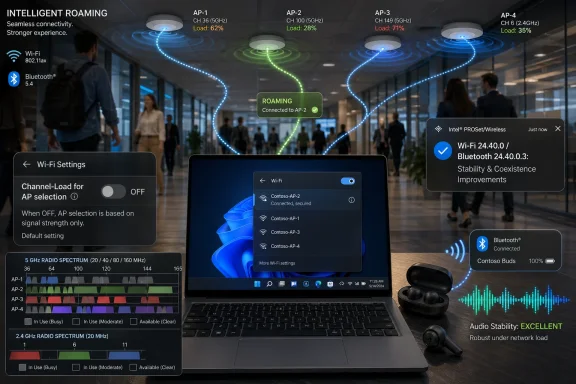
But the Wi-Fi changelog contains one unusually specific line. Intel has changed the default value of the Advanced setting “Channel-Load for AP selection” to disabled. That one sentence is the real story, because it suggests that a feature designed to make roaming smarter may also have created enough ambiguity in the field that Intel now prefers it off unless the user, OEM, or administrator decides otherwise.
The concept is simple: a nearby AP with a strong signal may still be a poor choice if its channel is congested. A slightly farther AP on a cleaner channel may deliver a better experience. Modern wireless networks increasingly depend on these kinds of contextual decisions, because the old model of “pick the loudest AP” breaks down when nearly every building has overlapping networks and every conference room is full of Bluetooth peripherals.
Yet roaming is also one of the least forgiving parts of client networking. If the client roams too slowly, users hit dead spots. If it roams too aggressively, calls drop, downloads stall, and users wonder why their laptop cannot sit still. If client-side roaming logic conflicts with enterprise controller logic, the network becomes a tug-of-war between infrastructure and endpoint.
That is why Intel’s decision to disable Channel-Load for AP selection by default is more interesting than the original addition of the option. The company is not removing the setting, at least based on the reported release notes. It is changing the default posture. In driver language, that is a quiet admission that smarter behavior is not always safer behavior.
Defaults matter because most users never visit Device Manager’s Advanced tab. Most administrators do not want every client making adventurous roaming decisions unless they have tested the behavior against their WLAN controllers, AP firmware, and physical layout. Intel is effectively moving Channel-Load from “assumed improvement” to “available tuning knob,” and that is the more conservative choice.
In 2026, the average Windows laptop is expected to handle a brutal wireless workload. It may be connected to a Wi-Fi 6E or Wi-Fi 7 network, paired with Bluetooth earbuds, tethered to a phone, talking to a mouse, syncing a smartwatch, and participating in a video call that punishes every burst of latency. The user sees one laptop. The radios see a scheduling problem.
Intel’s promise of better Wi-Fi and Bluetooth coexistence is therefore not a nicety. It is a response to the way people now use PCs. Bluetooth audio problems during heavy Wi-Fi traffic are especially visible because they interrupt meetings, not synthetic tests. A Wi-Fi driver can deliver excellent throughput in isolation and still produce a bad user experience if Bluetooth audio collapses when the network is busy.
This is also why wireless driver updates deserve more attention than they usually get. GPU drivers have trained users to expect visible changes: new game profiles, performance claims, bug fixes tied to specific titles. Network drivers are different. Their most important work often appears as the absence of failure.
A good wireless driver is not noticed. It lets the system roam, sleep, wake, pair, reconnect, and transfer without becoming the topic of conversation. Intel’s 24.40.0 release belongs to that category: the unglamorous maintenance layer that determines whether Windows feels polished on hardware that may otherwise be perfectly capable.
That list is notable for what it includes and what it no longer centers. Intel is carrying forward a substantial base of Wi-Fi 6, Wi-Fi 6E, and late 802.11ac hardware, which matters because Windows 10 and Windows 11 fleets are full of machines that are not brand new. At the same time, Intel is reminding users that the latest driver packages no longer include drivers for the Intel Wi-Fi 6 AX200 network card.
The AX200 omission will annoy some enthusiasts because that adapter was widely used, widely recommended, and often installed as an upgrade in desktops and older laptops. It helped bring Wi-Fi 6 to a large number of systems without requiring an entire platform refresh. But driver support lines eventually move, and Intel is drawing this one around its current consolidated package strategy.
For IT departments, that means the supported-hardware table is not a footnote. It is the deployment boundary. A fleet with AX201 and AX211 machines may be a straightforward candidate for testing the 24.40.0 package; a mixed environment with AX200 systems requires more careful inventory and possibly separate driver handling.
The industry often talks about Windows compatibility as if the operating system version is the main dividing line. In practice, the wireless adapter model can be just as important. A Windows 11 laptop with an unsupported wireless card is not helped by a shiny new package that does not contain its driver.
But the center of gravity has shifted. Wi-Fi 7 is a Windows 11-era feature story, especially on the newest PCs and chipsets. Intel’s BE-series adapters are arriving in systems designed for modern Windows 11 builds, newer platform power management, and the latest certification paths. Windows 10 compatibility is valuable, but it is not where the ecosystem’s energy is going.
This creates a familiar split for administrators. On one side are existing Windows 10 systems that need conservative, stable driver maintenance. On the other are Windows 11 systems where newer Wi-Fi 6E and Wi-Fi 7 capabilities make driver currency more important. The same Intel package may serve both, but the risk calculation is different.
A home user with a BE200 card may simply install the new driver and hope for better performance. An enterprise with hundreds of AX211 laptops should stage the update, validate roaming, test Bluetooth headsets, and watch sleep/resume behavior before wide deployment. Wireless updates are not firmware updates in name, but they can behave like them in effect.
But networking is not governed by slogans. In many environments, access point selection is already influenced by controller-side steering, band steering, minimum RSSI thresholds, 802.11k/v/r assistance, mesh logic, and vendor-specific algorithms. Add client-side channel-load weighting on top, and behavior can become difficult to predict.
That does not mean Channel-Load is bad. It means the feature belongs in the administrator’s toolkit, not necessarily in the default path for every laptop. A university campus with high-density Wi-Fi may want to test it. A small office with commodity mesh gear may be better off leaving it disabled. A home with two APs and sticky roaming problems might benefit, but only if the user is comfortable experimenting and rolling back.
The change also reflects an uncomfortable truth: client roaming is still not standardized in the way users assume it is. Standards can define capabilities, but the final roaming decision often belongs to the client device. Two laptops in the same hallway may make different choices because their drivers, firmware, antennas, and power policies differ.
By disabling Channel-Load by default, Intel is choosing predictability over theoretical optimization. That is not timid. It is responsible engineering for a driver distributed across countless OEM designs and network environments.
Still, “latest” is not always synonymous with “best for your specific machine.” Laptop OEMs often customize drivers, tune power behavior, and validate packages against their own BIOS and antenna designs. Installing Intel’s generic package can fix problems faster than waiting for an OEM update, but it can also bypass vendor validation.
That trade-off is familiar to Windows enthusiasts. If a system is working perfectly, there is no moral obligation to update a wireless driver on day one. If it is dropping Wi-Fi, refusing to reconnect after sleep, or mangling Bluetooth audio, the new Intel package is a rational first step.
A sensible home-user approach is simple:
The key question is not whether the driver installs. It is whether the driver behaves correctly in the environments where users actually move. Conference rooms, stairwells, warehouses, classrooms, hot desks, and docking stations reveal wireless bugs that a lab bench cannot. Bluetooth headset testing should be part of the validation plan, not an afterthought.
This is especially true for organizations that rely on voice and video collaboration. A driver that improves throughput but causes Bluetooth microphone glitches is a failed update for knowledge workers. Conversely, a driver that modestly improves coexistence may be worth deploying even if synthetic Wi-Fi performance is unchanged.
Administrators should also inventory AX200 systems before assuming a single Intel package covers the fleet. Intel’s reminder that newer packages no longer include AX200 drivers is the kind of detail that becomes painful only after help desk tickets arrive. Driver management is not merely about version numbers; it is about mapping packages to hardware generations.
The safest enterprise interpretation is this: Intel is continuing to maintain the active Windows wireless stack, but not every once-mainstream adapter remains inside the newest lane. That is normal, but it requires operational discipline.
This is not an Intel-only problem. Driver changelogs across the PC industry are often written for legal safety and support efficiency rather than technical clarity. Users get a handful of broad categories, a supported hardware list, and the encouragement to update. What they rarely get is a map from symptom to fix.
That opacity has consequences. If a Bluetooth headset fails during calls, users want to know whether the new driver touches audio profile handling, power management, coexistence timing, or device reconnection. If Wi-Fi roaming is unstable, administrators want to know whether the change affects 802.11k/v interpretation, scan intervals, band preference, or AP scoring. Instead, they often receive “better performance.”
The irony is that Intel’s one specific line about Channel-Load is precisely the kind of detail that makes a release note valuable. It gives technically literate users something to test. It tells network administrators which behavior may have changed. It also helps explain why a machine might act differently after installation.
Vendors do not need to publish every internal bug ID, but driver release notes should meet the user halfway. Wireless drivers sit at the intersection of hardware, OS, firmware, routers, and human mobility. Vague changelogs make that intersection harder to manage.
The real competition is reliability. Does the laptop reconnect instantly after waking? Does it stay associated during a call? Does it roam without drama? Does Bluetooth audio remain clean while a large download runs? Does the system avoid the dreaded cycle of disabling and re-enabling the adapter in Device Manager?
Intel’s 24.40.0 driver is best understood through that lens. It is not a launch vehicle for a new wireless era. It is maintenance on the foundation that makes the new wireless era tolerable. Users may buy Wi-Fi 7 laptops for speed, but they judge them by whether the connection behaves under stress.
That is why coexistence improvements matter as much as Wi-Fi-specific fixes. A modern PC’s wireless experience is holistic. Users do not separate the Wi-Fi radio from the Bluetooth radio when their earbuds stutter during a cloud backup. They blame the laptop.
Intel, Microsoft, OEMs, and router vendors all share that blame when things go wrong. But driver updates are one of the few levers that can improve a shipped PC without replacing hardware. That makes even modest releases worth watching.
Users with AX200 hardware should not try to force a driver package that does not support the adapter. They should use the appropriate older package, an OEM-provided driver, or the version delivered through Windows Update if that is the supported path. Chasing the newest number can be counterproductive when the package has moved on.
This is also a lesson in how quietly support boundaries shift. A GPU losing day-one game optimization is obvious. A wireless card falling out of a consolidated driver package is quieter, but it affects daily computing just as directly. The PC may still work, but the path to fixes narrows.
For businesses, that matters in lifecycle planning. Wireless adapters are often treated as incidental components, beneath CPU, memory, storage, and TPM requirements. But in a mobile workforce, the wireless card can determine whether a machine remains pleasant to support.
A laptop that still meets performance needs but depends on aging network drivers may become a hidden liability. That does not mean replacing it immediately. It means driver support should be part of the hardware lifecycle conversation, not an afterthought discovered during a connectivity incident.
Windows 10 and Windows 11 also differ in the way new platform capabilities are prioritized. A driver package may support both operating systems, but that does not mean every feature, certification path, or vendor validation story is identical. New wireless generations naturally align with the newer OS.
Microsoft’s driver ecosystem is both a strength and a source of friction. Windows Update can get fixes to large numbers of users without requiring them to know what an AX211 is. But it can also deliver drivers at inconvenient times, override OEM packages, or create confusion when Intel’s direct download, the PC manufacturer’s support page, and Windows Update do not show the same version.
For enthusiasts, that means Device Manager remains both useful and dangerous. It can reveal the adapter model, driver version, and advanced settings, but it also invites experimentation that may not be appropriate for every user. For administrators, it reinforces the value of controlled deployment tools and update rings.
The best driver is not simply the newest one. It is the newest one that has been validated against the hardware, OS build, network environment, and user workload. Intel can publish the package; Microsoft and OEMs help determine how safely it reaches the installed base.
The Channel-Load default change is especially revealing because it shows a vendor tuning not just for capability but for field behavior. Features are easy to add to a release note. Defaults are harder because they express a judgment about what should happen on millions of unknown systems.
In this case, Intel appears to be saying that channel-load-aware AP selection is useful enough to keep but not universal enough to enable by default. That is a mature stance. It respects the diversity of home routers, enterprise WLAN controllers, mesh systems, apartment interference, and laptop designs.
The broader lesson is that wireless progress is no longer just about faster radios. It is about policy, heuristics, coexistence, and conservative defaults. The radio spec may say one thing; the lived Windows experience depends on the driver’s thousand small decisions.
For Windows users, the practical advice is equally grounded. Update when the new driver addresses your pain or when your organization has validated it. Do not assume every advanced setting should be enabled because it sounds smarter. And do not ignore wireless driver releases simply because they lack the drama of a Patch Tuesday security bulletin.
Intel’s latest Wi-Fi and Bluetooth drivers are not a revolution, and that is precisely why they matter: modern PC connectivity is improved less by grand announcements than by careful defaults, quieter coexistence fixes, and the willingness to make a feature optional when the real world proves more complicated than the lab. As Windows 11 systems push further into Wi-Fi 7 and Windows 10 fleets continue their long tail, the winners will be the platforms that make wireless feel uneventful — because uneventful is what reliable technology looks like.
Source: Neowin Intel improves Windows 11 and 10 Wi-Fi and Bluetooth with new drivers
 Intel’s Driver Update Is Small Because the Problem Is Everywhere
Wireless networking on modern Windows PCs has become one of those technologies that is simultaneously mature and maddening. Wi-Fi 6, Wi-Fi 6E, and Wi-Fi 7 promise ever-higher theoretical throughput, lower latency, and smarter spectrum use, yet users still complain about laptops clinging to weak access points, Bluetooth earbuds stuttering during video calls, and machines waking from sleep with radios that need a restart before behaving. Intel’s 24.40.0 Wi-Fi driver release does not claim to solve all of that, and it would be suspicious if it did.Instead, Intel’s changelog reads like the maintenance notes of a company shaving down edge cases: better system stability, better connection performance, and better coexistence between Wi-Fi and Bluetooth. These are not flashy bullet points, but they are exactly the sort of fixes that matter on real hardware. A laptop that reconnects half a second faster after resume, roams less aggressively during a Teams call, or avoids Bluetooth audio crackle under heavy Wi-Fi traffic is not benchmark glory. It is the difference between a machine feeling reliable and one feeling cursed.
The Bluetooth package is even more understated. Version 24.40.0.3 is described as including functional updates, with Intel encouraging users to update for best performance. That phrasing is intentionally broad, and it gives enterprises little to work with beyond the usual inference: this is a maintenance release, not a feature launch.
But the Wi-Fi changelog contains one unusually specific line. Intel has changed the default value of the Advanced setting “Channel-Load for AP selection” to disabled. That one sentence is the real story, because it suggests that a feature designed to make roaming smarter may also have created enough ambiguity in the field that Intel now prefers it off unless the user, OEM, or administrator decides otherwise.
The Smart Roaming Idea Meets the Dumb Reality of Real Networks
Channel-load-aware access point selection sounds sensible. If a client can see not only signal strength but also how busy a channel is, it can theoretically make a better decision about which access point to join. In a house with multiple mesh nodes, an office with dense ceiling-mounted APs, or a school where hundreds of devices roam through corridors, signal strength alone is a crude way to decide where a laptop belongs.The concept is simple: a nearby AP with a strong signal may still be a poor choice if its channel is congested. A slightly farther AP on a cleaner channel may deliver a better experience. Modern wireless networks increasingly depend on these kinds of contextual decisions, because the old model of “pick the loudest AP” breaks down when nearly every building has overlapping networks and every conference room is full of Bluetooth peripherals.
Yet roaming is also one of the least forgiving parts of client networking. If the client roams too slowly, users hit dead spots. If it roams too aggressively, calls drop, downloads stall, and users wonder why their laptop cannot sit still. If client-side roaming logic conflicts with enterprise controller logic, the network becomes a tug-of-war between infrastructure and endpoint.
That is why Intel’s decision to disable Channel-Load for AP selection by default is more interesting than the original addition of the option. The company is not removing the setting, at least based on the reported release notes. It is changing the default posture. In driver language, that is a quiet admission that smarter behavior is not always safer behavior.
Defaults matter because most users never visit Device Manager’s Advanced tab. Most administrators do not want every client making adventurous roaming decisions unless they have tested the behavior against their WLAN controllers, AP firmware, and physical layout. Intel is effectively moving Channel-Load from “assumed improvement” to “available tuning knob,” and that is the more conservative choice.
Wi-Fi and Bluetooth Are Still Fighting Over the Same Laptop
The coexistence note is the other practical fix hiding in plain sight. Wi-Fi and Bluetooth have lived together for years, but “together” has always involved negotiation. Both technologies can operate in the 2.4GHz band, and many laptops route their wireless behavior through compact modules, shared antennas, tight thermal envelopes, and firmware coordination that users never see.In 2026, the average Windows laptop is expected to handle a brutal wireless workload. It may be connected to a Wi-Fi 6E or Wi-Fi 7 network, paired with Bluetooth earbuds, tethered to a phone, talking to a mouse, syncing a smartwatch, and participating in a video call that punishes every burst of latency. The user sees one laptop. The radios see a scheduling problem.
Intel’s promise of better Wi-Fi and Bluetooth coexistence is therefore not a nicety. It is a response to the way people now use PCs. Bluetooth audio problems during heavy Wi-Fi traffic are especially visible because they interrupt meetings, not synthetic tests. A Wi-Fi driver can deliver excellent throughput in isolation and still produce a bad user experience if Bluetooth audio collapses when the network is busy.
This is also why wireless driver updates deserve more attention than they usually get. GPU drivers have trained users to expect visible changes: new game profiles, performance claims, bug fixes tied to specific titles. Network drivers are different. Their most important work often appears as the absence of failure.
A good wireless driver is not noticed. It lets the system roam, sleep, wake, pair, reconnect, and transfer without becoming the topic of conversation. Intel’s 24.40.0 release belongs to that category: the unglamorous maintenance layer that determines whether Windows feels polished on hardware that may otherwise be perfectly capable.
The Supported Hardware List Shows the New Center of Gravity
The new Wi-Fi driver supports Intel’s recent client wireless lineup, including Wi-Fi 7 BE213, BE211, BE202, BE201, and BE200 adapters; Wi-Fi 6E AX411, AX211, and AX210; Wi-Fi 6 AX203, AX201, and AX101; and several Wireless-AC 9000-series parts such as the 9560, 9461, 9462, and 9260. The Bluetooth driver’s supported list broadly follows the same modern platform range.That list is notable for what it includes and what it no longer centers. Intel is carrying forward a substantial base of Wi-Fi 6, Wi-Fi 6E, and late 802.11ac hardware, which matters because Windows 10 and Windows 11 fleets are full of machines that are not brand new. At the same time, Intel is reminding users that the latest driver packages no longer include drivers for the Intel Wi-Fi 6 AX200 network card.
The AX200 omission will annoy some enthusiasts because that adapter was widely used, widely recommended, and often installed as an upgrade in desktops and older laptops. It helped bring Wi-Fi 6 to a large number of systems without requiring an entire platform refresh. But driver support lines eventually move, and Intel is drawing this one around its current consolidated package strategy.
For IT departments, that means the supported-hardware table is not a footnote. It is the deployment boundary. A fleet with AX201 and AX211 machines may be a straightforward candidate for testing the 24.40.0 package; a mixed environment with AX200 systems requires more careful inventory and possibly separate driver handling.
The industry often talks about Windows compatibility as if the operating system version is the main dividing line. In practice, the wireless adapter model can be just as important. A Windows 11 laptop with an unsupported wireless card is not helped by a shiny new package that does not contain its driver.
Windows 10 Support Persists, but the Future Is Clearly Windows 11
Intel’s package remains relevant to Windows 10 and Windows 11 users, which is important because Windows 10 is still alive in many businesses and homes even as its consumer support runway has narrowed. Wireless hardware does not become irrelevant just because Microsoft’s OS marketing has moved on. A stable network driver for Windows 10 can still be the difference between keeping a fleet productive and accelerating replacement plans.But the center of gravity has shifted. Wi-Fi 7 is a Windows 11-era feature story, especially on the newest PCs and chipsets. Intel’s BE-series adapters are arriving in systems designed for modern Windows 11 builds, newer platform power management, and the latest certification paths. Windows 10 compatibility is valuable, but it is not where the ecosystem’s energy is going.
This creates a familiar split for administrators. On one side are existing Windows 10 systems that need conservative, stable driver maintenance. On the other are Windows 11 systems where newer Wi-Fi 6E and Wi-Fi 7 capabilities make driver currency more important. The same Intel package may serve both, but the risk calculation is different.
A home user with a BE200 card may simply install the new driver and hope for better performance. An enterprise with hundreds of AX211 laptops should stage the update, validate roaming, test Bluetooth headsets, and watch sleep/resume behavior before wide deployment. Wireless updates are not firmware updates in name, but they can behave like them in effect.
The Channel-Load Default Is a Warning About “Intelligent” Clients
The most telling part of this release is that Intel is not merely adding intelligence; it is restraining it. Channel-load-based AP selection is the kind of feature that sounds obviously beneficial in a product briefing. More data should mean better decisions. A client that understands congestion should outperform one that only sees signal strength.But networking is not governed by slogans. In many environments, access point selection is already influenced by controller-side steering, band steering, minimum RSSI thresholds, 802.11k/v/r assistance, mesh logic, and vendor-specific algorithms. Add client-side channel-load weighting on top, and behavior can become difficult to predict.
That does not mean Channel-Load is bad. It means the feature belongs in the administrator’s toolkit, not necessarily in the default path for every laptop. A university campus with high-density Wi-Fi may want to test it. A small office with commodity mesh gear may be better off leaving it disabled. A home with two APs and sticky roaming problems might benefit, but only if the user is comfortable experimenting and rolling back.
The change also reflects an uncomfortable truth: client roaming is still not standardized in the way users assume it is. Standards can define capabilities, but the final roaming decision often belongs to the client device. Two laptops in the same hallway may make different choices because their drivers, firmware, antennas, and power policies differ.
By disabling Channel-Load by default, Intel is choosing predictability over theoretical optimization. That is not timid. It is responsible engineering for a driver distributed across countless OEM designs and network environments.
Enthusiasts Should Update, but Not Blindly
For individual users, the case for installing the new drivers is fairly strong if the hardware is supported and the system has been experiencing Wi-Fi or Bluetooth instability. Intel’s release notes point directly at stability, connection performance, and coexistence improvements. Those are the exact categories that affect day-to-day use.Still, “latest” is not always synonymous with “best for your specific machine.” Laptop OEMs often customize drivers, tune power behavior, and validate packages against their own BIOS and antenna designs. Installing Intel’s generic package can fix problems faster than waiting for an OEM update, but it can also bypass vendor validation.
That trade-off is familiar to Windows enthusiasts. If a system is working perfectly, there is no moral obligation to update a wireless driver on day one. If it is dropping Wi-Fi, refusing to reconnect after sleep, or mangling Bluetooth audio, the new Intel package is a rational first step.
A sensible home-user approach is simple:
- Confirm that the wireless adapter is actually on Intel’s supported list before installing the package.
- Create a restore point or keep a copy of the current working driver available before changing anything.
- Test the behaviors that matter most after installation, including sleep and resume, Bluetooth audio, video calls, roaming between access points, and large downloads.
- Leave Channel-Load for AP selection disabled unless there is a specific roaming problem worth testing against.
- If a laptop vendor provides a newer customized driver package, prefer that route for machines with unusual power or antenna behavior.
Enterprise IT Should Treat This as a Roaming Change, Not a Routine Patch
For administrators, the 24.40.0 Wi-Fi release should go into the normal pilot ring, not straight to broad deployment. The stability and coexistence fixes are appealing, but the Channel-Load default change introduces a behavior difference worth documenting. Even if the setting is now disabled by default, any prior configuration baselines or registry customizations should be checked.The key question is not whether the driver installs. It is whether the driver behaves correctly in the environments where users actually move. Conference rooms, stairwells, warehouses, classrooms, hot desks, and docking stations reveal wireless bugs that a lab bench cannot. Bluetooth headset testing should be part of the validation plan, not an afterthought.
This is especially true for organizations that rely on voice and video collaboration. A driver that improves throughput but causes Bluetooth microphone glitches is a failed update for knowledge workers. Conversely, a driver that modestly improves coexistence may be worth deploying even if synthetic Wi-Fi performance is unchanged.
Administrators should also inventory AX200 systems before assuming a single Intel package covers the fleet. Intel’s reminder that newer packages no longer include AX200 drivers is the kind of detail that becomes painful only after help desk tickets arrive. Driver management is not merely about version numbers; it is about mapping packages to hardware generations.
The safest enterprise interpretation is this: Intel is continuing to maintain the active Windows wireless stack, but not every once-mainstream adapter remains inside the newest lane. That is normal, but it requires operational discipline.
The Release Notes Say Less Than Users Need
Intel’s release notes, like many vendor driver notes, are useful but incomplete. “Functional updates” is a phrase that can cover anything from a minor compatibility tweak to a meaningful fix for a real-world failure. It protects the vendor, but it leaves users and administrators guessing about whether a known annoyance has been addressed.This is not an Intel-only problem. Driver changelogs across the PC industry are often written for legal safety and support efficiency rather than technical clarity. Users get a handful of broad categories, a supported hardware list, and the encouragement to update. What they rarely get is a map from symptom to fix.
That opacity has consequences. If a Bluetooth headset fails during calls, users want to know whether the new driver touches audio profile handling, power management, coexistence timing, or device reconnection. If Wi-Fi roaming is unstable, administrators want to know whether the change affects 802.11k/v interpretation, scan intervals, band preference, or AP scoring. Instead, they often receive “better performance.”
The irony is that Intel’s one specific line about Channel-Load is precisely the kind of detail that makes a release note valuable. It gives technically literate users something to test. It tells network administrators which behavior may have changed. It also helps explain why a machine might act differently after installation.
Vendors do not need to publish every internal bug ID, but driver release notes should meet the user halfway. Wireless drivers sit at the intersection of hardware, OS, firmware, routers, and human mobility. Vague changelogs make that intersection harder to manage.
The Real Competition Is Reliability, Not Peak Speed
The PC industry still loves wireless throughput numbers. Wi-Fi 7 marketing leans heavily on channels, bands, multi-link operation, and theoretical maximums that most users will never see. Those capabilities matter, especially for high-end networks and future devices, but they are not the primary pain point for most Windows users.The real competition is reliability. Does the laptop reconnect instantly after waking? Does it stay associated during a call? Does it roam without drama? Does Bluetooth audio remain clean while a large download runs? Does the system avoid the dreaded cycle of disabling and re-enabling the adapter in Device Manager?
Intel’s 24.40.0 driver is best understood through that lens. It is not a launch vehicle for a new wireless era. It is maintenance on the foundation that makes the new wireless era tolerable. Users may buy Wi-Fi 7 laptops for speed, but they judge them by whether the connection behaves under stress.
That is why coexistence improvements matter as much as Wi-Fi-specific fixes. A modern PC’s wireless experience is holistic. Users do not separate the Wi-Fi radio from the Bluetooth radio when their earbuds stutter during a cloud backup. They blame the laptop.
Intel, Microsoft, OEMs, and router vendors all share that blame when things go wrong. But driver updates are one of the few levers that can improve a shipped PC without replacing hardware. That makes even modest releases worth watching.
The AX200 Cutoff Is a Reminder That “Supported” Is a Moving Target
The Intel Wi-Fi 6 AX200 deserves special mention because it was, for a time, a default recommendation in enthusiast circles. It offered a relatively cheap path to Wi-Fi 6, appeared in many systems, and became familiar to anyone upgrading desktop wireless. Its absence from the latest driver packages does not make those systems obsolete, but it does complicate the update story.Users with AX200 hardware should not try to force a driver package that does not support the adapter. They should use the appropriate older package, an OEM-provided driver, or the version delivered through Windows Update if that is the supported path. Chasing the newest number can be counterproductive when the package has moved on.
This is also a lesson in how quietly support boundaries shift. A GPU losing day-one game optimization is obvious. A wireless card falling out of a consolidated driver package is quieter, but it affects daily computing just as directly. The PC may still work, but the path to fixes narrows.
For businesses, that matters in lifecycle planning. Wireless adapters are often treated as incidental components, beneath CPU, memory, storage, and TPM requirements. But in a mobile workforce, the wireless card can determine whether a machine remains pleasant to support.
A laptop that still meets performance needs but depends on aging network drivers may become a hidden liability. That does not mean replacing it immediately. It means driver support should be part of the hardware lifecycle conversation, not an afterthought discovered during a connectivity incident.
Microsoft’s Role Is the Quiet One, but It Still Matters
Because these are Intel drivers, it is tempting to treat Windows as a passive platform. That is too simple. Windows networking, power management, Bluetooth audio handling, Modern Standby, Windows Update driver delivery, and enterprise device management all influence how these packages land on real machines.Windows 10 and Windows 11 also differ in the way new platform capabilities are prioritized. A driver package may support both operating systems, but that does not mean every feature, certification path, or vendor validation story is identical. New wireless generations naturally align with the newer OS.
Microsoft’s driver ecosystem is both a strength and a source of friction. Windows Update can get fixes to large numbers of users without requiring them to know what an AX211 is. But it can also deliver drivers at inconvenient times, override OEM packages, or create confusion when Intel’s direct download, the PC manufacturer’s support page, and Windows Update do not show the same version.
For enthusiasts, that means Device Manager remains both useful and dangerous. It can reveal the adapter model, driver version, and advanced settings, but it also invites experimentation that may not be appropriate for every user. For administrators, it reinforces the value of controlled deployment tools and update rings.
The best driver is not simply the newest one. It is the newest one that has been validated against the hardware, OS build, network environment, and user workload. Intel can publish the package; Microsoft and OEMs help determine how safely it reaches the installed base.
This Is What Mature Platform Work Looks Like
There is a tendency to dismiss maintenance drivers as boring. That is understandable but wrong. Mature platform work is often a series of small decisions that prevent users from noticing the platform at all. Intel’s 24.40.0 Wi-Fi and 24.40.0.3 Bluetooth releases fit that pattern.The Channel-Load default change is especially revealing because it shows a vendor tuning not just for capability but for field behavior. Features are easy to add to a release note. Defaults are harder because they express a judgment about what should happen on millions of unknown systems.
In this case, Intel appears to be saying that channel-load-aware AP selection is useful enough to keep but not universal enough to enable by default. That is a mature stance. It respects the diversity of home routers, enterprise WLAN controllers, mesh systems, apartment interference, and laptop designs.
The broader lesson is that wireless progress is no longer just about faster radios. It is about policy, heuristics, coexistence, and conservative defaults. The radio spec may say one thing; the lived Windows experience depends on the driver’s thousand small decisions.
For Windows users, the practical advice is equally grounded. Update when the new driver addresses your pain or when your organization has validated it. Do not assume every advanced setting should be enabled because it sounds smarter. And do not ignore wireless driver releases simply because they lack the drama of a Patch Tuesday security bulletin.
Intel’s latest Wi-Fi and Bluetooth drivers are not a revolution, and that is precisely why they matter: modern PC connectivity is improved less by grand announcements than by careful defaults, quieter coexistence fixes, and the willingness to make a feature optional when the real world proves more complicated than the lab. As Windows 11 systems push further into Wi-Fi 7 and Windows 10 fleets continue their long tail, the winners will be the platforms that make wireless feel uneventful — because uneventful is what reliable technology looks like.
Source: Neowin Intel improves Windows 11 and 10 Wi-Fi and Bluetooth with new drivers
