

Intel has released XPU Manager 2.0, a major update to its open-source GPU administration tool that broadens Windows and Linux management for Arc Pro graphics cards, with the change surfacing in June 2026 through Intel’s GitHub-hosted packages and Phoronix’s reporting. The release is not a driver glamour shot or a gaming headline; it is a plumbing story. But for Intel’s workstation ambitions, plumbing is exactly where credibility is won or lost.
Intel’s discrete GPU story has spent years being judged by consumer metrics: game compatibility, driver maturity, ray tracing performance, XeSS support, and whether Arc can survive the brutal comparison against Nvidia and AMD in the desktop channel. XPU Manager 2.0 points to a different battleground. Intel is trying to make Arc Pro feel less like an interesting graphics card and more like an administrable platform.
That distinction matters. Workstation buyers, AI experimenters, small render farms, and sysadmins do not merely ask whether a GPU can run a workload. They ask whether it can be monitored, updated, diagnosed, power-limited, scripted, and recovered without turning every machine into a one-off science project.
XPU Manager already existed as Intel’s management layer for data center GPUs, tied into oneAPI Level Zero system management interfaces and designed for local command-line use, REST-based remote administration, telemetry export, diagnostics, and firmware updates. The significance of version 2.0 is that Intel is pushing that management logic more visibly into the Arc Pro era, where Windows workstations and Linux boxes increasingly sit side by side.
That is a practical admission. Arc Pro is not going to win professional mindshare on silicon alone. It needs the boring tools that make administrators comfortable deploying hardware they may never physically touch again.
That matters because professional GPU deployments are increasingly hybrid. A small AI lab may have Linux inference boxes in a rack, Windows 11 Pro workstations under desks, and Windows Server machines handling remote graphics or virtualization-adjacent tasks. If the GPU vendor’s tooling fractures across those environments, the hardware becomes more expensive to operate than its purchase price suggests.
Historically, Intel’s strongest open-source GPU story has been on Linux, where kernel, Mesa, compute, and oneAPI components can move in public. Windows, by contrast, is where workstation buyers often expect polished installers, familiar device management behavior, and vendor utilities that do not require reading half a GitHub issue thread to understand.
XPU Manager 2.0 does not magically erase all of Intel’s Windows gaps. The company’s own documentation has long differentiated between fuller Linux support and more limited Windows feature sets in some management contexts. But the direction of travel is important: Intel is acknowledging that Arc Pro needs a management surface on both operating systems if it wants to be taken seriously outside enthusiast tinkering.
The less charitable reading is that Intel is still catching up to a standard Nvidia made normal long ago. The more interesting reading is that Intel is choosing to compete where it can create leverage: open tooling, cross-platform management, and enough scriptability to appeal to administrators who would rather automate than babysit.
That is why a management tool can be more consequential than it looks. A GPU with 24GB or 32GB of memory is useful. A multi-GPU workstation that can report telemetry, expose firmware state, surface health data, and accept configuration changes from a consistent command-line interface is a product a sysadmin can rationalize.
This is especially true for Windows users who are GPU-curious but Nvidia-dependent. CUDA remains the gravity well. Intel cannot wish that away with a version bump. What it can do is reduce every other source of friction until the remaining question is workload compatibility rather than operational anxiety.
XPU Manager’s feature set speaks directly to that operational layer. Inventory, topology, telemetry, diagnostics, firmware flashing, power and clock management, health status, policy settings, Prometheus-friendly monitoring, and REST integration are not marketing decorations. They are the verbs administrators use when they turn a pile of hardware into infrastructure.
Intel’s challenge is to make those verbs dependable across the exact systems Arc Pro buyers will deploy. Version 2.0 is therefore less about one utility than about whether Intel can present Arc Pro as a manageable fleet component instead of a promising card with asterisk-heavy software.
But the workstation market is not a Linux monoculture. Architects, creators, engineers, local AI developers, and IT departments often need Windows because the rest of the workflow demands it. That makes Windows management not a nice-to-have but a ceiling on Arc Pro adoption.
The uncomfortable truth for Intel is that professional GPU buyers do not grade on novelty. They compare against established behavior. They expect firmware updates that do not feel risky, telemetry that can be scraped, diagnostics that produce actionable answers, and drivers that do not make administrators wonder whether the Linux and Windows sides of the house are living in different centuries.
XPU Manager 2.0 is a step toward reducing that mismatch. It gives Intel a common management vocabulary, even if every feature does not necessarily land with identical depth across platforms. For IT pros, consistency matters almost as much as completeness, because inconsistent tools generate hidden labor.
The bigger lesson is that Intel’s GPU stack is maturing in the least flashy but most necessary direction. Driver performance gets headlines. Management tooling gets purchase orders.
Intel cannot cross that moat by declaring Arc Pro cheaper or more open. It has to build enough surrounding infrastructure that a buyer can imagine deploying Intel GPUs without assembling a custom support culture around them. XPU Manager is one of the pieces that makes that imagination plausible.
The comparison is not entirely unfavorable to Intel. Intel’s embrace of open-source components, its willingness to expose tooling through GitHub, and its alignment with Linux management norms give it a different kind of appeal. For administrators allergic to opaque black boxes, Intel can argue that manageability and transparency are part of the product.
But transparency is not a substitute for maturity. A public tool that fails under pressure is merely a public failure. Intel has to prove that XPU Manager’s expanded role is accompanied by boring reliability: accurate metrics, safe firmware workflows, predictable output formats, and documentation that stays current with the hardware.
That is where version 2.0 becomes a credibility test. Major-version releases invite scrutiny. If Intel wants Arc Pro to be evaluated as infrastructure, it must accept infrastructure-grade expectations.
XPU Manager’s emphasis on telemetry and firmware management is therefore not peripheral. It goes directly to uptime and repeatability. A tool that can tell an admin what firmware is installed, what temperatures look like, how much memory bandwidth is being consumed, and whether diagnostics pass is the difference between managed hardware and guesswork.
This is also where Windows and Linux parity becomes more than a slogan. A Linux render node and a Windows workstation may run different workloads, but they can fail in similar ways. If IT teams can query both using a familiar toolchain, they gain a shared operational model.
Intel’s documentation has positioned XPU Manager as both a local CLI tool and something that can integrate through remote APIs and monitoring stacks. That layered approach is sensible. The same utility family can serve a developer checking a card at a desk, an admin collecting telemetry across machines, or a cluster operator feeding GPU metrics into Grafana.
The risk is complexity. Intel now has to make sure the product naming, packaging, feature availability, and command behavior do not become a maze. “XPU Manager,” “XPU-SMI,” Windows CLI support, Linux support, daemon-based and daemon-less modes, REST interfaces, and device-specific capabilities all need crisp boundaries if the tool is to attract administrators rather than repel them.
Intel has been positioning Arc Pro B-series hardware for that world, especially where VRAM capacity and workstation pricing can make an alternative to higher-cost GPUs attractive. But AI workloads magnify software weaknesses. If a model crashes, a framework lacks acceleration, or a driver update changes behavior, users quickly return to the vendor with the most proven stack.
XPU Manager does not solve framework compatibility. It does not turn every CUDA-first project into a oneAPI success story. It does, however, address the layer beneath those fights: whether the hardware can be observed, configured, and maintained without folklore.
That is a necessary precondition for broader adoption. A developer may tolerate rough edges on a hobby machine. A small business deploying several AI workstations will not tolerate mystery failures, undocumented firmware drift, or a support workflow that starts with “try reseating the card.”
The lesson from the CPU and server worlds is clear. Manageability becomes part of performance because downtime, uncertainty, and manual intervention are costs. Intel knows this language. The question is whether it can translate that institutional knowledge into a GPU business still fighting for software legitimacy.
That visibility helps Intel in the enthusiast and sysadmin communities. It creates confidence that problems can be observed and, at least sometimes, understood. It also gives early adopters a reason to believe the platform is moving even when finished polish lags.
But open development can also expose fragmentation. Users see device IDs arrive before products ship, features appear in one stack before another, and documentation trail real-world behavior. That is normal in open ecosystems, but it is not always reassuring to businesses comparing hardware for production use.
XPU Manager 2.0 sits at the intersection of those strengths and weaknesses. As an open management layer, it can win trust by being inspectable, scriptable, and aligned with Linux operational norms. As a product used by Windows and Linux administrators, it must also feel cohesive, tested, and supported.
Intel’s opportunity is to make openness feel like a support advantage rather than a development diary. That requires discipline. It means clean releases, practical examples, sane defaults, and compatibility notes that speak to users rather than only to engineers.
Administrators are not hostile to alternatives. Many would welcome more competition in professional GPUs, especially if it pressures pricing and reduces dependence on a single vendor. But they are paid to distrust novelty until it proves itself.
A management utility can change that conversation because it gives concrete answers. Yes, we can see the firmware version. Yes, we can monitor utilization. Yes, we can run diagnostics. Yes, we can export telemetry. Yes, we can script configuration. These are the operational assurances that turn “interesting hardware” into “deployable hardware.”
The Windows piece is particularly important because Windows-heavy organizations often have less tolerance for Linux-style assembly. They expect vendor packages, documented commands, and supportable workflows. If Intel wants Arc Pro in those environments, it must make XPU Manager feel like a professional utility, not a developer sidecar.
That does not mean hiding the complexity. It means packaging it in a way that respects the person who will be blamed when the system fails.
XPU Manager 2.0 is not a knockout blow. It is a time-buying move, and that is not an insult. Good management tooling gives hardware room to mature because it lowers the pain of living with imperfection.
If Arc Pro has a driver quirk, an admin with telemetry and diagnostics can isolate it faster. If firmware updates matter, a documented tool reduces the fear of applying them. If a workload behaves differently across Windows and Linux, shared device visibility narrows the troubleshooting gap.
That is the strategic value. Intel does not have to make Arc Pro flawless overnight. It has to make Arc Pro manageable enough that early professional buyers do not feel abandoned while the stack evolves.
This is a very Intel kind of play: less spectacular than a benchmark win, but potentially more durable. The company’s server heritage shows in the assumption that manageability, telemetry, and fleet behavior are not optional extras. For Arc Pro, that assumption is finally moving closer to the center of the product.
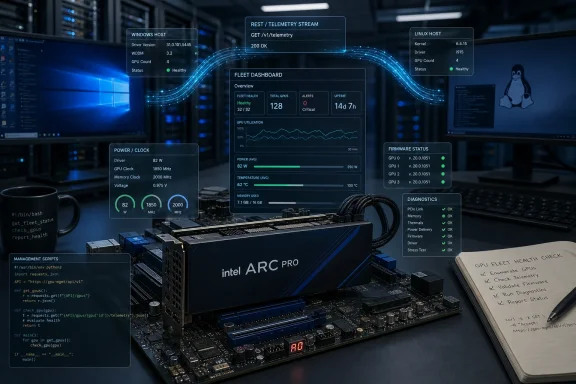 Intel’s GPU Pitch Moves From Frames Per Second to Fleet Control
Intel’s discrete GPU story has spent years being judged by consumer metrics: game compatibility, driver maturity, ray tracing performance, XeSS support, and whether Arc can survive the brutal comparison against Nvidia and AMD in the desktop channel. XPU Manager 2.0 points to a different battleground. Intel is trying to make Arc Pro feel less like an interesting graphics card and more like an administrable platform.That distinction matters. Workstation buyers, AI experimenters, small render farms, and sysadmins do not merely ask whether a GPU can run a workload. They ask whether it can be monitored, updated, diagnosed, power-limited, scripted, and recovered without turning every machine into a one-off science project.
XPU Manager already existed as Intel’s management layer for data center GPUs, tied into oneAPI Level Zero system management interfaces and designed for local command-line use, REST-based remote administration, telemetry export, diagnostics, and firmware updates. The significance of version 2.0 is that Intel is pushing that management logic more visibly into the Arc Pro era, where Windows workstations and Linux boxes increasingly sit side by side.
That is a practical admission. Arc Pro is not going to win professional mindshare on silicon alone. It needs the boring tools that make administrators comfortable deploying hardware they may never physically touch again.
The Windows Angle Is the Part Intel Could Not Afford to Treat as Secondary
For WindowsForum readers, the headline is not simply that Intel has a GPU management utility. It is that Intel is continuing to treat Windows management as part of the Arc Pro equation, rather than leaving serious tooling as a Linux-first afterthought.That matters because professional GPU deployments are increasingly hybrid. A small AI lab may have Linux inference boxes in a rack, Windows 11 Pro workstations under desks, and Windows Server machines handling remote graphics or virtualization-adjacent tasks. If the GPU vendor’s tooling fractures across those environments, the hardware becomes more expensive to operate than its purchase price suggests.
Historically, Intel’s strongest open-source GPU story has been on Linux, where kernel, Mesa, compute, and oneAPI components can move in public. Windows, by contrast, is where workstation buyers often expect polished installers, familiar device management behavior, and vendor utilities that do not require reading half a GitHub issue thread to understand.
XPU Manager 2.0 does not magically erase all of Intel’s Windows gaps. The company’s own documentation has long differentiated between fuller Linux support and more limited Windows feature sets in some management contexts. But the direction of travel is important: Intel is acknowledging that Arc Pro needs a management surface on both operating systems if it wants to be taken seriously outside enthusiast tinkering.
The less charitable reading is that Intel is still catching up to a standard Nvidia made normal long ago. The more interesting reading is that Intel is choosing to compete where it can create leverage: open tooling, cross-platform management, and enough scriptability to appeal to administrators who would rather automate than babysit.
Arc Pro Is Becoming a Systems Product, Not Just a Board
The Arc Pro B-series cards have made Intel’s GPU strategy more legible. The company is not only selling display outputs and viewport acceleration; it is chasing the workstation AI moment, where local models, inference pipelines, media workloads, virtualization experiments, and developer desktops all blur together.That is why a management tool can be more consequential than it looks. A GPU with 24GB or 32GB of memory is useful. A multi-GPU workstation that can report telemetry, expose firmware state, surface health data, and accept configuration changes from a consistent command-line interface is a product a sysadmin can rationalize.
This is especially true for Windows users who are GPU-curious but Nvidia-dependent. CUDA remains the gravity well. Intel cannot wish that away with a version bump. What it can do is reduce every other source of friction until the remaining question is workload compatibility rather than operational anxiety.
XPU Manager’s feature set speaks directly to that operational layer. Inventory, topology, telemetry, diagnostics, firmware flashing, power and clock management, health status, policy settings, Prometheus-friendly monitoring, and REST integration are not marketing decorations. They are the verbs administrators use when they turn a pile of hardware into infrastructure.
Intel’s challenge is to make those verbs dependable across the exact systems Arc Pro buyers will deploy. Version 2.0 is therefore less about one utility than about whether Intel can present Arc Pro as a manageable fleet component instead of a promising card with asterisk-heavy software.
Linux Still Sets the Pace, but Windows Sets the Market Ceiling
Linux remains Intel’s natural proving ground for this kind of work. The open driver stack, oneAPI tooling, Level Zero, containerized AI workflows, Prometheus exports, and cluster scheduler integration all fit the Linux operating model. If you are deploying GPUs as infrastructure, Linux is still where the deepest management expectations live.But the workstation market is not a Linux monoculture. Architects, creators, engineers, local AI developers, and IT departments often need Windows because the rest of the workflow demands it. That makes Windows management not a nice-to-have but a ceiling on Arc Pro adoption.
The uncomfortable truth for Intel is that professional GPU buyers do not grade on novelty. They compare against established behavior. They expect firmware updates that do not feel risky, telemetry that can be scraped, diagnostics that produce actionable answers, and drivers that do not make administrators wonder whether the Linux and Windows sides of the house are living in different centuries.
XPU Manager 2.0 is a step toward reducing that mismatch. It gives Intel a common management vocabulary, even if every feature does not necessarily land with identical depth across platforms. For IT pros, consistency matters almost as much as completeness, because inconsistent tools generate hidden labor.
The bigger lesson is that Intel’s GPU stack is maturing in the least flashy but most necessary direction. Driver performance gets headlines. Management tooling gets purchase orders.
The Nvidia Comparison Is Unavoidable, and That Is the Point
Any professional GPU management story exists in Nvidia’s shadow. Nvidia has spent years turning its GPUs into an ecosystem of drivers, CUDA libraries, management tools, telemetry interfaces, enterprise validation, and vendor muscle memory. That ecosystem is the moat.Intel cannot cross that moat by declaring Arc Pro cheaper or more open. It has to build enough surrounding infrastructure that a buyer can imagine deploying Intel GPUs without assembling a custom support culture around them. XPU Manager is one of the pieces that makes that imagination plausible.
The comparison is not entirely unfavorable to Intel. Intel’s embrace of open-source components, its willingness to expose tooling through GitHub, and its alignment with Linux management norms give it a different kind of appeal. For administrators allergic to opaque black boxes, Intel can argue that manageability and transparency are part of the product.
But transparency is not a substitute for maturity. A public tool that fails under pressure is merely a public failure. Intel has to prove that XPU Manager’s expanded role is accompanied by boring reliability: accurate metrics, safe firmware workflows, predictable output formats, and documentation that stays current with the hardware.
That is where version 2.0 becomes a credibility test. Major-version releases invite scrutiny. If Intel wants Arc Pro to be evaluated as infrastructure, it must accept infrastructure-grade expectations.
Firmware, Telemetry, and Diagnostics Are the New Driver Drama
Consumer GPU coverage tends to treat drivers as the whole software story. In professional deployments, drivers are only the start. Administrators care about how devices behave over months: whether fans ramp oddly, whether memory errors appear, whether firmware differs across systems, whether power policies survive reboots, and whether a failed card can be identified before a user files an angry ticket.XPU Manager’s emphasis on telemetry and firmware management is therefore not peripheral. It goes directly to uptime and repeatability. A tool that can tell an admin what firmware is installed, what temperatures look like, how much memory bandwidth is being consumed, and whether diagnostics pass is the difference between managed hardware and guesswork.
This is also where Windows and Linux parity becomes more than a slogan. A Linux render node and a Windows workstation may run different workloads, but they can fail in similar ways. If IT teams can query both using a familiar toolchain, they gain a shared operational model.
Intel’s documentation has positioned XPU Manager as both a local CLI tool and something that can integrate through remote APIs and monitoring stacks. That layered approach is sensible. The same utility family can serve a developer checking a card at a desk, an admin collecting telemetry across machines, or a cluster operator feeding GPU metrics into Grafana.
The risk is complexity. Intel now has to make sure the product naming, packaging, feature availability, and command behavior do not become a maze. “XPU Manager,” “XPU-SMI,” Windows CLI support, Linux support, daemon-based and daemon-less modes, REST interfaces, and device-specific capabilities all need crisp boundaries if the tool is to attract administrators rather than repel them.
Arc Pro’s AI Ambition Needs Exactly This Kind of Boring Software
The AI workstation market has become an odd blend of excitement and improvisation. Buyers want local inference, private model testing, fine-tuning experiments, media pipelines, and development environments that avoid cloud bills. They also want those systems to behave like appliances, even when the software stack underneath is still evolving quickly.Intel has been positioning Arc Pro B-series hardware for that world, especially where VRAM capacity and workstation pricing can make an alternative to higher-cost GPUs attractive. But AI workloads magnify software weaknesses. If a model crashes, a framework lacks acceleration, or a driver update changes behavior, users quickly return to the vendor with the most proven stack.
XPU Manager does not solve framework compatibility. It does not turn every CUDA-first project into a oneAPI success story. It does, however, address the layer beneath those fights: whether the hardware can be observed, configured, and maintained without folklore.
That is a necessary precondition for broader adoption. A developer may tolerate rough edges on a hobby machine. A small business deploying several AI workstations will not tolerate mystery failures, undocumented firmware drift, or a support workflow that starts with “try reseating the card.”
The lesson from the CPU and server worlds is clear. Manageability becomes part of performance because downtime, uncertainty, and manual intervention are costs. Intel knows this language. The question is whether it can translate that institutional knowledge into a GPU business still fighting for software legitimacy.
Open Source Gives Intel a Door, Not a Free Pass
One of Intel’s real advantages is that much of its GPU ecosystem is visible in ways competitors’ stacks often are not. Linux users can watch driver development, Mesa patches, kernel support, and tooling evolve in public. Phoronix’s close tracking of Intel GPU changes matters precisely because public development leaves a trail.That visibility helps Intel in the enthusiast and sysadmin communities. It creates confidence that problems can be observed and, at least sometimes, understood. It also gives early adopters a reason to believe the platform is moving even when finished polish lags.
But open development can also expose fragmentation. Users see device IDs arrive before products ship, features appear in one stack before another, and documentation trail real-world behavior. That is normal in open ecosystems, but it is not always reassuring to businesses comparing hardware for production use.
XPU Manager 2.0 sits at the intersection of those strengths and weaknesses. As an open management layer, it can win trust by being inspectable, scriptable, and aligned with Linux operational norms. As a product used by Windows and Linux administrators, it must also feel cohesive, tested, and supported.
Intel’s opportunity is to make openness feel like a support advantage rather than a development diary. That requires discipline. It means clean releases, practical examples, sane defaults, and compatibility notes that speak to users rather than only to engineers.
The Real Customer Is the Administrator Who Has to Explain the Purchase
Arc Pro’s success will not be decided only by benchmark charts. It will be decided in the quiet conversations where an IT lead asks whether buying Intel GPUs will create more work than it saves. That is the audience XPU Manager 2.0 needs to convince.Administrators are not hostile to alternatives. Many would welcome more competition in professional GPUs, especially if it pressures pricing and reduces dependence on a single vendor. But they are paid to distrust novelty until it proves itself.
A management utility can change that conversation because it gives concrete answers. Yes, we can see the firmware version. Yes, we can monitor utilization. Yes, we can run diagnostics. Yes, we can export telemetry. Yes, we can script configuration. These are the operational assurances that turn “interesting hardware” into “deployable hardware.”
The Windows piece is particularly important because Windows-heavy organizations often have less tolerance for Linux-style assembly. They expect vendor packages, documented commands, and supportable workflows. If Intel wants Arc Pro in those environments, it must make XPU Manager feel like a professional utility, not a developer sidecar.
That does not mean hiding the complexity. It means packaging it in a way that respects the person who will be blamed when the system fails.
Intel’s 2.0 Bet Is That Manageability Can Buy Time
Intel is still fighting uphill in GPUs. Nvidia owns the professional compute narrative, AMD has entrenched graphics and open-source credibility, and Intel is asking buyers to believe that its GPU roadmap will continue improving fast enough to justify adoption now.XPU Manager 2.0 is not a knockout blow. It is a time-buying move, and that is not an insult. Good management tooling gives hardware room to mature because it lowers the pain of living with imperfection.
If Arc Pro has a driver quirk, an admin with telemetry and diagnostics can isolate it faster. If firmware updates matter, a documented tool reduces the fear of applying them. If a workload behaves differently across Windows and Linux, shared device visibility narrows the troubleshooting gap.
That is the strategic value. Intel does not have to make Arc Pro flawless overnight. It has to make Arc Pro manageable enough that early professional buyers do not feel abandoned while the stack evolves.
This is a very Intel kind of play: less spectacular than a benchmark win, but potentially more durable. The company’s server heritage shows in the assumption that manageability, telemetry, and fleet behavior are not optional extras. For Arc Pro, that assumption is finally moving closer to the center of the product.
The Arc Pro Checklist Gets More Concrete
XPU Manager 2.0 should be read less as a shiny release and more as a marker of what Intel believes Arc Pro must become. The hardware story is no longer separable from the tooling story. For Windows and Linux users weighing Intel’s professional GPUs, the practical questions are now sharper.- Intel is expanding XPU Manager’s role as a cross-platform administration layer for Arc Pro GPUs rather than treating management as a data-center-only concern.
- Windows support matters because many professional GPU deployments mix Windows workstations with Linux servers, and fractured tooling raises operational costs.
- The most important features are the least glamorous ones: telemetry, firmware visibility, diagnostics, power controls, health reporting, and scriptable command-line behavior.
- XPU Manager does not erase Intel’s software gap against Nvidia, but it gives administrators a more credible basis for testing Arc Pro in managed environments.
- Intel’s open tooling strategy can win trust only if version 2.0 proves stable, well documented, and predictable across supported hardware and operating systems.
References
- Primary source: Phoronix
Published: 2026-06-10T19:40:06.915172
Intel XPU Manager 2.0 Overhauls Windows & Linux Management For Arc Pro GPUs - Phoronix
Just a week after the release of Intel XPU Manager 1.3.7, Intel today released XPU Manager 2.0 as a major overhaul for this software for monitoring and management of their data center GPUs on Microsoft Windows and Linux.www.phoronix.com
- Related coverage: intel.com
Intel® XPU Manager
Intel® XPU Manager is a free and open-source solution for local and remote monitoring and managing Intel data center GPUs. It is designed to simplify administration, maximize reliability and uptime, awww.intel.com - Related coverage: tomshardware.com
Disabling Intel Graphics Security Mitigations boosts compute performance — 20% uplift from setting change that even Intel employs, despite unknown security risk | Tom's Hardware
Intel's GPU architectures are just as sensitive to performance variations from security mitigations as its CPUs.www.tomshardware.com - Related coverage: intel.github.io
- Related coverage: dgpu-docs.intel.com
- Related coverage: intel.de
