

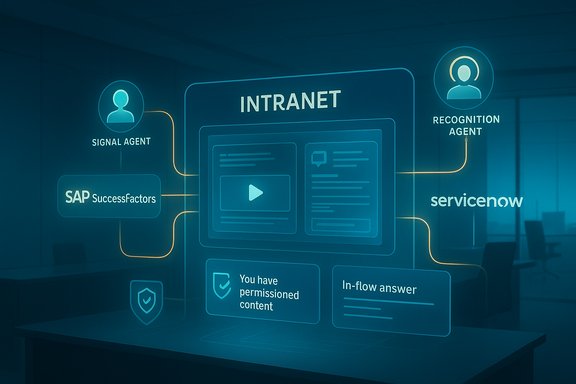
Interact’s Autumn 2025 release brings a clear claim: turn the intranet from a passive repository into an active, agent-driven surface that listens, surfaces recognition, and answers questions inside employees’ workflows. The vendor’s headline features — a Microsoft 365 Copilot connector, two “agentic AI” services called Signal Agent and Recognition Agent, and prebuilt marketplace integrations with SAP SuccessFactors and ServiceNow — are positioned as a practical answer to the twin problems of context‑switching and invisible cultural signals that plague modern workplaces. Interact and its press distribution announced the package on November 12, 2025, describing the new capabilities as generally available to customers today.
Organizations are drowning in tools while starving for context. Employees routinely move between HR systems, ticketing platforms, knowledge libraries, chat channels, and productivity apps — a workflow pattern that multiplies friction and reduces focus. Interact’s announcement frames its Autumn 2025 product update as an attempt to reduce tool fragmentation by centralizing answers and signals inside a single intranet surface and then exposing that surface to Microsoft 365 Copilot and other apps so information and recognition travel in‑flow, not off to siloed systems. This is not an isolated vendor move. During 2024–2025 major platform vendors accelerated work to embed agentic AI and connector frameworks into enterprise suites, enabling partners and customers to create permission‑aware agents and connectors that query tenant content, call APIs, and act on behalf of users under governance controls. Microsoft’s Copilot extensibility, connectors, and agent governance work have matured through 2025, giving vendors established technical paths to expose intranet content safely within Copilot and Teams. Microsoft’s own Copilot Studio and Copilot connector guidance explain how knowledge sources, connectors and DLP constraints interact — a necessary foundation for the kind of intranet‑to‑Copilot integration Interact describes.
Recommended action items:
Source: HRTech Series Interact's Enterprise Employee Experience Platform Adds Agentic AI to Drive Employee Listening at Scale
 Background
Organizations are drowning in tools while starving for context. Employees routinely move between HR systems, ticketing platforms, knowledge libraries, chat channels, and productivity apps — a workflow pattern that multiplies friction and reduces focus. Interact’s announcement frames its Autumn 2025 product update as an attempt to reduce tool fragmentation by centralizing answers and signals inside a single intranet surface and then exposing that surface to Microsoft 365 Copilot and other apps so information and recognition travel in‑flow, not off to siloed systems. This is not an isolated vendor move. During 2024–2025 major platform vendors accelerated work to embed agentic AI and connector frameworks into enterprise suites, enabling partners and customers to create permission‑aware agents and connectors that query tenant content, call APIs, and act on behalf of users under governance controls. Microsoft’s Copilot extensibility, connectors, and agent governance work have matured through 2025, giving vendors established technical paths to expose intranet content safely within Copilot and Teams. Microsoft’s own Copilot Studio and Copilot connector guidance explain how knowledge sources, connectors and DLP constraints interact — a necessary foundation for the kind of intranet‑to‑Copilot integration Interact describes. What Interact announced (feature rundown)
Core additions in the Autumn 2025 release
- Microsoft Copilot Connector — Exposes permissioned intranet content to Microsoft 365 Copilot so employees can ask Copilot questions and get permission‑aware answers that reference intranet pages, knowledge articles, and forum content without leaving their workflow. Interact positions this as a way to reduce context switching and get answers where work happens.
- Signal Agent (agentic AI) — An always‑on listening agent that analyzes posts, comments, and forum threads to detect sentiment shifts, trending topics, unanswered questions, and potential risks. Designed to route alerts and context to Internal Communications, HR, IT or Security teams so leaders get an early pulse on employee concerns.
- Recognition Agent (agentic AI) — A manager‑facing agent that scans internal channels for praise and recognition signals, packages context, and routes them to the right leader. The goal is to prevent praise from disappearing into thread noise and to scale recognition across frontline cohorts.
- Marketplace integrations — Out‑of‑the‑box connectors for systems such as SAP SuccessFactors and ServiceNow, enabling HR and IT transactions (PTO balances, tasks, ticket submission, knowledge articles) directly inside the intranet. This reduces the classic “open another app” detour that interrupts focus.
- Early access customer feedback — Interact published an early customer quote from Love’s Travel Stops to demonstrate practical lift in spotting recognition and surfacing value buried in intranet activity; the company emphasises these outcomes as early indicators rather than audited metrics.
How the technology fits together — the technical reality
A vendor announcement is one thing; the operational backbone is another. Interact’s value proposition relies on three technical pillars that enterprise architects need to validate: connectors (indexing and access control), agent runtime (how and where AI inference runs), and governance (DLP, auditability and human‑in‑the‑loop controls).Connectors and Copilot integration
Microsoft 365 Copilot supports connectors and Copilot agents that can add knowledge and tools to a Copilot experience. A Copilot connector typically indexes content into Microsoft Search/Copilot indexers so that Copilot can return tenant‑scoped results; administrators control what gets indexed and who can access it. Copilot connector architecture has limits and guardrails — for example, tenant connector counts, licensing requirements for users, and administrative control over published connectors. The Microsoft documentation that governs these connectors is explicit about permissions, indexing behavior, and the need to map content sources carefully when creating Copilot agents. Unily’s Microsoft 365 Copilot connector documentation provides a concrete example of how intranet vendors have already built connectors that index intranet content for Copilot — demonstrating that the pattern Interact cites is technically feasible and already in market practice. That precedent is important: it shows intranets can be surfaced into Copilot in a permissioned, indexable way — provided the vendor and tenant configuration are correctly managed.Agentic AI: runtime and governance
“Agentic AI” in this context refers to AI services that can run continuously or autonomously to detect patterns, synthesize context, and trigger actions or alerts. Microsoft has publicly moved toward agent patterns in several areas — notably in Security Copilot where agentic solutions help triage high‑volume security signals — and in Copilot Studio where admins can author agents with specific knowledge and tool access. Microsoft’s Copilot Studio and Security Copilot documentation outline governance controls such as Data Loss Prevention (DLP), audit logs, and environment routing that are designed to prevent risky agent behavior when agents are given connector access to tenant data. These governance capabilities are the same mechanisms organizations will rely on when deploying intranet‑hosted agents such as Interact’s Signal and Recognition agents.Strengths and practical opportunities
Interact’s Autumn 2025 update aligns tightly with several pressing enterprise needs. The likely practical benefits include:- Reduced context switching — Surfacing HR, IT, and knowledge answers through a single intranet surface and into Copilot reduces the cognitive cost of toggling between apps, which can improve employee focus and speed decision making. This is a direct user experience and productivity win if executed cleanly.
- Operationalized employee listening — Signal Agent promises passive continuous listening across forums and comments, which can detect early churn indicators, recurring knowledge gaps, or rising compliance concerns before a biannual survey captures them. For Internal Communications and HR, that’s a shift from periodic sampling to real‑time situational awareness.
- Recognition scaled to frontline teams — The Recognition Agent tackles a persistent HR problem: informal praise in chat or intranet posts is often invisible to reward workflows. By automating detection and routing, managers are nudged to celebrate wins more consistently — an action correlated with employee engagement gains when managers respond. Early access quotes suggest tangible adoption interest.
- Faster time‑to‑value via marketplace connectors — Prebuilt connectors for SuccessFactors and ServiceNow lower integration cost, enabling self‑service flows (PTO checks, ticket submissions) inside the intranet surface and reducing ticket bounce‑backs across systems. This will be appealing to organizations that prefer fewer custom integrations.
- Alignment with platform investment — The announcement is technically coherent with Microsoft’s Copilot agent and connector model. That alignment reduces the integration burden for IT teams that already operate in Microsoft 365 clouds and want Copilot‑driven, permissioned answers inside productivity flows.
Risks, vendor claims to scrutinize, and governance red flags
The potential gains come with real operational and trust risks. Interact’s release is frank about outcomes but does not publish independent accuracy figures, model provenance, or detailed retention and governance controls in the announcement itself. Those omissions are typical in marketing collateral but crucial to address before deployment. The main concerns are:1) Perception of surveillance vs legitimate listening
Continuous monitoring of internal comms — even on public intranet threads — can feel like surveillance unless scope, intent, and access are crystal clear. Employers must define what channels are monitored, who can see raw content, what triggers escalations, and what opt‑out options or consent mechanisms exist to preserve employee trust.2) Hallucinations, false positives, and escalation damage
Agentic models can misread tone, sarcasm, or idioms, producing false positives that escalate to managers or security teams. False security alerts or incorrectly surfaced disciplinary signals can waste time and injure morale. The practical mitigation is conservative thresholds, human‑in‑the‑loop review, and running agents in alert‑only mode during pilots. Interact’s product statements do not publish precision/recall metrics for Signal or Recognition Agents; buyers must demand pilot accuracy reports.3) Data residency, connector architecture and exportability
Where a connector indexes content and where inference occurs matters. Vendor‑hosted connectors without private network options can conflict with enterprise compliance or regional data residency regulations. Ask whether indexes and model inference occur in‑tenant, in Microsoft‑managed services, or on vendor‑hosted infrastructure. The Microsoft Copilot Studio and connector docs provide governance knobs (DLP policies, environment routing, audit logs) that enterprises should use to limit risk.4) Training data and model use
Contracts must be explicit about whether customer content will be used to fine‑tune vendor models. Many vendors provide options to prevent customer data reuse; others don’t. Seek contractual warranties prohibiting the vendor from using tenant data for training without explicit permission.5) Auditability and incident response
Agents must log all actions, queries, and escalations in an exportable form suitable for SIEM, legal discovery and incident response. Without exportable audit trails, organizations lack the forensic data needed during investigations. Microsoft Copilot Studio and Power Platform offer audit logging hooks — confirm the vendor surfaces these logs and supports export formats compatible with the tenant’s SIEM.Practical checklist: what to require in procurement
- Require a detailed data flow diagram showing where content is indexed, where model inference runs, and what managed services are involved.
- Insist on tenant‑scoped permission enforcement tests showing Copilot returns only documents the requesting identity can access. Run tenancy test prompts during a proof of concept.
- Demand explicit contractual language that customer content will not be used to train third‑party models (unless an opt‑in exists).
- Verify DLP, environment‑level governance and the ability to disable autonomous triggers by default. Microsoft’s Copilot Studio guidance outlines DLP and governance controls you should require.
- Confirm audit log export — ensure action logs can be streamed to Microsoft Sentinel, Purview, or the org’s SIEM.
- Run Signal Agent in an alert‑only mode for a bounded pilot cohort to measure false positive/negative rates before any automated escalation.
- Define an appeals and correction workflow for employees who are flagged by automated systems.
- Validate connectors for ServiceNow or SAP SuccessFactors for data residency and API‑level access limits.
Deployment roadmap (recommended phased approach)
- Pilot (4–8 weeks)
- Pick a small business unit or frontline cohort.
- Enable marketplace connectors in test environment.
- Run Signal and Recognition Agents in monitoring mode with human reviewers capturing precision/recall and escalation quality.
- Governance & Security hardening (parallel)
- Establish DLP policies for agents, configure environment routing in Copilot Studio, and enable audit log collection to Purview/Sentinel.
- Operationalize (8–12 weeks)
- Open low‑risk automations (e.g., routing recognition notifications to managers) after measured performance thresholds are met.
- Integrate audit trails and incident response runbooks.
- Measure & iterate (ongoing)
- Track KPIs such as manager response rate to recognition prompts, time‑to‑resolve issues surfaced by Signal, and false positive rate. Use these to tune thresholds and human reviewer policies.
Questions IT and HR teams should ask Interact (and vendors like it)
- Where does indexing occur, and how long is content retained in the index?
- Can the Copilot connector be deployed in a tenant‑managed way (private endpoint, VNet) or is it vendor‑hosted?
- What model(s) power Signal and Recognition Agents, and are those models audited for safety and bias?
- Is training or telemetry data ever retained or used to improve the vendor’s models without explicit consent?
- How are DLP controls enforced for autonomous triggers and connector calls?
- Can all agent actions be logged and exported to our SIEM and eDiscovery pipelines?
- What accuracy metrics (precision/recall) can you provide from the early access program for Signal and Recognition Agents?
Reading the vendor signals: what Interact’s messaging implies
Interact’s language emphasizes “fixing signal‑to‑noise” and ensuring “every single employee feels seen.” That is a product framing designed for the HR and Internal Communications audience; the technology side of the story is one of platform alignment and practical engineering. Interact’s claim of being a Microsoft Cloud AI Partner and providing a Copilot connector positions the company to exploit the interoperability Microsoft has baked into Copilot Studio and connectors. Microsoft documentation shows the necessary building blocks exist — connectors, agent templates, DLP and auditability — but also that responsible deployment requires tenant administrators to exercise the governance levers explicitly. The vendor’s early customer quote from Love’s Travel Stops reinforces the use case: frontline recognition is often missed, and automating discovery helps amplify core values. That quote is useful anecdotal evidence but not a substitute for validated, auditable outcomes across multiple customers. Procurement teams should treat early access success stories as compelling signals and not as performance guarantees.Bottom line and recommended next steps for WindowsForum readers
Interact’s Autumn 2025 release packages features that are technically achievable today and strategically aligned with the broader Copilot and agent trend: permissioned connectors, agentic listening, and recognition automation. The announcements are consistent with Microsoft’s Copilot extensibility and governance investments, and they address real pain points — context switching, unseen recognition, and slow discovery of trending issues. But the release also raises the very real need for disciplined deployment: explicit contracts on data use, conservative pilot settings, human oversight, auditability into enterprise SIEMs, and coordinated DLP policies. Organizations that pilot with rigor and enforce governance will likely see the productivity and culture benefits Interact promises. Organizations that flip agentic features on without controls risk damaging trust, creating noise via false positives, or inadvertently exposing data.Recommended action items:
- Run a bounded pilot using alert‑only mode for the Signal Agent and a scoped cohort for the Recognition Agent.
- Validate Copilot connector permission enforcement with tenant‑scoped tests.
- Configure DLP, environment routing, and audit log exports before enabling any automated escalations.
- Demand transparency on model use and training clauses in the contract.
- Measure manager response rates, false positive rates, and time‑to‑resolution to quantify business impact.
Source: HRTech Series Interact's Enterprise Employee Experience Platform Adds Agentic AI to Drive Employee Listening at Scale
