

Today's Intune change is not a gentle nudge — it's an operational deadline that will immediately affect any organization that hasn't updated its mobile app protection tooling, and unprepared administrators and app owners may see managed mobile apps (including Outlook and Teams) blocked from launching on user devices. erview
Microsoft announced tightening enforcement in its Intune Mobile Application Management (MAM) service that requires specific minimum versions of the Intune App SDK and the iOS App Wrapping Tool for iOS apps, plus a required Company Portal version for Android devices. The vendor’s published guidance sets precise version mappings tied to the Xcode toolchain used to compile apps: apps compiled with Xcode 16 must use Intune App SDK 20.8.0 (and App Wrapping Tool 20.8.1 where wrapping is used), while apps compiled with Xcode 26 must use Intune App SDK 21.1.0 (and App Wrapping Tool 21.1.0) to avoid being blocked from launch. Microsoft placed an enforcement pivot around January 19, 2026, following an earlier window referenced for December 15, 2025. On Android the mechanism differs: enforcement is tied to the version of the Intune Company Portal on the device and the presence of at least one Microsoft app built with the updated SDK. Once the Company Portal and a Microsoft app with the required SDK are present, Android’s update and management flows typically allow other managed apps to update or validate protection status. This makes the Android risk concentrated around a single Company Portal version requirement, whereas iOS presents a broader operational burden for app owners who must recompile or re-wrap binaries. Microsoft’s own wording warns bluntly: users who have signed into an app and have MAM policies applied "will eventually be blocked from accessing the application" if the app hasn’t been updated to the required SDK/wrapper levels. Expect a phased tenant targeting and variance in timing based on an organization’s policy configuration (Conditional Launch, offline grace periods, MTD integration, etc..
Microsoft frames this enforcement as a necessary modernization step. The rationale is straightforward:
This enforcement yields important security benefits but creates measurable operational risks administrators must accept and manage:
(Technical verification: Microsoft’s Intune “In development” documentation lists the Xcode/SDK/wrapper mappings and the January 19, 2026 enforcement pivot; GitHub release notes for the Intune App SDK confirm the 20.8.0 and 21.1.0 tags and associated release details referenced above.
Source: theregister.com Microsoft Intune changes to start biting unprepared admins
Microsoft announced tightening enforcement in its Intune Mobile Application Management (MAM) service that requires specific minimum versions of the Intune App SDK and the iOS App Wrapping Tool for iOS apps, plus a required Company Portal version for Android devices. The vendor’s published guidance sets precise version mappings tied to the Xcode toolchain used to compile apps: apps compiled with Xcode 16 must use Intune App SDK 20.8.0 (and App Wrapping Tool 20.8.1 where wrapping is used), while apps compiled with Xcode 26 must use Intune App SDK 21.1.0 (and App Wrapping Tool 21.1.0) to avoid being blocked from launch. Microsoft placed an enforcement pivot around January 19, 2026, following an earlier window referenced for December 15, 2025. On Android the mechanism differs: enforcement is tied to the version of the Intune Company Portal on the device and the presence of at least one Microsoft app built with the updated SDK. Once the Company Portal and a Microsoft app with the required SDK are present, Android’s update and management flows typically allow other managed apps to update or validate protection status. This makes the Android risk concentrated around a single Company Portal version requirement, whereas iOS presents a broader operational burden for app owners who must recompile or re-wrap binaries. Microsoft’s own wording warns bluntly: users who have signed into an app and have MAM policies applied "will eventually be blocked from accessing the application" if the app hasn’t been updated to the required SDK/wrapper levels. Expect a phased tenant targeting and variance in timing based on an organization’s policy configuration (Conditional Launch, offline grace periods, MTD integration, etc..
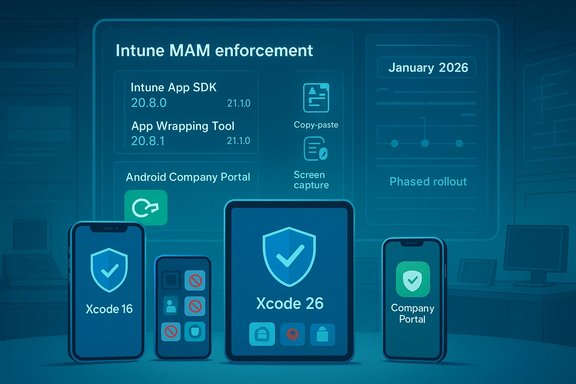 Why Microsoft is enforcing minima — the security rationale
Microsoft frames this enforcement as a necessary modernization step. The rationale is straightforward:- Platform churn: Apple and Google change security APIs and behavior frequently. New iOS/Android releases introduce hooks and protections that older SDKs don't surface to Intune policies.
- Policy reliability: App protection policies (data leak prevention, clipboard controls, screenshot/screen-capture blocks, managed paste) rely on SDK-level integrations to work deterministically.
- Attack surface reduction: Older SDKs and wrappers can leave gaps or inconsistent enforcement, making policy bypass more likely.
- Operational consistency: A maintained minimum reduces divergence across tenants and simbility to guarantee policy semantics.
What’s changing — technical specifics you must verify now
The minimum versions Microsoft calls out are precise and non-negotiable for compliance checks. Administrators should verify the following for their tenant and applications:- iOS builds compiled with Xcode 16 must integrate Intune App SDK v20.8.0 or later; if using app wrapping, use Intune App Wrapping Tool v20.8.1 for Xcode 16 builds.
- iOS builds compiled with Xcode 26 must integrate Intune App SDK v21.1.0 or later; app wrapping must use App Wrapping Tool v21.1.0 for Xcode 26 builds.
- Android devices must have the Intune Company Portal updated to the minimum version flagged by Microsoft (administrators should confirm tenant-specific required Company Portal version via Message Center or Intune admin center). Once a Microsoft app with the updated SDK and the Company Portal are present, Android app updates and enforcement typically propagate.
- BYOD users: Personal devices that rely on app-store updates or user action to upgrade apps are most fragile. If users don’t update Outlook, Teams, or third-party app protection supported apps, they risk immediatline-of-business (LOB) applications:** LOB apps that are internally distributed and either wrapped or embed the Intune SDK will need rebuilds or re-wrapping then re-distribution; this is not update and requires developer time.
- Android managed fleets: While the Company Portal acts as an anchoring dependency, a stale Company Portal can become a single point of failure for all managed apps on a device. Admins who can push Company Portal updates centrally will have an easier remediation path.
- **Helpdesk teamssupport volume — users who suddenly cannot open email or collaboration apps will escalate quickly. Early communications and playbooks reduce busywork.
Immediate checklist — a prioritized, tactical playbook for admins
Follow this triage-first checklist in order. These are short, actionable steps to reduce user impact today:- Inventory at-risk apps and devices now:
- Query Intune app protection status in the Intune admin center and export "Platform version" and "iOS SDK version" fields.
- Run Graph/PowerShell reports to enumerate Company Portal versions on Android devices.
- Prioritize Microsoft apps and the Company Portal:
- Push or instruct users to update the Intune Company Portal on Android immediately.
- Ensure Microsoft-managed apps (Outlook, Teams, OneDrieir latest store versions.
- Identify LOB apps compiled with Xcode 16 vs Xcode 26:
- For Xcode 16 builds: plan to update to Intune App SDK v20.8.0 and re-wrap with App Wrapping Tool v20.8.1 (if using wrapper).
- For Xcode 26 builds: plan to update to Intune App SDK v21.1.0 and App Wrapping Tool v21.1.0.
- Stage enforcement with Conditional Launch:
- Configure Conditional Launch policies to warn before switching to block, using Minimum SDK version and Minimum Company Portal version settings to reduce surprises.
- Communicate immediately:
- Send targeted messages to users who have devices or apps flagged as non-compliant. Provide step‑by‑step app update instructions and fallback options (Outlook Web, temporarily sanctioned devices).
- Prepare helpdesk runbooks:
- Include diagnostics to check app SDK versions and Company Portal versions, steps to re-enroll devices, and escalation paths to app owners for LOB rebuilds.
Developer guidance — what app owners must change in CI/CD and releases
- Automate version checks: Add Intune SDK version validation to CI build checks and fail builds when the binary uses unsupported SDK versions relative to your target Xcode toolchain.
- Tag build metadata: Record the Xcode version used to compile each build and the Intune SDK version in your artifact metadata to speed auditing.
- Automate wrapping: If you wrap internal iOS apps, script the Int invocation in CI pipelines (including certificate signing and distribution verification) to reduce manual errors.
- Test on representative devices: Validate protected-data flows (copy/paste, screenshot prevention, openURL behavior) on iOS 16–18 or relevant iOS versions and with the target SDK.
- Coordinate vendor SLAs: For third‑party apps, require Intune SDK update commitments in vendor contracts or maintain an exception process.
This enforcement yields important security benefits but creates measurable operational risks administrators must accept and manage:
- Single point of failure (Android Company Portal): Relying on the Company Portal version creates a concentrated dependency. Ites fail or are delayed in parts of your fleet, users may lose access to multiple apps simultaneously. Mitigation: prioritize Company Portal rollout and monitor update success rates.
- Resource burden for iOS LOB app owners: Rebuilding and re-w is not trivial – build pipelines, signing, QA, distribution, and MDM/App Catalog updates are required. Many shops underestimate the time and testing needed. Plan for developer backlog and regression testing.
- Helpdesk and productivity spiknt without proper staging leads to surges in tickets and lost productivity for users blocked from mail and collaboration apps. Pre-enforcement pilots and staged blocking reduce helpdesk loadd framework compatibility: Cross-platform frameworks (for example, .NET MAUI and other third‑party SDKs) can lag and cause indirect failures. Validate dependencies and monitor upstream repositories for compatibility notes.
- BYOD update dependency: For unmanaged devices, admins cannot force App Store updates; success depends on user compliance. Communication campaigns and fallback policies are necessary.
Practical remediation scenarios (concise playbooks)
Scenario A — Corporate-managed Android fleet
- Push the Company Portal update via your MDM. Confirm installation success using Intune reporting dashboards.
- Ensure at least one Microsoft app with the updated SDK is deployed to each device group to trigger Android-side validation flows.
- Use Conditional Launch to set a grace period before blocking.
Scenario B — BYOD iOS users using App Store Microsoft apps
- Send immediate end-user instructions to update Outlook/Teams/OneDrive via App Store.
- Offer fallback access via Outlook Web and clearly define helpdesk steps for users unable to update.
Scenario C — Internal iOS LOB apps (wrapped or SDK-integrated)
- Triage the LOB apps by build toolchain (Xcode 16 vs Xcode 26).
- Schedule rebuilds or rewraps using the correct SDK/wrapper:
- Xcode 16 → Intune App SDK 20.8.0 + Wrapping Tool 20.8.1.
- Xcode 26 → Intune App SDK 21.1.0 + Wrapping Tool 21.1.0.
- Run pilot group testing (representative devices) before broad distribution.
- Communicate new binary availability and push via your enterprise app distribution channels.
Monitoring and verification — what to watch after changes
- Conditional Access and Intune logs: Monitor grant/block decisions and correlate with app SDK and Company Portal version fields.
- Helpdesk metrics: Track Ticketegion and device type; triage hot spots urgently.
- App telemetry: For LOB apps, add telemetry on MAM SDK handshake success/failure to detect policy rejections early.
- User update rates: Use Intune reporting to measure the percentage of devices that updated Company Portal and Microsoft apps.
Strengths of Microsoft’s approach (what admins should appreciate)
- Predicta Administrators gain confidence that any managed app meeting the minima supports modern protection controls.
- Encourages disciplined app lifecycle management: Forcing SDK updates nudges development and release cycles toward steady maintenance — a long-term governance win.
- Leverages Conditional Launch: Admins retain staging controls and can warn users before blocking, enabling phased enforcement rather than blind cutovers.
Caveats and unverifiable claims — what to treat cautiously
- Reports of widespread outages vary in scale and appear tenant-specific; some early reports are anecdotal and should be evaluated against tenant Message Center notices and your own Intune reports before assuming broad systemic failure. Flag vendor bulletin claims about other vendors’ update timelines as vendor-dependent and verify directly with vendor release notes.
- If any public posts claim mass global outages caused solely by this enforcement, cross-check against your tenant’s admin messages and Microsoft Learn “In development” entries before escalating beyond normal remediation processes.
Longer-term strategy — governance, SLAs, and vendor management
- Include Intune SDK update commitments in third-party vendor contracts for any business-cation.
- Treat Intune SDK and wrapper updates as part of your app security lifecycle and require scheduled audits (quarterly).
- Build automated CI/CD checks that assert required Intune SDK versions and tie them to release gating.
- Establish a “critical app” fast lane for helpdesk and device replacement for high-value users who cannot be immediately remediated.
Conclusion
Microsoft’s Intune MAM enforcement is a defensible security improvement: it narrows gaps left by legacy SDKs and wrappers and forces a consistent baseline for app protection. The short-term reality is operational friction — particularly for iOS LOB apps and BYOD fleets — and organizations that deferred SDK/wrapper maintenance now face urgent rebuild, rewrap, or communications work. Admins who actorying apps and devices, prioritizing Company Portal and Microsoft app updates, staging Conditional Launch warnings, and coordinating LOB rebuilds — will minimize business disruption while gaining a stronger long-term security posture. The practical message for IT leaders is clear: treat this as a governance and communications exercise as much as a technical upgrade, and assume enforcement is tenant‑scoped but imminent unless your tenant messages indicate otherwise.(Technical verification: Microsoft’s Intune “In development” documentation lists the Xcode/SDK/wrapper mappings and the January 19, 2026 enforcement pivot; GitHub release notes for the Intune App SDK confirm the 20.8.0 and 21.1.0 tags and associated release details referenced above.
Source: theregister.com Microsoft Intune changes to start biting unprepared admins
