Windows 7 Issues with Non-Detection of Headphone Mic on Windows 7 Beta Build

Goochington

New Member
Joined
Oct 9, 2009
Messages
42
Hello,

Ive been searching for months for a solution to my problem but unfortunately ive been unable to solve this.

So i thought id try here.

I bought 2 sets of gaming headphones, one for myself and one for my girlfriend.

I did this because i work away and its much cheaper to talk over the internet than it is by phone.

She is using my pc which is running Windows Vista Ultimate and the recording is working fine over there.

Im using a slightly older pc which was running xp but is now on the BETA 7100 Build Windows 7.

I have the headphones on all the time the sound is great, but it just will not pick up anything in the recording devices, not even if I "Show disabled devices"

Its no where to be seen, its a line in and not a usb.

Any help would be greatly appreciated.

Thanks,

Ben.
 

Solution
Hi Ben,
it struck me that you may also be missing the latest drivers for your sound device which would make a difference...
Download the latest high definition codecs here: Link Removed

(the latest version was released two days ago)

Goochington

New Member
Joined
Oct 9, 2009
Messages
42
Its knocking on about 4 years old now i think,

Ive upgraded the RAM & Graphics card though.

Its still today not a bad system but i think the drivers may be out of date, but ive no clue how to get a hold of them.

Thanks for your reply.
 

kemical

Essential Member
Joined
Aug 28, 2007
Messages
36,176
If you can post the system spec I'll point them out for you.. If your unsure as to whats what, try this free app:
Link Removed
 

Goochington

New Member
Joined
Oct 9, 2009
Messages
42
Windows 7 Ultimate (build 7100)
395.04 Gigabytes Usable Hard Drive Capacity
2.80 gigahertz Intel Pentium D (2 CPU's)
High Definition Audio Device
NVIDIA GeForce 9500 GT [Display adapter]
BIOS: Phoenix Technologies, LTD 6.00 PG 06/07/2005

If there are any other things you'd like to know let me know.
 

kemical

Essential Member
Joined
Aug 28, 2007
Messages
36,176
Much thanks for that..:)

I think your high definition device is probably a Realtek chip and drivers for that can be found here: Link Removed

Your graphics card drivers can be found here: Drivers - Download NVIDIA Drivers

If you list your motherboard I can find the drivers for that too..:)
 

Goochington

New Member
Joined
Oct 9, 2009
Messages
42
Thank you ever so much Kemical for your help so far.

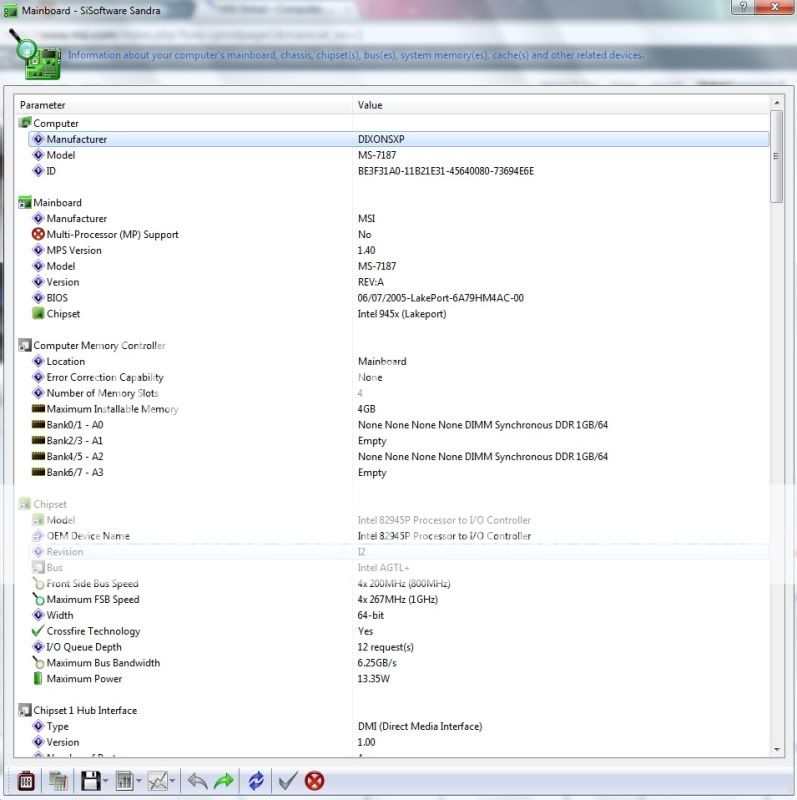
I dont have a clue how to find out which motherboard i have, could you possibly guide me through this?
 

kemical

Essential Member
Joined
Aug 28, 2007
Messages
36,176
Sure, no problem. If you use the app I suggested or this one: Link Removed

Both will give you the information you require as well as a little more..

If you look at the screenshot, you'll see I'm using Everest and have highlighted what you need to click in order to get to the info you need..
 

Last edited:

Goochington

New Member
Joined
Oct 9, 2009
Messages
42
Specs.jpg
 

kemical

Essential Member
Joined
Aug 28, 2007
Messages
36,176
Yes, much thanks.. It seems you have the 945 family chipset and the drivers are here:

Link Removed due to 404 Error

Not knowing what you were running exactly I chanced it and posted the 32bit version. if your running in 64bit then apologies..
 

kemical

Essential Member
Joined
Aug 28, 2007
Messages
36,176
Hmm.. maybe we should now look at your recording devices and make sure everything is ok in that department...
What are you using Goochington?
 

reghakr

Essential Member
Joined
Jan 26, 2009
Messages
14,186
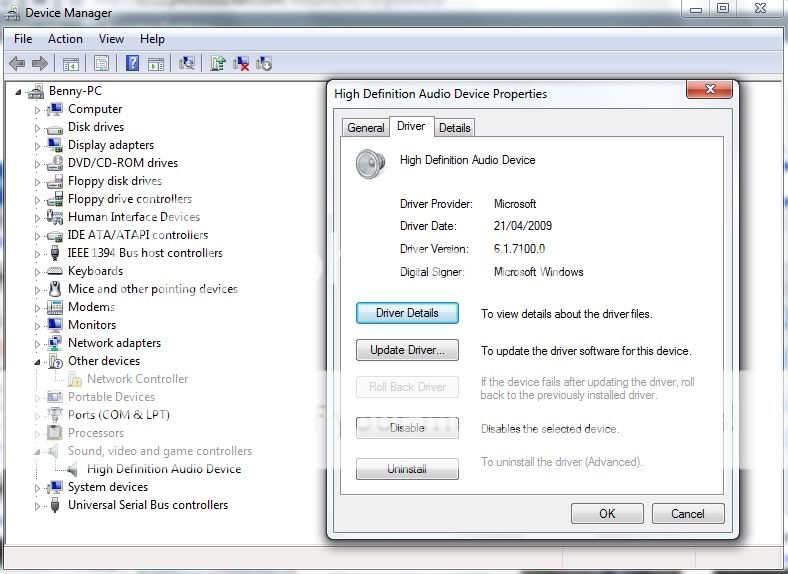
Could you look in Device manage and see if any entry has a yellow flag next to it on the PC that is not working correctly?
 

reghakr

Essential Member
Joined
Jan 26, 2009
Messages
14,186
Could you go to Start > Run, and type msinfo32.

Expand the Components section and click on your video card. This will give us more details.

Is your network card running OK/

I would ckick on the entry and choose remove or uninstall.

Windows might pick up a driver for it on reboot.
 

Back
Top