

Automation is the simplest way to turn repetitive toil into measurable business value — and the TechTarget roundup of “21 tasks to automate today to streamline IT operations” gives IT teams a practical, prioritized map for where to start.
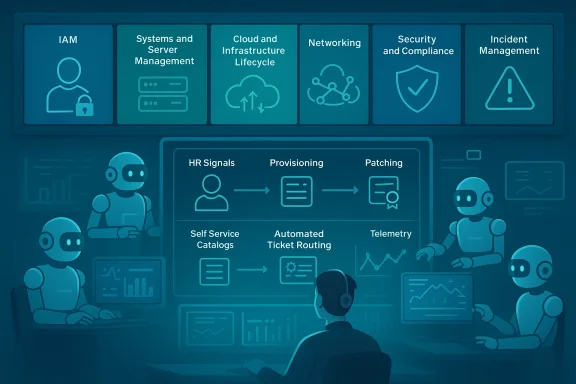
The pressure on IT operations teams to deliver faster, safer, and cheaper services has never been higher. Organizations that adopt IT automation strategically free staff from repetitive tasks, reduce human error, and close gaps in security and compliance. TechTarget organizes automation work into six practical domains — Identity and Access Management (IAM), Systems and Server Management, Cloud and Infrastructure Lifecycle, Networking, Security and Compliance, and Incident Management and Support — and ranks 21 tasks by estimated ROI (high, medium, low). This structure helps teams focus on quick wins while building toward full automation maturity.
Source: TechTarget 21 tasks to automate today to streamline IT operations | TechTarget
 Background
The pressure on IT operations teams to deliver faster, safer, and cheaper services has never been higher. Organizations that adopt IT automation strategically free staff from repetitive tasks, reduce human error, and close gaps in security and compliance. TechTarget organizes automation work into six practical domains — Identity and Access Management (IAM), Systems and Server Management, Cloud and Infrastructure Lifecycle, Networking, Security and Compliance, and Incident Management and Support — and ranks 21 tasks by estimated ROI (high, medium, low). This structure helps teams focus on quick wins while building toward full automation maturity.Why prioritize automation now
Automation isn't an abstract efficiency play; it's risk reduction and capacity creation. High-frequency, security-sensitive processes such as account provisioning, password resets, patching, and software deployments are prime candidates because they produce immediate, auditable returns. Automating these basics improves consistency, shortens mean time to repair (MTTR), and shrinks attack surfaces — outcomes every CIO is measured on. TechTarget’s list puts those same items at the top of the priority ladder.Overview of IT operations domains
Six domains to frame your program
- Identity and Access Management (IAM) — user lifecycle, password resets, role-based access.
- Systems and Server Management — patching, deployments, restart triggers, storage housekeeping.
- Cloud and Infrastructure Lifecycle — VM provisioning, tagging, lifecycle policies, cost controls.
- Networking — device configs, backups, provisioning automation.
- Security and Compliance — certificate lifecycle, log collection, incident response automation.
- Incident Management and Support — ticket routing, on-call escalation, self-service workflows.
High-ROI automation tasks (do these first)
TechTarget highlights a cluster of tasks that deliver the fastest and most consistent returns. These should form the backbone of your automation program since they directly impact security, uptime, and team capacity.1. User account provisioning and deprovisioning (IAM)
Automating the user lifecycle prevents orphaned accounts and enforces least privilege consistently. Tie provisioning to HR events and use templates for common roles. A simple workflow:- HR signals new hire with role metadata.
- Automation creates accounts across AD/Azure AD/Slack/ITSM.
- Role-based groups and MFA are applied automatically.
- On termination, access is revoked and credentials archived.
2. Password resets (IAM)
Self-service password reset systems with secure verification (MFA, device posture checks) eliminate heavy help-desk loads. This is low-effort, high-frequency, and immediately measurable in tickets closed per week.3. Patch management for servers and endpoints (Systems & server management)
Automated patch pipelines reduce exposure to known vulnerabilities and improve compliance posture. Orchestrate patch windows, test on staging pools, and use phased rollouts to control blast radius. Integrate telemetry so failed patches auto-open remediation tickets.4. Software deployment and updates (Systems & server management)
Use package managers and orchestration tools (e.g., Winget, Chocolatey, SCCM, Intune) to push consistent builds. Automate application lifecycle: detect outdated packages, schedule updates, validate service health post-update. This both saves admin time and enforces standard images.5. Storage monitoring and automated cleanup (Systems & server management)
Automate thresholds, escalate capacity alerts, and run cleanup for temp/old files. Preventing capacity-driven outages yields outsized returns by avoiding emergency restores and degraded backups.6. Application/service restarts triggered by alerts (Systems & server management)
Automated restart playbooks tied to alert thresholds can resolve transient failures without human intervention. Ensure safety checks and a rollback timeline to avoid restart loops.7. VM provisioning/deprovisioning and self-service catalog (Cloud lifecycle)
Turn ticket-heavy VM requests into a self-service catalog backed by automated provisioning and tagging policies. This shortens delivery times and reduces inconsistent builds. Self-service yields the highest incremental ROI here.8. Security incident correlation and automated response (Security & compliance)
Automated security playbooks that correlate SIEM events, quarantine hosts, and gather forensic artifacts can shut down attacks faster than manual processes. Automate the low-risk, high-certainty steps and human-in-the-loop for complex decisions.9. Incident ticket creation, categorization and routing (Incident management)
Automated ticket triage and routing speeds resolution and reduces human error in classification. Combine with knowledge-base-driven self-service to deflect repeatable requests and to increase customer satisfaction.Medium-ROI tasks (next wave)
Once core hygiene and incident tasks are automated, move to automation that improves governance, observability, and cost control.Access control and permissions updates (IAM)
Automating permission adjustments by role or workflow reduces privilege drift. Use periodic reviews and just-in-time (JIT) elevation where possible. This requires careful policy design but is essential for compliance.Server health monitoring and alerting
Automated monitoring with prebuilt remediation scripts reduces noise and shortens MTTR. This is often integrated with existing monitoring stacks and represents a straightforward medium-effort win.Configuration management enforcement (Systems)
Enforce baseline configurations via tools like Ansible, Puppet, or Chef. The initial effort pays off with consistent environments and fewer “works on my machine” incidents. Add drift detection and automatic remediation to keep systems healthy.Cloud resource tagging and compliance checks (Cloud and FinOps)
Automated tagging and policy enforcement are fundamental to cloud governance and FinOps. Use policy-as-code to prevent untagged or noncompliant resources from reaching production. These tasks reduce Opex waste and improve chargeback accuracy.Network device configuration backups
Automate periodic backups of switch/router configs and alert on drift. While infrequent, these backups are invaluable during outages and security incidents.Certificate lifecycle automation (Security)
Automating issuance, renewal, and revocation of TLS/certificates closes a frequent cause of outages and security lapses. Add self-service capabilities for certificate requests to increase ROI.On-call routing and escalation automation
Route alerts and escalate intelligently based on incident type and severity to reduce on-call fatigue and response time. Integrates with ITSM and collaboration platforms.Low-ROI but still valuable tasks
These tasks often happen infrequently or require high-quality data to yield returns, but they still matter for long-term discipline.- Service validation/testing after deployments — useful in environments with mature CI/CD. Automate smoke tests but validate business impact before spending heavily here.
- Capacity monitoring and forecasting — effective only with accurate historical telemetry and good forecasting models. Consider ML-assisted recommendations for scale.
- Automated network device provisioning — valuable for large-scale greenfield deployments; less so for static, small networks.
- Log collection, auditing, retention — easy to automate and often required for compliance; the ROI is primarily in audit-readiness.
- Inventory and asset management updates — cadence depends on hardware lifecycle; automation reduces manual reconciliation.
A practical prioritization framework
Not every environment benefits equally from the same automation work. Use a simple scoring matrix to prioritize tasks:- Frequency (1–5): How often the task is performed.
- Time cost (1–5): How much staff time it consumes.
- Security impact (1–5): Potential reduction in risk from automation.
- Complexity (1–5, inverse): How hard it is to automate.
Tooling and platform guidance
The right tooling depends on your stack, but common patterns emerge.- Scripting and orchestration: PowerShell and Task Scheduler for Windows-centric environments; Bash, Python, and cron for Linux. Community-contributed scripts can accelerate wins.
- Configuration management: Ansible, Puppet, Chef — enforce desired state and remediate drift.
- Infrastructure as Code (IaC): Terraform, ARM templates — version-controlled provisioning for cloud resources, enabling reproducibility and audit trails.
- Cloud-native automation: Use cloud policies (Azure Policy, AWS Config) to enforce tags and lifecycle rules, and leverage serverless functions or automation runbooks for scheduled tasks.
- Security orchestration: SOAR platforms and SIEM integrations to automate incident correlation and low-risk remediation steps.
- ITSM & self-service: ServiceNow, Jira Service Management, or Microsoft Power Automate for ticket creation, approval flows, and self-service catalogs.
Governance, security, and testing — non-negotiables
Automation increases speed, but speed without guardrails is risky. Apply the same engineering discipline to automation itself:- Version control: Store automation code and playbooks in Git. Treat them as first-class software artifacts.
- Change approval: Use pull-request workflows and automated tests before merging changes to production automation.
- Least privilege: Run automation with scoped service accounts and short-lived credentials where possible. JIT authorization limits blast radius.
- Observability: Emit logs and telemetry for every automated action, and surface failures to on-call engineers. This turns automation into measurable processes.
- Human-in-the-loop: For high-risk actions (e.g., bulk deprovisioning, cloud account deletions), require explicit approvals. Automation should reduce routine human work, not centralize risk.
Implementation roadmap: a 90-day plan
- Weeks 1–2: Inventory and quick wins
- Map repetitive tasks and ticket volumes. Identify top 5 high-frequency pain points (e.g., password resets, account provisioning, patching).
- Weeks 3–6: Build and pilot
- Automate one IAM workflow (provisioning) and one systems workflow (patching). Use a staging environment and define success metrics (time saved, tickets reduced).
- Weeks 7–10: Expand and integrate
- Add self-service VM catalog and automate certificate renewals. Integrate with ITSM and chatops for visibility.
- Weeks 11–12: Harden and measure
- Add version control, automated tests, and compliance checks. Report ROI to stakeholders: tickets deflected, MTTR reduced, cloud cost savings.
Risks, pitfalls, and mitigations
- Automating the wrong thing: Automating a flawed manual process just scales mistakes. Mitigation: measure outcomes and run pilots first.
- Poor data and tagging: Cloud automation for cost control fails without consistent tags. Mitigation: enforce tagging at provisioning and block untagged resources.
- Runaway automation: Unchecked loops or misconfigured policies can cause mass restarts or shutdowns. Mitigation: implement throttles, safety checks, and human approval gates.
- Security of automation: Credential leakage or excessive privileges can create systemic risk. Mitigation: use secrets management, short-lived credentials, and audit logs.
Short case examples (what success looks like)
- A mid-size team automated password resets and saw a 30–50% drop in first-level tickets in weeks; this freed two analysts to work on higher-value outages and cut queue time by half.
- A cloud engineering team automated idle VM detection and scheduled shutdowns, recovering significant monthly spend by enforcing a “48-hour inactivity” rule. The policy used tags and automated notifications before shutdown to avoid developer surprise.
- A security team implemented automated playbooks for common threats; quarantining and basic remediation happened in minutes, while complex forensics remained human-driven. This shortened exposure windows materially.
Checklist: 10 immediate automation actions to start this week
- Inventory the top 10 most frequent manual tasks and their ticket volumes.
- Add self-service password reset with MFA.
- Create an account-provisioning flow tied to HR metadata.
- Automate patching for a nonproduction pool and measure failures.
- Implement automated storage thresholds and cleanup jobs.
- Stand up a self-service VM catalog with enforced tagging.
- Automate certificate renewals and add monitoring for expiry.
- Create incident triage automation that opens and routes tickets.
- Enable configuration drift detection and remediate noncritical drift automatically.
- Add logging and telemetry for every automation run.
Conclusion
The value of automation is not theoretical — it’s immediately practical. Start by automating high-frequency, high-impact tasks such as user provisioning, password resets, patching, software deployment, and incident triage. Use the six-domain framework to divide work, and a simple scoring model to prioritize. Apply engineering best practices to automation artifacts themselves: version control, testing, observability, and least-privilege execution. With careful design and incremental rollout, automation moves from a tactical cost-saver to a strategic capability that improves security, accelerates delivery, and unlocks capacity for higher-value IT work. TechTarget’s list is a pragmatic checklist to get you started — follow it, measure results, and scale the program with governance and controls in place.Source: TechTarget 21 tasks to automate today to streamline IT operations | TechTarget
