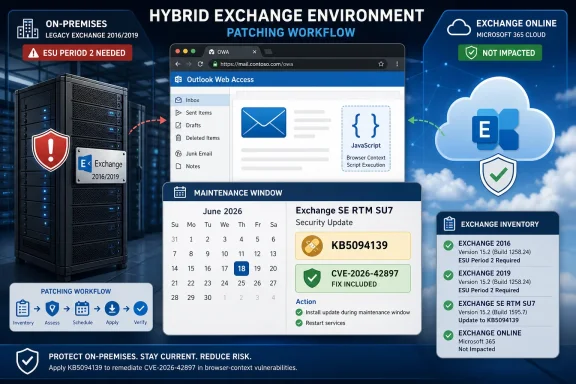
Microsoft released June 2026 Security Updates for Exchange Server Subscription Edition, plus ESU-only updates for Exchange Server 2019 CU14/CU15 and Exchange Server 2016 CU23, on June 9, 2026, addressing newly disclosed Exchange vulnerabilities and the earlier CVE-2026-42897 Outlook Web Access flaw. The release is not just another Patch Tuesday chore. It is Microsoft drawing a hard operational line between supported Exchange, paid extended support, and servers that are still online because migration projects slipped. For administrators, the uncomfortable message is simple: Exchange patching is now inseparable from lifecycle discipline.
The June 2026 Exchange Server security release lands with the usual language about vulnerabilities reported by partners and found internally, but the practical story is sharper. Exchange Server Subscription Edition receives the public update path. Exchange Server 2019 and 2016 receive updates only if the organization is enrolled in the Period 2 Extended Security Update program.
That distinction matters because Exchange is not a quiet back-office dependency. Even in hybrid Microsoft 365 environments, on-premises Exchange servers often remain in place for recipient management, mail flow, certificate handling, or legacy operational assumptions. Microsoft’s message is that those machines still count, even if the business has convinced itself that “we are mostly in Exchange Online now.”
The June release also reinforces the new reality of Exchange SE. Subscription Edition is not merely a branding exercise for administrators to postpone planning around. It is now the place where the normal security servicing path lives, while Exchange 2016 and 2019 have moved into a paid, limited, and temporary lane.
That makes this update a security release with a migration subtext. Microsoft is patching vulnerabilities, but it is also reminding customers that unsupported Exchange servers do not become less risky because they are inconvenient to replace.
The mechanics are familiar enough to make defenders uneasy. An attacker abusing a browser-facing Exchange surface does not need to own the server outright to cause real damage. Cross-site scripting in a webmail context can become a route into session abuse, mailbox manipulation, credential exposure, or follow-on attacks against users who still treat OWA as a trusted internal application.
Microsoft’s guidance around CVE-2026-42897 has also been unusually operational. The company recommended Exchange Emergency Mitigation Service coverage and made downloadable mitigation tooling available for environments that could not rely on automatic mitigation. That helped close the immediate gap, but it also left administrators managing the difference between a mitigation and a permanent fix.
The June SU narrows that gap, but does not erase it. Microsoft says installing the June 2026 update does not automatically remove previously applied CVE-2026-42897 mitigations. In fact, the company recommends keeping the mitigation in place for now as an additional layer of defense while further improvements continue.
That is the part administrators should read twice. The presence of a security update does not mean the incident response checklist can be closed without checking the mitigation state, IIS rules, and any known side effects that were tolerated during the emergency phase.
But the June 2026 update shows the cost of that model. Microsoft says that because of a service-side change, the Exchange Emergency Mitigation and Exchange Flighting services will be unable to use configuration files released in July 2026 or later unless servers are updated to the June 2026 SU or newer. Existing mitigations already downloaded and applied will continue to work, but new mitigations will not arrive on unpatched systems.
That changes the patch from “recommended” to structurally important. A server that skips June may still appear protected because today’s mitigation remains active, yet it becomes blind to the next mitigation wave. For security teams, that is a dangerous gray zone: the dashboard may look calm while the service’s future defensive channel has quietly broken.
The phrase “Unknown Issuer” in Microsoft’s related explanation points to the trust-chain plumbing behind these services. Administrators do not need to romanticize the details to understand the consequence. If Exchange cannot validate or consume future mitigation configuration, one of Microsoft’s faster emergency levers no longer works.
This is where Exchange’s age shows. The platform now depends on a mix of cumulative updates, security updates, service-side mitigations, management tools, hybrid wizards, IIS rules, and documentation that may lag the actual release. Keeping that stack healthy requires more than installing a patch when a CVE makes headlines.
The important qualifier is that Exchange servers and Exchange Management Tools workstations in the environment still need attention. Hybrid organizations often retain an on-premises Exchange footprint precisely because Microsoft’s supported management story historically expected it. Those servers may not host active user mailboxes, but they remain privileged infrastructure connected to identity, mail flow, certificates, and administration.
That makes “management only” Exchange a particularly tempting blind spot. It may not be monitored like a production mailbox server. It may sit behind assumptions about low exposure. It may be excluded from the urgent patch wave because nobody thinks of it as customer-facing.
Attackers do not share that taxonomy. If the server is present, joined, trusted, and running Exchange components or management tooling, it belongs in the update plan. Microsoft’s recommendation to update both Exchange servers and machines running Exchange Management Tools is not bureaucracy; it is an acknowledgement that version skew in an administrative plane can produce its own failures.
Hybrid customers also need to remember the certificate wrinkle. Microsoft says that if the auth certificate is changed after installing a security update, administrators should rerun the Hybrid Configuration Wizard. That is the kind of operational detail that does not sound dramatic until mail flow or cross-premises functionality breaks during a maintenance window.
That is a significant change in the psychology of Exchange patching. For years, many organizations treated being one or two lifecycle steps behind as a manageable technical debt problem. The vendor might scold, auditors might complain, but a critical update could often still be obtained if the risk became obvious enough.
That bargain is ending. Microsoft is making security servicing conditional on support status, and for 2016 and 2019 that means paid ESU enrollment during a defined window. Period 2 covers the May through October 2026 update period, after which the pressure to move to Exchange SE becomes even harder to ignore.
There is an argument that this is reasonable. Microsoft cannot support old server products indefinitely, especially one with Exchange’s attack history and operational complexity. There is also an argument that it is painful for organizations with legitimate migration constraints, regulatory dependencies, or third-party integrations that were never designed for rapid mail-platform turnover.
Both things can be true. The security reality, though, is that unsupported Exchange is now a business risk with a calendar attached. The June SU is not only patch code; it is a notice that the remaining runway for Exchange 2016 and 2019 is measured in months, not strategy decks.
That should reduce some friction, especially for organizations whose last Exchange maintenance window was months ago. It does not, however, rescue servers sitting on unsupported cumulative updates or unsupported product versions. The cumulative nature of SUs simplifies the path only after the server is already on a supported branch.
For Exchange SE, the target is straightforward: update the RTM release with the June 2026 SU or newer. For Exchange 2019, the eligible levels are CU14 and CU15, but access depends on Period 2 ESU enrollment. For Exchange 2016, the eligible level is CU23, again behind the ESU gate.
That matrix is not complicated, but it is unforgiving. A server running “Exchange 2019” is not automatically eligible in the meaningful sense. Its CU level, ESU status, and management role all matter.
The bigger operational lesson is that Exchange patching still rewards boring discipline. Inventory first. Confirm build numbers. Validate prerequisites. Patch in a planned order. Re-run health checks. Watch OWA, ECP, mail flow, transport queues, hybrid features, and Office Online Server integration afterward.
That is not the flashiest part of the release, but it is exactly the kind of issue that turns a security maintenance window into a Monday morning incident. Users do not care whether the root cause is version skew between patched and unpatched Exchange servers. They care that previews, document handling, or web experiences suddenly behave differently.
Mixed-version Exchange estates are common during patching because administrators stage updates across DAG members, sites, or service windows. That is normal. The risk is assuming a partially patched organization is functionally equivalent to a fully patched one for anything beyond the narrow security fix.
The OOS warning is a reminder that Exchange is a distributed application even when administrators experience it as a set of individual servers. Client access, authentication, rendering, and integrations can cross boundaries in ways that expose inconsistent patch states. A successful deployment plan has to include the “all servers done” state, not merely the first server patched without error.
It also argues against leaving one “low priority” Exchange server behind because it is rarely used. In a modern Exchange org, rarely used does not always mean operationally irrelevant.
Exchange administrators often work from official documentation during maintenance because the product’s patching procedures are precise and failure-prone. If the blog says one thing, the downloadable tool says another, and Learn has not caught up, the administrator in the change window is left deciding which source represents the current truth.
That is why the June release should be handled as a living operational bulletin rather than a static download announcement. The Exchange Team’s blog post may receive future updates. Security Update Guide entries may clarify individual CVEs. Mitigation instructions may change as Microsoft decides when CVE-2026-42897 mitigation M2 should stop reapplying to fully updated servers.
For security teams, this creates a documentation-monitoring task after installation, not just before it. If Microsoft updates guidance on mitigation removal, known issues, or OOS behavior, the “patched” state may still require follow-up work.
This is not unique to Microsoft. Modern enterprise software vendors increasingly ship fixes, service-side changes, and documentation updates on overlapping timelines. But Exchange’s operational blast radius makes that cadence harder to tolerate.
That does not mean every organization can or should abandon on-premises Exchange overnight. Some environments have regulatory constraints, network isolation requirements, custom transport integrations, or identity architectures that make cloud-only mail harder than a licensing slide suggests. Exchange SE exists because Microsoft knows on-premises Exchange is not disappearing in 2026.
But the direction of travel is clear. Exchange Online gets protected without customer-managed server patching. Exchange SE becomes the supported on-premises path. Exchange 2016 and 2019 move into a paid extended-support corridor that is both temporary and narrower than many customers would like.
The June 2026 update therefore forces a strategic conversation under the cover of a tactical one. Patching this month is necessary. Deciding whether the organization wants to keep repeating this pattern every time Exchange produces another urgent CVE is the harder question.
For some IT shops, the answer will be Exchange SE, better maintenance discipline, and a cleaned-up hybrid footprint. For others, it will be accelerating migration to Exchange Online and removing the last on-premises server as soon as the management model allows. The worst answer is to keep treating unsupported Exchange as a tolerable exception.
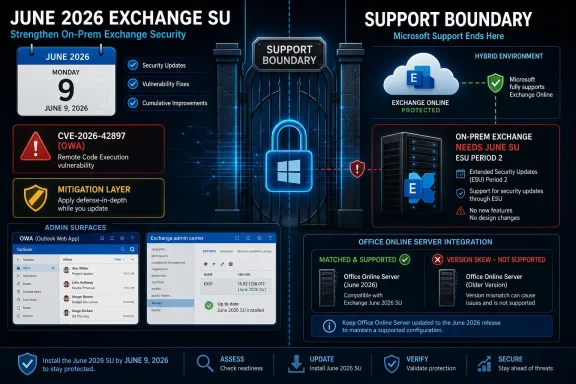 Microsoft Turns a Security Update Into a Support Boundary
The June 2026 Exchange Server security release lands with the usual language about vulnerabilities reported by partners and found internally, but the practical story is sharper. Exchange Server Subscription Edition receives the public update path. Exchange Server 2019 and 2016 receive updates only if the organization is enrolled in the Period 2 Extended Security Update program.That distinction matters because Exchange is not a quiet back-office dependency. Even in hybrid Microsoft 365 environments, on-premises Exchange servers often remain in place for recipient management, mail flow, certificate handling, or legacy operational assumptions. Microsoft’s message is that those machines still count, even if the business has convinced itself that “we are mostly in Exchange Online now.”
The June release also reinforces the new reality of Exchange SE. Subscription Edition is not merely a branding exercise for administrators to postpone planning around. It is now the place where the normal security servicing path lives, while Exchange 2016 and 2019 have moved into a paid, limited, and temporary lane.
That makes this update a security release with a migration subtext. Microsoft is patching vulnerabilities, but it is also reminding customers that unsupported Exchange servers do not become less risky because they are inconvenient to replace.
CVE-2026-42897 Was the Warning Shot
The most visible thread in this release is CVE-2026-42897, the Exchange Server vulnerability Microsoft disclosed in May 2026 and tied to Outlook Web Access. The flaw was treated seriously because it affected on-premises Exchange Server versions including Exchange SE, Exchange 2019, and Exchange 2016, and because Microsoft said the vulnerability was being addressed through mitigation before the June update arrived.The mechanics are familiar enough to make defenders uneasy. An attacker abusing a browser-facing Exchange surface does not need to own the server outright to cause real damage. Cross-site scripting in a webmail context can become a route into session abuse, mailbox manipulation, credential exposure, or follow-on attacks against users who still treat OWA as a trusted internal application.
Microsoft’s guidance around CVE-2026-42897 has also been unusually operational. The company recommended Exchange Emergency Mitigation Service coverage and made downloadable mitigation tooling available for environments that could not rely on automatic mitigation. That helped close the immediate gap, but it also left administrators managing the difference between a mitigation and a permanent fix.
The June SU narrows that gap, but does not erase it. Microsoft says installing the June 2026 update does not automatically remove previously applied CVE-2026-42897 mitigations. In fact, the company recommends keeping the mitigation in place for now as an additional layer of defense while further improvements continue.
That is the part administrators should read twice. The presence of a security update does not mean the incident response checklist can be closed without checking the mitigation state, IIS rules, and any known side effects that were tolerated during the emergency phase.
The Mitigation Layer Is Becoming Part of Exchange Operations
Exchange Emergency Mitigation was introduced as a way to move faster than the traditional cumulative update and security update cadence. In principle, that is exactly what modern enterprise software needs: a service-side mechanism capable of pushing defensive configuration when adversaries are moving faster than change-control boards.But the June 2026 update shows the cost of that model. Microsoft says that because of a service-side change, the Exchange Emergency Mitigation and Exchange Flighting services will be unable to use configuration files released in July 2026 or later unless servers are updated to the June 2026 SU or newer. Existing mitigations already downloaded and applied will continue to work, but new mitigations will not arrive on unpatched systems.
That changes the patch from “recommended” to structurally important. A server that skips June may still appear protected because today’s mitigation remains active, yet it becomes blind to the next mitigation wave. For security teams, that is a dangerous gray zone: the dashboard may look calm while the service’s future defensive channel has quietly broken.
The phrase “Unknown Issuer” in Microsoft’s related explanation points to the trust-chain plumbing behind these services. Administrators do not need to romanticize the details to understand the consequence. If Exchange cannot validate or consume future mitigation configuration, one of Microsoft’s faster emergency levers no longer works.
This is where Exchange’s age shows. The platform now depends on a mix of cumulative updates, security updates, service-side mitigations, management tools, hybrid wizards, IIS rules, and documentation that may lag the actual release. Keeping that stack healthy requires more than installing a patch when a CVE makes headlines.
Hybrid Does Not Mean Exchange Is Someone Else’s Problem
Microsoft is explicit that Exchange Online customers are already protected from the vulnerabilities addressed by the June SUs. That sentence will be the one some executives remember. It is not the sentence Exchange administrators should build the maintenance plan around.The important qualifier is that Exchange servers and Exchange Management Tools workstations in the environment still need attention. Hybrid organizations often retain an on-premises Exchange footprint precisely because Microsoft’s supported management story historically expected it. Those servers may not host active user mailboxes, but they remain privileged infrastructure connected to identity, mail flow, certificates, and administration.
That makes “management only” Exchange a particularly tempting blind spot. It may not be monitored like a production mailbox server. It may sit behind assumptions about low exposure. It may be excluded from the urgent patch wave because nobody thinks of it as customer-facing.
Attackers do not share that taxonomy. If the server is present, joined, trusted, and running Exchange components or management tooling, it belongs in the update plan. Microsoft’s recommendation to update both Exchange servers and machines running Exchange Management Tools is not bureaucracy; it is an acknowledgement that version skew in an administrative plane can produce its own failures.
Hybrid customers also need to remember the certificate wrinkle. Microsoft says that if the auth certificate is changed after installing a security update, administrators should rerun the Hybrid Configuration Wizard. That is the kind of operational detail that does not sound dramatic until mail flow or cross-premises functionality breaks during a maintenance window.
The ESU Gate Is Now a Security Control
Exchange Server 2016 and 2019 being out of support is not new, but the June 2026 update makes the consequences concrete. Customers enrolled in the Period 2 ESU program can receive the updates for Exchange 2019 CU14 and CU15, and Exchange 2016 CU23. Customers outside that program cannot simply download their way back to safety.That is a significant change in the psychology of Exchange patching. For years, many organizations treated being one or two lifecycle steps behind as a manageable technical debt problem. The vendor might scold, auditors might complain, but a critical update could often still be obtained if the risk became obvious enough.
That bargain is ending. Microsoft is making security servicing conditional on support status, and for 2016 and 2019 that means paid ESU enrollment during a defined window. Period 2 covers the May through October 2026 update period, after which the pressure to move to Exchange SE becomes even harder to ignore.
There is an argument that this is reasonable. Microsoft cannot support old server products indefinitely, especially one with Exchange’s attack history and operational complexity. There is also an argument that it is painful for organizations with legitimate migration constraints, regulatory dependencies, or third-party integrations that were never designed for rapid mail-platform turnover.
Both things can be true. The security reality, though, is that unsupported Exchange is now a business risk with a calendar attached. The June SU is not only patch code; it is a notice that the remaining runway for Exchange 2016 and 2019 is measured in months, not strategy decks.
Cumulative Updates Help, But They Do Not Remove the Planning Work
Microsoft repeats a useful point in the release notes: Exchange SUs are cumulative. If a server is on a cumulative update level supported by the SU, administrators do not need to install every intervening security or hotfix update in sequence. Install the latest applicable SU and move forward.That should reduce some friction, especially for organizations whose last Exchange maintenance window was months ago. It does not, however, rescue servers sitting on unsupported cumulative updates or unsupported product versions. The cumulative nature of SUs simplifies the path only after the server is already on a supported branch.
For Exchange SE, the target is straightforward: update the RTM release with the June 2026 SU or newer. For Exchange 2019, the eligible levels are CU14 and CU15, but access depends on Period 2 ESU enrollment. For Exchange 2016, the eligible level is CU23, again behind the ESU gate.
That matrix is not complicated, but it is unforgiving. A server running “Exchange 2019” is not automatically eligible in the meaningful sense. Its CU level, ESU status, and management role all matter.
The bigger operational lesson is that Exchange patching still rewards boring discipline. Inventory first. Confirm build numbers. Validate prerequisites. Patch in a planned order. Re-run health checks. Watch OWA, ECP, mail flow, transport queues, hybrid features, and Office Online Server integration afterward.
Office Online Server Is the Canary for Mixed Estates
One of the more practical warnings in Microsoft’s FAQ concerns Office Online Server integration. Microsoft says that after applying the June update, OOS integration with Exchange might not function as expected until all Exchange servers in the organization have been updated.That is not the flashiest part of the release, but it is exactly the kind of issue that turns a security maintenance window into a Monday morning incident. Users do not care whether the root cause is version skew between patched and unpatched Exchange servers. They care that previews, document handling, or web experiences suddenly behave differently.
Mixed-version Exchange estates are common during patching because administrators stage updates across DAG members, sites, or service windows. That is normal. The risk is assuming a partially patched organization is functionally equivalent to a fully patched one for anything beyond the narrow security fix.
The OOS warning is a reminder that Exchange is a distributed application even when administrators experience it as a set of individual servers. Client access, authentication, rendering, and integrations can cross boundaries in ways that expose inconsistent patch states. A successful deployment plan has to include the “all servers done” state, not merely the first server patched without error.
It also argues against leaving one “low priority” Exchange server behind because it is rarely used. In a modern Exchange org, rarely used does not always mean operationally irrelevant.
Documentation Lag Is Now Part of the Risk Surface
Microsoft notes that documentation may not be fully available at the time the post is published, and that a learn.microsoft.com publishing issue was preventing the latest documentation version from showing. That is a small caveat with large real-world implications.Exchange administrators often work from official documentation during maintenance because the product’s patching procedures are precise and failure-prone. If the blog says one thing, the downloadable tool says another, and Learn has not caught up, the administrator in the change window is left deciding which source represents the current truth.
That is why the June release should be handled as a living operational bulletin rather than a static download announcement. The Exchange Team’s blog post may receive future updates. Security Update Guide entries may clarify individual CVEs. Mitigation instructions may change as Microsoft decides when CVE-2026-42897 mitigation M2 should stop reapplying to fully updated servers.
For security teams, this creates a documentation-monitoring task after installation, not just before it. If Microsoft updates guidance on mitigation removal, known issues, or OOS behavior, the “patched” state may still require follow-up work.
This is not unique to Microsoft. Modern enterprise software vendors increasingly ship fixes, service-side changes, and documentation updates on overlapping timelines. But Exchange’s operational blast radius makes that cadence harder to tolerate.
The Real Decision Is Whether Exchange Still Belongs On-Prem
Every Exchange security release now carries the weight of history. ProxyLogon, ProxyShell, emergency mitigations, hybrid management debates, and repeated servicing changes have trained administrators to treat Exchange as one of the highest-risk Windows Server workloads they operate.That does not mean every organization can or should abandon on-premises Exchange overnight. Some environments have regulatory constraints, network isolation requirements, custom transport integrations, or identity architectures that make cloud-only mail harder than a licensing slide suggests. Exchange SE exists because Microsoft knows on-premises Exchange is not disappearing in 2026.
But the direction of travel is clear. Exchange Online gets protected without customer-managed server patching. Exchange SE becomes the supported on-premises path. Exchange 2016 and 2019 move into a paid extended-support corridor that is both temporary and narrower than many customers would like.
The June 2026 update therefore forces a strategic conversation under the cover of a tactical one. Patching this month is necessary. Deciding whether the organization wants to keep repeating this pattern every time Exchange produces another urgent CVE is the harder question.
For some IT shops, the answer will be Exchange SE, better maintenance discipline, and a cleaned-up hybrid footprint. For others, it will be accelerating migration to Exchange Online and removing the last on-premises server as soon as the management model allows. The worst answer is to keep treating unsupported Exchange as a tolerable exception.
The June Patch Leaves Administrators With a Narrower Margin
The immediate work is concrete enough, but the room for improvisation is shrinking. Microsoft’s June 2026 Exchange release ties together vulnerability remediation, mitigation continuity, product lifecycle, and hybrid hygiene in a way that makes selective attention risky.- Organizations running Exchange Server Subscription Edition should install the June 2026 SU or newer to address the current vulnerabilities and preserve future Emergency Mitigation and Flighting functionality.
- Organizations running Exchange Server 2019 CU14 or CU15 need Period 2 ESU enrollment to obtain the June 2026 security update.
- Organizations running Exchange Server 2016 CU23 need Period 2 ESU enrollment to obtain the June 2026 security update.
- Administrators should not assume CVE-2026-42897 mitigations disappear after patching, because Microsoft says they remain in place unless deliberately removed.
- Hybrid organizations still need to update on-premises Exchange servers and Exchange Management Tools machines, even when Exchange Online itself is already protected.
- Environments that patch only some Exchange servers may see lingering mitigation side effects or integration issues, especially around Office Online Server, until the entire organization is updated.
References
- Primary source: Microsoft Exchange Team Blog
Published: Tue, 09 Jun 2026 17:07:51 GMT
Released: June 2026 Exchange Server Security Updates | Microsoft Community Hub
We have released Security Updates for Exchange Server SE. Exchange Server 2019 and 2016 ESU updates only. techcommunity.microsoft.com
- Related coverage: techtimes.com
Exchange Server OWA Zero-Day CVE-2026-42897 Exploited With No Permanent Patch and New Mitigation Gaps
Microsoft confirmed on May 14 that CVE-2026-42897 — a cross-site scripting flaw in the Outlook Web Access component of Exchange Server 2016, 2019, and Subscription Edition — is under activewww.techtimes.com - Related coverage: thecybersignal.com
Exchange Server CVE-2026-42897: Active Zero-Day, No Patch Yet
Microsoft confirmed active exploitation of an XSS zero-day in on-prem Exchange. No patch yet — EEMS mitigation only. Period 2 ESU required for 2016/2019. www.thecybersignal.com
- Related coverage: notebookcheck.net
Microsoft Exchange Server zero-day exploited via crafted email - Notebookcheck News
Microsoft confirms active exploitation of Exchange Server zero-day CVE-2026-42897 via crafted email with no permanent patch available for on-prem deployments. www.notebookcheck.net
- Related coverage: theregister.com
Exploited Exchange Server flaw turns OWA inboxes into script launchpads
Microsoft mitigation may bork inline images, calendar printing while admins wait for a proper patchwww.theregister.com - Related coverage: atworkstudio.it
Exchange Server OWA zero-day (CVE-2026-42897): why to migrate to Microsoft 365 now | AtWorkStudio
CVE-2026-42897, an XSS vulnerability in Outlook Web Access on Exchange Server 2016/2019/Subscription Edition: active exploitation in the wild, no official patch and CISA KEV listing. What to do today and why Microsoft 365 closes the problem.www.atworkstudio.it
- Related coverage: cybersecurefox.com
CVE-2026-42897: Active XSS Attacks On Exchange Server
Microsoft has disclosed vulnerability CVE-2026-42897 (CVSS 8.1) in on-premises versions of Exchange Server, which is already being actively exploited bycybersecurefox.com - Related coverage: securitytoday.de
Exchange-Zero-Day CVE-2026-42897: OWA-Spoofing zwingt DACH-CISOs zum Sofort-Patch - SecurityToday
Microsoft warnt vor aktiv ausgenutztem OWA-Spoofing-/XSS-Issue in Exchange Server (CVE-2026-42897). Sofort-Patch und SOC-Sweep in 48 Stunden Pflicht.www.securitytoday.de - Related coverage: msxfaq.de
- Related coverage: tomsguide.com
Do you use Microsoft Exchange? Hackers are actively exploiting a new zero-day flaw | Tom's Guide
Microsoft warns of a new zero-day vulnerability that leaves Exchange open to hackers.www.tomsguide.com - Related coverage: ncsc.gov.ie
- Related coverage: media.defense.gov