

Microsoft’s June 2026 Secure Boot certificate deadline affects most Windows devices that still depend on Microsoft’s 2011-era boot trust certificates, and the immediate fix is installing current Windows updates, allowing the machine to restart, and leaving the new Secure Boot remediation files alone. The alarmist version is that Windows PCs may suddenly refuse to boot. The more accurate version is subtler and, for IT departments, more annoying: Microsoft is trying to rotate the cryptographic foundation under hundreds of millions of machines without making the floor collapse. That makes this less a one-day Windows scare than a live test of whether the modern PC ecosystem can update firmware-era trust at cloud-service scale.
Secure Boot is one of those Windows features users rarely think about until it appears in a warning dialog, a BIOS setting, or an anti-cheat error. It sits below Windows, checking whether early boot components are signed by trusted authorities before the operating system loads. That makes it a security feature, but also a dependency chain stretching from Microsoft to PC makers, firmware vendors, bootloaders, recovery environments, Linux distributions, virtualization tools, and enterprise imaging workflows.
The certificates at the center of this story date back to the Windows 8 era. Microsoft’s original Secure Boot certificate infrastructure, issued around 2011, has been embedded in the PC ecosystem for roughly 15 years. Those certificates begin expiring in June 2026, with additional related expirations later in the year.
A certificate expiration is not the same thing as a software bug. It is closer to a scheduled demolition date printed on the cornerstone. Everyone knew the dates existed, but the industry’s ability to act on them depends on machines that are patched, firmware that can accept updates, and administrators who understand that boot trust is not the same operational problem as “install the latest cumulative update.”
That is why the latest Windows updates have acquired a slightly strange side effect: extra restarts, visible Secure Boot status badges, and a newly created
The more visible change for ordinary users is the restart pattern. A typical Windows update already involves at least one reboot; the Secure Boot refresh can add another. Some users may see the update sequence appear to restart, resume, and restart again, with progress indicators behaving in ways that look like a failed installation even when Windows is doing exactly what it was told to do.
That is a communications problem as much as a technical one. Microsoft is asking users to trust a process that temporarily resembles the failure mode users have been trained to fear: an update that reboots repeatedly. On a consumer laptop, that may mean confusion. In a business fleet, it means help desk tickets, maintenance-window overruns, and anxiety from anyone who remembers the long history of Windows updates that did, in fact, break things.
Still, the practical advice is simple. Install the current Windows updates, reboot when prompted, and do not interrupt the machine because it restarted one more time than expected. The extra reboot is not the crisis. The crisis is the population of devices that never get far enough through the process to receive the new trust chain.
That distinction is important because it separates security degradation from instant failure. A machine that misses the certificate refresh is not necessarily doomed to a black screen the next morning. But over time, it becomes harder for Microsoft, OEMs, and administrators to safely update boot-critical components that rely on the newer certificate chain.
The risk is therefore cumulative. The longer a device remains on the old certificates, the more likely it becomes that a future boot manager, firmware update, recovery environment, or security mitigation expects trust material the machine does not have. That is where “still boots today” can turn into “cannot safely move forward tomorrow.”
For home users, the message is refreshingly boring: keep Windows Update enabled, install the May and June updates, and reboot. For IT pros, the message is sharper: inventory now, because the systems most likely to be missed are the ones that always fall through the cracks — powered-off spares, lab machines, kiosk PCs, branch-office desktops, dual-boot systems, and older hardware with neglected firmware.
A green indicator should reassure most users that the certificate refresh has landed or is on track. A yellow warning suggests the device may need action, such as installing Windows updates, applying firmware updates from the PC maker, or waiting for the phased rollout to reach that hardware configuration. A red stop-style indicator is more serious: it suggests the current boot configuration may prevent delivery of the new certificates through the normal path.
That last category is where enterprise administrators should pay attention. A red indicator does not merely mean “run Windows Update again.” It may mean the firmware, Secure Boot configuration, disk layout, bootloader state, or device targeting data puts the PC outside Microsoft’s high-confidence automatic path.
Microsoft’s phrase “high confidence device targeting data” is doing a lot of work here. In plainer English, the company does not want to push boot trust changes to devices unless telemetry and compatibility signals suggest the update is likely to succeed. That is prudent. It is also a reminder that Microsoft is not treating every Windows PC as equally safe to modify.
But cautious rollouts create their own ambiguity. A device that has not received the update may be waiting its turn, may be blocked because Microsoft lacks confidence in the configuration, or may need an OEM firmware update that Windows Update cannot supply. From the user’s point of view, all three states can look like “nothing has happened yet.”
This is especially troublesome for managed environments. Many organizations intentionally delay Windows updates, block optional updates, disable consumer-facing notifications, or use WSUS, Intune, Configuration Manager, Autopatch, or third-party tools to control servicing. Those controls are normally good hygiene. Here, they may also slow down delivery of a boot-trust refresh that Microsoft wants completed before the old certificates age out.
The problem is not that Microsoft is hiding the ball. The company has published guidance for consumers, IT administrators, and server operators. The problem is that the PC ecosystem is full of machines that do not behave like clean Microsoft reference devices. Some have custom images. Some have old firmware. Some dual-boot. Some are offline for months. Some are technically unsupported but still in daily use.
That is why this story lands differently for enthusiasts than for casual users. A typical Windows 11 laptop that updates normally is likely to pass through this with little more than an extra reboot and a new folder. A lovingly maintained but weirdly configured workstation may require more attention.
Not every Windows 10 PC is equally exposed. Devices enrolled in appropriate extended security programs or still receiving the relevant updates may get the Secure Boot refresh through Windows Update. But the broader pattern is clear: Microsoft is no longer optimizing the Windows ecosystem around the idea that 2015-era deployments should glide forever.
That is not just a support-policy argument. Secure Boot depends on cooperation among Windows, firmware, and the hardware vendor’s update channel. If a device maker has stopped publishing firmware updates, or if an enterprise has stopped applying them, Microsoft can only do so much from the operating system side.
This is where Microsoft’s “most devices” phrasing is both reassuring and unsettling. Most devices should receive the new certificates automatically. Most is not all. And for administrators, the operational burden lives in the remainder.
Those systems are dangerous because they are invisible until needed. A disaster-recovery laptop that missed the Secure Boot refresh is not a problem while it is in storage. It becomes a problem the day someone needs it to recover a domain controller, run a manufacturing process, or connect to a VPN during an outage.
Administrators should treat the Secure Boot certificate refresh as an inventory problem first and an update problem second. The question is not simply “Have we approved the Windows update?” It is “Which devices have actually received and applied the new certificates, and which ones still depend on the 2011 chain?”
That distinction is why reboot compliance matters. A patch that is downloaded but not fully applied is not a completed remediation. In this case, the reboot is not administrative theater; it is part of the process by which the new boot trust material becomes active.
This is the part consumer coverage often compresses into “update your PC.” For IT teams, it is more complicated. Firmware updates may be managed separately from Windows cumulative updates. They may require vendor tools, BIOS passwords, battery thresholds, staged rings, or user downtime. They may also carry their own risk profile, which makes organizations reluctant to deploy them broadly without testing.
The Secure Boot refresh therefore collides with one of enterprise IT’s chronic weak spots: firmware lifecycle management. Windows Update has become comparatively predictable. Firmware updates remain uneven, vendor-specific, and too often treated as something to do only when a specific hardware bug appears.
That attitude will not age well in a world where platform security features depend on firmware being current. Secure Boot, TPM-backed protections, virtualization-based security, measured boot, and modern credential defenses all assume the machine below Windows can be trusted. If the firmware layer is frozen in time, the security model becomes aspirational.
This is a recurring Windows problem. Microsoft has spent years making the operating system more service-like, more telemetry-driven, and more controlled by phased deployment. That model can reduce catastrophic failures. But when something does go wrong — or merely looks wrong — the user receives a handful of vague signals and a request to trust the process.
The company is in a difficult position. If it says too little, users panic when they see extra restarts. If it says too much, it risks giving unqualified users instructions that could break Secure Boot configurations. If it pushes aggressively, it may brick edge cases. If it waits, it leaves older certificates in place too long.
Still, clearer consumer language would help. “Your PC may restart an extra time to update Secure Boot certificates” is useful. “Do not delete the SecureBoot folder” is useful. “A red Secure Boot badge means Windows may not be able to deliver the certificate update automatically” is useful. The rest should be translated out of deployment-systems dialect before it reaches the public.
This is a case where restraint is valuable. If Windows creates a Secure Boot folder as part of the update, leave it. If the system needs another reboot, let it finish. If Windows Security reports a warning, investigate it through official update and firmware channels before trying to hand-edit boot settings.
That does not mean users should be passive. They should confirm that Windows Update is current, check Windows Security’s Secure Boot status, and install firmware updates from their OEM where appropriate. But the goal is to let the supported path complete, not to improvise a more heroic one.
Dual-boot users should be particularly cautious. Secure Boot changes can affect the trust assumptions around non-Windows bootloaders and pre-OS tools. Major Linux distributions have worked with Secure Boot for years, but unusual boot chains, custom keys, older shims, and niche recovery tools can complicate the story.
That means building a workstream around detection. Microsoft’s documentation includes ways to identify affected devices and monitor certificate state, and organizations using Intune, Configuration Manager, Defender for Endpoint, or scripting should be turning that into fleet reporting. The important thing is to avoid assuming that update deployment equals certificate completion.
Testing should include representative hardware models, not just the newest corporate standard laptop. Older business desktops, rugged devices, thin clients, lab PCs, and machines with custom boot configurations deserve special attention. If a device class needs firmware first, that is a procurement and vendor-management issue, not just a Windows patching issue.
Change windows should also account for the extra reboot. That sounds minor until a production floor, clinic, classroom, or call center discovers that a machine’s “normal” update cycle now takes longer and restarts more than expected. Communicating that beforehand is cheaper than explaining it afterward.
The difference is that Y2K was about time logic everywhere; this is about trust logic at the bottom of the boot stack. It is narrower, more technical, and less likely to create dramatic public failures. But it is also harder for a normal user to understand because the affected component is invisible until something breaks.
Microsoft deserves some credit for moving before the wall is hit. The company has been publishing guidance, adding status indicators, and using Windows Update to deliver the new certificates automatically where it has sufficient confidence. That is the right broad strategy.
But the deadline also reveals how much of the Windows ecosystem still depends on long-lived assumptions. A certificate issued when Windows 8 was new is now a live operational dependency for Windows 11-era machines. That is not scandalous; long-lived roots of trust are normal. But rotating them at scale is exactly the kind of maintenance the industry tends to under-practice until it becomes urgent.
That should change how organizations think about endpoint management. Firmware currency belongs in the same conversation as OS patch compliance. Spare devices need periodic servicing. Imaging workflows should be tested against current Secure Boot requirements. Procurement teams should prefer vendors with reliable firmware update channels and transparent lifecycle commitments.
For consumers, the lesson is less bureaucratic but still real. If Windows says it needs to restart again after an update, that may be annoying rather than broken. If Windows Security shows a Secure Boot warning, it should not be ignored. If a PC has been sitting unused for months, bring it online and let it update before it becomes the machine you desperately need.
Microsoft’s rollout will probably succeed for the majority of users because the majority of users are on mainstream hardware, leave updates enabled, and do not run exotic boot configurations. The story, as usual, will be written by the exceptions.
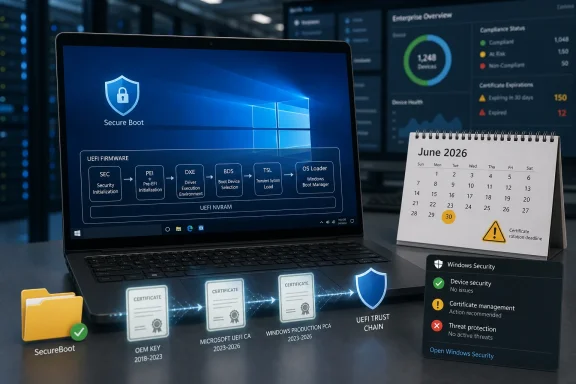 Microsoft Is Replacing the Floor While Everyone Is Still Standing on It
Secure Boot is one of those Windows features users rarely think about until it appears in a warning dialog, a BIOS setting, or an anti-cheat error. It sits below Windows, checking whether early boot components are signed by trusted authorities before the operating system loads. That makes it a security feature, but also a dependency chain stretching from Microsoft to PC makers, firmware vendors, bootloaders, recovery environments, Linux distributions, virtualization tools, and enterprise imaging workflows.The certificates at the center of this story date back to the Windows 8 era. Microsoft’s original Secure Boot certificate infrastructure, issued around 2011, has been embedded in the PC ecosystem for roughly 15 years. Those certificates begin expiring in June 2026, with additional related expirations later in the year.
A certificate expiration is not the same thing as a software bug. It is closer to a scheduled demolition date printed on the cornerstone. Everyone knew the dates existed, but the industry’s ability to act on them depends on machines that are patched, firmware that can accept updates, and administrators who understand that boot trust is not the same operational problem as “install the latest cumulative update.”
That is why the latest Windows updates have acquired a slightly strange side effect: extra restarts, visible Secure Boot status badges, and a newly created
SecureBoot folder that some users are noticing and some support forums are already treating as suspicious. In this case, the suspicious-looking folder is the least suspicious part of the story.The New Folder Is a Symptom, Not the Disease
The newSecureBoot folder appearing after Windows 11’s May 2026 update is expected behavior, not evidence that the update went wrong. It is part of the machinery Microsoft is using to stage the certificate refresh. Deleting it because it looks unfamiliar is the sort of “cleanup” that creates the very problems users are trying to avoid.The more visible change for ordinary users is the restart pattern. A typical Windows update already involves at least one reboot; the Secure Boot refresh can add another. Some users may see the update sequence appear to restart, resume, and restart again, with progress indicators behaving in ways that look like a failed installation even when Windows is doing exactly what it was told to do.
That is a communications problem as much as a technical one. Microsoft is asking users to trust a process that temporarily resembles the failure mode users have been trained to fear: an update that reboots repeatedly. On a consumer laptop, that may mean confusion. In a business fleet, it means help desk tickets, maintenance-window overruns, and anxiety from anyone who remembers the long history of Windows updates that did, in fact, break things.
Still, the practical advice is simple. Install the current Windows updates, reboot when prompted, and do not interrupt the machine because it restarted one more time than expected. The extra reboot is not the crisis. The crisis is the population of devices that never get far enough through the process to receive the new trust chain.
June Is a Deadline, but Not a Single Detonation
The phrase “starts in June” matters. This is not a cinematic countdown in which every unpatched PC becomes a paperweight at midnight on June 1, 2026. Microsoft’s own guidance is more measured: affected devices may continue to boot and may continue receiving standard Windows updates, but they may lose the ability to receive future Secure Boot protections for early boot components.That distinction is important because it separates security degradation from instant failure. A machine that misses the certificate refresh is not necessarily doomed to a black screen the next morning. But over time, it becomes harder for Microsoft, OEMs, and administrators to safely update boot-critical components that rely on the newer certificate chain.
The risk is therefore cumulative. The longer a device remains on the old certificates, the more likely it becomes that a future boot manager, firmware update, recovery environment, or security mitigation expects trust material the machine does not have. That is where “still boots today” can turn into “cannot safely move forward tomorrow.”
For home users, the message is refreshingly boring: keep Windows Update enabled, install the May and June updates, and reboot. For IT pros, the message is sharper: inventory now, because the systems most likely to be missed are the ones that always fall through the cracks — powered-off spares, lab machines, kiosk PCs, branch-office desktops, dual-boot systems, and older hardware with neglected firmware.
The Red Badge Is Microsoft’s Attempt at a Dashboard for Firmware Trust
Microsoft has started exposing Secure Boot certificate status through Windows Security, using colored indicators to show whether a device appears current, needs attention, or may be unable to receive the remediation automatically. That is a sensible move, but it also exposes the awkwardness of the underlying problem. Windows is reporting on a trust relationship that lives partly inside firmware and partly inside Microsoft’s update pipeline.A green indicator should reassure most users that the certificate refresh has landed or is on track. A yellow warning suggests the device may need action, such as installing Windows updates, applying firmware updates from the PC maker, or waiting for the phased rollout to reach that hardware configuration. A red stop-style indicator is more serious: it suggests the current boot configuration may prevent delivery of the new certificates through the normal path.
That last category is where enterprise administrators should pay attention. A red indicator does not merely mean “run Windows Update again.” It may mean the firmware, Secure Boot configuration, disk layout, bootloader state, or device targeting data puts the PC outside Microsoft’s high-confidence automatic path.
Microsoft’s phrase “high confidence device targeting data” is doing a lot of work here. In plainer English, the company does not want to push boot trust changes to devices unless telemetry and compatibility signals suggest the update is likely to succeed. That is prudent. It is also a reminder that Microsoft is not treating every Windows PC as equally safe to modify.
The Phased Rollout Is a Safety Net with Holes
Microsoft’s controlled rollout is the right engineering call. Updating Secure Boot certificates is not like changing an icon or patching Notepad. A bad push at this layer risks boot failures, recovery prompts, or machines that can no longer load expected pre-OS components. If there were ever a Windows change that deserved caution, this is it.But cautious rollouts create their own ambiguity. A device that has not received the update may be waiting its turn, may be blocked because Microsoft lacks confidence in the configuration, or may need an OEM firmware update that Windows Update cannot supply. From the user’s point of view, all three states can look like “nothing has happened yet.”
This is especially troublesome for managed environments. Many organizations intentionally delay Windows updates, block optional updates, disable consumer-facing notifications, or use WSUS, Intune, Configuration Manager, Autopatch, or third-party tools to control servicing. Those controls are normally good hygiene. Here, they may also slow down delivery of a boot-trust refresh that Microsoft wants completed before the old certificates age out.
The problem is not that Microsoft is hiding the ball. The company has published guidance for consumers, IT administrators, and server operators. The problem is that the PC ecosystem is full of machines that do not behave like clean Microsoft reference devices. Some have custom images. Some have old firmware. Some dual-boot. Some are offline for months. Some are technically unsupported but still in daily use.
That is why this story lands differently for enthusiasts than for casual users. A typical Windows 11 laptop that updates normally is likely to pass through this with little more than an extra reboot and a new folder. A lovingly maintained but weirdly configured workstation may require more attention.
Windows 10 Makes the Calendar Even Less Forgiving
The Secure Boot deadline arrives in the same year Windows 10 is already moving through its end-of-support drama. Windows 10’s mainstream consumer support ended in October 2025, with extended security options available for certain users and organizations. That creates a messy overlap: many PCs still in service are old enough to have Secure Boot certificates that need refreshing and old enough to be approaching the limits of Microsoft’s preferred servicing path.Not every Windows 10 PC is equally exposed. Devices enrolled in appropriate extended security programs or still receiving the relevant updates may get the Secure Boot refresh through Windows Update. But the broader pattern is clear: Microsoft is no longer optimizing the Windows ecosystem around the idea that 2015-era deployments should glide forever.
That is not just a support-policy argument. Secure Boot depends on cooperation among Windows, firmware, and the hardware vendor’s update channel. If a device maker has stopped publishing firmware updates, or if an enterprise has stopped applying them, Microsoft can only do so much from the operating system side.
This is where Microsoft’s “most devices” phrasing is both reassuring and unsettling. Most devices should receive the new certificates automatically. Most is not all. And for administrators, the operational burden lives in the remainder.
The Real Risk Is the Forgotten Machine
The machines most likely to cause trouble are not necessarily the ones on someone’s desk today. They are the loaner laptops in a cabinet, the point-of-sale terminals with update deferrals, the conference-room PCs nobody owns, the factory-floor systems that cannot be rebooted casually, and the spare Windows tablets that only come online during an incident.Those systems are dangerous because they are invisible until needed. A disaster-recovery laptop that missed the Secure Boot refresh is not a problem while it is in storage. It becomes a problem the day someone needs it to recover a domain controller, run a manufacturing process, or connect to a VPN during an outage.
Administrators should treat the Secure Boot certificate refresh as an inventory problem first and an update problem second. The question is not simply “Have we approved the Windows update?” It is “Which devices have actually received and applied the new certificates, and which ones still depend on the 2011 chain?”
That distinction is why reboot compliance matters. A patch that is downloaded but not fully applied is not a completed remediation. In this case, the reboot is not administrative theater; it is part of the process by which the new boot trust material becomes active.
Firmware Vendors Are the Silent Co-Authors of This Update
Microsoft can ship the Windows-side pieces, but the PC maker and firmware ecosystem still matter. Secure Boot variables live in UEFI firmware, and devices differ in how they expose, protect, and update those variables. That is why some machines may need firmware updates from Dell, HP, Lenovo, ASUS, Microsoft, or another OEM before the certificate rotation can complete cleanly.This is the part consumer coverage often compresses into “update your PC.” For IT teams, it is more complicated. Firmware updates may be managed separately from Windows cumulative updates. They may require vendor tools, BIOS passwords, battery thresholds, staged rings, or user downtime. They may also carry their own risk profile, which makes organizations reluctant to deploy them broadly without testing.
The Secure Boot refresh therefore collides with one of enterprise IT’s chronic weak spots: firmware lifecycle management. Windows Update has become comparatively predictable. Firmware updates remain uneven, vendor-specific, and too often treated as something to do only when a specific hardware bug appears.
That attitude will not age well in a world where platform security features depend on firmware being current. Secure Boot, TPM-backed protections, virtualization-based security, measured boot, and modern credential defenses all assume the machine below Windows can be trusted. If the firmware layer is frozen in time, the security model becomes aspirational.
Microsoft’s Messaging Is Technically Careful and Humanly Opaque
Microsoft’s language around this rollout is precise in the way platform security language tends to be precise. Phrases such as “additional high confidence device targeting data” and “sufficient successful update signals” are meaningful to the engineers running the rollout. They are not meaningful to a worried user staring at a red icon.This is a recurring Windows problem. Microsoft has spent years making the operating system more service-like, more telemetry-driven, and more controlled by phased deployment. That model can reduce catastrophic failures. But when something does go wrong — or merely looks wrong — the user receives a handful of vague signals and a request to trust the process.
The company is in a difficult position. If it says too little, users panic when they see extra restarts. If it says too much, it risks giving unqualified users instructions that could break Secure Boot configurations. If it pushes aggressively, it may brick edge cases. If it waits, it leaves older certificates in place too long.
Still, clearer consumer language would help. “Your PC may restart an extra time to update Secure Boot certificates” is useful. “Do not delete the SecureBoot folder” is useful. “A red Secure Boot badge means Windows may not be able to deliver the certificate update automatically” is useful. The rest should be translated out of deployment-systems dialect before it reaches the public.
Enthusiasts Should Resist the Urge to Out-Smart the Fix
Windows power users have a long and not entirely unjustified habit of intervening when updates behave oddly. They delete folders, clear caches, disable services, toggle BIOS settings, and run scripts found in forum threads. Sometimes that works. Sometimes it turns a staged remediation into a forensic exercise.This is a case where restraint is valuable. If Windows creates a Secure Boot folder as part of the update, leave it. If the system needs another reboot, let it finish. If Windows Security reports a warning, investigate it through official update and firmware channels before trying to hand-edit boot settings.
That does not mean users should be passive. They should confirm that Windows Update is current, check Windows Security’s Secure Boot status, and install firmware updates from their OEM where appropriate. But the goal is to let the supported path complete, not to improvise a more heroic one.
Dual-boot users should be particularly cautious. Secure Boot changes can affect the trust assumptions around non-Windows bootloaders and pre-OS tools. Major Linux distributions have worked with Secure Boot for years, but unusual boot chains, custom keys, older shims, and niche recovery tools can complicate the story.
Sysadmins Need Evidence, Not Reassurance
For administrators, the only useful answer is measurable status. A message that “most devices” will update automatically does not satisfy a compliance team, a change advisory board, or a person responsible for thousands of endpoints. The organization needs to know which machines are remediated, which are pending, and which are blocked.That means building a workstream around detection. Microsoft’s documentation includes ways to identify affected devices and monitor certificate state, and organizations using Intune, Configuration Manager, Defender for Endpoint, or scripting should be turning that into fleet reporting. The important thing is to avoid assuming that update deployment equals certificate completion.
Testing should include representative hardware models, not just the newest corporate standard laptop. Older business desktops, rugged devices, thin clients, lab PCs, and machines with custom boot configurations deserve special attention. If a device class needs firmware first, that is a procurement and vendor-management issue, not just a Windows patching issue.
Change windows should also account for the extra reboot. That sounds minor until a production floor, clinic, classroom, or call center discovers that a machine’s “normal” update cycle now takes longer and restarts more than expected. Communicating that beforehand is cheaper than explaining it afterward.
This Is the PC Industry’s Y2K, but Smaller and Stranger
The comparison to Y2K is imperfect, but useful. The Secure Boot certificate deadline is a known future date embedded in infrastructure that most users never inspect. The impact is not evenly distributed. The majority of systems may pass through uneventfully, while neglected edge cases become disproportionately painful.The difference is that Y2K was about time logic everywhere; this is about trust logic at the bottom of the boot stack. It is narrower, more technical, and less likely to create dramatic public failures. But it is also harder for a normal user to understand because the affected component is invisible until something breaks.
Microsoft deserves some credit for moving before the wall is hit. The company has been publishing guidance, adding status indicators, and using Windows Update to deliver the new certificates automatically where it has sufficient confidence. That is the right broad strategy.
But the deadline also reveals how much of the Windows ecosystem still depends on long-lived assumptions. A certificate issued when Windows 8 was new is now a live operational dependency for Windows 11-era machines. That is not scandalous; long-lived roots of trust are normal. But rotating them at scale is exactly the kind of maintenance the industry tends to under-practice until it becomes urgent.
The June Fix Is Really a Test of Trust Maintenance
The most important lesson is not that users should reboot their PCs, though they should. It is that trust infrastructure now has an operational lifecycle. Certificates expire, signing authorities rotate, boot chains evolve, and firmware must keep up. Security is no longer a static state achieved when a PC ships.That should change how organizations think about endpoint management. Firmware currency belongs in the same conversation as OS patch compliance. Spare devices need periodic servicing. Imaging workflows should be tested against current Secure Boot requirements. Procurement teams should prefer vendors with reliable firmware update channels and transparent lifecycle commitments.
For consumers, the lesson is less bureaucratic but still real. If Windows says it needs to restart again after an update, that may be annoying rather than broken. If Windows Security shows a Secure Boot warning, it should not be ignored. If a PC has been sitting unused for months, bring it online and let it update before it becomes the machine you desperately need.
Microsoft’s rollout will probably succeed for the majority of users because the majority of users are on mainstream hardware, leave updates enabled, and do not run exotic boot configurations. The story, as usual, will be written by the exceptions.
The Secure Boot Deadline Turns Routine Patch Hygiene Into a Boot-Level Responsibility
The practical message is less dramatic than the headlines, but more serious than ordinary Patch Tuesday advice. This is a scheduled trust refresh, and the safest path is to let Windows and firmware updates complete before June’s certificate expirations begin to bite.- Install the latest Windows updates and allow every required restart to complete, even if the update sequence appears to reboot more than once.
- Do not delete the new
SecureBootfolder created by recent Windows 11 updates, because it is expected behavior tied to certificate remediation. - Check Windows Security for Secure Boot status indicators, especially if the device shows a yellow or red warning.
- Install firmware updates from the PC manufacturer when Windows or enterprise tooling indicates the device cannot receive the certificate update automatically.
- Inventory offline, stored, dual-boot, kiosk, lab, and older business devices because they are the machines most likely to miss the automatic rollout.
- Treat a completed download as different from a completed remediation, because the certificate refresh may require a reboot and successful post-update signals.
References
- Primary source: Forbes
Published: Sun, 17 May 2026 07:33:43 GMT
‘Reboot Your PC’—Microsoft Changes ‘Most Windows Devices’ In June
Microsoft starts expiring critical Secure Boot certificates in just 2 weeks.www.forbes.com - Official source: learn.microsoft.com
Update Secure Boot Certificates for Windows Devices - Windows Client | Microsoft Learn
Update your Windows devices to maintain Secure Boot protection with 2023 certificates before they expire in June 2026.learn.microsoft.com - Related coverage: windowslatest.com
Microsoft confirms Windows 11 may restart multiple times after updates and your PC isn't broken, as it's due to Secure Boot 2023
Microsoft has clarified that Windows 11 restarting more than once after an update is expected behavior, not a sign of a failed install. www.windowslatest.com
- Official source: microsoft.com
Prepare your servers for Secure Boot certificate updates | Microsoft Windows Server Blog
The original Secure Boot certificates introduced in 2011 are approaching the end of their planned lifecycle, with expirations beginning in late June 2026.www.microsoft.com - Official source: support.microsoft.com
- Related coverage: pcworld.com
Windows 11 restarts several times after a recent update? Don't panic | PCWorld
Microsoft says it's normal if Windows 11 restarts two or three times after recent or upcoming updates. Here's what you should do afterwards.www.pcworld.com

- Related coverage: allthings.how
Windows 11 KB5083631 Extra Restart Explained (Secure Boot Certificate Update)
Why the April 2026 preview update can reboot twice on some PCs, plus the BitLocker recovery prompt to watch for.allthings.how - Related coverage: windowscentral.com
Microsoft warns Secure Boot certificates will expire in 2026 | Windows Central
After 15 years, the original Secure Boot certificates that keep your PC secure during boot are expiring. Here's what you need to know.www.windowscentral.com - Official source: techcommunity.microsoft.com
Secure Boot playbook for certificates expiring in 2026
Explore tools and step-by-step guidance to help you proactively update your Secure Boot certificates. techcommunity.microsoft.com
- Related coverage: notebookcheck.net
Microsoft sets 2026 deadline for Secure Boot certificate expiration - Notebookcheck News
Microsoft has issued new guidance warning that 2011 Secure Boot certificates begin expiring in June 2026. Windows updates are rolling out 2023 replacement certificates, with some PCs requiring OEM firmware updates. www.notebookcheck.net
- Related coverage: tomshardware.com
Microsoft is refreshing Secure Boot certificates to plug security holes before they happen — if you bought a PC last year, you should be set | Tom's Hardware
Be sure to keep Windows 11 systems updated to get refreshed security certificates.www.tomshardware.com - Related coverage: techradar.com
Microsoft confirms why Windows 11 updates might be weird right now, and look like they're failing — but it's nothing to worry about | TechRadar
You'll need to be patient with updates packing Secure Boot changes, thoughwww.techradar.com - Related coverage: pcgamer.com
Secure Boot certificates used by anti-cheat software are set to expire in June but new ones are already in the mail | PC Gamer
You shouldn't have to worry about expired certificates if you keep your PC up-to-date.www.pcgamer.com - Related coverage: tomsguide.com
Windows 10 users warned to upgrade now or risk a ‘degraded security state’ as Microsoft ends Secure Boot support | Tom's Guide
Support for Windows 10 officially ended in October 2025, and Microsoft says devices that don’t upgrade could enter a degraded security state — leaving them vulnerable to threats. Here’s what it means for your PC and how to protect it.www.tomsguide.com
