

Microsoft released a June 9, 2026 batch of Windows Dynamic Updates for Windows 11, Windows 10, and supported Windows Server releases, updating Windows Setup and recovery components alongside the month’s Patch Tuesday cumulative security updates. The headline is not that another set of KB numbers appeared in the Catalog. It is that Microsoft is again treating the installer, the recovery partition, and the upgrade path as first-class servicing targets rather than inert plumbing. For admins, that is both welcome and faintly ominous: the parts of Windows you notice least are often the parts that decide whether a fleet upgrade succeeds.
Patch Tuesday usually belongs to cumulative updates, CVE counts, reboot windows, and the predictable choreography of pilot rings. Dynamic Updates sit in a less glamorous lane. They are not the patches most users see in Windows Update history, and they rarely come with the kind of user-facing change log that generates excitement.
But they matter because they service the machinery that gets Windows from one state to another. Setup Dynamic Updates refresh the binaries and files used during feature update installation. Safe OS Dynamic Updates refresh the recovery and preinstallation environment that Windows depends on when the normal operating system is not yet fully available, or no longer healthy enough to do the job.
That distinction is important. A cumulative update fixes the Windows you are already running. A Dynamic Update tries to fix the Windows that is installing, repairing, rolling back, or recovering. In enterprise terms, that is the difference between a workstation that misses a security patch and a workstation that never makes it cleanly through a feature update in the first place.
The June 2026 batch spans current Windows 11 branches, aging-but-still-present Windows 10 estates, and older Windows Server baselines still common in the real world. The spread itself tells the story. Microsoft is not only optimizing for the latest Windows 11 build; it is still servicing the connective tissue for machines that may be several platform generations behind.
Windows 11 version 23H2 received its own Safe OS Dynamic Update, KB5094156, updating WinRE to 10.0.22621.7219. That same branch also received Setup Dynamic Update KB5095971, which improves Windows Setup binaries and related files used during feature update installations.
Windows 10 was not left out. Windows 10 versions 21H2 and 22H2 received KB5098815, which applies Safe OS Dynamic Update KB5094154 to supported systems and updates WinRE to version 10.0.19041.7417. Windows 10 version 1809 and Windows Server 2019 received KB5094153, bringing WinRE to 10.0.17763.8880, while Windows 10 version 1607 and Windows Server 2016 received KB5094152, updating WinRE to 10.0.14393.9234.
This is the kind of version-number soup that can make even seasoned admins glaze over. But the underlying point is simpler: Microsoft is refreshing the recovery substrate across a wide matrix of supported Windows generations. That matters because WinRE is the environment Windows relies on for recovery tools, reset operations, certain repair workflows, and portions of the upgrade process that occur outside the fully running OS.
WinRE has also become more prominent because recovery partitions have been a recurring source of servicing pain. When a recovery environment is outdated, undersized, missing, or inconsistently configured, administrators can find themselves debugging problems that look like ordinary update failures but are really failures of the hidden infrastructure around the OS. Dynamic Updates do not magically fix every partitioning mistake, but they are part of Microsoft’s attempt to keep the recovery layer aligned with the operating system it is meant to rescue.
That is why Dynamic Update runs early in a feature update when enabled. Windows Setup can contact Microsoft’s update infrastructure, retrieve newer setup files, bring in Safe OS updates, acquire servicing stack components where needed, and preserve language packs and Features on Demand. In managed environments, admins can also acquire those packages and inject them into installation media before deployment.
That last point is not an edge case. Many organizations do not want thousands of devices independently pulling update payloads during an in-place upgrade. Others use task sequences, Configuration Manager, Intune deployment rings, local content distribution, or offline media because their networks, compliance rules, or operational habits demand predictability. For them, the ability to refresh media ahead of time is not a convenience; it is the control plane.
Microsoft’s documentation has long framed Dynamic Update as a way to reduce upgrade friction, especially around optional content. If a device has language packs or Features on Demand installed, an upgrade path that fails to preserve or reacquire them can produce missing components, broken user expectations, or failed installations. Dynamic Update exists in part to prevent that torn state, where the base OS moves forward but the optional pieces do not arrive cleanly with it.
The trade-off is that Dynamic Update also adds another layer of servicing policy. Admins must decide whether to let Setup fetch content during installation, whether to pre-stage it, whether to disable parts of it, or whether to use options such as excluding the latest cumulative update from the Dynamic Update flow. Each choice has consequences for bandwidth, reboot behavior, testing discipline, and the reproducibility of upgrade results.
But the servicing story is broader than vulnerability remediation. A huge cumulative update cycle puts pressure on the whole Windows maintenance stack: Windows Update, WSUS, Microsoft Update Catalog, Intune, Configuration Manager, Delivery Optimization, install media, recovery partitions, and rollback paths. When something breaks, the problem is often not a single patch but the interaction between the patch, the servicing stack, the image state, and the device’s history.
That is where Dynamic Updates become strategically important. They reduce the chance that an upgrade fails because Setup used stale logic, a recovery image lagged behind, or optional components were not migrated properly. They also help Microsoft ship corrections to the deployment path without waiting for every organization to download fresh ISO media from scratch.
The refreshed Windows 11 Media Creation Tool fits the same pattern. By updating the tool with the latest Patch Tuesday builds, Microsoft is trying to ensure that new installations start closer to the current servicing baseline. For consumers, that can mean fewer updates immediately after setup. For technicians, it can mean less time spent installing Windows only to spend the next hour watching it download the fixes that should have been there already.
There is an old Windows admin joke that the first task after installing Windows is to update Windows. The joke remains true, but Microsoft has spent years trying to make it less true. Dynamic Updates and refreshed installation media are two ways of narrowing the gap between the Windows you deploy and the Windows Microsoft currently expects you to run.
That stickiness explains why Windows 10 version 1809 and Windows Server 2019, plus Windows 10 version 1607 and Windows Server 2016, still appear in the Dynamic Update lineup. These are not glamorous platforms. They are the long-lived operating systems under line-of-business apps, domain services, manufacturing systems, remote sites, and workloads that nobody wants to touch unless the risk of inaction finally exceeds the risk of change.
For those systems, recovery and setup servicing can be more important than cosmetic OS improvements. A server upgrade or repair operation that fails because the recovery environment is stale can become a weekend outage. A feature update path that mishandles language or optional components can derail a migration project that already has too many dependencies.
Microsoft’s challenge is that it must serve two Windows worlds at once. One world is the modern Windows 11 cadence, with annual feature updates, hardware requirements, and tighter integration with cloud-based management. The other world is the long tail of Windows 10 and Windows Server deployments that move slowly because they run organizations that cannot move quickly.
Dynamic Updates are one of the few servicing mechanisms that make sense across both worlds. They are not flashy, but they address a universal problem: the installation and recovery process must be at least as reliable as the operating system being serviced. If it is not, every other improvement becomes conditional.
If devices perform feature updates with Dynamic Update enabled and internet access available, Setup can fetch relevant content automatically. If devices are isolated, routed through strict update controls, or upgraded from offline media, admins may need to acquire and integrate the packages themselves. If Dynamic Update is disabled, the organization may be trading network predictability for a greater burden on image maintenance.
The June 2026 release reinforces the need to treat installation media as a living artifact. An ISO downloaded months ago is not just missing recent cumulative fixes; it may also be missing newer setup logic and Safe OS components. In a small environment, that may be acceptable. In a large estate, it can turn an otherwise manageable upgrade into a pattern of inconsistent failures.
This is especially true for multilingual environments and devices with Features on Demand. Optional components are easy to overlook because they often sit outside the mental model of a standard Windows image. But users notice when language support, handwriting, speech, RSAT components, .NET features, or other capabilities vanish or behave oddly after an upgrade.
A disciplined deployment process should therefore track Dynamic Updates alongside cumulative updates, servicing stack requirements, language content, and driver readiness. That does not mean every admin needs to obsess over every Safe OS KB number. It does mean that when building or refreshing media, Dynamic Update packages should be part of the checklist rather than an afterthought discovered during failure analysis.
Enterprise reality is less frictionless. Organizations routinely block, defer, stage, mirror, or selectively approve updates. Some do it for good reasons: regulatory control, bandwidth limitations, change windows, application compatibility, or the hard-earned knowledge that “automatic” is not a synonym for “safe.” Others do it because their servicing model grew by accumulation rather than design.
Dynamic Updates sit awkwardly in that world because they are both operationally useful and easy to miss. They may not be the monthly cumulative update that security dashboards scream about. They may not be the driver that breaks a dock. They may not be the feature update enablement package that changes the OS version. Yet they can influence whether all of those changes install successfully.
There is also a philosophical tension. Microsoft wants Windows to be continuously serviced, with more intelligence in the cloud and fewer stale components in the field. Admins want repeatable outcomes, controlled content, and the ability to explain why a device changed. Dynamic Update is where those two instincts meet: a mechanism designed to make setup smarter, but one that still must be governed.
The healthiest approach is neither blind trust nor blanket disablement. Let consumer and lightly managed systems consume Dynamic Update automatically. For managed fleets, test the same way users will deploy: if the upgrade path will use refreshed media, test refreshed media; if it will allow Dynamic Update online, test that flow; if it will run offline, inject the relevant packages and validate the result.
Security teams often focus on the running OS because that is where vulnerabilities are exploited and telemetry is collected. Attackers, however, care about edges: boot paths, recovery tools, misconfigured partitions, rollback mechanisms, and places where policy enforcement is weaker or harder to observe. A neglected recovery environment is not automatically a vulnerability, but it can become part of an organization’s risk surface.
That is why Safe OS Dynamic Updates should not be dismissed as housekeeping. Updating WinRE helps ensure the recovery environment reflects current assumptions about drivers, servicing, setup behavior, and platform security. It also reduces the gap between the protected OS and the environment used to repair or replace it.
There is a practical incident-response angle, too. When systems fail after a bad driver, botched deployment, storage issue, or malware cleanup, recovery tooling becomes the difference between a remote fix and a desk-side visit. If the recovery environment is broken, outdated, or inconsistent, the organization’s recovery plan becomes less reliable at exactly the wrong moment.
Microsoft’s June release does not transform WinRE into a magic shield. But it does underline that the recovery environment deserves patch discipline. The industry has learned, painfully, that backup systems must be tested and updated. Recovery partitions belong in the same category.
Microsoft is acknowledging that installation media ages quickly. In the Windows-as-a-service era, the distance between “official media” and “current supported state” can become large enough to matter within weeks. A refreshed Media Creation Tool closes that distance for clean installs and repairs performed by individuals, repair shops, and small IT teams.
For larger organizations, the equivalent action is not necessarily using the consumer-facing tool. It is maintaining internal deployment media with the same seriousness applied to monthly patch baselines. If Microsoft refreshes public install paths after Patch Tuesday, enterprise teams should ask whether their own install paths are similarly current.
There is also a supportability benefit. When a user installs from old media, then stacks months of updates, drivers, app installs, and configuration changes on top, troubleshooting becomes archaeology. Starting from newer media reduces the number of transitional states the device must pass through before it reaches the intended baseline.
That does not eliminate the need for post-install updates. Windows will continue to change after the media is created. But it lowers the immediate servicing debt, and in Windows deployment, less debt usually means fewer mysterious failures.
A setup failure is rarely just a technical nuisance. It consumes user time, support time, network capacity, and confidence. If the device rolls back cleanly, the organization still has to diagnose why. If it does not, the costs escalate. Multiply that across thousands of endpoints and the humble setup component becomes a budget item.
The Windows 11 24H2 and 25H2 Safe OS update is particularly relevant because those releases sit close to the front edge of Microsoft’s current client strategy. Any organization standardizing on those branches will want recovery and upgrade components to be current before broad deployment. The same applies to 26H1 if it is entering early adoption or validation rings.
Windows 10’s presence in the batch, meanwhile, should be read as a migration warning. The remaining Windows 10 estate is likely to include older hardware, unusual app dependencies, and machines that have already survived years of servicing history. Those are exactly the devices where upgrade and recovery components need to be boringly reliable.
The best time to discover a WinRE or Setup issue is in a lab, not during an executive’s upgrade or a remote site’s maintenance window. Dynamic Updates give admins better ingredients. They do not replace testing the recipe.
That creates more moving parts, but it also reflects reality. Modern Windows deployments are not clean-room installations on identical machines. They are layered histories of drivers, languages, security policies, management agents, encryption states, firmware quirks, user data, optional features, and years of cumulative servicing. Setup must navigate all of that.
Dynamic Update is Microsoft’s answer to an uncomfortable truth: static installation media cannot anticipate every issue discovered after release. The setup process needs a way to learn. Safe OS needs a way to keep pace. Recovery needs a way to remain aligned with the OS it is supposed to repair.
The risk is opacity. If admins cannot easily see which Dynamic Updates applied, which media were refreshed, and which recovery images are current, the model becomes harder to audit. Microsoft’s servicing direction is correct, but the tooling and reporting around these under-the-hood components still need to be legible enough for the people accountable for deployment outcomes.
Microsoft’s June 2026 Dynamic Updates will not change how Windows looks, and most users will never know they arrived. That is precisely why they deserve attention. In a mature Windows estate, success is often measured by the absence of drama: upgrades that do not roll back, recovery tools that open when needed, media that starts near the current baseline, and optional components that survive the trip. The next phase of Windows servicing will be won or lost in that quiet territory, where the installer and recovery environment stop being afterthoughts and become part of the platform’s security and reliability contract.
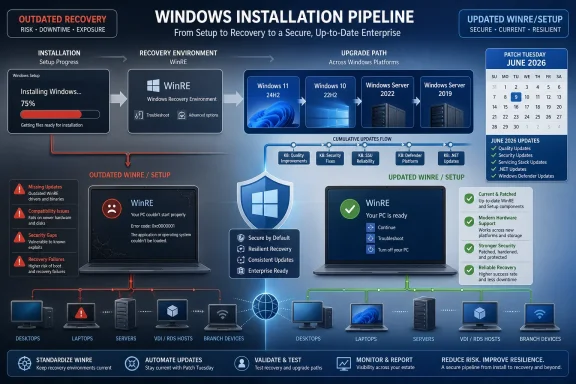 Microsoft’s Quietest Patch Tuesday Payload May Be the One That Saves the Upgrade
Patch Tuesday usually belongs to cumulative updates, CVE counts, reboot windows, and the predictable choreography of pilot rings. Dynamic Updates sit in a less glamorous lane. They are not the patches most users see in Windows Update history, and they rarely come with the kind of user-facing change log that generates excitement.But they matter because they service the machinery that gets Windows from one state to another. Setup Dynamic Updates refresh the binaries and files used during feature update installation. Safe OS Dynamic Updates refresh the recovery and preinstallation environment that Windows depends on when the normal operating system is not yet fully available, or no longer healthy enough to do the job.
That distinction is important. A cumulative update fixes the Windows you are already running. A Dynamic Update tries to fix the Windows that is installing, repairing, rolling back, or recovering. In enterprise terms, that is the difference between a workstation that misses a security patch and a workstation that never makes it cleanly through a feature update in the first place.
The June 2026 batch spans current Windows 11 branches, aging-but-still-present Windows 10 estates, and older Windows Server baselines still common in the real world. The spread itself tells the story. Microsoft is not only optimizing for the latest Windows 11 build; it is still servicing the connective tissue for machines that may be several platform generations behind.
WinRE Is No Longer a Footnote in Windows Servicing
The most visible theme in this release is WinRE, the Windows Recovery Environment. For Windows 11 version 26H1, Microsoft issued Safe OS Dynamic Update KB5095185, bringing WinRE to version 10.0.28000.2269. Windows 11 versions 24H2 and 25H2 received KB5094149, moving WinRE to 10.0.26100.8655.Windows 11 version 23H2 received its own Safe OS Dynamic Update, KB5094156, updating WinRE to 10.0.22621.7219. That same branch also received Setup Dynamic Update KB5095971, which improves Windows Setup binaries and related files used during feature update installations.
Windows 10 was not left out. Windows 10 versions 21H2 and 22H2 received KB5098815, which applies Safe OS Dynamic Update KB5094154 to supported systems and updates WinRE to version 10.0.19041.7417. Windows 10 version 1809 and Windows Server 2019 received KB5094153, bringing WinRE to 10.0.17763.8880, while Windows 10 version 1607 and Windows Server 2016 received KB5094152, updating WinRE to 10.0.14393.9234.
This is the kind of version-number soup that can make even seasoned admins glaze over. But the underlying point is simpler: Microsoft is refreshing the recovery substrate across a wide matrix of supported Windows generations. That matters because WinRE is the environment Windows relies on for recovery tools, reset operations, certain repair workflows, and portions of the upgrade process that occur outside the fully running OS.
WinRE has also become more prominent because recovery partitions have been a recurring source of servicing pain. When a recovery environment is outdated, undersized, missing, or inconsistently configured, administrators can find themselves debugging problems that look like ordinary update failures but are really failures of the hidden infrastructure around the OS. Dynamic Updates do not magically fix every partitioning mistake, but they are part of Microsoft’s attempt to keep the recovery layer aligned with the operating system it is meant to rescue.
Setup Is the Operating System Before the Operating System
The release of KB5095971 for Windows 11 version 23H2 is a useful reminder that Windows Setup is not a static installer burned into an ISO and forgotten. Setup is a serviced component with compatibility databases, replacement manifests, migration logic, drivers, and binaries that can decide whether an upgrade proceeds, blocks, rolls back, or leaves an estate in help-desk purgatory.That is why Dynamic Update runs early in a feature update when enabled. Windows Setup can contact Microsoft’s update infrastructure, retrieve newer setup files, bring in Safe OS updates, acquire servicing stack components where needed, and preserve language packs and Features on Demand. In managed environments, admins can also acquire those packages and inject them into installation media before deployment.
That last point is not an edge case. Many organizations do not want thousands of devices independently pulling update payloads during an in-place upgrade. Others use task sequences, Configuration Manager, Intune deployment rings, local content distribution, or offline media because their networks, compliance rules, or operational habits demand predictability. For them, the ability to refresh media ahead of time is not a convenience; it is the control plane.
Microsoft’s documentation has long framed Dynamic Update as a way to reduce upgrade friction, especially around optional content. If a device has language packs or Features on Demand installed, an upgrade path that fails to preserve or reacquire them can produce missing components, broken user expectations, or failed installations. Dynamic Update exists in part to prevent that torn state, where the base OS moves forward but the optional pieces do not arrive cleanly with it.
The trade-off is that Dynamic Update also adds another layer of servicing policy. Admins must decide whether to let Setup fetch content during installation, whether to pre-stage it, whether to disable parts of it, or whether to use options such as excluding the latest cumulative update from the Dynamic Update flow. Each choice has consequences for bandwidth, reboot behavior, testing discipline, and the reproducibility of upgrade results.
The Patch Tuesday Story Is Bigger Than the CVE Count
The June 2026 Dynamic Updates landed alongside a busy Patch Tuesday cycle that reportedly addressed more than 200 vulnerabilities across Microsoft’s software portfolio. That kind of number naturally dominates headlines, and rightly so. Security teams measure exposure in exploitable bugs, remediation deadlines, and exceptions that need signatures from risk owners.But the servicing story is broader than vulnerability remediation. A huge cumulative update cycle puts pressure on the whole Windows maintenance stack: Windows Update, WSUS, Microsoft Update Catalog, Intune, Configuration Manager, Delivery Optimization, install media, recovery partitions, and rollback paths. When something breaks, the problem is often not a single patch but the interaction between the patch, the servicing stack, the image state, and the device’s history.
That is where Dynamic Updates become strategically important. They reduce the chance that an upgrade fails because Setup used stale logic, a recovery image lagged behind, or optional components were not migrated properly. They also help Microsoft ship corrections to the deployment path without waiting for every organization to download fresh ISO media from scratch.
The refreshed Windows 11 Media Creation Tool fits the same pattern. By updating the tool with the latest Patch Tuesday builds, Microsoft is trying to ensure that new installations start closer to the current servicing baseline. For consumers, that can mean fewer updates immediately after setup. For technicians, it can mean less time spent installing Windows only to spend the next hour watching it download the fixes that should have been there already.
There is an old Windows admin joke that the first task after installing Windows is to update Windows. The joke remains true, but Microsoft has spent years trying to make it less true. Dynamic Updates and refreshed installation media are two ways of narrowing the gap between the Windows you deploy and the Windows Microsoft currently expects you to run.
The Windows 10 Tail Still Shapes Microsoft’s Servicing Strategy
It would be easy to read this release as another Windows 11 servicing item, but the Windows 10 entries are just as revealing. Windows 10 versions 21H2 and 22H2 remain deeply embedded in business environments, even as the platform’s mainstream consumer story has been winding down. Server baselines from the Windows 10 era are even stickier.That stickiness explains why Windows 10 version 1809 and Windows Server 2019, plus Windows 10 version 1607 and Windows Server 2016, still appear in the Dynamic Update lineup. These are not glamorous platforms. They are the long-lived operating systems under line-of-business apps, domain services, manufacturing systems, remote sites, and workloads that nobody wants to touch unless the risk of inaction finally exceeds the risk of change.
For those systems, recovery and setup servicing can be more important than cosmetic OS improvements. A server upgrade or repair operation that fails because the recovery environment is stale can become a weekend outage. A feature update path that mishandles language or optional components can derail a migration project that already has too many dependencies.
Microsoft’s challenge is that it must serve two Windows worlds at once. One world is the modern Windows 11 cadence, with annual feature updates, hardware requirements, and tighter integration with cloud-based management. The other world is the long tail of Windows 10 and Windows Server deployments that move slowly because they run organizations that cannot move quickly.
Dynamic Updates are one of the few servicing mechanisms that make sense across both worlds. They are not flashy, but they address a universal problem: the installation and recovery process must be at least as reliable as the operating system being serviced. If it is not, every other improvement becomes conditional.
The Admin Burden Is Not Knowing That Updates Exist, But Knowing Where They Land
For managed environments, the practical question is not whether Microsoft published another batch of Dynamic Updates. The question is whether those updates are being consumed in the way the organization thinks they are. That distinction is where many deployment assumptions go to die.If devices perform feature updates with Dynamic Update enabled and internet access available, Setup can fetch relevant content automatically. If devices are isolated, routed through strict update controls, or upgraded from offline media, admins may need to acquire and integrate the packages themselves. If Dynamic Update is disabled, the organization may be trading network predictability for a greater burden on image maintenance.
The June 2026 release reinforces the need to treat installation media as a living artifact. An ISO downloaded months ago is not just missing recent cumulative fixes; it may also be missing newer setup logic and Safe OS components. In a small environment, that may be acceptable. In a large estate, it can turn an otherwise manageable upgrade into a pattern of inconsistent failures.
This is especially true for multilingual environments and devices with Features on Demand. Optional components are easy to overlook because they often sit outside the mental model of a standard Windows image. But users notice when language support, handwriting, speech, RSAT components, .NET features, or other capabilities vanish or behave oddly after an upgrade.
A disciplined deployment process should therefore track Dynamic Updates alongside cumulative updates, servicing stack requirements, language content, and driver readiness. That does not mean every admin needs to obsess over every Safe OS KB number. It does mean that when building or refreshing media, Dynamic Update packages should be part of the checklist rather than an afterthought discovered during failure analysis.
Microsoft’s Automation Helps, Until Policy Gets in the Way
Microsoft’s pitch is that Recovery Dynamic Updates and Setup Dynamic Updates are delivered automatically through Windows Update. For many users, that is enough. The machine receives what it needs, Setup improves itself, WinRE gets serviced, and nobody has to learn the difference between Safe OS and Setup DU.Enterprise reality is less frictionless. Organizations routinely block, defer, stage, mirror, or selectively approve updates. Some do it for good reasons: regulatory control, bandwidth limitations, change windows, application compatibility, or the hard-earned knowledge that “automatic” is not a synonym for “safe.” Others do it because their servicing model grew by accumulation rather than design.
Dynamic Updates sit awkwardly in that world because they are both operationally useful and easy to miss. They may not be the monthly cumulative update that security dashboards scream about. They may not be the driver that breaks a dock. They may not be the feature update enablement package that changes the OS version. Yet they can influence whether all of those changes install successfully.
There is also a philosophical tension. Microsoft wants Windows to be continuously serviced, with more intelligence in the cloud and fewer stale components in the field. Admins want repeatable outcomes, controlled content, and the ability to explain why a device changed. Dynamic Update is where those two instincts meet: a mechanism designed to make setup smarter, but one that still must be governed.
The healthiest approach is neither blind trust nor blanket disablement. Let consumer and lightly managed systems consume Dynamic Update automatically. For managed fleets, test the same way users will deploy: if the upgrade path will use refreshed media, test refreshed media; if it will allow Dynamic Update online, test that flow; if it will run offline, inject the relevant packages and validate the result.
Recovery Has Become a Security Boundary in Practice
One reason these updates feel more important now than they might have a decade ago is that recovery is increasingly tied to security posture. WinRE is not just the place users go when Windows will not boot. It is part of a broader chain that includes BitLocker recovery, Secure Boot expectations, reset workflows, incident recovery, and the ability to repair systems without weakening controls.Security teams often focus on the running OS because that is where vulnerabilities are exploited and telemetry is collected. Attackers, however, care about edges: boot paths, recovery tools, misconfigured partitions, rollback mechanisms, and places where policy enforcement is weaker or harder to observe. A neglected recovery environment is not automatically a vulnerability, but it can become part of an organization’s risk surface.
That is why Safe OS Dynamic Updates should not be dismissed as housekeeping. Updating WinRE helps ensure the recovery environment reflects current assumptions about drivers, servicing, setup behavior, and platform security. It also reduces the gap between the protected OS and the environment used to repair or replace it.
There is a practical incident-response angle, too. When systems fail after a bad driver, botched deployment, storage issue, or malware cleanup, recovery tooling becomes the difference between a remote fix and a desk-side visit. If the recovery environment is broken, outdated, or inconsistent, the organization’s recovery plan becomes less reliable at exactly the wrong moment.
Microsoft’s June release does not transform WinRE into a magic shield. But it does underline that the recovery environment deserves patch discipline. The industry has learned, painfully, that backup systems must be tested and updated. Recovery partitions belong in the same category.
The Media Creation Tool Refresh Is a Consumer Clue With Enterprise Implications
The reported refresh of the Windows 11 Media Creation Tool is easy to frame as a consumer convenience. Someone downloads the tool, creates installation media, installs Windows 11, and starts from a newer build with fewer post-install patches. That is useful, but it understates the signal.Microsoft is acknowledging that installation media ages quickly. In the Windows-as-a-service era, the distance between “official media” and “current supported state” can become large enough to matter within weeks. A refreshed Media Creation Tool closes that distance for clean installs and repairs performed by individuals, repair shops, and small IT teams.
For larger organizations, the equivalent action is not necessarily using the consumer-facing tool. It is maintaining internal deployment media with the same seriousness applied to monthly patch baselines. If Microsoft refreshes public install paths after Patch Tuesday, enterprise teams should ask whether their own install paths are similarly current.
There is also a supportability benefit. When a user installs from old media, then stacks months of updates, drivers, app installs, and configuration changes on top, troubleshooting becomes archaeology. Starting from newer media reduces the number of transitional states the device must pass through before it reaches the intended baseline.
That does not eliminate the need for post-install updates. Windows will continue to change after the media is created. But it lowers the immediate servicing debt, and in Windows deployment, less debt usually means fewer mysterious failures.
The Real Test Comes During the Next Feature Upgrade Wave
Dynamic Updates are most interesting when feature upgrades are in motion. Windows 11 version 23H2 systems moving toward newer releases, Windows 10 devices being migrated before support deadlines, and server estates planning long-delayed transitions all depend on setup reliability. The June packages land precisely in that context.A setup failure is rarely just a technical nuisance. It consumes user time, support time, network capacity, and confidence. If the device rolls back cleanly, the organization still has to diagnose why. If it does not, the costs escalate. Multiply that across thousands of endpoints and the humble setup component becomes a budget item.
The Windows 11 24H2 and 25H2 Safe OS update is particularly relevant because those releases sit close to the front edge of Microsoft’s current client strategy. Any organization standardizing on those branches will want recovery and upgrade components to be current before broad deployment. The same applies to 26H1 if it is entering early adoption or validation rings.
Windows 10’s presence in the batch, meanwhile, should be read as a migration warning. The remaining Windows 10 estate is likely to include older hardware, unusual app dependencies, and machines that have already survived years of servicing history. Those are exactly the devices where upgrade and recovery components need to be boringly reliable.
The best time to discover a WinRE or Setup issue is in a lab, not during an executive’s upgrade or a remote site’s maintenance window. Dynamic Updates give admins better ingredients. They do not replace testing the recipe.
The KB Numbers Are Less Important Than the Pattern
The June 2026 batch can be reduced to a neat table of KBs and WinRE versions, but that misses the editorial point. Microsoft is steadily expanding the idea of what must be serviced for Windows to remain healthy. The operating system is no longer just the visible desktop, kernel, apps, and security stack. It is also the installer, the recovery image, the media pipeline, the optional-content migration process, and the logic that decides whether an upgrade is safe to attempt.That creates more moving parts, but it also reflects reality. Modern Windows deployments are not clean-room installations on identical machines. They are layered histories of drivers, languages, security policies, management agents, encryption states, firmware quirks, user data, optional features, and years of cumulative servicing. Setup must navigate all of that.
Dynamic Update is Microsoft’s answer to an uncomfortable truth: static installation media cannot anticipate every issue discovered after release. The setup process needs a way to learn. Safe OS needs a way to keep pace. Recovery needs a way to remain aligned with the OS it is supposed to repair.
The risk is opacity. If admins cannot easily see which Dynamic Updates applied, which media were refreshed, and which recovery images are current, the model becomes harder to audit. Microsoft’s servicing direction is correct, but the tooling and reporting around these under-the-hood components still need to be legible enough for the people accountable for deployment outcomes.
The Practical Reading of June’s Dynamic Update Drop
The immediate lesson is not panic, and it is not celebration. It is maintenance discipline. Microsoft has pushed updated setup and recovery components across active and long-lived Windows branches, and organizations should make sure their deployment workflows actually consume them.- Windows 11 version 26H1 received Safe OS Dynamic Update KB5095185, updating WinRE to version 10.0.28000.2269.
- Windows 11 versions 24H2 and 25H2 received KB5094149, updating WinRE to version 10.0.26100.8655.
- Windows 11 version 23H2 received both Setup Dynamic Update KB5095971 and Safe OS Dynamic Update KB5094156, with the latter updating WinRE to version 10.0.22621.7219.
- Windows 10 versions 21H2 and 22H2 received KB5098815, which applies KB5094154 and updates WinRE to version 10.0.19041.7417.
- Windows 10 version 1809 with Windows Server 2019 and Windows 10 version 1607 with Windows Server 2016 received Safe OS updates that keep older recovery environments aligned with their supported servicing baselines.
- Organizations using offline or custom media should treat Dynamic Updates as part of the deployment baseline, not as optional trivia to chase after upgrade failures.
Microsoft’s June 2026 Dynamic Updates will not change how Windows looks, and most users will never know they arrived. That is precisely why they deserve attention. In a mature Windows estate, success is often measured by the absence of drama: upgrades that do not roll back, recovery tools that open when needed, media that starts near the current baseline, and optional components that survive the trip. The next phase of Windows servicing will be won or lost in that quiet territory, where the installer and recovery environment stop being afterthoughts and become part of the platform’s security and reliability contract.
References
- Primary source: Windows Report
Published: 2026-06-15T09:10:18.159990
Microsoft Releases New Dynamic Updates for Windows 11, Windows 10, and Windows Server
Microsoft has released a new batch of Dynamic Updates alongside this month’s Patch Tuesday security updates, bringing improvements to Windows recovery and setup components across Windows 11, Windows 10, and Windows Server, as Neowin writes. The new releases arrive alongside the latest... windowsreport.com
- Official source: support.microsoft.com
- Official source: catalog.update.microsoft.com
- Official source: learn.microsoft.com
Update Windows installation media with Dynamic Update | Microsoft Learn
Learn how to acquire and apply Dynamic Update packages to existing Windows images prior to deploymentlearn.microsoft.com - Official source: techcommunity.microsoft.com

