

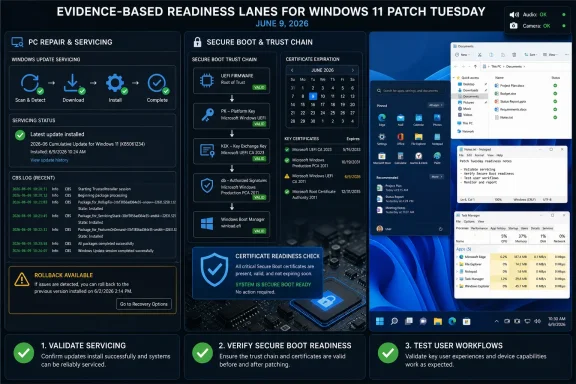
Before the June 9, 2026 Patch Tuesday window, Windows 11 administrators and power users should do three separate jobs: validate update servicing, verify Secure Boot certificate readiness, and test visible desktop workflows. Do not collapse those into one generic “patch risk.” KB5089573 is useful as a May 26 preview signal for Windows 11 versions 24H2 and 25H2, but it is not a substitute for Secure Boot readiness work, and it should not be described as a guaranteed fix for every earlier May installation problem.
The WindowsForum angle is direct: use the week before June 9 to identify the machines most likely to surprise you. That means older firmware, custom-built desktops, dual-boot systems, PCs with cramped EFI System Partitions, devices with previous rollback behavior, and endpoints that have been upgraded across several Windows generations. If those machines can install the chosen update path, restart cleanly, show no Secure Boot certificate readiness concern, and preserve the workflows users actually depend on, the fleet is in a much better position for Patch Tuesday.
Microsoft has been warning that Secure Boot certificates used by most Windows devices begin expiring in June 2026. WindowsForum’s May 26 coverage of setup and Safe OS updates repeatedly framed that deadline as the reason administrators should stop treating Secure Boot as a static checkbox. The key point is not that every PC will suddenly stop booting on June 9. The stronger, more defensible point is that Microsoft wants devices prepared for the 2023 Secure Boot certificate transition before the older trust material ages out.
That distinction matters. Secure Boot is often reported in inventory tools as if it were binary: capable or not, enabled or not. The certificate transition makes that too shallow. A device may still boot and may still look normal to a user while its boot-trust state is not where Microsoft expects it to be for future protections.
So the first pre-June question should not be “does Windows start?” It should be: “Is this device ready for the Secure Boot certificate transition Microsoft has been warning about?” That is a firmware and trust-chain question, not merely a Windows Update question.
This is where administrators need precision. A failed cumulative update is a servicing problem. A missing or delayed Secure Boot certificate transition is a trust-chain problem. A changed Start, File Explorer, Search, audio, or app-launch experience is a workflow problem. Those three can appear during the same maintenance window, but they are not the same failure and they should not be triaged as one.
That is the right way to read it. KB5089573 can be part of a validation plan if your servicing policy allows optional previews in test rings. It should not be blindly pushed everywhere just because June is approaching. Preview updates exist to surface fixes and changes before the next broad security release, but they also carry their own validation burden.
The current risk is easy to overstate in the wrong direction. It is fair to say KB5089573 is tied to the May preview cycle and appears in WindowsForum’s coverage of Secure Boot preparation. It is also fair to say WindowsForum separately tracked an EFI System Partition space issue and a KB5089549 error 0x800f0922 scenario in the same late-May update cluster. What is not safe is to claim, without exact Microsoft wording, that KB5089573 definitively resolves the earlier May installation issue through KB5089549. Treat that linkage as a lead to investigate, not as a settled fact.
For administrators, the operational lesson is still useful: any machine that has already shown update installation trouble deserves attention before June 9. A preview failure, rollback history, or EFI partition problem is not proof of Secure Boot certificate trouble, but it is evidence that the device’s servicing and boot environment should be inspected before the next cumulative update lands.
The highest-risk devices are not necessarily the oldest devices. They are the ones with evidence: previous failed cumulative updates, repeated rollback behavior, constrained recovery or EFI partitions, third-party boot managers, OEM recovery leftovers, or unclear management state.
Pass criteria should be boring and measurable:
The highest-risk Secure Boot devices are:
This is not the same as Secure Boot risk. A faster File Explorer launch does not prove the boot chain is ready. A Secure Boot warning does not prove WinUI 3 is broken. But both can show up in the same user’s week, and users will report them as “the update broke my PC” unless support teams separate the symptoms.
Use Microsoft’s actual framing here: WinUI 3 performance work, File Explorer and Notepad benchmark improvements, Windows K2 responsiveness work, low latency performance, shared audio, setup, Task Manager, camera, and reliability changes. Drop invented labels such as “App Start Turbo.” They sound tidy, but they make the article weaker because they imply a named Microsoft feature that the available WindowsForum material does not support.
Pass criteria for workflow testing should be based on real use:
Good candidates for a KB5089573 test ring:
Use this sequence instead:
A useful five-minute workflow test:
Small-business admins should test the machines that would hurt most if they failed: accounting, scheduling, point-of-sale, reception, shared conference-room PCs, and the owner’s laptop. These environments often lack spare hardware and formal endpoint management, so a single boot or update failure can become a business interruption.
Enthusiasts should test the systems with the most personal complexity: gaming rigs with custom firmware settings, dual-boot workstations, BitLocker-protected laptops, systems with older motherboard firmware, and PCs where Windows has been upgraded in place for years. The machine that boots every day is not automatically the machine that is easiest to recover.
Help desks should test their script before users call. The right explanation is simple: Microsoft has warned that older Secure Boot certificates used by most Windows devices begin expiring in June 2026; devices should be prepared for the newer certificate chain; a PC that still boots is not automatically a PC that has completed every readiness step; and update installation failures are separate from Secure Boot trust-chain warnings.
The performance story should be described with the names Microsoft and WindowsForum have actually been using: WinUI 3 performance optimizations, File Explorer and Notepad benchmark improvements, Windows K2 responsiveness work, low latency performance, and native interface tuning. That is enough. There is no need to invent a catchphrase.
The reason this belongs in the June 9 article is not that File Explorer performance and Secure Boot are technically the same issue. They are not. The reason is operational: administrators will be validating Windows behavior in the same window that Microsoft is staging preview changes, responsiveness work, setup changes, shared audio work, Task Manager adjustments, camera fixes, and Secure Boot preparation. Users experience all of that as one Windows update season.
So test it as users experience it, but diagnose it as separate systems:
Before June 9, document:
For unmanaged and enthusiast systems, the rollback plan is simpler but still important: current backup, recovery media, BitLocker key, firmware access, and notes about what changed. Do not stack changes. If you update firmware, reboot and verify. If you install a preview, reboot and verify. If you change Secure Boot settings, reboot and verify. One change at a time turns troubleshooting into evidence instead of folklore.
This script prevents the most common patch-week mistake: turning every symptom into one giant update story. Users may describe it that way. IT should not.
For servicing, it has installed the selected update path in the appropriate ring or is intentionally waiting for Patch Tuesday under a documented policy. It has no unresolved rollback loop, no unexplained failed install, and no unmanaged error pattern.
For Secure Boot, it has an understood firmware state, Secure Boot configuration matches policy, recovery keys are available, and there is no ignored certificate-readiness warning. If the device is an exception, the exception is named and owned.
For workflow, the person or team responsible for the device has tested the tasks that matter: Start, File Explorer, app launch, audio, camera, Task Manager, and core business apps. The test does not need to be elaborate, but it must be real.
A not-ready device is also easy to define. It has an unresolved update failure, an unexplained Secure Boot warning, a risky firmware state, missing recovery keys, or a workflow break that would cause user tickets after deployment.
Those are related in timing, not identical in cause. Keep them separate.
Before June 9:
The WindowsForum angle is direct: use the week before June 9 to identify the machines most likely to surprise you. That means older firmware, custom-built desktops, dual-boot systems, PCs with cramped EFI System Partitions, devices with previous rollback behavior, and endpoints that have been upgraded across several Windows generations. If those machines can install the chosen update path, restart cleanly, show no Secure Boot certificate readiness concern, and preserve the workflows users actually depend on, the fleet is in a much better position for Patch Tuesday.
 June 9 Is About More Than One Cumulative Update
Microsoft has been warning that Secure Boot certificates used by most Windows devices begin expiring in June 2026. WindowsForum’s May 26 coverage of setup and Safe OS updates repeatedly framed that deadline as the reason administrators should stop treating Secure Boot as a static checkbox. The key point is not that every PC will suddenly stop booting on June 9. The stronger, more defensible point is that Microsoft wants devices prepared for the 2023 Secure Boot certificate transition before the older trust material ages out.That distinction matters. Secure Boot is often reported in inventory tools as if it were binary: capable or not, enabled or not. The certificate transition makes that too shallow. A device may still boot and may still look normal to a user while its boot-trust state is not where Microsoft expects it to be for future protections.
So the first pre-June question should not be “does Windows start?” It should be: “Is this device ready for the Secure Boot certificate transition Microsoft has been warning about?” That is a firmware and trust-chain question, not merely a Windows Update question.
This is where administrators need precision. A failed cumulative update is a servicing problem. A missing or delayed Secure Boot certificate transition is a trust-chain problem. A changed Start, File Explorer, Search, audio, or app-launch experience is a workflow problem. Those three can appear during the same maintenance window, but they are not the same failure and they should not be triaged as one.
KB5089573 Is a Preview Signal, Not a Magic Bridge
WindowsForum’s KB5089573 report described Microsoft’s May 26, 2026 optional preview update for Windows 11 versions 24H2 and 25H2, moving systems to OS builds 26100.8524 and 26200.8524. The same WindowsForum coverage placed the preview in a wider bucket of staged performance, shared audio, setup, Task Manager, camera, and reliability work, with Secure Boot preparation sitting alongside those changes rather than replacing the June Patch Tuesday obligation.That is the right way to read it. KB5089573 can be part of a validation plan if your servicing policy allows optional previews in test rings. It should not be blindly pushed everywhere just because June is approaching. Preview updates exist to surface fixes and changes before the next broad security release, but they also carry their own validation burden.
The current risk is easy to overstate in the wrong direction. It is fair to say KB5089573 is tied to the May preview cycle and appears in WindowsForum’s coverage of Secure Boot preparation. It is also fair to say WindowsForum separately tracked an EFI System Partition space issue and a KB5089549 error 0x800f0922 scenario in the same late-May update cluster. What is not safe is to claim, without exact Microsoft wording, that KB5089573 definitively resolves the earlier May installation issue through KB5089549. Treat that linkage as a lead to investigate, not as a settled fact.
For administrators, the operational lesson is still useful: any machine that has already shown update installation trouble deserves attention before June 9. A preview failure, rollback history, or EFI partition problem is not proof of Secure Boot certificate trouble, but it is evidence that the device’s servicing and boot environment should be inspected before the next cumulative update lands.
Separate the Three Risk Buckets
The cleanest runbook starts by putting every concern into one of three buckets.1. Update-servicing risk
This is the ordinary Windows Update question: can the device install the selected update, reboot, and remain on the expected build? KB5089573 belongs here when used in a test ring. So do rollback behavior, error 0x800f0922, failed restarts, pending reboot loops, and inconsistent Windows Update history.The highest-risk devices are not necessarily the oldest devices. They are the ones with evidence: previous failed cumulative updates, repeated rollback behavior, constrained recovery or EFI partitions, third-party boot managers, OEM recovery leftovers, or unclear management state.
Pass criteria should be boring and measurable:
- The update installs without rollback.
- The device reboots twice without repair prompts.
- Windows Update history reports the expected result.
- Event logs do not show recurring servicing failures.
- Recovery and EFI-related storage constraints are not obviously blocking the update path.
- The device remains manageable through the organization’s normal endpoint tools.
- Install rollback.
- Repeated error codes.
- Boot repair prompts.
- BitLocker recovery surprises after firmware or boot changes.
- A device that installs only after manual intervention that cannot be repeated at scale.
2. Secure Boot trust-chain risk
This is the certificate-readiness question. Microsoft’s June 2026 warning concerns the Secure Boot trust chain, not whether File Explorer opens faster or whether an optional preview installs on one test machine. WindowsForum’s reports on KB5092765, KB5089592, KB5096038, and KB5089573 all point back to the same calendar pressure: Secure Boot certificate expiration is now close enough to require device-level evidence.The highest-risk Secure Boot devices are:
- PCs with older firmware that has not been updated in years.
- Custom desktops with manually changed Secure Boot settings.
- Dual-boot systems using Linux, older bootloaders, or third-party boot managers.
- Devices that have moved from Windows 10 to Windows 11 through multiple upgrade paths.
- Machines with OEM recovery tools or unusual partition layouts.
- Systems where Secure Boot was disabled temporarily and never reviewed.
- Devices that are unmanaged or only partially managed, especially in small offices.
- Secure Boot is enabled where policy requires it.
- Firmware is current enough for the vendor’s supported Windows 11 path.
- No Secure Boot certificate warning is being surfaced to the user or admin.
- Recovery keys are escrowed before firmware or boot settings are touched.
- The device can restart after firmware review without BitLocker or bootloader disruption.
- Any exception is documented with owner, reason, and next action.
- Secure Boot disabled without an approved exception.
- Unknown firmware state on business-critical hardware.
- User-visible Secure Boot certificate warnings that nobody has triaged.
- Dual-boot or custom bootloader systems with no tested recovery path.
- BitLocker recovery key gaps.
- Devices that “still boot” but cannot be proven ready for Microsoft’s 2023 certificate transition.
3. User-workflow and shell risk
This is the visible Windows experience: Start, File Explorer, Notepad, audio, camera, Task Manager, app launch, and other everyday workflows. WindowsForum’s recent WinUI 3 and Windows K2 coverage belongs here. Those reports described Microsoft’s push to improve Windows 11 responsiveness by optimizing WinUI 3, using File Explorer and Notepad as benchmark apps, and reducing launch overhead in native interface components.This is not the same as Secure Boot risk. A faster File Explorer launch does not prove the boot chain is ready. A Secure Boot warning does not prove WinUI 3 is broken. But both can show up in the same user’s week, and users will report them as “the update broke my PC” unless support teams separate the symptoms.
Use Microsoft’s actual framing here: WinUI 3 performance work, File Explorer and Notepad benchmark improvements, Windows K2 responsiveness work, low latency performance, shared audio, setup, Task Manager, camera, and reliability changes. Drop invented labels such as “App Start Turbo.” They sound tidy, but they make the article weaker because they imply a named Microsoft feature that the available WindowsForum material does not support.
Pass criteria for workflow testing should be based on real use:
- File Explorer opens consistently from the taskbar, Start, and Win+E.
- Notepad and other common inbox apps launch without visible stalls or repeated first-run oddities.
- Start opens, search launches, and pinned apps behave predictably.
- Audio devices, shared audio scenarios, and camera workflows still work on hardware where those features matter.
- Task Manager opens and reports expected device state.
- Line-of-business apps still launch after reboot without repair prompts or credential loops.
- Explorer appears to hang, flash, or open inconsistently.
- Pinned apps disappear, fail to launch, or change behavior unexpectedly.
- Audio or camera behavior changes on meeting-room, classroom, or call-center devices.
- Task Manager or shell components become unreliable.
- Users cannot complete the workflows they perform every day, even if the update technically installed.
The WindowsForum Pre-June Checklist
For WindowsForum readers, the useful checklist is short, concrete, and biased toward evidence.1. Build a priority list before touching updates
Start with the machines most likely to lie by looking normal:- Previous Windows Update failures or rollbacks.
- Error 0x800f0922 history.
- Small or crowded EFI System Partitions.
- Older BIOS or UEFI firmware.
- Dual-boot systems.
- Custom-built desktops.
- Devices upgraded across multiple Windows releases.
- PCs with BitLocker but uncertain recovery-key escrow.
- Business-critical endpoints with no spare replacement.
- Remote machines that are difficult to recover physically.
2. Decide whether KB5089573 belongs in your test ring
KB5089573 is an optional preview update. That means it can be valuable in a validation ring, but it does not belong automatically on every production machine. Use it deliberately.Good candidates for a KB5089573 test ring:
- IT-owned devices representing common hardware models.
- A few older systems with known firmware complexity.
- One or two machines with prior update-servicing issues.
- Devices used by power users who can report workflow changes clearly.
- Non-critical systems that still resemble production hardware.
- The only accounting PC.
- The only device used to run payroll.
- A remote executive laptop with no recovery plan.
- A dual-boot workstation with no current backup.
- Any machine where BitLocker recovery keys are not confirmed.
3. Verify Secure Boot without changing five things at once
Secure Boot readiness work should be slow and documented. Do not combine firmware updates, boot-mode changes, BitLocker changes, driver updates, optional previews, and cumulative updates in one sitting unless you are deliberately testing a full rebuild path.Use this sequence instead:
- Confirm backup status.
- Confirm BitLocker recovery-key escrow.
- Record current firmware version and Secure Boot state.
- Check for vendor firmware updates where appropriate.
- Review whether Secure Boot is enabled and expected by policy.
- Investigate any Secure Boot certificate warning before June 9.
- Reboot and confirm the device returns normally.
- Only then proceed with update validation.
4. Test workflows that people actually use
Do not validate the desktop by opening Settings and closing the lid. WindowsForum’s performance coverage around WinUI 3, File Explorer, Notepad, and Windows K2 exists because users have spent years complaining that Windows 11 can feel heavier than it should. If Microsoft is now tuning native interface performance, administrators should verify the effect on real workflows, not just update status.A useful five-minute workflow test:
- Reboot.
- Sign in with a normal user account.
- Open Start and launch the user’s top pinned apps.
- Open File Explorer from the taskbar and with Win+E.
- Open a large folder and a network or cloud-synced location if used.
- Open Notepad or another inbox app used in the environment.
- Join or simulate a meeting if the device depends on camera and audio.
- Open Task Manager and confirm it behaves normally.
- Lock, unlock, and relaunch one core app.
5. Define pass/fail before June 9
A device passes pre-June validation only if it clears all three buckets:- Servicing: update path succeeds, reboot is clean, no rollback loop.
- Secure Boot: Secure Boot state and certificate readiness show no unresolved warning or unmanaged exception.
- Workflow: Start, File Explorer, app launch, audio/camera where relevant, and line-of-business tasks behave acceptably.
Who Should Test First
Enterprise admins should test by risk and business impact, not by convenience. The first ring should include IT-owned systems and representative hardware. The second should include the ugly machines: older firmware, previous update failures, custom partitioning, and Secure Boot uncertainty. The third should include business-critical workflows with owners who can confirm whether the device still behaves normally.Small-business admins should test the machines that would hurt most if they failed: accounting, scheduling, point-of-sale, reception, shared conference-room PCs, and the owner’s laptop. These environments often lack spare hardware and formal endpoint management, so a single boot or update failure can become a business interruption.
Enthusiasts should test the systems with the most personal complexity: gaming rigs with custom firmware settings, dual-boot workstations, BitLocker-protected laptops, systems with older motherboard firmware, and PCs where Windows has been upgraded in place for years. The machine that boots every day is not automatically the machine that is easiest to recover.
Help desks should test their script before users call. The right explanation is simple: Microsoft has warned that older Secure Boot certificates used by most Windows devices begin expiring in June 2026; devices should be prepared for the newer certificate chain; a PC that still boots is not automatically a PC that has completed every readiness step; and update installation failures are separate from Secure Boot trust-chain warnings.
KB5089573 and Windows Performance: Keep the Names Straight
WindowsForum’s recent coverage has tracked two overlapping Microsoft themes: the KB5089573 preview update for Windows 11 24H2 and 25H2, and Microsoft’s broader Windows 11 responsiveness work around WinUI 3 and Windows K2.The performance story should be described with the names Microsoft and WindowsForum have actually been using: WinUI 3 performance optimizations, File Explorer and Notepad benchmark improvements, Windows K2 responsiveness work, low latency performance, and native interface tuning. That is enough. There is no need to invent a catchphrase.
The reason this belongs in the June 9 article is not that File Explorer performance and Secure Boot are technically the same issue. They are not. The reason is operational: administrators will be validating Windows behavior in the same window that Microsoft is staging preview changes, responsiveness work, setup changes, shared audio work, Task Manager adjustments, camera fixes, and Secure Boot preparation. Users experience all of that as one Windows update season.
So test it as users experience it, but diagnose it as separate systems:
- If the update will not install, investigate servicing.
- If Secure Boot warnings appear, investigate firmware and certificate readiness.
- If Explorer or app launch behavior changes, investigate shell and workflow regressions.
- If audio or camera behavior changes, investigate device and driver paths.
- If all of those happen on one machine, do not assume they share one root cause.
Rollback Planning Is Part of Readiness
Rollback planning is not an admission that the update will fail. It is how administrators patch without guessing.Before June 9, document:
- Which update rings will receive preview updates.
- Which rings will wait for the cumulative update.
- Which devices are excluded because of Secure Boot or firmware uncertainty.
- Which devices need vendor firmware review.
- Which machines have BitLocker recovery keys confirmed.
- Which devices previously hit installation failures.
- Which symptoms should be treated as servicing failures.
- Which symptoms should be treated as Secure Boot trust-chain concerns.
- Which symptoms should be treated as user-workflow regressions.
For unmanaged and enthusiast systems, the rollback plan is simpler but still important: current backup, recovery media, BitLocker key, firmware access, and notes about what changed. Do not stack changes. If you update firmware, reboot and verify. If you install a preview, reboot and verify. If you change Secure Boot settings, reboot and verify. One change at a time turns troubleshooting into evidence instead of folklore.
The Help Desk Script
Support teams should be ready for three different user reports.“The update failed.”
Treat this as servicing first. Gather the update KB, error code, Windows build, reboot behavior, available system partition space if relevant, and whether the device has a rollback history. Do not immediately turn this into a Secure Boot certificate incident unless the device also shows Secure Boot warnings or boot-chain symptoms.“Windows says something about Secure Boot.”
Treat this as trust-chain readiness first. Confirm whether Secure Boot is enabled, whether the device is managed, whether firmware is current, and whether recovery keys are available before any firmware or boot setting change. Explain that the concern is readiness for Microsoft’s Secure Boot certificate transition, not necessarily that the PC is about to stop working immediately.“Windows feels different after the update.”
Treat this as workflow first. Ask what changed: File Explorer launch, Start, app launch, audio, camera, Task Manager, pinned apps, or line-of-business software. A workflow regression can be real even when the update installed correctly and Secure Boot is fine.This script prevents the most common patch-week mistake: turning every symptom into one giant update story. Users may describe it that way. IT should not.
The Devices Highest on the Watch List
If you only have time to inspect a subset before June 9, start here:- Devices with prior Windows Update rollback behavior.
- Systems that previously produced error 0x800f0922.
- PCs with cramped EFI System Partitions.
- Older business desktops with stale firmware.
- Custom-built desktops with manually changed UEFI settings.
- Dual-boot systems.
- BitLocker-protected laptops without confirmed key escrow.
- Remote devices with no hands-on recovery option.
- Meeting-room PCs dependent on camera and audio stability.
- Shared workstations used for finance, scheduling, dispatch, or point-of-sale.
- Any machine where Secure Boot was disabled “temporarily.”
- Any device that has been upgraded repeatedly rather than rebuilt.
What “Ready for June 9” Means
A ready device is not merely one that turns on. A ready device has evidence in all three areas.For servicing, it has installed the selected update path in the appropriate ring or is intentionally waiting for Patch Tuesday under a documented policy. It has no unresolved rollback loop, no unexplained failed install, and no unmanaged error pattern.
For Secure Boot, it has an understood firmware state, Secure Boot configuration matches policy, recovery keys are available, and there is no ignored certificate-readiness warning. If the device is an exception, the exception is named and owned.
For workflow, the person or team responsible for the device has tested the tasks that matter: Start, File Explorer, app launch, audio, camera, Task Manager, and core business apps. The test does not need to be elaborate, but it must be real.
A not-ready device is also easy to define. It has an unresolved update failure, an unexplained Secure Boot warning, a risky firmware state, missing recovery keys, or a workflow break that would cause user tickets after deployment.
The Bottom Line
The June 9 Patch Tuesday window should be handled as a rehearsal-backed maintenance event, not a routine click-through. Microsoft’s June 2026 Secure Boot certificate deadline gives the month its security weight. KB5089573 gives administrators a May 26 preview signal for Windows 11 24H2 and 25H2, including OS builds 26100.8524 and 26200.8524 and a set of staged changes that WindowsForum has tracked across performance, shared audio, setup, Task Manager, camera, reliability, and Secure Boot preparation. WindowsForum’s WinUI 3 and Windows K2 coverage adds the user-experience side: Microsoft is trying to make Windows 11 feel faster, especially around native interface components such as File Explorer and Notepad.Those are related in timing, not identical in cause. Keep them separate.
Before June 9:
- Validate update servicing.
- Verify Secure Boot certificate readiness.
- Confirm recovery keys.
- Review firmware on high-risk devices.
- Test KB5089573 only where preview testing fits policy.
- Check File Explorer, Start, app launch, audio, camera, Task Manager, and business apps.
- Document exceptions.
- Prepare rollback and support language.
References
- Primary source: learn.microsoft.com
- Independent coverage: heise.de
Windows Update Preview: App Start Turbo and Known Installation Problems | heise online
The preview of the non-security-relevant parts of the Windows update for the June patch day speeds up app startup. www.heise.de
- Independent coverage: windowslatest.com
Microsoft confirms release date of macOS-like Windows 11 CPU boost trick that critics tried to mock
Microsoft confirms Windows 11's Low Latency Profile CPU boost is rolling out in June 2026. Get ready for faster app and Start menu launches. www.windowslatest.com
- Independent coverage: windowscentral.com
Major Windows 11 performance upgrades set to rollout within weeks, Microsoft confirms: New 'Low Latency Profile' improvements confirmed to "accelerate app launches and core shell experiences" | Windows Central
Windows 11's highly anticipated Low Latency Profile performance feature is now in the final round of testing, with rollout expected to begin within the next few weeks.www.windowscentral.com - Independent coverage: blogs.windows.com
Announcing new builds for 29 May 2026
Hello Windows Insiders, This week we continue to expand the rollout of the new Windows Insider Program changes to devices in channels already announced. New builds this week Today we are releasing new Windows 11 Insider Preview Bblogs.windows.com - Independent coverage: computerbase.de
Schnellere App-Starts: CPU-Boost für Windows 11 steht kurz vor allgemeinem Release - ComputerBase
Der CPU-Boost im Rahmen der Low Latency Profile befindet sich bereits in der Release Preview von Windows 11.www.computerbase.de
- Independent coverage: pcwelt.de
Ab Juni 2026 wird Ihr Windows 11 schneller – verspricht Microsoft - PC-WELT
Windows-Nutzer dürfen sich auf den Juni freuen. Dann soll Windows nämlich schneller werden. Dank eines Tricks, den Microsoft freischaltet.www.pcwelt.de
