

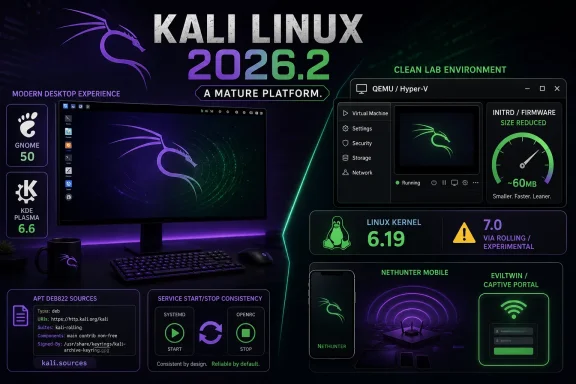
Offensive Security released Kali Linux 2026.2 on June 29, 2026, delivering a new quarterly snapshot of the Debian-based penetration-testing distribution with GNOME 50, KDE Plasma 6.6, Linux kernel 6.19, nine added tools, VM boot changes, and expanded NetHunter support. The tempting headline is the desktop refresh, but the real story is a more disciplined Kali: less excess firmware in virtual machines, cleaner APT sources, more consistent service helpers, and a cautious kernel choice. Kali remains a rolling security workstation, but this release shows its maintainers acting less like tool collectors and more like platform engineers. For WindowsForum readers who live in Hyper-V, WSL, lab VMs, and mixed Windows/Linux security environments, that shift matters.
Kali releases often invite the same predictable reaction: scan the new-tool list, update a lab image, and move on. That habit misses what 2026.2 is trying to do. The release is not a wholesale reinvention of Kali, nor does it pretend that a desktop environment bump changes the nature of offensive security work.
The interesting part is that Kali is sanding down the small annoyances that accumulate in real-world labs. Service wrappers behave more consistently. VM images stop carrying graphics firmware most users never need. APT moves toward the modern DEB822-style format that Debian and its derivatives have been normalizing for years.
That is not glamorous, but it is exactly the work a distribution does when it has matured beyond being a pile of tools. Kali is still a sharp instrument, and one that can be misused. But 2026.2 makes the case that the project is paying closer attention to the mundane parts of sharp-instrument ownership: boot speed, upgrade reliability, remote access, package behavior, and documentation drift.
For Windows admins who occasionally boot Kali for audits, wireless testing, malware triage, or red-team exercises, those changes may be more important than whether GNOME looks a little smoother. The professional value of Kali has never been that it looks like a daily-driver Linux desktop. It is that, when the job starts, the toolchain is present, maintained, and predictable enough not to become the job itself.
GNOME 50 brings the sort of polish that matters most to people who actually spend long sessions in a graphical shell. File manager responsiveness, faster thumbnail and icon handling, memory improvements, better accessibility preferences, and document annotation support are not dramatic changes in isolation. Together, they make Kali less punishing when it is used as more than a disposable boot stick.
KDE Plasma 6.6 is a more interesting fit for users who want a richer desktop without leaving the Linux workstation world. The new on-screen keyboard, accessibility improvements, OCR in Spectacle, and Wayland-facing refinements make Plasma feel increasingly like a serious modern environment rather than a customization playground. For investigators and testers, screenshot OCR is not a toy; pulling text directly from captured UI states can shave time from documentation, evidence collection, and reporting.
Still, the default matters. Kali staying with Xfce is a quiet rejection of the idea that a security distribution should chase desktop fashion. GNOME and KDE are there for users who want them, but Kali’s center of gravity remains fast launch, low overhead, and broad compatibility across physical hardware, virtual machines, ARM boards, WSL, cloud images, and mobile builds.
That balance is the right one. Kali is not Fedora Workstation with a lockpick set. Its desktop exists to get out of the way, and 2026.2 improves the optional experiences without pretending that the shell is the product.
That restraint is not timidity. Kali’s maintainers point to recent vulnerability disclosures as one reason they would ordinarily want the newest kernel available. But they also acknowledge reports of incompatibilities involving Nvidia DKMS drivers after the 7.0 kernel reached Debian.
This is the sort of decision that separates a distribution from a repository mirror. Security users often talk as if newer is automatically safer, especially when kernel vulnerabilities are in the news. But a broken graphics stack, failed DKMS build, or unusable workstation can be its own operational risk, particularly in a class, assessment, or incident-response window where time is short.
Kali’s answer is pragmatic: ship 6.19 for the release image, make 7.0 reachable for those who want it, and avoid forcing the breakage onto everyone. That is not the most exciting choice, but it is the sort of boring judgment users should want from a distribution that many people boot only when something already needs attention.
For Windows users running Kali under Hyper-V or as a secondary system on Nvidia-equipped laptops, this matters. The value of an offensive-security platform is not measured only in how quickly it absorbs upstream bits. It is measured in how often it boots, upgrades, and works when the user is already deep in a problem.
The project says graphics firmware for Nvidia, AMD, and Intel can take nearly 300MB, and portions of that firmware may be pulled into the initrd loaded early in boot. Kali’s initrd had reportedly grown to around 200MB in some cases, largely due to graphics firmware. For VM users, the new approach cuts that initrd down to about 60MB and produced roughly a threefold boot-time improvement in Kali’s QEMU testing.
The broader point is that Kali is finally treating virtual machines as first-class citizens rather than pretending every image might be dropped onto unpredictable bare metal. That distinction is overdue. A huge share of Kali usage happens in VMware, VirtualBox, Hyper-V, cloud images, classroom labs, and disposable sandboxes where GPU firmware is at best unnecessary and at worst a tax on every boot.
The caveat is GPU passthrough. If a Kali VM is configured with a dedicated GPU, the user may need to install the relevant firmware manually. That is a fair trade. The old model optimized for a hypothetical hardware edge case at the expense of the default VM path; the new model optimizes for how most people actually use the distribution.
WindowsForum readers should pay particular attention here because Kali-on-Windows often means nested workflows: Windows host, Hyper-V or VMware guest, maybe WSL for lighter tasks, maybe cloud for collaborative labs. Faster VM startup is not a benchmark vanity metric in that context. It is the difference between using the right environment for a quick check and avoiding it because the boot-and-update loop has become a chore.
This is one of those changes that will look trivial to casual users and significant to anyone who manages fleets, lab templates, golden images, or scripted rebuilds. The DEB822-style format is more structured and expressive than the old one-line
The practical risk is not that users cannot learn a new file path. The risk is stale automation. Scripts that blindly overwrite
Kali’s decision not to rewrite existing systems is sensible. Surprise migrations of package sources are a wonderful way to create support noise. But the project is also giving users the signal early: if you build around Kali, update your mental model and your automation before APT starts warning more loudly.
This is how responsible platform change should happen. First new installs change. Then documentation changes. Then warnings arrive. Eventually the old model becomes legacy. The best time for admins to adapt is before the red text appears in a build log at 2 a.m.
That sounds minor until you consider how many modern security tools are no longer just binaries you invoke and exit. They are web UIs, local APIs, databases, listeners, dashboards, and background services. A penetration-testing distribution that treats them all as one-off commands is increasingly out of step with its own ecosystem.
Consistency also has a safety angle. Services left running accidentally can change the state of a lab, expose interfaces, consume ports, or confuse later tests. Clear start, stop, status, access, and credential behavior reduces the chance that users operate by folklore.
This matters especially in classrooms and enterprise labs, where repeatability is the difference between a useful exercise and a support queue. If an instructor says, “Start the tool,” every student should see roughly the same behavior and know how to unwind it. If a blue-team analyst spins up Kali during an investigation, they should not have to remember which tool has which idiosyncratic wrapper.
Kali is not eliminating complexity. It is acknowledging that complexity should have a pattern. That is the quiet professionalism behind the helper-script work.
The inclusion of oletools is particularly relevant for defenders and incident responders. Office document analysis remains a practical need, even as Microsoft hardens defaults and organizations move more workflows into cloud collaboration suites. Malicious documents are not a solved problem; they have simply become one strand in a larger phishing, identity, and endpoint chain.
Legba and hydra-gtk sit closer to the traditional Kali image: authentication testing, brute forcing, spraying, and enumeration. These tools carry obvious legal and ethical boundaries, but in authorized environments they remain part of the password-risk conversation. The fact that these capabilities are still being packaged and refreshed says something uncomfortable but true: weak credentials and exposed authentication surfaces are still a live problem.
Penelope and uro are more workflow-oriented. Shell handling and URL decluttering are not glamorous in a demo, but they are the kinds of tasks that show up repeatedly in assessments. Tools that reduce friction at these steps can have an outsized effect on the pace and cleanliness of an engagement.
Tailscale’s presence is notable because it reflects how security labs increasingly need secure, flexible connectivity without brittle VPN ceremony. Kali is often used in distributed settings: a tester on one network, a target lab in another, a cloud box somewhere else, and a reporting workflow on a corporate machine. A mesh-connectivity tool belongs in that reality.
Then there is shell-gpt. Its addition is the one most likely to raise eyebrows, because LLM-assisted command-line work sits at the intersection of productivity, risk, and overconfidence. Kali including an AI-powered CLI helper does not mean users should paste sensitive data into random models or execute suggested commands without inspection. It does mean the project recognizes that AI assistance is already entering technical workflows, whether distributions bless it or not.
Wireless injection support on mobile hardware has long been one of those features that separates a genuinely useful mobile testing platform from a novelty. The device and kernel matrix is messy, and Android hardware support is never as clean as anyone wants it to be. Kali’s update does not magically make every phone a wireless testing rig, but it moves more devices into practical territory.
The device list spans OnePlus, Poco, Redmi, Samsung, Xiaomi, Google Pixel, Fairphone, SHIFTphone, LG, and Sony models across NetHunter and NetHunter Pro work. That breadth matters because mobile security work has always been constrained by hardware availability, bootloader realities, kernel support, and the patience required to keep a device usable.
The EvilTwin improvements are another reminder that NetHunter is not merely Kali squeezed onto a phone. Mobile form factors change the field workflow. A pocketable testing device with Wi-Fi features, captive portal behavior, and better hotspot recovery is qualitatively different from a laptop with a USB adapter dangling from it.
For defenders, the same update is a reminder of how portable offensive capability has become. The barrier to running sophisticated wireless and credential workflows has not disappeared, but it continues to fall. Organizations that still think of security testing as something performed only from a conspicuous laptop in a conference room are living in the wrong decade.
That is why the xrdp note in 2026.2 deserves attention. Kali updated xrdp and xorgxrdp to the 0.10 series and warns that users should reboot after the upgrade. Hyper-V Enhanced Session Mode users are effectively xrdp users even if they never think about it that way, and Kali explicitly flags possible breakage and the option to use
This is the kind of small release-note detail that saves real time. If a Kali VM suddenly stops behaving correctly after an upgrade, the natural instinct is to blame Hyper-V, Windows, graphics integration, or the guest tools. In this case, the project is saying plainly that the remote desktop stack changed and that a reboot is not optional housekeeping.
The polkit warning belongs in the same category. Kali says the updated
The practical lesson is simple: this is not a release to upgrade casually and leave suspended. Update, read the terminal output, reboot, and then test your lab workflows before you need them. A Kali VM is often treated as an emergency drawer. Emergency drawers should not contain dead batteries.
This is not always how security distributions behave. The temptation in a rolling or semi-rolling ecosystem is to equate aggression with seriousness. Newer kernel, newer desktop, newer tools, fewer compromises: ship it and let the forums sort it out.
Kali’s maintainers are choosing a more conservative kind of competence. They still move quickly, but they are not pretending every user is a kernel hobbyist with a spare afternoon. They understand that their distribution is used in professional contexts where downtime is embarrassing and failed upgrades are not fun learning opportunities.
That also means users need to hold up their end. Kali is not a general-purpose desktop for people who want edgy wallpaper and preinstalled hacking tools. It is a specialized platform. If you run it, especially in enterprise or instructional environments, you need to treat it like any other operational dependency: snapshot before major upgrades, document local changes, keep test images, and know which workflows matter.
The release gives users enough warning to behave responsibly. Whether they do is another matter.
 Kali’s Flashiest Release Is Really About Friction
Kali releases often invite the same predictable reaction: scan the new-tool list, update a lab image, and move on. That habit misses what 2026.2 is trying to do. The release is not a wholesale reinvention of Kali, nor does it pretend that a desktop environment bump changes the nature of offensive security work.The interesting part is that Kali is sanding down the small annoyances that accumulate in real-world labs. Service wrappers behave more consistently. VM images stop carrying graphics firmware most users never need. APT moves toward the modern DEB822-style format that Debian and its derivatives have been normalizing for years.
That is not glamorous, but it is exactly the work a distribution does when it has matured beyond being a pile of tools. Kali is still a sharp instrument, and one that can be misused. But 2026.2 makes the case that the project is paying closer attention to the mundane parts of sharp-instrument ownership: boot speed, upgrade reliability, remote access, package behavior, and documentation drift.
For Windows admins who occasionally boot Kali for audits, wireless testing, malware triage, or red-team exercises, those changes may be more important than whether GNOME looks a little smoother. The professional value of Kali has never been that it looks like a daily-driver Linux desktop. It is that, when the job starts, the toolchain is present, maintained, and predictable enough not to become the job itself.
The Desktop Upgrade Is Welcome, but Xfce Still Carries the Flag
Kali 2026.2 ships with GNOME 50 and KDE Plasma 6.6 available, while Xfce remains the default desktop on the 4.20 series. That default still tells you plenty about Kali’s priorities. Xfce is not there because it wins design awards; it is there because it is light, familiar, and hard to surprise.GNOME 50 brings the sort of polish that matters most to people who actually spend long sessions in a graphical shell. File manager responsiveness, faster thumbnail and icon handling, memory improvements, better accessibility preferences, and document annotation support are not dramatic changes in isolation. Together, they make Kali less punishing when it is used as more than a disposable boot stick.
KDE Plasma 6.6 is a more interesting fit for users who want a richer desktop without leaving the Linux workstation world. The new on-screen keyboard, accessibility improvements, OCR in Spectacle, and Wayland-facing refinements make Plasma feel increasingly like a serious modern environment rather than a customization playground. For investigators and testers, screenshot OCR is not a toy; pulling text directly from captured UI states can shave time from documentation, evidence collection, and reporting.
Still, the default matters. Kali staying with Xfce is a quiet rejection of the idea that a security distribution should chase desktop fashion. GNOME and KDE are there for users who want them, but Kali’s center of gravity remains fast launch, low overhead, and broad compatibility across physical hardware, virtual machines, ARM boards, WSL, cloud images, and mobile builds.
That balance is the right one. Kali is not Fedora Workstation with a lockpick set. Its desktop exists to get out of the way, and 2026.2 improves the optional experiences without pretending that the shell is the product.
The Kernel Decision Shows a Rare Kind of Restraint
The most revealing technical choice in Kali 2026.2 is the kernel. The release ships on Linux 6.19, even though the project notes that Linux 7.0 is available through Kali’s more experimental paths and rolling updates for users willing to accept the trade-offs.That restraint is not timidity. Kali’s maintainers point to recent vulnerability disclosures as one reason they would ordinarily want the newest kernel available. But they also acknowledge reports of incompatibilities involving Nvidia DKMS drivers after the 7.0 kernel reached Debian.
This is the sort of decision that separates a distribution from a repository mirror. Security users often talk as if newer is automatically safer, especially when kernel vulnerabilities are in the news. But a broken graphics stack, failed DKMS build, or unusable workstation can be its own operational risk, particularly in a class, assessment, or incident-response window where time is short.
Kali’s answer is pragmatic: ship 6.19 for the release image, make 7.0 reachable for those who want it, and avoid forcing the breakage onto everyone. That is not the most exciting choice, but it is the sort of boring judgment users should want from a distribution that many people boot only when something already needs attention.
For Windows users running Kali under Hyper-V or as a secondary system on Nvidia-equipped laptops, this matters. The value of an offensive-security platform is not measured only in how quickly it absorbs upstream bits. It is measured in how often it boots, upgrades, and works when the user is already deep in a problem.
The VM Firmware Cut Is the Release’s Most Practical Change
Kali 2026.2 removes preinstalled graphics firmware from pre-built VM images and changes installer behavior so that systems installed inside virtual machines do not automatically receive the same graphics firmware payload as bare-metal systems. That sounds like housekeeping until you look at the numbers.The project says graphics firmware for Nvidia, AMD, and Intel can take nearly 300MB, and portions of that firmware may be pulled into the initrd loaded early in boot. Kali’s initrd had reportedly grown to around 200MB in some cases, largely due to graphics firmware. For VM users, the new approach cuts that initrd down to about 60MB and produced roughly a threefold boot-time improvement in Kali’s QEMU testing.
The broader point is that Kali is finally treating virtual machines as first-class citizens rather than pretending every image might be dropped onto unpredictable bare metal. That distinction is overdue. A huge share of Kali usage happens in VMware, VirtualBox, Hyper-V, cloud images, classroom labs, and disposable sandboxes where GPU firmware is at best unnecessary and at worst a tax on every boot.
The caveat is GPU passthrough. If a Kali VM is configured with a dedicated GPU, the user may need to install the relevant firmware manually. That is a fair trade. The old model optimized for a hypothetical hardware edge case at the expense of the default VM path; the new model optimizes for how most people actually use the distribution.
WindowsForum readers should pay particular attention here because Kali-on-Windows often means nested workflows: Windows host, Hyper-V or VMware guest, maybe WSL for lighter tasks, maybe cloud for collaborative labs. Faster VM startup is not a benchmark vanity metric in that context. It is the difference between using the right environment for a quick check and avoiding it because the boot-and-update loop has become a chore.
APT’s New Sources Format Is Boring in the Best Possible Way
Kali 2026.2 moves fresh installations from the old/etc/apt/sources.list convention to a DEB822-style file at /etc/apt/sources.list.d/kali.sources. Existing installations are not forcibly migrated, and the old style still works. But the direction of travel is clear.This is one of those changes that will look trivial to casual users and significant to anyone who manages fleets, lab templates, golden images, or scripted rebuilds. The DEB822-style format is more structured and expressive than the old one-line
deb entries. It also aligns Kali with the way Debian and Debian-derived distributions are gradually modernizing repository configuration.The practical risk is not that users cannot learn a new file path. The risk is stale automation. Scripts that blindly overwrite
/etc/apt/sources.list, compliance checks that grep for old patterns, classroom setup guides, CI images, and private lab notes may all keep working for a while, but they are now pointed at yesterday’s assumption.Kali’s decision not to rewrite existing systems is sensible. Surprise migrations of package sources are a wonderful way to create support noise. But the project is also giving users the signal early: if you build around Kali, update your mental model and your automation before APT starts warning more loudly.
This is how responsible platform change should happen. First new installs change. Then documentation changes. Then warnings arrive. Eventually the old model becomes legacy. The best time for admins to adapt is before the red text appears in a build log at 2 a.m.
Helper Scripts Admit That Tools Are Services Now
Kali’s updated helper scripts aim to bring consistency to tools that depend on services. Previously, a package might provide a way to start a service without an equivalent way to stop it, or it might display inconsistent information about status, access methods, or default credentials. In 2026.2, Kali is pushing packages toward predictable<tool>-start and <tool>-stop conventions.That sounds minor until you consider how many modern security tools are no longer just binaries you invoke and exit. They are web UIs, local APIs, databases, listeners, dashboards, and background services. A penetration-testing distribution that treats them all as one-off commands is increasingly out of step with its own ecosystem.
Consistency also has a safety angle. Services left running accidentally can change the state of a lab, expose interfaces, consume ports, or confuse later tests. Clear start, stop, status, access, and credential behavior reduces the chance that users operate by folklore.
This matters especially in classrooms and enterprise labs, where repeatability is the difference between a useful exercise and a support queue. If an instructor says, “Start the tool,” every student should see roughly the same behavior and know how to unwind it. If a blue-team analyst spins up Kali during an investigation, they should not have to remember which tool has which idiosyncratic wrapper.
Kali is not eliminating complexity. It is acknowledging that complexity should have a pattern. That is the quiet professionalism behind the helper-script work.
The New Tools Show Kali’s Expanding Definition of the Security Workbench
Kali 2026.2 adds nine tools to the network repositories: arsenal-ng, hydra-gtk, legba, oletools, Penelope, shell-gpt, Tailscale, tookie-osint, and uro. The list is a useful snapshot of where security work has gone. It spans credential testing, document analysis, shell handling, OSINT, URL cleanup, secure connectivity, and AI-assisted command-line productivity.The inclusion of oletools is particularly relevant for defenders and incident responders. Office document analysis remains a practical need, even as Microsoft hardens defaults and organizations move more workflows into cloud collaboration suites. Malicious documents are not a solved problem; they have simply become one strand in a larger phishing, identity, and endpoint chain.
Legba and hydra-gtk sit closer to the traditional Kali image: authentication testing, brute forcing, spraying, and enumeration. These tools carry obvious legal and ethical boundaries, but in authorized environments they remain part of the password-risk conversation. The fact that these capabilities are still being packaged and refreshed says something uncomfortable but true: weak credentials and exposed authentication surfaces are still a live problem.
Penelope and uro are more workflow-oriented. Shell handling and URL decluttering are not glamorous in a demo, but they are the kinds of tasks that show up repeatedly in assessments. Tools that reduce friction at these steps can have an outsized effect on the pace and cleanliness of an engagement.
Tailscale’s presence is notable because it reflects how security labs increasingly need secure, flexible connectivity without brittle VPN ceremony. Kali is often used in distributed settings: a tester on one network, a target lab in another, a cloud box somewhere else, and a reporting workflow on a corporate machine. A mesh-connectivity tool belongs in that reality.
Then there is shell-gpt. Its addition is the one most likely to raise eyebrows, because LLM-assisted command-line work sits at the intersection of productivity, risk, and overconfidence. Kali including an AI-powered CLI helper does not mean users should paste sensitive data into random models or execute suggested commands without inspection. It does mean the project recognizes that AI assistance is already entering technical workflows, whether distributions bless it or not.
NetHunter Keeps Pushing Kali Beyond the Laptop
Kali NetHunter receives a substantial update in 2026.2, including faster app launch behavior, fixes for custom commands and chroot management, a new EvilTwin tab with captive-portal password verification, iptables fixes, refreshed kernel-flasher work, new kernels, and expanded NetHunter Pro device support. The headline for mobile security users is the beginning of a broader qcacld-3.0 injection patch wave.Wireless injection support on mobile hardware has long been one of those features that separates a genuinely useful mobile testing platform from a novelty. The device and kernel matrix is messy, and Android hardware support is never as clean as anyone wants it to be. Kali’s update does not magically make every phone a wireless testing rig, but it moves more devices into practical territory.
The device list spans OnePlus, Poco, Redmi, Samsung, Xiaomi, Google Pixel, Fairphone, SHIFTphone, LG, and Sony models across NetHunter and NetHunter Pro work. That breadth matters because mobile security work has always been constrained by hardware availability, bootloader realities, kernel support, and the patience required to keep a device usable.
The EvilTwin improvements are another reminder that NetHunter is not merely Kali squeezed onto a phone. Mobile form factors change the field workflow. A pocketable testing device with Wi-Fi features, captive portal behavior, and better hotspot recovery is qualitatively different from a laptop with a USB adapter dangling from it.
For defenders, the same update is a reminder of how portable offensive capability has become. The barrier to running sophisticated wireless and credential workflows has not disappeared, but it continues to fall. Organizations that still think of security testing as something performed only from a conspicuous laptop in a conference room are living in the wrong decade.
Windows Users Should Read This as a Lab Operations Story
Kali is not a Windows product, but Windows professionals are part of its core audience. They use it in Hyper-V, VMware Workstation, VirtualBox, WSL, Azure, and mixed lab networks. They use it to validate exposure created by Windows services, Active Directory configurations, VPN assumptions, SMB policy, RDP decisions, and identity hygiene.That is why the xrdp note in 2026.2 deserves attention. Kali updated xrdp and xorgxrdp to the 0.10 series and warns that users should reboot after the upgrade. Hyper-V Enhanced Session Mode users are effectively xrdp users even if they never think about it that way, and Kali explicitly flags possible breakage and the option to use
kali-tweaks to disable and re-enable Enhanced Session Mode.This is the kind of small release-note detail that saves real time. If a Kali VM suddenly stops behaving correctly after an upgrade, the natural instinct is to blame Hyper-V, Windows, graphics integration, or the guest tools. In this case, the project is saying plainly that the remote desktop stack changed and that a reboot is not optional housekeeping.
The polkit warning belongs in the same category. Kali says the updated
polkitd package requires a reboot, otherwise launching GUI applications as root can fail with cryptic errors. That is the sort of failure that can waste an hour because it looks like a permission, desktop, or application bug rather than a post-upgrade state problem.The practical lesson is simple: this is not a release to upgrade casually and leave suspended. Update, read the terminal output, reboot, and then test your lab workflows before you need them. A Kali VM is often treated as an emergency drawer. Emergency drawers should not contain dead batteries.
Kali’s Maturity Is Showing in What It Refuses to Break
There is a mature pattern running through 2026.2: Kali changes defaults for new systems, warns about disruptive upgrades, and avoids pushing unnecessary risk onto existing users. The DEB822 APT migration is opt-in for older installs. The kernel stays on 6.19 for the release image to avoid known compatibility pain. VM firmware removal targets images and VM-detected installs rather than bare-metal users who might need that firmware.This is not always how security distributions behave. The temptation in a rolling or semi-rolling ecosystem is to equate aggression with seriousness. Newer kernel, newer desktop, newer tools, fewer compromises: ship it and let the forums sort it out.
Kali’s maintainers are choosing a more conservative kind of competence. They still move quickly, but they are not pretending every user is a kernel hobbyist with a spare afternoon. They understand that their distribution is used in professional contexts where downtime is embarrassing and failed upgrades are not fun learning opportunities.
That also means users need to hold up their end. Kali is not a general-purpose desktop for people who want edgy wallpaper and preinstalled hacking tools. It is a specialized platform. If you run it, especially in enterprise or instructional environments, you need to treat it like any other operational dependency: snapshot before major upgrades, document local changes, keep test images, and know which workflows matter.
The release gives users enough warning to behave responsibly. Whether they do is another matter.
The 2026.2 Upgrade Playbook Fits on One Screen
The practical story of Kali 2026.2 is that most users should upgrade, but not blindly. This is a release where the reboot is part of the process, the APT source format deserves a look, and VM users may notice a meaningful improvement on fresh images.- Existing Kali users can upgrade through APT rather than downloading a new ISO, but they should plan a reboot afterward because of the polkit and xrdp changes.
- Fresh installations now use the DEB822-style
kali.sourcesformat, while existing systems using the oldsources.listlayout continue to work. - Pre-built VM images no longer carry unnecessary graphics firmware by default, which should reduce initrd size and improve boot behavior for typical virtualized Kali use.
- Users who rely on GPU passthrough in a Kali VM may need to install the relevant graphics firmware themselves.
- Kali ships Linux 6.19 in the 2026.2 release image, while users who want newer kernel bits can pursue them through the appropriate rolling or experimental channels.
- NetHunter users get meaningful mobile and wireless-workflow improvements, but device support remains dependent on specific hardware, kernels, and Android ecosystem constraints.
References
- Primary source: 9to5Linux
Published: 2026-06-29T17:50:18.530082
- Related coverage: kali.org
Kali Linux 2016.2 Release | Kali Linux Blog
We’re well recovered from the Black Hat and DEF CON Vegas conferences and as promised, we’re launching our second Kali Rolling ISO release aka Kali 2016.2. This release brings a whole bunch of interesting news and updates into the world of Kali and we’re excited to tell you all...www.kali.org - Related coverage: kde.org
KDE Plasma 6.6.2, Bugfix Release for March - KDE Community
Today KDE releases a bugfix update to KDE Plasma 6.kde.org - Related coverage: bugs.kali.org
Change Log - Kali Linux Bug Tracker
bugs.kali.org
- Related coverage: world.hey.com
