

The FBI issued a May 2026 public warning that Kali365, a phishing-as-a-service platform first seen in April 2026, is being used to hijack Microsoft 365 access tokens and reach Outlook, Teams, and OneDrive accounts without directly stealing passwords. That is the uncomfortable point: the fake part of the attack is not always the Microsoft sign-in page. The trick is persuading a user to authorize the wrong thing through a real authentication flow. For Microsoft 365 shops, the warning is less a novelty than a reminder that identity security has moved beyond “did the user type a password into a bad website?”
For years, the folk wisdom of phishing defense was simple enough to fit on a break-room poster: check the sender, hover the link, look for spelling errors, and never type your password into a suspicious page. That advice is not useless, but it is increasingly incomplete. Kali365 represents a category of attack in which the attacker does not need the victim’s password in the traditional sense, because the attacker is trying to obtain the thing that comes after authentication.
That thing is an OAuth token, the short-lived or renewable credential that lets cloud services remember that a user has already signed in. Tokens are what make Microsoft 365 feel seamless across Outlook, Teams, OneDrive, SharePoint, mobile apps, desktop clients, and browser sessions. They are also why a successful compromise can look, to the victim, like nothing more dramatic than an ordinary Microsoft prompt.
The FBI’s alert says Kali365 is being marketed as a platform for criminals who may not have the skill to build their own phishing infrastructure. That matters because the real innovation in phishing-as-a-service is not magic code; it is industrialization. The more that targeting, lures, dashboards, templates, and token capture are bundled into a subscription-like product, the more likely ordinary businesses become targets of attacks that previously required more specialized operators.
This is the part that should make small and midsize organizations pay attention. The risk is not limited to global banks, defense contractors, or government agencies. If a company runs payroll, sends invoices, stores contracts in OneDrive, or discusses clients in Teams, a Microsoft 365 account is not merely a mailbox. It is a workspace, a file cabinet, a communications archive, and often a stepping stone into everything else.
In the criminal version, the attacker initiates the flow and sends the victim the code. The victim is told, usually through an email or message dressed up as a document share, Teams action, voicemail, or account prompt, to enter or approve the code. If the victim complies, the legitimate Microsoft process can authorize the attacker-controlled session.
That is why the phrase “fake login page” can be misleading here. The page may be real. The brand may be real. The authentication system may be Microsoft’s. The fraud sits in the context: who initiated the request, why the user is being asked to approve it, and which device or session is being authorized.
This is a subtle but important shift. Traditional phishing asks the user to surrender a secret. Device-code phishing asks the user to complete an action. The user may walk away thinking they never gave up a password, never typed a one-time code into a lookalike domain, and never ignored an obvious browser warning. In a sense, they are right — and still compromised.
The FBI’s warning also highlights why MFA is not a silver bullet. Multi-factor authentication raises the cost of many attacks, and organizations should continue to use it. But MFA does not protect a user who is tricked into approving the attacker’s authentication path, nor does it automatically invalidate tokens that have already been issued.
That is why token theft is so dangerous. The attacker is not merely “reading email.” They may be studying the organization.
A compromised mailbox can be used to find password reset messages, financial instructions, HR records, supplier contracts, or customer data. A compromised Teams account can be used to impersonate a colleague in a place where employees are trained to respond quickly. A compromised OneDrive account can expose drafts, spreadsheets, shared folders, and documents that no one would ever email as attachments anymore.
The more Microsoft 365 becomes the default operating layer for work, the more identity becomes the perimeter. That phrase has become a cliché in security circles, but Kali365 gives it practical meaning. The attacker does not need to breach the network in the 1990s sense if they can persuade one user to authorize cloud access that looks routine.
For administrators, the implication is blunt. The security event may not begin with malware, a suspicious executable, or a noisy endpoint alert. It may begin with a successful sign-in, a valid token, and a user who genuinely believes they completed a normal work task.
Many organizations have spent the last several years measuring MFA rollout as a finish line. The board asked whether MFA was enabled. The cyber insurer asked whether MFA was enabled. The IT team checked the box and moved on. Kali365 is a reminder that “MFA enabled” is not the same as “identity attack resistant.”
There are degrees of strength here. App-based prompts are better than passwords alone, but they can still be abused through fatigue or social engineering. Number matching and phishing-resistant authenticators improve the situation. Hardware-backed passkeys and FIDO2 security keys move the organization closer to a model where the user cannot easily be tricked into authenticating the wrong site or session.
But most businesses live in the messy middle. They have legacy clients, service accounts, mobile users, contractors, shared mailboxes, line-of-business integrations, and executives who expect everything to work from everywhere. That complexity creates gaps, and attackers know that identity systems are usually full of exceptions.
Kali365 thrives in those gaps. It does not need to defeat the mathematical strength of MFA. It needs to exploit the human and administrative assumptions around it.
This is not the kind of advice that makes for a cinematic breach story, but it is exactly where defenders can make the attack harder. Device code flow is useful in specific scenarios, not universally necessary for every user in every tenant. If a finance clerk, HR manager, or executive assistant never needs to authenticate a limited-input device, allowing that flow broadly is risk without much business upside.
Conditional access is where Microsoft 365 security often becomes real. Organizations can restrict authentication based on device compliance, location, risk signals, application, user group, and authentication method. The challenge is that these controls require maintenance, testing, and political backing when someone complains that a workflow changed.
Token revocation deserves special attention. A password reset may be necessary after a suspicious approval, but it may not be sufficient if the attacker still has a valid session or refresh token. Incident response must include revoking sessions, reviewing sign-in logs, checking mailbox rules, inspecting OAuth app consents, and looking for evidence of forwarding, exfiltration, or lateral movement.
The uncomfortable truth is that many smaller organizations do not have this muscle memory. They know how to reset a password. They may not know how to answer the more important question: what did the account authorize, from where, for how long, and what happened next?
Users need to be taught that codes, approvals, and prompts are sensitive actions. If they did not start a login, they should not complete one. If a message tells them to enter a code to view a file, join a meeting, retrieve a voicemail, or keep access to an account, they should pause and verify through a separate channel.
The most useful phrase may be simple: do not authenticate on command. Employees should not treat every Microsoft-branded prompt as routine just because their workday is already full of Microsoft-branded prompts. The decision point is not whether the page looks official; it is whether the user initiated the action and understands what they are approving.
This training has to be practical, not theatrical. Workers do not need a lecture on OAuth grant types. They need examples that resemble their day: a shared document, a Teams recording, a QR code, a device code, a “missed voicemail,” a request from a vendor, or a message that appears to come from a colleague.
The reporting culture matters just as much as the warning. If an employee realizes they may have approved a suspicious request, silence is more damaging than the original click. The organization needs the chance to revoke sessions quickly, inspect activity, and determine whether the account was used for follow-on fraud.
Once inside a mailbox, criminals can wait for the right moment. They can watch for an invoice, alter payment details, impersonate a supplier, or reply inside an existing conversation. They can search for words like “wire,” “bank,” “invoice,” “contract,” “payroll,” “passport,” or “confidential.” They can use the compromised account to phish the next employee with far more credibility than an external spoofed address.
Teams adds a newer wrinkle. Many employees treat chat as more immediate and less formal than email, which makes it attractive for social engineering. A message from a real colleague’s account asking someone to review a file, approve a login, or check a payment detail may not trigger the same skepticism as an external email.
OneDrive and SharePoint widen the blast radius. A single user may have access to shared departmental folders, client materials, board documents, or project archives. The attacker does not have to break into a file server if the organization has helpfully synchronized its most valuable documents into the cloud.
This is why the “anyone who uses Outlook, Teams or OneDrive” framing is not merely consumer-safety language. In a Microsoft 365 business tenant, those services are not isolated products. They are the daily substrate of work.
Device code flow is a good example because it solves a real usability problem. The security issue is not that such a flow exists. The issue is that many tenants may allow it more broadly than their risk model justifies, and many users have never been taught to regard a device code as a high-value authorization step.
There is also a deeper platform tension. Microsoft 365 is powerful because identity, apps, files, communications, and automation are tightly integrated. The same integration that helps a worker move from an email to a Teams meeting to a OneDrive document also helps an attacker move from a token to a mailbox to a file store to a more convincing internal phish.
That does not mean organizations should retreat from cloud productivity. It does mean that tenant configuration is now as important as endpoint hardening once was. The defaults and exceptions in Entra ID, conditional access, app consent, session lifetime, and audit logging are not administrative trivia. They are security architecture.
The companies most exposed are often not the ones with no security tools at all. They are the ones with many tools, loosely configured, and no one clearly responsible for the identity control plane.
This does not make every criminal sophisticated. It makes sophistication rentable. The distinction matters because defenders often calibrate their expectations around the presumed skill of the attacker. A small business may assume it is beneath the attention of advanced operators, but phishing-as-a-service changes the economics.
Automation also changes scale. A criminal using a kit can test lures, track victims, manage campaigns, and reuse infrastructure faster than a lone operator building from scratch. Add AI-generated text and the old comfort of spotting broken English becomes even weaker. The email may be well written, localized, and tailored closely enough to pass a tired employee’s first glance.
There is a tendency in security reporting to overstate every new named threat as if it were a revolution. Kali365 does not need that treatment. The underlying ideas — token theft, OAuth abuse, device-code phishing, MFA bypass through social engineering — have been known. What matters is the packaging, timing, and Microsoft 365 focus.
When a technique moves from specialist tradecraft into a commercial kit, defenders should assume volume will follow.
The first step is to determine whether device code authentication is needed broadly. Some organizations may require it for legitimate workflows, but many will find that the majority of users never need it. A conditional access policy that blocks or tightly restricts the flow can remove an entire class of easy social engineering from most accounts.
The second step is to make session revocation part of incident response. Help desks should not stop at password resets when a user reports an unexpected Microsoft prompt or suspicious approval. They should know how to revoke sessions, review recent sign-ins, check for new mailbox rules, and escalate when OAuth activity looks abnormal.
The third step is targeted protection for high-value roles. Finance, HR, executives, administrators, legal teams, and employees with broad SharePoint or OneDrive access deserve stricter controls than the average user. Attackers follow privilege, money, and useful context.
The fourth step is to make reporting safe. Employees who fear embarrassment may wait hours or days before telling IT that something felt wrong. In token-based attacks, that delay can be the difference between a contained session and a full business email compromise.
A user who sees a Microsoft verification page may assume the dangerous part is over. In reality, that may be the moment the attack succeeds. The safest habit is to separate the message from the action: do not follow the authentication path supplied by the message; go directly to the service or ask the sender through another trusted channel.
QR codes deserve similar skepticism. They move the user from one device to another and often bypass the visual URL-checking habits employees have been taught. A QR code that leads to a login or device approval should be treated with the same suspicion as a link demanding credentials.
The attack also punishes hurry. “Approve this now,” “enter this code,” “your access will expire,” and “the meeting recording is waiting” are all attempts to narrow the user’s thinking. The defense is not paranoia; it is a pause long enough to ask whether the user initiated the login.
For organizations, the lesson is to stop treating unexpected prompts as a normal tax on modern work. They are security events until proven otherwise.
The FBI warning should not be read as a reason to distrust Microsoft 365 wholesale, but as a reason to stop treating Microsoft 365 identity as background plumbing. Outlook, Teams, and OneDrive now sit close to the center of business operations, and the credentials that unlock them are no longer just passwords. The next wave of phishing will keep aiming at the moment users prove who they are, not merely at the words they type into a box; organizations that understand that shift will be the ones that turn this warning into a survivable control change rather than the opening paragraph of their next incident report.
 The Password Is No Longer the Prize
For years, the folk wisdom of phishing defense was simple enough to fit on a break-room poster: check the sender, hover the link, look for spelling errors, and never type your password into a suspicious page. That advice is not useless, but it is increasingly incomplete. Kali365 represents a category of attack in which the attacker does not need the victim’s password in the traditional sense, because the attacker is trying to obtain the thing that comes after authentication.That thing is an OAuth token, the short-lived or renewable credential that lets cloud services remember that a user has already signed in. Tokens are what make Microsoft 365 feel seamless across Outlook, Teams, OneDrive, SharePoint, mobile apps, desktop clients, and browser sessions. They are also why a successful compromise can look, to the victim, like nothing more dramatic than an ordinary Microsoft prompt.
The FBI’s alert says Kali365 is being marketed as a platform for criminals who may not have the skill to build their own phishing infrastructure. That matters because the real innovation in phishing-as-a-service is not magic code; it is industrialization. The more that targeting, lures, dashboards, templates, and token capture are bundled into a subscription-like product, the more likely ordinary businesses become targets of attacks that previously required more specialized operators.
This is the part that should make small and midsize organizations pay attention. The risk is not limited to global banks, defense contractors, or government agencies. If a company runs payroll, sends invoices, stores contracts in OneDrive, or discusses clients in Teams, a Microsoft 365 account is not merely a mailbox. It is a workspace, a file cabinet, a communications archive, and often a stepping stone into everything else.
Kali365 Turns a Legitimate Flow Into a Criminal Shortcut
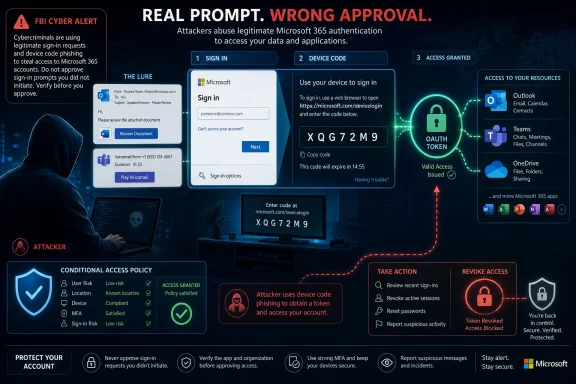
The core tactic associated with Kali365 is device-code phishing. Microsoft’s device code flow exists for good reasons: it helps users sign in on devices that may not have a convenient keyboard or browser. A TV, console, printer, command-line tool, or limited-input device can display a short code, and the user can enter that code on a Microsoft verification page from another device.In the criminal version, the attacker initiates the flow and sends the victim the code. The victim is told, usually through an email or message dressed up as a document share, Teams action, voicemail, or account prompt, to enter or approve the code. If the victim complies, the legitimate Microsoft process can authorize the attacker-controlled session.
That is why the phrase “fake login page” can be misleading here. The page may be real. The brand may be real. The authentication system may be Microsoft’s. The fraud sits in the context: who initiated the request, why the user is being asked to approve it, and which device or session is being authorized.
This is a subtle but important shift. Traditional phishing asks the user to surrender a secret. Device-code phishing asks the user to complete an action. The user may walk away thinking they never gave up a password, never typed a one-time code into a lookalike domain, and never ignored an obvious browser warning. In a sense, they are right — and still compromised.
The FBI’s warning also highlights why MFA is not a silver bullet. Multi-factor authentication raises the cost of many attacks, and organizations should continue to use it. But MFA does not protect a user who is tricked into approving the attacker’s authentication path, nor does it automatically invalidate tokens that have already been issued.
The Real Target Is the Work Graph
Outlook, Teams, and OneDrive are usually described as apps, but from an attacker’s perspective they are better understood as a graph of relationships and business processes. Outlook reveals who talks to whom, what invoices are expected, where approvals happen, and which external partners are trusted. Teams exposes internal tempo, project names, escalation paths, and the tone of executive communications. OneDrive and SharePoint often contain the files that turn a compromised account into a data breach.That is why token theft is so dangerous. The attacker is not merely “reading email.” They may be studying the organization.
A compromised mailbox can be used to find password reset messages, financial instructions, HR records, supplier contracts, or customer data. A compromised Teams account can be used to impersonate a colleague in a place where employees are trained to respond quickly. A compromised OneDrive account can expose drafts, spreadsheets, shared folders, and documents that no one would ever email as attachments anymore.
The more Microsoft 365 becomes the default operating layer for work, the more identity becomes the perimeter. That phrase has become a cliché in security circles, but Kali365 gives it practical meaning. The attacker does not need to breach the network in the 1990s sense if they can persuade one user to authorize cloud access that looks routine.
For administrators, the implication is blunt. The security event may not begin with malware, a suspicious executable, or a noisy endpoint alert. It may begin with a successful sign-in, a valid token, and a user who genuinely believes they completed a normal work task.
MFA Still Matters, but the Myth Around It Is Dangerous
The worst lesson to take from the FBI warning would be that MFA has failed. The better lesson is that MFA must be treated as one layer in a wider identity defense model. Strong authentication is necessary, but it cannot compensate for every risky authentication flow, every excessive permission, or every unmonitored session.Many organizations have spent the last several years measuring MFA rollout as a finish line. The board asked whether MFA was enabled. The cyber insurer asked whether MFA was enabled. The IT team checked the box and moved on. Kali365 is a reminder that “MFA enabled” is not the same as “identity attack resistant.”
There are degrees of strength here. App-based prompts are better than passwords alone, but they can still be abused through fatigue or social engineering. Number matching and phishing-resistant authenticators improve the situation. Hardware-backed passkeys and FIDO2 security keys move the organization closer to a model where the user cannot easily be tricked into authenticating the wrong site or session.
But most businesses live in the messy middle. They have legacy clients, service accounts, mobile users, contractors, shared mailboxes, line-of-business integrations, and executives who expect everything to work from everywhere. That complexity creates gaps, and attackers know that identity systems are usually full of exceptions.
Kali365 thrives in those gaps. It does not need to defeat the mathematical strength of MFA. It needs to exploit the human and administrative assumptions around it.
The Admin Fix Is Boring, Which Is Why It Matters
The FBI’s recommended mitigations are not glamorous. Restrict device code flow where it is not needed. Use conditional access policies. Monitor authentication activity. Review suspicious sessions. Revoke tokens when compromise is suspected. Train users to distrust unexpected authentication prompts, even when the page looks legitimate.This is not the kind of advice that makes for a cinematic breach story, but it is exactly where defenders can make the attack harder. Device code flow is useful in specific scenarios, not universally necessary for every user in every tenant. If a finance clerk, HR manager, or executive assistant never needs to authenticate a limited-input device, allowing that flow broadly is risk without much business upside.
Conditional access is where Microsoft 365 security often becomes real. Organizations can restrict authentication based on device compliance, location, risk signals, application, user group, and authentication method. The challenge is that these controls require maintenance, testing, and political backing when someone complains that a workflow changed.
Token revocation deserves special attention. A password reset may be necessary after a suspicious approval, but it may not be sufficient if the attacker still has a valid session or refresh token. Incident response must include revoking sessions, reviewing sign-in logs, checking mailbox rules, inspecting OAuth app consents, and looking for evidence of forwarding, exfiltration, or lateral movement.
The uncomfortable truth is that many smaller organizations do not have this muscle memory. They know how to reset a password. They may not know how to answer the more important question: what did the account authorize, from where, for how long, and what happened next?
The User Training Script Needs a Rewrite
Security awareness training has long leaned on visual detection: bad logos, awkward grammar, weird domains, urgent language, and suspicious attachments. Those clues still matter, but device-code phishing forces a different lesson. A real Microsoft page can still be part of a fraudulent sequence.Users need to be taught that codes, approvals, and prompts are sensitive actions. If they did not start a login, they should not complete one. If a message tells them to enter a code to view a file, join a meeting, retrieve a voicemail, or keep access to an account, they should pause and verify through a separate channel.
The most useful phrase may be simple: do not authenticate on command. Employees should not treat every Microsoft-branded prompt as routine just because their workday is already full of Microsoft-branded prompts. The decision point is not whether the page looks official; it is whether the user initiated the action and understands what they are approving.
This training has to be practical, not theatrical. Workers do not need a lecture on OAuth grant types. They need examples that resemble their day: a shared document, a Teams recording, a QR code, a device code, a “missed voicemail,” a request from a vendor, or a message that appears to come from a colleague.
The reporting culture matters just as much as the warning. If an employee realizes they may have approved a suspicious request, silence is more damaging than the original click. The organization needs the chance to revoke sessions quickly, inspect activity, and determine whether the account was used for follow-on fraud.
The Attack Is Also a Business Email Compromise Story
It is tempting to file Kali365 under “technical phishing,” because OAuth tokens and device code flows sound like administrator territory. But the likely business impact is classic business email compromise. The attacker wants access, then context, then leverage.Once inside a mailbox, criminals can wait for the right moment. They can watch for an invoice, alter payment details, impersonate a supplier, or reply inside an existing conversation. They can search for words like “wire,” “bank,” “invoice,” “contract,” “payroll,” “passport,” or “confidential.” They can use the compromised account to phish the next employee with far more credibility than an external spoofed address.
Teams adds a newer wrinkle. Many employees treat chat as more immediate and less formal than email, which makes it attractive for social engineering. A message from a real colleague’s account asking someone to review a file, approve a login, or check a payment detail may not trigger the same skepticism as an external email.
OneDrive and SharePoint widen the blast radius. A single user may have access to shared departmental folders, client materials, board documents, or project archives. The attacker does not have to break into a file server if the organization has helpfully synchronized its most valuable documents into the cloud.
This is why the “anyone who uses Outlook, Teams or OneDrive” framing is not merely consumer-safety language. In a Microsoft 365 business tenant, those services are not isolated products. They are the daily substrate of work.
Microsoft’s Convenience Has Become the Attacker’s Interface
Microsoft has spent years smoothing the sign-in experience across devices and services. That is not a mistake; users demand it, and enterprises cannot function if every app behaves like a fortress with a separate drawbridge. But every convenience feature becomes part of the attack surface once criminals learn how to manipulate it.Device code flow is a good example because it solves a real usability problem. The security issue is not that such a flow exists. The issue is that many tenants may allow it more broadly than their risk model justifies, and many users have never been taught to regard a device code as a high-value authorization step.
There is also a deeper platform tension. Microsoft 365 is powerful because identity, apps, files, communications, and automation are tightly integrated. The same integration that helps a worker move from an email to a Teams meeting to a OneDrive document also helps an attacker move from a token to a mailbox to a file store to a more convincing internal phish.
That does not mean organizations should retreat from cloud productivity. It does mean that tenant configuration is now as important as endpoint hardening once was. The defaults and exceptions in Entra ID, conditional access, app consent, session lifetime, and audit logging are not administrative trivia. They are security architecture.
The companies most exposed are often not the ones with no security tools at all. They are the ones with many tools, loosely configured, and no one clearly responsible for the identity control plane.
The Phishing Kit Economy Keeps Compressing the Skill Gap
Kali365 fits into a broader pattern: phishing infrastructure is being productized. Attackers no longer need to write every lure, build every landing page, host every dashboard, or understand every authentication nuance. Kits package the workflow and sell access to the result.This does not make every criminal sophisticated. It makes sophistication rentable. The distinction matters because defenders often calibrate their expectations around the presumed skill of the attacker. A small business may assume it is beneath the attention of advanced operators, but phishing-as-a-service changes the economics.
Automation also changes scale. A criminal using a kit can test lures, track victims, manage campaigns, and reuse infrastructure faster than a lone operator building from scratch. Add AI-generated text and the old comfort of spotting broken English becomes even weaker. The email may be well written, localized, and tailored closely enough to pass a tired employee’s first glance.
There is a tendency in security reporting to overstate every new named threat as if it were a revolution. Kali365 does not need that treatment. The underlying ideas — token theft, OAuth abuse, device-code phishing, MFA bypass through social engineering — have been known. What matters is the packaging, timing, and Microsoft 365 focus.
When a technique moves from specialist tradecraft into a commercial kit, defenders should assume volume will follow.
Where Windows Shops Should Draw the Line This Week
The practical response to the FBI warning is not panic. It is prioritization. Microsoft 365 administrators should treat device-code phishing as an identity configuration problem, a monitoring problem, and a user-behavior problem at the same time.The first step is to determine whether device code authentication is needed broadly. Some organizations may require it for legitimate workflows, but many will find that the majority of users never need it. A conditional access policy that blocks or tightly restricts the flow can remove an entire class of easy social engineering from most accounts.
The second step is to make session revocation part of incident response. Help desks should not stop at password resets when a user reports an unexpected Microsoft prompt or suspicious approval. They should know how to revoke sessions, review recent sign-ins, check for new mailbox rules, and escalate when OAuth activity looks abnormal.
The third step is targeted protection for high-value roles. Finance, HR, executives, administrators, legal teams, and employees with broad SharePoint or OneDrive access deserve stricter controls than the average user. Attackers follow privilege, money, and useful context.
The fourth step is to make reporting safe. Employees who fear embarrassment may wait hours or days before telling IT that something felt wrong. In token-based attacks, that delay can be the difference between a contained session and a full business email compromise.
The Warning Signs Are Ordinary by Design
The lure does not have to be dramatic. It may look like a shared document, a Teams meeting recording, a voicemail notification, a request to reconnect a device, or a message saying a file cannot be opened until authorization is completed. That ordinariness is the point.A user who sees a Microsoft verification page may assume the dangerous part is over. In reality, that may be the moment the attack succeeds. The safest habit is to separate the message from the action: do not follow the authentication path supplied by the message; go directly to the service or ask the sender through another trusted channel.
QR codes deserve similar skepticism. They move the user from one device to another and often bypass the visual URL-checking habits employees have been taught. A QR code that leads to a login or device approval should be treated with the same suspicion as a link demanding credentials.
The attack also punishes hurry. “Approve this now,” “enter this code,” “your access will expire,” and “the meeting recording is waiting” are all attempts to narrow the user’s thinking. The defense is not paranoia; it is a pause long enough to ask whether the user initiated the login.
For organizations, the lesson is to stop treating unexpected prompts as a normal tax on modern work. They are security events until proven otherwise.
The Microsoft 365 Defenses That Deserve the First Budget Dollar
The most concrete lesson from Kali365 is that identity controls need to be engineered, not merely enabled. MFA deployment was a necessary chapter. The next chapter is reducing the number of ways a user can be tricked into authorizing a bad session.- Organizations should restrict device code flow unless they have a documented business need for it, and exceptions should be narrow rather than tenant-wide.
- Help desks should treat suspicious Microsoft 365 approvals as possible token compromise, not merely as a password-reset request.
- Security teams should monitor sign-ins, OAuth grants, mailbox rules, forwarding behavior, and unusual access to Teams, SharePoint, and OneDrive after any reported prompt.
- High-value users in finance, HR, executive support, legal, and administration should receive stronger authentication controls and tighter conditional access policies.
- Employee training should explicitly cover device codes, QR codes, OAuth prompts, and legitimate Microsoft pages used in fraudulent workflows.
- A fast, blame-free reporting path is essential because revoking sessions quickly can matter more than determining whether the user “should have known.”
The FBI warning should not be read as a reason to distrust Microsoft 365 wholesale, but as a reason to stop treating Microsoft 365 identity as background plumbing. Outlook, Teams, and OneDrive now sit close to the center of business operations, and the credentials that unlock them are no longer just passwords. The next wave of phishing will keep aiming at the moment users prove who they are, not merely at the words they type into a box; organizations that understand that shift will be the ones that turn this warning into a survivable control change rather than the opening paragraph of their next incident report.
References
- Primary source: Devon Live
Published: 2026-06-03T09:12:13.846039
FBI warning to anyone who uses Outlook, Teams or OneDrive - Devon Live
There is a new security threat that could see your accounts accessedwww.devonlive.com - Related coverage: safebrowz.com
FBI Kali365 Warning 2026: Why OAuth Device-Code Phishing Slips Past MFA | SafeBrowz
The FBI's May 2026 PSA260521 advisory on Kali365 phishing-as-a-service is a watershed moment for Microsoft 365 security. SafeBrowz unpacks the OAuth device-code flow abuse, why MFA does not stop it, and how our 3-layer detection engine catches the landing pages.safebrowz.com - Related coverage: itpro.com
Warning issued as surge in OAuth device code phishing leads to M365 account takeovers | IT Pro
Successful attacks enable full M365 account access, opening the door to data theft, lateral movement, and persistent compromisewww.itpro.com
