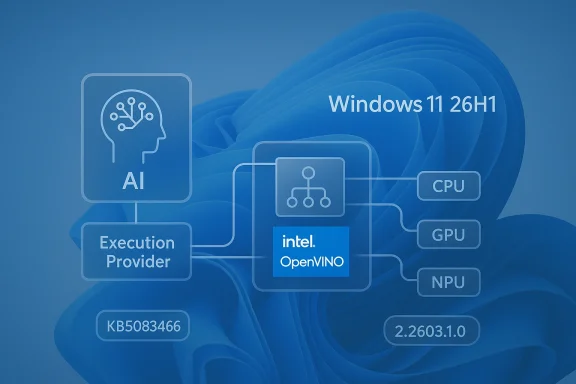
Microsoft’s latest KB5083462 update for the Intel OpenVINO Execution Provider is a small headline item with outsized strategic meaning. On paper, it is “just” a component refresh, but it sits squarely inside Microsoft’s broader push to make Windows 11 a more capable local-AI platform on Intel CPUs, GPUs, and NPUs. The update is targeted at Windows 11, version 24H2 and 25H2, arrives automatically through Windows Update, and requires the latest cumulative update already installed. Microsoft also points users to Update history so they can confirm the component landed successfully. (support.microsoft.com)
What makes this noteworthy is the pace of change behind the scenes. Microsoft’s AI update history shows that OpenVINO execution-provider builds have been landing repeatedly through late 2025 and early 2026, which suggests a fast-moving servicing cadence rather than a one-off patch. In other words, this is part of a living platform strategy, not a static feature drop. (support.microsoft.com)
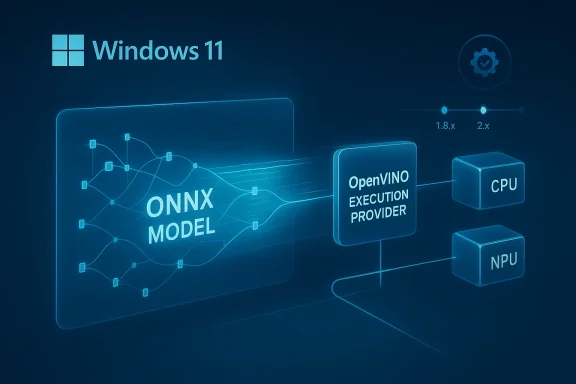
The Intel OpenVINO Execution Provider matters because it is one of the bridges between Windows AI ambitions and the hardware that actually runs those workloads. Microsoft describes the component as accelerating ONNX models on Intel CPUs, GPUs, and NPUs, which places it directly in the inference path for local AI applications. That is important because the execution provider determines where model operations are scheduled, how workloads are partitioned, and how efficiently the system uses available silicon. (support.microsoft.com)
This also helps explain why Microsoft is packaging the update through Windows Update rather than treating it as a niche developer download. By shipping AI runtime components as serviced system updates, Microsoft reduces friction for consumers and IT administrators alike. The model mirrors the way traditional Windows components have long been maintained, except now the payload is increasingly about AI inference performance rather than only security or compatibility. (support.microsoft.com)
The OpenVINO side of the partnership is equally significant. Intel’s OpenVINO toolkit has long been positioned as an optimization and deployment stack for AI workloads, and Microsoft’s own Windows ML documentation now frames execution providers as the mechanism that lets ONNX inference adapt to CPUs, GPUs, and specialized accelerators. Put simply, OpenVINO is not just another library; it is part of the software layer that makes heterogeneous AI hardware feel coherent to application developers.
Historically, this pattern signals a shift in how Windows is evolving. Instead of asking every application vendor to solve hardware acceleration individually, Microsoft is building a shared runtime model with vendor-specific execution providers underneath. That approach should lower the barrier for app makers while also keeping Intel, AMD, NVIDIA, and Qualcomm in a competitive but standardized framework. It is subtly transformative, because the battleground moves from raw support to runtime quality, scheduling efficiency, and update cadence. (support.microsoft.com)
For Windows users, that means the most important benefits may be invisible. A photo app, local chatbot, transcription engine, or on-device Copilot-style feature can simply feel better because the runtime is better at choosing and using the hardware. That is why even a modest version bump can matter.
That cadence matters because AI runtimes are not static code paths. Driver interactions, model behavior, and hardware support all shift as Microsoft, Intel, and app developers change their layers in parallel. Frequent servicing is a sign that the ecosystem is still maturing and still being normalized for everyday Windows use. (support.microsoft.com)
The update is also gated by prerequisites. Microsoft says devices must already have the latest cumulative update for the relevant Windows 11 release installed. That is a meaningful clue: the execution provider is being layered atop an already current OS baseline, which helps reduce compatibility drift and makes the AI stack more predictable across the fleet. (support.microsoft.com)
That design choice also hints at Microsoft’s confidence in the package. Updates that are expected to ride the normal patch pipeline are generally intended to be routine, not exotic. The company wants this to feel like normal Windows upkeep, even though the underlying mission is to improve AI acceleration. (support.microsoft.com)
For readers, the key takeaway is that version numbers are less important than the direction of travel. The file size is irrelevant to the broader story; what matters is that Microsoft keeps refining the Intel AI path as Windows 11’s local-AI stack matures. That is the real signal. (support.microsoft.com)
That lack of specificity is not unusual in Windows servicing. AI runtimes are often updated quietly because the platform is trying to stay out of the way while still improving how applications use hardware. In a sense, invisibility is the point. (support.microsoft.com)
For Intel-based PCs, that is especially valuable because Intel’s hardware stack is diverse. Microsoft and Intel are effectively trying to make one software path span multiple generations of CPUs, integrated graphics, and NPUs without requiring app makers to hand-tune every edge case. That is a strong pitch for AI PCs, where the hardware story is only as good as the runtime that binds it together.
This is especially relevant on newer Intel AI PCs, where Microsoft and Intel are positioning the stack for broader adoption. The integration story is stronger when users do not need to manually install vendor runtimes or wrangle dependencies. Fewer steps means fewer failures.
The combination of automatic delivery and prerequisite enforcement reduces configuration drift. That is a quiet but important advantage when AI components are increasingly embedded in productivity apps, knowledge tools, and internal copilots. In enterprise environments, predictability often beats novelty. (support.microsoft.com)
The long-term significance is that Microsoft is normalizing AI maintenance. If the OpenVINO path keeps moving through Windows Update at this pace, enterprises will need to treat AI component governance as a standard part of patch management. That is a new operational burden, but also a new source of capability. (support.microsoft.com)
The competitive implication is straightforward: if Microsoft makes Intel acceleration easy and dependable, Intel strengthens its claim that its hardware is the best-supported mainstream path for local AI on Windows. That does not exclude AMD, Qualcomm, or NVIDIA, but it does increase the pressure on those rivals to match runtime maturity and developer friendliness. (support.microsoft.com)
That said, the advantage is fragile. If updates are frequent but opaque, developers may appreciate the direction while still wanting better diagnostics, clearer changelogs, and stronger benchmarking guidance. The ecosystem wins when the software layer feels dependable rather than mysterious. (support.microsoft.com)
This architecture also makes Microsoft's servicing choices especially consequential. When the runtime is centrally managed, the OS vendor can influence performance, compatibility, and deployment behavior in ways that used to belong mainly to application developers. That is a bigger deal than the update title suggests.
The result is that runtime quality becomes a competitive moat. Hardware specs still matter, but the perception of performance increasingly depends on whether the software stack can actually use that hardware well in everyday Windows apps. That is where the next hardware war is being fought.
The upside is obvious. Automatic delivery reduces installation friction, helps ensure that features work out of the box, and gives Microsoft a way to improve AI capabilities without waiting for third-party installers. The downside is that the release surface becomes more complex, and users may not realize that “Windows Update” now includes AI runtime behavior, not just system stability. (support.microsoft.com)
There is also a communication challenge. Users may see an entry in Update history without understanding why it mattered or what changed. That opacity is acceptable for specialists, but mainstream users benefit when Microsoft explains the practical effect more clearly. Right now, the messaging is more technical than useful. (support.microsoft.com)
For IT admins, this also means monitoring becomes part of patch compliance. AI component versioning is now something that may need to be tracked alongside monthly cumulative updates, driver revisions, and security baselines. The administrative overhead is manageable, but it is real. (support.microsoft.com)
This is especially true for applications that depend on predictable inference behavior. As more Windows applications rely on local AI, runtime consistency becomes as important as API stability. The best-case scenario is a platform that improves under the hood without forcing app rewrites.
Enterprises also benefit from the fact that Microsoft explicitly points to Update history for verification. That makes it easier to audit whether a device has the current AI runtime without resorting to bespoke scripts or third-party inventory tools. In a large environment, that kind of visibility matters. (support.microsoft.com)
That suggests a cautious but practical deployment model. Pilot first, validate on representative Intel hardware, then expand after confirming that the update does not alter app performance or compatibility in unexpected ways. This is standard enterprise hygiene, but it becomes more important as AI runtimes move into the OS. (support.microsoft.com)
This is why AI update history pages are becoming valuable internal references. They let admins map component changes to policy checkpoints, test cycles, and app validation windows. The administrative process is maturing alongside the technology itself. (support.microsoft.com)
If you do use AI-capable Windows apps, though, the update can still matter. Better runtime integration can mean fewer hiccups, faster model startup, and smoother use of Intel hardware paths. The gains may be small individually, but platform-wide they add up.
It is also worth remembering that this is a component update, not a feature upgrade. It does not change the Windows version number, and it does not introduce a flashy new setting panel. Its value is embedded in performance and reliability rather than visible design. (support.microsoft.com)
That is why these maintenance updates deserve attention even when the release notes look thin. They are part of the invisible scaffolding that keeps Windows AI usable at scale. Without them, the promise of AI PCs would be much harder to deliver consistently. (support.microsoft.com)
For now, the safest conclusion is that Microsoft and Intel are still tightening the screws on the local-AI stack. The update may not be flashy, but it is consistent with a platform that wants AI to feel native, maintainable, and hardware-aware. That consistency is the real story. (support.microsoft.com)
Source: Microsoft Support KB5083462: Intel OpenVINO Execution Provider update (version 2.2603.1.0) - Microsoft Support
What makes this noteworthy is the pace of change behind the scenes. Microsoft’s AI update history shows that OpenVINO execution-provider builds have been landing repeatedly through late 2025 and early 2026, which suggests a fast-moving servicing cadence rather than a one-off patch. In other words, this is part of a living platform strategy, not a static feature drop. (support.microsoft.com)
 Background
The Intel OpenVINO Execution Provider matters because it is one of the bridges between Windows AI ambitions and the hardware that actually runs those workloads. Microsoft describes the component as accelerating ONNX models on Intel CPUs, GPUs, and NPUs, which places it directly in the inference path for local AI applications. That is important because the execution provider determines where model operations are scheduled, how workloads are partitioned, and how efficiently the system uses available silicon. (support.microsoft.com)This also helps explain why Microsoft is packaging the update through Windows Update rather than treating it as a niche developer download. By shipping AI runtime components as serviced system updates, Microsoft reduces friction for consumers and IT administrators alike. The model mirrors the way traditional Windows components have long been maintained, except now the payload is increasingly about AI inference performance rather than only security or compatibility. (support.microsoft.com)
The OpenVINO side of the partnership is equally significant. Intel’s OpenVINO toolkit has long been positioned as an optimization and deployment stack for AI workloads, and Microsoft’s own Windows ML documentation now frames execution providers as the mechanism that lets ONNX inference adapt to CPUs, GPUs, and specialized accelerators. Put simply, OpenVINO is not just another library; it is part of the software layer that makes heterogeneous AI hardware feel coherent to application developers.
Historically, this pattern signals a shift in how Windows is evolving. Instead of asking every application vendor to solve hardware acceleration individually, Microsoft is building a shared runtime model with vendor-specific execution providers underneath. That approach should lower the barrier for app makers while also keeping Intel, AMD, NVIDIA, and Qualcomm in a competitive but standardized framework. It is subtly transformative, because the battleground moves from raw support to runtime quality, scheduling efficiency, and update cadence. (support.microsoft.com)
Why execution providers matter
Execution providers are the plumbing beneath the user experience. They decide how an ONNX graph is broken apart and mapped to the best available backend, whether that is a CPU core, integrated graphics, or an NPU. If that plumbing improves, apps can feel faster and more responsive without any visible UI change.For Windows users, that means the most important benefits may be invisible. A photo app, local chatbot, transcription engine, or on-device Copilot-style feature can simply feel better because the runtime is better at choosing and using the hardware. That is why even a modest version bump can matter.
The update cadence tells its own story
Microsoft’s AI update history shows Intel OpenVINO entries on December 1, 2025, January 29, 2026, and February 24, 2026, including the 1.8.26.0 build associated with KB5072094 and later builds such as 1.8.63.0 under KB5077525. The recurring releases indicate active servicing and likely ongoing tuning for reliability, compatibility, and performance. (support.microsoft.com)That cadence matters because AI runtimes are not static code paths. Driver interactions, model behavior, and hardware support all shift as Microsoft, Intel, and app developers change their layers in parallel. Frequent servicing is a sign that the ecosystem is still maturing and still being normalized for everyday Windows use. (support.microsoft.com)
What KB5083462 Actually Does
At a practical level, KB5083462 is an OpenVINO Execution Provider update for Windows 11 24H2 and 25H2. Microsoft says it “includes improvements” to the AI component and is distributed automatically through Windows Update, but the support note does not publicly enumerate bug fixes, performance deltas, or known issues. That wording is typical for servicing updates to AI components: the value is real, but the public changelog is intentionally sparse. (support.microsoft.com)The update is also gated by prerequisites. Microsoft says devices must already have the latest cumulative update for the relevant Windows 11 release installed. That is a meaningful clue: the execution provider is being layered atop an already current OS baseline, which helps reduce compatibility drift and makes the AI stack more predictable across the fleet. (support.microsoft.com)
The installation path is deliberately boring
This update is not something most users will hunt down manually. Microsoft says it will be downloaded and installed automatically from Windows Update, and users can confirm presence in Settings > Windows Update > Update history. The low-friction delivery model is important because it ensures the component stays aligned with Windows servicing rather than becoming a separate maintenance burden. (support.microsoft.com)That design choice also hints at Microsoft’s confidence in the package. Updates that are expected to ride the normal patch pipeline are generally intended to be routine, not exotic. The company wants this to feel like normal Windows upkeep, even though the underlying mission is to improve AI acceleration. (support.microsoft.com)
Versioning suggests a fast-moving branch
The update naming shows a newer version line than the January 2026 OpenVINO entry in the AI update history. The earlier release is listed as 1.8.63.0, while KB5083462 points to version 2.2603.1.0 in Microsoft Support. That strongly suggests a significant internal branch or packaging change, not merely a cosmetic revision. It is fair to infer that the runtime layer is evolving quickly, although Microsoft has not publicly broken down the delta. (support.microsoft.com)For readers, the key takeaway is that version numbers are less important than the direction of travel. The file size is irrelevant to the broader story; what matters is that Microsoft keeps refining the Intel AI path as Windows 11’s local-AI stack matures. That is the real signal. (support.microsoft.com)
What is not disclosed
Microsoft does not say whether the update improves raw throughput, lowers latency, fixes a crash, or expands model compatibility. The absence of detail means we should avoid overstating the user-facing effect. In a component of this kind, the “improvement” may be technical hygiene, driver compatibility, or backend tuning rather than a dramatic visible feature change. (support.microsoft.com)That lack of specificity is not unusual in Windows servicing. AI runtimes are often updated quietly because the platform is trying to stay out of the way while still improving how applications use hardware. In a sense, invisibility is the point. (support.microsoft.com)
Why This Matters for Windows 11 AI
The strategic importance of KB5083462 is that it reinforces Windows 11’s role as an AI runtime platform, not just an operating system. Microsoft’s Windows ML documentation says ONNX models can run locally via the ONNX Runtime with automatic execution provider management for CPUs, GPUs, and NPUs. That means the OS is increasingly making hardware selection a managed service, not a developer afterthought.For Intel-based PCs, that is especially valuable because Intel’s hardware stack is diverse. Microsoft and Intel are effectively trying to make one software path span multiple generations of CPUs, integrated graphics, and NPUs without requiring app makers to hand-tune every edge case. That is a strong pitch for AI PCs, where the hardware story is only as good as the runtime that binds it together.
Consumer impact: invisible but useful
Consumers will probably notice the update only indirectly. If a local app uses ONNX models for image processing, transcription, translation, or generative features, the app may become smoother, more battery-friendly, or simply more reliable. Those gains are usually incremental, but they matter because local AI experiences are often judged by whether they feel instant or sluggish.This is especially relevant on newer Intel AI PCs, where Microsoft and Intel are positioning the stack for broader adoption. The integration story is stronger when users do not need to manually install vendor runtimes or wrangle dependencies. Fewer steps means fewer failures.
Enterprise impact: manageability and consistency
For enterprises, the more important story is consistency. IT teams care less about a specific benchmark bump than about whether the AI component is delivered through the standard patching channel, survives fleet management, and behaves consistently across similar hardware. KB5083462 fits that model neatly. (support.microsoft.com)The combination of automatic delivery and prerequisite enforcement reduces configuration drift. That is a quiet but important advantage when AI components are increasingly embedded in productivity apps, knowledge tools, and internal copilots. In enterprise environments, predictability often beats novelty. (support.microsoft.com)
A sign of platform normalization
One of the most interesting implications is that AI acceleration is becoming part of Windows servicing in the same way drivers and codecs once were. Microsoft’s AI update history page now groups execution providers alongside other AI components, which makes the stack feel less experimental and more operational. That helps legitimize local AI as a Windows feature category rather than a demo. (support.microsoft.com)The long-term significance is that Microsoft is normalizing AI maintenance. If the OpenVINO path keeps moving through Windows Update at this pace, enterprises will need to treat AI component governance as a standard part of patch management. That is a new operational burden, but also a new source of capability. (support.microsoft.com)
Intel’s Position in the AI PC Race
Intel has a clear incentive to keep OpenVINO prominent inside Windows. Intel’s own materials describe the OpenVINO Execution Provider for Windows ML as a way to leverage performance across Intel CPUs, GPUs, and NPUs with a consistent programming model. That makes the Microsoft update not just a Windows story, but a channel for Intel’s broader AI PC strategy.The competitive implication is straightforward: if Microsoft makes Intel acceleration easy and dependable, Intel strengthens its claim that its hardware is the best-supported mainstream path for local AI on Windows. That does not exclude AMD, Qualcomm, or NVIDIA, but it does increase the pressure on those rivals to match runtime maturity and developer friendliness. (support.microsoft.com)
Intel’s ecosystem advantage
Intel’s advantage is not just chips; it is continuity. The company has spent years building OpenVINO into a recognizable deployment stack, and Microsoft’s Windows ML documentation now gives that stack a first-class role. In a market where developer trust is crucial, familiarity matters almost as much as raw hardware capability.That said, the advantage is fragile. If updates are frequent but opaque, developers may appreciate the direction while still wanting better diagnostics, clearer changelogs, and stronger benchmarking guidance. The ecosystem wins when the software layer feels dependable rather than mysterious. (support.microsoft.com)
The role of Windows ML
Windows ML is the glue here. Microsoft says it includes a copy of ONNX Runtime and can dynamically download vendor-specific execution providers, which gives the operating system a vendor-neutral shell with vendor-optimized backends underneath. That is an elegant architecture because it preserves choice while hiding complexity from the app layer.This architecture also makes Microsoft's servicing choices especially consequential. When the runtime is centrally managed, the OS vendor can influence performance, compatibility, and deployment behavior in ways that used to belong mainly to application developers. That is a bigger deal than the update title suggests.
Competitive pressure on rivals
AMD, Qualcomm, and NVIDIA all have a stake in execution-provider quality, but Microsoft’s AI history page shows that the OpenVINO track is actively maintained in lockstep with other vendor paths. That creates a comparative benchmark: whichever provider delivers the most stable, fastest, and least troublesome integration will attract more platform confidence. (support.microsoft.com)The result is that runtime quality becomes a competitive moat. Hardware specs still matter, but the perception of performance increasingly depends on whether the software stack can actually use that hardware well in everyday Windows apps. That is where the next hardware war is being fought.
Windows Update as an AI Delivery Channel
Microsoft’s decision to use Windows Update for AI components is one of the most important parts of this story. It means the company is treating AI runtimes as core platform assets that deserve the same service path as security fixes and quality updates. That is a major shift from the old model, where acceleration libraries lived mostly in developer ecosystems and SDK installs. (support.microsoft.com)The upside is obvious. Automatic delivery reduces installation friction, helps ensure that features work out of the box, and gives Microsoft a way to improve AI capabilities without waiting for third-party installers. The downside is that the release surface becomes more complex, and users may not realize that “Windows Update” now includes AI runtime behavior, not just system stability. (support.microsoft.com)
Automatic updates are good, but not magical
Automatic installation is not the same as automatic compatibility. The prerequisite that the latest cumulative update be installed first shows how tightly coupled the AI component is to the OS build train. That can be good for reliability, but it also means organizations have to keep patch levels aligned or risk delaying AI improvements. (support.microsoft.com)There is also a communication challenge. Users may see an entry in Update history without understanding why it mattered or what changed. That opacity is acceptable for specialists, but mainstream users benefit when Microsoft explains the practical effect more clearly. Right now, the messaging is more technical than useful. (support.microsoft.com)
Servicing also means accountability
By shipping through Windows Update, Microsoft implicitly accepts that AI runtime updates should behave like normal platform updates. That creates expectations around rollback safety, quality assurance, and traceability. If an update affects model performance or app behavior, customers will expect the Windows servicing model to absorb that risk gracefully. (support.microsoft.com)For IT admins, this also means monitoring becomes part of patch compliance. AI component versioning is now something that may need to be tracked alongside monthly cumulative updates, driver revisions, and security baselines. The administrative overhead is manageable, but it is real. (support.microsoft.com)
What this means for app developers
Developers do not need to treat every update as a breaking change, but they should pay attention to the cadence. If the Windows ML stack continues evolving quickly, developers will want to validate model performance and backend selection across supported OpenVINO versions. Small runtime shifts can have outsized effects on latency, memory use, and compatibility.This is especially true for applications that depend on predictable inference behavior. As more Windows applications rely on local AI, runtime consistency becomes as important as API stability. The best-case scenario is a platform that improves under the hood without forcing app rewrites.
Enterprise Deployment Considerations
From an enterprise perspective, KB5083462 is less about a single feature than about operational maturity. Organizations adopting AI-enabled Windows 11 devices want vendor-maintained execution providers to arrive through a standard servicing path, because that simplifies compliance and reduces deployment sprawl. Microsoft’s documentation aligns well with that expectation. (support.microsoft.com)Enterprises also benefit from the fact that Microsoft explicitly points to Update history for verification. That makes it easier to audit whether a device has the current AI runtime without resorting to bespoke scripts or third-party inventory tools. In a large environment, that kind of visibility matters. (support.microsoft.com)
Fleet managers will care about three things
The first is version consistency, because AI components can affect application behavior. The second is driver alignment, since OpenVINO and hardware drivers are tightly linked. The third is rollback strategy, because any runtime update that changes AI inference behavior should be testable before broad rollout.That suggests a cautious but practical deployment model. Pilot first, validate on representative Intel hardware, then expand after confirming that the update does not alter app performance or compatibility in unexpected ways. This is standard enterprise hygiene, but it becomes more important as AI runtimes move into the OS. (support.microsoft.com)
Security and governance are adjacent concerns
Even when an update is not explicitly about security, it still changes the trusted computing environment. A local AI runtime can influence data flow, model execution locality, and how app components interact with hardware resources. For regulated environments, that is enough to justify governance review.This is why AI update history pages are becoming valuable internal references. They let admins map component changes to policy checkpoints, test cycles, and app validation windows. The administrative process is maturing alongside the technology itself. (support.microsoft.com)
Consumer Experience and Practical Expectations
For everyday users, the honest answer is that KB5083462 probably won’t look dramatic. If you do not run local AI apps that rely on OpenVINO-backed execution, you may never notice the update at all. That is not a flaw; it is the hallmark of a platform component doing invisible infrastructure work. (support.microsoft.com)If you do use AI-capable Windows apps, though, the update can still matter. Better runtime integration can mean fewer hiccups, faster model startup, and smoother use of Intel hardware paths. The gains may be small individually, but platform-wide they add up.
What users should actually check
A practical user should confirm that Windows Update has completed normally and that Update history shows the component entry. That is the simplest proof that the AI runtime update was applied. Users on Windows 11 24H2 or 25H2 should also ensure their latest cumulative update is current, because Microsoft makes that a prerequisite. (support.microsoft.com)It is also worth remembering that this is a component update, not a feature upgrade. It does not change the Windows version number, and it does not introduce a flashy new setting panel. Its value is embedded in performance and reliability rather than visible design. (support.microsoft.com)
Why local AI depends on these quiet updates
Local AI only works well when the plumbing is dependable. Users are unlikely to judge the execution provider directly, but they will notice if a feature launches faster, drains less battery, or behaves more predictably after a patch. Those are the kinds of quality signals that make a platform feel polished.That is why these maintenance updates deserve attention even when the release notes look thin. They are part of the invisible scaffolding that keeps Windows AI usable at scale. Without them, the promise of AI PCs would be much harder to deliver consistently. (support.microsoft.com)
Strengths and Opportunities
The strongest aspect of KB5083462 is that it fits into a coherent platform direction: Microsoft is steadily moving Windows 11 toward a world where local AI is serviced, versioned, and managed like any other core capability. That gives Intel-based PCs a credible, updateable foundation for AI workloads, and it gives developers a cleaner deployment target. The opportunity is not the patch itself, but the platform discipline it represents. (support.microsoft.com)- Automatic delivery through Windows Update reduces friction for users and admins. (support.microsoft.com)
- Prerequisite enforcement helps keep AI components aligned with OS servicing. (support.microsoft.com)
- Intel hardware acceleration spans CPUs, GPUs, and NPUs, broadening compatibility. (support.microsoft.com)
- Windows ML integration makes execution provider management more coherent for developers.
- Enterprise auditability improves because the component appears in Update history. (support.microsoft.com)
- Platform normalization helps AI feel like a first-class Windows feature rather than an add-on. (support.microsoft.com)
- Strategic alignment with Intel strengthens the Intel AI PC story inside Windows.
Risks and Concerns
The main concern is opacity. Microsoft tells users that the update contains “improvements,” but it does not explain what was fixed, how performance changed, or whether the release addresses specific bugs. That makes it harder for admins and developers to judge the update’s impact, and it leaves enthusiasts with little more than a version number and a promise. That may be acceptable for servicing, but it is not ideal for transparency. (support.microsoft.com)- Limited public detail makes impact assessment difficult. (support.microsoft.com)
- Tight OS coupling means cumulative updates become a dependency for AI runtime gains. (support.microsoft.com)
- Frequent servicing can increase validation overhead for enterprises. (support.microsoft.com)
- Inconsistent hardware ecosystems may still create performance variance across Intel device generations.
- User confusion is likely because the update is invisible unless someone checks Update history. (support.microsoft.com)
- Developer uncertainty may persist without clearer changelogs or benchmarking guidance. (support.microsoft.com)
- Operational complexity grows as AI components become part of standard patch governance. (support.microsoft.com)
Looking Ahead
The next few months will tell us whether KB5083462 is a routine refinement or part of a broader acceleration in Microsoft’s AI servicing model. If OpenVINO updates continue landing alongside other AI components in Microsoft’s history pages, it will reinforce the idea that Windows 11 is becoming a managed AI runtime environment. That would be a significant shift in the product’s identity. (support.microsoft.com)For now, the safest conclusion is that Microsoft and Intel are still tightening the screws on the local-AI stack. The update may not be flashy, but it is consistent with a platform that wants AI to feel native, maintainable, and hardware-aware. That consistency is the real story. (support.microsoft.com)
- Watch for additional OpenVINO releases in Microsoft’s AI update history. (support.microsoft.com)
- Monitor whether Microsoft adds more detail to future KB notes. (support.microsoft.com)
- Track Windows ML documentation for changes in execution-provider behavior.
- Compare Intel runtime updates against AMD, NVIDIA, and Qualcomm servicing cadence. (support.microsoft.com)
- Validate enterprise app performance after cumulative and AI component updates together. (support.microsoft.com)
Source: Microsoft Support KB5083462: Intel OpenVINO Execution Provider update (version 2.2603.1.0) - Microsoft Support
Last edited: