

Microsoft’s April 2026 cumulative update for Windows 11 has landed with an uncomfortable reminder for administrators: encryption is only as smooth as the policies behind it. KB5083769, released for Windows 11 24H2 and 25H2, includes security improvements, Secure Boot-related work, Remote Desktop hardening, and a confirmed known issue in which some BitLocker-protected systems may request a recovery key after the first reboot. The problem is not described by Microsoft as a mass-breaking update, but for the small subset of devices with a very specific BitLocker Group Policy configuration, it can still turn an ordinary patch cycle into a help desk fire drill.
Windows updates have always lived at the intersection of security, reliability, and user patience. In the Windows 10 era, cumulative updates simplified servicing by packaging fixes together, but they also raised the stakes: one monthly payload could touch storage, networking, identity, device management, boot components, and user interface behavior at the same time. Windows 11 has continued that model while adding more aggressive security baselines around Secure Boot, TPM, virtualization-based security, and encrypted storage.
The April 2026 release is a textbook example of that modern Windows reality. KB5083769 applies to Windows 11 version 25H2 and 24H2, moving systems to OS builds 26200.8246 and 26100.8246 respectively. It also includes the latest security fixes, quality improvements from prior preview and out-of-band updates, and changes related to Secure Boot certificate readiness ahead of certificate expirations beginning in June 2026.
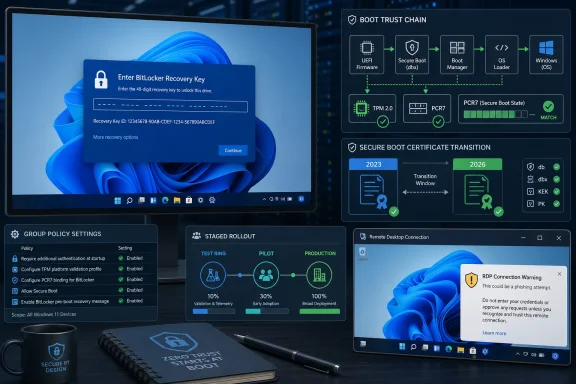
The BitLocker issue is especially notable because it sits deep in the boot trust chain rather than in an ordinary desktop component. Microsoft says affected systems have an unrecommended policy configuration involving the TPM platform validation profile for native UEFI firmware, with PCR7 explicitly included even though System Information reports PCR7 binding as not possible. That distinction matters because BitLocker is designed to distrust unexpected changes in early boot state, and in this case the distrust mechanism is working too visibly for certain managed environments.
The situation also arrives amid broader pressure on Microsoft to improve Windows update predictability. Administrators are being asked to manage Secure Boot certificate transitions, firmware dependencies, BitLocker recovery readiness, Remote Desktop security prompts, and Windows servicing cadence simultaneously. The update is not merely a patch; it is a stress test of whether an organization’s endpoint configuration has kept pace with Windows’ evolving security model.
Microsoft also highlights improvements around Secure Boot certificate updates. Windows devices need to move through a certificate transition before older Secure Boot certificates begin expiring, and Microsoft has been phasing in targeting logic to decide which machines are ready. That means the update is part of a larger effort to avoid boot disruption later, even though a limited BitLocker disruption is now surfacing earlier.
The update also improves protection against phishing-style attacks using Remote Desktop Protocol files. When opening an RDP file, Windows now exposes requested connection settings before the connection proceeds, with settings disabled by default and a one-time warning shown on first use. That is a security-first change, but it also introduces new workflow friction for administrators who rely on generated RDP files.
Key elements of the April update include:
Those measurements are stored in Platform Configuration Registers, usually shortened to PCRs. Each PCR reflects a different part of the boot path or system state, such as firmware behavior, boot manager components, Secure Boot state, or BitLocker access control. PCRs are not user-facing in normal Windows usage, but they are central to why encrypted systems can boot automatically when nothing suspicious has changed.
PCR7 is the register at the heart of this issue. On modern UEFI systems, PCR7 is associated with Secure Boot state, including whether Secure Boot is enabled and which keys are trusted by the platform. When PCR7 binding is available and correctly configured, BitLocker can use Secure Boot state for integrity validation rather than binding itself too tightly to exact hashes of boot binaries that may legitimately change during updates.
The problem described for KB5083769 appears when policy and platform reality do not agree. If Group Policy explicitly includes PCR7 in the validation profile, but Windows reports that PCR7 binding is not possible, the update’s Secure Boot and boot manager transition logic can create a state change that BitLocker treats as requiring recovery. In plain English: the administrator told BitLocker to care about a measurement path that the device cannot bind to cleanly.
This is why Microsoft calls the configuration unrecommended. It is not saying BitLocker is unsafe, nor is it saying Secure Boot is broken. It is saying that manually forcing PCR behavior can reduce manageability, especially during boot certificate and boot manager transitions.
Affected systems must meet multiple requirements at the same time. BitLocker must be enabled on the OS drive, the relevant Group Policy must be configured with PCR7 included, msinfo32 must show PCR7 binding as not possible, the Windows UEFI CA 2023 certificate must already be present in the Secure Boot database, and the device must not already be running the 2023-signed Windows Boot Manager. That is a precise and relatively unusual alignment.
The systems most likely to encounter this are not random gaming PCs or freshly installed consumer laptops. They are more likely to be managed enterprise endpoints, government workstations, education devices, lab machines, or older corporate images where BitLocker policies were hardened years ago and never revisited. The issue may also appear on manually tuned enthusiast systems where administrators copied strict PCR profiles without fully understanding future Secure Boot migration consequences.
Conditions to watch include:
Secure Boot exists to ensure that the pre-boot environment loads only properly signed components. That chain includes firmware trust databases, Windows boot components, and certificate authorities used to validate them. When those certificates age out, the platform must have newer trust anchors available, and Windows must be able to move eligible devices without creating unnecessary boot failures.
KB5083769 includes work to expand coverage for devices eligible to receive newer Secure Boot certificates. Microsoft says it uses high-confidence targeting signals so devices receive updated certificates only after demonstrating sufficient update reliability. That cautious rollout is sensible, but it also means certificate state, boot manager signing state, and BitLocker state can temporarily vary across a fleet.
This is where the KB5083769 BitLocker issue becomes strategically interesting. The affected devices are caught between older assumptions and newer trust material. They have the 2023 certificate in the Secure Boot database, they are eligible for the newer boot manager path, but BitLocker policy still forces a validation profile that does not match the device’s PCR7 binding capability.
The lesson is not that certificate rotation is bad. The lesson is that boot security is becoming more dynamic, and policies that once looked stable may become brittle when the underlying trust chain evolves. Enterprises should treat Secure Boot certificate migration as a program, not as a background maintenance detail.
The critical policy is Configure TPM platform validation profile for native UEFI firmware configurations. If it is enabled and PCR7 is selected manually, administrators should reassess whether that policy is still needed. In Microsoft’s current guidance, leaving the policy Not Configured allows Windows to select the default PCR profile appropriate to the device’s hardware and Secure Boot capability.
A recommended operational sequence looks like this:
This is also a moment to clean up old security baselines. Many environments accumulated BitLocker policies during the MBAM era, during Windows 10 hardening projects, or after compliance audits that rewarded explicit configuration. Some of those settings may still be valid, but explicit PCR configuration should no longer be treated as harmless paperwork.
In well-run enterprise environments, BitLocker recovery passwords should be escrowed to Microsoft Entra ID, Active Directory Domain Services, or an approved management system. Help desk teams should know how to retrieve them, users should know what to expect, and security teams should monitor access to recovery material. A recovery key is powerful; mishandling it creates both downtime and security risk.
Consumers face a different version of the same problem. Windows often backs recovery keys to a Microsoft account when device encryption is enabled, but many users do not know that until they are locked out. Even though Microsoft says personal devices are unlikely to meet the KB5083769 conditions, any BitLocker-enabled device owner should know where their recovery key lives before a firmware update, motherboard change, BIOS reset, or Windows servicing event.
A healthy recovery-key posture includes:
This is not as dramatic as a BitLocker recovery prompt, but it matters for administrators. Remote Desktop files are widely used in support workflows, privileged access systems, jump-server environments, and third-party password vault integrations. If a warning dialog has overlapping text or partially hidden buttons, users may be unable to read or confidently interact with a security prompt.
Microsoft’s workaround is to use the same display scaling across all monitors. That is simple in theory and annoying in practice, especially for laptop users docked to high-DPI monitors or administrators working across mixed displays. The keyboard workaround, using Tab and Space to interact with the warning, is useful but hardly elegant.
The RDP issue matters because it shows the trade-off between security visibility and interface reliability. Microsoft wants users to see what an RDP file is requesting before they connect, which is the right security direction. But if the warning itself renders poorly, users may learn to treat it as another obstacle rather than a meaningful risk signal.
Administrators should consider:
For enterprises, the impact is more operational than technical. The fix is understandable, but it requires inventory, policy review, communication, staged deployment, and recovery readiness. The machines most likely to be affected are also the machines most likely to matter: domain-joined laptops, executive endpoints, regulated workstations, and devices with stricter encryption baselines.
Large organizations should avoid framing the issue as a reason to pause all patching indefinitely. Security updates still matter, and Secure Boot certificate migration cannot be ignored. The better approach is ring-based deployment, starting with test groups that include representative hardware and policy profiles before moving to broader waves.
The enterprise-versus-consumer split looks like this:
Apple controls more of the hardware and software stack, which can simplify secure boot and disk encryption transitions across supported Macs. ChromeOS similarly benefits from a tightly managed boot model and a narrower administrative surface. Windows, by contrast, must support a sprawling ecosystem of OEM firmware, old images, third-party management tooling, custom baselines, and user-modified systems.
That breadth is Windows’ competitive advantage and its recurring challenge. Enterprise customers choose Windows because it can be customized, integrated, managed, audited, and deployed almost anywhere. The KB5083769 BitLocker issue shows the cost of that flexibility when older explicit settings collide with newer security assumptions.
For OEMs and endpoint management vendors, the message is clear. Hardware must report Secure Boot and PCR7 state reliably, management tools must surface risky BitLocker profiles, and deployment platforms should make these checks easy before updates roll out. The vendors that can convert Microsoft’s guidance into actionable dashboards will reduce customer pain and strengthen their own value proposition.
This incident may also accelerate a shift away from hand-authored Group Policy baselines toward modern security baselines maintained through cloud management. That is not because cloud management is magically immune to bad settings. It is because stale local and domain policies are harder to detect, rationalize, and retire across diverse fleets.
The most important step is identifying whether the problematic policy exists. If Configure TPM platform validation profile for native UEFI firmware configurations is set and includes PCR7, that is the red flag. Setting it to Not Configured, refreshing policy, and suspending then resuming BitLocker protectors allows Windows to update bindings using its selected default PCR profile.
A short operational checklist:
This is also a good time to test reporting around manage-bde and BitLocker protector state. Many organizations can tell whether encryption is enabled, but fewer can quickly report the PCR validation profile in use across every model. KB5083769 makes that gap more visible.
The bigger story is the continuing modernization of Windows boot security. Secure Boot certificates, 2023-signed Windows Boot Manager deployment, PCR7 binding, and BitLocker validation profiles will remain relevant well beyond this one update. Organizations that treat this as a one-off bug may miss the larger shift toward more actively managed boot trust.
Watch these areas closely:
KB5083769 will not be remembered as a catastrophic Windows update, but it deserves attention because it exposes a fragile seam in modern endpoint security. BitLocker, TPM, Secure Boot, and Windows servicing are designed to protect systems from tampering, yet they depend on policies that must age gracefully as Microsoft updates the boot chain. The path forward is not to weaken encryption or fear updates; it is to manage the trust chain deliberately, document recovery paths, and make sure the next reboot is boring for the user and predictable for IT.
Source: igor´sLAB Windows 11 KB5083769: The April Update may require the recovery key on certain BitLocker-enabled systems | igor´sLAB
 Background
Windows updates have always lived at the intersection of security, reliability, and user patience. In the Windows 10 era, cumulative updates simplified servicing by packaging fixes together, but they also raised the stakes: one monthly payload could touch storage, networking, identity, device management, boot components, and user interface behavior at the same time. Windows 11 has continued that model while adding more aggressive security baselines around Secure Boot, TPM, virtualization-based security, and encrypted storage.The April 2026 release is a textbook example of that modern Windows reality. KB5083769 applies to Windows 11 version 25H2 and 24H2, moving systems to OS builds 26200.8246 and 26100.8246 respectively. It also includes the latest security fixes, quality improvements from prior preview and out-of-band updates, and changes related to Secure Boot certificate readiness ahead of certificate expirations beginning in June 2026.
The BitLocker issue is especially notable because it sits deep in the boot trust chain rather than in an ordinary desktop component. Microsoft says affected systems have an unrecommended policy configuration involving the TPM platform validation profile for native UEFI firmware, with PCR7 explicitly included even though System Information reports PCR7 binding as not possible. That distinction matters because BitLocker is designed to distrust unexpected changes in early boot state, and in this case the distrust mechanism is working too visibly for certain managed environments.
The situation also arrives amid broader pressure on Microsoft to improve Windows update predictability. Administrators are being asked to manage Secure Boot certificate transitions, firmware dependencies, BitLocker recovery readiness, Remote Desktop security prompts, and Windows servicing cadence simultaneously. The update is not merely a patch; it is a stress test of whether an organization’s endpoint configuration has kept pace with Windows’ evolving security model.
What KB5083769 Delivers
More than a BitLocker headline
The BitLocker recovery prompt is the story that will get the most attention, but KB5083769 is a broader cumulative update. It includes security fixes, prior quality improvements, and servicing-stack improvements intended to make future Windows updates install more reliably. That combination is normal for Patch Tuesday, but the specific mix this month is unusually tied to the pre-boot trust environment.Microsoft also highlights improvements around Secure Boot certificate updates. Windows devices need to move through a certificate transition before older Secure Boot certificates begin expiring, and Microsoft has been phasing in targeting logic to decide which machines are ready. That means the update is part of a larger effort to avoid boot disruption later, even though a limited BitLocker disruption is now surfacing earlier.
The update also improves protection against phishing-style attacks using Remote Desktop Protocol files. When opening an RDP file, Windows now exposes requested connection settings before the connection proceeds, with settings disabled by default and a one-time warning shown on first use. That is a security-first change, but it also introduces new workflow friction for administrators who rely on generated RDP files.
Key elements of the April update include:
- Security fixes for Windows 11 24H2 and 25H2.
- Secure Boot certificate readiness improvements for eligible devices.
- BitLocker-related boot recovery behavior affecting a limited configuration set.
- Remote Desktop file warning changes designed to reduce phishing risk.
- SMB over QUIC reliability improvements for compressed traffic.
- Servicing stack updates to support more reliable future patching.
Why BitLocker May Ask for a Recovery Key
The role of TPM measurements
BitLocker does not simply encrypt a drive and hope for the best. On systems using TPM-based protection, it relies on measured boot data to decide whether the environment requesting the disk unlock looks like the same trusted environment that existed when protection was configured. If the measurements change in a way BitLocker does not expect, the TPM does not release the secret automatically, and Windows asks for the recovery key.Those measurements are stored in Platform Configuration Registers, usually shortened to PCRs. Each PCR reflects a different part of the boot path or system state, such as firmware behavior, boot manager components, Secure Boot state, or BitLocker access control. PCRs are not user-facing in normal Windows usage, but they are central to why encrypted systems can boot automatically when nothing suspicious has changed.
PCR7 is the register at the heart of this issue. On modern UEFI systems, PCR7 is associated with Secure Boot state, including whether Secure Boot is enabled and which keys are trusted by the platform. When PCR7 binding is available and correctly configured, BitLocker can use Secure Boot state for integrity validation rather than binding itself too tightly to exact hashes of boot binaries that may legitimately change during updates.
The problem described for KB5083769 appears when policy and platform reality do not agree. If Group Policy explicitly includes PCR7 in the validation profile, but Windows reports that PCR7 binding is not possible, the update’s Secure Boot and boot manager transition logic can create a state change that BitLocker treats as requiring recovery. In plain English: the administrator told BitLocker to care about a measurement path that the device cannot bind to cleanly.
This is why Microsoft calls the configuration unrecommended. It is not saying BitLocker is unsafe, nor is it saying Secure Boot is broken. It is saying that manually forcing PCR behavior can reduce manageability, especially during boot certificate and boot manager transitions.
Who Is Actually Affected
A narrow but serious configuration set
Microsoft describes the affected population as limited, and that framing is important. A typical unmanaged home PC is unlikely to meet all of the required conditions because most consumers have not manually configured BitLocker’s native UEFI TPM platform validation profile. Even many business laptops will not be affected if they rely on Microsoft’s default platform validation choices.Affected systems must meet multiple requirements at the same time. BitLocker must be enabled on the OS drive, the relevant Group Policy must be configured with PCR7 included, msinfo32 must show PCR7 binding as not possible, the Windows UEFI CA 2023 certificate must already be present in the Secure Boot database, and the device must not already be running the 2023-signed Windows Boot Manager. That is a precise and relatively unusual alignment.
The systems most likely to encounter this are not random gaming PCs or freshly installed consumer laptops. They are more likely to be managed enterprise endpoints, government workstations, education devices, lab machines, or older corporate images where BitLocker policies were hardened years ago and never revisited. The issue may also appear on manually tuned enthusiast systems where administrators copied strict PCR profiles without fully understanding future Secure Boot migration consequences.
Conditions to watch include:
- Operating system drive encryption is enabled with BitLocker.
- Native UEFI TPM validation policy is configured manually.
- PCR7 is explicitly included in the validation profile.
- msinfo32 reports PCR7 binding as not possible.
- Windows UEFI CA 2023 is present in the Secure Boot database.
- The 2023-signed Windows Boot Manager is not already the active default.
- Policy settings were inherited from older security baselines or MBAM-era templates.
The Secure Boot Certificate Backdrop
Why 2026 matters
This BitLocker issue should be understood in the wider context of Secure Boot certificate expiration. Microsoft has warned that Secure Boot certificates used by most Windows devices are set to begin expiring from June 2026. That does not mean every machine suddenly stops booting on a single date, but it does mean the Windows ecosystem must transition certificate trust material in a controlled way.Secure Boot exists to ensure that the pre-boot environment loads only properly signed components. That chain includes firmware trust databases, Windows boot components, and certificate authorities used to validate them. When those certificates age out, the platform must have newer trust anchors available, and Windows must be able to move eligible devices without creating unnecessary boot failures.
KB5083769 includes work to expand coverage for devices eligible to receive newer Secure Boot certificates. Microsoft says it uses high-confidence targeting signals so devices receive updated certificates only after demonstrating sufficient update reliability. That cautious rollout is sensible, but it also means certificate state, boot manager signing state, and BitLocker state can temporarily vary across a fleet.
This is where the KB5083769 BitLocker issue becomes strategically interesting. The affected devices are caught between older assumptions and newer trust material. They have the 2023 certificate in the Secure Boot database, they are eligible for the newer boot manager path, but BitLocker policy still forces a validation profile that does not match the device’s PCR7 binding capability.
The lesson is not that certificate rotation is bad. The lesson is that boot security is becoming more dynamic, and policies that once looked stable may become brittle when the underlying trust chain evolves. Enterprises should treat Secure Boot certificate migration as a program, not as a background maintenance detail.
How IT Teams Should Prepare
Audit before reboot becomes recovery
The practical guidance is straightforward: audit before deployment, especially in managed environments. Microsoft recommends checking BitLocker Group Policy settings for explicit PCR7 inclusion and verifying PCR7 binding status with msinfo32 before installing the update. That advice sounds dry, but it is exactly the kind of pre-flight check that separates a normal patch wave from a recovery-key scramble.The critical policy is Configure TPM platform validation profile for native UEFI firmware configurations. If it is enabled and PCR7 is selected manually, administrators should reassess whether that policy is still needed. In Microsoft’s current guidance, leaving the policy Not Configured allows Windows to select the default PCR profile appropriate to the device’s hardware and Secure Boot capability.
A recommended operational sequence looks like this:
- Identify BitLocker-protected devices running Windows 11 24H2 or 25H2.
- Check Group Policy or equivalent registry settings for the native UEFI TPM validation profile.
- Confirm whether PCR7 is explicitly included in the validation profile.
- Run msinfo32 or inventory tooling to determine PCR7 binding status.
- Move the policy to Not Configured where Microsoft’s workaround applies.
- Force policy refresh before installing KB5083769.
- Suspend and resume BitLocker protectors where needed to refresh bindings.
- Verify recovery-key escrow before rebooting any at-risk device.
This is also a moment to clean up old security baselines. Many environments accumulated BitLocker policies during the MBAM era, during Windows 10 hardening projects, or after compliance audits that rewarded explicit configuration. Some of those settings may still be valid, but explicit PCR configuration should no longer be treated as harmless paperwork.
Recovery-Key Readiness Is the Real Test
Escrow is not optional
For affected users, the recovery screen is only a disaster if the recovery key cannot be found. That is why the KB5083769 issue exposes a broader operational truth: BitLocker recovery-key management is not an administrative afterthought. It is part of the boot reliability model.In well-run enterprise environments, BitLocker recovery passwords should be escrowed to Microsoft Entra ID, Active Directory Domain Services, or an approved management system. Help desk teams should know how to retrieve them, users should know what to expect, and security teams should monitor access to recovery material. A recovery key is powerful; mishandling it creates both downtime and security risk.
Consumers face a different version of the same problem. Windows often backs recovery keys to a Microsoft account when device encryption is enabled, but many users do not know that until they are locked out. Even though Microsoft says personal devices are unlikely to meet the KB5083769 conditions, any BitLocker-enabled device owner should know where their recovery key lives before a firmware update, motherboard change, BIOS reset, or Windows servicing event.
A healthy recovery-key posture includes:
- Verified key escrow before broad update deployment.
- Clear ownership records tying devices to users and departments.
- Help desk runbooks for recovery-screen incidents.
- Access controls and logging for recovery-key retrieval.
- User communication explaining what a BitLocker prompt looks like.
- Periodic recovery drills for executive, remote, and high-value systems.
- Rotation policies where recovery passwords are accessed or used.
Remote Desktop Changes Add a Second Admin Headache
Security warnings meet multi-monitor reality
KB5083769 also introduces a separate known issue involving Remote Desktop warnings. Microsoft added stronger warnings for RDP files to reduce phishing risk, but later acknowledged that the warning message may not display correctly in some multi-monitor setups. The problem can appear when monitors use different scaling values, such as one display at 100 percent and another at 125 percent.This is not as dramatic as a BitLocker recovery prompt, but it matters for administrators. Remote Desktop files are widely used in support workflows, privileged access systems, jump-server environments, and third-party password vault integrations. If a warning dialog has overlapping text or partially hidden buttons, users may be unable to read or confidently interact with a security prompt.
Microsoft’s workaround is to use the same display scaling across all monitors. That is simple in theory and annoying in practice, especially for laptop users docked to high-DPI monitors or administrators working across mixed displays. The keyboard workaround, using Tab and Space to interact with the warning, is useful but hardly elegant.
The RDP issue matters because it shows the trade-off between security visibility and interface reliability. Microsoft wants users to see what an RDP file is requesting before they connect, which is the right security direction. But if the warning itself renders poorly, users may learn to treat it as another obstacle rather than a meaningful risk signal.
Administrators should consider:
- Testing RDP workflows after installing KB5083769.
- Checking password vault integrations that generate RDP files.
- Standardizing display scaling on admin workstations where practical.
- Training users not to bypass warnings blindly.
- Tracking vendor updates for tools that create or sign RDP files.
Enterprise Impact Versus Consumer Impact
Managed fleets carry the burden
For consumers, KB5083769 is mostly a reminder to know where BitLocker recovery keys are stored. Microsoft’s affected-conditions list makes clear that unmanaged personal devices are unlikely to be hit by this exact recovery prompt. That said, Windows 11 has made device encryption more common, and users who never intentionally enabled BitLocker may still discover that their system drive is protected.For enterprises, the impact is more operational than technical. The fix is understandable, but it requires inventory, policy review, communication, staged deployment, and recovery readiness. The machines most likely to be affected are also the machines most likely to matter: domain-joined laptops, executive endpoints, regulated workstations, and devices with stricter encryption baselines.
Large organizations should avoid framing the issue as a reason to pause all patching indefinitely. Security updates still matter, and Secure Boot certificate migration cannot be ignored. The better approach is ring-based deployment, starting with test groups that include representative hardware and policy profiles before moving to broader waves.
The enterprise-versus-consumer split looks like this:
- Home users are unlikely to match the full affected policy profile.
- Small businesses may be exposed if a consultant applied old Group Policy templates.
- Enterprises should assume some legacy BitLocker configurations exist until proven otherwise.
- Education and government fleets may have strict baselines that explicitly define PCR behavior.
- Remote-first organizations face higher support cost if users hit recovery away from IT.
- Regulated industries need documented evidence that key escrow and access controls work.
Competitive and Ecosystem Implications
Microsoft’s security stack is both asset and liability
Microsoft’s Windows security posture has become one of its strongest enterprise selling points. BitLocker, Secure Boot, TPM integration, Windows Hello, Defender, virtualization-based security, and cloud-backed device management give Windows a deep platform story that rivals struggle to match at comparable scale. But integration cuts both ways: when a low-level trust transition causes recovery prompts, the complexity becomes visible.Apple controls more of the hardware and software stack, which can simplify secure boot and disk encryption transitions across supported Macs. ChromeOS similarly benefits from a tightly managed boot model and a narrower administrative surface. Windows, by contrast, must support a sprawling ecosystem of OEM firmware, old images, third-party management tooling, custom baselines, and user-modified systems.
That breadth is Windows’ competitive advantage and its recurring challenge. Enterprise customers choose Windows because it can be customized, integrated, managed, audited, and deployed almost anywhere. The KB5083769 BitLocker issue shows the cost of that flexibility when older explicit settings collide with newer security assumptions.
For OEMs and endpoint management vendors, the message is clear. Hardware must report Secure Boot and PCR7 state reliably, management tools must surface risky BitLocker profiles, and deployment platforms should make these checks easy before updates roll out. The vendors that can convert Microsoft’s guidance into actionable dashboards will reduce customer pain and strengthen their own value proposition.
This incident may also accelerate a shift away from hand-authored Group Policy baselines toward modern security baselines maintained through cloud management. That is not because cloud management is magically immune to bad settings. It is because stale local and domain policies are harder to detect, rationalize, and retire across diverse fleets.
What Administrators Should Do Now
A practical response plan
The right response to KB5083769 is neither panic nor indifference. Administrators should validate exposure, adjust policy where needed, and confirm recovery readiness before broad deployment. If the update is already installed and a device asks for the BitLocker recovery key, Microsoft’s guidance indicates that entering the key should be a one-time event under the same policy conditions.The most important step is identifying whether the problematic policy exists. If Configure TPM platform validation profile for native UEFI firmware configurations is set and includes PCR7, that is the red flag. Setting it to Not Configured, refreshing policy, and suspending then resuming BitLocker protectors allows Windows to update bindings using its selected default PCR profile.
A short operational checklist:
- Inventory Windows 11 24H2 and 25H2 devices before expanding deployment.
- Detect explicit PCR7 inclusion in native UEFI BitLocker validation policy.
- Check PCR7 binding status in System Information or through scripted reporting.
- Confirm recovery keys are escrowed and retrievable by authorized staff.
- Pilot KB5083769 on hardware models that represent the fleet.
- Document the recovery process for help desk and field support teams.
- Monitor first-reboot outcomes rather than only installation success.
This is also a good time to test reporting around manage-bde and BitLocker protector state. Many organizations can tell whether encryption is enabled, but fewer can quickly report the PCR validation profile in use across every model. KB5083769 makes that gap more visible.
Strengths and Opportunities
KB5083769 is frustrating for affected administrators, but it also advances important security work and exposes configuration weaknesses that organizations should want to find before a larger certificate transition. The update is a reminder that secure boot chains, encryption policy, and endpoint management are now inseparable parts of Windows operations.- Stronger Secure Boot readiness helps prepare devices for upcoming certificate changes.
- RDP file warning improvements address a real phishing and social-engineering attack path.
- The affected BitLocker scope is narrow, which limits the blast radius for unmanaged users.
- Microsoft’s workaround is actionable for administrators who can change Group Policy.
- The incident encourages recovery-key hygiene, a long-overdue priority in many fleets.
- Fleet auditing can uncover stale policies inherited from older Windows security projects.
- Vendors have an opportunity to build better dashboards for PCR and BitLocker posture.
Risks and Concerns
The concern is not that BitLocker asked for a key when boot trust changed; that is the technology doing its job. The concern is that many organizations may not know which devices have risky policy combinations until those devices restart, and the user experience of a surprise recovery screen is unforgiving. In a remote-work environment, one reboot can become one lost workday.- Recovery keys may be missing, stale, or difficult to retrieve in poorly managed environments.
- Remote users may lack support access during the first reboot after installation.
- Legacy Group Policy settings may remain undocumented across old organizational units.
- Help desk volume can spike even if only a small fleet percentage is affected.
- RDP warning rendering issues may train users to ignore security prompts.
- Certificate migration complexity may create more edge cases as June 2026 approaches.
- Administrators may delay security updates too long if the issue is misunderstood as widespread.
Looking Ahead
What to watch in future updates
Microsoft says a permanent resolution for the BitLocker issue is planned in a future Windows update. Until then, administrators should expect KB5083769 to remain a live operational concern for devices that have not yet been audited or rebooted. The next meaningful signal will be whether Microsoft narrows the affected conditions further, ships a servicing fix, or updates enterprise guidance for Secure Boot certificate migration.The bigger story is the continuing modernization of Windows boot security. Secure Boot certificates, 2023-signed Windows Boot Manager deployment, PCR7 binding, and BitLocker validation profiles will remain relevant well beyond this one update. Organizations that treat this as a one-off bug may miss the larger shift toward more actively managed boot trust.
Watch these areas closely:
- Microsoft’s future fix for the KB5083769 BitLocker recovery scenario.
- Secure Boot certificate migration guidance before June 2026 certificate expirations begin.
- RDP warning behavior updates for multi-monitor and mixed-scaling environments.
- Endpoint management vendor tooling for detecting explicit PCR configuration.
- Windows release health updates for any expansion or reduction of known issues.
KB5083769 will not be remembered as a catastrophic Windows update, but it deserves attention because it exposes a fragile seam in modern endpoint security. BitLocker, TPM, Secure Boot, and Windows servicing are designed to protect systems from tampering, yet they depend on policies that must age gracefully as Microsoft updates the boot chain. The path forward is not to weaken encryption or fear updates; it is to manage the trust chain deliberately, document recovery paths, and make sure the next reboot is boring for the user and predictable for IT.
Source: igor´sLAB Windows 11 KB5083769: The April Update may require the recovery key on certain BitLocker-enabled systems | igor´sLAB
