

Microsoft’s April 2026 Windows 11 Patch Tuesday update, KB5083769, is more than another routine security rollup. It introduces a meaningful hardening change to Remote Desktop by inserting a new warning-and-consent flow whenever users open .rdp files, aiming to blunt phishing campaigns that abuse redirected local resources. The change is tied to CVE-2026-26151, a Remote Desktop spoofing vulnerability, and Microsoft is framing it as part user education, part technical friction, and part damage control.
Remote Desktop has long been one of Windows’ most useful and most abused enterprise features. It enables staff to reach work machines, servers, and virtual desktops as if they were sitting in front of them, but that same convenience has also made it a favorite path for social engineering, lateral movement, and credential theft. Microsoft’s own guidance now makes clear that attackers have been using RDP files as delivery vehicles in phishing campaigns because those files can silently instruct the client to connect to an attacker-controlled host while also requesting access to local resources. (learn.microsoft.com)
The key issue is not just the connection itself, but the redirections that can accompany it. Clipboard sharing, drive mapping, camera access, smart card forwarding, WebAuthn prompts, printer access, and other device redirections can create a quiet bridge between a local workstation and a remote session. Microsoft’s new documentation explicitly spells out that each of these redirections can expose sensitive information or enable malicious activity, from copying passwords out of a clipboard to planting malware in local folders. (learn.microsoft.com)
This is not the first time Microsoft has tightened Remote Desktop security in response to real-world abuse. The company has spent years adjusting authentication, transport, and management layers around the protocol, and its security blogs have repeatedly shown that cybercriminals continue to weaponize remote access infrastructure. The practical lesson has stayed the same: a feature designed for legitimate administration can become a powerful attack surface when users are trained to click through prompts too quickly.
What makes the April 2026 change notable is that Microsoft is shifting some of the burden away from the hidden complexity of .rdp files and onto a visible, one-time educational warning. The company is effectively acknowledging that many users do not understand what is inside an RDP file until after they have already launched it. By changing the first-run experience and the connection dialog, Microsoft is trying to create a pause at the exact moment phishing relies on speed, urgency, and habit. (learn.microsoft.com)
The update also matters because it lands in a broader Windows hardening cycle. Microsoft has been integrating security changes into monthly updates more aggressively, including changes that affect older Windows versions and server builds, which means the company is treating phishing-resistant usability as a platform-wide concern rather than a niche enterprise tweak. That broader posture suggests the Remote Desktop warning is not an isolated fix, but part of a longer effort to make risky behaviors harder to execute casually.
A second change is the one-time educational warning shown the first time an RDP file is opened after the update. That prompt explains that RDP files can be abused in phishing attacks and that users should verify the source carefully. Microsoft is clearly trying to use the first-run experience to create a memorable cautionary moment, not just a checkbox. (learn.microsoft.com)
The warning experience also distinguishes between signed and unsigned files. Unsigned files are labeled as coming from an Unknown publisher, while signed files display the publisher name, but Microsoft still warns users not to assume the file is safe simply because it is signed. That distinction matters because a signature proves origin and integrity, not trustworthiness in the broader sense. (learn.microsoft.com)
The company is also trying to reframe the user’s mental model of an RDP file. Instead of seeing it as a harmless shortcut, Microsoft wants users to treat it like an executable trust decision. That is an important shift, because the social engineering problem here is not merely technical; it is about convincing people that “open” is safe when, in this context, “open” can mean “grant access.” (learn.microsoft.com)
The risk here is especially serious because RDP files can bundle multiple permissions into one click. A malicious actor does not need to win a long negotiation with the user if the file itself can request drives, clipboards, or input devices at launch time. In practice, that means a single convincing email can trigger a chain of access decisions that the user may not fully understand until after the damage is done. (learn.microsoft.com)
Microsoft’s warning language around publisher names is also revealing. Even signed files can be deceptive if the signer name is crafted to resemble a legitimate organization, and Microsoft explicitly calls out this risk. That means the company is not relying on code-signing alone; it is trying to push users toward contextual verification, which is harder but more realistic in a phishing-heavy environment. (learn.microsoft.com)
That said, enterprises will also feel the friction. Some workflows depend on RDP files being opened repeatedly and with little ceremony, especially in managed environments, remote support stacks, and virtual desktop deployments. Microsoft acknowledges that admins can temporarily revert the dialog behavior through a registry value, but it also warns that this rollback may disappear in future updates, which is a clear signal that organizations should plan to adapt rather than rely on the exception. (learn.microsoft.com)
Enterprises should also think about communication, not just configuration. If users suddenly see a new warning and do not understand why it is there, they may either click through it out of habit or contact support in large numbers. The best response is to pair the patch with short, concrete guidance on what signed and unsigned RDP files mean, what redirections should stay disabled, and how to verify a request through a separate channel. (learn.microsoft.com)
There is also a practical consumer benefit in the fact that manually started connections are unaffected. Microsoft says the update does not change the experience when users type a computer name directly into Remote Desktop Connection; it only affects connections started by opening RDP files. That means the patch targets the riskier, file-based entry point without broadening the impact on ordinary manual use. (learn.microsoft.com)
Microsoft’s guidance also reinforces a simple rule that is easy to forget in the moment: if you were not expecting the file, do not open it. That advice sounds obvious, but the whole point of phishing is to make the obvious feel optional. By embedding that message inside the product, Microsoft is trying to turn good security hygiene into a default behavior instead of a lecture. (learn.microsoft.com)
The company is also leaning into what might be called pre-connection transparency. The important moment is not after the session starts; it is before the handshake completes. That is when the user still has an opportunity to back out, and that is why the dialog arrives ahead of the connection instead of as a post-facto notification. (learn.microsoft.com)
At the same time, this approach has limits. Security dialogs can be ignored, and repeated prompts can become wallpaper if users see them too often. Microsoft seems aware of that risk, which is why the first-launch dialog is only shown once while the connection dialog is shown every time a file is opened. The balance is meant to educate without overwhelming. (learn.microsoft.com)
It also aligns with the company’s recent attention to Remote Desktop abuse in the wild. Microsoft’s security research has documented how threat actors use remote desktop infrastructure and virtual desktop services for criminal operations, including rented environments that hide in normal-looking hosting footprints. When that kind of abuse is common, changing the client-side interaction model becomes a logical defense.
There is a competitive dimension here as well. Microsoft wants Windows to remain the trusted endpoint for enterprise connectivity, and that requires more than raw compatibility. If users see Windows as a platform that helps prevent phishing instead of merely enabling remote access, that strengthens the case for Microsoft’s broader security stack across Windows, Microsoft 365, and virtual desktop offerings. (learn.microsoft.com)
Organizations should also map the rollout carefully. Because Microsoft says the dialog behavior can be temporarily reverted through policy, some environments will be tempted to avoid the new prompt if internal testing reveals friction. That may be reasonable in the short term, but the long-term posture should be to adapt business processes so the new defaults can remain intact. (learn.microsoft.com)
The update also creates an opportunity to improve user education at scale. Because the warning appears in-product, it can reach users who would never read a security bulletin, and it can do so at the moment when the lesson matters most. If Microsoft gets the messaging right, this could meaningfully reduce click-through behavior over time. (learn.microsoft.com)
Another concern is operational inconsistency. Some organizations will adapt quickly, while others will temporarily revert the new dialog or delay deployment because of custom tooling, helpdesk scripts, or signed-file assumptions. That creates the risk of a fragmented security posture where some endpoints are protected and others are not. (learn.microsoft.com)
There is also the evergreen risk that attackers will adapt. If users learn to expect a warning, phishing emails may become more polished, more urgent, and more tailored to specific organizations. The patch raises the bar, but it does not end the game. (learn.microsoft.com)
The other thing to watch is whether Microsoft expands this kind of warning model beyond .rdp files. The logic is compelling: whenever a file can silently configure a privileged action, the platform may eventually decide that explicit, contextual consent is worth the extra click. That would be a broader philosophical shift for Windows, and one that would likely extend into other admin and virtualization tools. (learn.microsoft.com)
In the end, KB5083769 is less about a single vulnerability than about re-teaching users how to think about Remote Desktop. By turning RDP files into an explicit security checkpoint, Microsoft is trying to close a gap that attackers have exploited for years. The update may feel like a small UI change, but in security terms, it is a meaningful attempt to make the safest choice the easiest one.
Source: Neowin Microsoft details Windows 11 KB5083769 Remote Desktop changes
 Background
Remote Desktop has long been one of Windows’ most useful and most abused enterprise features. It enables staff to reach work machines, servers, and virtual desktops as if they were sitting in front of them, but that same convenience has also made it a favorite path for social engineering, lateral movement, and credential theft. Microsoft’s own guidance now makes clear that attackers have been using RDP files as delivery vehicles in phishing campaigns because those files can silently instruct the client to connect to an attacker-controlled host while also requesting access to local resources. (learn.microsoft.com)The key issue is not just the connection itself, but the redirections that can accompany it. Clipboard sharing, drive mapping, camera access, smart card forwarding, WebAuthn prompts, printer access, and other device redirections can create a quiet bridge between a local workstation and a remote session. Microsoft’s new documentation explicitly spells out that each of these redirections can expose sensitive information or enable malicious activity, from copying passwords out of a clipboard to planting malware in local folders. (learn.microsoft.com)
This is not the first time Microsoft has tightened Remote Desktop security in response to real-world abuse. The company has spent years adjusting authentication, transport, and management layers around the protocol, and its security blogs have repeatedly shown that cybercriminals continue to weaponize remote access infrastructure. The practical lesson has stayed the same: a feature designed for legitimate administration can become a powerful attack surface when users are trained to click through prompts too quickly.
What makes the April 2026 change notable is that Microsoft is shifting some of the burden away from the hidden complexity of .rdp files and onto a visible, one-time educational warning. The company is effectively acknowledging that many users do not understand what is inside an RDP file until after they have already launched it. By changing the first-run experience and the connection dialog, Microsoft is trying to create a pause at the exact moment phishing relies on speed, urgency, and habit. (learn.microsoft.com)
The update also matters because it lands in a broader Windows hardening cycle. Microsoft has been integrating security changes into monthly updates more aggressively, including changes that affect older Windows versions and server builds, which means the company is treating phishing-resistant usability as a platform-wide concern rather than a niche enterprise tweak. That broader posture suggests the Remote Desktop warning is not an isolated fix, but part of a longer effort to make risky behaviors harder to execute casually.
What Microsoft changed in KB5083769
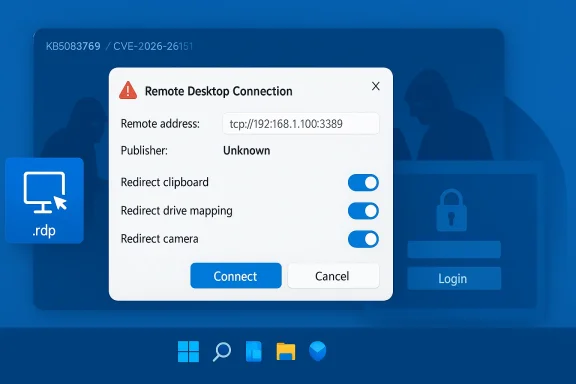
The most visible change in KB5083769 is a new dialog that appears when a user opens an .rdp file. Microsoft says the connection details are shown before any session is created, and all requested redirections are turned off by default. The user must explicitly opt into any local resource access, which is a major reversal from the more permissive flow that many users have long accepted without scrutiny. (learn.microsoft.com)A second change is the one-time educational warning shown the first time an RDP file is opened after the update. That prompt explains that RDP files can be abused in phishing attacks and that users should verify the source carefully. Microsoft is clearly trying to use the first-run experience to create a memorable cautionary moment, not just a checkbox. (learn.microsoft.com)
The new dialog flow
Microsoft’s updated behavior is intended to force users to slow down. Instead of silently accepting all the redirections embedded in an RDP file, the dialog shows the remote computer address, publisher information when available, and each requested resource separately. That makes the connection safer by default and also gives admins a clearer way to see what the file is asking to do. (learn.microsoft.com)The warning experience also distinguishes between signed and unsigned files. Unsigned files are labeled as coming from an Unknown publisher, while signed files display the publisher name, but Microsoft still warns users not to assume the file is safe simply because it is signed. That distinction matters because a signature proves origin and integrity, not trustworthiness in the broader sense. (learn.microsoft.com)
- Remote address is shown before connection.
- Publisher name appears when the file can be verified.
- All redirections are off by default.
- Users must opt in to each local resource.
- First-launch education appears only once per account. (learn.microsoft.com)
Why Microsoft is emphasizing redirections
Microsoft’s own documentation lists the risks in unusually blunt language. Drives can expose documents and let attackers plant files; clipboard redirection can reveal passwords; smart cards and Windows Hello credentials can be redirected for unauthorized access; microphones and cameras can be used for surveillance. That level of specificity is a sign that Microsoft is responding to a very concrete class of misuse rather than a theoretical issue. (learn.microsoft.com)The company is also trying to reframe the user’s mental model of an RDP file. Instead of seeing it as a harmless shortcut, Microsoft wants users to treat it like an executable trust decision. That is an important shift, because the social engineering problem here is not merely technical; it is about convincing people that “open” is safe when, in this context, “open” can mean “grant access.” (learn.microsoft.com)
CVE-2026-26151 and the phishing problem
Microsoft’s handling of CVE-2026-26151 suggests the vulnerability is less about code execution and more about deceptive trust boundaries. The issue is classified as a remote desktop spoofing vulnerability, which is consistent with the abuse pattern Microsoft describes: users are tricked into connecting to the wrong endpoint and into granting sensitive redirections. That is a classic phishing problem dressed in infrastructure clothing.The risk here is especially serious because RDP files can bundle multiple permissions into one click. A malicious actor does not need to win a long negotiation with the user if the file itself can request drives, clipboards, or input devices at launch time. In practice, that means a single convincing email can trigger a chain of access decisions that the user may not fully understand until after the damage is done. (learn.microsoft.com)
Why spoofing is dangerous in Remote Desktop
Spoofing is effective because it is psychologically cheap and technically efficient. The victim thinks they are connecting to a legitimate internal system, a vendor portal, or a helpdesk session, but the file can redirect them to an attacker-controlled host that looks normal enough to pass a glance test. Once connected, the local resources attached to that session can become the real prize. (learn.microsoft.com)Microsoft’s warning language around publisher names is also revealing. Even signed files can be deceptive if the signer name is crafted to resemble a legitimate organization, and Microsoft explicitly calls out this risk. That means the company is not relying on code-signing alone; it is trying to push users toward contextual verification, which is harder but more realistic in a phishing-heavy environment. (learn.microsoft.com)
- Spoofing is the main threat model.
- Phishing emails remain the common delivery vector.
- Publisher signatures help, but do not guarantee safety.
- Resource redirection turns a connection into a data-exposure event.
- User verification is still required, even after the patch. (learn.microsoft.com)
Enterprise impact
For enterprises, the strongest argument in favor of the change is that it reduces the chance of accidental over-sharing. If a helpdesk technician, contractor, or employee opens a malicious RDP file, the new dialog should make it more obvious that the connection is not passive and that redirections can be dangerous. In that sense, Microsoft is improving the baseline security posture of every organization that depends on Remote Desktop. (learn.microsoft.com)That said, enterprises will also feel the friction. Some workflows depend on RDP files being opened repeatedly and with little ceremony, especially in managed environments, remote support stacks, and virtual desktop deployments. Microsoft acknowledges that admins can temporarily revert the dialog behavior through a registry value, but it also warns that this rollback may disappear in future updates, which is a clear signal that organizations should plan to adapt rather than rely on the exception. (learn.microsoft.com)
Admin considerations
The registry option underHKLM\Software\Policies\Microsoft\Windows NT\Terminal Services\Client gives IT teams a pressure valve if the new dialog causes compatibility problems. But any rollback is likely to become technical debt, not a long-term strategy, because Microsoft explicitly says future updates may remove support for it. That makes this more of a transition aid than a policy escape hatch. (learn.microsoft.com)Enterprises should also think about communication, not just configuration. If users suddenly see a new warning and do not understand why it is there, they may either click through it out of habit or contact support in large numbers. The best response is to pair the patch with short, concrete guidance on what signed and unsigned RDP files mean, what redirections should stay disabled, and how to verify a request through a separate channel. (learn.microsoft.com)
- Review internal workflows that rely on
.rdpfiles. - Audit whether signed files are used consistently.
- Train users to verify publishers, not just filenames.
- Expect support calls after rollout.
- Treat the registry rollback as temporary only. (learn.microsoft.com)
Consumer impact
For home and small-business users, the update is potentially even more important because they are less likely to have formal training on Remote Desktop risks. Many users think of an.rdp file the same way they think of a PDF or a shortcut, and that assumption is exactly what phishing operators exploit. The new warning creates a useful speed bump for people who might otherwise double-click without a second thought. (learn.microsoft.com)There is also a practical consumer benefit in the fact that manually started connections are unaffected. Microsoft says the update does not change the experience when users type a computer name directly into Remote Desktop Connection; it only affects connections started by opening RDP files. That means the patch targets the riskier, file-based entry point without broadening the impact on ordinary manual use. (learn.microsoft.com)
Why this matters for everyday users
The consumer side of the problem is often underestimated because phishing attacks are usually described in corporate terms. In reality, remote-support scams, fake IT tickets, and bogus “please connect here” messages can reach anyone who uses Windows at home or runs a small office. A warning that appears before the connection is made can stop a hurried click from becoming a quiet compromise. (learn.microsoft.com)Microsoft’s guidance also reinforces a simple rule that is easy to forget in the moment: if you were not expecting the file, do not open it. That advice sounds obvious, but the whole point of phishing is to make the obvious feel optional. By embedding that message inside the product, Microsoft is trying to turn good security hygiene into a default behavior instead of a lecture. (learn.microsoft.com)
- Unexpected
.rdpfiles should be treated as suspicious. - Manual connections remain unchanged.
- Signed files still need verification.
- Resource sharing should stay limited to what is necessary.
- Separate-channel confirmation is safer than email replies alone. (learn.microsoft.com)
Security design philosophy
This patch is interesting because it reveals Microsoft’s current security design philosophy: reduce surprise, expose context, and make risky choices explicit. That pattern is visible in the way the company now surfaces the remote address, the publisher name, and the specific redirections requested by the file. Rather than pretending the risk can be eliminated, Microsoft is making it harder for users to step into it blindly. (learn.microsoft.com)The company is also leaning into what might be called pre-connection transparency. The important moment is not after the session starts; it is before the handshake completes. That is when the user still has an opportunity to back out, and that is why the dialog arrives ahead of the connection instead of as a post-facto notification. (learn.microsoft.com)
From hidden behavior to visible trust
RDP files have always been compact containers for behavior the average user does not inspect. Microsoft is responding by changing the trust model from “launch first, understand later” to “understand first, connect later.” That is a meaningful shift, and it reflects the broader industry move toward safer defaults and more explicit consent prompts. (learn.microsoft.com)At the same time, this approach has limits. Security dialogs can be ignored, and repeated prompts can become wallpaper if users see them too often. Microsoft seems aware of that risk, which is why the first-launch dialog is only shown once while the connection dialog is shown every time a file is opened. The balance is meant to educate without overwhelming. (learn.microsoft.com)
- Transparency is being moved earlier in the flow.
- Consent is becoming more granular.
- Safer defaults now matter more than legacy convenience.
- One-time education reduces repetition fatigue.
- Persistent prompts preserve scrutiny on every file. (learn.microsoft.com)
How this fits Microsoft’s broader security posture
The April 2026 RDP changes do not exist in a vacuum. Microsoft has been steadily surfacing more security detail in monthly updates, and the company has become more willing to make product behavior less permissive when the threat model justifies it. This update fits the same pattern as other security-hardening moves: fewer silent assumptions, more visible warnings, and fewer default allowances.It also aligns with the company’s recent attention to Remote Desktop abuse in the wild. Microsoft’s security research has documented how threat actors use remote desktop infrastructure and virtual desktop services for criminal operations, including rented environments that hide in normal-looking hosting footprints. When that kind of abuse is common, changing the client-side interaction model becomes a logical defense.
Why Patch Tuesday is becoming a product-design vehicle
Patch Tuesday used to mean little more than fixing bugs and closing holes. Increasingly, it also acts as a vehicle for changing how Windows behaves in response to abuse patterns that have already matured. That shift matters because it means security updates are no longer just repairs; they are policy decisions expressed through code.There is a competitive dimension here as well. Microsoft wants Windows to remain the trusted endpoint for enterprise connectivity, and that requires more than raw compatibility. If users see Windows as a platform that helps prevent phishing instead of merely enabling remote access, that strengthens the case for Microsoft’s broader security stack across Windows, Microsoft 365, and virtual desktop offerings. (learn.microsoft.com)
- Security updates are doubling as UX changes.
- Abuse patterns are shaping client behavior.
- Microsoft is making trust decisions visible.
- Remote Desktop is being reframed as a security-sensitive workflow.
- The patch strengthens the enterprise security narrative. (learn.microsoft.com)
Practical guidance for admins and users
The new warnings are not difficult to understand, but they do require a change in habit. Users should treat an RDP file like a live security decision, not a routine attachment. If the remote address is unfamiliar, if the publisher is unknown, or if the request includes redirections you do not need, the safest answer is to stop and verify. (learn.microsoft.com)Organizations should also map the rollout carefully. Because Microsoft says the dialog behavior can be temporarily reverted through policy, some environments will be tempted to avoid the new prompt if internal testing reveals friction. That may be reasonable in the short term, but the long-term posture should be to adapt business processes so the new defaults can remain intact. (learn.microsoft.com)
A simple response checklist
- Confirm that the RDP file was expected.
- Verify the remote computer address by a separate channel.
- Check whether the publisher name matches the organization you trust.
- Leave unnecessary redirections disabled.
- Escalate suspicious files to IT or security staff. (learn.microsoft.com)
- Verify through a separate channel.
- Do not rely on filename familiarity.
- Keep resource redirections minimal.
- Train helpdesk staff on the new dialog.
- Treat rollback use as temporary. (learn.microsoft.com)
Strengths and Opportunities
Microsoft’s change has several clear strengths. It addresses a real abuse pattern, it targets the riskiest entry point, and it does so without breaking manual Remote Desktop connections. That combination makes it a relatively surgical improvement rather than a blunt disruption, which is exactly what enterprises usually want from a security update. (learn.microsoft.com)The update also creates an opportunity to improve user education at scale. Because the warning appears in-product, it can reach users who would never read a security bulletin, and it can do so at the moment when the lesson matters most. If Microsoft gets the messaging right, this could meaningfully reduce click-through behavior over time. (learn.microsoft.com)
- Reduces silent over-sharing.
- Makes phishing harder to execute quickly.
- Preserves manual connection workflows.
- Helps users understand RDP file risk.
- Gives admins a transition path.
- Supports a safer default posture.
- Aligns with Microsoft’s broader security messaging. (learn.microsoft.com)
Risks and Concerns
The biggest concern is user fatigue. Any new warning can become background noise if people see it too often, especially in organizations that rely heavily on RDP-based workflows. If the prompt is ignored, the change could degrade into a checkbox exercise rather than a meaningful safeguard. (learn.microsoft.com)Another concern is operational inconsistency. Some organizations will adapt quickly, while others will temporarily revert the new dialog or delay deployment because of custom tooling, helpdesk scripts, or signed-file assumptions. That creates the risk of a fragmented security posture where some endpoints are protected and others are not. (learn.microsoft.com)
Operational and security downsides
Microsoft’s own warning that future updates may remove the rollback option is important, because it means a short-term exception could become a long-term incompatibility. Organizations that use the registry to sidestep the dialog may be postponing a problem rather than solving it. That is especially true if their workflows still depend on broad redirection permissions that should probably be tightened anyway. (learn.microsoft.com)There is also the evergreen risk that attackers will adapt. If users learn to expect a warning, phishing emails may become more polished, more urgent, and more tailored to specific organizations. The patch raises the bar, but it does not end the game. (learn.microsoft.com)
- Users may click through warnings too quickly.
- Admins may overuse the rollback path.
- Mixed-policy environments may confuse support teams.
- Attackers will likely refine their lures.
- Signed files may still appear trustworthy at a glance.
- Legacy workflows may break or slow down.
- Training gaps will remain a major risk. (learn.microsoft.com)
Looking Ahead
What happens next will depend on how well Microsoft balances security and usability during the first months of rollout. If the new dialog proves manageable, the company may keep tightening pre-connection trust decisions across other remote-access surfaces. If support costs spike or admins revolt, Microsoft may refine the experience further, but the direction of travel is unlikely to reverse. (learn.microsoft.com)The other thing to watch is whether Microsoft expands this kind of warning model beyond .rdp files. The logic is compelling: whenever a file can silently configure a privileged action, the platform may eventually decide that explicit, contextual consent is worth the extra click. That would be a broader philosophical shift for Windows, and one that would likely extend into other admin and virtualization tools. (learn.microsoft.com)
What to monitor in the coming weeks
- Whether enterprise helpdesks report a spike in calls.
- Whether admins keep or remove the registry workaround.
- Whether Microsoft revises the wording of the dialog.
- Whether attackers shift to new remote-support lures.
- Whether similar consent flows appear in adjacent Windows features. (learn.microsoft.com)
In the end, KB5083769 is less about a single vulnerability than about re-teaching users how to think about Remote Desktop. By turning RDP files into an explicit security checkpoint, Microsoft is trying to close a gap that attackers have exploited for years. The update may feel like a small UI change, but in security terms, it is a meaningful attempt to make the safest choice the easiest one.
Source: Neowin Microsoft details Windows 11 KB5083769 Remote Desktop changes
