

Microsoft published KB5087594 on May 12, 2026 as a Safe OS Dynamic Update for Windows 11 version 23H2, tying another servicing package to the larger Secure Boot certificate rollover that begins affecting Windows devices in June 2026. The update itself is not a flashy feature release; it is plumbing for the recovery and setup environment. But the timing makes it part of a much bigger story: Microsoft is racing the calendar to refresh a trust chain that has quietly underpinned Windows boot security for roughly 15 years.
That is the uncomfortable lesson in this Patch Tuesday footnote. Windows servicing is no longer just about monthly cumulative updates, browser fixes, and the occasional Copilot button. It is now about whether the pre-boot security assumptions baked into millions of PCs, servers, virtual machines, appliances, and managed fleets can be refreshed before old cryptographic roots age out.
KB5087594 is a Safe OS Dynamic Update, which means it targets the Windows recovery and setup environment rather than the visible desktop experience. These updates are easy to overlook because they do not arrive with a new Start menu flourish, a File Explorer redesign, or a headline-grabbing security fix. They service the machinery Windows relies on when the operating system is being installed, upgraded, repaired, or recovered.
That makes them precisely the sort of update administrators ignore at their peril. The Safe OS phase is where Windows may need to boot into a trusted recovery context, replace boot-critical files, manipulate partitions, or apply updates before the full operating system is online. If Secure Boot trust material is changing across the ecosystem, the recovery environment cannot be treated as a sidecar; it has to participate in the same chain of trust as the rest of the platform.
Microsoft’s warning attached to this update is blunt enough to cut through the usual support-article haze. Secure Boot certificates used by most Windows devices are set to expire starting in June 2026, and some personal and business systems may be affected if they are not updated in time. In practical terms, this is Microsoft telling customers that the thing designed to make boot safer can itself become a source of fragility if the trust database is left to rot.
The word “most” matters. Microsoft is not describing a niche problem restricted to hobbyist dual-boot rigs or a handful of forgotten industrial PCs. Secure Boot is the default posture for modern Windows hardware, a requirement woven into the Windows 11 era, and an expectation in many enterprise baselines. When its certificates roll over, the affected surface area is less like an app compatibility issue and more like a root-of-trust infrastructure change.
The expiring certificates drag that machinery into the foreground. The original Microsoft Secure Boot certificates from the 2011 generation have done years of uneventful work authorizing Windows boot components, third-party UEFI applications, and updates to Secure Boot databases. Now those credentials are reaching the end of their planned lifecycle, and Microsoft is moving systems toward replacement 2023-era certificate authorities.
This is not simply a matter of stamping a new date on an old certificate. Secure Boot’s trust stores live in firmware-managed variables, and the actors involved include Microsoft, device OEMs, firmware vendors, Linux distributions, virtualization platforms, anti-cheat developers, security vendors, and enterprise IT teams with their own compliance tooling. A certificate rollover at this layer is a coordination problem disguised as a servicing note.
That coordination burden explains why Microsoft has been warning about the June 2026 deadline months in advance. If this were just another Windows Update payload, Redmond could afford to be calmer. Instead, the company is telling home users, businesses, schools, and server administrators to verify that their systems are receiving the updated certificates before expiration dates turn a theoretical risk into a support incident.
That does not make the issue less security-relevant. Secure Boot exists to reduce the opportunity for bootkits, rootkits, and other pre-OS tampering to gain control before Windows can defend itself. If systems continue using expired trust anchors or miss the transition to updated ones, they risk entering what Microsoft has called a degraded security state, even if they still appear to boot and function normally.
This distinction is crucial for administrators. The worst outcome is not necessarily a dramatic wave of bricked PCs on the first morning of expiration. The more plausible operational mess is unevenness: some devices update automatically, some need OEM firmware, some are stuck behind servicing deferrals, some are offline, some are managed by brittle imaging workflows, and some have custom boot paths that do not behave like Microsoft’s reference case.
That unevenness is where enterprise incidents are born. A fleet can pass a dashboard health check while still hiding pockets of pre-boot debt. The systems most likely to surprise IT are often the ones least likely to be touched regularly: lab machines, kiosks, point-of-sale terminals, conference-room PCs, remote branch hardware, dormant spares, specialized workstations, and servers that nobody wants to reboot until absolutely necessary.
For managed environments, however, “Windows Update will handle it” is not a plan. It is a dependency. Organizations that use Windows Server Update Services, Configuration Manager, Intune rings, offline servicing, golden images, update deferrals, or strict change-control windows need to know whether the relevant updates are actually landing, whether the certificate update process has completed, and whether firmware prerequisites exist for their hardware.
The issue is especially sharp for systems outside the mainstream Windows 11 client path. Windows 10 devices without ongoing eligibility for post-end-of-support updates are a separate risk category. Servers often follow more conservative maintenance schedules. Embedded and IoT systems may be vendor-managed or functionally frozen. Virtual machines may depend on host firmware emulation, template age, or hypervisor behavior rather than the same update path as a laptop.
Microsoft’s support language tries to reassure without overpromising. Many devices should receive the updated certificates automatically, but some systems may require additional firmware updates from the OEM. That caveat is doing heavy lifting. It means Windows Update may be necessary but not always sufficient.
The Secure Boot certificate transition lives uncomfortably close to that boundary. Some systems can take the new trust material through Microsoft’s update pipeline. Others may need firmware capable of accepting, storing, or correctly using updated Secure Boot certificates. That means the success path may depend on BIOS or UEFI updates that many organizations have historically treated as exceptional rather than routine.
For consumer users, the problem is simpler but not easier. A PC bought from a major OEM may receive firmware through Windows Update or vendor utilities. A custom-built desktop may depend on a motherboard vendor’s support cadence. An aging but still-useful Windows 11-capable machine may be technically supported by Microsoft but practically dependent on whether its firmware vendor has done the necessary work.
The industry has learned this lesson before. TPMs, CPU microcode, speculative-execution mitigations, and firmware-level security features all showed that the neat boundary between Windows and hardware is mostly a convenience for marketing copy. Secure Boot certificate expiration is another reminder that the PC platform is a coalition, not a single product.
Administrators should think beyond the live OS. Windows Recovery Environment images, installation media, task-sequence boot images, deployment shares, recovery partitions, and disaster-recovery workflows all need scrutiny. If an organization validates only the running Windows installation, it may discover the gap only during the worst possible moment: a failed upgrade, a BitLocker recovery event, a bare-metal restore, or a mass remediation push.
This is where Safe OS Dynamic Updates earn their keep. They help ensure the environment Windows uses during setup and recovery has current servicing components. In a certificate rollover year, that is not mere housekeeping. It is part of keeping the recovery path inside the same trust story as the installed OS.
There is also a psychological trap here. Because Safe OS updates are not user-facing, they feel optional. They are not. The less visible a component is during normal operation, the more painful it becomes when it is needed and turns out to be outdated.
That scrutiny is justified. The Microsoft UEFI CA has historically played an important role in signing third-party bootloaders and EFI applications, including pathways used by Linux distributions. If the old CA expires and systems do not receive or trust the replacement, some non-Windows boot scenarios could break or require manual intervention. For enthusiasts, this is not an edge case; it is the daily reality of machines that run more than one operating system.
But reducing the June 2026 problem to “Linux might not boot” understates the scope. Enterprise security tools, recovery agents, disk encryption workflows, bootable diagnostics, anti-cheat components, hypervisors, and specialized pre-boot environments can all live near the Secure Boot trust boundary. The certificate update is about the Windows ecosystem, but the blast radius extends anywhere the Microsoft-managed Secure Boot trust chain has become infrastructure.
Microsoft’s challenge is to rotate keys without appearing to tighten platform control by accident. The company will argue, fairly, that expiring certificates must be replaced and that continuing to rely on 2011-era trust anchors forever would be irresponsible. Critics will watch, also fairly, for cases where the rollover makes alternative boot paths more fragile than Windows-first configurations.
That is why administrators should not file this under “23H2 maintenance” and move on. A mixed environment may include Windows 11 23H2, Windows 11 24H2 or later, Windows 10 machines under extended servicing arrangements, Windows Server releases, virtual desktops, and devices that report to entirely different management stacks. The certificate state, not merely the OS version, becomes the relevant inventory item.
This is a subtle shift for patch management teams. Traditional compliance dashboards ask whether a machine has installed a given cumulative update. For Secure Boot rollover readiness, the better question is whether the device has the updated certificates in the correct stores, whether the boot manager and related components are signed in the expected way, and whether event logs or registry signals show completion.
In other words, the update package is the means, not the end state. A green check mark beside KB5087594 is useful. It is not the same thing as a fleet-wide assurance that every boot path has crossed the bridge to the 2023 certificate chain.
The risk is that Microsoft’s warnings may be interpreted as an imminent boot apocalypse. That is not what the company is saying. Many devices should continue to start, and the update process is already underway. The point is preparation, not panic.
Still, users should not confuse “my PC booted today” with “my PC is ready for certificate expiration.” A system can appear healthy while still waiting on a firmware update, a pending Windows update, or a reboot that finalizes servicing. Laptops that sleep for weeks, desktops powered off between gaming sessions, and machines with paused updates are precisely the sort of consumer devices that can miss quiet infrastructure changes.
For WindowsForum readers, the practical move is to treat this as a spring cleaning exercise for the boot stack. Check Windows Update history, vendor firmware tools, Secure Boot status, and recovery media. If the machine dual-boots or depends on specialized EFI software, test that path before June becomes a deadline rather than a date on a support page.
The hard part is not identifying the newest laptops in a well-managed Intune tenant. Those machines are likely to be fine. The hard part is the long tail: remote devices, executive travel laptops, shared machines, lab gear, factory-floor PCs, servers maintained by application owners, and VMs created from templates nobody has refreshed in years.
Security teams should resist framing this as merely an operations problem. Secure Boot is part of the integrity story that underlies BitLocker, measured boot, credential protection, and several modern endpoint security assumptions. If an organization waves away certificate expiration because “the machines still run,” it is accepting a weaker trust baseline at the exact layer attackers love because defenders rarely look there.
Change boards also need to understand the sequence. Firmware first may be required on some models. Windows updates may then deliver certificate changes. Reboots may be necessary. Validation must follow. That is a campaign, not a Tuesday-night patch job.
That matters because recovery events already happen under pressure. A ransomware response, mass BitLocker recovery, botched driver deployment, failed feature update, or storage migration is not the moment to discover that your boot media and Secure Boot policy disagree. The same applies to bare-metal restore workflows that have not been tested since the hardware was purchased.
Administrators should therefore include recovery validation in their readiness checks. It is not enough to patch the running OS and call the project complete. Boot the deployment environment. Test the repair path. Validate the vendor recovery process. Confirm that critical third-party tools still load under Secure Boot after the certificate transition.
This is the sort of work that rarely wins praise because success looks like nothing happening. That is also the work that separates resilient IT from spreadsheet compliance.
But the broader lesson is less flattering to everyone. The PC industry is excellent at adding new security layers and less excellent at designing graceful retirement paths for the old ones. Trust anchors, firmware interfaces, hardware features, and compatibility commitments accumulate. Eventually, someone has to rotate the keys while the world is still using the locks.
Microsoft has at least chosen to make noise before the deadline. The company is publishing guidance, shipping updates, and pushing the issue into support notes attached to ordinary servicing releases. That is better than pretending the problem is obscure. The remaining question is whether the ecosystem can convert warning time into completed action.
OEMs have a particular responsibility here. If a device is still within a support window and capable of running a supported Windows release, customers will reasonably expect firmware cooperation. A Secure Boot certificate rollover should not become another way for hardware vendors to abandon systems that are otherwise perfectly serviceable.
That is what mature platform maintenance looks like now. The line between security update, feature update, firmware dependency, recovery environment refresh, and identity infrastructure has blurred. Administrators who still treat Patch Tuesday as a list of CVEs and reboot prompts are missing the deeper operating model Microsoft is forcing on the ecosystem.
Windows has become an operating system whose security posture depends heavily on coordinated state across cloud policy, firmware, certificates, bootloaders, hardware roots, and recovery partitions. That is a stronger model than the old days of unsigned drivers and BIOS free-for-alls. It is also a model that punishes unmanaged drift.
The certificate deadline is therefore not just a Microsoft problem. It is an audit of how well organizations understand the machines they own. The ones with current inventory, disciplined firmware management, and tested recovery workflows will experience this as another planned maintenance project. The ones running on hope will call it a Microsoft surprise.
For Windows enthusiasts, the update is a reminder to keep installation media and recovery tools current, especially on systems with Secure Boot enabled. For sysadmins, it is a prompt to inventory certificate readiness rather than merely update compliance. For security teams, it is evidence that boot integrity is becoming a live maintenance domain instead of a static BIOS checkbox.
The deadline also exposes a useful philosophical tension. Secure Boot is marketed as a protection, but any protection based on expiring trust must be maintained. The alternative to maintenance is not stability; it is decay with a nicer name.
This is why Microsoft’s warning belongs in the headline even if KB5087594 itself is mundane. The small servicing package is part of a larger industry deadline, and the deadline is close enough that “later” has become a risky plan.
Source: Microsoft Support KB5087594: Safe OS Dynamic Update for Windows 11, version 23H2: May 12, 2026 - Microsoft Support
That is the uncomfortable lesson in this Patch Tuesday footnote. Windows servicing is no longer just about monthly cumulative updates, browser fixes, and the occasional Copilot button. It is now about whether the pre-boot security assumptions baked into millions of PCs, servers, virtual machines, appliances, and managed fleets can be refreshed before old cryptographic roots age out.
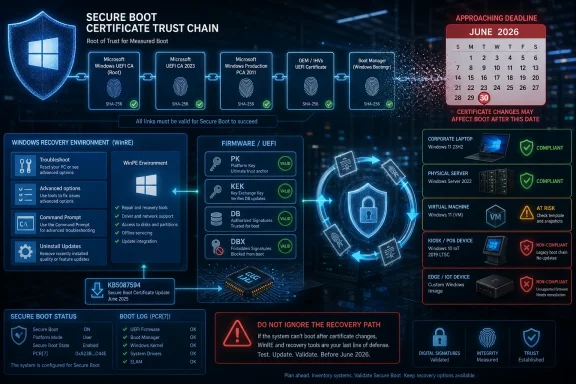 A Small Safe OS Update Points to a Much Larger Boot Problem
KB5087594 is a Safe OS Dynamic Update, which means it targets the Windows recovery and setup environment rather than the visible desktop experience. These updates are easy to overlook because they do not arrive with a new Start menu flourish, a File Explorer redesign, or a headline-grabbing security fix. They service the machinery Windows relies on when the operating system is being installed, upgraded, repaired, or recovered.That makes them precisely the sort of update administrators ignore at their peril. The Safe OS phase is where Windows may need to boot into a trusted recovery context, replace boot-critical files, manipulate partitions, or apply updates before the full operating system is online. If Secure Boot trust material is changing across the ecosystem, the recovery environment cannot be treated as a sidecar; it has to participate in the same chain of trust as the rest of the platform.
Microsoft’s warning attached to this update is blunt enough to cut through the usual support-article haze. Secure Boot certificates used by most Windows devices are set to expire starting in June 2026, and some personal and business systems may be affected if they are not updated in time. In practical terms, this is Microsoft telling customers that the thing designed to make boot safer can itself become a source of fragility if the trust database is left to rot.
The word “most” matters. Microsoft is not describing a niche problem restricted to hobbyist dual-boot rigs or a handful of forgotten industrial PCs. Secure Boot is the default posture for modern Windows hardware, a requirement woven into the Windows 11 era, and an expectation in many enterprise baselines. When its certificates roll over, the affected surface area is less like an app compatibility issue and more like a root-of-trust infrastructure change.
Secure Boot’s Quiet Authority Is Becoming Visible
Secure Boot normally succeeds by disappearing. A user presses the power button, firmware validates early boot components, Windows starts, and nobody thinks about certificate authorities, DB variables, KEK stores, or boot manager signatures. That invisibility is part of the design: trust decisions happen before the operating system is fully awake.The expiring certificates drag that machinery into the foreground. The original Microsoft Secure Boot certificates from the 2011 generation have done years of uneventful work authorizing Windows boot components, third-party UEFI applications, and updates to Secure Boot databases. Now those credentials are reaching the end of their planned lifecycle, and Microsoft is moving systems toward replacement 2023-era certificate authorities.
This is not simply a matter of stamping a new date on an old certificate. Secure Boot’s trust stores live in firmware-managed variables, and the actors involved include Microsoft, device OEMs, firmware vendors, Linux distributions, virtualization platforms, anti-cheat developers, security vendors, and enterprise IT teams with their own compliance tooling. A certificate rollover at this layer is a coordination problem disguised as a servicing note.
That coordination burden explains why Microsoft has been warning about the June 2026 deadline months in advance. If this were just another Windows Update payload, Redmond could afford to be calmer. Instead, the company is telling home users, businesses, schools, and server administrators to verify that their systems are receiving the updated certificates before expiration dates turn a theoretical risk into a support incident.
The Calendar Is the Threat Model Now
Microsoft’s security posture has spent years emphasizing faster patching, hardware-backed isolation, measured boot, virtualization-based security, and signed code. KB5087594 lands in a different category: the enemy is not a newly disclosed exploit so much as time. Certificates expire whether or not an attacker shows up.That does not make the issue less security-relevant. Secure Boot exists to reduce the opportunity for bootkits, rootkits, and other pre-OS tampering to gain control before Windows can defend itself. If systems continue using expired trust anchors or miss the transition to updated ones, they risk entering what Microsoft has called a degraded security state, even if they still appear to boot and function normally.
This distinction is crucial for administrators. The worst outcome is not necessarily a dramatic wave of bricked PCs on the first morning of expiration. The more plausible operational mess is unevenness: some devices update automatically, some need OEM firmware, some are stuck behind servicing deferrals, some are offline, some are managed by brittle imaging workflows, and some have custom boot paths that do not behave like Microsoft’s reference case.
That unevenness is where enterprise incidents are born. A fleet can pass a dashboard health check while still hiding pockets of pre-boot debt. The systems most likely to surprise IT are often the ones least likely to be touched regularly: lab machines, kiosks, point-of-sale terminals, conference-room PCs, remote branch hardware, dormant spares, specialized workstations, and servers that nobody wants to reboot until absolutely necessary.
Microsoft Wants Windows Update to Carry the Load
The strategic bet is clear: Microsoft wants normal servicing to do as much of this rollover as possible. The company has said updated Secure Boot certificates are being distributed through regular Windows updates to in-support devices under Microsoft-managed servicing. For ordinary consumer PCs, that is the only realistic path; expecting users to manually inspect firmware trust stores would be absurd.For managed environments, however, “Windows Update will handle it” is not a plan. It is a dependency. Organizations that use Windows Server Update Services, Configuration Manager, Intune rings, offline servicing, golden images, update deferrals, or strict change-control windows need to know whether the relevant updates are actually landing, whether the certificate update process has completed, and whether firmware prerequisites exist for their hardware.
The issue is especially sharp for systems outside the mainstream Windows 11 client path. Windows 10 devices without ongoing eligibility for post-end-of-support updates are a separate risk category. Servers often follow more conservative maintenance schedules. Embedded and IoT systems may be vendor-managed or functionally frozen. Virtual machines may depend on host firmware emulation, template age, or hypervisor behavior rather than the same update path as a laptop.
Microsoft’s support language tries to reassure without overpromising. Many devices should receive the updated certificates automatically, but some systems may require additional firmware updates from the OEM. That caveat is doing heavy lifting. It means Windows Update may be necessary but not always sufficient.
Firmware Is Where Clean Plans Go to Become Messy
Every experienced administrator knows the sentence that ruins a maintenance calendar: “Requires OEM firmware update.” Firmware updates are slower to validate, riskier to deploy, harder to roll back, and more dependent on vendor-specific tooling than ordinary Windows patches. They also tend to expose the difference between a supported fleet and a merely functioning one.The Secure Boot certificate transition lives uncomfortably close to that boundary. Some systems can take the new trust material through Microsoft’s update pipeline. Others may need firmware capable of accepting, storing, or correctly using updated Secure Boot certificates. That means the success path may depend on BIOS or UEFI updates that many organizations have historically treated as exceptional rather than routine.
For consumer users, the problem is simpler but not easier. A PC bought from a major OEM may receive firmware through Windows Update or vendor utilities. A custom-built desktop may depend on a motherboard vendor’s support cadence. An aging but still-useful Windows 11-capable machine may be technically supported by Microsoft but practically dependent on whether its firmware vendor has done the necessary work.
The industry has learned this lesson before. TPMs, CPU microcode, speculative-execution mitigations, and firmware-level security features all showed that the neat boundary between Windows and hardware is mostly a convenience for marketing copy. Secure Boot certificate expiration is another reminder that the PC platform is a coalition, not a single product.
Recovery Environments Cannot Be an Afterthought
The Safe OS angle in KB5087594 is more interesting than it first appears because recovery paths often lag behind installed operating systems. A Windows desktop may be fully patched while its recovery image, deployment media, bootable repair tools, or offline servicing pipeline remains stale. When the security boundary shifts at boot, those stale components can matter.Administrators should think beyond the live OS. Windows Recovery Environment images, installation media, task-sequence boot images, deployment shares, recovery partitions, and disaster-recovery workflows all need scrutiny. If an organization validates only the running Windows installation, it may discover the gap only during the worst possible moment: a failed upgrade, a BitLocker recovery event, a bare-metal restore, or a mass remediation push.
This is where Safe OS Dynamic Updates earn their keep. They help ensure the environment Windows uses during setup and recovery has current servicing components. In a certificate rollover year, that is not mere housekeeping. It is part of keeping the recovery path inside the same trust story as the installed OS.
There is also a psychological trap here. Because Safe OS updates are not user-facing, they feel optional. They are not. The less visible a component is during normal operation, the more painful it becomes when it is needed and turns out to be outdated.
The Linux and Third-Party Bootloader Angle Is Real, but Not the Whole Story
Secure Boot has always been a political technology as much as a technical one. It sits at the intersection of Microsoft’s Windows platform control, OEM defaults, Linux distribution compatibility, enterprise compliance, and user freedom. Any change to Microsoft’s UEFI CA naturally attracts scrutiny from dual-boot users and open-source communities.That scrutiny is justified. The Microsoft UEFI CA has historically played an important role in signing third-party bootloaders and EFI applications, including pathways used by Linux distributions. If the old CA expires and systems do not receive or trust the replacement, some non-Windows boot scenarios could break or require manual intervention. For enthusiasts, this is not an edge case; it is the daily reality of machines that run more than one operating system.
But reducing the June 2026 problem to “Linux might not boot” understates the scope. Enterprise security tools, recovery agents, disk encryption workflows, bootable diagnostics, anti-cheat components, hypervisors, and specialized pre-boot environments can all live near the Secure Boot trust boundary. The certificate update is about the Windows ecosystem, but the blast radius extends anywhere the Microsoft-managed Secure Boot trust chain has become infrastructure.
Microsoft’s challenge is to rotate keys without appearing to tighten platform control by accident. The company will argue, fairly, that expiring certificates must be replaced and that continuing to rely on 2011-era trust anchors forever would be irresponsible. Critics will watch, also fairly, for cases where the rollover makes alternative boot paths more fragile than Windows-first configurations.
Windows 11 23H2 Is Not the End of the Support Story
The KB number here applies to Windows 11 version 23H2, but the certificate issue is broader than any single client release. Windows 11 23H2 remains a large installed base in homes and businesses, and Safe OS servicing for that version matters. Yet the Secure Boot transition cuts across Windows releases because Secure Boot itself lives below the OS version boundary.That is why administrators should not file this under “23H2 maintenance” and move on. A mixed environment may include Windows 11 23H2, Windows 11 24H2 or later, Windows 10 machines under extended servicing arrangements, Windows Server releases, virtual desktops, and devices that report to entirely different management stacks. The certificate state, not merely the OS version, becomes the relevant inventory item.
This is a subtle shift for patch management teams. Traditional compliance dashboards ask whether a machine has installed a given cumulative update. For Secure Boot rollover readiness, the better question is whether the device has the updated certificates in the correct stores, whether the boot manager and related components are signed in the expected way, and whether event logs or registry signals show completion.
In other words, the update package is the means, not the end state. A green check mark beside KB5087594 is useful. It is not the same thing as a fleet-wide assurance that every boot path has crossed the bridge to the 2023 certificate chain.
The Home User Advice Is Boring Because It Has to Be
For most home users, the practical advice is intentionally dull: keep Windows Update enabled, install firmware updates offered by the PC maker, do not disable Secure Boot casually, and avoid relying on ancient installation media. That is not satisfying advice for enthusiasts who want a single command to confirm everything. But for mainstream users, automatic servicing is the only path that scales.The risk is that Microsoft’s warnings may be interpreted as an imminent boot apocalypse. That is not what the company is saying. Many devices should continue to start, and the update process is already underway. The point is preparation, not panic.
Still, users should not confuse “my PC booted today” with “my PC is ready for certificate expiration.” A system can appear healthy while still waiting on a firmware update, a pending Windows update, or a reboot that finalizes servicing. Laptops that sleep for weeks, desktops powered off between gaming sessions, and machines with paused updates are precisely the sort of consumer devices that can miss quiet infrastructure changes.
For WindowsForum readers, the practical move is to treat this as a spring cleaning exercise for the boot stack. Check Windows Update history, vendor firmware tools, Secure Boot status, and recovery media. If the machine dual-boots or depends on specialized EFI software, test that path before June becomes a deadline rather than a date on a support page.
Enterprises Need Inventory, Not Hope
The enterprise version of this story is brutally simple: if you cannot inventory it, you cannot know whether it is ready. Secure Boot state has to move from architectural assumption to measurable asset property. That means collecting signals from Windows, firmware, management agents, update compliance systems, and hardware vendor tooling.The hard part is not identifying the newest laptops in a well-managed Intune tenant. Those machines are likely to be fine. The hard part is the long tail: remote devices, executive travel laptops, shared machines, lab gear, factory-floor PCs, servers maintained by application owners, and VMs created from templates nobody has refreshed in years.
Security teams should resist framing this as merely an operations problem. Secure Boot is part of the integrity story that underlies BitLocker, measured boot, credential protection, and several modern endpoint security assumptions. If an organization waves away certificate expiration because “the machines still run,” it is accepting a weaker trust baseline at the exact layer attackers love because defenders rarely look there.
Change boards also need to understand the sequence. Firmware first may be required on some models. Windows updates may then deliver certificate changes. Reboots may be necessary. Validation must follow. That is a campaign, not a Tuesday-night patch job.
The Hidden Risk Is the Recovery Day Nobody Scheduled
The most dangerous failures may not occur during ordinary startup. They may appear during recovery, replacement, or crisis response. A device that boots daily from its internal drive could still fail when asked to boot old recovery media, a stale WinPE image, or a third-party tool signed under assumptions that no longer hold.That matters because recovery events already happen under pressure. A ransomware response, mass BitLocker recovery, botched driver deployment, failed feature update, or storage migration is not the moment to discover that your boot media and Secure Boot policy disagree. The same applies to bare-metal restore workflows that have not been tested since the hardware was purchased.
Administrators should therefore include recovery validation in their readiness checks. It is not enough to patch the running OS and call the project complete. Boot the deployment environment. Test the repair path. Validate the vendor recovery process. Confirm that critical third-party tools still load under Secure Boot after the certificate transition.
This is the sort of work that rarely wins praise because success looks like nothing happening. That is also the work that separates resilient IT from spreadsheet compliance.
Microsoft’s Security Debt Is Also the Industry’s Security Debt
It is tempting to portray this as Microsoft belatedly cleaning up its own 2011-era certificate infrastructure. There is truth in that. A 15-year trust root is a long-lived object, and the Windows ecosystem has been living on assumptions made when UEFI Secure Boot was still becoming mainstream.But the broader lesson is less flattering to everyone. The PC industry is excellent at adding new security layers and less excellent at designing graceful retirement paths for the old ones. Trust anchors, firmware interfaces, hardware features, and compatibility commitments accumulate. Eventually, someone has to rotate the keys while the world is still using the locks.
Microsoft has at least chosen to make noise before the deadline. The company is publishing guidance, shipping updates, and pushing the issue into support notes attached to ordinary servicing releases. That is better than pretending the problem is obscure. The remaining question is whether the ecosystem can convert warning time into completed action.
OEMs have a particular responsibility here. If a device is still within a support window and capable of running a supported Windows release, customers will reasonably expect firmware cooperation. A Secure Boot certificate rollover should not become another way for hardware vendors to abandon systems that are otherwise perfectly serviceable.
The May Update Is a Test of Windows Servicing Maturity
KB5087594 is not the update that single-handedly solves Secure Boot certificate expiration. It is one tile in a mosaic of monthly updates, support articles, firmware releases, server guidance, and operational checks. But it is a useful marker because it shows the certificate rollover surfacing in the routine cadence of Windows maintenance.That is what mature platform maintenance looks like now. The line between security update, feature update, firmware dependency, recovery environment refresh, and identity infrastructure has blurred. Administrators who still treat Patch Tuesday as a list of CVEs and reboot prompts are missing the deeper operating model Microsoft is forcing on the ecosystem.
Windows has become an operating system whose security posture depends heavily on coordinated state across cloud policy, firmware, certificates, bootloaders, hardware roots, and recovery partitions. That is a stronger model than the old days of unsigned drivers and BIOS free-for-alls. It is also a model that punishes unmanaged drift.
The certificate deadline is therefore not just a Microsoft problem. It is an audit of how well organizations understand the machines they own. The ones with current inventory, disciplined firmware management, and tested recovery workflows will experience this as another planned maintenance project. The ones running on hope will call it a Microsoft surprise.
The Practical Reading of KB5087594 Is Bigger Than the KB Number
The right way to read KB5087594 is not as a standalone curiosity for Windows 11 23H2. It is a signal that Microsoft is continuing to prepare the lower layers of Windows for a trust-chain transition that cannot be postponed indefinitely. Safe OS updates, recovery servicing, certificate refreshes, and firmware readiness are now part of the same operational conversation.For Windows enthusiasts, the update is a reminder to keep installation media and recovery tools current, especially on systems with Secure Boot enabled. For sysadmins, it is a prompt to inventory certificate readiness rather than merely update compliance. For security teams, it is evidence that boot integrity is becoming a live maintenance domain instead of a static BIOS checkbox.
The deadline also exposes a useful philosophical tension. Secure Boot is marketed as a protection, but any protection based on expiring trust must be maintained. The alternative to maintenance is not stability; it is decay with a nicer name.
This is why Microsoft’s warning belongs in the headline even if KB5087594 itself is mundane. The small servicing package is part of a larger industry deadline, and the deadline is close enough that “later” has become a risky plan.
June 2026 Is Close Enough for a Real Checklist
By this point, the story has moved from awareness to execution. The organizations that will fare best are the ones that treat the Secure Boot rollover like a migration project with owners, measurements, exceptions, and validation. The users who will fare best are the ones who let Windows and firmware updates do their work before the deadline arrives.- Windows 11 version 23H2 received KB5087594 on May 12, 2026 as a Safe OS Dynamic Update for setup and recovery components.
- Microsoft is warning that Secure Boot certificates used by most Windows devices begin expiring in June 2026.
- Many supported devices should receive updated Secure Boot certificates through regular Windows servicing, but some systems may also require OEM firmware updates.
- Administrators should validate the actual Secure Boot certificate state of devices rather than relying only on cumulative update compliance.
- Recovery environments, deployment media, WinPE images, and third-party boot tools need testing because boot failures may appear first during repair or restore scenarios.
- Dual-boot systems, specialized EFI applications, servers, and long-lived managed devices deserve extra scrutiny before the certificate deadline.
Source: Microsoft Support KB5087594: Safe OS Dynamic Update for Windows 11, version 23H2: May 12, 2026 - Microsoft Support
