

Microsoft released the May 12, 2026 Windows 11 security update KB5089549 for versions 25H2 and 24H2, moving supported systems to OS builds 26200.8457 and 26100.8457 while also publishing standalone catalog packages that require ordered MSU handling for manual deployment. The update is not just another Patch Tuesday rollup; it is a servicing checkpoint for a year in which Secure Boot certificate rotation, BitLocker recovery behavior, and offline image maintenance are all converging. For home users, the sensible move is still to let Windows Update do its work. For administrators, the real story is buried in the installation mechanics.
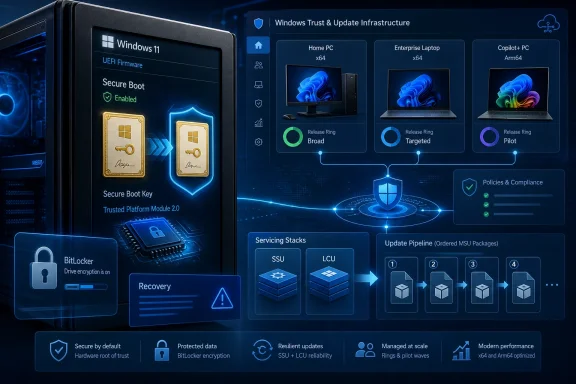
The headline item in KB5089549 is security, but the strategic item is trust. Microsoft is again using the monthly cumulative update channel to prepare Windows devices for Secure Boot certificate changes ahead of expirations that begin in June 2026. That matters because Secure Boot lives below the operating system layer, where a bad assumption can turn a routine maintenance window into a fleet of machines asking for recovery keys.
Microsoft says this release adds more “high confidence device targeting data” to improve coverage for devices eligible to receive new Secure Boot certificates automatically. That phrasing is corporate, but the operational meaning is plain enough: Microsoft wants more machines to qualify for certificate updates without pushing the change too broadly or too early. The company is trying to thread a familiar Windows needle, expanding automation while preserving enough caution to avoid bricking edge-case systems.
This is why the May update deserves more attention than a normal cumulative patch. It lands one month before the Secure Boot certificate expiration window begins, and it arrives after an April security update that Microsoft now acknowledges could send some systems into BitLocker Recovery after boot file updates. When updates touch boot trust, update reliability is not a convenience feature. It is the difference between a managed estate and an incident bridge.
The irony is that the scariest part of the update is also the part most users will never see. A successful Secure Boot transition looks boring: no prompt, no recovery screen, no visible certificate drama. The best possible outcome is that Microsoft’s targeting logic quietly does the work before the calendar turns into a support problem.
The update also incorporates changes from the April 14, 2026 security release and the April 30, 2026 preview release. That makes May’s package a consolidation point rather than a clean-sheet release. Anyone who skipped the preview channel is now receiving those quality changes alongside the security payload.
The most visible fixes are not flashy desktop features. Microsoft calls out improvements to boot manager servicing, SSDP notification reliability, and Secure Boot certificate targeting. These are plumbing changes, and that is precisely why they deserve scrutiny. Windows quality is often decided less by a new app surface than by whether the underlying stack can update, boot, network, and recover predictably.
There is also a servicing stack update in the package: KB5092762, version 26100.8456. Servicing stack updates are the machinery that install Windows updates themselves, and Microsoft now combines the latest servicing stack update with the latest cumulative update for the operating system. That bundling reduces a category of administrator error, but it does not eliminate all deployment sequencing issues, especially for standalone MSU packages.
BitLocker Recovery is not data loss, but it often feels like downtime. A user sees a blue recovery screen, the help desk needs the recovery key, and the administrator has to determine whether the problem is isolated, policy-driven, firmware-related, or update-induced. Multiply that across remote laptops and the cost of a “successful” patch quickly becomes visible.
The May fix is therefore both remediation and reassurance. Microsoft is saying that boot file servicing should now be more reliable and less likely to trip BitLocker recovery paths in affected configurations. But the episode also reinforces a hard lesson: boot chain updates deserve staged deployment even when they arrive inside the familiar cumulative update package.
For organizations with aggressive update rings, this is where telemetry and device inventory matter. A pilot group that includes modern secured-core PCs, older TPM implementations, docked laptops, BitLocker-protected endpoints, and devices with known firmware quirks is far more useful than a token handful of IT department machines. Patch Tuesday has become less about whether a patch installs and more about whether it survives the messy diversity of real hardware.
This is not the path most people should take. Windows Update, Microsoft Update, Windows Update for Business, and WSUS exist precisely to hide this sequencing. If a device is online, healthy, and managed by ordinary update policy, the catalog instructions are mostly a fallback for administrators, image maintainers, and edge cases.
But the instructions matter because they reveal the layered state of modern Windows servicing. The cumulative update is not always a single logical object from an administrator’s point of view. There may be a prerequisite checkpoint package, the current cumulative payload, a servicing stack component, and dynamic update packages for installation media. Windows Update can orchestrate that dance; a human double-clicking MSU files can still get the choreography wrong.
The documentation also contains the slightly surreal placeholder “Download link will be available soon” in several command examples. That looks like a publication artifact, not a technical requirement, but it is exactly the kind of rough edge that makes administrators nervous. When a KB article is telling people that package order matters, placeholders in command text are not harmless decoration. They invite copy-paste mistakes.
The safest interpretation is simple: do not improvise with partial downloads. If using the Catalog, download all applicable MSU files for the architecture, keep them together, and use DISM or Add-WindowsPackage deliberately. If maintaining images, make sure Dynamic Update packages align with the same month where available, and fall back only where Microsoft explicitly says to use the most recently published SafeOS or Setup Dynamic Update package.
Microsoft notes that these AI component updates apply only to Windows Copilot+ PCs and will not install on ordinary Windows PCs or Windows Server. That distinction matters because the Windows 11 update package is increasingly a vehicle for differentiated device experiences. Two machines can receive the same monthly cumulative update and still light up different internal components depending on hardware class.
For IT, this complicates testing. The old question was, “Does the update install on Windows 11?” The better question now is, “Which Windows 11 hardware profile received which payload?” A Copilot+ laptop, an x64 desktop, an Arm64 developer machine, and a server-adjacent administrative workstation may all fall under the same broad KB umbrella while behaving differently at the component level.
That is not inherently bad. It is how Microsoft can service a rapidly diversifying Windows ecosystem without maintaining a separate operating system for every device class. But it does mean administrators should stop treating KB numbers as complete descriptions of what changed. The KB is the wrapper; hardware targeting increasingly determines the lived update.
Microsoft’s guidance points administrators toward updating installation media with Dynamic Update and adding packages to mounted images using DISM or Add-WindowsPackage. This is the right direction, particularly for environments that build gold images, support bare-metal recovery, or maintain installation shares. A patched endpoint estate is only half the story if the media used to create new endpoints is months behind.
The Secure Boot certificate timeline makes this more urgent than usual. Devices built or rebuilt during the certificate transition period should not start life behind the servicing curve. If boot trust changes are being phased through quality updates, installation media should be part of that phase-in strategy rather than an afterthought.
There is a practical benefit too. Updating images reduces the number of reboots and update passes after deployment, which improves user experience and shortens technician time. It also gives administrators a controlled place to validate the package order and architecture-specific payloads before those packages are used in production provisioning.
Patch Tuesday veterans understand this gap. Known issues often emerge only after broad deployment, especially when the affected configuration sits outside Microsoft’s internal and preview telemetry. The absence of a known issue is a green light to proceed with normal process, not a reason to skip process.
That is particularly true here because the changes touch boot reliability, TPM-linked behavior, Secure Boot certificate targeting, and networking reliability. None of those are exotic, but each can interact with environmental assumptions. A device with unusual firmware settings, nonstandard BitLocker PCR validation, or older deployment tooling may expose problems that a clean consumer laptop never will.
For consumers, the advice remains uncomplicated: install the update through Windows Update and do not chase Catalog packages unless there is a specific reason. For administrators, the advice is more nuanced: deploy promptly, but deploy with rings, recovery key readiness, image maintenance checks, and a specific eye on BitLocker recovery events after reboot.
Secure Boot is one of those technologies that users rarely think about until something breaks. It establishes trust in the boot process so malware cannot quietly insert itself before Windows loads. If the trust anchors behind that process need rotation, the update must be delivered carefully enough not to strand machines and broadly enough not to leave systems exposed or unsupported.
Microsoft appears to be taking a phased approach, using successful update signals and targeting data before delivering new certificates. That is prudent. A universal blast would be risky, especially in a Windows ecosystem that includes consumer laptops, enterprise fleets, industrial devices, education machines, and hardware that may be rarely rebooted or poorly inventoried.
But phased rollout also shifts responsibility to administrators. If a device has been offline, blocked from updates, pinned to old media, or excluded by policy, it may not receive the preparatory work when expected. The devices most likely to surprise IT during a certificate transition are not the well-managed ones. They are the machines that have been quietly drifting outside the normal update current.
On the progress side, most users will not need to understand any of this. The update downloads automatically from Windows Update and Microsoft Update, follows Windows Update for Business policy, and syncs with WSUS when configured for Windows 11 security updates. That is the ideal abstraction: users get protected, administrators get policy control, and the servicing stack handles dependencies.
On the complexity side, the standalone instructions still expose order-sensitive MSU installation, architecture-specific packages, image servicing requirements, and removal caveats. Microsoft also reminds administrators that uninstalling the LCU from a combined SSU-and-LCU package requires DISM with the LCU package name, while wusa.exe with the uninstall switch will not work on the combined package because the SSU cannot be removed. That is not consumer-friendly, but it is the reality of a servicing system designed to preserve update reliability over rollback simplicity.
This is the trade Microsoft has chosen. Windows updates are more integrated, more cumulative, and more automated than they used to be. When something goes wrong, however, the underlying machinery can be harder to reason about because the package boundary the user sees is not the same as the servicing boundary the system enforces.
KB5089549 is a security update, but it reads like a rehearsal for the next phase of Windows trust maintenance. If Microsoft succeeds, most users will remember May 2026 as just another Patch Tuesday; if it stumbles, the pain will appear before Windows even reaches the sign-in screen. That is why this release deserves prompt installation, careful deployment, and more respect than its ordinary cumulative-update packaging suggests.
Source: Microsoft - Message Center May 12, 2026—KB5089549 (OS Builds 26200.8457 and 26100.8457) - Microsoft Support
 Microsoft’s May Patch Tuesday Is Really About Trust Before Boot
The headline item in KB5089549 is security, but the strategic item is trust. Microsoft is again using the monthly cumulative update channel to prepare Windows devices for Secure Boot certificate changes ahead of expirations that begin in June 2026. That matters because Secure Boot lives below the operating system layer, where a bad assumption can turn a routine maintenance window into a fleet of machines asking for recovery keys.Microsoft says this release adds more “high confidence device targeting data” to improve coverage for devices eligible to receive new Secure Boot certificates automatically. That phrasing is corporate, but the operational meaning is plain enough: Microsoft wants more machines to qualify for certificate updates without pushing the change too broadly or too early. The company is trying to thread a familiar Windows needle, expanding automation while preserving enough caution to avoid bricking edge-case systems.
This is why the May update deserves more attention than a normal cumulative patch. It lands one month before the Secure Boot certificate expiration window begins, and it arrives after an April security update that Microsoft now acknowledges could send some systems into BitLocker Recovery after boot file updates. When updates touch boot trust, update reliability is not a convenience feature. It is the difference between a managed estate and an incident bridge.
The irony is that the scariest part of the update is also the part most users will never see. A successful Secure Boot transition looks boring: no prompt, no recovery screen, no visible certificate drama. The best possible outcome is that Microsoft’s targeting logic quietly does the work before the calendar turns into a support problem.
KB5089549 Carries April’s Work Into the Security Channel
KB5089549 applies to Windows 11 version 25H2 and version 24H2, and it includes the security fixes for May 2026 along with improvements previously shipped in April’s optional preview update. That is the normal rhythm of Windows servicing: optional preview changes give administrators and enthusiasts a look ahead, and the next Patch Tuesday rolls selected fixes into the mandatory security train.The update also incorporates changes from the April 14, 2026 security release and the April 30, 2026 preview release. That makes May’s package a consolidation point rather than a clean-sheet release. Anyone who skipped the preview channel is now receiving those quality changes alongside the security payload.
The most visible fixes are not flashy desktop features. Microsoft calls out improvements to boot manager servicing, SSDP notification reliability, and Secure Boot certificate targeting. These are plumbing changes, and that is precisely why they deserve scrutiny. Windows quality is often decided less by a new app surface than by whether the underlying stack can update, boot, network, and recover predictably.
There is also a servicing stack update in the package: KB5092762, version 26100.8456. Servicing stack updates are the machinery that install Windows updates themselves, and Microsoft now combines the latest servicing stack update with the latest cumulative update for the operating system. That bundling reduces a category of administrator error, but it does not eliminate all deployment sequencing issues, especially for standalone MSU packages.
The BitLocker Fix Is a Warning From April
One of the most practical fixes in this release addresses a problem where some devices could enter BitLocker Recovery after boot file updates on systems with certain TPM validation settings, including invalid PCR7 configurations. Microsoft ties that issue to systems that installed the April 2026 security update. That is the kind of bug that can sour an entire organization on otherwise necessary security maintenance.BitLocker Recovery is not data loss, but it often feels like downtime. A user sees a blue recovery screen, the help desk needs the recovery key, and the administrator has to determine whether the problem is isolated, policy-driven, firmware-related, or update-induced. Multiply that across remote laptops and the cost of a “successful” patch quickly becomes visible.
The May fix is therefore both remediation and reassurance. Microsoft is saying that boot file servicing should now be more reliable and less likely to trip BitLocker recovery paths in affected configurations. But the episode also reinforces a hard lesson: boot chain updates deserve staged deployment even when they arrive inside the familiar cumulative update package.
For organizations with aggressive update rings, this is where telemetry and device inventory matter. A pilot group that includes modern secured-core PCs, older TPM implementations, docked laptops, BitLocker-protected endpoints, and devices with known firmware quirks is far more useful than a token handful of IT department machines. Patch Tuesday has become less about whether a patch installs and more about whether it survives the messy diversity of real hardware.
The Catalog Instructions Are Awkward Because Windows Servicing Is Still Layered
The user-facing oddity in this release is the Microsoft Update Catalog guidance. Microsoft says the standalone package contains one or more MSU files that must be installed in a specific order, and it gives two methods: put all MSU files in the same folder and let DISM discover prerequisites, or install each MSU file individually in order. The order shown pairs KB5043080 before KB5089549 for both Arm64 and x64 paths.This is not the path most people should take. Windows Update, Microsoft Update, Windows Update for Business, and WSUS exist precisely to hide this sequencing. If a device is online, healthy, and managed by ordinary update policy, the catalog instructions are mostly a fallback for administrators, image maintainers, and edge cases.
But the instructions matter because they reveal the layered state of modern Windows servicing. The cumulative update is not always a single logical object from an administrator’s point of view. There may be a prerequisite checkpoint package, the current cumulative payload, a servicing stack component, and dynamic update packages for installation media. Windows Update can orchestrate that dance; a human double-clicking MSU files can still get the choreography wrong.
The documentation also contains the slightly surreal placeholder “Download link will be available soon” in several command examples. That looks like a publication artifact, not a technical requirement, but it is exactly the kind of rough edge that makes administrators nervous. When a KB article is telling people that package order matters, placeholders in command text are not harmless decoration. They invite copy-paste mistakes.
The safest interpretation is simple: do not improvise with partial downloads. If using the Catalog, download all applicable MSU files for the architecture, keep them together, and use DISM or Add-WindowsPackage deliberately. If maintaining images, make sure Dynamic Update packages align with the same month where available, and fall back only where Microsoft explicitly says to use the most recently published SafeOS or Setup Dynamic Update package.
Arm64 Is No Longer a Footnote in Windows Maintenance
The submitted excerpt focuses on Arm64, and that is telling. Windows on Arm has moved from curiosity to a real servicing constituency, especially with Copilot+ PCs and the broader shift toward neural processing units and AI-assisted client features. The update’s AI component table underscores that this release also updates components such as Image Search, Content Extraction, Semantic Analysis, and the Settings Model.Microsoft notes that these AI component updates apply only to Windows Copilot+ PCs and will not install on ordinary Windows PCs or Windows Server. That distinction matters because the Windows 11 update package is increasingly a vehicle for differentiated device experiences. Two machines can receive the same monthly cumulative update and still light up different internal components depending on hardware class.
For IT, this complicates testing. The old question was, “Does the update install on Windows 11?” The better question now is, “Which Windows 11 hardware profile received which payload?” A Copilot+ laptop, an x64 desktop, an Arm64 developer machine, and a server-adjacent administrative workstation may all fall under the same broad KB umbrella while behaving differently at the component level.
That is not inherently bad. It is how Microsoft can service a rapidly diversifying Windows ecosystem without maintaining a separate operating system for every device class. But it does mean administrators should stop treating KB numbers as complete descriptions of what changed. The KB is the wrapper; hardware targeting increasingly determines the lived update.
Offline Images Need the Same Discipline as Live Machines
The instructions for updating Windows installation media are not filler. They are a reminder that offline images age, and aged images become operational debt. If an organization is still deploying Windows from stale media and relying on the first post-install update cycle to catch everything, it is accepting longer provisioning time and potentially exposing newly built machines to known update sequencing issues.Microsoft’s guidance points administrators toward updating installation media with Dynamic Update and adding packages to mounted images using DISM or Add-WindowsPackage. This is the right direction, particularly for environments that build gold images, support bare-metal recovery, or maintain installation shares. A patched endpoint estate is only half the story if the media used to create new endpoints is months behind.
The Secure Boot certificate timeline makes this more urgent than usual. Devices built or rebuilt during the certificate transition period should not start life behind the servicing curve. If boot trust changes are being phased through quality updates, installation media should be part of that phase-in strategy rather than an afterthought.
There is a practical benefit too. Updating images reduces the number of reboots and update passes after deployment, which improves user experience and shortens technician time. It also gives administrators a controlled place to validate the package order and architecture-specific payloads before those packages are used in production provisioning.
“No Known Issues” Is Welcome, Not a Warranty
Microsoft says it is not currently aware of any issues with KB5089549. That is good news, and it should be read exactly as written. It means Microsoft has not listed a known issue at publication time; it does not mean the update has been proven harmless across every firmware combination, security baseline, VPN stack, endpoint detection product, and peripheral environment.Patch Tuesday veterans understand this gap. Known issues often emerge only after broad deployment, especially when the affected configuration sits outside Microsoft’s internal and preview telemetry. The absence of a known issue is a green light to proceed with normal process, not a reason to skip process.
That is particularly true here because the changes touch boot reliability, TPM-linked behavior, Secure Boot certificate targeting, and networking reliability. None of those are exotic, but each can interact with environmental assumptions. A device with unusual firmware settings, nonstandard BitLocker PCR validation, or older deployment tooling may expose problems that a clean consumer laptop never will.
For consumers, the advice remains uncomplicated: install the update through Windows Update and do not chase Catalog packages unless there is a specific reason. For administrators, the advice is more nuanced: deploy promptly, but deploy with rings, recovery key readiness, image maintenance checks, and a specific eye on BitLocker recovery events after reboot.
The Security Update Is Also a Calendar Event
The most consequential phrase in Microsoft’s notes may be the warning that Secure Boot certificates used by most Windows devices are set to expire starting in June 2026. That sentence turns KB5089549 from a monthly patch into part of a deadline-driven infrastructure campaign. Certificate expiration is unforgiving; the calendar does not care whether procurement, testing, and change windows are convenient.Secure Boot is one of those technologies that users rarely think about until something breaks. It establishes trust in the boot process so malware cannot quietly insert itself before Windows loads. If the trust anchors behind that process need rotation, the update must be delivered carefully enough not to strand machines and broadly enough not to leave systems exposed or unsupported.
Microsoft appears to be taking a phased approach, using successful update signals and targeting data before delivering new certificates. That is prudent. A universal blast would be risky, especially in a Windows ecosystem that includes consumer laptops, enterprise fleets, industrial devices, education machines, and hardware that may be rarely rebooted or poorly inventoried.
But phased rollout also shifts responsibility to administrators. If a device has been offline, blocked from updates, pinned to old media, or excluded by policy, it may not receive the preparatory work when expected. The devices most likely to surprise IT during a certificate transition are not the well-managed ones. They are the machines that have been quietly drifting outside the normal update current.
The Real Test Is Whether Microsoft Can Make Firmware-Adjacent Updating Boring
Microsoft has spent years trying to make Windows updates feel less like a monthly gamble. The combined SSU and LCU model, cumulative updates, Windows Update for Business policies, safeguard holds, and release health dashboards all point toward the same goal: fewer bespoke decisions for every machine. KB5089549 shows both the progress and the remaining complexity.On the progress side, most users will not need to understand any of this. The update downloads automatically from Windows Update and Microsoft Update, follows Windows Update for Business policy, and syncs with WSUS when configured for Windows 11 security updates. That is the ideal abstraction: users get protected, administrators get policy control, and the servicing stack handles dependencies.
On the complexity side, the standalone instructions still expose order-sensitive MSU installation, architecture-specific packages, image servicing requirements, and removal caveats. Microsoft also reminds administrators that uninstalling the LCU from a combined SSU-and-LCU package requires DISM with the LCU package name, while wusa.exe with the uninstall switch will not work on the combined package because the SSU cannot be removed. That is not consumer-friendly, but it is the reality of a servicing system designed to preserve update reliability over rollback simplicity.
This is the trade Microsoft has chosen. Windows updates are more integrated, more cumulative, and more automated than they used to be. When something goes wrong, however, the underlying machinery can be harder to reason about because the package boundary the user sees is not the same as the servicing boundary the system enforces.
The May Patch Rewards Admins Who Already Know Their Boot Estate
The concrete action items from KB5089549 are not dramatic, but they are time-sensitive. The update should be treated as a normal security release with above-normal attention to boot and servicing behavior.- Organizations should deploy KB5089549 through standard managed channels first, rather than manually installing standalone MSU files unless they have a defined operational reason.
- Administrators using Microsoft Update Catalog packages should download the full architecture-appropriate set and preserve the required installation order, especially where KB5043080 is listed before KB5089549.
- Endpoint teams should verify BitLocker recovery key escrow and monitor for recovery prompts after reboot, particularly on systems with unusual TPM or PCR7 configurations.
- Image maintainers should update Windows installation media and align Dynamic Update packages by month wherever Microsoft provides matching packages.
- Security teams should treat the June 2026 Secure Boot certificate expiration window as an active readiness project, not as a future documentation footnote.
- Copilot+ PC fleets should be tested separately from conventional Windows 11 PCs because AI component servicing may apply differently even under the same cumulative update umbrella.
KB5089549 is a security update, but it reads like a rehearsal for the next phase of Windows trust maintenance. If Microsoft succeeds, most users will remember May 2026 as just another Patch Tuesday; if it stumbles, the pain will appear before Windows even reaches the sign-in screen. That is why this release deserves prompt installation, careful deployment, and more respect than its ordinary cumulative-update packaging suggests.
Source: Microsoft - Message Center May 12, 2026—KB5089549 (OS Builds 26200.8457 and 26100.8457) - Microsoft Support
