

Microsoft has published KB5089866, an automatic Windows Update package delivering Phi Silica AI component version 1.2603.373.0 to Qualcomm-powered Copilot+ PCs running Windows 11 version 26H1, provided the device already has the latest cumulative update installed. The small support note looks routine, but it points to a much bigger shift in Windows servicing. Microsoft is now treating local AI models like platform components, not optional app features. That means the future of Windows AI will be patched, audited, replaced, and occasionally broken through the same machinery that has long delivered drivers, security fixes, and servicing-stack changes.
KB5089866 is not a flashy Copilot announcement, and that is precisely why it matters. Microsoft is updating Phi Silica through Windows Update as a named AI component with a KB number, a version string, prerequisites, replacement metadata, and an entry in Update history. The package is aimed at Qualcomm-powered Copilot+ PCs and applies to Windows 11 version 26H1, where users should see “2026-04 Phi Silica version 1.2603.373.0 for Qualcomm-powered systems” after installation.
That phrasing is dry, but it changes the mental model. Phi Silica is not being presented as a downloadable curiosity for developers or a cloud-side capability that invisibly changes behind a web endpoint. It is a local Windows component, and Microsoft is beginning to service it like one.
For years, Windows users have understood that the operating system is not a single thing. It is a stack of kernel code, inbox apps, drivers, Store-delivered packages, Defender signatures, Edge WebView runtimes, language packs, feature experience packs, and firmware-adjacent plumbing. KB5089866 makes local AI part of that stack.
That has consequences. If the model is part of Windows, then model quality, model safety, API behavior, hardware compatibility, and enterprise change control are no longer abstract AI questions. They become Windows operations questions.
That distinction is important. The PC does not need a local model because every user wants a chatbot in every window. The PC needs a local model because language operations are becoming ambient: summarize this, rewrite that, extract the point, turn this mess into a table, help an accessibility feature describe context, or let an app add a small AI affordance without provisioning cloud infrastructure.
A cloud model can be more capable, but it is also more conditional. It depends on connectivity, service availability, identity, quota, policy, region, and cost. A local model, if it is good enough, can become a baseline capability of the machine.
Microsoft’s pitch for Phi Silica is built around that baseline. It is a Transformer-based small language model optimized for NPU inference, exposed through Windows AI APIs, and intended for tasks such as summarization, rewriting, text understanding, and short-form generation. In other words: not artificial general intelligence, but operating-system-grade text assistance.
That is why servicing matters. A local model that ships once and then stagnates becomes a liability. A local model that is updated unpredictably becomes an enterprise nightmare. Microsoft is trying to thread the needle by treating Phi Silica as a managed component with a discoverable update trail.
That puts Qualcomm systems in a familiar Windows position: early enough to get the new platform capabilities, and early enough to expose the rough edges. The KB article’s prerequisite requirement — the latest cumulative update for Windows 11 version 26H1 — is a reminder that these AI components are tied tightly to the OS image around them. The model package is only one piece; the runtime, APIs, drivers, content safety layers, and hardware execution path all have to line up.
This is not like installing a desktop app that happens to use AI. It is closer to installing a graphics driver plus a framework plus a system service plus a model file whose behavior application developers may depend on. That makes the update path more complicated, but also more powerful.
For Microsoft, Qualcomm-powered Copilot+ PCs are the proving ground for whether Windows can absorb AI into its regular servicing discipline. If this works, the same pattern will likely spread across silicon vendors and model families. If it does not, “AI component update” will become one more phrase that makes admins reach for deferral policies.
Microsoft’s developer strategy is not simply “here is a model, have fun.” It is trying to create a system abstraction. Apps call Windows APIs for text generation or text intelligence tasks, and Windows decides how to load the model, use the NPU, apply safety controls, and return structured results. That is a very Microsoft move: hide hardware diversity and implementation churn behind a platform contract.
The upside is obvious. Developers can build features that run locally without bundling a model, negotiating GPU/NPU acceleration, carrying their own inference runtime, or asking users for cloud API keys. A notes app can summarize. A mail client can rewrite. A line-of-business application can turn field notes into structured text. The app developer gets a capability; Windows owns the machinery.
The downside is equally obvious to anyone who has supported Windows fleets. Once the API becomes a platform dependency, the model behind it has to behave consistently enough that applications do not surprise users after Patch Tuesday. “Improved Phi Silica AI component” sounds benign until an enterprise workflow depends on a particular summarization format, moderation threshold, latency profile, or token behavior.
That is the tension KB5089866 brings into view. Local AI becomes useful when it is abstracted and serviced by the OS. Local AI becomes risky when that abstraction changes faster than developers and admins can validate.
A local summarizer can process a draft legal memo without shipping it to a remote endpoint. A local rewrite tool can polish internal notes without turning them into service telemetry. An accessibility feature can derive descriptions or context with less dependency on network transport. None of that eliminates all privacy questions, but it changes their shape.
The important caveat is that “local” does not automatically mean “risk-free.” The application invoking the model still matters. The logs still matter. The surrounding telemetry settings still matter. The user interface still matters. The fact that Phi Silica runs on-device reduces one major category of exposure, but it does not absolve developers or IT departments from thinking about data handling.
That is where Microsoft’s platform approach may help. If local inference, content moderation, and model loading are handled through Windows AI APIs, enterprises get a more standardized surface to evaluate. They can ask what Windows is doing instead of auditing a dozen bundled runtimes from a dozen vendors.
But standardization cuts both ways. If Microsoft’s local model layer becomes broadly adopted, its defaults become hugely consequential. A bad default will scale across apps. A good default will quietly raise the privacy floor for the whole ecosystem.
Visibility is not governance by itself, but it is a start. If a help desk is troubleshooting why an AI feature behaves differently on two ostensibly identical Copilot+ PCs, a visible version entry matters. If a developer is trying to reproduce a bug in a local text-generation feature, the component version matters. If an enterprise wants to verify readiness before enabling an app feature, the model update state matters.
This is also the beginning of a paper trail. Today, KB5089866 says the update includes improvements and replaces a previous update. It does not provide a rich changelog of model behavior changes, evaluation shifts, or content moderation adjustments. That may be acceptable for an early component update, but it will not be enough if local AI becomes business-critical.
Admins will eventually need more than “improvements.” They will want to know whether an update changes output length, blocked categories, supported languages, context handling, token limits, performance, memory behavior, or API exceptions. AI systems are probabilistic, but enterprise change management is not. Microsoft will have to reconcile those cultures.
The KB number is a first step toward accountability. The next step is explaining what changed in terms that matter to people who have to support the machines.
Microsoft’s documentation around Phi Silica acknowledges this by tying the model to responsible AI guidance, content moderation, and scenario-specific testing. The model includes safety mechanisms, and developers can configure moderation severity levels through the Windows AI APIs. That is useful, but it also means application behavior can vary depending on developer choices.
The local model’s limited context window is another practical constraint. Phi Silica is intended for relatively bounded tasks, not unlimited document reasoning. Long prompts can slow performance or exceed supported context. That makes it well suited to small productivity assists and less suited to “read this entire archive and make a legally significant decision” fantasies.
This is where the Windows enthusiast instinct needs discipline. It is natural to benchmark, tweak, and push a local model beyond its intended use. But the most successful Phi Silica experiences will likely be boring in the best way: focused, constrained, predictable, and clearly labeled.
The future of on-device AI on Windows will not be won by pretending a small model is a giant model. It will be won by designing features that understand why a small local model is useful in the first place.
It also raises the bar for responsibility. If an app adds a “summarize” button, users will judge the app, not the platform abstraction. If the summary misses a key caveat, the app owns the experience. If content moderation blocks a legitimate workflow, the app gets the support ticket. If the feature only works on certain hardware and Windows builds, the app must explain that gracefully.
The Copilot+ requirement is especially important. Phi Silica is not a universal Windows 11 capability. It depends on supported hardware, including an NPU, and on the right OS and component state. Developers who treat it as always available will create brittle applications.
The better pattern is progressive enhancement. An app should detect support, expose local AI when available, and provide clear alternatives when it is not. That might mean falling back to cloud AI, Foundry Local, a non-AI workflow, or no feature at all. What matters is that the user is not left staring at a disabled button with no explanation.
Windows has been through this before with touch, pen, biometric sensors, HDR, DirectX features, and hardware security. The lesson is the same: a platform feature becomes mainstream only when apps handle absence as carefully as presence.
KB5089866 answers only a small part of that. It confirms the update path and the update-history entry. It establishes that the package is automatic through Windows Update and depends on the latest cumulative update for Windows 11 version 26H1. Those are useful facts, but they are not a management model.
The management model will have to mature quickly if local AI becomes embedded in productivity and line-of-business software. Enterprises do not merely deploy Windows; they operate Windows as a controlled environment. An AI model that changes behavior under an application is not just a component. It is a dependency with compliance implications.
This is particularly true in regulated industries. If a local model rewrites customer communications, summarizes medical notes, or assists with financial documentation, the organization must understand how outputs are produced and reviewed. “It stayed on the device” is helpful, but it is not the whole governance story.
Microsoft has an opportunity here. Because Phi Silica is part of the Windows platform, it can be inventoried, documented, and governed more coherently than random third-party model bundles. But opportunity is not execution. Admins will expect policy controls, reporting, release notes, and lifecycle commitments that match the seriousness of the use cases Microsoft wants to enable.
That has real advantages. Windows Update already has distribution scale, trust relationships, rollback concepts, compliance reporting hooks, and user familiarity. Shipping model updates through it avoids a fragmented mess of per-app downloads and opaque background updaters. It also lets Microsoft coordinate model updates with OS changes that the model depends on.
But Windows Update also carries baggage. Users and admins associate it with forced restarts, surprise regressions, driver mishaps, and the occasional “why did this install now?” mystery. If AI components ride that channel, they inherit both the trust and the suspicion.
The replacement note in KB5089866 is telling. This update replaces KB5083513, meaning Phi Silica already has a servicing lineage. That is normal for Windows components, but it is still notable for an AI model. The model is not static. It will have predecessors and successors, and the installed version will matter.
The industry often talks about AI as a service because cloud models can change continuously. Microsoft is building a different rhythm for local AI: not quite frozen, not quite continuous, but serviced. That may be the only rhythm that can work on managed PCs.
That creates a tiered Windows world. There will be conventional Windows 11 PCs, Copilot+ PCs with supported NPUs, Arm systems with Qualcomm-specific AI component updates, and future x86 Copilot+ systems with their own update paths. Users may all see the same Windows logo, but the available platform capabilities will differ sharply.
For enthusiasts, that is exciting and messy. For IT departments, it complicates fleet planning. Hardware refresh cycles now determine not just performance, but whether applications can use local AI APIs. OS version policy determines not just security posture, but access to AI component updates. Silicon choice determines not just battery life, but the model servicing channel a device follows.
Microsoft has been trying for years to give buyers a reason to care about new PC hardware beyond “it is faster.” Copilot+ PCs are the strongest attempt yet. KB5089866 is the maintenance side of that pitch: if the PC’s AI capability is part of the purchase, Microsoft has to keep it current after the sale.
That may be the real test. AI hardware claims are easy at launch. Sustained component servicing is what turns them into a platform.
That is both reassuring and unsettling. It is reassuring because platform components need boring update mechanisms, visible versioning, and integration with the OS lifecycle. It is unsettling because AI model behavior is not as easy to reason about as a printer driver or a security patch. A model update can be technically successful and still change the user experience in ways that matter.
Windows has always been a negotiation between innovation and control. Microsoft wants to move quickly enough to make the PC feel relevant in the AI era, while admins and users want machines that behave predictably. Phi Silica sits directly in that conflict. It promises private, low-latency, on-device intelligence, but it also asks the Windows ecosystem to accept a new kind of component whose behavior will evolve over time.
KB5089866 will not be remembered because version 1.2603.373.0 is magical. It will be remembered, if at all, because it shows the pattern. Local AI on Windows will not arrive as one giant feature drop. It will arrive as a succession of component updates, API expansions, hardware-specific packages, and support notes that slowly turn the model into infrastructure. The next phase of the PC will be built not only in demos, but in Update history.
Source: Microsoft Support KB5089866: Phi Silica AI component update (version 1.2603.373.0) for Qualcomm-powered systems - Microsoft Support
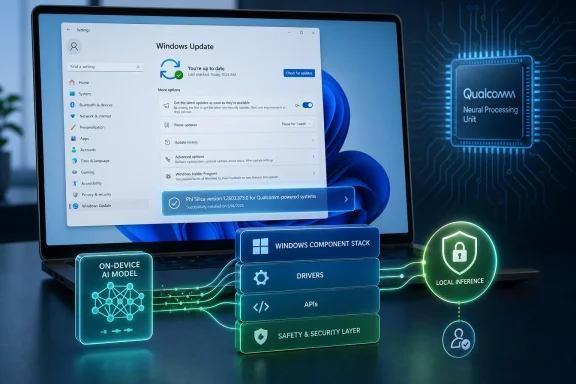 Microsoft Turns the Model Into Part of Windows
KB5089866 is not a flashy Copilot announcement, and that is precisely why it matters. Microsoft is updating Phi Silica through Windows Update as a named AI component with a KB number, a version string, prerequisites, replacement metadata, and an entry in Update history. The package is aimed at Qualcomm-powered Copilot+ PCs and applies to Windows 11 version 26H1, where users should see “2026-04 Phi Silica version 1.2603.373.0 for Qualcomm-powered systems” after installation.That phrasing is dry, but it changes the mental model. Phi Silica is not being presented as a downloadable curiosity for developers or a cloud-side capability that invisibly changes behind a web endpoint. It is a local Windows component, and Microsoft is beginning to service it like one.
For years, Windows users have understood that the operating system is not a single thing. It is a stack of kernel code, inbox apps, drivers, Store-delivered packages, Defender signatures, Edge WebView runtimes, language packs, feature experience packs, and firmware-adjacent plumbing. KB5089866 makes local AI part of that stack.
That has consequences. If the model is part of Windows, then model quality, model safety, API behavior, hardware compatibility, and enterprise change control are no longer abstract AI questions. They become Windows operations questions.
Phi Silica Is Small Because Windows Needs It to Be Everywhere
Phi Silica is Microsoft’s small language model for Copilot+ PCs, designed to run on the neural processing unit rather than depend on a cloud round trip. The point is not to beat frontier cloud models at every possible benchmark. The point is to provide a local language layer that is fast enough, private enough, and cheap enough in power terms to become a normal part of the PC experience.That distinction is important. The PC does not need a local model because every user wants a chatbot in every window. The PC needs a local model because language operations are becoming ambient: summarize this, rewrite that, extract the point, turn this mess into a table, help an accessibility feature describe context, or let an app add a small AI affordance without provisioning cloud infrastructure.
A cloud model can be more capable, but it is also more conditional. It depends on connectivity, service availability, identity, quota, policy, region, and cost. A local model, if it is good enough, can become a baseline capability of the machine.
Microsoft’s pitch for Phi Silica is built around that baseline. It is a Transformer-based small language model optimized for NPU inference, exposed through Windows AI APIs, and intended for tasks such as summarization, rewriting, text understanding, and short-form generation. In other words: not artificial general intelligence, but operating-system-grade text assistance.
That is why servicing matters. A local model that ships once and then stagnates becomes a liability. A local model that is updated unpredictably becomes an enterprise nightmare. Microsoft is trying to thread the needle by treating Phi Silica as a managed component with a discoverable update trail.
Qualcomm Gets the First Real Windows AI Servicing Story
KB5089866 is explicitly for Qualcomm-powered systems, which reflects the current Copilot+ PC reality. Qualcomm’s Snapdragon X platform gave Microsoft its first broad Windows-on-Arm hardware base with NPUs capable of making the Copilot+ branding meaningful. Intel and AMD have their own NPU roadmaps, but Qualcomm has been the leading edge of Microsoft’s first local-AI Windows push.That puts Qualcomm systems in a familiar Windows position: early enough to get the new platform capabilities, and early enough to expose the rough edges. The KB article’s prerequisite requirement — the latest cumulative update for Windows 11 version 26H1 — is a reminder that these AI components are tied tightly to the OS image around them. The model package is only one piece; the runtime, APIs, drivers, content safety layers, and hardware execution path all have to line up.
This is not like installing a desktop app that happens to use AI. It is closer to installing a graphics driver plus a framework plus a system service plus a model file whose behavior application developers may depend on. That makes the update path more complicated, but also more powerful.
For Microsoft, Qualcomm-powered Copilot+ PCs are the proving ground for whether Windows can absorb AI into its regular servicing discipline. If this works, the same pattern will likely spread across silicon vendors and model families. If it does not, “AI component update” will become one more phrase that makes admins reach for deferral policies.
The Real Product Is the API Contract
The most important part of Phi Silica may not be the model itself. It may be the Windows AI APIs that sit in front of it.Microsoft’s developer strategy is not simply “here is a model, have fun.” It is trying to create a system abstraction. Apps call Windows APIs for text generation or text intelligence tasks, and Windows decides how to load the model, use the NPU, apply safety controls, and return structured results. That is a very Microsoft move: hide hardware diversity and implementation churn behind a platform contract.
The upside is obvious. Developers can build features that run locally without bundling a model, negotiating GPU/NPU acceleration, carrying their own inference runtime, or asking users for cloud API keys. A notes app can summarize. A mail client can rewrite. A line-of-business application can turn field notes into structured text. The app developer gets a capability; Windows owns the machinery.
The downside is equally obvious to anyone who has supported Windows fleets. Once the API becomes a platform dependency, the model behind it has to behave consistently enough that applications do not surprise users after Patch Tuesday. “Improved Phi Silica AI component” sounds benign until an enterprise workflow depends on a particular summarization format, moderation threshold, latency profile, or token behavior.
That is the tension KB5089866 brings into view. Local AI becomes useful when it is abstracted and serviced by the OS. Local AI becomes risky when that abstraction changes faster than developers and admins can validate.
Local AI Moves Privacy From Promise to Architecture
The privacy argument for Phi Silica is straightforward: if inference runs on the device, user prompts and generated outputs do not need to be sent to a cloud service for the core task. That is not just marketing. For many workflows, especially in regulated or sensitive environments, data locality is the difference between an acceptable feature and a nonstarter.A local summarizer can process a draft legal memo without shipping it to a remote endpoint. A local rewrite tool can polish internal notes without turning them into service telemetry. An accessibility feature can derive descriptions or context with less dependency on network transport. None of that eliminates all privacy questions, but it changes their shape.
The important caveat is that “local” does not automatically mean “risk-free.” The application invoking the model still matters. The logs still matter. The surrounding telemetry settings still matter. The user interface still matters. The fact that Phi Silica runs on-device reduces one major category of exposure, but it does not absolve developers or IT departments from thinking about data handling.
That is where Microsoft’s platform approach may help. If local inference, content moderation, and model loading are handled through Windows AI APIs, enterprises get a more standardized surface to evaluate. They can ask what Windows is doing instead of auditing a dozen bundled runtimes from a dozen vendors.
But standardization cuts both ways. If Microsoft’s local model layer becomes broadly adopted, its defaults become hugely consequential. A bad default will scale across apps. A good default will quietly raise the privacy floor for the whole ecosystem.
The Update History Entry Is a Governance Feature
It is easy to overlook the “Check update history” portion of the support article, but that may be the most admin-friendly detail in the whole release. Microsoft tells users to go to Settings, Windows Update, Update history, and look for the Phi Silica version entry. That makes the model component visible in the same place users already check for cumulative updates and driver packages.Visibility is not governance by itself, but it is a start. If a help desk is troubleshooting why an AI feature behaves differently on two ostensibly identical Copilot+ PCs, a visible version entry matters. If a developer is trying to reproduce a bug in a local text-generation feature, the component version matters. If an enterprise wants to verify readiness before enabling an app feature, the model update state matters.
This is also the beginning of a paper trail. Today, KB5089866 says the update includes improvements and replaces a previous update. It does not provide a rich changelog of model behavior changes, evaluation shifts, or content moderation adjustments. That may be acceptable for an early component update, but it will not be enough if local AI becomes business-critical.
Admins will eventually need more than “improvements.” They will want to know whether an update changes output length, blocked categories, supported languages, context handling, token limits, performance, memory behavior, or API exceptions. AI systems are probabilistic, but enterprise change management is not. Microsoft will have to reconcile those cultures.
The KB number is a first step toward accountability. The next step is explaining what changed in terms that matter to people who have to support the machines.
Small Models Do Not Remove the Need for Safety
Phi Silica’s local nature can tempt people into thinking of it as a harmless utility, more like spellcheck than a generative AI system. That would be a mistake. A small language model is still a language model. It can produce incorrect summaries, omit crucial context, over-polish meaning out of a document, or respond unpredictably to ambiguous prompts.Microsoft’s documentation around Phi Silica acknowledges this by tying the model to responsible AI guidance, content moderation, and scenario-specific testing. The model includes safety mechanisms, and developers can configure moderation severity levels through the Windows AI APIs. That is useful, but it also means application behavior can vary depending on developer choices.
The local model’s limited context window is another practical constraint. Phi Silica is intended for relatively bounded tasks, not unlimited document reasoning. Long prompts can slow performance or exceed supported context. That makes it well suited to small productivity assists and less suited to “read this entire archive and make a legally significant decision” fantasies.
This is where the Windows enthusiast instinct needs discipline. It is natural to benchmark, tweak, and push a local model beyond its intended use. But the most successful Phi Silica experiences will likely be boring in the best way: focused, constrained, predictable, and clearly labeled.
The future of on-device AI on Windows will not be won by pretending a small model is a giant model. It will be won by designing features that understand why a small local model is useful in the first place.
Developers Get Convenience, But Not a Free Pass
For Windows developers, Phi Silica is attractive because it turns local AI into a platform capability. Instead of packaging a model, handling acceleration, and maintaining a separate update story, an app can call into Windows and use the model already present on supported Copilot+ PCs. That lowers the barrier to entry dramatically.It also raises the bar for responsibility. If an app adds a “summarize” button, users will judge the app, not the platform abstraction. If the summary misses a key caveat, the app owns the experience. If content moderation blocks a legitimate workflow, the app gets the support ticket. If the feature only works on certain hardware and Windows builds, the app must explain that gracefully.
The Copilot+ requirement is especially important. Phi Silica is not a universal Windows 11 capability. It depends on supported hardware, including an NPU, and on the right OS and component state. Developers who treat it as always available will create brittle applications.
The better pattern is progressive enhancement. An app should detect support, expose local AI when available, and provide clear alternatives when it is not. That might mean falling back to cloud AI, Foundry Local, a non-AI workflow, or no feature at all. What matters is that the user is not left staring at a disabled button with no explanation.
Windows has been through this before with touch, pen, biometric sensors, HDR, DirectX features, and hardware security. The lesson is the same: a platform feature becomes mainstream only when apps handle absence as carefully as presence.
Enterprise IT Will Ask the Unfashionable Questions
Consumer marketing around Copilot+ PCs tends to focus on speed, privacy, and convenience. Enterprise IT will ask duller and more important questions. Can we inventory this component? Can we defer it? Can we validate it before deployment? Can we know what changed? Can we disable features that call it? Can we prove where data goes?KB5089866 answers only a small part of that. It confirms the update path and the update-history entry. It establishes that the package is automatic through Windows Update and depends on the latest cumulative update for Windows 11 version 26H1. Those are useful facts, but they are not a management model.
The management model will have to mature quickly if local AI becomes embedded in productivity and line-of-business software. Enterprises do not merely deploy Windows; they operate Windows as a controlled environment. An AI model that changes behavior under an application is not just a component. It is a dependency with compliance implications.
This is particularly true in regulated industries. If a local model rewrites customer communications, summarizes medical notes, or assists with financial documentation, the organization must understand how outputs are produced and reviewed. “It stayed on the device” is helpful, but it is not the whole governance story.
Microsoft has an opportunity here. Because Phi Silica is part of the Windows platform, it can be inventoried, documented, and governed more coherently than random third-party model bundles. But opportunity is not execution. Admins will expect policy controls, reporting, release notes, and lifecycle commitments that match the seriousness of the use cases Microsoft wants to enable.
Windows Update Becomes the Model Supply Chain
The phrase “model supply chain” sounds like conference jargon until a KB article like this appears. KB5089866 shows Microsoft using Windows Update to move a local AI model component from one version to another. That makes Windows Update not just a software patching system, but a delivery mechanism for the intelligence layer of the OS.That has real advantages. Windows Update already has distribution scale, trust relationships, rollback concepts, compliance reporting hooks, and user familiarity. Shipping model updates through it avoids a fragmented mess of per-app downloads and opaque background updaters. It also lets Microsoft coordinate model updates with OS changes that the model depends on.
But Windows Update also carries baggage. Users and admins associate it with forced restarts, surprise regressions, driver mishaps, and the occasional “why did this install now?” mystery. If AI components ride that channel, they inherit both the trust and the suspicion.
The replacement note in KB5089866 is telling. This update replaces KB5083513, meaning Phi Silica already has a servicing lineage. That is normal for Windows components, but it is still notable for an AI model. The model is not static. It will have predecessors and successors, and the installed version will matter.
The industry often talks about AI as a service because cloud models can change continuously. Microsoft is building a different rhythm for local AI: not quite frozen, not quite continuous, but serviced. That may be the only rhythm that can work on managed PCs.
The 26H1 Detail Signals a Faster Windows AI Track
The article’s applicability to Windows 11 version 26H1 is more than a version label. It signals that Microsoft’s AI platform work is closely tied to newer Windows releases, where the OS can assume the presence of newer frameworks, servicing paths, and Copilot+ assumptions. Local AI will not spread evenly across all Windows 11 machines.That creates a tiered Windows world. There will be conventional Windows 11 PCs, Copilot+ PCs with supported NPUs, Arm systems with Qualcomm-specific AI component updates, and future x86 Copilot+ systems with their own update paths. Users may all see the same Windows logo, but the available platform capabilities will differ sharply.
For enthusiasts, that is exciting and messy. For IT departments, it complicates fleet planning. Hardware refresh cycles now determine not just performance, but whether applications can use local AI APIs. OS version policy determines not just security posture, but access to AI component updates. Silicon choice determines not just battery life, but the model servicing channel a device follows.
Microsoft has been trying for years to give buyers a reason to care about new PC hardware beyond “it is faster.” Copilot+ PCs are the strongest attempt yet. KB5089866 is the maintenance side of that pitch: if the PC’s AI capability is part of the purchase, Microsoft has to keep it current after the sale.
That may be the real test. AI hardware claims are easy at launch. Sustained component servicing is what turns them into a platform.
The Quiet KB That Explains the Next Windows Fight
The immediate facts of KB5089866 are simple, but the implications are concrete enough for users, developers, and admins to act on now. This is not a general Windows AI manifesto; it is a specific sign that Microsoft is operationalizing local models through normal servicing channels.- KB5089866 installs Phi Silica AI component version 1.2603.373.0 on Qualcomm-powered Copilot+ PCs running Windows 11 version 26H1.
- The update is delivered automatically through Windows Update and requires the latest cumulative update for Windows 11 version 26H1.
- The installed component should appear in Windows Update history as a 2026-04 Phi Silica update for Qualcomm-powered systems.
- The package replaces an earlier Phi Silica component update, which means Microsoft is already maintaining a versioned servicing chain for the local model.
- Developers should treat Phi Silica as a supported-but-conditional Windows capability, not as a feature that exists on every Windows 11 PC.
- Enterprises should start thinking about local AI model versions as part of endpoint inventory, validation, and change management.
Microsoft’s AI Future Is Being Smuggled In Through Servicing
The most interesting thing about KB5089866 is how ordinary it looks. There is no launch-event gloss, no sweeping promise to reinvent the PC, and no demo reel. There is just a support article for an automatic component update with a version number and a prerequisite. Yet that ordinariness is the story: Microsoft’s local AI ambitions are becoming part of the Windows maintenance fabric.That is both reassuring and unsettling. It is reassuring because platform components need boring update mechanisms, visible versioning, and integration with the OS lifecycle. It is unsettling because AI model behavior is not as easy to reason about as a printer driver or a security patch. A model update can be technically successful and still change the user experience in ways that matter.
Windows has always been a negotiation between innovation and control. Microsoft wants to move quickly enough to make the PC feel relevant in the AI era, while admins and users want machines that behave predictably. Phi Silica sits directly in that conflict. It promises private, low-latency, on-device intelligence, but it also asks the Windows ecosystem to accept a new kind of component whose behavior will evolve over time.
KB5089866 will not be remembered because version 1.2603.373.0 is magical. It will be remembered, if at all, because it shows the pattern. Local AI on Windows will not arrive as one giant feature drop. It will arrive as a succession of component updates, API expansions, hardware-specific packages, and support notes that slowly turn the model into infrastructure. The next phase of the PC will be built not only in demos, but in Update history.
Source: Microsoft Support KB5089866: Phi Silica AI component update (version 1.2603.373.0) for Qualcomm-powered systems - Microsoft Support
