

Microsoft has published KB5089867, a Windows Update-delivered Image Transform AI component update for Copilot+ PCs running Windows 11 version 26H1, moving the component to version 1.2603.373.0 in the April 2026 update history. It is a small package with a large implication: Windows is no longer just updating apps and drivers, but the local AI machinery that increasingly defines what the PC can do. The update’s narrow scope — Copilot+ PCs only, Windows 11 26H1 only, latest cumulative update required — is exactly why it matters. Microsoft is turning Windows AI into a serviced platform, not a feature drop.
KB5089867 is not the kind of update that will make a normal user stop what they are doing. It does not advertise a redesigned app, a new Copilot sidebar, or a splashy generative feature. In Microsoft’s own framing, it improves the Image Transform AI component for Windows 11 version 26H1 and installs automatically through Windows Update.
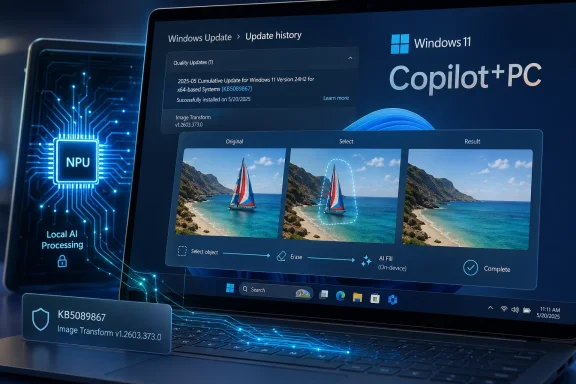
That blandness is the point. The component powers on-device image editing and visual transformation tasks, including object removal and background reconstruction. In practical terms, this is the machinery behind the “erase this thing and intelligently fill the gap” class of AI editing that has migrated from specialist creative tools into default operating-system experiences.
The old Windows model treated these capabilities as app features. Paint, Photos, Snipping Tool, or a third-party editor would own the magic. The Copilot+ model is different: Microsoft is pushing common AI components underneath Windows experiences, then servicing those components separately as the models and runtimes evolve.
That shift makes KB5089867 more interesting than its one-line support entry suggests. It is not merely an image-editing patch. It is evidence that the AI PC is becoming a stack of replaceable, versioned components whose behavior can change underneath the user interface.
Image Transform belongs to that new category. It is not a standalone app, and it is not merely a DLL shipped for one program. It sits in the Windows AI component family, supporting local inference for visual editing tasks across Windows features and applications.
That makes the servicing story more complicated. A user may think an image editing improvement came from Photos. An admin may look for an app version. A developer may wonder whether the capability lives in a Windows runtime, an inbox model, a hardware-specific execution provider, or a Store-delivered package. The answer, increasingly, is “yes.”
KB5089867 also reinforces that Microsoft is separating Windows AI capability from the classic once-a-year Windows feature-update rhythm. The underlying OS version still matters — this one is for 26H1 — but the AI component version has its own number, its own update history entry, and its own replacement chain. This update replaces KB5083512, which means the component is already being treated as a maintained servicing line rather than a static feature.
For consumers, that may be invisible. For IT, invisibility is not necessarily comfort. The more Windows AI depends on serviced models and runtimes, the more administrators will need to know what is installed, why it changed, whether it is approved, and whether it behaves consistently across fleets.
This is a subtle but important change in how Windows features arrive. Microsoft’s AI roadmap is increasingly tied to hardware capability, especially the presence of dedicated neural processing hardware and the Copilot+ PC branding. The result is a Windows ecosystem where nominally similar PCs can have very different capability surfaces.
That was already true for gaming GPUs, biometric hardware, HDR displays, and security features such as Pluton or virtualization-based protections. But AI makes the split more visible because the features sit in familiar places. A photo editor, search box, or context menu may behave differently depending not only on the app version, but also on whether the machine has the right NPU, the right OS branch, and the right AI component payload.
The 26H1 requirement also undercuts the simplistic idea that “Windows 11” is a single platform. In practice, Windows 11 is becoming a family of serviced experiences bound together by branding and divided by silicon, OS branch, region, policy, and component availability. KB5089867 is small, but it lives inside that bigger fragmentation story.
For enthusiasts, this is a familiar irritation. For enterprises, it is a planning issue. A fleet that includes conventional Windows 11 laptops, first-generation Copilot+ PCs, AMD and Intel AI PCs, and newer 26H1 devices may not have one AI feature baseline. It may have several.
But at the platform level, this is a test case for a broader idea. Microsoft wants Windows to provide local AI services that can be reused across experiences. Image Transform handles transformation. Image Processing helps interpret and prepare visual content. Image Creation handles generative output. Other AI components support search, semantic analysis, text extraction, and on-device language tasks.
The important word is local. Microsoft’s pitch for Copilot+ PCs depends heavily on doing meaningful inference on the device rather than sending every request to the cloud. That matters for latency, cost, resilience, and privacy. It also matters for perception: users are more likely to accept AI in sensitive workflows if the image, document, or screen content does not leave the machine.
KB5089867 sits exactly in that trust boundary. The support text emphasizes that Image Transform performs context-aware transformations locally on the device’s dedicated AI hardware while keeping image data on the device. That is not marketing garnish. It is a direct answer to the question that has haunted Windows AI since Recall first triggered a privacy backlash: where does the data go?
Local processing does not make every concern disappear. A model can still produce bad output. A feature can still be misused. An enterprise may still need policy controls. But locality changes the risk calculation, especially for image editing in regulated or sensitive environments.
Image Transform is a cleaner case than Recall because the user’s intent is explicit. The user selects an object, requests a transformation, and receives an edited image. There is no always-on timeline, no ambient capture model, and no obvious sense that Windows is silently watching. That makes it a useful example of how AI features can feel native rather than invasive.
Still, enterprise governance has to catch up. If a user edits a product photo, removes a badge from an internal event image, or reconstructs part of a scene, the privacy story is only one part of the risk model. Authenticity, auditability, labeling, and policy all come into play.
The operating system is quietly becoming capable of generating plausible visual content as part of normal user workflows. That is convenient. It is also a compliance headache in industries where images are records, evidence, or regulated communications.
Microsoft can argue, fairly, that the tool is just enabling editing that was already possible elsewhere. But by moving the capability into Windows components and shipping it automatically, the company changes its default availability. What was once a specialist tool becomes ambient capability.
This is efficient, but it changes expectations. Windows Update is no longer just remediating vulnerabilities, improving compatibility, or delivering OS polish. It is also distributing the model-side substrate that determines how local AI features behave.
Model updates are different from conventional patches. A security fix has a relatively clear desired outcome: close the hole without breaking the system. A model update may alter quality, speed, supported scenarios, edge-case behavior, or output style. It may improve most images while changing the result for some. It may reduce artifacts in one class of photo and introduce unexpected behavior in another.
That is not a reason to avoid updates. It is a reason to document them more clearly. Microsoft’s AI component release information is a good start, but the company’s support entries often remain too sparse for administrators who need operational confidence. “Includes improvements” is not a changelog; it is a shrug in corporate prose.
This was tolerable when the feature was a novelty. It will become less tolerable as AI components participate in workflows that matter. If a serviced model changes output quality in a legal, medical, design, engineering, or government environment, “the component updated automatically” is not a satisfying explanation.
That is not only because things break. It is because capabilities will not arrive uniformly. Two Copilot+ PCs may both run Windows 11 and both display the same app version, yet behave differently because one has a newer Image Transform component or a different hardware-specific execution path.
Microsoft does provide a user-facing way to check for this update: Settings, Windows Update, Update history. After installation, the device should list “2026-04 Image Transform version 1.2603.373.0 (KB5089867).” That is useful, but it is still a consumer-grade answer to an enterprise-grade problem.
Administrators will want inventory. They will want reporting. They will want policy control. They will want to know whether these components flow through Windows Update for Business, Autopatch, WSUS, Intune reporting, or some mixture that changes by component and device class.
The AI PC era will not be judged only by demos. It will be judged by whether IT can manage the thing without building spreadsheets of mystery packages.
KB5089867 illustrates the moving target. It is for Copilot+ PCs, but not all Copilot+ PCs. It is for Windows 11 26H1, not earlier broadly deployed branches. It requires the latest cumulative update for that branch. It replaces a prior KB. It appears in update history as a component-specific item.
That is a lot of conditionality for a feature family Microsoft wants ordinary buyers to understand. The company can market “AI editing on your PC,” but the actual support matrix is more like a dependency graph. Enthusiasts may tolerate that. Mainstream users will not parse it. Enterprise IT will demand it.
The deeper issue is that Microsoft’s AI feature rollout is now constrained by the hardware transition it is trying to accelerate. If the best Windows AI experiences require newer NPUs and newer OS branches, Microsoft has a powerful incentive to make older PCs feel less complete. That is good for OEM refresh cycles. It is less good for customers who bought capable Windows 11 systems recently and now find themselves outside the Copilot+ line.
This is not entirely Microsoft’s fault. Local AI inference has real hardware requirements. But the company’s messaging often compresses those requirements into branding, and branding is bad at nuance.
That boundary is dissolving. When Windows supplies shared AI components, an app can become a surface for OS-level intelligence. The model, runtime, and hardware acceleration may live below the app. The user sees a button; the platform does the work.
This could be good for developers. If Microsoft exposes reliable, privacy-preserving, hardware-accelerated AI capabilities through Windows APIs, smaller apps could gain features that would otherwise require cloud infrastructure or expensive model integration. A local image transformation pipeline could become a platform primitive.
It could also be constraining. If Microsoft’s inbox experiences get privileged access, better optimization, or earlier support for new components, third-party developers may feel they are chasing a platform owner that also competes with them. Windows has lived through this tension before with browsers, media, security, cloud storage, and app distribution.
The fairest outcome would be a Windows AI platform that is transparent, well-documented, and accessible to developers without forcing every serious app into Microsoft’s preferred UX patterns. KB5089867 does not answer that question. It reminds us the question is coming.
But the future of Windows may be built out of exactly these quiet updates. Microsoft does not need to ship one giant “AI Windows” release if it can keep servicing the AI substrate under the current one. The company can improve local models, expand supported experiences, tune performance, and align new silicon through a stream of component updates.
That is powerful because it lets Windows evolve faster than the traditional OS cycle. It is risky because it makes the platform harder to reason about. Users and admins need to know not just what Windows version they run, but what AI components are present and what those components do.
There is also a trust dimension. Automatic updates are accepted because they are broadly understood as necessary for security and reliability. AI model updates will need to earn the same trust. That requires clearer explanations, better controls, and less reliance on vague “improvements” language.
Microsoft has been here before. Windows as a service promised continuous improvement and delivered a decade of arguments about control, telemetry, update quality, and enterprise readiness. Windows AI as a service will replay some of those arguments with higher stakes because the outputs are not just system behavior; they are generated content, semantic interpretation, and automated assistance.
Source: Microsoft Support KB5089867: Image Transform AI component update (version 1.2603.373.0) - Microsoft Support
 Microsoft’s Quiet AI Update Says More Than Its Changelog
KB5089867 is not the kind of update that will make a normal user stop what they are doing. It does not advertise a redesigned app, a new Copilot sidebar, or a splashy generative feature. In Microsoft’s own framing, it improves the Image Transform AI component for Windows 11 version 26H1 and installs automatically through Windows Update.That blandness is the point. The component powers on-device image editing and visual transformation tasks, including object removal and background reconstruction. In practical terms, this is the machinery behind the “erase this thing and intelligently fill the gap” class of AI editing that has migrated from specialist creative tools into default operating-system experiences.
The old Windows model treated these capabilities as app features. Paint, Photos, Snipping Tool, or a third-party editor would own the magic. The Copilot+ model is different: Microsoft is pushing common AI components underneath Windows experiences, then servicing those components separately as the models and runtimes evolve.
That shift makes KB5089867 more interesting than its one-line support entry suggests. It is not merely an image-editing patch. It is evidence that the AI PC is becoming a stack of replaceable, versioned components whose behavior can change underneath the user interface.
The AI PC Is Becoming a Servicing Problem
For years, Windows servicing was easy to describe even when it was painful to manage. There were cumulative updates, feature updates, driver updates, Microsoft Store app updates, Defender intelligence updates, and the occasional firmware package that made administrators nervous. Copilot+ PCs add another layer: AI components that look like system updates but behave more like model-and-runtime refreshes.Image Transform belongs to that new category. It is not a standalone app, and it is not merely a DLL shipped for one program. It sits in the Windows AI component family, supporting local inference for visual editing tasks across Windows features and applications.
That makes the servicing story more complicated. A user may think an image editing improvement came from Photos. An admin may look for an app version. A developer may wonder whether the capability lives in a Windows runtime, an inbox model, a hardware-specific execution provider, or a Store-delivered package. The answer, increasingly, is “yes.”
KB5089867 also reinforces that Microsoft is separating Windows AI capability from the classic once-a-year Windows feature-update rhythm. The underlying OS version still matters — this one is for 26H1 — but the AI component version has its own number, its own update history entry, and its own replacement chain. This update replaces KB5083512, which means the component is already being treated as a maintained servicing line rather than a static feature.
For consumers, that may be invisible. For IT, invisibility is not necessarily comfort. The more Windows AI depends on serviced models and runtimes, the more administrators will need to know what is installed, why it changed, whether it is approved, and whether it behaves consistently across fleets.
26H1 Is the Tell, Not the Footnote
The update’s Windows 11 version requirement is not incidental. KB5089867 applies to Windows 11 version 26H1, a targeted release associated with new hardware rather than a broad feature update for the installed Windows base. That immediately narrows the audience and explains why many readers will never see the update on their current PCs.This is a subtle but important change in how Windows features arrive. Microsoft’s AI roadmap is increasingly tied to hardware capability, especially the presence of dedicated neural processing hardware and the Copilot+ PC branding. The result is a Windows ecosystem where nominally similar PCs can have very different capability surfaces.
That was already true for gaming GPUs, biometric hardware, HDR displays, and security features such as Pluton or virtualization-based protections. But AI makes the split more visible because the features sit in familiar places. A photo editor, search box, or context menu may behave differently depending not only on the app version, but also on whether the machine has the right NPU, the right OS branch, and the right AI component payload.
The 26H1 requirement also undercuts the simplistic idea that “Windows 11” is a single platform. In practice, Windows 11 is becoming a family of serviced experiences bound together by branding and divided by silicon, OS branch, region, policy, and component availability. KB5089867 is small, but it lives inside that bigger fragmentation story.
For enthusiasts, this is a familiar irritation. For enterprises, it is a planning issue. A fleet that includes conventional Windows 11 laptops, first-generation Copilot+ PCs, AMD and Intel AI PCs, and newer 26H1 devices may not have one AI feature baseline. It may have several.
Object Removal Is the Friendly Face of a Deeper Platform
Image Transform’s headline task is easy to understand: erase selected foreground objects and generate plausible background content to fill the removed area. That sounds like a Photos feature, and for many users that is how it will be experienced. Select a distraction, click the magic button, wait a moment, and the picture looks cleaner.But at the platform level, this is a test case for a broader idea. Microsoft wants Windows to provide local AI services that can be reused across experiences. Image Transform handles transformation. Image Processing helps interpret and prepare visual content. Image Creation handles generative output. Other AI components support search, semantic analysis, text extraction, and on-device language tasks.
The important word is local. Microsoft’s pitch for Copilot+ PCs depends heavily on doing meaningful inference on the device rather than sending every request to the cloud. That matters for latency, cost, resilience, and privacy. It also matters for perception: users are more likely to accept AI in sensitive workflows if the image, document, or screen content does not leave the machine.
KB5089867 sits exactly in that trust boundary. The support text emphasizes that Image Transform performs context-aware transformations locally on the device’s dedicated AI hardware while keeping image data on the device. That is not marketing garnish. It is a direct answer to the question that has haunted Windows AI since Recall first triggered a privacy backlash: where does the data go?
Local processing does not make every concern disappear. A model can still produce bad output. A feature can still be misused. An enterprise may still need policy controls. But locality changes the risk calculation, especially for image editing in regulated or sensitive environments.
Privacy Is the Selling Point, Governance Is the Missing Manual
Microsoft has learned that “AI in Windows” is not automatically received as a benefit. The company’s strongest argument for Copilot+ PCs is not that every AI feature is revolutionary. It is that local hardware can make AI feel instant while reducing dependence on cloud processing.Image Transform is a cleaner case than Recall because the user’s intent is explicit. The user selects an object, requests a transformation, and receives an edited image. There is no always-on timeline, no ambient capture model, and no obvious sense that Windows is silently watching. That makes it a useful example of how AI features can feel native rather than invasive.
Still, enterprise governance has to catch up. If a user edits a product photo, removes a badge from an internal event image, or reconstructs part of a scene, the privacy story is only one part of the risk model. Authenticity, auditability, labeling, and policy all come into play.
The operating system is quietly becoming capable of generating plausible visual content as part of normal user workflows. That is convenient. It is also a compliance headache in industries where images are records, evidence, or regulated communications.
Microsoft can argue, fairly, that the tool is just enabling editing that was already possible elsewhere. But by moving the capability into Windows components and shipping it automatically, the company changes its default availability. What was once a specialist tool becomes ambient capability.
Windows Update Is Now a Model Distribution Channel
The most consequential sentence in the KB article may be the most ordinary one: the update will be downloaded and installed automatically from Windows Update. That line places AI component servicing inside the same machinery users already associate with Patch Tuesday, drivers, and reliability fixes.This is efficient, but it changes expectations. Windows Update is no longer just remediating vulnerabilities, improving compatibility, or delivering OS polish. It is also distributing the model-side substrate that determines how local AI features behave.
Model updates are different from conventional patches. A security fix has a relatively clear desired outcome: close the hole without breaking the system. A model update may alter quality, speed, supported scenarios, edge-case behavior, or output style. It may improve most images while changing the result for some. It may reduce artifacts in one class of photo and introduce unexpected behavior in another.
That is not a reason to avoid updates. It is a reason to document them more clearly. Microsoft’s AI component release information is a good start, but the company’s support entries often remain too sparse for administrators who need operational confidence. “Includes improvements” is not a changelog; it is a shrug in corporate prose.
This was tolerable when the feature was a novelty. It will become less tolerable as AI components participate in workflows that matter. If a serviced model changes output quality in a legal, medical, design, engineering, or government environment, “the component updated automatically” is not a satisfying explanation.
The Version Number Is a New Kind of Windows Literacy
The component version, 1.2603.373.0, looks like a minor detail. For the next generation of Windows support, it may become essential vocabulary. Just as admins learned to ask for build numbers, cumulative update IDs, driver versions, and firmware revisions, they will need to ask for AI component versions.That is not only because things break. It is because capabilities will not arrive uniformly. Two Copilot+ PCs may both run Windows 11 and both display the same app version, yet behave differently because one has a newer Image Transform component or a different hardware-specific execution path.
Microsoft does provide a user-facing way to check for this update: Settings, Windows Update, Update history. After installation, the device should list “2026-04 Image Transform version 1.2603.373.0 (KB5089867).” That is useful, but it is still a consumer-grade answer to an enterprise-grade problem.
Administrators will want inventory. They will want reporting. They will want policy control. They will want to know whether these components flow through Windows Update for Business, Autopatch, WSUS, Intune reporting, or some mixture that changes by component and device class.
The AI PC era will not be judged only by demos. It will be judged by whether IT can manage the thing without building spreadsheets of mystery packages.
Copilot+ PCs Are Becoming a Moving Target
The Copilot+ PC brand originally promised a simple threshold: buy a machine with enough local AI horsepower and Windows would unlock a new class of experiences. In practice, the platform is more dynamic than that. Hardware matters, but so do OS branch, regional rollout, app updates, Store packages, cumulative updates, and AI component versions.KB5089867 illustrates the moving target. It is for Copilot+ PCs, but not all Copilot+ PCs. It is for Windows 11 26H1, not earlier broadly deployed branches. It requires the latest cumulative update for that branch. It replaces a prior KB. It appears in update history as a component-specific item.
That is a lot of conditionality for a feature family Microsoft wants ordinary buyers to understand. The company can market “AI editing on your PC,” but the actual support matrix is more like a dependency graph. Enthusiasts may tolerate that. Mainstream users will not parse it. Enterprise IT will demand it.
The deeper issue is that Microsoft’s AI feature rollout is now constrained by the hardware transition it is trying to accelerate. If the best Windows AI experiences require newer NPUs and newer OS branches, Microsoft has a powerful incentive to make older PCs feel less complete. That is good for OEM refresh cycles. It is less good for customers who bought capable Windows 11 systems recently and now find themselves outside the Copilot+ line.
This is not entirely Microsoft’s fault. Local AI inference has real hardware requirements. But the company’s messaging often compresses those requirements into branding, and branding is bad at nuance.
The App Is No Longer the Boundary
Image editing used to be an app contest. Adobe, Affinity, Microsoft Photos, Paint, GIMP, and web-based editors competed on tools, workflows, and output quality. Windows itself mostly stayed out of the way.That boundary is dissolving. When Windows supplies shared AI components, an app can become a surface for OS-level intelligence. The model, runtime, and hardware acceleration may live below the app. The user sees a button; the platform does the work.
This could be good for developers. If Microsoft exposes reliable, privacy-preserving, hardware-accelerated AI capabilities through Windows APIs, smaller apps could gain features that would otherwise require cloud infrastructure or expensive model integration. A local image transformation pipeline could become a platform primitive.
It could also be constraining. If Microsoft’s inbox experiences get privileged access, better optimization, or earlier support for new components, third-party developers may feel they are chasing a platform owner that also competes with them. Windows has lived through this tension before with browsers, media, security, cloud storage, and app distribution.
The fairest outcome would be a Windows AI platform that is transparent, well-documented, and accessible to developers without forcing every serious app into Microsoft’s preferred UX patterns. KB5089867 does not answer that question. It reminds us the question is coming.
The Small KB That Points to the Next Windows Fight
There is a temptation to dismiss component updates like KB5089867 as housekeeping. The version number changes, a support page appears, Windows Update does its work, and a tiny line lands in update history. Nothing dramatic happens.But the future of Windows may be built out of exactly these quiet updates. Microsoft does not need to ship one giant “AI Windows” release if it can keep servicing the AI substrate under the current one. The company can improve local models, expand supported experiences, tune performance, and align new silicon through a stream of component updates.
That is powerful because it lets Windows evolve faster than the traditional OS cycle. It is risky because it makes the platform harder to reason about. Users and admins need to know not just what Windows version they run, but what AI components are present and what those components do.
There is also a trust dimension. Automatic updates are accepted because they are broadly understood as necessary for security and reliability. AI model updates will need to earn the same trust. That requires clearer explanations, better controls, and less reliance on vague “improvements” language.
Microsoft has been here before. Windows as a service promised continuous improvement and delivered a decade of arguments about control, telemetry, update quality, and enterprise readiness. Windows AI as a service will replay some of those arguments with higher stakes because the outputs are not just system behavior; they are generated content, semantic interpretation, and automated assistance.
What KB5089867 Really Changes for Copilot+ Owners
KB5089867 is best understood as a platform maintenance update, not a feature launch. It sharpens the picture of how Microsoft intends to service AI on Windows 11 26H1 and how Copilot+ PCs will receive improvements over time.- KB5089867 updates the Image Transform AI component to version 1.2603.373.0 for Copilot+ PCs running Windows 11 version 26H1.
- The component supports local AI image transformation tasks such as object removal and generated background fill.
- The update installs automatically through Windows Update and requires the latest cumulative update for Windows 11 version 26H1.
- Users can confirm installation in Windows Update history, where it should appear as the April 2026 Image Transform component update.
- The update replaces KB5083512, showing that Windows AI components are now part of an ongoing servicing chain.
- The larger story is that Windows AI capability is becoming versioned, hardware-bound, and operationally important in ways traditional app updates never were.
Source: Microsoft Support KB5089867: Image Transform AI component update (version 1.2603.373.0) - Microsoft Support
