

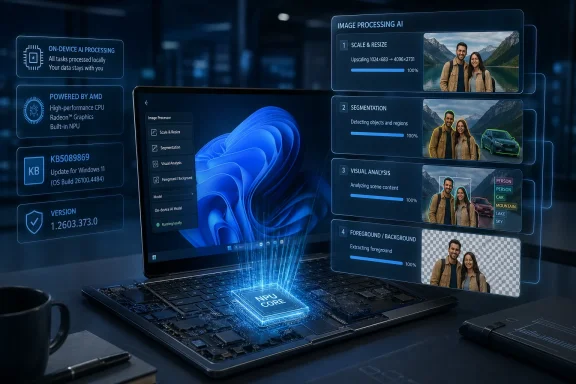
Microsoft has published KB5089869, an Image Processing AI component update to version 1.2603.373.0 for AMD-powered Copilot+ PCs running Windows 11 version 26H1, delivered automatically through Windows Update after the latest cumulative update is installed. The support note is short, almost aggressively so, but the update points to a larger shift in how Windows is being serviced. Microsoft is no longer treating AI features as app decorations or optional cloud add-ons; it is breaking them into hardware-specific, locally updated system components. For AMD Copilot+ PC owners, this is less a flashy feature drop than a sign that the AI PC era is becoming a servicing problem.
KB5089869 does not read like a milestone. It says the Image Processing AI component enables on-device image understanding and image processing across Windows features and apps, and that it performs tasks such as scaling, segmentation, visual analysis, and foreground/background extraction. It also says the update applies only to Copilot+ PCs, only to AMD-powered systems, and only to Windows 11 version 26H1.
That narrow targeting is the story. Traditional Windows updates already vary by device class, driver stack, and security baseline, but AI components introduce a new axis: the model and runtime layer that sits between Windows features and the neural processing unit. A PC can be “Windows 11 compatible” and still be irrelevant to this update. It can even be an AMD system and still miss the target if it is not a Copilot+ PC with the expected NPU capability and OS branch.
Microsoft’s wording also makes clear that the component is not a single consumer-facing feature. It is plumbing. It prepares image data for other experiences, including image enhancement, accessibility, and AI-assisted editing workflows, while coordinating with other Windows AI components such as Image Transform and Image Creation.
That matters because plumbing is where platforms are won or lost. Users notice the button in Photos or Paint; developers notice whether the system model exists, whether it is current, whether APIs behave consistently, and whether the device can run inference locally without punting to the cloud.
KB5089869 is a useful example because it is neither a GPU driver nor a feature update in the classic Windows sense. It is an AI component update that advances a Windows-managed model/runtime capability for a specific silicon family. That is a different cadence from waiting for the next Windows release, and a different responsibility model from letting every app vendor bundle its own models.
The upside is obvious. If Windows owns the common image-processing layer, multiple apps can benefit from improved models without each developer shipping a separate blob. Microsoft can tune for AMD’s NPU path, reduce duplicated storage, and keep sensitive image operations on the device. The promise is a platform-level AI substrate rather than a mess of one-off accelerators.
The downside is equally obvious to anyone who manages PCs. Another component channel means another inventory problem. Another model version means another compliance question. Another hardware-specific package means another “why did this machine get it and that one did not?” ticket.
That turns this KB into an early glimpse of the fragmentation Windows AI may bring. In the old model, feature availability was already messy: Home versus Pro, region, language, chipset, driver, and staged rollout all mattered. In the Copilot+ model, the dependency chain gets longer. The OS version, cumulative update level, NPU class, silicon vendor, AI component version, app version, and rollout ring can all determine what a user actually sees.
For enthusiasts, this is annoying. For IT, it is operationally significant. A fleet of “Windows 11 laptops” is no longer a meaningful category when some machines have no AI components, some have Copilot+ components for one silicon vendor, and some are on a branch like 26H1 that exists because next-generation hardware needs platform changes.
This is where Microsoft’s KB brevity hurts. “Includes improvements” may be enough for a background consumer update, but enterprises need to know whether an update changes model behavior, output quality, latency, resource usage, API compatibility, storage footprint, or privacy posture. When AI components become part of business workflows, vague release notes stop being charmingly minimal and start becoming a governance problem.
For image processing, the privacy case is especially persuasive. Photos, screenshots, scanned documents, design drafts, and camera frames can contain faces, addresses, credentials, medical details, client data, and proprietary information. If Windows can perform segmentation or visual analysis locally, that reduces the need to send sensitive pixels to a remote service just to power a convenience feature.
But local AI also changes who controls the model. With a cloud service, Microsoft can update server-side behavior continuously. With local components, the model lands on the endpoint, appears in update history, and becomes part of the device’s managed state. That is better for transparency in one sense, but it also means admins must treat AI models like software artifacts, not magic.
This is why component-level servicing matters. The future of Windows AI will not be decided only by whether Recall, Click to Do, Paint, Photos, or Studio Effects impress consumers. It will be decided by whether Microsoft can make local AI feel as dependable as DirectX, Windows Hello, or the print stack should have been: shared, serviced, documented, and boring in the best possible way.
KB5089869 reinforces that AMD is now a first-class target for Microsoft’s AI component servicing. The package is explicitly for AMD-powered systems, which suggests Microsoft is maintaining separate delivery logic and versioning paths for different hardware stacks. That is not surprising. NPUs are not interchangeable abstractions in practice; they have different drivers, execution providers, memory behavior, toolchains, and performance envelopes.
The strategic question is whether Microsoft can hide that complexity from users and developers. If an app calls a Windows AI image API, the ideal outcome is that Windows handles the silicon-specific machinery underneath. A developer should not have to become an expert in every NPU vendor’s quirks to extract a subject from a photo or generate an image description.
Still, the hardware-specific KB is a reminder that abstraction has a cost. Microsoft can present a common API surface, but the underlying components must still be validated, optimized, and serviced per platform. AMD wins when Windows makes its NPU useful automatically. Microsoft wins when AMD’s hardware looks like part of a coherent Windows AI platform rather than a separate compatibility island.
For power users, this is welcome. If an AI feature behaves differently after Patch Tuesday, or if an image tool suddenly improves foreground detection, update history may provide a clue. For support staff, it gives at least one way to establish whether the machine has the expected component baseline.
But update history is not enough for serious fleet management. Enterprises will want reporting through familiar management planes, clear applicability rules, and predictable behavior with Windows Update for Business, Autopatch, Intune, and WSUS-like environments. AI components will need the same lifecycle discipline as firmware, drivers, and cumulative updates, especially if Microsoft expects organizations to trust local AI in regulated settings.
The tension is that AI model updates do not always map neatly to the patch culture Windows admins understand. A security update fixes a vulnerability. A driver update fixes a device or improves compatibility. A model update can subtly change outputs, which may be exactly the point. That makes version tracking essential, but it also makes simple “latest is best” thinking less comfortable.
That may be defensible if the changes are internal tuning, packaging fixes, or compatibility work. It may also reflect the reality that model updates are difficult to summarize without overpromising measurable gains. But as these components become more central to Windows behavior, Microsoft will need a richer vocabulary than “improvements.”
The company does not have to disclose model weights, proprietary tuning methods, or every internal benchmark. It should, however, tell admins and developers what class of change they are receiving. Did segmentation improve on complex backgrounds? Was NPU utilization reduced? Did memory consumption change? Were crashes fixed? Did the update alter behavior in a way that developers might notice through Windows AI APIs?
This is not pedantry. AI systems are probabilistic, and even small changes can affect workflows. A background extraction model that is better for hair may be worse for transparent objects. A visual analysis model that improves charts may behave differently on screenshots. The more Windows features depend on shared AI components, the more those component updates deserve grown-up release notes.
That invisibility is both the ambition and the risk. Microsoft wants AI capabilities to feel native to Windows, not like a website in a sidebar. That means image understanding becomes part of the OS experience, not just a cloud prompt box. The PC itself becomes responsible for understanding pixels.
The developer story is just as important. Microsoft’s Windows AI APIs and Foundry-on-Windows push are designed to give app makers access to local models without requiring them to ship or optimize everything themselves. Image description, foreground extraction, object erasing, super resolution, and related capabilities all become more compelling if the platform handles distribution and acceleration.
But developers will only build on that layer if they trust it. They need stable APIs, clear capability detection, documented failure modes, and confidence that a component update will not unexpectedly break production behavior. KB5089869 is a tiny brick in that wall. The wall itself is Microsoft’s attempt to make Windows a credible local AI runtime.
That does not mean every Copilot+ boundary will be above suspicion. Microsoft still has to justify which features truly require NPUs and which are being packaged as exclusives to sell new PCs. Windows users have long memories when it comes to arbitrary hardware cutoffs. The Windows 11 TPM and CPU requirements debate did not vanish; it merely became background noise.
Yet image processing is one of the better arguments for the Copilot+ split. Real-time or near-real-time local image segmentation, description, enhancement, and transformation benefit from dedicated acceleration. Running those workflows on a CPU-only laptop may be technically possible but unpleasant, battery-hungry, or inconsistent. If Microsoft wants these features to feel reliable, it needs a baseline.
The danger is that “Copilot+ only” becomes a moving target users cannot understand. If one AMD Copilot+ PC on 26H1 gets KB5089869, another AMD AI PC on a different Windows branch does not, and an Intel machine gets a related but differently numbered package, the branding alone will not explain reality. Microsoft will need to make eligibility legible.
KB5089869 hits all the pressure points. It is automatic through Windows Update. It depends on a latest cumulative update. It applies to a specific OS version and hardware class. It changes an AI component whose behavior may affect apps and features, while offering little detail about the changes themselves.
That does not make the update bad. It makes it a preview of the administrative model Microsoft must refine. AI components need rings, deferrals, reporting, rollback expectations, and compatibility notes. If Windows AI is to become part of productivity, accessibility, content creation, and enterprise workflows, it cannot be serviced like a novelty pack.
There is also a procurement angle. Organizations buying AMD-powered Copilot+ PCs will need to ask not only whether the NPU meets Microsoft’s threshold, but whether the device’s Windows branch, driver support, OEM image, and update policies keep the AI stack current. An AI PC that cannot reliably receive AI component updates is just an expensive laptop with an underused block of silicon.
This is one of the most important architectural changes in modern Windows. Microsoft is decomposing parts of the AI experience into individually serviced components. That lets the company improve models and runtimes faster than the full OS cadence would allow, while still using Windows Update as the trust and delivery mechanism.
The model resembles what Microsoft has done elsewhere: Edge decoupled from Windows, Store apps updating independently, Defender intelligence updating continuously, and Windows Feature Experience Packs moving some shell-adjacent work outside monolithic OS releases. AI components extend that logic into local machine learning.
The difference is that AI output is experiential, not just functional. Users may notice that a cutout is cleaner, a description is richer, or an enhancement is more natural. They may also notice regressions that are hard to describe. Microsoft is entering a world where Windows quality includes model quality, and model quality is not always captured by a pass/fail test.
The best version of this future is straightforward. Windows exposes a common set of AI capabilities, detects the local hardware, installs the right components, and gives apps a predictable contract. Users get fast local features without caring whether the NPU path is Qualcomm, AMD, or Intel. OEMs compete on performance, battery life, thermals, and device design rather than on basic feature availability.
The worst version is a compatibility maze. Features arrive by chipset, OS branch, language, region, app version, and preview channel, while support documents trail behind reality. Users see “Copilot+ PC” on the box but cannot tell which Copilot+ experiences they actually have. Developers build graceful degradation paths for everything and quietly avoid relying on the platform.
KB5089869 is too small to decide which future wins. But it belongs to the fork in the road. Hardware-specific AI component updates are necessary; they are also the place where platform cohesion can either be proven or lost.
If you manage or support these systems, the important facts are concrete:
Microsoft’s challenge now is to make that servicing model trustworthy at scale. KB5089869 is a modest AMD-specific update, but it points toward a Windows platform where AI components are as ordinary as drivers and as consequential as system libraries. If Microsoft can document them clearly, deliver them predictably, and keep the hardware differences from leaking into everyday use, Copilot+ PCs may finally become more than a badge on a lid; they may become the first Windows machines whose most important upgrades are not new apps, but better local intelligence quietly arriving underneath them.
Source: Microsoft Support KB5089869: Image Processing AI component update (version 1.2603.373.0) for AMD-powered systems - Microsoft Support
 Microsoft’s Small KB Article Says the Quiet Part Out Loud
KB5089869 does not read like a milestone. It says the Image Processing AI component enables on-device image understanding and image processing across Windows features and apps, and that it performs tasks such as scaling, segmentation, visual analysis, and foreground/background extraction. It also says the update applies only to Copilot+ PCs, only to AMD-powered systems, and only to Windows 11 version 26H1.That narrow targeting is the story. Traditional Windows updates already vary by device class, driver stack, and security baseline, but AI components introduce a new axis: the model and runtime layer that sits between Windows features and the neural processing unit. A PC can be “Windows 11 compatible” and still be irrelevant to this update. It can even be an AMD system and still miss the target if it is not a Copilot+ PC with the expected NPU capability and OS branch.
Microsoft’s wording also makes clear that the component is not a single consumer-facing feature. It is plumbing. It prepares image data for other experiences, including image enhancement, accessibility, and AI-assisted editing workflows, while coordinating with other Windows AI components such as Image Transform and Image Creation.
That matters because plumbing is where platforms are won or lost. Users notice the button in Photos or Paint; developers notice whether the system model exists, whether it is current, whether APIs behave consistently, and whether the device can run inference locally without punting to the cloud.
The AI PC Is Becoming a Stack, Not a Sticker
When Microsoft introduced Copilot+ PCs, the marketing emphasis landed on the NPU: 40 trillion operations per second, all-day battery life, local AI, and new experiences that older PCs could not run. That was the easy story to tell. The harder story is that an AI PC is not just a processor with a neural accelerator; it is an operating-system stack that must keep models, execution providers, APIs, app hooks, and privacy expectations aligned.KB5089869 is a useful example because it is neither a GPU driver nor a feature update in the classic Windows sense. It is an AI component update that advances a Windows-managed model/runtime capability for a specific silicon family. That is a different cadence from waiting for the next Windows release, and a different responsibility model from letting every app vendor bundle its own models.
The upside is obvious. If Windows owns the common image-processing layer, multiple apps can benefit from improved models without each developer shipping a separate blob. Microsoft can tune for AMD’s NPU path, reduce duplicated storage, and keep sensitive image operations on the device. The promise is a platform-level AI substrate rather than a mess of one-off accelerators.
The downside is equally obvious to anyone who manages PCs. Another component channel means another inventory problem. Another model version means another compliance question. Another hardware-specific package means another “why did this machine get it and that one did not?” ticket.
26H1 Makes the Target Smaller and the Stakes Larger
The 26H1 requirement gives KB5089869 a sharper edge than a routine component bump. Windows 11 version 26H1 is not the broad annual Windows update most users expect to see on their existing machines. It is a targeted release tied to new device innovation and newer platform requirements, with Microsoft and the Windows ecosystem treating it as a special branch rather than a general upgrade path for every Windows 11 PC.That turns this KB into an early glimpse of the fragmentation Windows AI may bring. In the old model, feature availability was already messy: Home versus Pro, region, language, chipset, driver, and staged rollout all mattered. In the Copilot+ model, the dependency chain gets longer. The OS version, cumulative update level, NPU class, silicon vendor, AI component version, app version, and rollout ring can all determine what a user actually sees.
For enthusiasts, this is annoying. For IT, it is operationally significant. A fleet of “Windows 11 laptops” is no longer a meaningful category when some machines have no AI components, some have Copilot+ components for one silicon vendor, and some are on a branch like 26H1 that exists because next-generation hardware needs platform changes.
This is where Microsoft’s KB brevity hurts. “Includes improvements” may be enough for a background consumer update, but enterprises need to know whether an update changes model behavior, output quality, latency, resource usage, API compatibility, storage footprint, or privacy posture. When AI components become part of business workflows, vague release notes stop being charmingly minimal and start becoming a governance problem.
Local AI Is a Privacy Argument, but Also a Control Argument
Microsoft frames the Image Processing AI component as local and low-latency. That is not incidental. The strongest case for Copilot+ PCs has always been that certain AI work should happen on the device: faster, more private, less dependent on network availability, and better suited to interactive features like background extraction, image descriptions, or super resolution.For image processing, the privacy case is especially persuasive. Photos, screenshots, scanned documents, design drafts, and camera frames can contain faces, addresses, credentials, medical details, client data, and proprietary information. If Windows can perform segmentation or visual analysis locally, that reduces the need to send sensitive pixels to a remote service just to power a convenience feature.
But local AI also changes who controls the model. With a cloud service, Microsoft can update server-side behavior continuously. With local components, the model lands on the endpoint, appears in update history, and becomes part of the device’s managed state. That is better for transparency in one sense, but it also means admins must treat AI models like software artifacts, not magic.
This is why component-level servicing matters. The future of Windows AI will not be decided only by whether Recall, Click to Do, Paint, Photos, or Studio Effects impress consumers. It will be decided by whether Microsoft can make local AI feel as dependable as DirectX, Windows Hello, or the print stack should have been: shared, serviced, documented, and boring in the best possible way.
AMD’s Role Is No Longer Peripheral
The first Copilot+ PC wave put Qualcomm in the spotlight, partly because Snapdragon X systems arrived first and partly because Microsoft needed a clean Arm story. AMD and Intel followed into the Copilot+ class with their own NPU-equipped platforms, but the Windows AI experience has not always looked perfectly synchronized across silicon vendors. Features have rolled out unevenly, and some capabilities have appeared first on one platform before reaching another.KB5089869 reinforces that AMD is now a first-class target for Microsoft’s AI component servicing. The package is explicitly for AMD-powered systems, which suggests Microsoft is maintaining separate delivery logic and versioning paths for different hardware stacks. That is not surprising. NPUs are not interchangeable abstractions in practice; they have different drivers, execution providers, memory behavior, toolchains, and performance envelopes.
The strategic question is whether Microsoft can hide that complexity from users and developers. If an app calls a Windows AI image API, the ideal outcome is that Windows handles the silicon-specific machinery underneath. A developer should not have to become an expert in every NPU vendor’s quirks to extract a subject from a photo or generate an image description.
Still, the hardware-specific KB is a reminder that abstraction has a cost. Microsoft can present a common API surface, but the underlying components must still be validated, optimized, and serviced per platform. AMD wins when Windows makes its NPU useful automatically. Microsoft wins when AMD’s hardware looks like part of a coherent Windows AI platform rather than a separate compatibility island.
The Update History Page Becomes an AI Inventory Tool
Microsoft tells users to confirm installation by checking Settings, Windows Update, and Update history. That sounds mundane, but it is an important change in user-visible Windows behavior. AI models and AI runtime components are no longer hidden entirely behind app updates or driver packages. They are showing up as named Windows updates with KB numbers and versions.For power users, this is welcome. If an AI feature behaves differently after Patch Tuesday, or if an image tool suddenly improves foreground detection, update history may provide a clue. For support staff, it gives at least one way to establish whether the machine has the expected component baseline.
But update history is not enough for serious fleet management. Enterprises will want reporting through familiar management planes, clear applicability rules, and predictable behavior with Windows Update for Business, Autopatch, Intune, and WSUS-like environments. AI components will need the same lifecycle discipline as firmware, drivers, and cumulative updates, especially if Microsoft expects organizations to trust local AI in regulated settings.
The tension is that AI model updates do not always map neatly to the patch culture Windows admins understand. A security update fixes a vulnerability. A driver update fixes a device or improves compatibility. A model update can subtly change outputs, which may be exactly the point. That makes version tracking essential, but it also makes simple “latest is best” thinking less comfortable.
“Includes Improvements” Is Not a Release Note Strategy
Microsoft’s support language for many AI component updates remains sparse. KB5089869 describes what the Image Processing AI component does, states that the update includes improvements, and explains how it installs. It does not provide a granular changelog of what improved in version 1.2603.373.0.That may be defensible if the changes are internal tuning, packaging fixes, or compatibility work. It may also reflect the reality that model updates are difficult to summarize without overpromising measurable gains. But as these components become more central to Windows behavior, Microsoft will need a richer vocabulary than “improvements.”
The company does not have to disclose model weights, proprietary tuning methods, or every internal benchmark. It should, however, tell admins and developers what class of change they are receiving. Did segmentation improve on complex backgrounds? Was NPU utilization reduced? Did memory consumption change? Were crashes fixed? Did the update alter behavior in a way that developers might notice through Windows AI APIs?
This is not pedantry. AI systems are probabilistic, and even small changes can affect workflows. A background extraction model that is better for hair may be worse for transparent objects. A visual analysis model that improves charts may behave differently on screenshots. The more Windows features depend on shared AI components, the more those component updates deserve grown-up release notes.
The Consumer Feature Is Only the Front Door
Most users will encounter this stack through visible features: image editing, accessibility descriptions, webcam effects, search, Paint, Photos, or other Copilot+ experiences. The Image Processing AI component sits underneath those experiences, doing the preparatory work that makes higher-level features feel instant. If it works well, users will not think about it at all.That invisibility is both the ambition and the risk. Microsoft wants AI capabilities to feel native to Windows, not like a website in a sidebar. That means image understanding becomes part of the OS experience, not just a cloud prompt box. The PC itself becomes responsible for understanding pixels.
The developer story is just as important. Microsoft’s Windows AI APIs and Foundry-on-Windows push are designed to give app makers access to local models without requiring them to ship or optimize everything themselves. Image description, foreground extraction, object erasing, super resolution, and related capabilities all become more compelling if the platform handles distribution and acceleration.
But developers will only build on that layer if they trust it. They need stable APIs, clear capability detection, documented failure modes, and confidence that a component update will not unexpectedly break production behavior. KB5089869 is a tiny brick in that wall. The wall itself is Microsoft’s attempt to make Windows a credible local AI runtime.
Copilot+ Exclusivity Is Becoming More Concrete
The phrase “Copilot+ PCs only” used to sound like marketing segmentation. Updates like KB5089869 make it operational. This is not an artificial toggle that Microsoft is withholding from older machines; it is a component designed around local inference on dedicated AI hardware, tied to a specific class of devices.That does not mean every Copilot+ boundary will be above suspicion. Microsoft still has to justify which features truly require NPUs and which are being packaged as exclusives to sell new PCs. Windows users have long memories when it comes to arbitrary hardware cutoffs. The Windows 11 TPM and CPU requirements debate did not vanish; it merely became background noise.
Yet image processing is one of the better arguments for the Copilot+ split. Real-time or near-real-time local image segmentation, description, enhancement, and transformation benefit from dedicated acceleration. Running those workflows on a CPU-only laptop may be technically possible but unpleasant, battery-hungry, or inconsistent. If Microsoft wants these features to feel reliable, it needs a baseline.
The danger is that “Copilot+ only” becomes a moving target users cannot understand. If one AMD Copilot+ PC on 26H1 gets KB5089869, another AMD AI PC on a different Windows branch does not, and an Intel machine gets a related but differently numbered package, the branding alone will not explain reality. Microsoft will need to make eligibility legible.
The Enterprise Problem Is Not AI Hype; It Is Change Control
Enterprise IT is often caricatured as anti-AI, but the real issue is usually change control. Admins do not object to local image processing because it is futuristic. They object when functionality changes without adequate documentation, when update applicability is opaque, and when users ask why two nearly identical laptops behave differently.KB5089869 hits all the pressure points. It is automatic through Windows Update. It depends on a latest cumulative update. It applies to a specific OS version and hardware class. It changes an AI component whose behavior may affect apps and features, while offering little detail about the changes themselves.
That does not make the update bad. It makes it a preview of the administrative model Microsoft must refine. AI components need rings, deferrals, reporting, rollback expectations, and compatibility notes. If Windows AI is to become part of productivity, accessibility, content creation, and enterprise workflows, it cannot be serviced like a novelty pack.
There is also a procurement angle. Organizations buying AMD-powered Copilot+ PCs will need to ask not only whether the NPU meets Microsoft’s threshold, but whether the device’s Windows branch, driver support, OEM image, and update policies keep the AI stack current. An AI PC that cannot reliably receive AI component updates is just an expensive laptop with an underused block of silicon.
The Version Number Is a Signal of a Faster Windows
Version 1.2603.373.0 looks like the kind of number only a servicing engineer could love. But it signals a faster-moving Windows underlayer. The OS may still have annual feature updates and monthly cumulative updates, but AI components are developing their own release history and identity.This is one of the most important architectural changes in modern Windows. Microsoft is decomposing parts of the AI experience into individually serviced components. That lets the company improve models and runtimes faster than the full OS cadence would allow, while still using Windows Update as the trust and delivery mechanism.
The model resembles what Microsoft has done elsewhere: Edge decoupled from Windows, Store apps updating independently, Defender intelligence updating continuously, and Windows Feature Experience Packs moving some shell-adjacent work outside monolithic OS releases. AI components extend that logic into local machine learning.
The difference is that AI output is experiential, not just functional. Users may notice that a cutout is cleaner, a description is richer, or an enhancement is more natural. They may also notice regressions that are hard to describe. Microsoft is entering a world where Windows quality includes model quality, and model quality is not always captured by a pass/fail test.
The AMD Update Points to a Multi-Vendor Balancing Act
Microsoft wants Windows to be the neutral home for AI PCs across Qualcomm, AMD, Intel, and eventually other silicon players. That neutrality is valuable, but it requires constant balancing. If Qualcomm gets features first, x86 buyers complain. If AMD receives a component update tied to 26H1, admins ask what that means for Intel. If APIs behave differently across devices, developers hesitate.The best version of this future is straightforward. Windows exposes a common set of AI capabilities, detects the local hardware, installs the right components, and gives apps a predictable contract. Users get fast local features without caring whether the NPU path is Qualcomm, AMD, or Intel. OEMs compete on performance, battery life, thermals, and device design rather than on basic feature availability.
The worst version is a compatibility maze. Features arrive by chipset, OS branch, language, region, app version, and preview channel, while support documents trail behind reality. Users see “Copilot+ PC” on the box but cannot tell which Copilot+ experiences they actually have. Developers build graceful degradation paths for everything and quietly avoid relying on the platform.
KB5089869 is too small to decide which future wins. But it belongs to the fork in the road. Hardware-specific AI component updates are necessary; they are also the place where platform cohesion can either be proven or lost.
The Useful Reading of KB5089869 Is Operational, Not Promotional
The practical response to KB5089869 is not excitement, and it is not panic. It is inventory. The update tells AMD Copilot+ PC owners and admins to pay attention to Windows AI component versions as part of normal device health.If you manage or support these systems, the important facts are concrete:
- KB5089869 updates the Image Processing AI component for AMD-powered Copilot+ PCs to version 1.2603.373.0.
- The package is scoped to Windows 11 version 26H1 and requires the latest cumulative update for that OS version.
- The component supports local image-processing tasks such as scaling, segmentation, visual analysis, and foreground/background extraction.
- Installation is automatic through Windows Update for eligible systems, and presence can be checked in Windows Update history.
- The update is part of a broader Windows AI component servicing model in which local models and runtimes receive their own KB-tracked updates.
- The sparse release note means admins should verify behavior on representative devices before assuming every AI workflow is unchanged.
Microsoft’s challenge now is to make that servicing model trustworthy at scale. KB5089869 is a modest AMD-specific update, but it points toward a Windows platform where AI components are as ordinary as drivers and as consequential as system libraries. If Microsoft can document them clearly, deliver them predictably, and keep the hardware differences from leaking into everyday use, Copilot+ PCs may finally become more than a badge on a lid; they may become the first Windows machines whose most important upgrades are not new apps, but better local intelligence quietly arriving underneath them.
Source: Microsoft Support KB5089869: Image Processing AI component update (version 1.2603.373.0) for AMD-powered systems - Microsoft Support
