

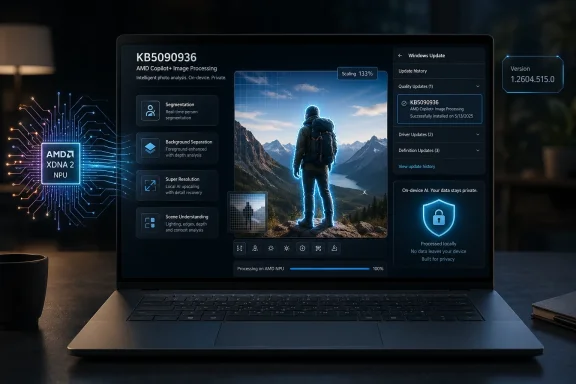
Microsoft’s KB5090936 is an Image Processing AI component update for AMD-powered Copilot+ PCs, moving the Windows 11 AI image pipeline to version 1.2604.515.0 for devices running Windows 11 version 24H2 or 25H2. It is not a general Windows patch, not a graphics driver, and not a feature release in the old sense. It is a quiet servicing move in Microsoft’s newer strategy: Windows AI capabilities are becoming modular, hardware-specific, and continuously updated through Windows Update.
The most important thing about KB5090936 is not the version number, though version 1.2604.515.0 will matter to administrators trying to identify it in update history. The important thing is that Microsoft is treating the image-understanding layer of Windows like a living platform component rather than a static feature tied to a once-a-year OS release.
That distinction sounds subtle until you follow where it leads. For decades, Windows users understood the operating system as a foundation that received security patches, driver updates, and occasional feature upgrades. Now Microsoft is carving out AI models, runtime layers, and hardware-optimized execution paths as individually serviced parts of the Windows experience.
KB5090936 is exactly that kind of update. It applies only to AMD-powered Copilot+ PCs, only on Windows 11 version 24H2 and 25H2, and only after the latest cumulative update is installed. It arrives automatically through Windows Update and appears in Settings under Windows Update history, rather than asking the user to download an installer or make an explicit feature choice.
That makes the update feel minor. Strategically, it is anything but.
That is why KB5090936 matters as an AMD-specific update. Microsoft is not merely shipping “Windows AI” in the abstract. It is shipping tuned components for particular silicon families, and the update history around Image Processing has already shown a pattern of separate tracks for AMD, Intel, and Qualcomm-based Copilot+ systems.
This is the practical cost of local AI. Cloud services can hide hardware variation behind Microsoft’s data centers. On-device AI has to live with the physical machine in front of it: the NPU, its drivers, memory behavior, thermal limits, model formats, and power budget. If Microsoft wants a Photos feature, accessibility feature, or image-editing workflow to behave consistently across Copilot+ PCs, it has to service those differences continuously.
KB5090936 is therefore less like a traditional application update and more like a calibration pass for Windows’ local AI machinery. The package description points to image scaling, segmentation, visual analysis, and foreground-background extraction. Those are not flashy user-facing brands. They are the plumbing underneath the features users eventually recognize.
Microsoft describes the component as supporting on-device image understanding and image processing across Windows features and applications. In plain English, it gives Windows a reusable local capability to inspect images, identify regions, scale visual content, separate foreground from background, and prepare images for downstream transformation.
That last phrase is critical. The Image Processing component is not the whole image AI story. It works alongside other Windows AI components such as Image Transform and Image Creation. Processing prepares the raw understanding; transformation modifies the image; creation generates new content. Microsoft is assembling a pipeline, not a single button.
That pipeline approach explains why updates like KB5090936 may look vague. A component update can improve the accuracy, reliability, latency, or hardware behavior of an underlying stage without exposing a new menu item. Users may never see “version 1.2604.515.0” in normal life. They may simply notice that subject selection is cleaner, background extraction fails less often, or an AI edit completes faster.
That is why on-device image processing is not just a performance story. It is a trust story. Users are more likely to accept AI-assisted editing, accessibility analysis, or visual enhancement when they believe the image is not being shipped to a remote service for routine processing.
But “local” is not magic. Local AI depends on models, runtimes, drivers, firmware, and app integration all behaving correctly. When Microsoft updates the Image Processing component through Windows Update, it is effectively acknowledging that the privacy promise is operational. It has to be patched, tuned, and verified across hardware families.
This is also where the Copilot+ PC category becomes more than marketing. Ordinary Windows PCs can run many AI apps using CPUs or GPUs, but Copilot+ PCs are supposed to provide a more standardized local AI target. KB5090936 reinforces that Microsoft sees the NPU-backed AI subsystem as part of Windows itself, not merely as a vendor utility bolted onto a laptop.
That is a meaningful shift. Windows Update is becoming the distribution channel not only for OS fixes and hardware drivers, but also for machine-learning models and AI runtime components. For consumers, that should reduce friction. For enterprise IT, it raises a new governance question: what exactly counts as an acceptable automatic update when AI models are involved?
The requirement to have the latest cumulative update installed also shows how closely Microsoft is tying AI component servicing to the broader Windows servicing baseline. These components are not floating independently in user space. They assume a current OS foundation, which likely includes the right servicing stack behavior, security fixes, and platform APIs.
That may simplify support for Microsoft. It also means admins who defer cumulative updates may find that AI component updates do not land as expected. In the Copilot+ era, delaying Windows maintenance may delay not only security fixes, but also the AI capabilities Microsoft is using to differentiate new PCs.
That cadence is familiar from browsers and cloud services, but it is still somewhat new for core Windows experiences. Microsoft is asking Windows users to accept that AI features may improve through component revisions that do not map neatly to the old categories of “feature update,” “quality update,” or “driver update.”
The company’s language remains restrained. KB5090936 “includes improvements” to the Image Processing AI component. That phrase does a lot of work while saying very little. It does not identify a fixed bug, name a performance metric, or describe a model change. For home users, that may be fine. For IT professionals, it is thin gruel.
Still, the absence of detail does not mean the update is trivial. In AI systems, small model or runtime changes can affect latency, accuracy, battery use, memory pressure, and feature reliability. They can also change failure modes. Microsoft’s challenge is to provide enough transparency for managed environments without turning every model refresh into a research-paper appendix.
That matters for the Image Processing component because visual AI workloads are sensitive to hardware acceleration. A model that performs well on one NPU may need different quantization, runtime handling, memory scheduling, or execution-provider behavior on another. The user sees a slider, a crop, a generated background, or an accessibility description. Underneath, Windows is negotiating with a very specific piece of hardware.
KB5090936 is therefore a sign of maturation for AMD Copilot+ PCs. The platform is not being left to generic Windows behavior. It is receiving its own servicing stream for the AI image layer, which is exactly what should happen if Microsoft wants AMD-based Copilot+ devices to feel first-class.
There is also a competitive implication. Copilot+ PCs started in the public imagination as a Qualcomm-and-Arm story, partly because Snapdragon systems arrived early and carried much of Microsoft’s launch messaging. AMD and Intel systems have had to catch up not only in availability, but in the completeness of Windows AI feature support. Targeted component updates are one mechanism for closing that gap.
That is the promise. The reality will depend on Microsoft’s ability to keep the underlying components reliable and consistent. A developer cannot confidently use Windows’ local AI stack if a feature behaves differently on a Snapdragon laptop, an AMD laptop, and an Intel laptop in ways that are undocumented or hard to diagnose.
Component updates like KB5090936 are how Microsoft tries to keep that abstraction intact. The update is not only for Microsoft’s own apps. It is part of a broader platform story in which Windows becomes the broker between applications, AI models, and local accelerators.
This is also why Microsoft’s Windows AI component documentation has become more important than the marketing pages. The model is not just “Copilot in Windows.” It is a set of discrete local capabilities: image creation, image processing, image transformation, and language models such as Phi Silica. Those components will be patched, revised, and optimized as Windows evolves.
Enterprise fleets increasingly contain mixed hardware. A Windows 11 estate may include older non-Copilot+ PCs, Qualcomm Copilot+ laptops, AMD Copilot+ devices, and Intel Copilot+ systems. A single broad statement like “we updated Windows” no longer captures what actually changed on each machine.
The Image Processing AI component is a good example. It may be absent on non-Copilot+ PCs, present at one version on AMD systems, present at another version on Intel systems, and serviced differently again on Qualcomm hardware. If a help desk ticket says an AI image feature changed behavior after Patch Tuesday, the relevant version is not just the OS build. It may be the component build.
That pushes Windows management into more granular territory. Update history becomes more important. Inventory tooling has to account for AI components. Documentation needs to distinguish between OS-level updates, app updates, model updates, and driver changes. The AI PC era is going to make “what version of Windows are you on?” an increasingly incomplete question.
There are reasonable reasons for caution. Microsoft may not want to expose model internals, security-sensitive details, or performance claims that vary by device. It may also be iterating quickly enough that exhaustive public notes would slow the pipeline.
But there is a middle ground. Microsoft could identify whether an update primarily addresses reliability, performance, power efficiency, compatibility, model quality, or feature enablement. It could also state whether there are known changes in output behavior. That would give IT pros and developers a better sense of risk without requiring Microsoft to disclose every implementation detail.
The Windows community has learned to read between the lines of cumulative updates, driver packages, and enablement packages. AI components will require a similar literacy, but Microsoft should not make that literacy harder than necessary. A serviced AI subsystem needs serviced documentation to match.
That is a powerful selling point. It means early Copilot+ PCs can gain better local experiences over time without waiting for a full OS upgrade. It also lets Microsoft respond to bugs, performance bottlenecks, and new application needs through the existing Windows servicing infrastructure.
But it also means Copilot+ is a moving target. Reviews written at launch may age quickly. Enterprise pilots conducted on one component version may not fully predict behavior six months later. A feature that underwhelmed on first release may become acceptable after several model updates, while a workflow that was stable may need retesting after a servicing change.
This is normal in cloud software. It is less normal in personal computers, where buyers historically expected hardware capability to be relatively fixed and software changes to be more visible. Copilot+ PCs blur that boundary. KB5090936 is one more small reminder that the AI PC is defined by an update stream as much as by the sticker on the palm rest.
That means Microsoft’s servicing model has to be judged not only by convenience, but by integrity. Automatic delivery through Windows Update is reassuring because it uses an established trust mechanism. Users are not being asked to chase random model packages across the web, and OEMs are not solely responsible for shipping updates through uneven vendor portals.
At the same time, the AI component layer becomes another attack surface to reason about. If Windows features increasingly depend on local models and runtimes, then those components need the same seriousness Microsoft applies to browser engines, media parsers, and graphics stacks. Image processing has historically been a rich area for security bugs because images are untrusted input. AI does not repeal that reality.
The safest interpretation of KB5090936 is therefore neither panic nor complacency. It is a maintenance update for a sensitive local processing layer. That is exactly the sort of thing users should want serviced automatically, provided Microsoft remains transparent enough for administrators to track it.
That does not mean it has no user impact. Image AI quality is often experienced in small moments: a cleaner cutout, fewer ragged edges around hair, a faster preview, a better accessibility description, a feature that works offline on an airplane, or a laptop fan that does not spin up during a local edit. These are the details that determine whether AI feels integrated or gimmicky.
Microsoft’s challenge is that the best version of this work is almost invisible. A bad AI component is obvious because features fail, lag, or produce ugly results. A good one becomes part of the texture of the OS. Users do not think about segmentation models when they remove a background. They just think Windows did the job.
That invisibility is both the strength and weakness of Microsoft’s current strategy. It lets AI blend into Windows without requiring users to learn a new product category. It also makes it harder for Microsoft to communicate progress. KB5090936 may improve the system, but the release note does not give users much reason to care.
That creates tension. If Microsoft abstracts too much, hardware vendors become interchangeable beneath the Windows AI layer. If Microsoft abstracts too little, developers face the same fragmentation that has haunted GPU compute, camera pipelines, and driver-dependent features for years.
The current component model is Microsoft’s attempt at a compromise. AMD gets an optimized track. Intel gets one. Qualcomm gets one. Windows Update coordinates delivery. Applications and Windows features sit above that layer and, ideally, do not have to care.
Whether that succeeds will depend on execution. Users will not reward architectural elegance if Copilot+ features remain inconsistent. Developers will not embrace Windows AI APIs if they cannot trust availability and behavior. Enterprises will not green-light broad deployment if component updates remain opaque. KB5090936 is a small update in that test, but it belongs to the central exam.
Eligibility matters. The machine must be a Copilot+ PC, it must be running Windows 11 version 24H2 or 25H2, and it must have the latest cumulative update for that Windows branch. If those conditions are not met, the update may not appear.
After installation, users can check Settings, Windows Update, and Update history to confirm whether the package is present. That is the only visibility most people will need. If image AI features are working normally, there is little reason to intervene.
The people who should pay closer attention are admins, support staff, and enthusiasts comparing AI behavior across machines. For them, the component version is a useful diagnostic clue. When image-related Copilot+ behavior differs between two AMD laptops, KB5090936 may be part of the version trail.
Source: Microsoft Support KB5090936: Image Processing AI component update (version 1.2604.515.0) for AMD-powered systems - Microsoft Support
 Microsoft Is Turning AI Into a Serviced Windows Subsystem
The most important thing about KB5090936 is not the version number, though version 1.2604.515.0 will matter to administrators trying to identify it in update history. The important thing is that Microsoft is treating the image-understanding layer of Windows like a living platform component rather than a static feature tied to a once-a-year OS release.That distinction sounds subtle until you follow where it leads. For decades, Windows users understood the operating system as a foundation that received security patches, driver updates, and occasional feature upgrades. Now Microsoft is carving out AI models, runtime layers, and hardware-optimized execution paths as individually serviced parts of the Windows experience.
KB5090936 is exactly that kind of update. It applies only to AMD-powered Copilot+ PCs, only on Windows 11 version 24H2 and 25H2, and only after the latest cumulative update is installed. It arrives automatically through Windows Update and appears in Settings under Windows Update history, rather than asking the user to download an installer or make an explicit feature choice.
That makes the update feel minor. Strategically, it is anything but.
The AI Stack Is No Longer One Stack
Microsoft’s Copilot+ PC pitch began as a hardware story: buy a machine with a sufficiently capable neural processing unit, and Windows can run new AI workloads locally. But the actual engineering reality is messier. Qualcomm, AMD, and Intel machines do not all expose the same performance characteristics, driver stacks, execution providers, or model packaging requirements.That is why KB5090936 matters as an AMD-specific update. Microsoft is not merely shipping “Windows AI” in the abstract. It is shipping tuned components for particular silicon families, and the update history around Image Processing has already shown a pattern of separate tracks for AMD, Intel, and Qualcomm-based Copilot+ systems.
This is the practical cost of local AI. Cloud services can hide hardware variation behind Microsoft’s data centers. On-device AI has to live with the physical machine in front of it: the NPU, its drivers, memory behavior, thermal limits, model formats, and power budget. If Microsoft wants a Photos feature, accessibility feature, or image-editing workflow to behave consistently across Copilot+ PCs, it has to service those differences continuously.
KB5090936 is therefore less like a traditional application update and more like a calibration pass for Windows’ local AI machinery. The package description points to image scaling, segmentation, visual analysis, and foreground-background extraction. Those are not flashy user-facing brands. They are the plumbing underneath the features users eventually recognize.
Image Processing Is the Boring Layer That Makes the Flashy Features Work
Image Processing sits beneath the parts of Windows AI that get demos. Before an app can remove an object from a photo, restyle an image, enhance a scene, describe visual content, or separate a subject from a background, something has to understand the structure of the image. That is the role this component plays.Microsoft describes the component as supporting on-device image understanding and image processing across Windows features and applications. In plain English, it gives Windows a reusable local capability to inspect images, identify regions, scale visual content, separate foreground from background, and prepare images for downstream transformation.
That last phrase is critical. The Image Processing component is not the whole image AI story. It works alongside other Windows AI components such as Image Transform and Image Creation. Processing prepares the raw understanding; transformation modifies the image; creation generates new content. Microsoft is assembling a pipeline, not a single button.
That pipeline approach explains why updates like KB5090936 may look vague. A component update can improve the accuracy, reliability, latency, or hardware behavior of an underlying stage without exposing a new menu item. Users may never see “version 1.2604.515.0” in normal life. They may simply notice that subject selection is cleaner, background extraction fails less often, or an AI edit completes faster.
The Privacy Claim Depends on Local Execution Actually Working
Microsoft’s preferred framing for Copilot+ PCs is that local AI is faster, more responsive, and more private because sensitive data can stay on the device. KB5090936 is part of the maintenance burden behind that claim. If the local image stack is slow, inconsistent, or unreliable, users and developers drift back toward cloud processing.That is why on-device image processing is not just a performance story. It is a trust story. Users are more likely to accept AI-assisted editing, accessibility analysis, or visual enhancement when they believe the image is not being shipped to a remote service for routine processing.
But “local” is not magic. Local AI depends on models, runtimes, drivers, firmware, and app integration all behaving correctly. When Microsoft updates the Image Processing component through Windows Update, it is effectively acknowledging that the privacy promise is operational. It has to be patched, tuned, and verified across hardware families.
This is also where the Copilot+ PC category becomes more than marketing. Ordinary Windows PCs can run many AI apps using CPUs or GPUs, but Copilot+ PCs are supposed to provide a more standardized local AI target. KB5090936 reinforces that Microsoft sees the NPU-backed AI subsystem as part of Windows itself, not merely as a vendor utility bolted onto a laptop.
Windows Update Becomes the Model Delivery Channel
The delivery mechanism is worth lingering on. KB5090936 downloads and installs automatically from Windows Update. Microsoft tells users to verify installation by checking Settings, then Windows Update, then Update history. There is no separate app store ceremony and no driver-style branding from AMD.That is a meaningful shift. Windows Update is becoming the distribution channel not only for OS fixes and hardware drivers, but also for machine-learning models and AI runtime components. For consumers, that should reduce friction. For enterprise IT, it raises a new governance question: what exactly counts as an acceptable automatic update when AI models are involved?
The requirement to have the latest cumulative update installed also shows how closely Microsoft is tying AI component servicing to the broader Windows servicing baseline. These components are not floating independently in user space. They assume a current OS foundation, which likely includes the right servicing stack behavior, security fixes, and platform APIs.
That may simplify support for Microsoft. It also means admins who defer cumulative updates may find that AI component updates do not land as expected. In the Copilot+ era, delaying Windows maintenance may delay not only security fixes, but also the AI capabilities Microsoft is using to differentiate new PCs.
The Version Number Tells a Story of Continuous Tuning
Version 1.2604.515.0 is not a number most users will memorize. But it belongs to a cadence that Windows watchers have already seen: small, targeted AI component updates, often with sparse release notes, moving the underlying model or runtime package forward without fanfare.That cadence is familiar from browsers and cloud services, but it is still somewhat new for core Windows experiences. Microsoft is asking Windows users to accept that AI features may improve through component revisions that do not map neatly to the old categories of “feature update,” “quality update,” or “driver update.”
The company’s language remains restrained. KB5090936 “includes improvements” to the Image Processing AI component. That phrase does a lot of work while saying very little. It does not identify a fixed bug, name a performance metric, or describe a model change. For home users, that may be fine. For IT professionals, it is thin gruel.
Still, the absence of detail does not mean the update is trivial. In AI systems, small model or runtime changes can affect latency, accuracy, battery use, memory pressure, and feature reliability. They can also change failure modes. Microsoft’s challenge is to provide enough transparency for managed environments without turning every model refresh into a research-paper appendix.
AMD Copilot+ PCs Need Their Own Track
AMD’s Ryzen AI 300-class systems brought x86 Copilot+ PCs into the same broad category as Qualcomm’s first wave of Snapdragon X devices, but “same category” does not mean “same implementation.” AMD machines are expected to run the same Windows-branded experiences, yet they do so through a different silicon and software stack.That matters for the Image Processing component because visual AI workloads are sensitive to hardware acceleration. A model that performs well on one NPU may need different quantization, runtime handling, memory scheduling, or execution-provider behavior on another. The user sees a slider, a crop, a generated background, or an accessibility description. Underneath, Windows is negotiating with a very specific piece of hardware.
KB5090936 is therefore a sign of maturation for AMD Copilot+ PCs. The platform is not being left to generic Windows behavior. It is receiving its own servicing stream for the AI image layer, which is exactly what should happen if Microsoft wants AMD-based Copilot+ devices to feel first-class.
There is also a competitive implication. Copilot+ PCs started in the public imagination as a Qualcomm-and-Arm story, partly because Snapdragon systems arrived early and carried much of Microsoft’s launch messaging. AMD and Intel systems have had to catch up not only in availability, but in the completeness of Windows AI feature support. Targeted component updates are one mechanism for closing that gap.
The Quiet Patch Is Also a Compatibility Contract
For developers, KB5090936 points toward the future Microsoft wants: build against Windows AI capabilities, not against a pile of vendor-specific utilities. If Windows can provide image processing, local model execution, and access to NPU-backed acceleration through platform APIs, developers can spend less time managing low-level hardware differences.That is the promise. The reality will depend on Microsoft’s ability to keep the underlying components reliable and consistent. A developer cannot confidently use Windows’ local AI stack if a feature behaves differently on a Snapdragon laptop, an AMD laptop, and an Intel laptop in ways that are undocumented or hard to diagnose.
Component updates like KB5090936 are how Microsoft tries to keep that abstraction intact. The update is not only for Microsoft’s own apps. It is part of a broader platform story in which Windows becomes the broker between applications, AI models, and local accelerators.
This is also why Microsoft’s Windows AI component documentation has become more important than the marketing pages. The model is not just “Copilot in Windows.” It is a set of discrete local capabilities: image creation, image processing, image transformation, and language models such as Phi Silica. Those components will be patched, revised, and optimized as Windows evolves.
The Admin View Is Less Romantic
For sysadmins, the question is not whether Microsoft’s AI architecture is elegant. The question is whether it can be managed, audited, deferred, inventoried, and explained when something breaks. KB5090936 is automatic, hardware-scoped, and dependent on the latest cumulative update. That is convenient until it intersects with change control.Enterprise fleets increasingly contain mixed hardware. A Windows 11 estate may include older non-Copilot+ PCs, Qualcomm Copilot+ laptops, AMD Copilot+ devices, and Intel Copilot+ systems. A single broad statement like “we updated Windows” no longer captures what actually changed on each machine.
The Image Processing AI component is a good example. It may be absent on non-Copilot+ PCs, present at one version on AMD systems, present at another version on Intel systems, and serviced differently again on Qualcomm hardware. If a help desk ticket says an AI image feature changed behavior after Patch Tuesday, the relevant version is not just the OS build. It may be the component build.
That pushes Windows management into more granular territory. Update history becomes more important. Inventory tooling has to account for AI components. Documentation needs to distinguish between OS-level updates, app updates, model updates, and driver changes. The AI PC era is going to make “what version of Windows are you on?” an increasingly incomplete question.
Sparse Release Notes Are Becoming a Real Liability
Microsoft has long been comfortable with terse update descriptions, but AI component updates make that habit more problematic. “Includes improvements” may be acceptable for a minor reliability fix. It is less satisfying when the component in question affects image analysis, accessibility workflows, local privacy claims, and potentially third-party app behavior.There are reasonable reasons for caution. Microsoft may not want to expose model internals, security-sensitive details, or performance claims that vary by device. It may also be iterating quickly enough that exhaustive public notes would slow the pipeline.
But there is a middle ground. Microsoft could identify whether an update primarily addresses reliability, performance, power efficiency, compatibility, model quality, or feature enablement. It could also state whether there are known changes in output behavior. That would give IT pros and developers a better sense of risk without requiring Microsoft to disclose every implementation detail.
The Windows community has learned to read between the lines of cumulative updates, driver packages, and enablement packages. AI components will require a similar literacy, but Microsoft should not make that literacy harder than necessary. A serviced AI subsystem needs serviced documentation to match.
Copilot+ Is Becoming a Moving Target by Design
One of the underappreciated implications of KB5090936 is that a Copilot+ PC bought in 2024, updated in 2025, and maintained in 2026 is not the same AI device throughout its life. The silicon is fixed, but the models and runtime components are not. Microsoft can improve the machine’s AI behavior after purchase.That is a powerful selling point. It means early Copilot+ PCs can gain better local experiences over time without waiting for a full OS upgrade. It also lets Microsoft respond to bugs, performance bottlenecks, and new application needs through the existing Windows servicing infrastructure.
But it also means Copilot+ is a moving target. Reviews written at launch may age quickly. Enterprise pilots conducted on one component version may not fully predict behavior six months later. A feature that underwhelmed on first release may become acceptable after several model updates, while a workflow that was stable may need retesting after a servicing change.
This is normal in cloud software. It is less normal in personal computers, where buyers historically expected hardware capability to be relatively fixed and software changes to be more visible. Copilot+ PCs blur that boundary. KB5090936 is one more small reminder that the AI PC is defined by an update stream as much as by the sticker on the palm rest.
The Security Conversation Cannot Stop at “On Device”
Keeping image data on the device is an important privacy advantage, but it does not end the security discussion. Local AI components still process sensitive content. They still run code. They still depend on model files and execution runtimes. They still sit inside a complex OS with multiple privilege boundaries and update channels.That means Microsoft’s servicing model has to be judged not only by convenience, but by integrity. Automatic delivery through Windows Update is reassuring because it uses an established trust mechanism. Users are not being asked to chase random model packages across the web, and OEMs are not solely responsible for shipping updates through uneven vendor portals.
At the same time, the AI component layer becomes another attack surface to reason about. If Windows features increasingly depend on local models and runtimes, then those components need the same seriousness Microsoft applies to browser engines, media parsers, and graphics stacks. Image processing has historically been a rich area for security bugs because images are untrusted input. AI does not repeal that reality.
The safest interpretation of KB5090936 is therefore neither panic nor complacency. It is a maintenance update for a sensitive local processing layer. That is exactly the sort of thing users should want serviced automatically, provided Microsoft remains transparent enough for administrators to track it.
The User Experience Will Be Measured in Moments, Not Menus
Most users will not notice KB5090936 as an event. There will be no launch presentation, no new app icon, and probably no dramatic reboot narrative. If the update succeeds, it will disappear into the background.That does not mean it has no user impact. Image AI quality is often experienced in small moments: a cleaner cutout, fewer ragged edges around hair, a faster preview, a better accessibility description, a feature that works offline on an airplane, or a laptop fan that does not spin up during a local edit. These are the details that determine whether AI feels integrated or gimmicky.
Microsoft’s challenge is that the best version of this work is almost invisible. A bad AI component is obvious because features fail, lag, or produce ugly results. A good one becomes part of the texture of the OS. Users do not think about segmentation models when they remove a background. They just think Windows did the job.
That invisibility is both the strength and weakness of Microsoft’s current strategy. It lets AI blend into Windows without requiring users to learn a new product category. It also makes it harder for Microsoft to communicate progress. KB5090936 may improve the system, but the release note does not give users much reason to care.
Where the Real Windows AI Battle Moves Next
KB5090936 is about image processing, but the broader battle is over who controls the local AI layer on the PC. Microsoft wants Windows to be the platform that abstracts hardware differences, supplies local models, exposes APIs, and gives applications a consistent path to NPUs. Chip vendors want their silicon advantages visible. OEMs want differentiated devices. Developers want reach without fragmentation.That creates tension. If Microsoft abstracts too much, hardware vendors become interchangeable beneath the Windows AI layer. If Microsoft abstracts too little, developers face the same fragmentation that has haunted GPU compute, camera pipelines, and driver-dependent features for years.
The current component model is Microsoft’s attempt at a compromise. AMD gets an optimized track. Intel gets one. Qualcomm gets one. Windows Update coordinates delivery. Applications and Windows features sit above that layer and, ideally, do not have to care.
Whether that succeeds will depend on execution. Users will not reward architectural elegance if Copilot+ features remain inconsistent. Developers will not embrace Windows AI APIs if they cannot trust availability and behavior. Enterprises will not green-light broad deployment if component updates remain opaque. KB5090936 is a small update in that test, but it belongs to the central exam.
The Practical Read for AMD Copilot+ Owners
For owners of AMD-powered Copilot+ PCs, the practical interpretation is straightforward: KB5090936 is a normal Windows AI component update, and it should arrive automatically if the device is eligible and current. It is not meant for non-Copilot+ AMD desktops or older Ryzen laptops simply because they have AMD processors.Eligibility matters. The machine must be a Copilot+ PC, it must be running Windows 11 version 24H2 or 25H2, and it must have the latest cumulative update for that Windows branch. If those conditions are not met, the update may not appear.
After installation, users can check Settings, Windows Update, and Update history to confirm whether the package is present. That is the only visibility most people will need. If image AI features are working normally, there is little reason to intervene.
The people who should pay closer attention are admins, support staff, and enthusiasts comparing AI behavior across machines. For them, the component version is a useful diagnostic clue. When image-related Copilot+ behavior differs between two AMD laptops, KB5090936 may be part of the version trail.
This Tiny KB Reveals the Shape of the AI PC
KB5090936 is easy to dismiss because it is narrow, automatic, and described in Microsoft’s usual minimalist prose. But it offers a clear view of where Windows is going.- Microsoft is servicing AI models and runtimes as independent Windows components rather than waiting for annual feature releases.
- AMD-powered Copilot+ PCs have their own Image Processing update track because local AI performance depends on silicon-specific optimization.
- The update applies to Windows 11 version 24H2 and 25H2 and requires the latest cumulative update before installation.
- The Image Processing component supports underlying tasks such as scaling, segmentation, visual analysis, and foreground-background extraction.
- Users can verify the update through Windows Update history, while administrators should treat AI component versions as part of fleet inventory.
- Microsoft’s privacy pitch for Copilot+ PCs depends on these local components remaining fast, reliable, and properly serviced.
Source: Microsoft Support KB5090936: Image Processing AI component update (version 1.2604.515.0) for AMD-powered systems - Microsoft Support
