
Microsoft acknowledged on June 16, 2026, that Windows 11 update KB5094126, released June 9 for versions 24H2 and 25H2, can stop Microsoft Office apps from opening when launched through some third-party applications using Office automation. The bug is narrow enough to sound obscure and broad enough to ruin a workday. It hits the old connective tissue of Windows productivity: the quiet handoff between line-of-business software and Word, Excel, PowerPoint, Access, and other Office applications.
That is why this is not just another “Patch Tuesday broke something” story. KB5094126 is a reminder that Windows compatibility is not measured only by whether the Start menu opens or whether the kernel stays upright. For many organizations, Windows is still a web of integrations, COM calls, embedded documents, automation hooks, and vendor-specific workflows built over decades — and one cumulative update can tug on a thread most users never knew existed.
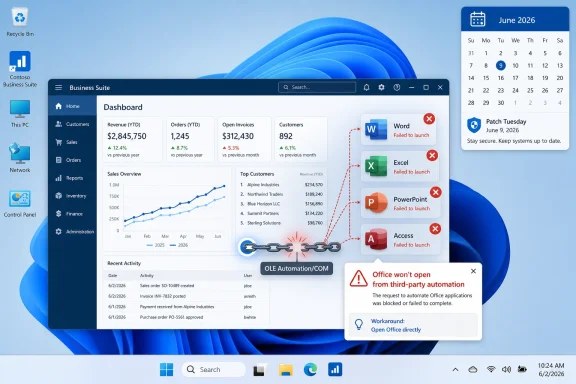
The affected scenario is deceptively simple. A user is inside a third-party application, clicks a button to open an Office document or launch an Office app, and nothing useful happens. Word or Excel may fail to appear, the document may not open, and in some cases the lack of a clear error message leaves both users and help desks staring at a workflow that worked yesterday and fails today.
Microsoft’s known-issues entry ties the problem to Windows updates released on or after June 9, 2026, including KB5094126 for Windows 11 24H2 and 25H2. The update brings systems to OS build 26100.8655 on 24H2 and 26200.8655 on 25H2. Microsoft added the Office-launch issue to the KB’s changelog on June 16, one week after Patch Tuesday.
The affected Office applications include the usual productivity heavyweights: Word, Excel, PowerPoint, Access, and other Microsoft Office apps launched through the same automation path. The important qualifier is that Microsoft is not saying Office is broadly unable to open. Documents launched directly from Office may continue working normally, which makes the fault more confusing in the field.
That distinction matters. If Word opens from the Start menu and a DOCX opens from File Explorer, the instinct is to blame the third-party application. But the timing, Microsoft’s acknowledgement, and the common dependency point toward a Windows-side compatibility regression in the plumbing those applications use to talk to Office.
OLE Automation is not glamorous. It is also not optional in many environments. Accounting firms, dental practices, legal offices, universities, hospitals, engineering shops, and local governments often rely on vertical software that treats Office as a rendering engine, reporting layer, or document endpoint.
That is the paradox of Windows backwards compatibility. The oldest interfaces are often the ones most deeply embedded in professional workflows. The people who use them are not necessarily “legacy” users; they may be running modern Windows 11 PCs, current Microsoft 365 Apps, and cloud-managed identities while a critical business process still depends on a COM call that would look familiar to a developer from the late 1990s.
Microsoft has spent years modernizing Windows security, app isolation, file handling, identity, and update servicing. But modernization does not erase the installed base. The platform’s promise is that ancient automation still works until Microsoft explicitly says it will not. When that promise bends, even briefly, the pain shows up in places far from the consumer-facing Windows roadmap.
These are not workflows where “open the file another way” is always a trivial workaround. In a tax or audit environment, Office may be part of a governed chain of documents, templates, workpapers, and approvals. In a dental office, a document handoff may be tied to patient records, imaging notes, correspondence, or forms. In a research workflow, Zotero’s Office integration is not just convenience; it is the difference between managed citation metadata and manual cleanup.
The bug also has a credibility problem for IT teams. If a user says “Excel won’t open from our accounting software,” but Excel opens normally by itself, the first troubleshooting path often goes toward the application vendor, user profile, Office repair, add-ins, file associations, or permissions. Those steps consume time before anyone lands on a Windows cumulative update as the shared denominator.
This is where known-issue documentation becomes operationally important. Microsoft’s acknowledgement gives admins something to point to, something to test against, and something to escalate with vendors. Without it, the issue risks becoming a week of fragmented support tickets and vendor blame-shifting.
That is the modern Windows servicing model in miniature. The monthly cumulative update is not one thing; it is a freight train. Security hardening, feature enablement, driver-adjacent fixes, shell behavior changes, servicing-stack requirements, AI component versions, and legacy compatibility assumptions all move together.
For consumers, the model is mostly invisible until something breaks. For enterprise IT, it is the central tension of Windows administration. You need the security update because delaying it increases exposure, but the update is also a bundle of changes whose operational consequences may not be visible until real users touch real workflows.
The June patch also sits against a larger background of Windows security housekeeping. Microsoft has been preparing devices for Secure Boot certificate expiration beginning in June 2026, and the update includes expanded data meant to help eligible devices receive updated certificates through a controlled rollout. That sort of platform maintenance is necessary, but it also underscores how much system-level work now rides inside the same monthly servicing vehicle as user-facing compatibility.
The workaround also assumes users know where the document is, have permission to browse to it directly, and can safely bypass the application workflow that usually invokes Office. In some systems, documents are generated dynamically, stored in managed repositories, or tied to a case, client, patient, or project record. Opening Office directly may be easy; recreating the context supplied by the calling application may not be.
Microsoft says it is working on a permanent fix to be delivered in a future Windows update. For enterprise customers, Microsoft has also indicated that an administrative mitigation is available through Microsoft Support for Business. That wording matters: the broad public workaround is user behavior, while the scalable mitigation is gated behind support engagement.
For managed environments, the immediate response should be pragmatic. Identify whether the organization uses any Office-integrated third-party applications, verify whether the failure reproduces on KB5094126 systems, and document which workflows can safely use the direct-open workaround. Where the affected app is business-critical, admins should consider pausing broader rollout rings if they still have that option, while balancing the security implications of delaying a cumulative update.
Silent failures are especially damaging in environments with outsourced support or multiple vendors. The Office team, the Windows team, the third-party application vendor, and the managed service provider may all need to participate before the root cause is understood. Meanwhile, the person trying to finish a client workbook or generate a patient letter is not interested in architectural responsibility.
This is also why compatibility testing has to include workflow testing, not just application launch testing. A pilot device that opens Word, Excel, and PowerPoint successfully is not enough if the real business process is “open a generated document from inside CCH Engagement” or “send a letter template from Dentrix into Word.” The boundary between applications is where this bug lives.
Windows admins already know this in theory. The problem is that update validation windows keep shrinking while the number of integrated apps keeps growing. Monthly patching has become a race between exposure management and regression discovery, and this bug landed squarely in the gap.
But that argument lets the platform owner off too easily. Microsoft’s dominance in business computing rests partly on the fact that Windows and Office have historically tolerated enormous amounts of old integration surface area. Customers bought into that ecosystem because they believed their workflows would continue to work across hardware refreshes, Office upgrades, and Windows releases.
The company cannot both benefit from that compatibility moat and treat it as an embarrassing relic when regressions happen. A dental practice or accounting firm did not invent the dependency on Office automation in a vacuum. Microsoft built the platform, documented the interfaces, courted developers, and spent decades assuring customers that Windows would carry their investments forward.
That does not mean every old behavior can remain untouched forever. Security changes sometimes require breaking assumptions. But when a cumulative update disrupts a long-standing automation path, Microsoft owes customers fast acknowledgement, a clear mitigation path, and a fix that arrives on a schedule measured in days or weeks, not vague future servicing cycles.
That is not hypocrisy. It is Windows. The platform is a live museum with a modern security team bolted to it, an AI strategy layered on top, and a vast enterprise software economy still walking through its older doors every morning.
For enthusiasts, that complexity is part of the appeal. Windows can run new AI features and ancient Win32 utilities on the same desktop. For admins, it is both blessing and curse. The compatibility surface is unmatched, but every security hardening change must tiptoe through a graveyard of assumptions.
The Office automation bug is therefore more than a bad week for some users. It is a case study in why Windows servicing remains one of the hardest jobs in software. The update must defend the machine, modernize the platform, preserve the app ecosystem, and not break a dental office’s letter workflow — all at once.
Admins should treat this incident as a reason to refine their validation scripts and pilot-ring checklists. If a department’s productivity depends on Office integration inside a third-party application, that integration deserves its own test case. “Open Excel” is not the same as “generate an Excel workbook from the finance system and confirm it opens under the expected user context.”
This kind of testing does not have to be elaborate. A handful of representative workflows from accounting, clinical, legal, engineering, or research teams will catch more real-world risk than a generic smoke test. The hard part is building an inventory of the workflows that quietly depend on Office automation.
That inventory is often missing because these integrations are invisible until they fail. Users do not say they are using OLE Automation; they say they are clicking “Export to Word.” They do not say COM activation failed; they say their report did not open. IT’s job is to translate those ordinary actions into dependencies that can be tested before the next cumulative update lands.
The recurring pattern is familiar. A security or platform change ships. A subset of specialized workflows breaks. Microsoft documents the known issue after enough reports accumulate. A workaround appears. A fix follows later. The system works, but it works reactively.
A more mature model would put more of these legacy-dependency checks into pre-release validation. That is easier said than done, because Microsoft cannot realistically test every vertical application. But it can test representative automation patterns, build stronger compatibility telemetry around Office launch failures, and communicate earlier when changes may affect old integration surfaces.
There is also a role for vendors. If a product depends on Office automation, its maker should be testing Insider, preview, and Patch Tuesday builds quickly and publishing advisories for customers. The worst outcome is a support triangle where Microsoft points to the app, the app vendor points to Microsoft, and the customer becomes the integration test lab.
But the opposite posture is also too glib. “Just patch immediately” is not enough when a mandatory cumulative update can break document workflows in revenue-generating departments. The practical enterprise answer is staged deployment with meaningful testing, fast rollback planning where supported, and clear user communication when workarounds are needed.
For smaller organizations without mature patch rings, the lesson is harsher. They often receive the same update through automatic servicing but lack the tooling to detect and contain the fallout. A dental office or small accounting firm may not have an Intune administrator tuning deployment waves. It has a practice manager, a consultant, and a Monday morning full of appointments.
That is why Microsoft’s public known-issue pages matter. They are not just documentation for sysadmins; they are the shared source of truth that lets small IT providers distinguish a local misconfiguration from a platform regression. The faster those pages reflect reality, the less time everyone wastes on superstition.
For IT teams, the issue should trigger a short burst of focused action rather than panic.
That is why this is not just another “Patch Tuesday broke something” story. KB5094126 is a reminder that Windows compatibility is not measured only by whether the Start menu opens or whether the kernel stays upright. For many organizations, Windows is still a web of integrations, COM calls, embedded documents, automation hooks, and vendor-specific workflows built over decades — and one cumulative update can tug on a thread most users never knew existed.
 The Bug Lives Where Office Becomes Infrastructure
The affected scenario is deceptively simple. A user is inside a third-party application, clicks a button to open an Office document or launch an Office app, and nothing useful happens. Word or Excel may fail to appear, the document may not open, and in some cases the lack of a clear error message leaves both users and help desks staring at a workflow that worked yesterday and fails today.Microsoft’s known-issues entry ties the problem to Windows updates released on or after June 9, 2026, including KB5094126 for Windows 11 24H2 and 25H2. The update brings systems to OS build 26100.8655 on 24H2 and 26200.8655 on 25H2. Microsoft added the Office-launch issue to the KB’s changelog on June 16, one week after Patch Tuesday.
The affected Office applications include the usual productivity heavyweights: Word, Excel, PowerPoint, Access, and other Microsoft Office apps launched through the same automation path. The important qualifier is that Microsoft is not saying Office is broadly unable to open. Documents launched directly from Office may continue working normally, which makes the fault more confusing in the field.
That distinction matters. If Word opens from the Start menu and a DOCX opens from File Explorer, the instinct is to blame the third-party application. But the timing, Microsoft’s acknowledgement, and the common dependency point toward a Windows-side compatibility regression in the plumbing those applications use to talk to Office.
OLE Automation Is Old, Boring, and Still Everywhere
The technology at the center of the incident is OLE Automation, part of the broader Object Linking and Embedding and COM-era architecture that allowed Windows applications to manipulate one another long before “API economy” became a conference phrase. It is the reason a document-management product can call Word, an accounting package can populate Excel, or a research tool can hand a citation workflow to Office without the user thinking about the boundary between applications.OLE Automation is not glamorous. It is also not optional in many environments. Accounting firms, dental practices, legal offices, universities, hospitals, engineering shops, and local governments often rely on vertical software that treats Office as a rendering engine, reporting layer, or document endpoint.
That is the paradox of Windows backwards compatibility. The oldest interfaces are often the ones most deeply embedded in professional workflows. The people who use them are not necessarily “legacy” users; they may be running modern Windows 11 PCs, current Microsoft 365 Apps, and cloud-managed identities while a critical business process still depends on a COM call that would look familiar to a developer from the late 1990s.
Microsoft has spent years modernizing Windows security, app isolation, file handling, identity, and update servicing. But modernization does not erase the installed base. The platform’s promise is that ancient automation still works until Microsoft explicitly says it will not. When that promise bends, even briefly, the pain shows up in places far from the consumer-facing Windows roadmap.
The Named Apps Tell the Real Story
The applications reportedly affected are not random hobby tools. Microsoft has received reports involving CCH Engagement, Workpaper Manager, Dentrix, Softdent, and Zotero. That list is a useful map of the blast radius: accounting, workpaper management, dental practice management, document handling, and academic research.These are not workflows where “open the file another way” is always a trivial workaround. In a tax or audit environment, Office may be part of a governed chain of documents, templates, workpapers, and approvals. In a dental office, a document handoff may be tied to patient records, imaging notes, correspondence, or forms. In a research workflow, Zotero’s Office integration is not just convenience; it is the difference between managed citation metadata and manual cleanup.
The bug also has a credibility problem for IT teams. If a user says “Excel won’t open from our accounting software,” but Excel opens normally by itself, the first troubleshooting path often goes toward the application vendor, user profile, Office repair, add-ins, file associations, or permissions. Those steps consume time before anyone lands on a Windows cumulative update as the shared denominator.
This is where known-issue documentation becomes operationally important. Microsoft’s acknowledgement gives admins something to point to, something to test against, and something to escalate with vendors. Without it, the issue risks becoming a week of fragmented support tickets and vendor blame-shifting.
KB5094126 Was Already Carrying a Heavy Patch Tuesday Load
KB5094126 was not a tiny servicing update. It arrived as the June 2026 cumulative security update for Windows 11 24H2 and 25H2, bundling the latest security fixes alongside quality improvements and items from prior optional previews. Microsoft’s notes also call out Secure Boot certificate work, virtualization fixes, desktop.ini handling changes affecting folder customization, and AI component updates for eligible Copilot+ PCs.That is the modern Windows servicing model in miniature. The monthly cumulative update is not one thing; it is a freight train. Security hardening, feature enablement, driver-adjacent fixes, shell behavior changes, servicing-stack requirements, AI component versions, and legacy compatibility assumptions all move together.
For consumers, the model is mostly invisible until something breaks. For enterprise IT, it is the central tension of Windows administration. You need the security update because delaying it increases exposure, but the update is also a bundle of changes whose operational consequences may not be visible until real users touch real workflows.
The June patch also sits against a larger background of Windows security housekeeping. Microsoft has been preparing devices for Secure Boot certificate expiration beginning in June 2026, and the update includes expanded data meant to help eligible devices receive updated certificates through a controlled rollout. That sort of platform maintenance is necessary, but it also underscores how much system-level work now rides inside the same monthly servicing vehicle as user-facing compatibility.
The Workaround Is Simple, Which Does Not Make It Cheap
Microsoft’s practical workaround is to open Office applications directly and then open documents from within Word, Excel, PowerPoint, Access, or the relevant Office app rather than launching them through the affected third-party software. For a single user working on a single file, that is manageable. For an office with tightly scripted workflows, it is friction multiplied across the day.The workaround also assumes users know where the document is, have permission to browse to it directly, and can safely bypass the application workflow that usually invokes Office. In some systems, documents are generated dynamically, stored in managed repositories, or tied to a case, client, patient, or project record. Opening Office directly may be easy; recreating the context supplied by the calling application may not be.
Microsoft says it is working on a permanent fix to be delivered in a future Windows update. For enterprise customers, Microsoft has also indicated that an administrative mitigation is available through Microsoft Support for Business. That wording matters: the broad public workaround is user behavior, while the scalable mitigation is gated behind support engagement.
For managed environments, the immediate response should be pragmatic. Identify whether the organization uses any Office-integrated third-party applications, verify whether the failure reproduces on KB5094126 systems, and document which workflows can safely use the direct-open workaround. Where the affected app is business-critical, admins should consider pausing broader rollout rings if they still have that option, while balancing the security implications of delaying a cumulative update.
The Silence of a Failed Launch Is the Worst Kind of Regression
One of the more frustrating parts of the reported behavior is that Office may simply fail to launch with little or no visible explanation. That is a classic enterprise-support nightmare. A clear error message can be searched, logged, screenshotted, or routed. A silent failure becomes folklore.Silent failures are especially damaging in environments with outsourced support or multiple vendors. The Office team, the Windows team, the third-party application vendor, and the managed service provider may all need to participate before the root cause is understood. Meanwhile, the person trying to finish a client workbook or generate a patient letter is not interested in architectural responsibility.
This is also why compatibility testing has to include workflow testing, not just application launch testing. A pilot device that opens Word, Excel, and PowerPoint successfully is not enough if the real business process is “open a generated document from inside CCH Engagement” or “send a letter template from Dentrix into Word.” The boundary between applications is where this bug lives.
Windows admins already know this in theory. The problem is that update validation windows keep shrinking while the number of integrated apps keeps growing. Monthly patching has become a race between exposure management and regression discovery, and this bug landed squarely in the gap.
Microsoft’s Compatibility Burden Is Its Competitive Advantage
It is tempting to look at OLE Automation and say the enterprise should have moved on. In some cases, that is true. Modern APIs, web-based document generation, cloud storage integrations, and add-in frameworks can reduce dependence on fragile desktop automation.But that argument lets the platform owner off too easily. Microsoft’s dominance in business computing rests partly on the fact that Windows and Office have historically tolerated enormous amounts of old integration surface area. Customers bought into that ecosystem because they believed their workflows would continue to work across hardware refreshes, Office upgrades, and Windows releases.
The company cannot both benefit from that compatibility moat and treat it as an embarrassing relic when regressions happen. A dental practice or accounting firm did not invent the dependency on Office automation in a vacuum. Microsoft built the platform, documented the interfaces, courted developers, and spent decades assuring customers that Windows would carry their investments forward.
That does not mean every old behavior can remain untouched forever. Security changes sometimes require breaking assumptions. But when a cumulative update disrupts a long-standing automation path, Microsoft owes customers fast acknowledgement, a clear mitigation path, and a fix that arrives on a schedule measured in days or weeks, not vague future servicing cycles.
The New Windows Is Still Haunted by the Old Windows
KB5094126 also shows how the Windows 11 story is split between the futuristic and the stubbornly historical. On the same release page, Microsoft can discuss AI components, Copilot+ PCs, Secure Boot certificate modernization, virtualization fixes, and the servicing stack — and then acknowledge that Office may not launch from a third-party program because a decades-old automation mechanism is misbehaving.That is not hypocrisy. It is Windows. The platform is a live museum with a modern security team bolted to it, an AI strategy layered on top, and a vast enterprise software economy still walking through its older doors every morning.
For enthusiasts, that complexity is part of the appeal. Windows can run new AI features and ancient Win32 utilities on the same desktop. For admins, it is both blessing and curse. The compatibility surface is unmatched, but every security hardening change must tiptoe through a graveyard of assumptions.
The Office automation bug is therefore more than a bad week for some users. It is a case study in why Windows servicing remains one of the hardest jobs in software. The update must defend the machine, modernize the platform, preserve the app ecosystem, and not break a dental office’s letter workflow — all at once.
The Lesson for Admins Is to Test the Handoff, Not the Icon
The obvious advice is to test updates before broad deployment. The better advice is to test the actual handoffs that matter. For this bug, the Office icon is a false signal. Word launching directly does not prove that Word launching through automation works.Admins should treat this incident as a reason to refine their validation scripts and pilot-ring checklists. If a department’s productivity depends on Office integration inside a third-party application, that integration deserves its own test case. “Open Excel” is not the same as “generate an Excel workbook from the finance system and confirm it opens under the expected user context.”
This kind of testing does not have to be elaborate. A handful of representative workflows from accounting, clinical, legal, engineering, or research teams will catch more real-world risk than a generic smoke test. The hard part is building an inventory of the workflows that quietly depend on Office automation.
That inventory is often missing because these integrations are invisible until they fail. Users do not say they are using OLE Automation; they say they are clicking “Export to Word.” They do not say COM activation failed; they say their report did not open. IT’s job is to translate those ordinary actions into dependencies that can be tested before the next cumulative update lands.
The Patch Pipeline Needs a Better Memory for Legacy Dependencies
Microsoft is not alone in struggling with compatibility regressions. Every operating-system vendor faces the same trade-off between hardening and continuity. But Windows has a particular burden because it is the operating system of record for so many long-lived business processes.The recurring pattern is familiar. A security or platform change ships. A subset of specialized workflows breaks. Microsoft documents the known issue after enough reports accumulate. A workaround appears. A fix follows later. The system works, but it works reactively.
A more mature model would put more of these legacy-dependency checks into pre-release validation. That is easier said than done, because Microsoft cannot realistically test every vertical application. But it can test representative automation patterns, build stronger compatibility telemetry around Office launch failures, and communicate earlier when changes may affect old integration surfaces.
There is also a role for vendors. If a product depends on Office automation, its maker should be testing Insider, preview, and Patch Tuesday builds quickly and publishing advisories for customers. The worst outcome is a support triangle where Microsoft points to the app, the app vendor points to Microsoft, and the customer becomes the integration test lab.
Security Still Wins, but Operations Gets a Vote
No serious admin should respond to this bug by declaring that Windows updates are bad and should be avoided. KB5094126 contains security fixes, and the broader June 2026 servicing work addresses real platform maintenance. Skipping cumulative updates indefinitely is not a strategy; it is a deferred incident.But the opposite posture is also too glib. “Just patch immediately” is not enough when a mandatory cumulative update can break document workflows in revenue-generating departments. The practical enterprise answer is staged deployment with meaningful testing, fast rollback planning where supported, and clear user communication when workarounds are needed.
For smaller organizations without mature patch rings, the lesson is harsher. They often receive the same update through automatic servicing but lack the tooling to detect and contain the fallout. A dental office or small accounting firm may not have an Intune administrator tuning deployment waves. It has a practice manager, a consultant, and a Monday morning full of appointments.
That is why Microsoft’s public known-issue pages matter. They are not just documentation for sysadmins; they are the shared source of truth that lets small IT providers distinguish a local misconfiguration from a platform regression. The faster those pages reflect reality, the less time everyone wastes on superstition.
The June Office Bug Leaves a Paper Trail for the Next Patch Tuesday
The practical conclusions from KB5094126 are not dramatic, but they are concrete. This is a compatibility bug, not a universal Office outage. It is tied to Windows updates released on or after June 9, 2026. It appears when certain third-party applications try to launch Office apps or documents through automation. Microsoft is working on a fix, and the safest public workaround is to open Office directly.For IT teams, the issue should trigger a short burst of focused action rather than panic.
- Organizations running Windows 11 24H2 or 25H2 should check whether KB5094126 is installed on systems that use Office-integrated third-party applications.
- Help desks should ask whether Office fails only when launched from another application, because direct Office launches may still work.
- Admins should test named or similar affected workflows in products such as accounting, dental, document-management, and research tools before expanding deployment rings.
- Users should be instructed to open Word, Excel, PowerPoint, or Access directly and then open the document from inside Office when that workflow is safe and practical.
- Enterprises with broad exposure should contact Microsoft Support for Business about the available mitigation rather than relying only on manual workarounds.
- Future patch validation should include real document handoffs from critical third-party applications, not just basic Office startup checks.
References
- Primary source: thewincentral.com
Published: 2026-06-17T10:10:20.612491
Windows 11 KB5094126 Causes Microsoft Office Launch Failures in Some Apps - WinCentral
Microsoft has confirmed a Windows 11 KB5094126 issue that prevents Word, Excel, PowerPoint and other Office apps from opening through some third-party software. - Read in Windows Issues on WinCentral thewincentral.com
- Related coverage: allthings.how
KB5094126 for Windows 11 (June 2026): Builds 26200.8655 and 26100.8655
The June Patch Tuesday update brings the Low Latency Profile, Shared Audio, multi-app camera streaming, and the Secure Boot certificate push.allthings.how - Related coverage: ninjaone.com
KB5094126 - Details, Issues, & Feedback - NinjaOne
Community reception has been notably negative, with multiple users reporting the same critical issue affecting OneDrive accessibility. Users express frustrwww.ninjaone.com - Official source: learn.microsoft.com
After installation of KB5094126 the Word integration over COM fails - Microsoft Q&A
After installing Windows Update KB5094126 (June 2026), our application fails when opening Word via COM automation. Error: HRESULT 0x80020005 (DISP_E_TYPEMISMATCH) Type mismatch Happens during Documents.Open() (IDispatch call) Fully reproducible …learn.microsoft.com - Related coverage: berrall.com
Windows 11 KB5094126 BSODs some PCs (HP?), breaks OneDrive in File Explorer, and other issues confirmed - Peer Networks UK
Wales & West leading provider of PC repairs & IT support for home & business. Peer Networks delivers prompt, no fuss, PC repair services to customers.www.berrall.com
- Related coverage: fdaytalk.com
Windows 11 KB5094126 BSOD, OneDrive and Install Fixes
Windows 11 KB5094126 is causing BSODs on HP devices, breaking OneDrive in File Explorer, and failing to install. Here are all confirmed issues & working fixes.www.fdaytalk.com
- Related coverage: igorslab.de
Windows 11 KB5094126: Microsoft's desktop.ini hardening causes some f…
Windows occasionally manages to make even a security measure look like a small defect.www.igorslab.de - Official source: support.microsoft.com
- Related coverage: techrepublic.com
Windows 11 June Update Adds NPU Monitoring for AI PCs - TechRepublic
Windows 11 KB5094126 adds Task Manager NPU monitoring for AI PCs, giving IT teams a way to verify hardware visibility, drivers, and rollout readiness.www.techrepublic.com
- Related coverage: windowscult.com
Windows 11 KB5094126: What’s New and How to Install It
Microsoft has released Windows 11 KB5094126 (Build 26100.8655). Here's what's new, including Low Latency Profile, Shared Audio, June 2026 Patch Tuesday security fixes, and known issues.www.windowscult.com - Related coverage: anavem.com
KB5094126 Windows 11 Update Fixes Hyper-V BSOD Crashes
Microsoft's KB5094126 update patches critical HYPERVISOR_ERROR blue screens and BitLocker recovery loops in Windows 11 24H2 and 25H2. Enterprise Hyper-Vwww.anavem.com - Related coverage: resources.avid.com
- Related coverage: sra.io
- Related coverage: dokumen.pub
Windows Vista Inside Out 0735622701, 9780735622708 - DOKUMEN.PUB
You’re beyond the basics, so dive right in and really put your PC to work! This supremely organized reference is packed...dokumen.pub

