

The June Patch Is a Security Update With a Deployment Blast Radius
KB5094126 is not a cosmetic cumulative update that users can casually ignore until next month. It is part of the June 2026 Patch Tuesday cycle and includes fixes for a large slate of vulnerabilities, including critical bugs and zero-days. That alone puts administrators in the usual bind: the update is operationally risky for some systems, but not installing it is also a security decision.
The update also arrives during a bigger Secure Boot transition. Microsoft has been preparing Windows devices for the expiration of older Secure Boot certificates issued in 2011 and the migration toward 2023 certificate authorities. That work matters because Secure Boot is not just a checkbox in Windows Security; it is the trust chain that decides whether the earliest components of the operating system are allowed to run.
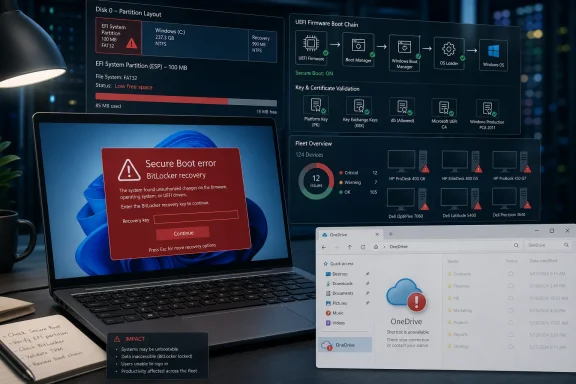
That is why the reports around KB5094126 are more consequential than the average “File Explorer feels weird after Patch Tuesday” complaint. If an update touches Boot Manager, Secure Boot certificates, EFI contents, or related metadata, failure modes move from annoying to existential. A broken taskbar can wait for a servicing stack fix; a machine that lands in BitLocker recovery before the help desk opens cannot.
The affected reports are also clustered in exactly the sort of environments where Patch Tuesday is supposed to be boring: HP EliteBooks, ProBooks, ZBooks, point-of-sale systems, and at least some Dell Precision machines. These are not hobbyist Frankenbuilds with questionable firmware toggles. They are business-class PCs, often bought precisely because they are supposed to be manageable.
HP Looks Like the Canary, Not Necessarily the Culprit
The most visible pattern so far is HP. Reports have been received from organizations managing hundreds of HP devices, with some systems failing to boot after KB5094126 and landing instead in BitLocker recovery, Secure Boot signature errors, or a Black Screen of Death. Models named in the reporting include the HP EliteBook 840 G10, HP ProBook 460 G11, HP Engage One Pro 15.6 G2 AiO POS, and HP ZBook systems.
That does not prove the update is “an HP bug,” and it does not absolve Microsoft either. What it suggests is a compatibility fault line: Windows is attempting to apply a boot trust update, and certain OEM layouts or firmware states may leave too little margin for the operation to complete safely. In a modern Windows deployment, the line between Microsoft’s operating system and the OEM’s platform configuration is not a clean border; it is a negotiated handshake every time the machine starts.
The key detail is the EFI System Partition. Some affected systems reportedly have older 100MB EFI partitions rather than larger 500MB or 1GB layouts. If that partition is already crowded with OEM firmware recovery files, diagnostics, or vendor-specific folders, Windows may not have enough space to write updated boot or Secure Boot material. In that scenario, the “disk full” problem is not on C: and not visible to the average user looking at Storage settings.
HP systems may be more exposed because HP commonly stores firmware recovery material in the EFI partition. That design can be useful when firmware recovery is needed, but it becomes a liability if Windows later expects room in the same partition for boot-chain servicing. Enterprise imaging practices can make the problem worse if old partition templates survive across hardware generations.
The result is the kind of bug that frustrates everyone involved. Microsoft can say, plausibly, that Secure Boot certificate renewal is necessary and that firmware readiness matters. OEMs can say, plausibly, that their recovery files serve a purpose and that not every device is failing. Admins can say, accurately, that none of this helps when a CEO’s laptop is asking for a BitLocker key at 8:05 a.m.
BitLocker Turns a Boot Bug Into an Incident
BitLocker is doing what it is designed to do when it throws a recovery prompt after boot-chain changes. The problem is that “working as designed” can still be operationally brutal. When Secure Boot state, firmware measurements, or boot files change unexpectedly, BitLocker may refuse to trust the environment and demand the recovery key.
In a well-managed enterprise, recovery keys should be escrowed in Entra ID, Active Directory, Intune, or another management system. In a less disciplined environment, the key might be missing, stale, assigned to the wrong asset, or known only to a user who ignored every prompt to back it up. KB5094126 is a reminder that BitLocker readiness is not proven by encryption status alone; it is proven by recovery at scale.
The nastier reports involve loops. Some users reportedly enter the BitLocker key only to return to recovery or crash during rollback. That points to a deeper issue than a one-time PCR measurement change. If the boot files or Secure Boot update state are inconsistent, the system may not be able to progress cleanly even after the user satisfies BitLocker.
The workaround circulating in early reports is to disable Secure Boot temporarily, boot back into Windows, inspect the EFI partition, update firmware, and then re-enable Secure Boot if the system stabilizes. That may be the least bad option for affected machines, but it is not a comfortable enterprise recommendation. Turning off Secure Boot weakens a real security boundary, and it should be treated as a recovery step, not a steady-state configuration.
This is where Microsoft’s migration plan meets the messy world of device fleets. The company can publish guidance about Secure Boot certificate status, firmware updates, Intune reporting, and staged deployment. But many organizations will discover their weak points only when the update hits hardware that was assumed to be “standard.”
The EFI Partition Is the Tiny Room Everyone Forgot About
For years, Windows administrators have obsessed over the size of the OS partition, the recovery partition, and the update cache. The EFI System Partition usually gets less attention because it is hidden, small, and only interesting when something has already gone wrong. KB5094126 may change that.
The EFI partition is where UEFI firmware finds the bootloaders and related files needed to start the operating system. It is also where OEMs may place recovery tools and firmware support material. If the partition was sized years ago for a simpler boot environment, today’s Secure Boot certificate updates can expose the mismatch.
A 100MB EFI partition was once common and often sufficient. But “sufficient” is a dangerous word in a world where Windows, OEM utilities, multiple bootloaders, recovery files, and certificate updates may all compete for space. The failure message — a Secure Boot update failing to update Boot Manager due to insufficient disk space — is exactly the sort of clue that points away from ordinary storage exhaustion and toward boot partition hygiene.
This is not the first time Windows servicing has tripped over small system partitions. Administrators have seen update failures tied to undersized recovery partitions and EFI partitions before. What makes this case more alarming is the reported post-update boot impact. Failing to install an update is one class of incident; failing to boot after a partial boot-chain update is another.
The practical takeaway for IT departments is that EFI partition sizing should no longer be treated as ancient imaging trivia. It belongs in fleet inventory. If an organization can report TPM version, BIOS version, Secure Boot status, and BitLocker state, it should also be able to identify machines with cramped EFI partitions before they become ticket generators.
The Cloud Drive Breakage Is Smaller but More Revealing
The second reported KB5094126 problem is less catastrophic but still telling. Some users say OneDrive no longer opens properly from File Explorer’s left navigation pane, the system tray shortcut, or existing shell entry points after installing the update. In some cases, manually browsing to the local user profile path still works, which suggests the data is present but the shell integration path is broken.
That distinction matters. This does not sound like OneDrive “sync is down” in the broad service-outage sense. It sounds more like Windows Explorer’s cloud-storage integration layer failing to hand off correctly. Similar behavior with Dropbox and iCloud Drive on some systems is also reported, although OneDrive appears to be the most visible complaint.
The reported pattern around UAC-disabled systems and local administrator accounts is especially interesting. Microsoft has spent years nudging Windows toward a model where identity, cloud storage, account state, and shell experiences are tightly woven together. If a cumulative update changes assumptions around elevation, token handling, shell extensions, or account integration, configurations that deviate from Microsoft’s preferred path may break first.
That does not make those configurations illegitimate. Plenty of lab machines, kiosks, line-of-business systems, and small-business PCs run with local accounts or unusual UAC choices. Windows still supports many of those scenarios, even if the modern Windows experience is increasingly optimized around Microsoft accounts, Entra-managed identities, and cloud-first defaults.
The OneDrive issue is therefore more than an inconvenience. It is another example of Windows becoming harder to reason about as the shell turns into a broker for cloud identity, sync engines, policy, and file virtualization. When it works, it feels seamless. When it fails, users experience it as “File Explorer is broken,” even though the fault may live in a shell namespace extension, an identity token, or a post-update permission change.
Enterprise Apps Are Where Patch Tuesday Pain Becomes Political
The user-facing symptoms get the headlines: BSODs, BitLocker screens, OneDrive shortcuts that do nothing. But the enterprise-app angle may be the longer tail. Any update that changes boot trust, certificate behavior, shell integration, or security enforcement can ripple into line-of-business software in ways that are difficult to reproduce outside the customer’s environment.
The June update reportedly includes a large number of security fixes, and security fixes increasingly mean behavior changes. Microsoft has been tightening cryptography, certificate handling, authentication flows, kernel protections, driver trust, and pre-boot validation across Windows. Each change may be defensible in isolation. Taken together, they create an operating system that is more secure but also less tolerant of stale assumptions.
That is particularly uncomfortable for vertical systems: point-of-sale terminals, medical workstations, factory PCs, shared counters, and managed laptops with vendor agents installed years ago. These systems are often patched late because downtime is expensive, yet they are also high-value targets because compromise can have physical, financial, or compliance consequences. KB5094126 lands directly in that tension.
The HP Engage One Pro POS reports are a good example. A point-of-sale system that fails to boot is not merely an endpoint problem; it is a revenue problem. A patch that triggers BitLocker recovery on a laptop is disruptive. A patch that bricks a checkout lane before opening hours is an operations incident.
This is why ring deployment exists. But rings only work if the pilot ring actually represents the fleet. If the early ring has newer firmware, larger EFI partitions, different BitLocker policy, or fewer OEM recovery files than production, it may pass the update with false confidence. The dangerous devices are often the boring ones nobody has touched since imaging day.
Microsoft’s Secure Boot Deadline Was Always Going to Find Bad Assumptions
The Secure Boot certificate transition is not a surprise in the abstract. Certificates expire. Trust anchors age. Boot malware evolves. Microsoft cannot keep relying indefinitely on 2011-era authorities for future boot protection. The industry has known for years that early-boot trust needs modernization.
The hard part is not the cryptography; it is the installed base. Windows runs on an absurd diversity of firmware, partition layouts, OEM utilities, imaging histories, and management policies. A change that is straightforward on a clean Surface device can be unpredictable on a five-year-old enterprise image cloned across multiple hardware families.
Microsoft’s own guidance acknowledges higher-risk scenarios involving outdated firmware, failed certificate updates, BitLocker prompts, startup hangs, and devices failing to boot. That is unusually direct language by the standards of platform documentation. It implies that Microsoft understands the certificate transition is not just another registry flip.
KB5094126 may be the moment when that abstract guidance becomes real for administrators. The update reportedly enables Secure Boot certificate updates for most supported PCs. If so, it is not merely patching Windows; it is testing the readiness of the entire boot ecosystem under each machine.
That distinction should shape the response. Treating this as a normal cumulative-update glitch misses the point. The fix may require firmware updates, EFI cleanup, partition resizing, deployment ring redesign, and better reporting on Secure Boot certificate state. In other words, it is a lifecycle-management problem disguised as a Patch Tuesday problem.
The Right Response Is Controlled Remediation, Not Panic Uninstalling
For home users who already installed KB5094126 without trouble, there is no reason to assume disaster is waiting. The reported failures appear limited, hardware- and configuration-dependent, and especially visible on certain business systems. If the machine boots normally, OneDrive opens normally, and Windows Security reports no unusual Secure Boot warnings, the update may simply be doing its job.
For affected users, uninstalling the update may restore boot or shell behavior, but it also removes security fixes. That may be reasonable as a temporary recovery step, especially on a machine caught in a boot loop. It should not become the long-term plan for a managed environment.
The better enterprise response starts with inventory. Identify HP and Dell business models in the fleet, BIOS versions, Secure Boot status, BitLocker escrow status, EFI partition size, and whether the Secure Boot certificate update has completed. Then test KB5094126 or its successor on representative machines, not just whatever laptops happen to be in IT’s closet.
Firmware updates should move higher in the patching hierarchy. Many organizations still treat BIOS updates as exceptional because they carry their own risk. That caution is understandable, but the Secure Boot transition makes stale firmware a dependency problem. If Windows servicing now assumes firmware behavior that old BIOS releases do not handle cleanly, avoiding firmware updates simply moves the risk to Patch Tuesday.
For OneDrive and cloud-drive shell failures, the immediate triage is different. Confirm whether files are reachable by direct path, whether sync is running, whether the issue is limited to Explorer entry points, and whether UAC or account configuration affects the behavior. If the data is intact, the business impact is lower, but the user experience is still bad enough to justify pausing wider rollout until Microsoft clarifies the scope.
The June Update Turns Firmware Hygiene Into Security Hygiene
There was a time when Windows patch management meant watching cumulative updates, drivers, and maybe Office channels. That era is gone. Modern Windows security sits on firmware state, TPM health, Secure Boot databases, certificate authorities, recovery partitions, cloud identity, and shell-integrated sync clients.
KB5094126 is uncomfortable because it makes those dependencies visible all at once. A security update can be simultaneously necessary and risky. An OEM partition decision can remain invisible for years and then break a boot update. A BitLocker policy can look compliant until the first mass recovery prompt. A cloud shell extension can fail while the files themselves remain perfectly present on disk.
The most important move now is to resist simplistic blame. Microsoft owns the Windows servicing experience and should communicate quickly if KB5094126 has a known interaction with HP firmware, EFI space, or OneDrive shell integration. HP and other OEMs own firmware and recovery layouts that may be constraining the update. Administrators own the deployment practices that determine whether a bad interaction hits ten machines or ten thousand.
That shared responsibility is not emotionally satisfying, but it is technically accurate. Windows has become a platform where trust is assembled by multiple parties before the OS even paints the login screen. When that assembly fails, the user sees one brand: Windows.
The KB5094126 Lesson Fits in a Smaller Runbook Than the Outage
The emerging picture is still incomplete, and Microsoft may yet publish a known-issue entry, safeguard hold, out-of-band fix, or vendor-specific advisory. Until then, the practical posture is caution without paralysis. The update matters, but so does proving that the machines receiving it are ready for the boot-chain work it performs.
- Organizations should verify BitLocker recovery-key escrow before expanding KB5094126 deployment to additional rings.
- Administrators should inventory EFI System Partition size and free space on affected hardware families, especially HP business devices with OEM recovery content.
- Firmware updates should be tested and deployed as part of Secure Boot certificate readiness, not treated as a separate someday project.
- Help desks should be prepared for BitLocker recovery prompts, Secure Boot validation errors, and boot loops on affected systems.
- Users with broken OneDrive or cloud-drive shortcuts should test direct folder access before assuming their files are gone.
- Temporary Secure Boot disablement may be a recovery tactic on affected machines, but it should not become a permanent workaround without a documented risk decision.
KB5094126 is the kind of Windows update that reveals the real shape of modern endpoint management: not one operating system update landing on one PC, but a coordinated bet across firmware, certificates, partitions, encryption, identity, and the shell. Microsoft is right to modernize Secure Boot before old certificates age out of usefulness, but the company and its OEM partners now need to make the transition less punishing for the fleets that kept Windows dominant in the first place. The next few days should bring clearer acknowledgments and workarounds; the next few months should bring a harder reckoning with how many “standard” Windows deployments are only standard until the boot chain changes.